

Gemini CLI MCP servers
Turn Gemini CLI into an enterprise agent
Let your employees delegate real work to Gemini CLI across all their apps, under their own identity and permissions.






Get Gemini CLI to work.
Not just chat.
One connection to StackOne, and Gemini CLI gets scoped access to every app your employees use, to act on their behalf.

Connect
Make every system AI-ready
Give your AI access to 540+ managed MCP servers and 33,000+ tested tools. No auth code to write, no API maintenance.

Secure
Keep AI under control
Enforce identity-based access, screen every response for prompt injection, and audit every action.

Optimize
Trust what AI delivers
Keep your agent sharp with lean tool loading, boost reliability with the Falcon execution engine, and enhance its context with pre-synced data.
Roll out MCP tools to every Gemini CLI user.
Set up and onboarding in minutes.
One-time setup for IT. Self-serve for everyone else.
IT Admin
One-time setup, no per-user wiring.
The URL carries no access on its own, so it is safe to publish in an internal wiki or commit with your dotfiles. There is no Google Cloud project to configure and no client secret to hand out. Gemini CLI setup guide →
 Shopify
Need Help
Shopify
Need Help Version
Profile name
Authentication type
OAuth 2.0 Setup DocumentationClient ID
Client Secret
Member
Please select the member(s) from your organization you would like to add to your project.
Role
Please select the role you would like your new member(s) to have within the project.
Employee
Self-serve, no code.
Every action runs under that employee's own permissions. They only ever see the accounts they already have access to.
Sign In to StackOne
Password
Don't have an account? Sign up →

Select accounts
Choose the accounts and actions Gemini CLI can access.
Alexander Cox Shopify • 90 Actions • Updated Jul 29, 2026 1 accounts selected 90 actions selected
Which MCP server will you
connect Gemini CLI to?
Connect to the StackOne MCP gateway once and give your employees' agents instant access to 540+ pre-built SaaS connectors and 33,000+ MCP tools.
- 380 Actions Live
- 266 Actions Live
- 253 Actions Live
- 247 Actions Live
- 231 Actions Live
- 203 Actions Live
- 185 Actions Live
- 172 Actions Live
- 172 Actions Live
- 169 Actions Live
- 163 Actions Live
- 162 Actions Live
- 158 Actions Live
- 150 Actions Live
- 147 Actions Live
- 145 Actions Live
- 142 Actions Live
- 139 Actions Live
- 138 Actions Live
- 138 Actions Live
- 138 Actions Live
- 138 Actions Live
- 137 Actions Live
- 136 Actions Live
- 136 Actions Live
- 135 Actions Live
- 135 Actions Live
- 133 Actions Live
- 133 Actions Live
- 132 Actions Live
- 132 Actions Live
- 130 Actions Live
- 129 Actions Live
- 128 Actions Live
- 127 Actions Live
- 126 Actions Live
- 126 Actions Live
- 125 Actions Live
- 125 Actions Live
- 125 Actions Live
- 124 Actions Live
- 122 Actions Live
- 122 Actions Live
- 121 Actions Live
- 120 Actions Live
- 120 Actions Live
- 119 Actions Live
- 119 Actions Live
- 117 Actions Live
- 117 Actions Live
- 116 Actions Live
- 115 Actions Live
- 115 Actions Live
- 115 Actions Live
- 113 Actions Live
- 112 Actions Live
- 111 Actions Live
- 111 Actions Live
- 110 Actions Live
- 110 Actions Live
- 107 Actions Live
- 106 Actions Live
- 105 Actions Live
- 105 Actions Live
- 104 Actions Live
- 104 Actions Live
- 103 Actions Live
- 102 Actions Live
- 102 Actions Live
- 102 Actions Live
- 101 Actions Live
- 100 Actions Live
- 100 Actions Live
- 100 Actions Live
- 99 Actions Live
- 99 Actions Live
- 98 Actions Live
- 98 Actions Live
- 98 Actions Live
- 98 Actions Live
- 98 Actions Live
- 98 Actions Live
- 96 Actions Live
- 96 Actions Live
- 96 Actions Live
- 96 Actions Live
- 95 Actions Live
- 95 Actions Live
- 95 Actions Live
- 94 Actions Live
- 92 Actions Live
- 92 Actions Live
- 92 Actions Live
- 92 Actions Live
- 91 Actions Live
- 91 Actions Live
- 91 Actions Live
- 90 Actions Live
- 90 Actions Live
- 90 Actions Live
- 90 Actions Live
- 89 Actions Live
- 89 Actions Live
- 88 Actions Live
- 88 Actions Live
- 88 Actions Live
- 87 Actions Live
- 87 Actions Live
- 87 Actions Live
- 87 Actions Live
- 87 Actions Live
- 87 Actions Live
- 85 Actions Live
- 85 Actions Live
- 85 Actions Live
- 84 Actions Live
- 83 Actions Live
- 83 Actions Live
- 83 Actions Live
- 83 Actions Live
- 82 Actions Live
- 82 Actions Live
- 82 Actions Live
- 82 Actions Live
- 81 Actions Live
- 80 Actions Live
- 80 Actions Live
- 80 Actions Live
- 80 Actions Live
- 80 Actions Live
- 80 Actions Live
- 79 Actions Live
- 79 Actions Live
- 78 Actions Live
- 78 Actions Live
- 78 Actions Live
- 77 Actions Live
- 77 Actions Live
- 77 Actions Live
- 77 Actions Live
- 77 Actions Live
- 77 Actions Live
- 77 Actions Live
- 76 Actions Live
- 76 Actions Live
- 76 Actions Live
- 76 Actions Live
- 76 Actions Live
- 75 Actions Live
- 75 Actions Live
- 75 Actions Live
- 75 Actions Live
- 73 Actions Live
- 73 Actions Live
- 73 Actions Live
- 73 Actions Live
- 72 Actions Live
- 72 Actions Live
- 72 Actions Live
- 72 Actions Live
- 72 Actions Live
- 72 Actions Live
- 71 Actions Live
- 71 Actions Live
- 71 Actions Live
- 71 Actions Live
- 71 Actions Live
- 71 Actions Live
- 70 Actions Live
- 70 Actions Live
- 70 Actions Live
- 70 Actions Live
- 70 Actions Live
- 70 Actions Live
- 70 Actions Live
- 70 Actions Live
- 70 Actions Live
- 69 Actions Live
- 69 Actions Live
- 69 Actions Live
- 69 Actions Live
- 69 Actions Live
- 68 Actions Live
- 68 Actions Live
- 68 Actions Live
- 68 Actions Live
- 68 Actions Live
- 68 Actions Live
- 68 Actions Live
- 68 Actions Live
- 67 Actions Live
- 67 Actions Live
- 67 Actions Live
- 67 Actions Live
- 67 Actions Live
- 67 Actions Live
- 67 Actions Live
- 67 Actions Live
- 66 Actions Live
- 66 Actions Live
- 66 Actions Live
- 66 Actions Live
- 66 Actions Live
- 66 Actions Live
- 65 Actions Live
- 65 Actions Live
- 65 Actions Live
- 65 Actions Live
- 64 Actions Live
- 64 Actions Live
- 64 Actions Live
- 64 Actions Live
- 64 Actions Live
- 64 Actions Live
- 64 Actions Live
- 64 Actions Live
- 64 Actions Live
- 64 Actions Live
- 63 Actions Live
- 63 Actions Live
- 63 Actions Live
- 63 Actions Live
- 63 Actions Live
- 63 Actions Live
- 63 Actions Live
- 62 Actions Live
- 62 Actions Live
- 62 Actions Live
- 62 Actions Live
- 62 Actions Live
- 62 Actions Live
- 62 Actions Live
- 62 Actions Live
- 62 Actions Live
- 62 Actions Live
- 62 Actions Live
- 61 Actions Live
- 61 Actions Live
- 61 Actions Live
- 61 Actions Live
- 61 Actions Live
- 61 Actions Live
- 61 Actions Live
- 61 Actions Live
- 61 Actions Live
- 60 Actions Live
- 60 Actions Live
- 60 Actions Live
- 60 Actions Live
- 60 Actions Live
- 59 Actions Live
- 59 Actions Live
- 59 Actions Live
- 59 Actions Live
- 59 Actions Live
- 59 Actions Live
- 59 Actions Live
- 59 Actions Live
- 59 Actions Live
- 59 Actions Live
- 58 Actions Live
- 58 Actions Live
- 58 Actions Live
- 58 Actions Live
- 58 Actions Live
- 58 Actions Live
- 57 Actions Live
- 57 Actions Live
- 57 Actions Live
- 57 Actions Live
- 57 Actions Live
- 57 Actions Live
- 57 Actions Live
- 57 Actions Live
- 56 Actions Live
- 56 Actions Live
- 56 Actions Live
- 56 Actions Live
- 56 Actions Live
- 56 Actions Live
- 56 Actions Live
- 56 Actions Live
- 56 Actions Live
- 56 Actions Live
- 56 Actions Live
- 55 Actions Live
- 55 Actions Live
- 55 Actions Live
- 54 Actions Live
- 54 Actions Live
- 54 Actions Live
- 54 Actions Live
- 54 Actions Live
- 54 Actions Live
- 54 Actions Live
- 54 Actions Live
- 54 Actions Live
- 53 Actions Live
- 53 Actions Live
- 53 Actions Live
- 53 Actions Live
- 53 Actions Live
- 53 Actions Live
- 52 Actions Live
- 52 Actions Live
- 52 Actions Live
- 52 Actions Live
- 52 Actions Live
- 52 Actions Live
- 51 Actions Live
- 51 Actions Live
- 51 Actions Live
- 50 Actions Live
- 50 Actions Live
- 50 Actions Live
- 50 Actions Live
- 50 Actions Live
- 50 Actions Live
- 49 Actions Live
- 49 Actions Live
- 49 Actions Live
- 49 Actions Live
- 49 Actions Live
- 48 Actions Live
- 48 Actions Live
- 48 Actions Live
- 48 Actions Live
- 47 Actions Live
- 47 Actions Live
- 47 Actions Live
- 47 Actions Live
- 47 Actions Live
- 47 Actions Live
- 47 Actions Live
- 47 Actions Live
- 47 Actions Live
- 47 Actions Live
- 47 Actions Live
- 46 Actions Live
- 46 Actions Live
- 46 Actions Live
- 45 Actions Live
- 45 Actions Live
- 45 Actions Live
- 44 Actions Live
- 44 Actions Live
- 44 Actions Live
- 44 Actions Live
- 43 Actions Live
- 43 Actions Live
- 43 Actions Live
- 43 Actions Live
- 43 Actions Live
- 42 Actions Live
- 42 Actions Live
- 42 Actions Live
- 42 Actions Live
- 42 Actions Live
- 42 Actions Live
- 42 Actions Live
- 41 Actions Live
- 41 Actions Live
- 41 Actions Live
- 41 Actions Live
- 41 Actions Live
- 41 Actions Live
- 41 Actions Live
- 40 Actions Live
- 40 Actions Live
- 40 Actions Live
- 40 Actions Live
- 40 Actions Live
- 39 Actions Live
- 39 Actions Live
- 39 Actions Live
- 39 Actions Live
- 39 Actions Live
- 38 Actions Live
- 38 Actions Live
- 38 Actions Live
- 38 Actions Live
- 38 Actions Live
- 37 Actions Live
- 37 Actions Live
- 37 Actions Live
- 37 Actions Live
- 37 Actions Live
- 37 Actions Live
- 37 Actions Live
- 36 Actions Live
- 36 Actions Live
- 36 Actions Live
- 36 Actions Live
- 36 Actions Live
- 36 Actions Live
- 35 Actions Live
- 35 Actions Live
- 35 Actions Live
- 35 Actions Live
- 35 Actions Live
- 35 Actions Live
- 35 Actions Live
- 34 Actions Live
- 34 Actions Live
- 34 Actions Live
- 34 Actions Live
- 34 Actions Live
- 34 Actions Live
- 34 Actions Live
- 34 Actions Live
- 33 Actions Live
- 33 Actions Live
- 33 Actions Live
- 33 Actions Live
- 32 Actions Live
- 32 Actions Live
- 31 Actions Live
- 30 Actions Live
- 30 Actions Live
- 30 Actions Live
- 30 Actions Live
- 30 Actions Live
- 29 Actions Live
- 29 Actions Live
- 29 Actions Live
- 29 Actions Live
- 29 Actions Live
- 29 Actions Live
- 29 Actions Live
- 28 Actions Live
- 28 Actions Live
- 28 Actions Live
- 27 Actions Live
- 27 Actions Live
- 27 Actions Live
- 27 Actions Live
- 27 Actions Live
- 27 Actions Live
- 26 Actions Live
- 26 Actions Live
- 26 Actions Live
- 26 Actions Live
- 26 Actions Live
- 25 Actions Live
- 25 Actions Live
- 25 Actions Live
- 25 Actions Live
- 25 Actions Live
- 24 Actions Live
- 24 Actions Live
- 24 Actions Live
- 24 Actions Live
- 24 Actions Live
- 24 Actions Live
- 24 Actions Live
- 24 Actions Live
- 23 Actions Live
- 23 Actions Live
- 23 Actions Live
- 23 Actions Live
- 22 Actions Live
- 22 Actions Live
- 22 Actions Live
- 21 Actions Live
- 21 Actions Live
- 21 Actions Live
- 21 Actions Live
- 20 Actions Live
- 20 Actions Live
- 20 Actions Live
- 20 Actions Live
- 19 Actions Live
- 19 Actions Live
- 19 Actions Live
- 19 Actions Live
- 18 Actions Live
- 17 Actions Live
- 16 Actions Live
- 16 Actions Live
- 16 Actions Live
- 15 Actions Live
- 15 Actions Live
- 15 Actions Live
- 15 Actions Live
- 15 Actions Live
- 14 Actions Live
- 14 Actions Live
- 14 Actions Live
- 14 Actions Live
- 14 Actions Live
- 14 Actions Live
- 14 Actions Live
- 13 Actions Live
- 13 Actions Live
- 13 Actions Live
- 13 Actions Live
- 12 Actions Live
- 12 Actions Live
- 12 Actions Live
- 12 Actions Live
- 11 Actions Live
- 11 Actions Live
- 11 Actions Live
- 11 Actions Live
- 10 Actions Live
- 9 Actions Live
- 9 Actions Live
- 9 Actions Live
- 9 Actions Live
- 9 Actions Live
- 9 Actions Live
- 9 Actions Live
- 8 Actions Live
- 8 Actions Live
- 8 Actions Live
- 8 Actions Live
- 8 Actions Live
- 8 Actions Live
- 7 Actions Live
- 7 Actions Live
- 7 Actions Live
- 7 Actions Live
- 7 Actions Live
- 6 Actions Live
- 6 Actions Live
- 6 Actions Live
- 6 Actions Live
- 6 Actions Live
- 6 Actions Live
- 6 Actions Live
- 6 Actions Live
- 5 Actions Live
- 4 Actions Live
- 4 Actions Live
- 4 Actions Live
- 4 Actions Live
- 3 Actions Live
- 2 Actions Live
- 2 Actions Live
- 2 Actions Live
- 1 Actions Live


No MCP servers match your filter.
Need another connector? Build one with the AI Connector Builder
What will your employees
delegate to Gemini CLI?
From HR and recruiting to sales and support, Gemini CLI completes work across any app you connect.
> List this month's Workday work anniversaries and draft a personalized celebration message for each.
> Compare Greenhouse interview feedback across stages and flag candidates trending toward an offer.
> Analyze Salesforce deals stuck 30+ days and draft a re-engagement email for each owner.
Not everyone on Gemini CLI?
Your integration layer stays the same.
The same setup works across Coding agents like Claude Code, Cursor, and every other MCP client.
Gemini CLI Resources
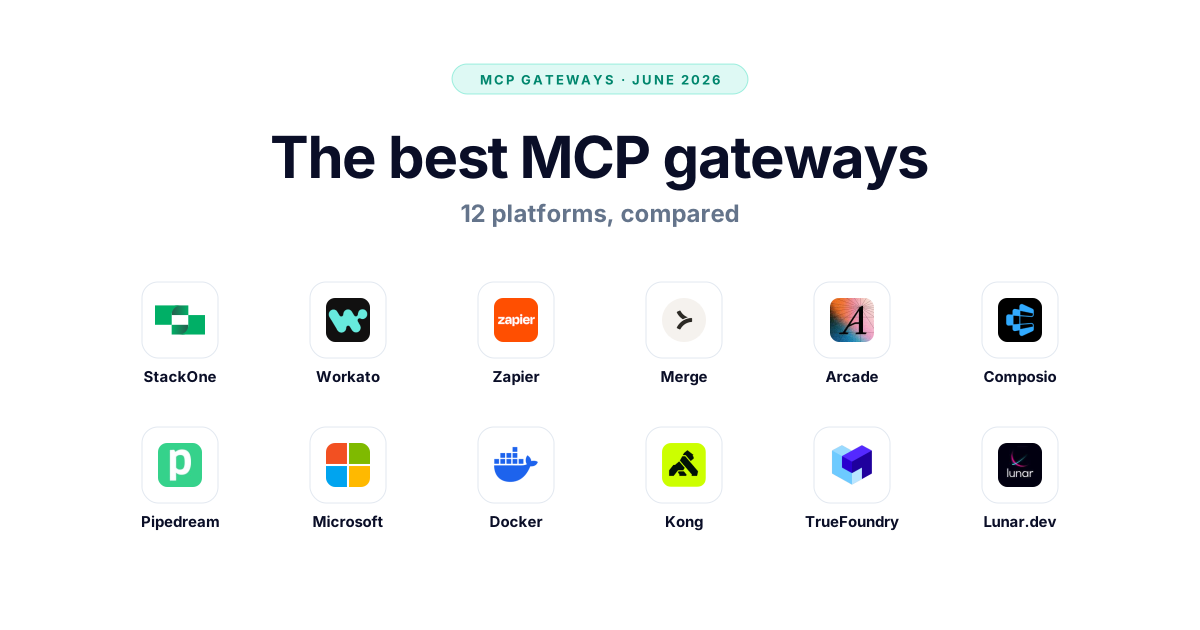
The Best MCP Gateways in 2026, Compared
We compared 12 MCP gateways — StackOne, Zapier, Composio, Microsoft, Docker and more — on auth, multi-tenancy, governance, and pricing. Updated June 2026.
11 min
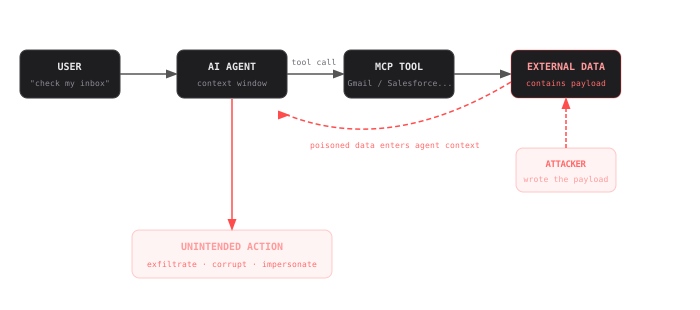
Indirect Prompt Injection in MCP Tools: 10 Real Examples & Defenses
See how MCP injection (indirect prompt injection through MCP tool calls) threatens your AI agents across Gmail, Slack, Salesforce and 7 other integrations, with defenses.
8 min
Frequently Asked Questions
gemini mcp add --transport http stackone https://mcp.stackone.com/mcp. Same entry can go straight into ~/.gemini/settings.json as an mcpServers block with "httpUrl" set to that address. Run gemini, authorize in the browser tab it opens, and pick your project, accounts, and actions. Setup guide.~/.gemini/settings.json, under an mcpServers key, and gemini mcp add writes that entry for you. It's a plain file, so IT can commit it with your dotfiles — it holds only the gateway address, never credentials or OAuth tokens./mcp lists what came through. Browse the actions in the directory above.Connect All Your Apps to Gemini CLI.
One URL, 540+ pre-built SaaS connectors. Set up in minutes.