


BrowserStack MCP Server
for AI Agents
Connect your AI agent to StackOne's BrowserStack MCP server and give it 216 MCP tools out of the box. Auth, tool execution, and security all managed.
 StackOne


Coverage
216 Agent Actions
Agents can read, write, delete and run operations in BrowserStack. Extend your agent's capabilities with custom actions.

Authentication
Agent Tool Authentication
Per-user OAuth in one call. Your BrowserStack MCP server gets session-scoped tokens with zero credentials stored on your infra.
Agent Auth →
Security
Agent Protection
Every BrowserStack tool response scanned for prompt injection in milliseconds, with 88.7% accuracy, all running on CPU.
Prompt Injection Defense →
Performance
Max Agent Context. Min Cost.
Free up to 96% of your agent's context window to enhance reasoning and reduce cost, on every BrowserStack call.
Tools Discovery →What is the BrowserStack MCP Server?
A BrowserStack MCP server lets AI agents read and write BrowserStack data through the Model Context Protocol, Anthropic's open standard for connecting LLMs to external tools. StackOne's BrowserStack MCP server ships with 216 pre-built actions, fully extensible via the Connector Builder, plus managed authentication, prompt injection defense, observability, and agent execution runtime. Connect it from MCP clients like Claude Desktop, Claude Code, Cursor, Goose, and VS Code, or from agent frameworks like OpenAI Agents SDK, LangChain, and Vercel AI SDK.
All BrowserStack MCP Tools
Every StackOne action for BrowserStack, ready for your agent. Read, write, delete and run operations, scoped to exactly what you need.
Scan Auth Configs
- Create Scan Auth Config
Create a basic or form login config for Website Scanner scans.
- List Scan Auth Configs
List the authentication configs available to Website Scanner scans.
Unified Groups
- List Unified Groups
List the teams of a BrowserStack organization account as unified groups.
- Get Unified Group
Get a unified BrowserStack team by ID.
Unified Roles
- List Unified Roles
List the built-in user roles of BrowserStack.
- Get Unified Role
Get a built-in BrowserStack user role by ID.
Unified Users
- List Unified Users
List unified users in a BrowserStack organization account.
- Get Unified User
Get a unified BrowserStack user by ID.
An IAM Projects
- Create An IAM Project
Create a BrowserStack organization project and enable products on it.
- Update An IAM Project
Update the name, description, access level or products of a BrowserStack organization project.
- Delete An IAM Project
Permanently delete a BrowserStack organization project and all its data.
Builds
- List Builds
List the builds in a Low Code Automation project.
- Get Build
Get one Low Code Automation build with its test runs and its accessibility and visual testing results.
Test Suites
- List Test Suites
List the test suites in a Low Code Automation project.
- Get Test Suite
Get the full configuration of one Low Code Automation test suite.
Tests
- List Tests
List the recorded tests in a Low Code Automation project.
- Get Test
Get one recorded Low Code Automation test with its steps, variables, dataset and versions.
- Get Tests
List the test runs of one Test Reporting & Analytics build run, with their results.
Snapshots
- List Snapshots
List the snapshots of one Percy build, with optional review state, ID and name filters.
- Get Snapshot
Get one Percy snapshot with its comparisons, screenshots, images and comparison tags.
Service Accounts
- Create Service Account
Create a BrowserStack Enterprise service account for the organization or for one team.
- List Service Accounts
List the service accounts of the BrowserStack organization account without their access keys.
- Delete Service Account
Delete a BrowserStack Enterprise service account.
Teams
- Create Team
Create a team in the BrowserStack organization account.
- List Teams
List the teams of the BrowserStack organization account with their members.
- Get Team
Get one BrowserStack team by name, with its members.
- Delete Team
Delete a team from the BrowserStack organization account.
A Folders
- Create A Folder
Create a folder in a Test Management project, at the root or inside another folder.
- Update A Folder
Rename a Test Management folder or change its description.
- Delete A Folder
Permanently delete a folder from a Test Management project.
A Test Management Projects
- Create A Test Management Project
Create a Test Management project.
- Update A Test Management Project
Rename a Test Management project or change its description.
- Delete A Test Management Project
Permanently delete a Test Management project.
A Test Cases
- Create A Test Case
Create a standard or BDD test case in a Test Management folder.
- Get A Test Case
Get one Test Management test case by its identifier.
- Update A Test Case
Update the fields, steps, tags or reviewers of one Test Management test case.
- Move A Test Case
Move one Test Management test case to another folder in the same project.
- Delete A Test Case
Permanently delete one Test Management test case.
Sub Test Plans
- Create Sub Test Plan
Create a sub test plan under a Test Management test plan.
- List Sub Test Plans
List the sub test plans of a Test Management test plan.
- Get Sub Test Plan
Get one sub test plan of a Test Management test plan.
- Update Sub Test Plan
Update the name, description, dates or status of a sub test plan.
- Delete Sub Test Plan
Delete a sub test plan from a Test Management test plan.
Test Plans
- Create Test Plan
Create a test plan in a Test Management project.
- Update Test Plan
Update the name, status, description or dates of a Test Management test plan.
A Test Runs
- Create A Test Run
Create a test run in a Test Management project.
- Clone A Test Run
Create a new Test Management test run by copying an existing manual run.
- Update A Test Run
Change the name, state, tags, sub test plan, configurations or test cases of a Test Management test run.
- Delete A Test Run
Delete a Test Management test run.
Users
- Create User
Add a user to the BrowserStack organization account without sending an invitation.
- List Users
List the users of the BrowserStack organization account, with role, teams and product access.
- Get User
Get one BrowserStack user by email address.
- Delete User
Revoke all access of a BrowserStack user and delete the user from the account.
Other (163)
- Create Scan
Create a one-time or recurring Accessibility Testing Website Scanner scan.
- Upload An App Automate App
Upload an Android or iOS app from a public URL for Appium testing on App Automate.
- Upload An Espresso App
Upload an Android app from a public URL for Espresso testing on App Automate.
- Upload An Espresso Test Suite
Upload an Espresso test suite (.apk) from a public URL to App Automate.
- Upload An XCUITest App
Upload an iOS app (.ipa) from a public URL for XCUITest testing on App Automate.
- Upload An XCUITest Test Suite
Upload an XCUITest test suite (.zip) from a public URL to App Automate.
- Create A Screenshot Job
Start a BrowserStack Screenshots job that captures a URL on a set of OS and browser combinations.
- Add Test Result(s) To A Test Run
Record one or many test results, with optional step results, in a Test Management test run.
- Add Or Remove Test Cases In A Test Run
Add test cases to, or remove them from, a Test Management test run.
- Create User Usage Report Job
Start a job that builds a BrowserStack Enterprise usage report per user.
- Create Team Usage Report Job
Start a job that builds a BrowserStack Enterprise usage report per team.
- Add Product Access
Give a BrowserStack user access to a product.
- Get Accessibility Build List
List Accessibility Testing builds run by Automated tests, with basic details for each build.
- Get Build Report Summary
Get a high-level accessibility summary for one Automated tests build, such as score and issue counts.
- Get Build Report Issues
Get the issue export for an Accessibility Testing Automated tests build, including a CSV report_link.
- Get Test Case List
List the test cases run in one Accessibility Testing Automated tests build, with basic details for each.
- Get Test Case Report Summary
Get a high-level accessibility summary for one test case in an Automated tests build.
- Get Test Case Report Issues
Get the issue export for one test case in an Accessibility Testing Automated tests build, including a CSV report_link.
- Get Assisted Test Report List
List Accessibility Testing reports created by Assisted tests, with basic details for each report.
- Get Assisted Test Report Summary
Get a high-level summary of one Accessibility Testing Assisted tests report, such as score and issue counts.
- Get Assisted Test Report Issues
Get the issue export for an Accessibility Testing Assisted tests report, including a CSV report_link.
- Get Workflow Analyzer Report List
List Accessibility Testing reports created by Workflow Analyzer, with basic details for each report.
- Get Workflow Analyzer Report Summary
Get a high-level summary of one Accessibility Testing Workflow Analyzer report.
- Get Workflow Analyzer Report Issues
Get the issue export for an Accessibility Testing Workflow Analyzer report, including a CSV report_link.
- Get Scan List
List the scans set up in the Accessibility Testing Website Scanner, with basic details for each scan.
- Get Scan Details
Get the configuration overview and URL list of one Accessibility Testing Website Scanner scan.
- Get Scan Run List
List the runs of one Accessibility Testing Website Scanner scan.
- Get Scan Run Summary
Get the summary of one Accessibility Testing Website Scanner scan run, such as score and issue counts.
- Get Scan Run Status
Get the status of one Accessibility Testing Website Scanner scan run.
- Get Scan Run Issues
Get the issue export for one Accessibility Testing Website Scanner scan run, including a CSV report_link.
- Get Device List
List the real Android and iOS devices available for Appium tests on App Automate.
- Get App Automate Plan Details
Get the App Automate plan with its parallel limits and live running and queued counts.
- List Uploaded Apps
List apps recently uploaded for Appium testing on App Automate.
- List Recent App Automate Builds
List recent Appium builds on App Automate.
- Get App Automate Build Details
List the test sessions run under an Appium build on App Automate.
- Get Text Logs
Get the text logs of an Appium session on App Automate.
- Get Device Logs
Get the device logs of an Appium session on App Automate.
- Get Crash Logs
Get the crash logs of an Appium session on App Automate.
- Get Appium Logs
Get the Appium server logs of an App Automate session.
- Get Network Logs
Get the network logs of an App Automate session in HAR format.
- List Recent Espresso Builds
List recent Espresso builds on App Automate.
- Get Espresso Build Status
Get the status of an Espresso build on App Automate with its per-device sessions and test case counts.
- Get Espresso Session Details
Get an Espresso session on App Automate with per-test-case results and log URLs.
- List Recent Projects
List recent Appium projects on App Automate.
- Get App Automate Project Details
Get an App Automate project and the builds run under it.
- Get App Automate Session Details
Get the details of an Appium session on App Automate.
- List Recent XCUITest Builds
List recent XCUITest builds on App Automate.
- Get XCUITest Build Status
Get the status of an XCUITest build on App Automate with its per-device sessions and test case counts.
- Get XCUITest Session Details
Get an XCUITest session on App Automate with per-test-case results and log URLs.
- List Audit Logs
List the audit log events of the BrowserStack organization account between two dates.
- Get Audit Activity Types
List the activity types that BrowserStack Enterprise audit logs record, grouped by category.
- Get Browser List
List every OS, browser, browser version and real device combination supported by BrowserStack Automate.
- Get Automate Plan Details
Get the Automate plan with its parallel session limit and current running and queued sessions.
- Get Automate Build List
List recent Automate builds.
- Get Automate Build Details
Get an Automate build with up to 100 of its recent sessions.
- Get Session List
List the sessions of an Automate build.
- Get Automate Project List
List the Automate projects for the account.
- Get Automate Project Details
Get an Automate project and its builds.
- Get Automate Session Details
Get an Automate session with its status, environment and log and video URLs.
- Get Session Text Logs
Get the text log of an Automate session with all its requests and responses.
- Get Session Network Logs
Get the network logs of an Automate session in HAR format, for sessions run with network logs enabled.
- Get Session Console Logs
Get the raw browser console logs of an Automate session (Chrome only).
- Get Unified Credentials
Get the current BrowserStack connection's unified credentials and identity.
- List IAM Projects
List the BrowserStack organization projects you can view.
- Get IAM Project Details
Get one BrowserStack organization project by its PR identifier.
- Get Project Access List
List the users, teams and service accounts with explicit access to a BrowserStack organization project.
- List Local Testing Binary Instances
List BrowserStack Local Testing binary instances, by default only the running ones.
- Get A Local Testing Binary Instance
Get one BrowserStack Local Testing binary instance by ID.
- Get Test Run
Get one test run of a Low Code Automation build with its attempts, steps, artifacts and bug details.
- Get Low Code Build Status
Get the status and execution summary of a Low Code Automation build.
- Get Build Report
Get the XML report of a Low Code Automation build in the format of a test management tool.
- List Low Code Projects
List the Low Code Automation projects your group owns.
- Get Project
Get one Low Code Automation project with its description.
- List Recent Percy Builds
List Percy builds from the last 30 days, with optional commit SHA, branch and state filters.
- Get Percy Build Details
Get one Percy build, optionally with its build summary.
- Get Percy Project Details
Get Percy project details, such as ID, slug, settings and browser targets.
- List Available OS And Browser Combinations
List the OS, browser and device combinations available to BrowserStack Screenshots.
- Get Screenshot Job Status And Image URLs
Get a BrowserStack Screenshots job with the state and image URLs of each screenshot.
- Get Configurations
List the system and custom Test Management configurations, which are OS, browser and device combinations.
- Get Configuration By ID
Get one system or custom Test Management configuration by its ID.
- Get Custom Fields
List the custom fields configured for Test Management test cases and test results.
- Get List Of Folders
List the root-level folders of a Test Management project.
- Get Folder Details
Get one folder in a Test Management project.
- Get Test Management Project List
List the Test Management projects the account can access.
- Get Test Management Project Details
Get one Test Management project by its identifier.
- Get Allowed Reviewers Of A Project
List the users allowed to review test cases in a Test Management project.
- Get List Of Test Cases
List and filter the test cases in a Test Management project.
- Get Comments Of A Test Case
List the comments on a Test Management test case.
- Get List Of Test Plans
List the test plans in a Test Management project.
- Get Test Plan Details
Get one Test Management test plan with its linked test runs.
- Get Test Runs Linked To A Test Plan
List the test runs linked to a Test Management test plan.
- Get All Test Results For A Test Run
List every test result recorded in a Test Management test run.
- Get Results For A Test Case In A Run
List the results of one test case within one Test Management test run.
- Get Results For A Test Case Across Runs
List the results of one Test Management test case across all test runs.
- Get Test Runs List
List and filter the test runs in a Test Management project.
- Get Test Run Details
Get one Test Management test run with its state, progress counts, configurations and test cases.
- Get Test Cases Of A Test Run
List and filter the test cases in a Test Management test run with their latest status and assignee.
- Get Test Reporting Build List
List the build runs of one Test Reporting & Analytics project, with optional filters.
- Get Test Reporting Build Details
Get the summary of one Test Reporting & Analytics build run.
- Get Latest Build Details
Get the latest build run of a Test Reporting & Analytics project, with optional filters.
- Get Self-Healing Report
Get a download link for the self-healing report of one Test Reporting & Analytics build run.
- Get Quality Gate Status Of A Build
Get the Quality Gate status of one Test Reporting & Analytics build run.
- Get Automation Coverage
Get the automation coverage of one Test Reporting & Analytics project.
- Get Test Reporting Project List
List Test Reporting & Analytics projects with their metadata.
- Get User Report Job Status
Check the status of a BrowserStack Enterprise user usage report job.
- Get User Usage Report
Get a finished BrowserStack Enterprise usage report per user.
- Get Team Report Job Status
Check the status of a BrowserStack Enterprise team usage report job.
- Get Team Usage Report
Get a finished BrowserStack Enterprise usage report per team.
- Get Account Owner
Read the Owner of the BrowserStack organization account.
- Update Build Details
Rename a finished Appium build on App Automate, or set or remove its build tag.
- Update Session Status
Mark an Appium session on App Automate as passed or failed, or rename it.
- Update Build Details / Build Tags
Rename a finished Automate build or set or remove its build tag.
- Set Test Status / Update Session Name
Mark an Automate session as passed or failed with a reason, or rename it.
- Update A Test Result
Change the status, notes or custom fields of a recorded Test Management test result.
- Update Assignee Of Test Cases In A Run
Assign specific test cases in a Test Management test run to testers, optionally per configuration.
- Update Build Metadata
Add build tags to a completed Test Reporting & Analytics build run.
- Update User Email
Change the email address of a BrowserStack user.
- Update User Role
Change the role of a BrowserStack user.
- Update User Team
Change the primary team of a BrowserStack user and optionally assign additional teams.
- Delete An App
Permanently delete an app uploaded for Appium testing on App Automate.
- Delete An App Automate Build
Permanently delete an Appium build and all its sessions on App Automate.
- Delete Espresso App
Delete an uploaded Espresso app from App Automate.
- Delete Espresso Test Suite
Delete an uploaded Espresso test suite from App Automate.
- Delete A Session
Permanently delete an Appium session on App Automate.
- Delete XCUITest App
Delete an uploaded XCUITest app from App Automate.
- Delete XCUITest Test Suite
Delete an uploaded XCUITest test suite from App Automate.
- Delete An Automate Build
Permanently delete an Automate build and all its sessions.
- Delete Session
Permanently delete an Automate session.
- Delete A Percy Build
Delete a Percy build.
- Delete A Test Reporting Build
Permanently delete one Test Reporting & Analytics build run and its test results.
- Compare Build Issues
Compare the accessibility issues of two Automated tests builds of the same project.
- Trigger Scan Run
Start a new run of an existing Accessibility Testing Website Scanner scan.
- Monitor Parallel And Queue Usage Details
Get real-time App Automate parallel and queue usage broken down by team and member.
- Execute An Espresso Build
Start an Espresso test build on App Automate on the selected devices.
- Stop An Espresso Build
Stop a running Espresso build on App Automate.
- Execute An XCUITest Build
Start an XCUITest build on App Automate on the selected iOS devices.
- Stop An XCUITest Build
Stop a running XCUITest build on App Automate.
- Archive A Project
Archive a BrowserStack organization project.
- Unarchive A Project
Restore an archived BrowserStack organization project.
- Transfer Project Ownership
Transfer a BrowserStack organization project to a new owner or move it to another team.
- Grant/Replace Project Access
Grant access to a BrowserStack organization project or change the project roles of its accessors.
- Revoke Project Access
Remove access to a BrowserStack organization project from users, teams or service accounts.
- Poll Run Status
Get the state of a BrowserStack Load Testing run.
- Fetch Run Report
Get the final report of a BrowserStack Load Testing run.
- Trigger A Load Test Run
Start a saved BrowserStack Load Testing test by project and test name.
- Stop A Run
Stop an in-progress BrowserStack Load Testing run.
- Stop A Local Testing Binary Instance
Disconnect a running BrowserStack Local Testing binary instance.
- Rerun Failed Tests
Queue a rerun of the failed tests in a Low Code Automation build.
- File A Bug For A Test Run
File a bug in a connected Jira or Azure DevOps tracker and link it to a Low Code Automation test run.
- Trigger A Test Suite Run
Start a run of a Low Code Automation test suite.
- Approve, Unapprove Or Reject A Build
Approve, unapprove or reject a Percy build.
- Allocate Parallels To Team
Set how many Automate or App Automate tests each BrowserStack team can run in parallel.
- Allocate Licenses To Teams
Set how many Live or App Live licenses each BrowserStack team gets.
- Global Test Case Search
Search Test Management test cases by text across every project the account can access.
- Assign Reviewers To Multiple Test Cases
Add, remove or replace reviewers and set the review status on many Test Management test cases at once.
- Bulk Create Test Cases
Create up to 10,000 Test Management test cases in one folder with a single call.
- Bulk Edit Test Cases
Apply the same field changes to many Test Management test cases at once. The response only confirms the request, and the changes can take a few minutes to apply.
- Archive A Test Case
Archive a Test Management test case so it is hidden but not deleted.
- Unarchive A Test Case
Restore an archived Test Management test case to active.
- Close A Test Run
Close a Test Management test run.
- Revoke Product Access
Remove a BrowserStack user's access to a product.
- Disable User
Revoke all access of a BrowserStack user while keeping the user in the account.
- Enable User
Restore the access and role a disabled BrowserStack user had before.
Set Up Your BrowserStack MCP Server in Minutes
One endpoint. Any framework. Your agent is talking to BrowserStack in under 10 lines of code.
Agent Frameworks


 JSON
{
  "mcpServers": {
    "stackone": {
      "command": "npx",
      "args": [
        "-y",
        "mcp-remote@latest",
        "https://api.stackone.com/mcp?x-account-id=<account_id>",
        "--header",
        "Authorization: Basic <YOUR_BASE64_TOKEN>"
      ]
    }
  }
}Platform Resources

Comparing BM25, TF-IDF, and Hybrid Search for MCP Tool Discovery
Benchmarking BM25, TF-IDF, and hybrid search for MCP tool discovery across 916 tools. The 80/20 TF-IDF/BM25 hybrid hits 21% Top-1 accuracy in under 1ms.
10 min
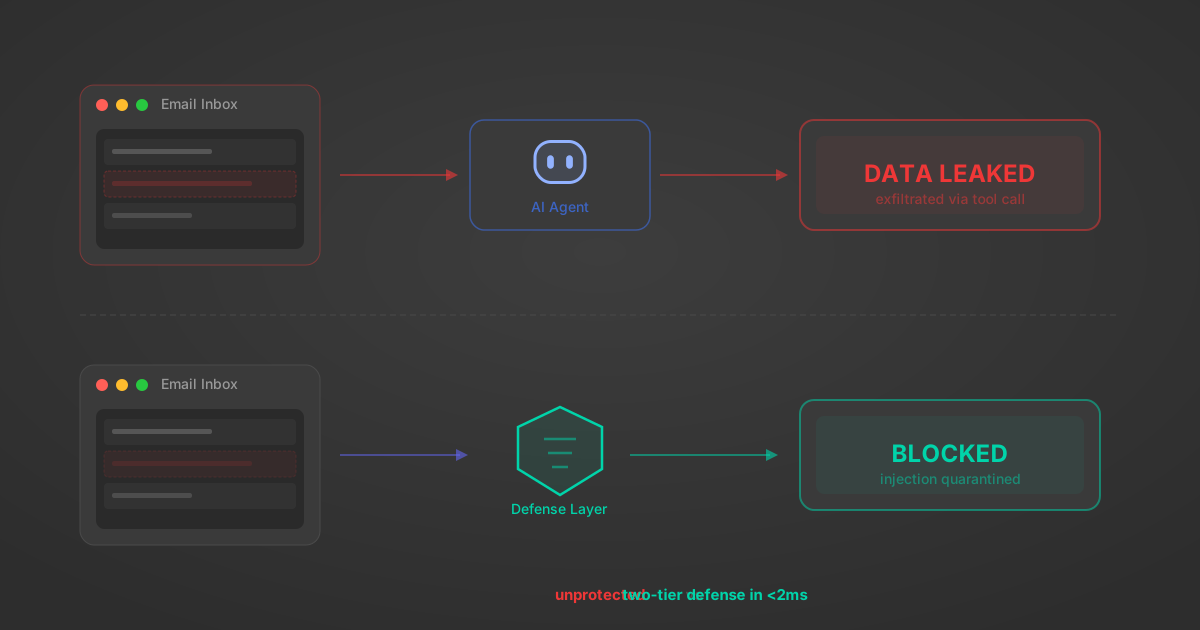
Indirect Prompt Injection Defense for MCP Tools: A Technical Guide
MCP tools that read emails, CRM records, and tickets are indirect prompt injection vectors. Here's how we built a two-tier defense that scans tool results in ~11ms.
12 min

MCP vs A2A: Architecture, Security, and When to Use Each
MCP vs A2A: what each protocol standardizes, how they differ, their shared security risks including indirect prompt injection, and when to use one, both, or a hybrid architecture.
12 min
MCP vs API: What Hundreds of Connector Builds Taught Us
MCP wraps APIs, it doesn't replace them. After building hundreds of connectors that serve both, here's when each approach wins.
14 min read
BrowserStack MCP Server FAQ
Does StackOne have a BrowserStack MCP server?
BrowserStack MCP server vs direct API integration: what's the difference?
How does BrowserStack authentication work for AI agents?
origin_owner_id.Are BrowserStack MCP tools vulnerable to prompt injection?
What is the context bloat of a BrowserStack agent and how do I avoid it?
Can I limit which actions my BrowserStack agent can access?
Can I create custom agent actions for my BrowserStack MCP server?
When should I NOT use a BrowserStack MCP server?
What AI frameworks and AI clients does the StackOne BrowserStack MCP server support?
Put your AI agents to work
All the tools you need to build and scale AI agent integrations, with best-in-class connectivity, execution, and security.