
Expensify MCP Server
for AI Agents
Connect your AI agent to StackOne's Expensify MCP server and give it 27 MCP tools out of the box. Auth, tool execution, and security all managed.
 StackOne






Coverage
27 Agent Actions
Create, read, update, and delete across Expensify — and extend your agent's capabilities with custom actions.

Authentication
Agent Tool Authentication
Per-user OAuth in one call. Your Expensify MCP server gets session-scoped tokens with zero credentials stored on your infra.
Agent Auth →
Security
Agent Protection
Every Expensify tool response scanned for prompt injection in milliseconds — 88.7% accuracy, all running on CPU.
Prompt Injection Defense →
Performance
Max Agent Context. Min Cost.
Free up to 96% of your agent's context window to enhance reasoning and reduce cost, on every Expensify call.
Tools Discovery →What is the Expensify MCP Server?
A Expensify MCP server lets AI agents read and write Expensify data through the Model Context Protocol — Anthropic's open standard for connecting LLMs to external tools. StackOne's Expensify MCP server ships with 27 pre-built actions, fully extensible via the Connector Builder — plus managed authentication, prompt injection defense, observability, and agent execution runtime. Connect it from MCP clients like Claude Desktop, Claude Code, Cursor, Goose, and VS Code, or from agent frameworks like OpenAI Agents SDK, LangChain, and Vercel AI SDK.
All Expensify MCP Tools
Every action from Expensify's API, ready for your agent. Create, read, update, and delete — scoped to exactly what you need.
Expense Rules
- Create Expense Rule
Automate expense classification by creating rules that automatically apply tags to employee expenses based on policy configuration and business logic
- Update Expense Rule
Update an existing expense rule for a given employee on a policy to modify automatic tag or billable settings
Unified Organizations
- List Unified Organizations
List unified organizations in Expensify.
- Get Unified Organization
Get a unified Expensify organization by ID.
Unified Roles
- List Unified Roles
List unified roles in Expensify.
- Get Unified Role
Get a unified Expensify role by ID.
Unified Users
- List Unified Users
List unified users in Expensify.
- Get Unified User
Get a unified Expensify user by ID.
Policys
- Create Policy
Provision a new Expensify expense policy (workspace) with specified name and plan type for organizing expense management workflows
- Get Policy
Retrieve detailed policy configuration for one or more policies, including expense categories, tags, custom report fields, tax rates, and employee roster, with optional field filtering and user delegation
Reports
- Create Report
Create an expense report with an initial expense transaction and submit it for approval. employeeEmail is optional in schema, but reliable use requires supplying the connected user's own email — omitting it (or targeting another user) only works when your Expensify domain has advanced/delegated access enabled via concierge@expensify.com, otherwise the call fails (HTTP 400 on omit, 401 on a different user).
- Export Reports
Generate a CSV/file export of expense reports for accounting integration, audit, and financial reporting. Returns a filename that you pass to download_report to retrieve the file. Filter by either startDate+endDate or reportIDList, freely combined with reportState, fileExtension, limit, and policyIDList.
- Download Report
Retrieve CSV file content for previously generated expense report or reconciliation exports to complete data extraction workflows
Other (14)
- Create Expense
Programmatically create individual expense transactions in user accounts for automated expense importing from external systems or receipt processing services
- List Domain Cards
Retrieve comprehensive inventory of corporate cards configured at domain level with transaction import status and cardholder assignment details
- Export Card Reconciliation
Generate comprehensive corporate card reconciliation reports for specified date ranges to compare card transactions with expense reports for accounting closure
- Get Unified Credentials
Get the current Expensify connection's unified credentials and identity.
- List Unified Resource Types
List unified resource types in Expensify.
- List Unified Resource Users
List unified resource users in Expensify.
- List Policies
Retrieve all Expensify policies (workspaces) accessible to the authenticated user, including policy details, roles, and configuration settings
- Update Employee
Add a new employee to an Expensify policy OR update an existing one (upsert), via the Advanced Employee Updater — sets approval hierarchy, role, external ID, and other fields. Looks up the employee by employeeEmail (not employeeID); a brand-new email is provisioned as a new policy member. All four fields (employeeEmail, managerEmail, employeeID, policyID) are required on every call, even to change a single field.
- Update Tag Approver
Configure tag-based approval routing to automatically route expenses with specific tags to designated approvers for department or project-based workflows
- Update Policy Category
Add, update, or replace expense categories on a policy with configurable merge or replace strategy for granular category management
- Update Policy Report Field
Add or update custom report field definitions on a policy for structured expense report data collection
- Update Report Status
Mark reports that are ALREADY in Approved state as Reimbursed, for automated reimbursement workflow completion and accounting reconciliation. This connector CANNOT approve a report — approval happens in Expensify via a reviewer or policy auto-approval — so a just-created or just-submitted report is not yet Approved and will be silently skipped here (see skippedReports in the response). Only call this once the target report is Approved; if you just created a report, do not chain this action expecting it to succeed.
- IAM Auth Test
Validate Expensify partner credentials by calling Policy List Getter. Returns the raw, unmapped Expensify response so you can verify credentials are live and inspect available policies. Bypasses the unified IAM credentials schema.
- Replace Policy Tags
DESTRUCTIVE FULL REPLACE — overwrites the entire tag level on an Expensify policy with only the tags provided. Existing tags omitted from the request are permanently deleted. Always send the complete desired tag set via tagsList.
Expensify AI Agent Use Cases
Connect your AI agent to Expensify and help your team scale the finance operations they run by hand today.
Automate invoice processing with AI agents connected to your ERP, accounting software, and AP tools through StackOne.
ViewUse StackOne to connect your AI agent to your accounting, CRM, and messaging systems to automate Accounts Receivable dunning and payment follow-up.
ViewUse StackOne to connect your AI agent to your accounting, email, and document management systems to automate invoice processing and purchase order matching.
ViewSet Up Your Expensify MCP Server in Minutes
One endpoint. Any framework. Your agent is talking to Expensify in under 10 lines of code.
Agent Frameworks


 JSON
JSON{
"mcpServers": {
"stackone": {
"command": "npx",
"args": [
"-y",
"mcp-remote@latest",
"https://api.stackone.com/mcp?x-account-id=<account_id>",
"--header",
"Authorization: Basic <YOUR_BASE64_TOKEN>"
]
}
}
}Check More Accounting MCP Servers
139+ actions
125+ actions
117+ actions
115+ actions
105+ actions
95+ actions
89+ actions
Platform Resources

MCP Code Mode: Keeping Tool Responses Out of Agent Context
Anthropic's code_execution processes data already in context. Custom MCP code mode keeps raw tool responses in a sandbox. 14K tokens vs 500.
11 min

Comparing BM25, TF-IDF, and Hybrid Search for MCP Tool Discovery
Benchmarking BM25, TF-IDF, and hybrid search for MCP tool discovery across 916 tools. The 80/20 TF-IDF/BM25 hybrid hits 21% Top-1 accuracy in under 1ms.
10 min
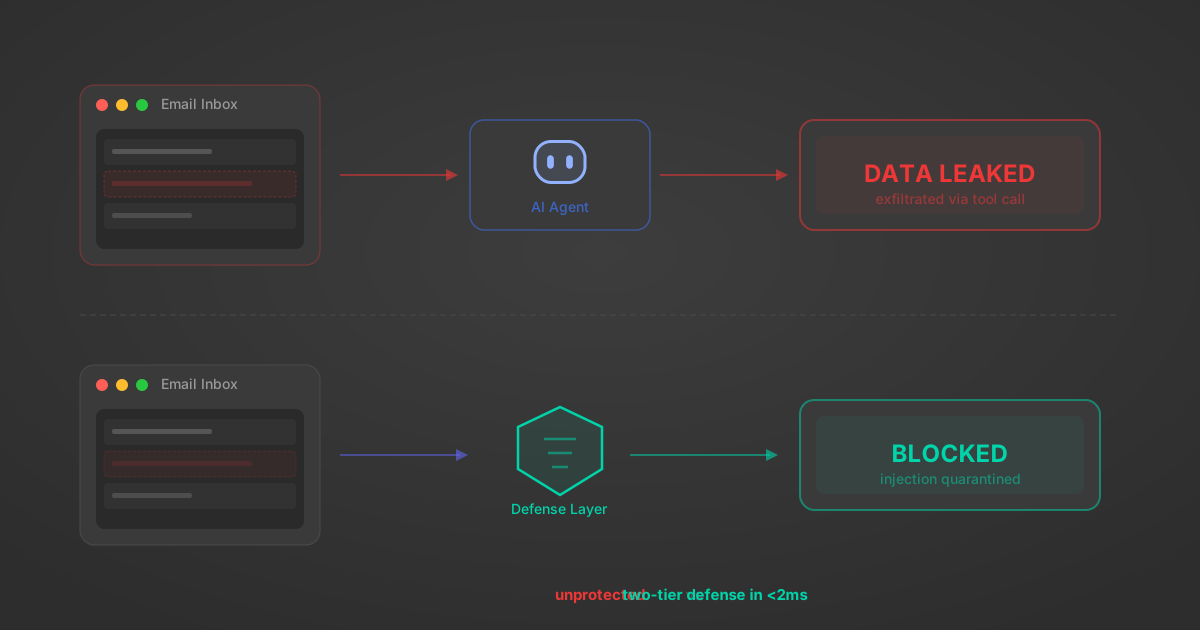
Indirect Prompt Injection Defense for MCP Tools: A Technical Guide
MCP tools that read emails, CRM records, and tickets are indirect prompt injection vectors. Here's how we built a two-tier defense that scans tool results in ~11ms.
12 min
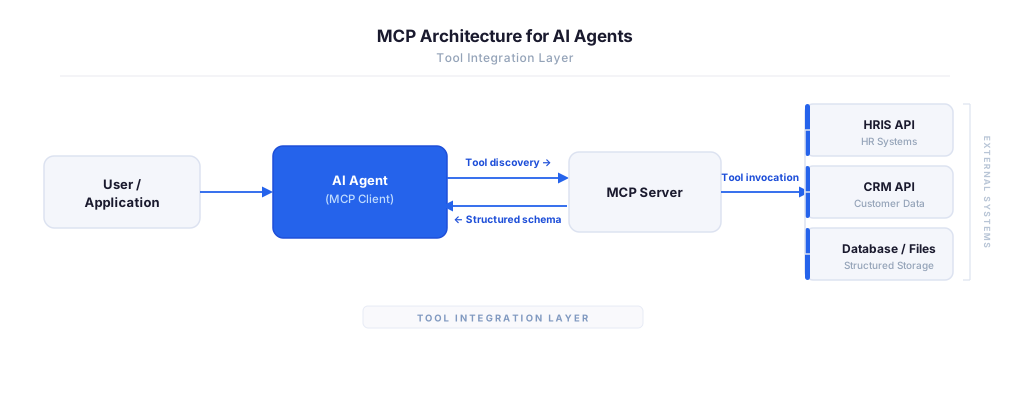
MCP vs A2A: Architecture, Security, and When to Use Each
MCP vs A2A: what each protocol standardizes, how they differ, their shared security risks including indirect prompt injection, and when to use one, both, or a hybrid architecture.
12 min
MCP vs API: What Hundreds of Connector Builds Taught Us
MCP wraps APIs, it doesn't replace them. After building hundreds of connectors that serve both, here's when each approach wins.
14 min read
Expensify MCP Server FAQ
Does StackOne have a Expensify MCP server?
Expensify MCP server vs direct API integration — what's the difference?
How does Expensify authentication work for AI agents?
origin_owner_id.Are Expensify MCP tools vulnerable to prompt injection?
What is the context bloat of a Expensify agent and how do I avoid it?
Can I limit which actions my Expensify agent can access?
Can I create custom agent actions for my Expensify MCP server?
When should I NOT use a Expensify MCP server?
What AI frameworks and AI clients does the StackOne Expensify MCP server support?
Put your AI agents to work
All the tools you need to build and scale AI agent integrations, with best-in-class connectivity, execution, and security.