
Vincere MCP Server
for AI Agents
Connect your AI agent to StackOne's Vincere MCP server and give it 232 MCP tools out of the box. Auth, tool execution, and security all managed.
 StackOne






Coverage
232 Agent Actions
Create, read, update, and delete across Vincere — and extend your agent's capabilities with custom actions.

Authentication
Agent Tool Authentication
Per-user OAuth in one call. Your Vincere MCP server gets session-scoped tokens with zero credentials stored on your infra.
Agent Auth →
Security
Agent Protection
Every Vincere tool response scanned for prompt injection in milliseconds — 88.7% accuracy, all running on CPU.
Prompt Injection Defense →
Performance
Max Agent Context. Min Cost.
Free up to 96% of your agent's context window to enhance reasoning and reduce cost, on every Vincere call.
Tools Discovery →What is the Vincere MCP Server?
A Vincere MCP server lets AI agents read and write Vincere data through the Model Context Protocol — Anthropic's open standard for connecting LLMs to external tools. StackOne's Vincere MCP server ships with 232 pre-built actions, fully extensible via the Connector Builder — plus managed authentication, prompt injection defense, observability, and agent execution runtime. Connect it from MCP clients like Claude Desktop, Claude Code, Cursor, Goose, and VS Code, or from agent frameworks like OpenAI Agents SDK, LangChain, and Vercel AI SDK.
All Vincere MCP Tools
Every action from Vincere's API, ready for your agent. Create, read, update, and delete — scoped to exactly what you need.
Comments
- Create Comment
Create Comment
- Update Comment
Update Comment
Tasks
- Create Task
Create Task
- Update Task
Update Task
- Delete Task
Delete task
Meetings
- Create Meeting
Create Meeting
- Update Meeting
Update Meeting
- Delete Meeting
Delete meeting
Candidates
- Create Candidate
Create candidate
- Update Candidate
Update Candidate
Candidate's Functional Expertises
- Get Candidate's Functional Expertises
Get candidate's functional expertises
- Update Candidate's Functional Expertises
Update the functional expertises linked to a candidate
Candidate's Sub-functional Expertises
- Get Candidate's Sub-functional Expertises
Get candidate's sub-functional expertises for a functional expertise
- Update Candidate's Sub-functional Expertises
Update the sub-functional expertises linked to a candidate under one functional expertise
Candidate's Desired Functional Expertises
- Get Candidate's Desired Functional Expertises
Get candidate's desired functional and sub-functional expertises
- Update Candidate's Desired Functional Expertises
Update candidate's desired functional and sub-functional expertises
Candidate Status
- Get Candidate Status
Get candidate status
- Update Candidate Status
Update candidate status
Candidate Source Contacts
- Get Candidate Source Contact
Get candidate source contact
- Update Candidate Source Contact
Update candidate source contact
Candidate Working States
- Get Candidate Working State
Get candidate working state
- Update Candidate Working State
Update candidate working state
Candidate Notes
- Create Candidate Note
Candidate notes
- Get Candidate Notes
Candidate notes
- Update Candidate Note
Candidate notes
- Delete Candidate Note
Candidate notes
Candidate Documents
- Upload Candidate Document
Upload a document (resume, offer letter, etc.) to a candidate
- Update Candidate Document
Update candidate document
Companys
- Create Company
Create Company
- Update Company
Update Company
- Delete Company
Delete company
Company Locations
- Create Company Location
Create a location for a company
- Update Company Location
Fully update a company location
- Delete Company Location
Delete company location
Company Status
- Get Company Status
Get company status
- Update Company Status
Update company status
Contacts
- Create Contact
Create contact
- Update Contact
Update Contact
- Delete Contact
Delete contact
Contact Status
- Get Contact Status
Get contact status
- Update Contact Status
Update contact status
Jobs
- Create Job
Create a job with a fixed JOB category
- Update Job
Fully update an existing job
Job Rating Skills
- Get Job Rating Skills
Get job rating skills
- Update Job Rating Skill
Update job rating skill
Other (187)
- Create Job Application
Create Job Application
- Create Or Update Candidate's Current Location
Create or update candidate's current location
- Create Or Update Candidate's Company Location
Create or update company location
- Create Or Update Candidate's Personal Location
Create or update candidate's personal location
- Create Or Update Company's Custom Fields
Create or update company's custom fields
- Upload New Company Document
Upload new company document
- Create Or Update Contact's Personal Location
Create or update contact's personal location
- Create Contact's Work Location
Create contact's work location
- Create Or Update Contact's Custom Fields
Create or update contact's custom fields
- Upload New Contact Document
Upload new contact document
- Create Job Lead
Create a Job Lead
- Create Or Update Job's Custom Fields
Create or update job's custom fields
- Add Candidate To Talent Pools
Add candidate to talent pools
- Search User's Activities
Search user's activities
- Search Candidate's Activities
Search candidate's activities
- Search Contact's Activities
Search contact's activities
- Search Position's Activities
Search position's activities
- Search Company's Activities
Search company's activities
- Search All Activities Between Two Dates
Search all activities between two dates
- Get Comment Details
Get comment details
- Get Comment's Categories
Get comment's categories
- Get Comment's Linked Candidates
Get comment's linked candidates
- Get Comment's Linked Companies
Get comment's linked companies
- Get Comment's Linked Contacts
Get comment's linked contacts
- Get Comment's Linked Jobs
Get comment's linked jobs
- Get Comment's Notification Recipients
Get comment's notification recipients
- Get Task Details
Get task details
- Get Meeting Details
Get meeting details
- Get Meeting's Categories
Get meeting's categories
- Get Meeting's Linked Candidates
Get meeting's linked candidates
- Get Meeting's Linked Companies
Get meeting's linked companies
- Get Meeting's Linked Contacts
Get meeting's linked contacts
- Get Meeting's Linked Jobs
Get meeting's linked jobs
- Get Meeting's Attendees
Get meeting's attendees
- Get Meeting's Notification Recipients
Get meeting's notification recipients
- Search Activities
Search activities
- Get Activity Details
Get activity details
- Get Application Details
Get application details
- Search Applications By Filter
Search applications by filter
- Get Application Stage Logs
Get application stage logs
- Get Application Logs On Range
Get application logs on range
- Get Application Actions
Get application actions
- Get List Of Rejection Reasons
Get list of rejection reasons
- Get Substatus Of Application
Get substatus of application
- Get Candidate Details
Get candidate details
- Get Candidate's Education Details
Get candidate's education details
- Get Candidate's Owners
Get candidate's owners
- Get Candidate's Work Experiences
Get candidate's work experiences
- Get Candidate's Desired Job Types
Get candidate's desired job types
- Get Candidate's Language Skills
Get candidate's language skills
- Get Candidate's Industries
Get candidate's industries
- Get Candidate's Current Location
Get candidate's current location
- Get Candidate's Company Location
Company location
- Get Candidate's Personal Location
Get candidate's personal location
- Get Candidate's Custom Fields
Get candidate's custom fields
- Get Candidate's Core Fields
Get candidate's core fields
- Get Candidate's Branches
Get candidate's branches
- Get Candidate's Brands
Get candidate's brands
- Get Candidate's Placement Status
Candidate's placement statuss
- Get Candidate Email Activity Information
Get candidate email activity information
- Get The List Of Active Applications
Get the list of active applications
- Get Candidate's Compliance Setting
Get candidate's compliance setting
- Get Candidate's Applications
Get candidate's applications
- Get Summary Status Of Each Applications Of Candidate
Get summary status of each applications of candidate
- Get Candidate's Document Detail
Get candidate's document detail
- Get All Candidate's Documents
Get all candidate's documents
- Get Company Details
Get company details
- Get All Company's Locations
Get all company's locations
- Get Company's Location
Get company's location
- Get Company's Industries
Get company's industries
- Get Company's Custom Fields
Get company's custom fields
- Get Company's Branches
Get company's branches
- Get Company's Brands
Get company's brands
- Get Company First Location By Country_code
Get company first location by country_code
- Get Company's Logo
Get company's logo
- Get All Company's Documents
Get all company's documents
- Get Contact Details
Get contact details
- Get Contact's Linked Jobs
Get contact's linked jobs
- Get Contact's Industries
Get contact's industries
- Get Contact's Personal Location
Get contact's personal location
- Get All Contact's Work Locations
Get all contact's work locations
- Get Contact's Custom Fields
Get contact's custom fields
- Get First Contact Work Location
Get first contact work location
- Get Contact's Branches
Get contact's branches
- Get Contact's Brands
Get contact's brands
- Get Contact Email Activity Information
Get contact email activity information
- Get Contact's Photo
Get contact's photo
- Get All Contact's Documents
Get all contact's documents
- Get Distribution Lists Of A Contact Based On User's Permission
Get distribution lists of a contact based on user's permission
- Get Distribution Lists A User Can Use
Get distribution lists a user can use
- List Of Contact Details By A Distribution List And User
List of contact details by a distribution list and user
- List Of Contacts By A Distribution List
List of contacts by a distribution list
- Get Job Details
Get job details
- Get Job Screening Questions
Get job screening questions
- Get Job's Owners
Get job's owners
- Get Job's Custom Fields
Get job's custom fields
- Get Job's Branches
Get job's branches
- Get Job's Brands
Get job's brands
- Get Job Status
Get job status
- Get Job's Applications
Get job's applications
- Get Job's Company Logo
Get job's company logo
- Get Placement Details
Get placement details
- Get Placement Profit Splits
Get placement profit splits
- Get Placement Custom Fields
Get placement custom fields
- Get Placement Your-company Detail
Get placement your-company detail
- Get Placement Branches
Get placement branches
- Get Placement Amendment Reasons
Get placement amendment reasons
- Get Reference Salary Type List For Permanent Jobs
Get reference salary type list for permanent jobs
- Get Reference Pay Interval List For Contract-related Jobs
Get reference pay interval list for contract-related jobs
- Get Filter Values For Current User
Get filter values for current user
- Search Candidate Records
Search candidate records
- Search Job Records
Search job records
- Search Contact Records
Search contact records
- Search Company Records
Search company records
- Search User Records
Search user records
- Get Offer Approval Setting
Get offer approval setting
- Get Twilio Credentials
Get Twilio credentials
- Get Talent Pools Of A Candidate Based On User's Permission
Get talent pools of a candidate based on user's permission
- Get Talent Pools A User Can Use
Get talent pools a user can use
- List Of Candidate Details By A Talent Pool And User
List of candidate details by a talent pool and user
- List Of Candidates By A Talent Pool
List of candidates by a talent pool
- Get All Umbrella Companies
Get all umbrella companies
- Get User By Email
Get user by email
- Search Users By Name
Search users by name
- Get All Users
Get all users
- Get All Active Users
Get all active users
- Get All Administrator Users
Get all administrator users
- Get Current User
Get current user
- Get All Approvers
Get all approvers
- Move Application Forward To Stage Sent
Move application forward to stage sent
- Move Application Forward To Stage Interview
Move application forward to stage interview
- Update Candidate's Functional And Sub-functional Expertises
Update (replace) a candidate's functional and sub-functional expertises in one call
- Update Email Subscription Status
Update email subscription status
- Set Job Owners
Replace the complete owner list for a job
- Update Position Status
Update position status
- Delete Applications
Delete applications
- Remove Candidate From Talent Pools
Remove candidate from talent pools
- Reject Application
Reject Application
- View A Job Compensation
View a job compensation
- View Placements Of Job
View placements of Job
- Count Job Applications By Stage
Count a job's applications in the supplied stages
- Accept An Offer
Accept an offer
- Reject An Offer
Reject an offer
- Reference List For Candidate Custom Field Definitions
Reference list for candidate custom field definitions
- Reference List For Contact Custom Field Definitions
Reference list for contact custom field definitions
- Reference List For Company Custom Field Definitions
Reference list for company custom field definitions
- Reference List For Job Custom Field Definitions
Reference list for job custom field definitions
- Reference List For Placement Custom Field Definitions
Reference list for placement custom field definitions
- Reference List For Candidate Sources
Reference list for Candidate Sources
- Reference List For Contact Sources
Reference list for Contact Sources
- Reference List For Languages
Reference list for languages
- Reference List For Language Skill Levels
Reference list for language skill levels
- Reference List For Marital Status
Reference list for marital status
- Reference List For Nationalities
Reference list for nationalities
- Reference List For Relocation Potentials
Reference list for relocation potentials
- Reference List For Candidate Statuses
Reference list for candidate statuses
- Reference List For Contact Statuses
Reference list for contact statuses
- Reference List For Company Statuses
Reference list for company statuses
- Reference List For Job Statuses
Reference list for job statuses
- Reference List For Countries
Reference list for countries
- Reference List For Currencies
Reference list for currencies
- Reference List For Employment Types
Reference list for employment types
- Reference List For Genders
Reference list for genders
- Reference List For Stages Of An Application
Reference list for stages of an Application
- Reference List For Job Types
Reference list for job types
- Reference List For Job Subtypes
Reference list for job subtypes
- Reference List For Meeting Status
Reference list for meeting status
- Reference List For All Candidate Document Types.
Reference list for all candidate document types.
- Reference List For Document Types Based On User's Permission.
Reference list for document types based on user's permission.
- Reference List For All Activity's Categories
Reference list for all activity's categories
- Reference List For Contact Stage
Reference list for Contact Stage
- Reference List For Company Stage
Reference list for Company Stage
- Reference List For All Total Pay Calculation Types
Reference list for all total pay calculation types
- Reference List For All Time Management Types
Reference list for all Time Management types
- Reference List For All Contract Length Type
Reference list for all Contract length type
- Reference List For All Pay Method
Reference list for all Pay Method
- Reference List For All Team In Vincere
Reference list for all Team in Vincere
- Reference List For All Brand In Vincere
Reference list for all Brand in Vincere
- Reference List For All Branch In Vincere
Reference list for all Branch in Vincere
- Reference List For All Division In Vincere
Reference list for all Division in Vincere
- Reference List For All User Location In Vincere
Reference list for all user Location in Vincere
- Reference List For Job Status
Reference list for job status
- Reference List For Activity Names
Reference list for Activity names
- Reference List For Functional Expertises
Reference list for all functional expertises
- Reference List For Sub-functional Expertises Of A Functional Expertise
Reference list of sub-functional expertises for one functional expertise
- Reference List For Sub-functional Expertises
Reference list for all sub-functional expertises
- Check If A User Exists
Check if a user exists
Vincere AI Agent Use Cases
Connect your AI agent to Vincere and help your team scale the recruiting operations they run by hand today.
Use StackOne to connect your AI agent to your ATS and job boards to automate job posting distribution.
ViewUse StackOne to connect your AI agent to your ATS, survey tools, and messaging systems to automate reference checks.
ViewUse StackOne to connect your AI agent to your ATS, HRIS, and document management tools to automate offer letter generation.
ViewSet Up Your Vincere MCP Server in Minutes
One endpoint. Any framework. Your agent is talking to Vincere in under 10 lines of code.
Agent Frameworks


 JSON
JSON{
"mcpServers": {
"stackone": {
"command": "npx",
"args": [
"-y",
"mcp-remote@latest",
"https://api.stackone.com/mcp?x-account-id=<account_id>",
"--header",
"Authorization: Basic <YOUR_BASE64_TOKEN>"
]
}
}
}Check More Recruiting MCP Servers
247+ actions
169+ actions
138+ actions
132+ actions
129+ actions
127+ actions
120+ actions
Platform Resources

MCP Code Mode: Keeping Tool Responses Out of Agent Context
Anthropic's code_execution processes data already in context. Custom MCP code mode keeps raw tool responses in a sandbox. 14K tokens vs 500.
11 min

Comparing BM25, TF-IDF, and Hybrid Search for MCP Tool Discovery
Benchmarking BM25, TF-IDF, and hybrid search for MCP tool discovery across 916 tools. The 80/20 TF-IDF/BM25 hybrid hits 21% Top-1 accuracy in under 1ms.
10 min
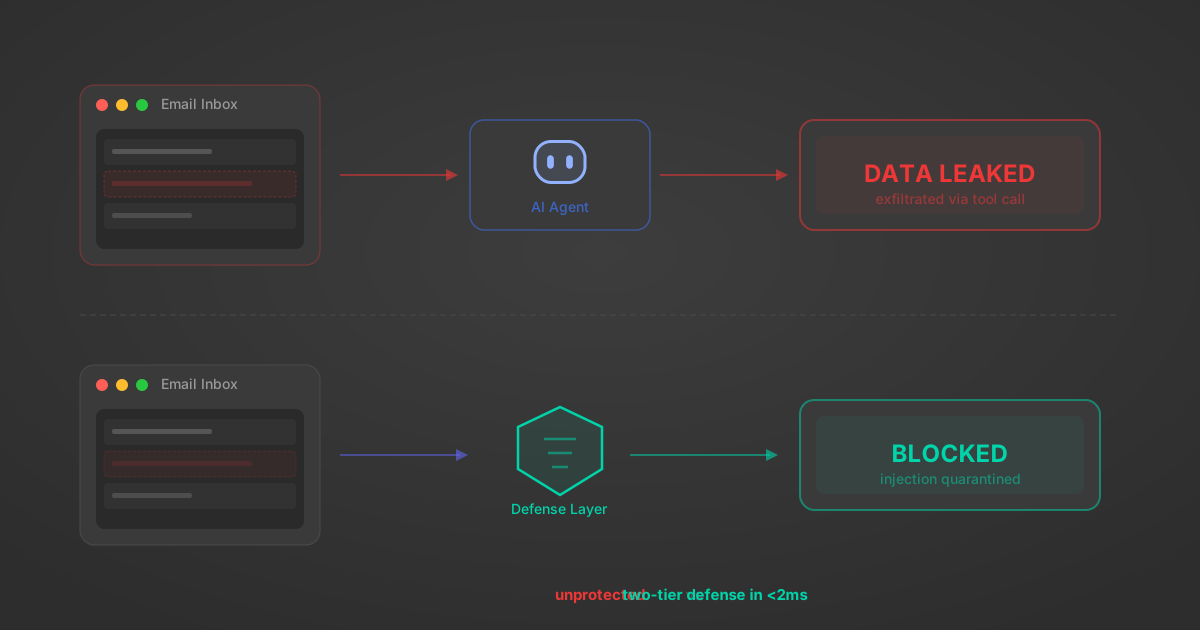
Indirect Prompt Injection Defense for MCP Tools: A Technical Guide
MCP tools that read emails, CRM records, and tickets are indirect prompt injection vectors. Here's how we built a two-tier defense that scans tool results in ~11ms.
12 min
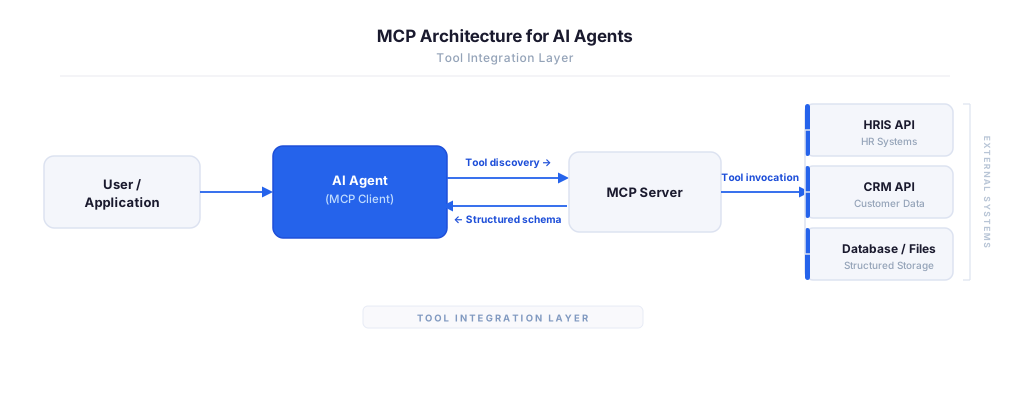
MCP vs A2A: Architecture, Security, and When to Use Each
MCP vs A2A: what each protocol standardizes, how they differ, their shared security risks including indirect prompt injection, and when to use one, both, or a hybrid architecture.
12 min
MCP vs API: What Hundreds of Connector Builds Taught Us
MCP wraps APIs, it doesn't replace them. After building hundreds of connectors that serve both, here's when each approach wins.
14 min read
Vincere MCP Server FAQ
Does StackOne have a Vincere MCP server?
Vincere MCP server vs direct API integration — what's the difference?
How does Vincere authentication work for AI agents?
origin_owner_id.Are Vincere MCP tools vulnerable to prompt injection?
What is the context bloat of a Vincere agent and how do I avoid it?
Can I limit which actions my Vincere agent can access?
Can I create custom agent actions for my Vincere MCP server?
When should I NOT use a Vincere MCP server?
What AI frameworks and AI clients does the StackOne Vincere MCP server support?
Put your AI agents to work
All the tools you need to build and scale AI agent integrations, with best-in-class connectivity, execution, and security.