


Tomba MCP Server
for AI Agents
Connect your AI agent to StackOne's Tomba MCP server and give it 66 MCP tools out of the box. Auth, tool execution, and security all managed.
 StackOne


Coverage
66 Agent Actions
Agents can read, write and delete in Tomba. Extend your agent's capabilities with custom actions.

Authentication
Agent Tool Authentication
Per-user OAuth in one call. Your Tomba MCP server gets session-scoped tokens with zero credentials stored on your infra.
Agent Auth →
Security
Agent Protection
Every Tomba tool response scanned for prompt injection in milliseconds, with 88.7% accuracy, all running on CPU.
Prompt Injection Defense →
Performance
Max Agent Context. Min Cost.
Free up to 96% of your agent's context window to enhance reasoning and reduce cost, on every Tomba call.
Tools Discovery →What is the Tomba MCP Server?
A Tomba MCP server lets AI agents read and write Tomba data through the Model Context Protocol, Anthropic's open standard for connecting LLMs to external tools. StackOne's Tomba MCP server ships with 66 pre-built actions, fully extensible via the Connector Builder, plus managed authentication, prompt injection defense, observability, and agent execution runtime. Connect it from MCP clients like Claude Desktop, Claude Code, Cursor, Goose, and VS Code, or from agent frameworks like OpenAI Agents SDK, LangChain, and Vercel AI SDK.
All Tomba MCP Tools
Every StackOne action for Tomba, ready for your agent. Read, write and delete, scoped to exactly what you need.
A Bulk Jobs
- Create A Bulk Job
Create a job from a list of values, data rows, or a CSV file (multipart).
- Get A Bulk Job
Get a job by ID, with its options in config, its results in metrics, and, once it is billed, the first result rows in preview.
- Delete A Bulk Job
Delete a job.
An API Keys
- Create An API Key
Creates an API key for your account and returns its value in data.message.
- Delete An API Key
Deletes a key.
A Lead Attributes
- Create A Lead Attribute
Creates a custom lead attribute.
- Update A Lead Attribute
Renames an attribute and sets its type.
- Delete A Lead Attribute
Deletes an attribute of your workspace.
Leads Lists
- Create Leads List
Creates a lead list.
- Retrieve Leads Lists
Returns up to 25 lead lists of your workspace, or your own lists when you aren't in a workspace.
- Update Leads List
Renames a list of your workspace, or marks or unmarks it as a favorite.
- Delete Leads List
Deletes a list of your workspace.
A Leads
- Create A Lead
Saves a lead to your account.
- Update A Lead
Updates a lead of your workspace.
- Delete A Lead
Deletes a lead of your workspace, with its custom attribute values.
Other (51)
- Retrieve API Logs
Returns your billable lookups, newest first, with what each one cost.
- Retrieve API Usage
Returns your daily credit usage over a range of days, one row per user and day, with totals for the range.
- Get Account
Returns your account, your plan, and your credit usage in the current usage window.
- Retrieve A Single API Log
Returns one row of GET /logs by its id.
- Retrieve Rate Limits
Returns, for every rate-limited route, the limits that apply to your account and the requests counted against them in the current minute and day.
- Get The Bulk Webhook Secret
Get the key your bulk job events are signed with.
- List Bulk Jobs
List the jobs of a type, limit per page, sorted by job ID.
- List Bulk Types
List every bulk type with its input fields and the header names detected for them, its options, row limit, daily limits, result files, and metrics distributions.
- Download Bulk Job Results
Download a result file of a completed job as CSV.
- Get Bulk Job History
List a job's events, oldest first: creation, launch, start, end, retries, downloads, renames, archiving, and webhook deliveries.
- Get Bulk Job Progress
Get a job's status, progress, estimated time left, and results so far.
- Get Bulk Statistics
Get the bulk activity of your account, or of your workspace: jobs created by status, rows processed, results, and credits billed, in total, per type, and per day.
- Get Domain Suggestions
Returns up to five companies whose name or domain matches your query, with their domain and the number of email addresses Tomba has for it.
- List Similar Companies
Returns companies similar to a domain, such as competitors, 25 per page.
- List My Flags
Returns the reports you submitted, with their review status and any credits returned.
- Retrieve API Keys
Returns the API keys of your workspace: yours and every other member's, including their full key values.
- Retrieve A Single API Key
Returns one API key of your workspace, including its value.
- Retrieve Lead Attributes
Returns up to 25 custom lead attributes of your workspace, or your own attributes when you aren't in a workspace.
- Retrieve A Single Lead Attribute
Confirms that an attribute exists in your workspace.
- Retrieve A Single Leads List
Returns one lead list of your workspace.
- Retrieve Leads
Returns the leads of your workspace, or your own leads when you aren't in a workspace, with each lead's list and custom attribute values.
- Retrieve A Single Lead
Returns one lead of your workspace, as the only item of data.leads.
- Search Companies
Searches Tomba's company database with structured filters or a natural-language query, and returns 50 companies per page.
- Rotate The Bulk Webhook Secret
Replace the key your bulk job events are signed with.
- Estimate Bulk Job Credits
Get the credits a job costs, and whether your balance covers them.
- Cancel A Bulk Job
Cancel a pending job: its status becomes cancelled, and you can retry it later.
- Retry A Bulk Job
Run a failed or cancelled job again from its input, with the same options.
- Launch A Bulk Job
Start a pending job; any other status, or an expired job, returns 409.
- Rename A Bulk Job
Rename a job.
- Restore An Archived Bulk Job
Move an archived job back to the default list.
- Archive A Bulk Job
Archive a completed, failed, or cancelled job: it leaves the default list and appears with archived=true.
- Combined API
Returns the person behind an email address and the company behind its domain in one call, in Clearbit's format: data.person has the Person API fields and data.company the Company API fields.
- Company API
Returns the company behind a domain in Clearbit's Company API format: name, description, location, industry codes, social handles, size, revenue, and technologies.
- Domain Status
Tells you whether a domain, or the domain of an email address, belongs to a webmail provider such as Gmail or to a disposable email provider.
- Technology
Returns the technologies detected on a domain's website, such as its analytics, live chat, and payment tools, with their categories.
- Author Finder
Finds the email address of the author of an article or blog post from its URL.
- Domain Search
Returns the company behind a domain and one page of the email addresses Tomba has for it, with each person's name, job title, department, and verification status.
- Email Count
Returns how many email addresses Tomba has for a domain, by email type, department, and seniority.
- Email Enrichment
Returns the person behind an email address, with their name, company, job title, social profiles, and the address's verification status, in Tomba's own format.
- Email Finder
Finds a person's professional email address from their name and their company's domain or name.
- Email Format
Returns the formats that a domain's email addresses follow, such as {first}.{last}, with the share of known addresses that use each one.
- Location
Returns, for each country, how many of a domain's email addresses belong to people in that country.
- Linkedin Finder
Finds the professional email address of the person behind a LinkedIn profile URL.
- Flag Incorrect Data
Reports incorrect data: an email address that bounced or is wrong, or a wrong organization, phone number, author URL, or website.
- Reset An API Key
Rotates a key: issues a new value and a new 365-day expiry, and the old value stops working immediately.
- Rename An API Key
Changes a key's name.
- Person API
Returns the person behind an email address in Clearbit's Person API format: name, location, employment, and social profiles.
- Phone Finder
Finds phone numbers for a person or a company from an email address, a domain, or a LinkedIn profile URL.
- Phone Validator
Checks whether a phone number is valid in its country's numbering plan and returns its formats, line type, carrier, region, and time zones.
- Email Sources
Returns the public web pages where Tomba found an email address, with when it was first and last seen on each.
- Email Verifier
Checks whether an email address can receive mail.
Tomba AI Agent Use Cases
Connect your AI agent to Tomba and help your team scale the sales operations they run by hand today.
Use StackOne to connect your AI agent to your CRM, email, and calendar tools to automate post-demo follow-up.
ViewUse StackOne to connect your AI agent to your CRM, email, and calendar tools to automate deal risk scoring and pipeline alerts.
ViewUse StackOne to connect your AI agent to your marketing automation, CRM, and email tools to automate lead nurture email sequences.
ViewSet Up Your Tomba MCP Server in Minutes
One endpoint. Any framework. Your agent is talking to Tomba in under 10 lines of code.
Agent Frameworks


 JSON
{
  "mcpServers": {
    "stackone": {
      "command": "npx",
      "args": [
        "-y",
        "mcp-remote@latest",
        "https://api.stackone.com/mcp?x-account-id=<account_id>",
        "--header",
        "Authorization: Basic <YOUR_BASE64_TOKEN>"
      ]
    }
  }
}
Check More crm-sales MCP Servers
251+ actions
195+ actions
187+ actions
136+ actions
104+ actions
82+ actions
75+ actions
Platform Resources

Comparing BM25, TF-IDF, and Hybrid Search for MCP Tool Discovery
Benchmarking BM25, TF-IDF, and hybrid search for MCP tool discovery across 916 tools. The 80/20 TF-IDF/BM25 hybrid hits 21% Top-1 accuracy in under 1ms.
10 min
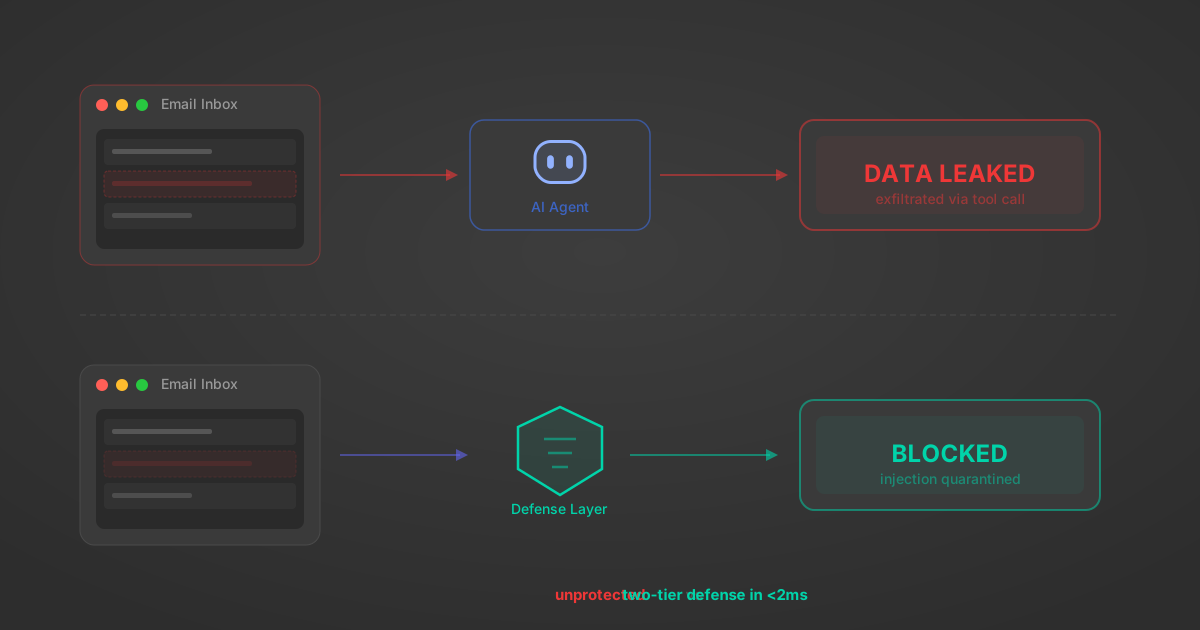
Indirect Prompt Injection Defense for MCP Tools: A Technical Guide
MCP tools that read emails, CRM records, and tickets are indirect prompt injection vectors. Here's how we built a two-tier defense that scans tool results in ~11ms.
12 min

MCP vs A2A: Architecture, Security, and When to Use Each
MCP vs A2A: what each protocol standardizes, how they differ, their shared security risks including indirect prompt injection, and when to use one, both, or a hybrid architecture.
12 min
MCP vs API: What Hundreds of Connector Builds Taught Us
MCP wraps APIs, it doesn't replace them. After building hundreds of connectors that serve both, here's when each approach wins.
14 min read
Tomba MCP Server FAQ
Does StackOne have a Tomba MCP server?
Tomba MCP server vs direct API integration: what's the difference?
How does Tomba authentication work for AI agents?
origin_owner_id.Are Tomba MCP tools vulnerable to prompt injection?
What is the context bloat of a Tomba agent and how do I avoid it?
Can I limit which actions my Tomba agent can access?
Can I create custom agent actions for my Tomba MCP server?
When should I NOT use a Tomba MCP server?
What AI frameworks and AI clients does the StackOne Tomba MCP server support?
Put your AI agents to work
All the tools you need to build and scale AI agent integrations, with best-in-class connectivity, execution, and security.