
MongoDB Atlas MCP Server
for AI Agents
Connect your AI agent to StackOne's MongoDB Atlas MCP server and give it 71 MCP tools out of the box. Auth, tool execution, and security all managed.
 StackOne






Coverage
71 Agent Actions
Create, read, update, and delete across MongoDB Atlas — and extend your agent's capabilities with custom actions.

Authentication
Agent Tool Authentication
Per-user OAuth in one call. Your MongoDB Atlas MCP server gets session-scoped tokens with zero credentials stored on your infra.
Agent Auth →
Security
Agent Protection
Every MongoDB Atlas tool response scanned for prompt injection in milliseconds — 88.7% accuracy, all running on CPU.
Prompt Injection Defense →
Performance
Max Agent Context. Min Cost.
Free up to 96% of your agent's context window to enhance reasoning and reduce cost, on every MongoDB Atlas call.
Tools Discovery →What is the MongoDB Atlas MCP Server?
A MongoDB Atlas MCP server lets AI agents read and write MongoDB Atlas data through the Model Context Protocol — Anthropic's open standard for connecting LLMs to external tools. StackOne's MongoDB Atlas MCP server ships with 71 pre-built actions, fully extensible via the Connector Builder — plus managed authentication, prompt injection defense, observability, and agent execution runtime. Connect it from MCP clients like Claude Desktop, Claude Code, Cursor, Goose, and VS Code, or from agent frameworks like OpenAI Agents SDK, LangChain, and Vercel AI SDK.
All MongoDB Atlas MCP Tools
Every action from MongoDB Atlas's API, ready for your agent. Create, read, update, and delete — scoped to exactly what you need.
Alert Configurations
- Create Alert Configuration
Creates a new alert configuration (rule) in an Atlas project, defining the event that triggers an alert and where notifications are sent.
- List Alert Configurations
Lists all alert configurations (the rules defining alert triggers and notification targets) for the given Atlas project.
- Get Alert Configuration
Retrieves a single alert configuration (rule) from an Atlas project by its alert configuration ID.
- Update Alert Configuration
Replaces an existing alert configuration (rule) in an Atlas project by its ID, overwriting the trigger event, thresholds, matchers, and notification targets.
- Delete Alert Configuration
Permanently deletes an alert configuration (rule) from an Atlas project by its alert configuration ID.
Alerts
- List Alerts
Lists all fired alerts in one Atlas project (GET /groups/{groupId}/alerts). An alert fires when a monitored component crosses a threshold; filter by status (OPEN, TRACKING, CLOSED) to narrow results.
- Get Alert
Retrieves one fired alert by its ID within an Atlas project (GET /groups/{groupId}/alerts/{alertId}), including its status, trigger metric, and acknowledgement state.
API Keys
- Create API Key
Creates a new programmatic organization API key in a MongoDB Atlas organization (orgId), requiring a description and at least one role; returns the private key only once.
- List API Keys
Lists all programmatic organization API keys in a MongoDB Atlas organization (orgId), returning each key's ID, description, and assigned roles.
- Get API Key
Retrieves a single organization API key by its apiUserId within a MongoDB Atlas organization (orgId), returning its description and assigned roles.
- Delete API Key
Permanently deletes an organization API key (apiUserId) from a MongoDB Atlas organization (orgId), immediately revoking its programmatic access everywhere it is used.
Backup Snapshots
- Create Backup Snapshot
Takes one on-demand cloud backup SNAPSHOT of a cluster immediately (outside the scheduled backup policy), returning the new snapshot's ID and initial status.
- List Backup Snapshots
Lists all cloud backup SNAPSHOTS (point-in-time copies of stored data) for one cluster in a project, returning each snapshot's ID, creation time, status, size, and retention.
- Get Backup Snapshot
Retrieves one cloud backup SNAPSHOT by its snapshotId, returning its full metadata (creation time, status, size, retention, and replica-set details).
Backup Restore Jobs
- Create Backup Restore Job
Creates a backup RESTORE JOB that recovers a cluster's data from a snapshot, either restoring into a target cluster (automated/pointInTime) or producing a downloadable archive (download).
- List Backup Restore Jobs
Lists all cloud backup RESTORE JOBS for one cluster in a project, showing each recovery operation's status, delivery type, target cluster, and the snapshot it restores.
Organization Users
- Create Organization User
Invites a human user (new or existing MongoDB Cloud account) to join an organization with the given roles, creating a PENDING membership until the invitee accepts.
- List Organization Users
Lists the human MongoDB Cloud USERS (both active and pending-invitation) that belong to an organization, returning each user's ID, username/email, roles, teams, and membership status.
- Get Organization User
Retrieves one human MongoDB Cloud USER by userId within an organization, returning their username/email, org roles, team memberships, and membership status.
- Update Organization User
Updates one human MongoDB Cloud USER in an organization (active or still pending), changing their org roles and/or team memberships.
Clusters
- Create Cluster
Provisions a new database cluster in a project (groupId), with its topology, region, instance size, MongoDB version, and backup options defined in replicationSpecs. The call returns quickly with the cluster in a CREATING state before provisioning finishes.
- List Clusters
Lists all dedicated and Flex database clusters within a single project (groupId), returning each cluster's name, instance size, MongoDB version, state, region config, and connection strings.
- Get Cluster
Retrieves the full details of a single cluster by project (groupId) and clusterName, including its current state, instance size, MongoDB version, region/shard configuration, and connection strings.
- Update Cluster
Modifies an existing cluster identified by groupId and clusterName — for example to scale the instance size, change the MongoDB version, toggle backups, pause/resume, or adjust termination protection. Only the fields you supply are changed, and the change applies asynchronously.
- Delete Cluster
Permanently deletes a single cluster (by groupId and clusterName) and its data, leaving the parent project intact. Runs asynchronously and requires termination protection to be disabled first.
Custom Database Roles
- Create Custom Database Role
Creates a new custom database role in an Atlas project, defining its privilege actions and/or the built-in roles it inherits. A role with no privileges is rejected — always include at least one action or an inherited role (inheritedRoles).
- List Custom Database Roles
Lists all custom database roles defined in the given Atlas project (groupId), including their granted privilege actions and inherited roles.
- Get Custom Database Role
Retrieves a single custom database role from an Atlas project by its role name, including its privilege actions and inherited roles.
- Update Custom Database Role
Updates an existing custom database role in an Atlas project (by role name), replacing its privilege actions and inherited roles.
- Delete Custom Database Role
Permanently deletes a custom database role from an Atlas project by its role name.
Database Users
- Create Database User
Creates a new database user (a data-plane credential) in an Atlas project with the given username, authentication database, and role-to-database pairings.
- List Database Users
Lists every database user in the given Atlas project (groupId), returning their username, authentication database, roles, and scopes.
- Get Database User
Retrieves a single database user from an Atlas project, identified by its authentication database and username.
- Update Database User
Updates an existing database user in an Atlas project (identified by authentication database + username), fully replacing its roles and scopes with the values sent.
- Delete Database User
Permanently deletes a database user from an Atlas project, identified by its authentication database and username.
Flex Clusters
- Create Flex Cluster
Creates a new MongoDB Atlas flex cluster in a project (groupId), requiring a cluster name and providerSettings (cloud provider and region).
- List Flex Clusters
Lists all MongoDB Atlas flex clusters in a project (groupId), returning each cluster's name, state, and connection details.
- Get Flex Cluster
Retrieves a single MongoDB Atlas flex cluster by its name within a project (groupId), returning its state, provider settings, and connection strings.
- Delete Flex Cluster
Permanently deletes a MongoDB Atlas flex cluster by name from a project (groupId), destroying the instance and its data; termination protection must be disabled first.
Unified Groups
- List Unified Groups
List unified groups in MongoDB Atlas.
- Get Unified Group
Get a unified MongoDB Atlas team by ID.
Unified Organizations
- List Unified Organizations
List unified organizations in MongoDB Atlas.
- Get Unified Organization
Get a unified MongoDB Atlas organization by ID.
Unified Roles
- List Unified Roles
List unified roles in MongoDB Atlas.
- Get Unified Role
Get a unified MongoDB Atlas organization role by ID.
Unified Users
- List Unified Users
List unified users in MongoDB Atlas.
- Get Unified User
Get a unified MongoDB Atlas user by ID.
Organizations
- Create Organization
Creates a new MongoDB Atlas organization and links it under the calling credential's existing (paying) organization, returning the new orgId. Requires a name; optionally provisions an owner and a fresh API key or service account for the new org.
- List Organizations
Lists every MongoDB Atlas organization the authenticated Service Account or API Key can access, returning each organization's id (orgId), name, and status. Optionally filter by a name prefix.
- Get Organization
Retrieves the details of a single MongoDB Atlas organization by its orgId, including name, status, and account-level settings.
- Update Organization
Updates a MongoDB Atlas organization identified by orgId — primarily its human-readable name and its default-alert-creation behavior — and returns the updated organization.
IP Access List Entries
- Create IP Access List Entries
Adds one or more IP access list entries to a project so clients from those sources can connect to its clusters, taking an `entries` ARRAY where each item specifies exactly one source.
- List IP Access List Entries
Lists all IP access list entries for a project — the IP addresses, CIDR blocks, and AWS security groups from which Atlas permits client connections to the project's clusters.
IP Access List Entrys
- Get IP Access List Entry
Retrieves one IP access list entry from a project by its entry value (an IP address, CIDR block, or AWS security group ID), returning its comment, timestamps, and any temporary-expiry date.
- Delete IP Access List Entry
Removes one IP access list entry from a project by its entry value, revoking cluster network access from that IP address, CIDR block, or AWS security group. Pass the plain entryValue (e.g. a CIDR like 203.0.113.0/30) — the connector URL-encodes a CIDR block's slash to %2F automatically, so no manual encoding is needed.
Projects
- Create Project
Creates a new MongoDB Atlas project (a.k.a. "group") inside an existing organization and returns it with its newly assigned groupId. Requires name and orgId; the project starts empty (no clusters).
- List Projects
Lists every MongoDB Atlas project (called a "group" in the API) that the authenticated Service Account or API Key can access, across all organizations, returning each project's id (groupId), name, orgId, cluster count, and creation date.
- Get Project
Retrieves the full details of a single MongoDB Atlas project (a.k.a. "group") by its groupId, including name, orgId, cluster count, creation date, tags, and alert settings.
- Update Project
Updates a project's mutable settings by groupId — its human-readable name, its tags, and whether default alerts are auto-created — and returns the updated project. Only the fields you supply are changed.
- Delete Project
Permanently deletes an entire MongoDB Atlas project (group) by groupId, along with everything it contains. Succeeds only if the project has no Online Archives on its clusters.
Teams
- Create Team
Creates a new team in a MongoDB Atlas organization (orgId), requiring a name and an initial list of member usernames.
- List Teams
Lists all teams in a MongoDB Atlas organization (identified by orgId), returning each team's ID, name, and member count.
- Get Team
Retrieves a single MongoDB Atlas team by its teamId within the given organization (orgId), returning the team's name and details.
- Delete Team
Permanently deletes a MongoDB Atlas team (teamId) from an organization (orgId), immediately revoking the project access it granted its members.
Other (7)
- List Project Events
Lists audit-log events scoped to one Atlas project (GET /groups/{groupId}/events) — database, billing, and security activities or status changes; filterable by eventType, cluster, and date range.
- List Organization Events
Lists audit-log events scoped to one Atlas organization (GET /orgs/{orgId}/events) — org-wide database, billing, and security activities or status changes; filterable by eventType and date range.
- Get Unified Credentials
Get the current MongoDB Atlas connection's unified credentials and identity.
- List Unified Resource Types
List unified resource types in MongoDB Atlas.
- List Unified Resource Users
List unified users with access to a specific MongoDB Atlas project.
- List Organization Projects
Lists all projects (groups) that belong to one specific organization (orgId), returning each project's groupId, name, and cluster count. Optionally filter by a project name prefix.
- Acknowledge Alert
Acknowledges (silences) one open alert in an Atlas project (PATCH /groups/{groupId}/alerts/{alertId}), suppressing further notifications until the acknowledgedUntil timestamp, or un-acknowledges it.
Set Up Your MongoDB Atlas MCP Server in Minutes
One endpoint. Any framework. Your agent is talking to MongoDB Atlas in under 10 lines of code.
Agent Frameworks


 JSON
JSON{
"mcpServers": {
"stackone": {
"command": "npx",
"args": [
"-y",
"mcp-remote@latest",
"https://api.stackone.com/mcp?x-account-id=<account_id>",
"--header",
"Authorization: Basic <YOUR_BASE64_TOKEN>"
]
}
}
}Platform Resources

MCP Code Mode: Keeping Tool Responses Out of Agent Context
Anthropic's code_execution processes data already in context. Custom MCP code mode keeps raw tool responses in a sandbox. 14K tokens vs 500.
11 min

Comparing BM25, TF-IDF, and Hybrid Search for MCP Tool Discovery
Benchmarking BM25, TF-IDF, and hybrid search for MCP tool discovery across 916 tools. The 80/20 TF-IDF/BM25 hybrid hits 21% Top-1 accuracy in under 1ms.
10 min
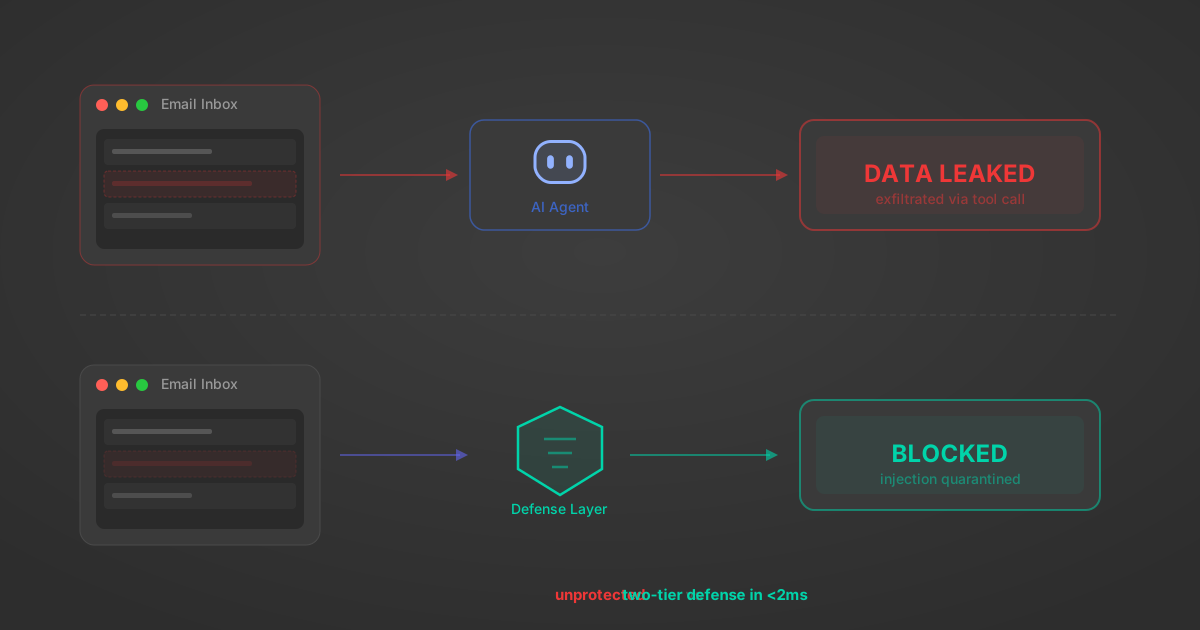
Indirect Prompt Injection Defense for MCP Tools: A Technical Guide
MCP tools that read emails, CRM records, and tickets are indirect prompt injection vectors. Here's how we built a two-tier defense that scans tool results in ~11ms.
12 min
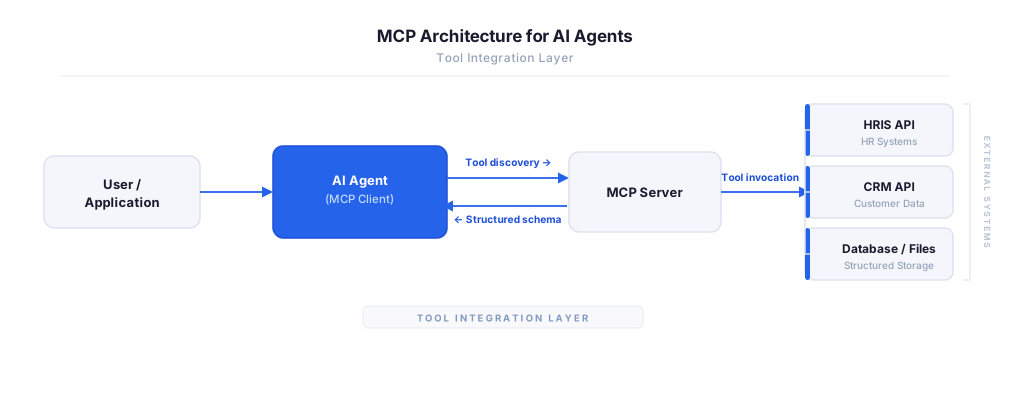
MCP vs A2A: Architecture, Security, and When to Use Each
MCP vs A2A: what each protocol standardizes, how they differ, their shared security risks including indirect prompt injection, and when to use one, both, or a hybrid architecture.
12 min
MCP vs API: What Hundreds of Connector Builds Taught Us
MCP wraps APIs, it doesn't replace them. After building hundreds of connectors that serve both, here's when each approach wins.
14 min read
MongoDB Atlas MCP Server FAQ
Does StackOne have a MongoDB Atlas MCP server?
MongoDB Atlas MCP server vs direct API integration — what's the difference?
How does MongoDB Atlas authentication work for AI agents?
origin_owner_id.Are MongoDB Atlas MCP tools vulnerable to prompt injection?
What is the context bloat of a MongoDB Atlas agent and how do I avoid it?
Can I limit which actions my MongoDB Atlas agent can access?
Can I create custom agent actions for my MongoDB Atlas MCP server?
When should I NOT use a MongoDB Atlas MCP server?
What AI frameworks and AI clients does the StackOne MongoDB Atlas MCP server support?
Put your AI agents to work
All the tools you need to build and scale AI agent integrations, with best-in-class connectivity, execution, and security.