


PubChem MCP Server
for AI Agents
Connect your AI agent to StackOne's PubChem MCP server and give it 99 MCP tools out of the box. Auth, tool execution, and security all managed.
 StackOne


Coverage
99 Agent Actions
Read-only access to PubChem. Extend your agent's capabilities with custom actions.

Authentication
Agent Tool Authentication
Per-user OAuth in one call. Your PubChem MCP server gets session-scoped tokens with zero credentials stored on your infra.
Agent Auth →
Security
Agent Protection
Every PubChem tool response scanned for prompt injection in milliseconds, with 88.7% accuracy, all running on CPU.
Prompt Injection Defense →
Performance
Max Agent Context. Min Cost.
Free up to 96% of your agent's context window to enhance reasoning and reduce cost, on every PubChem call.
Tools Discovery →What is the PubChem MCP Server?
A PubChem MCP server lets AI agents read PubChem data through the Model Context Protocol, Anthropic's open standard for connecting LLMs to external tools. StackOne's PubChem MCP server ships with 99 pre-built actions, fully extensible via the Connector Builder, plus managed authentication, prompt injection defense, observability, and agent execution runtime. Connect it from MCP clients like Claude Desktop, Claude Code, Cursor, Goose, and VS Code, or from agent frameworks like OpenAI Agents SDK, LangChain, and Vercel AI SDK.
All PubChem MCP Tools
Every StackOne action for PubChem, ready for your agent. Read-only, scoped to exactly what you need.
Other (99)
- Search Compounds By Name
Find PubChem compound IDs (CIDs) from a compound name or synonym.
- Get Compound By SMILES
Find the CID of a compound from a SMILES string.
- Get Compound By InChI
Find the CID of a compound from an InChI string.
- Get Compound By SDF
Find the CID of a compound from an SDF or MOL file text.
- Get Compound By InChIKey
Find the CID of a compound from its InChIKey.
- Get Compound By Registry ID
Find the CID of a compound from a registry number such as a CAS number.
- Search Compounds By Formula
Find compounds with a molecular formula.
- Get Compound Properties
Get computed properties such as formula, weight, SMILES and InChIKey for one or more compounds.
- Get Compound Synonyms
List every name PubChem has for a compound.
- Get Compound Description
Get the title and source-attributed text descriptions of a compound.
- Get Compound Registry IDs
List the registry identifiers PubChem holds for a compound, such as CAS, UNII and ChEBI.
- Get Compound Cross-References
Get cross-references from a compound to other databases, such as PubMed, patents and genes.
- Get Related Compounds
List compounds related to a compound by parent, stereo, isotope, connectivity or tautomer.
- Search Compounds By Cross-Reference
Find compounds that carry a given external cross-reference, such as a registry number or PubMed ID.
- Search Compounds By Mass
Find compounds by molecular weight, exact mass or monoisotopic mass, as an exact value or a range.
- Get Compound Record
Get the full structure record of one or more compounds: atoms, bonds, coordinates and properties.
- Get Compound Substance IDs
List the substance IDs (SIDs) that depositors submitted for a compound.
- Get Compound Assay Summary
Summarise the bioassay results recorded for a compound, one row per assay.
- Get Compound Conformers
List the 3D conformer IDs PubChem has for a compound.
- Get Compound Dates
Get the date PubChem first created each compound record.
- Get ListKey IDs
Read a page of CIDs, SIDs or AIDs from a ListKey returned by an earlier search.
- Search Substances By Name
Find PubChem substance IDs (SIDs) from a substance name or synonym.
- Get Substances By Source ID
Find the substance IDs (SIDs) a source deposited under its own identifier.
- List Source Substances
List every substance ID (SID) a source has deposited.
- Search Substances By Cross-Reference
Find substances that carry a given external cross-reference, such as a registry number or PubMed ID.
- Get Substance Record
Get the full depositor record for one or more substances.
- Get Substance Synonyms
List the names a depositor gave one or more substances.
- Get Substance Compound IDs
Get the compound IDs (CIDs) that one or more substances were standardized into.
- Get Substance Assay IDs
List the bioassays (AIDs) that tested one or more substances.
- Get Substance Assay Summary
Get a table of every bioassay result for one or more substances.
- Get Substance Classification
Get the classification hierarchies PubChem places a substance in.
- Get Substance Cross-References
Get cross-references from one or more substances to other databases, such as registry numbers, PubMed and patents.
- Get Substance Dates
Get the deposition, modification and hold dates of one or more substances.
- Get Compound Assay IDs
List the bioassays (AIDs) that tested a compound.
- Get Assay Summary
Get a short summary of one or more bioassays: name, source, target and counts.
- Get Assay Description
Get the full description of a bioassay: protocol, readout, targets and result columns.
- Get Assay Targets
List the protein and gene targets of one or more bioassays.
- Get Assay Compounds
List the compounds (CIDs) or substances (SIDs) tested in a bioassay, filtered by outcome.
- Get Assay Data
Get the result data of a bioassay, optionally for chosen substances only.
- Get Assay Dose Response
Get the dose-response curves of chosen substances in a bioassay.
- Search Assays By Target
Find the bioassays (AIDs) that tested a protein or gene target.
- Get Assay Concise
Get a table of every substance result in a bioassay, one row per substance.
- Get Assay Classification
Get the classification hierarchies PubChem places a bioassay in.
- Get Assay Dates
Get the deposition, modification and hold dates of one or more bioassays.
- List Assays By Type
List the bioassays (AIDs) of one type, such as dose-response or confirmatory assays.
- List Assays By Source
List the bioassays (AIDs) deposited by one source.
- Search Assays By Activity
Find the bioassays (AIDs) that report a given activity column, such as EC50 or IC50.
- Get Gene Summary
Get the summary of a gene: symbol, name, organism, description and synonyms.
- Get Gene Assay IDs
List the bioassays (AIDs) that tested a gene as a target.
- Get Gene Pathways
List the pathways that include a gene.
- Get Gene Identifiers
List the external database identifiers PubChem holds for a gene.
- Get Protein Summary
Get the summary of a protein: accession, name, organism and synonyms.
- Get Protein Assay IDs
List the bioassays (AIDs) that tested a protein as a target.
- Get Protein Pathways
List the pathways that include a protein.
- Get Protein Identifiers
List the external database identifiers PubChem holds for a protein.
- Get Pathway Summary
Get the summary of a pathway: source, name, organism and description.
- Get Pathway Members
List the compounds, genes or proteins that belong to a pathway.
- Get Taxonomy Summary
Get the summary of an organism: scientific name, common name, rank, lineage and synonyms.
- Get Taxonomy Assay IDs
List the bioassays (AIDs) that involve an organism.
- Get Taxonomy Identifiers
List the external database identifiers PubChem holds for an organism.
- Get Cell Line Summary
Get the summary of a cell line: accession, name, sex, category, source tissue and organism.
- Get Cell Line Assay IDs
List the bioassays (AIDs) that used a cell line.
- Get Cell Line Identifiers
List the external database identifiers PubChem holds for a cell line.
- List Sources
List every source that has deposited substances or bioassays into PubChem.
- Get Source Table
Get the table of depositing sources with their counts, category, organization and contact details.
- Get Conformer
Get one computed 3D conformer of a compound, with atom coordinates.
- List Annotation Headings
List every PUG View annotation heading with the record type it applies to.
- List Heading Sources
List the sources that provide annotations under one PUG View heading.
- List Source Annotations
List the PUG View headings that one source provides annotations for.
- Get Classification Node Members
List the PubChem records classified under one node of a classification hierarchy.
- Get Periodic Table
Get the periodic table of the elements with PubChem's properties for each element.
- List Identifier Types
List the external identifier types PubChem can look up in one domain.
- List Compound Annotation Headings
List the annotation headings that a compound has data for.
- Get Compound Annotations
Get the annotations PubChem holds for a compound, such as safety, toxicity, pharmacology and physical properties, with sources.
- Get Compound Literature Links
Get PubMed search links for the literature about a compound, grouped by subheading.
- Get Compound Protein Structures
List the protein structures from the PDB and MMDB that contain a compound.
- Get Patent
Get the PubChem record of a patent: abstract, dates, inventors, assignee and linked chemicals, genes and proteins.
- Get Record Annotations
Get the annotations PubChem holds for a substance, gene, protein, pathway, taxonomy, cell line, bioassay or element.
- List Substance Annotation Headings
List the annotation headings that a substance has data for.
- Get Annotations By Heading
Get every record's annotation values for one heading, with the source of each.
- Get Compound Source Categories
List the sources that deposited data for a compound, grouped by category.
- Get Linkouts
List the external web pages that link out from a compound, substance or bioassay record.
- Get Compound QR Code
Get a QR code, as SVG text, that links to a compound's PubChem page.
- Get Biologic Image
Get the image of a biologic, such as a peptide or protein sequence, as SVG text.
- Get RDF Resource
Get the RDF triples PubChem holds for one resource, such as a compound, substance, bioassay or gene.
- Query RDF
Query PubChem RDF with a graph name and optional filters, for example to find compounds by synonym.
- Get Co-occurrences
Get literature co-occurrence scores between a chemical, gene or disease and other entities.
- Get RDF Reference
Look up a literature reference in PubChem RDF by PubMed ID or DOI.
- Autocomplete Terms
Suggest PubChem names that start with a text fragment.
- Standardize Structure
Run a structure through PubChem's standardization and return the standardized record.
- Similarity Search
Find compounds whose 2D structure is similar to a query structure.
- Substructure Search
Find compounds that contain a query structure or SMARTS pattern.
- Superstructure Search
Find compounds that are contained in a query structure.
- Similarity Search 3D
Find compounds whose 3D shape and features are similar to a query structure.
- Identity Search
Find compounds that are identical to a query structure under a chosen definition of identity.
- Entrez Search
Search PubChem Compound, Substance or BioAssay with an Entrez query and get the matching IDs.
- Entrez Summary
Get the Entrez document summaries for PubChem Compound, Substance or BioAssay IDs.
- Entrez Links
Find the records in another Entrez database that are linked to PubChem Compound, Substance or BioAssay IDs.
- Entrez Database Info
Get the searchable fields, links and record count of a PubChem Entrez database.
Set Up Your PubChem MCP Server in Minutes
One endpoint. Any framework. Your agent is talking to PubChem in under 10 lines of code.
Agent Frameworks


 JSON
{
  "mcpServers": {
    "stackone": {
      "command": "npx",
      "args": [
        "-y",
        "mcp-remote@latest",
        "https://api.stackone.com/mcp?x-account-id=<account_id>",
        "--header",
        "Authorization: Basic <YOUR_BASE64_TOKEN>"
      ]
    }
  }
}
Platform Resources

Comparing BM25, TF-IDF, and Hybrid Search for MCP Tool Discovery
Benchmarking BM25, TF-IDF, and hybrid search for MCP tool discovery across 916 tools. The 80/20 TF-IDF/BM25 hybrid hits 21% Top-1 accuracy in under 1ms.
10 min
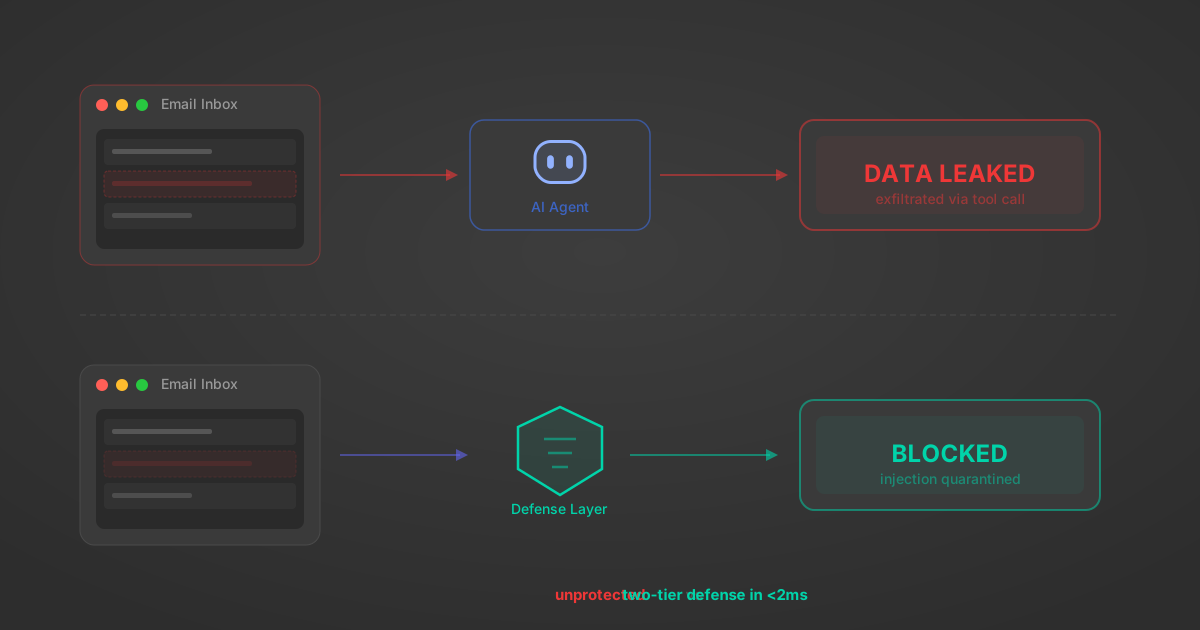
Indirect Prompt Injection Defense for MCP Tools: A Technical Guide
MCP tools that read emails, CRM records, and tickets are indirect prompt injection vectors. Here's how we built a two-tier defense that scans tool results in ~11ms.
12 min

MCP vs A2A: Architecture, Security, and When to Use Each
MCP vs A2A: what each protocol standardizes, how they differ, their shared security risks including indirect prompt injection, and when to use one, both, or a hybrid architecture.
12 min
MCP vs API: What Hundreds of Connector Builds Taught Us
MCP wraps APIs, it doesn't replace them. After building hundreds of connectors that serve both, here's when each approach wins.
14 min read
PubChem MCP Server FAQ
Does StackOne have a PubChem MCP server?
PubChem MCP server vs direct API integration: what's the difference?
How does PubChem authentication work for AI agents?
origin_owner_id.Are PubChem MCP tools vulnerable to prompt injection?
What is the context bloat of a PubChem agent and how do I avoid it?
Can I limit which actions my PubChem agent can access?
Can I create custom agent actions for my PubChem MCP server?
When should I NOT use a PubChem MCP server?
What AI frameworks and AI clients does the StackOne PubChem MCP server support?
Put your AI agents to work
All the tools you need to build and scale AI agent integrations, with best-in-class connectivity, execution, and security.