


Pleo MCP Server
for AI Agents
Connect your AI agent to StackOne's Pleo MCP server and give it 89 MCP tools out of the box. Auth, tool execution, and security all managed.
 StackOne


Coverage
89 Agent Actions
Agents can read, write and delete in Pleo. Extend your agent's capabilities with custom actions.

Authentication
Agent Tool Authentication
Per-user OAuth in one call. Your Pleo MCP server gets session-scoped tokens with zero credentials stored on your infra.
Agent Auth →
Security
Agent Protection
Every Pleo tool response scanned for prompt injection in milliseconds, with 88.7% accuracy, all running on CPU.
Prompt Injection Defense →
Performance
Max Agent Context. Min Cost.
Free up to 96% of your agent's context window to enhance reasoning and reduce cost, on every Pleo call.
Tools Discovery →What is the Pleo MCP Server?
A Pleo MCP server lets AI agents read and write Pleo data through the Model Context Protocol, Anthropic's open standard for connecting LLMs to external tools. StackOne's Pleo MCP server ships with 89 pre-built actions, fully extensible via the Connector Builder, plus managed authentication, prompt injection defense, observability, and agent execution runtime. Connect it from MCP clients like Claude Desktop, Claude Code, Cursor, Goose, and VS Code, or from agent frameworks like OpenAI Agents SDK, LangChain, and Vercel AI SDK.
All Pleo MCP Tools
Every StackOne action for Pleo, ready for your agent. Read, write and delete, scoped to exactly what you need.
An Accounts
- Update An Account
Update details of an existing account in Pleo
- Delete An Account
Deletes an existing account in Pleo
A Bookkeeping Categorys
- Update A Bookkeeping Category
Update one bookkeeping category, an expense purpose
- Delete A Bookkeeping Category
Delete one bookkeeping category by its ID
A Bookkeeping Category Groups
- Update A Bookkeeping Category Group
Update a whole bookkeeping category group
- Delete A Bookkeeping Category Group
Delete a whole bookkeeping category group by its ID
A Tag Group Dimensions
- Retrieve A Tag Group Dimension
Get one dimension definition of a tag group
- Update A Tag Group Dimension
Change the definition of a dimension on a tag group
- Delete A Tag Group Dimension
Delete a dimension definition from a tag group
A Dimension Values
- Retrieve A Dimension Value
Get the value one tag holds for one specific dimension
- Update A Dimension Value
Change the value one tag holds for one dimension
- Delete A Dimension Value
Remove the value one tag holds for one dimension
Employees
- List Employees
List the employees of the companies the Pleo API key can reach.
- Get Employee
Get a Pleo employee by ID.
A Tag Groups
- Update A Tag Group
Rename or change the details of a whole tag group
- Delete A Tag Group
Delete a whole tag group by its ID
Unified Groups
- List Unified Groups
List unified groups in Pleo.
- Get Unified Group
Get a unified Pleo group by ID.
Unified Users
- List Unified Users
List unified users in Pleo.
- Get Unified User
Get a unified Pleo user by ID.
Job Items
- Get Export Job Items
An export job item tracks the export progress of a specific accounting entry in an export job
- Update Export Job Items
Update the status and other attributes of the export job items in batches of 100
A Subscriptions
- Create A Subscription
Creates a subscription for given event type(s)
- Update A Subscription
Modifies the subscription details
Subscription By Ids
- Get Subscription By Id
Fetches subscription details by the specific subscription ID
- Delete Subscription By Id
Delete subscription by id
A Tags
- Update A Tag
Change the name, code or archived state of one tag
- Delete A Tag
Delete a tag from its tag group by the tag ID
A Tax Codes
- Create A Tax Code
Create a tax code for a company with its rate, type and tax accounts
- Get A Tax Code
Get one tax code by its ID, with its rate, type and tax accounts
- Update A Tax Code
Replace the name, code, rate, type or tax accounts of a tax code
- Delete A Tax Code
Delete a tax code by its ID
Teams
- List Teams
List the teams of the Pleo company or organisation.
- Get Team
Get a Pleo team by ID, with its member ids.
Other (55)
- Create A New Account
The integration sends a request to this endpoint to create a corresponding account in Pleo for any new record created in the external ERP/accounting system
- Create Multiple Accounts In A Single Request
Create multiple accounts in a single request
- Create A New Bookkeeping Category
Create a bookkeeping category, an expense purpose, inside a category group
- Create A New Bookkeeping Category Group
Create a bookkeeping category group that organises categories
- Create A New Tag Group Dimension
Create a dimension, an extra attribute column, on a tag group
- Create A New Dimension Value
Set the value one tag holds for one dimension
- Create A New Tag Group
Create a tag group, the container that holds tags, in Pleo
- Create A New Export Job
Use this endpoint to create a new export job that would transfer a list of specific accounting entries from Pleo to the target ERP/accounting system
- Create An Export Job Event
Create an Export Job Event
- Create A New Tag For A Tag Group
Create a tag, one selectable value, inside an existing tag group
- Add Members To A Team
Use this endpoint to add one or more Employees to a Team
- Create A Team
Use this endpoint to create a new team for the company or organisation the access token is scoped to
- Create A New Vendor
This endpoint has the following functions - - Create a corresponding record in Pleo for any new vendor created in the ERP/accounting system
- Retrieve An Account In Pleo By Its ID
Retrieve an account in Pleo by its ID
- Retrieve A Bookkeeping Category By Its ID
Get one bookkeeping category, an expense purpose, by its ID
- Get Aggregated Bookkeeping Category Groups
List bookkeeping category groups for a company, each with its bookkeeping categories nested inside
- Retrieve A Bookkeeping Category Group By Its ID
Get one bookkeeping category group by its ID
- Get Company
Get a Pleo company by ID.
- Search For Companies
Use this endpoint to search for companies associated with a specific organisation
- Get The Balance For A Company
Get the balance for a company
- Retrieve A List Of Tag Group Dimensions
Retrieve a list of tag group dimensions
- Retrieve Dimension Values
List all dimension values of one tag
- Get Export Items
An export item = an accounting entry transformed into an exportable entry
- Retrieve The Tag Groups For A Company Or An Organisation In Aggregated Format
List tag groups together with their dimensions in one response
- Retrieve Tag Groups For A Company Or An Organisation
List the tag group records of a company or organisation
- Retrieve A Tag Group By Its ID
Get one tag group record by its ID
- Get Unified Credentials
Get the current Pleo connection's unified credentials.
- Get API Key Details
Get the details of the Pleo API key the connection uses.
- Get A List Of Export Jobs
Get a list of Export Jobs
- Get An Export Job
Retrieve an export job by a specific export job ID
- Get All Receipts Of An Accounting Entry
Get all receipts of an accounting entry
- Get Subscription Activities
List the delivery and change activity recorded for a webhook subscription
- Get Subscription Secret By Id
Get subscription secret by id
- Get Subscriptions
Retrieves a list of subscriptions for the specific event types (registered for the specific company or organisation by the third party application)
- Retrieve A Tag By Its ID
Get one tag by its ID
- Retrieve Tags For A Tag Group
Retrieve tags for a tag group
- Retrieve Tags In Aggregated Format
Retrieve tags in aggregated format
- Update A Vendor
Updates a Vendor for a company in Pleo
- Delete A Team By ID
Use this endpoint to delete a specific team by its teamId
- Remove A Member From A Team
Remove a member from a Team
- Fetch A Single Accounting Entry By Id
Fetch a single accounting entry by id
- Fetch Accounting Entries Based On Filters
Fetch accounting entries based on filters
- Enrich Accounting Entry V2
Enrich Accounting Entry V2
- Fetch A List Of Accounts
Retrieves a list of accounts with companyId and other optional filters
- Fetch A List Of Bookkeeping Categories
Search bookkeeping categories, the individual expense purposes
- Fetch A List Of Bookkeeping Category Groups
Search bookkeeping category groups, the collections that hold categories
- Returns An Aggregated Tag Group By Its ID
Get one tag group by ID together with its dimensions
- Returns A Receipt With Time Bound Access To The Receipt File
Returns a receipt with time-bound access to the receipt file
- Apply Filters To Search For Specific Accounting Entry Receipts
Apply filters to search for specific accounting entry receipts
- Returns A List Of Tax Codes
Returns a list of tax codes
- Partially Update A Team
Use this endpoint to update a Team's name and/or code
- Activate A Vendor
Updates the vendor state to Active, reflecting its availability in the target ERP/accounting system
- Archive A Vendor
Archives a Vendor in Pleo by its id
- Fetches Vendors By Search Criteria
Fetches Vendors by search criteria
- Retrieves A Vendor In Pleo By Its Id
Retrieves a Vendor in Pleo by its id
Set Up Your Pleo MCP Server in Minutes
One endpoint. Any framework. Your agent is talking to Pleo in under 10 lines of code.
Agent Frameworks


 JSON
{
  "mcpServers": {
    "stackone": {
      "command": "npx",
      "args": [
        "-y",
        "mcp-remote@latest",
        "https://api.stackone.com/mcp?x-account-id=<account_id>",
        "--header",
        "Authorization: Basic <YOUR_BASE64_TOKEN>"
      ]
    }
  }
}Platform Resources

Comparing BM25, TF-IDF, and Hybrid Search for MCP Tool Discovery
Benchmarking BM25, TF-IDF, and hybrid search for MCP tool discovery across 916 tools. The 80/20 TF-IDF/BM25 hybrid hits 21% Top-1 accuracy in under 1ms.
10 min
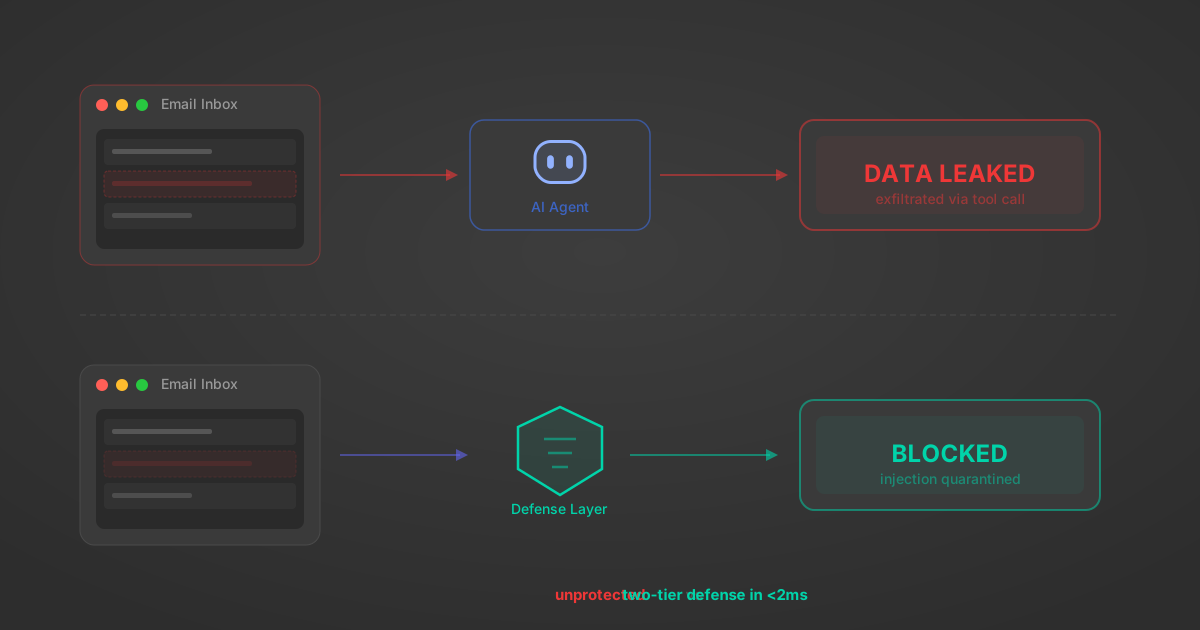
Indirect Prompt Injection Defense for MCP Tools: A Technical Guide
MCP tools that read emails, CRM records, and tickets are indirect prompt injection vectors. Here's how we built a two-tier defense that scans tool results in ~11ms.
12 min

MCP vs A2A: Architecture, Security, and When to Use Each
MCP vs A2A: what each protocol standardizes, how they differ, their shared security risks including indirect prompt injection, and when to use one, both, or a hybrid architecture.
12 min
MCP vs API: What Hundreds of Connector Builds Taught Us
MCP wraps APIs, it doesn't replace them. After building hundreds of connectors that serve both, here's when each approach wins.
14 min read
Pleo MCP Server FAQ
Does StackOne have a Pleo MCP server?
Pleo MCP server vs direct API integration: what's the difference?
How does Pleo authentication work for AI agents?
origin_owner_id.Are Pleo MCP tools vulnerable to prompt injection?
What is the context bloat of a Pleo agent and how do I avoid it?
Can I limit which actions my Pleo agent can access?
Can I create custom agent actions for my Pleo MCP server?
When should I NOT use a Pleo MCP server?
What AI frameworks and AI clients does the StackOne Pleo MCP server support?
Put your AI agents to work
All the tools you need to build and scale AI agent integrations, with best-in-class connectivity, execution, and security.