


Avionté MCP Server
for AI Agents
Connect your AI agent to StackOne's Avionté MCP server and give it 77 MCP tools out of the box. Auth, tool execution, and security all managed.
 StackOne


Coverage
77 Agent Actions
Agents can read, write and delete in Avionté. Extend your agent's capabilities with custom actions.

Authentication
Agent Tool Authentication
Per-user OAuth in one call. Your Avionté MCP server gets session-scoped tokens with zero credentials stored on your infra.
Agent Auth →
Security
Agent Protection
Every Avionté tool response scanned for prompt injection in milliseconds, with 88.7% accuracy, all running on CPU.
Prompt Injection Defense →
Performance
Max Agent Context. Min Cost.
Free up to 96% of your agent's context window to enhance reasoning and reduce cost, on every Avionté call.
Tools Discovery →What is the Avionté MCP Server?
A Avionté MCP server lets AI agents read and write Avionté data through the Model Context Protocol, Anthropic's open standard for connecting LLMs to external tools. StackOne's Avionté MCP server ships with 77 pre-built actions, fully extensible via the Connector Builder, plus managed authentication, prompt injection defense, observability, and agent execution runtime. Connect it from MCP clients like Claude Desktop, Claude Code, Cursor, Goose, and VS Code, or from agent frameworks like OpenAI Agents SDK, LangChain, and Vercel AI SDK.
All Avionté MCP Tools
Every StackOne action for Avionté, ready for your agent. Read, write and delete, scoped to exactly what you need.
Company Billing Preferences
- Create Company Billing Preferences
Creates new company billing preferences.
- Get Company Billing Preferences
Returns company billing options for the specified company, based on its unique record identifier.
- Update Company Billing Preferences
Updates the specified company's billing preferences. Supports `replace` operations for non-identifier fields and `remove` operations for nullable properties.
Details For Hours Workeds
- Get Details For Hours Worked
Returns a list of detail rows for a given set of hours.
- Get Details For Hours Worked
Returns a list of detail rows for a given set of hours.
A Config Choices
- Create A Config Choice
Creates a Config Choice and returns the newly created object.
- Get A Config Choice
Returns the Config Choice for the specified ID.
- Update A Config Choice
Updates the specified Config Choice and returns the updated object.
A Talents
- Create A Talent
Creates a new talent record.
- Get A Talent
Returns the specified talent by external reference or Back Office UUID.
- Get A Talent
Returns details about the specified talent record.
- Update A Talent
Updates information about the specified talent record.
Job Skills
- Add Job Skills
Adds new skills to the skill set for a particular job. Skills are displayed in the *Position Categories and Skill Set* section of the job profile page.
- Get Job Skills
Returns a list of skills for the specified job.
- Remove Job Skills
Removes existing job skills for a particular job. Skills are displayed in the *Position Categories and Skill Set* section of the job profile page.
A Jobs
- Create A Job
Adds a new job record to the system.
- Get A Job
Returns details about the specified job.
- Update A Job
Updates the existing job record in the system
Citizenships
- Add Citizenship
Adds a citizenship tag or a custom tag the company would like to use for the specified talent record. Added tag is displayed on the *Tags* tab of the talent’s profile page.
- Remove Citizenship
Permanently deletes the specified citizenship tag or custom tag for the specified talent record from their profile.
An E-Verify Records
- Add An E-Verify Record
Adds information about the talent’s E-Verify record. The information about the record is displayed in the *Personal Information* section of the *Tax* tab of the talent’s profile page.
- Update An E-Verify Record
Updates information about the E-Verify record of the specified talent.
Talent Skills
- Add Talent Skills
Adds talent skill tags. Added tags are displayed on the *Tags* tab of the talent’s profile page.
- Get Talent Skills
Returns a list of skills from the *Tags* tab for the specified talent record.
- Remove Talent Skills
Permanently deletes talent skills tags of the specified talent record.
A Talent Tags
- Add A Talent Tag
Add tags to the talent. Added tags display on the *Tags* tab of the talent profile page. Tags may comprise the information that can help to further categorize the talent and make their profile more searchable.
- Remove A Talent Tag
Permanently deletes the specified talent tag from the specified talent profile page.
Other (50)
- Create Additional Talent Tax
Creates an additional tax for the talent record.
- Create Talent Default Taxes
Creates the default taxes for the specified talent record based on the talent's resident address and the worksite addresses of their placements.
- Upload A Document To Job
Uploads the provided document to the job.
- Add Talent Source
Adds a talent source tag. Added tag is displayed on the *Tags* tab of the talent profile page under *Applicant Source*.
- Get Invoices For A Company
Returns a list of invoices processed under the company record.
- Get Paychecks By Payment Batch GUID
Returns a list of paychecks for the specified payment batch.
- Get Paystub Report By Applicant ID
Returns a paystub report for the specified paycheck for the specified talent.
- Get Details About The Talent Paycheck
Returns detailed information about the specified paycheck for the specified talent.
- Get A List Of Talent Paychecks
Returns a list of paychecks for the specified talent.
- Get Time Entries By Time Entry Batch GUID
Retrieves a paginated list of time entries for the requested time entry batch GUID.
- Get A List Of Branches
Returns a list of all branches for the specified tenant.
- Get Entity Reference By ID
Returns related BOLD and Back Office entity ID for a variety of entity types.
- Get Multiple Placements By Their Placement GUIDs
Retrieves multiple placement records using their placement GUIDs and returns the associated talent objects or error details.
- Get A List Of Suppliers
Returns a list of all Suppliers for the specified Tenant.
- Get All Config Choices
Returns all Config Choices.
- Get A List Of Available Taxes
Returns a list of taxes available to set up for the talent record.
- Get A List Of Available Tax Filing Statuses
Returns a list of available filing statuses for the specified tax.
- Get Paid Talent
Returns a paginated list of talent GUIDs with positive total wages within the provided date range.
- Get A List Of Talent 1099 Forms By Applicant ID
Returns a list of 1099 forms for the specified talent.
- Get Talent Form 1099 PDF By Applicant ID
Returns Form 1099 PDF for the specified talent for the specified quarter.
- Get Talent Deductions
Returns a list of talent deductions for the specified talent. Transaction type names are masked for security/privacy reasons.
- Query Multiple Talent By TalentGuids
Retrieves details about the specified talent records.
- Get Talent Tax Details
Returns tax details for the specified talent.
- Get Talent Tax History
Returns tax history for the specified talent.
- Get Talent Form W-2 PDF By Applicant ID
Returns the PDF for the specified Form W-2 for the specified talent.
- Get A List Of Talent W-2 Forms By Applicant ID
Returns a list of W-2 forms for the specified talent.
- Get Branches
Returns a list of available branches and their details.
- Get Company IDs
Returns a paged list of all company IDs registered in the system.
- Get A Company
Returns details about the specified company.
- Get Contact IDs For Companies
Returns a list of contact IDs for the specified companies.
- Get A Department
Returns details about the specified department.
- Get Department IDs For Companies
Returns a list of department IDs for the specified companies.
- Get Job Order Templates
Returns all Job Order Templates for the tenant.
- Get Matching Jobs
Returns a list of jobs from the same branch with the same job title, dates, and rates.
- Get Job IDs
Returns a paged list of all job IDs registered in the system.
- Query Multiple Jobs
Returns details about the specified jobs.
- Query Multiple Jobs Skills
Returns details about the skills for the specified jobs.
- Get Job Status Definitions
Returns a list of job statuses that can be assigned to a job.
- Get Job Types
Returns a list of available job types.
- Get Talent Accounts
Returns details about the specified talent account.
- Get E-Verify Records
Returns details about the E-Verify records for the specified talent.
- Get A List Of Tags For A Talent
Returns a list of all tags from the *Tags* tab of the talent profile, including custom tag category definitions.
- Query Multiple Talent Skills
Returns details about the skills for the specified talent records.
- Query Multiple Talents
Returns details about the specified talent records.
- Get Talent IDs
Returns a paged list of talent IDs registered in the system.
- Get HCM Users
Returns details about HCM Users registered in the system.
- Update Talent Tax
Updates the setup of the specified talent's tax record.
- Billing Period Options
Returns a predefined list of billing period values with the valid billing cycles for the period that are supported by the system. The endpoint is typically used to populate dropdowns or selection fields in user interfaces or to enforce business rules.
- Pay Period Options
Returns a predefined list of payroll period values supported by the system. The endpoint is typically used to populate dropdowns or selection fields in user interfaces or to enforce business rules.
- Patch A Talent
Patches information about the specified talent record.
Avionté AI Agent Use Cases
Connect your AI agent to Avionté and help your team scale the recruiting operations they run by hand today.
Use StackOne to connect your AI agent to your ATS and job boards to automate job posting distribution.
ViewUse StackOne to connect your AI agent to your ATS, survey tools, and messaging systems to automate reference checks.
ViewUse StackOne to connect your AI agent to your ATS, HRIS, and document management tools to automate offer letter generation.
ViewSet Up Your Avionté MCP Server in Minutes
One endpoint. Any framework. Your agent is talking to Avionté in under 10 lines of code.
Agent Frameworks


 JSON
{
  "mcpServers": {
    "stackone": {
      "command": "npx",
      "args": [
        "-y",
        "mcp-remote@latest",
        "https://api.stackone.com/mcp?x-account-id=<account_id>",
        "--header",
        "Authorization: Basic <YOUR_BASE64_TOKEN>"
      ]
    }
  }
}Platform Resources

Comparing BM25, TF-IDF, and Hybrid Search for MCP Tool Discovery
Benchmarking BM25, TF-IDF, and hybrid search for MCP tool discovery across 916 tools. The 80/20 TF-IDF/BM25 hybrid hits 21% Top-1 accuracy in under 1ms.
10 min
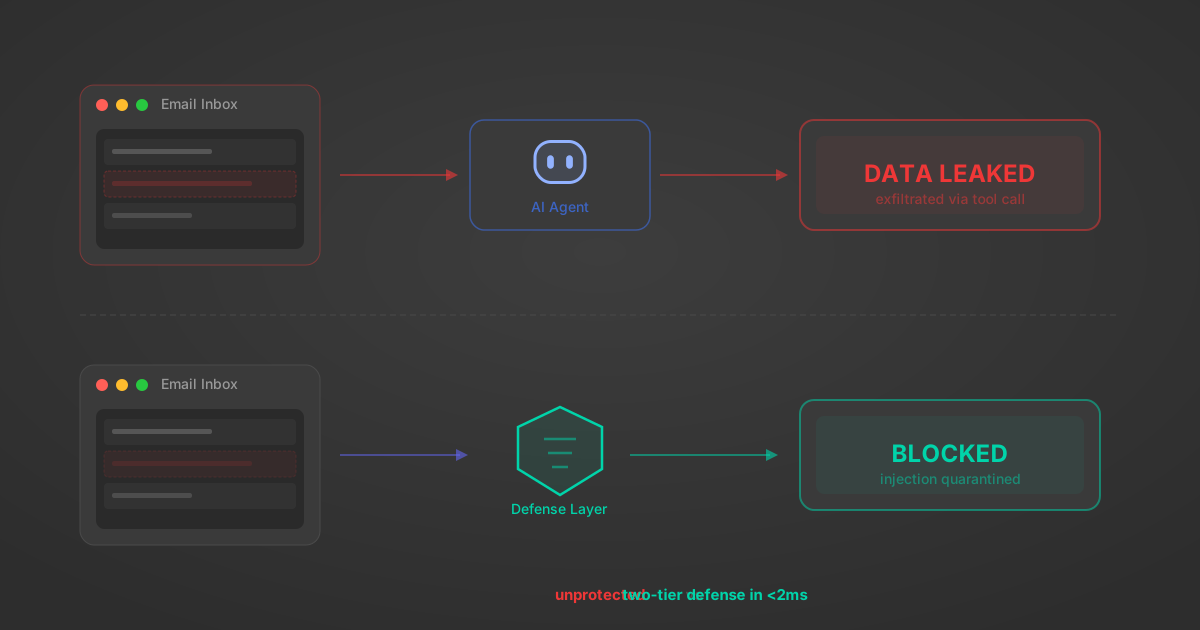
Indirect Prompt Injection Defense for MCP Tools: A Technical Guide
MCP tools that read emails, CRM records, and tickets are indirect prompt injection vectors. Here's how we built a two-tier defense that scans tool results in ~11ms.
12 min

MCP vs A2A: Architecture, Security, and When to Use Each
MCP vs A2A: what each protocol standardizes, how they differ, their shared security risks including indirect prompt injection, and when to use one, both, or a hybrid architecture.
12 min
MCP vs API: What Hundreds of Connector Builds Taught Us
MCP wraps APIs, it doesn't replace them. After building hundreds of connectors that serve both, here's when each approach wins.
14 min read
Avionté MCP Server FAQ
Does StackOne have a Avionté MCP server?
Avionté MCP server vs direct API integration: what's the difference?
How does Avionté authentication work for AI agents?
origin_owner_id.Are Avionté MCP tools vulnerable to prompt injection?
What is the context bloat of a Avionté agent and how do I avoid it?
Can I limit which actions my Avionté agent can access?
Can I create custom agent actions for my Avionté MCP server?
When should I NOT use a Avionté MCP server?
What AI frameworks and AI clients does the StackOne Avionté MCP server support?
Put your AI agents to work
All the tools you need to build and scale AI agent integrations, with best-in-class connectivity, execution, and security.