


Nextcloud MCP Server
for AI Agents
Connect your AI agent to StackOne's Nextcloud MCP server and give it 431 MCP tools out of the box. Auth, tool execution, and security all managed.
 StackOne


Coverage
431 Agent Actions
Agents can read, write and delete in Nextcloud. Extend your agent's capabilities with custom actions.

Authentication
Agent Tool Authentication
Per-user OAuth in one call. Your Nextcloud MCP server gets session-scoped tokens with zero credentials stored on your infra.
Agent Auth →
Security
Agent Protection
Every Nextcloud tool response scanned for prompt injection in milliseconds, with 88.7% accuracy, all running on CPU.
Prompt Injection Defense →
Performance
Max Agent Context. Min Cost.
Free up to 96% of your agent's context window to enhance reasoning and reduce cost, on every Nextcloud call.
Tools Discovery →What is the Nextcloud MCP Server?
A Nextcloud MCP server lets AI agents read and write Nextcloud data through the Model Context Protocol, Anthropic's open standard for connecting LLMs to external tools. StackOne's Nextcloud MCP server ships with 431 pre-built actions, fully extensible via the Connector Builder, plus managed authentication, prompt injection defense, observability, and agent execution runtime. Connect it from MCP clients like Claude Desktop, Claude Code, Cursor, Goose, and VS Code, or from agent frameworks like OpenAI Agents SDK, LangChain, and Vercel AI SDK.
All Nextcloud MCP Tools
Every StackOne action for Nextcloud, ready for your agent. Read, write and delete, scoped to exactly what you need.
Trusted Servers
- Add Trusted Server
Add server to the list of trusted Nextcloud servers.
- List Trusted Servers
List all trusted servers.
- Remove Trusted Server
Add server to the list of trusted Nextcloud servers.
LDAP Configs
- Create LDAP Config
Create a new (empty) configuration and return the resulting prefix.
- Copy LDAP Config
Copy a configuration.
- Get LDAP Config
Get a configuration.
- Update LDAP Config
Modify a configuration.
- Delete LDAP Config
Delete a LDAP configuration.
Tasks
- Get Task
Gets a task including status and result.
- List Tasks
Returns tasks for the current user filtered by the optional taskType and optional customId.
- Delete Task
Deletes a task.
Text Processing Tasks
- Get Text Processing Task
This endpoint allows checking the status and results of a task. Tasks are removed 1 week after receiving their last update.
- List Text Processing Tasks
This endpoint returns a list of tasks of a user that are related with a specific appId and optionally with an identifier.
- Delete Text Processing Task
This endpoint allows to delete a scheduled task for a user.
Text To Image Tasks
- Get Text To Image Task
This endpoint allows checking the status and results of a task. Tasks are removed 1 week after receiving their last update.
- List Text To Image Tasks
This endpoint returns a list of tasks of a user that are related with a specific appId and optionally with an identifier.
- Delete Text To Image Task
This endpoint allows to delete a scheduled task for a user.
App Config Keys
- List App Config Keys
Get the config keys of an app.
- Delete App Config Key
Delete a config key of an app.
App Config Values
- Get App Config Value
Get a the config value of an app.
- Set App Config Value
Update the config value of an app.
Apps
- List Apps
Get a list of installed apps.
- Update App
Update an app.
Collections
- Create Collection
Create a collection for a resource.
- Get Collection
Get a collection.
- Search Collections
Search for collections.
Collection Resources
- Add Collection Resource
Add a resource to a collection.
- Remove Collection Resource
Remove a resource from a collection.
Resolve References
- Resolve Reference
Resolve a reference.
- Resolve References
Resolve multiple references.
Resolve Public References
- Resolve Public Reference
Resolve from a public page.
- Resolve Public References
Resolve multiple references from a public page.
File Reminders
- Get File Reminder
Get a reminder.
- Set File Reminder
Set a reminder.
- Remove File Reminder
Remove a reminder.
Groups
- Create Group
Create a new group.
- List Groups
List Nextcloud group ids.
- Update Group
Update a group.
- Delete Group
Delete a group.
Out Of Offices
- Get Out Of Office
Get the configured out-of-office data of a user.
- Set Out Of Office
Set out-of-office absence.
Calendars
- Import Calendar
Import calendar data.
- Export Calendar
Export calendar data.
Unified Groups
- List Unified Groups
List unified groups on a Nextcloud server.
- Get Unified Group
Get a unified Nextcloud group by id.
Unified Roles
- List Unified Roles
List the roles of a Nextcloud server.
- Get Unified Role
Get a documented Nextcloud role by id.
Unified Users
- List Unified Users
List unified users on a Nextcloud server.
- Get Unified User
Get a unified Nextcloud user by id.
Notifications
- List Notifications
Get all notifications.
- Get Notification
Get a notification.
- Delete Notification
Delete a notification.
Dashboard Layouts
- Get Dashboard Layout
Get the layout.
- Update Dashboard Layout
Update the layout.
Dashboard Statuses
- Get Dashboard Statuses
Get the statuses.
- Update Dashboard Statuses
Update the statuses.
User Preferences
- Set User Preference
Update a preference value of an app.
- Set User Preferences
Update multiple preference values of an app.
- Delete User Preference
Delete a preference for an app.
- Delete User Preferences
Delete multiple preferences for an app.
User Subadmin Groups
- Add User Subadmin Group
Make a user a subadmin of a group.
- Remove User Subadmin Group
Remove a user from the subadmins of a group.
Users
- Create User
Create a new user.
- List Users
List Nextcloud user names.
- Get User
Get one Nextcloud user with their details.
- Update User
Update a value of the user's details.
- Delete User
Delete a user.
Shares
- Create Share
Create a share.
- List Shares
Get shares of the current user.
- Get Share
Get a specific share by id.
- Update Share
Update a share.
- Delete Share
Delete a share.
Remote Shares
- List Remote Shares
Get a list of accepted remote shares.
- Get Remote Share
Get info of a remote share.
- Delete Remote Share
Unshare a remote share.
Sharing Shares
- Create Sharing Share
Create a new share.
- Get Sharing Share
Get a share.
- List Sharing Shares
Get multiple shares.
- Delete Sharing Share
Delete a share.
Sharing Share Sources
- Add Sharing Share Source
Add a new source to a share.
- Remove Sharing Share Source
Remove an existing source from a share.
Sharing Share Recipients
- Add Sharing Share Recipient
Add a new recipient to a share.
- Remove Sharing Share Recipient
Remove an existing recipient from a share.
My Status
- Get My Status
Get the status of the current user.
- Set My Status
Update the status type of the current user.
Webhooks
- Create Webhook
Register a new webhook.
- List Webhooks
List registered webhooks.
- Get Webhook
Get details on a registered webhook.
- Update Webhook
Update an existing webhook registration.
- Delete Webhook
Remove an existing webhook registration.
Global Workflows
- Create Global Workflow
Create a workflow.
- List Global Workflows
Retrieve all configured workflow rules.
- Update Global Workflow
Modify a workflow.
- Delete Global Workflow
Delete a workflow.
User Workflows
- Create User Workflow
Create a workflow.
- List User Workflows
Retrieve all configured workflow rules.
- Update User Workflow
Modify a workflow.
- Delete User Workflow
Delete a workflow.
Other (333)
- Create File From Template
Create a template.
- Create Direct Download Link
Get a direct link to a file.
- Import Contacts
Import contacts data.
- Add User To Group
Add a user to a group.
- Send Share Email
Send a mail notification again for a share. The mail_send option must be enabled for the given share.
- List Task Types
Returns all available TaskProcessing task types.
- List App Tasks
Returns tasks for the current user filtered by the appId and optional customId.
- Get Task File Contents
Returns the contents of a file referenced in a task.
- Get Task Queue Position
Get a task's position in the queue.
- List Text Processing Task Types
This endpoint returns all available LanguageModel task types.
- Get Text To Image Availability
Check whether this feature is available.
- List Translation Languages
Get the list of supported languages.
- Get Task Queue Stats
Returns queue statistics for task processing.
- List Config Apps
Get a list of apps.
- List App Store Categories
Get all available categories.
- List App Store Apps
Get all available apps.
- Get App Info
Get the app info for an app.
- List App Update Compatibility
List available updates for apps.
- Get App Changelog
Get changelog entry for an app.
- List Resource Collections
Get collections by resource.
- List Reference Providers
Get the providers.
- List Team Resources
Get all resources of a team.
- List Resource Teams
Get all teams of a resource.
- List Templates
List the available templates.
- List Template Fields
List the fields for the template specified by the given file ID.
- Get Folder Tree
Returns the folder tree of the user.
- List External Storage Mounts
Get the mount points visible for this user.
- List Groups With Details
List Nextcloud groups with display name and member counts.
- Get Group Users
List the user names in a Nextcloud group.
- Get Group Users With Details
List the users in a Nextcloud group with their details.
- Get Group Admins
List the group administrators of a Nextcloud group.
- List Pending Federated Calendars
Get the pending federated calendar invitations of the current user.
- List Upcoming Events
Get information about upcoming events.
- Get Current Out Of Office
Get the currently configured out-of-office data of a user.
- Get Unified Credentials
Get the identity of the current Nextcloud connection.
- List Dashboard Widget Items
Get the items for the widgets.
- List Dashboard Widget Items V2
Get the items for the widgets.
- List Dashboard Widgets
Get the widgets.
- List Profile Resources
Get resources shared between the current user and the specified user.
- List Declarative Setting Forms
Gets all declarative forms with the values prefilled.
- List Recent Users
Gets the list of users sorted by lastLogin, from most recent to least recent.
- Search Users By Phone
Search users by their phone numbers.
- List Editable User Fields
Get a list of fields that are editable for the current user.
- List User Editable Fields
Get a list of fields that are editable for a user.
- List My Enabled Apps
Get a list of enabled apps for the current user.
- List User Groups Details
Get a list of groups with details.
- List User Subadmin Groups Details
Get a list of the groups the user is a subadmin of, with details.
- Get User Hover Card
Get the account details for a hovercard.
- List Search Providers
Get the providers for unified search.
- Search
Launch a search for a specific search provider.
- Get Capabilities
Get the capabilities.
- Get Profile Fields
Get profile fields for another user.
- Get Mime Icon URL
Get a preview by mime.
- List Inherited Shares
Get all shares relative to a file, including parent folders shares rights.
- List Pending Shares
Get all shares that are still pending.
- List Deleted Shares
Get a list of all deleted shares.
- Search Sharees
Search for sharees.
- List Recommended Sharees
Find recommended sharees.
- List Pending Remote Shares
Get list of pending remote shares.
- Search Share Recipients
Search for recipients that can be added to a share.
- List Users With Details
List Nextcloud users with their details.
- List Disabled Users
List the disabled Nextcloud users with their details.
- Get Current User
Get the Nextcloud account the app password belongs to.
- Get User Groups
List the groups a Nextcloud user belongs to.
- Get User Group Admin Groups
List the groups a Nextcloud user is a group administrator of.
- Get Two Factor State
Get which two-factor providers a Nextcloud user has enabled.
- List Predefined Statuses
Get all predefined messages.
- List User Statuses
Find statuses of users.
- Get User Status
Find the status of a user.
- Get Global Workflows By Class
Retrieve a specific workflow.
- Get User Workflows By Class
Retrieve a specific workflow.
- Update Notification Settings
Update personal notification settings.
- Set Declarative Setting
Sets a declarative settings value.
- Set Sensitive Declarative Setting
Sets a declarative settings value. Password confirmation is required for sensitive values.
- Update User Field By Index
Update multiple user account fields atomically. All submitted fields are validated first; if any fail, no changes are applied.
- Update User Multi Value Field
Update multiple values of the user's details.
- Set Profile Field Visibility
Update the visibility of a parameter.
- Update Sharing Share State
Update the state of a share.
- Update Sharing Share User Status
Update the user status for a share.
- Update Sharing Recipient Secret
Update the secret of a recipient.
- Update Sharing Share Property
Update a property of a share.
- Update Sharing Share Permission
Update a permission of a share.
- Update Sharing Recipient Permission
Update a permission for a recipient of a share.
- Set My Predefined Status Message
Set the message to a predefined message for the current user.
- Set My Custom Status Message
Set the message to a custom message for the current user.
- Delete All Notifications
Delete all notifications.
- Remove User From Group
Remove a user from a group.
- Delete App Webhooks
Remove all existing webhook registration mapped to an AppAPI app id.
- Test LDAP Config
Test a configuration.
- Run LDAP Wizard Action
Run a wizard action and returns the result.
- Clear LDAP Mappings
Clear user or group mappings.
- Schedule Task
Schedules a task.
- Cancel Task
Cancels a task.
- Schedule Text Processing Task
This endpoint allows scheduling a language model task.
- Schedule Text To Image Task
This endpoint allows scheduling a text to image task.
- Translate Text
Translate a text.
- Enable App Store Apps
Enable one apps.
- Disable App Store Apps
Disable an app.
- Uninstall App
Uninstall an app.
- Enable App Bundle
Enable all apps of a bundle.
- Enable App
Enable an app.
- Disable App
Disable an app.
- Rename Collection
Rename a collection.
- Extract References
Extract references from a text.
- Extract Public References
Extract references from a text.
- Touch Reference Provider
Touch a provider.
- Initialize Template Directory
Initialize the template directory.
- Transfer Ownership
Transfer the ownership to another user.
- Accept Ownership Transfer
Accept an ownership transfer.
- Reject Ownership Transfer
Reject an ownership transfer.
- Convert File
Converts a file from one MIME type to another.
- Forms Generate Share Token
Get a unique share token.
- Accept Federated Calendar
Accept a pending federated calendar invitation.
- Decline Federated Calendar
Decline a pending federated calendar invitation.
- Clear Out Of Office
Clear the out-of-office.
- Check Notification IDs
Check if notification IDs exist.
- Generate Notification
Generate a notification with rich object parameters for a user.
- Enable Theme
Enable theme.
- Disable Theme
Disable theme.
- Wipe User Devices
Wipe all devices of a user.
- Enable User
Enable a user.
- Disable User
Disable a user.
- Resend Welcome Email
Resend the welcome message.
- Autocomplete Users
Autocomplete a query.
- Enable Two Factor Providers
Enable two factor authentication providers for specific user.
- Disable Two Factor Providers
Disable two factor authentication providers for specific user.
- Accept Share
Accept a share.
- Restore Deleted Share
Undelete a deleted share.
- Accept Remote Share
Accept a remote share.
- Decline Remote Share
Decline a remote share.
- Generate Share Token
Get a unique share token.
- Generate Share Secret
Generate a new secret.
- Select Sharing Permission Preset
Select a permission preset for a share.
- Tables Get Overview
[api v2] Returns all main resources.
- Tables List Tables
[api v2] Returns all Tables.
- Tables Create Table
[api v2] Create a new table and return it.
- Tables Get Table
[api v2] Get a table object.
- Tables Update Table
[api v2] Update tables properties.
- Tables Delete Table
[api v2] Delete a table.
- Tables Get Table Scheme
[api v2] Get a table Scheme.
- Tables Create Table From Scheme
Creates table from scheme.
- Tables Transfer Table
[api v2] Transfer table.
- Tables Preview Table Scheme Changes
[api v2] Preview changes to a table scheme.
- Tables Import Table Scheme
[api v2] import table scheme into existing table.
- Tables Add Favorite
[api v2] Add a node (table or view) to user favorites.
- Tables Remove Favorite
[api v2] Remove a node (table or view) to from favorites.
- Tables List Applications
[api v2] Get all contexts available to the requesting person.
- Tables Create Application
[api v2] Create a new context and return it.
- Tables Get Application
[api v2] Get information about the requests context.
- Tables Update Application
[api v2] Update an existing context and return it.
- Tables Delete Application
[api v2] Delete an existing context and return it.
- Tables Export Application Scheme
[api v2] Export the scheme of a context.
- Tables Preview Application Scheme Changes
[api v2] Preview the changes that would be applied to a context scheme.
- Tables Import Application Scheme
[api v2] Import the scheme of a context.
- Tables Transfer Application
[api v2] Transfer the ownership of a context and return it.
- Tables Reorder Application Page
[api v2] Update the order on a page of a context.
- Tables Get Table Config
Gets the config for a specific table.
- Tables Get View Config
Gets the config for a specific view.
- Tables Set User Config
Sets a config value for a specific key.
- Tables Create View
Create a new view for a table.
- Tables List Columns
[api v2] Get all columns for a table or a view.
- Tables Get Column
[api v2] Get a column object.
- Tables Create Number Column
[api v2] Create new numbered column.
- Tables Create Text Column
[api v2] Create new text column.
- Tables Create Selection Column
[api v2] Create new selection column.
- Tables Create Datetime Column
[api v2] Create new datetime column.
- Tables Create Usergroup Column
[api v2] Create new usergroup column.
- Tables List Public Columns
[api v2] Get all columns for a table or a view shared by link.
- Tables List Public Rows
[api v2] Fetch all rows from a link share.
- Tables Create Public Row
[api v2] Create a row in a link share.
- Tables Update Public Row
[api v2] Update a row in a link share.
- Tables Delete Public Row
[api v2] Delete a row in a link share.
- Tables Create Row
[api v2] Create a new row in a table or a view.
- Tables Update Row
[api v2] Update a row in a table or a view.
- Tables Delete Row
[api v2] Delete a row in a table or a view.
- Tables Create Link Share
[api v2] Create a new link share of a table or view.
- Talk Configure Breakout Rooms
Configure the breakout rooms.
- Talk Remove Breakout Rooms
Remove the breakout rooms.
- Talk Broadcast Chat Message
Broadcast a chat message to all breakout rooms.
- Talk Apply Attendee Map
Apply an attendee map to the breakout rooms.
- Talk Request Assistance
Request assistance.
- Talk Reset Request For Assistance
Reset the request for assistance.
- Talk Start Breakout Rooms
Start the breakout rooms.
- Talk Stop Breakout Rooms
Stop the breakout rooms.
- Talk Switch Breakout Room
Switch to another breakout room.
- Talk List Call Peers
Get the peers for a call.
- Talk Download Call Participants
Download the list of current call participants.
- Talk Ring Attendee
Ring an attendee.
- Talk SIP Dial Out
Call a SIP dial-out attendee.
- Talk Get Call Notification State
Check the expected state of a call notification.
- Talk Enable Live Transcription
Enable the live transcription.
- Talk Disable Live Transcription
Disable the live transcription.
- Talk List Transcription Languages
Get available languages for live transcriptions.
- Talk List Translation Languages
Get available languages for live translations.
- Talk Set Transcription Language
Set language for live transcriptions.
- Talk Set Translation Target Language
Set target language for live translations.
- Talk Start Recording
Start the recording.
- Talk Stop Recording
Stop the recording.
- Talk Dismiss Recording Notification
Dismiss the store call recording notification.
- Talk Share Recording To Chat
Share the recorded file to the chat.
- Talk Send Message
Sends a new chat message to the given room.
- Talk List Messages
Receives chat messages from the given room.
- Talk Clear Chat History
Clear the chat history.
- Talk Get Scheduled Messages
Get all scheduled messages of a given room and participant.
- Talk Schedule Message
Schedules the sending of a new chat message to the given room.
- Talk Edit Scheduled Message
Update a scheduled message.
- Talk Delete Scheduled Message
Delete a scheduled message.
- Talk Share Rich Object
Sends a rich-object to the given room.
- Talk List Shared Items
Get objects that are shared in the room.
- Talk Summarize Chat
Summarize the next bunch of chat messages from a given offset.
- Talk Get Message Context
Get the context of a message.
- Talk Delete Message
Delete a chat message.
- Talk Edit Message
Edit a chat message.
- Talk Set Reminder
Set a reminder for a chat message.
- Talk Get Reminder
Get the reminder for a chat message.
- Talk Delete Reminder
Delete a chat reminder.
- Talk Get Upcoming Reminders
Get all upcoming reminders.
- Talk Set Read Marker
Set the read marker to a specific message.
- Talk Mark Unread
Mark a chat as unread.
- Talk List Shared Items Overview
Get objects that are shared in the room overview.
- Talk Pin Message
Pin a message in a chat as a moderator.
- Talk Unpin Message
Unpin a message in a chat as a moderator.
- Talk Hide Pinned Message
Hide a message in a chat as a user.
- Talk Search Mention Suggestions
Search for mentions.
- Talk Probe Attachment Folder
Prepare the conversation attachment folder and probe filename conflicts.
- Talk Post Attachment
Post a file from the conversation Draft folder as a chat message.
- Talk Create Poll
Create a poll.
- Talk Update Draft Poll
Modify a draft poll.
- Talk List Draft Polls
Get all drafted polls.
- Talk Get Poll
Get a poll.
- Talk Vote Poll
Vote on a poll.
- Talk Close Poll
Close a poll.
- Talk Export Poll
Export poll results as a spreadsheet.
- Talk Add Reaction
Add a reaction to a message.
- Talk Delete Reaction
Delete a reaction from a message.
- Talk List Reactions
Get a list of reactions for a message.
- Talk List Recent Threads
Get recent active threads in a conversation.
- Talk List Subscribed Threads
Get subscribed threads for a user.
- Talk Get Thread
Get thread info of a single thread.
- Talk Rename Thread
Rename a thread.
- Talk Set Thread Notification Level
Set notification level for a specific thread.
- Talk Upload Conversation Avatar
Upload an avatar for a room.
- Talk Delete Conversation Avatar
Delete the avatar of a room.
- Talk Set Conversation Emoji Avatar
Set an emoji as avatar.
- Talk List Dashboard Events
Get up to 10 rooms that have events in the next 7 days sorted by their start timestamp ascending.
- Talk List Mutual Events
Get up to 3 events in the next 7 days sorted by their start timestamp ascending.
- Talk List Conversation Tags
Get all conversation tags for the current user.
- Talk Create Conversation Tag
Create a new conversation tag.
- Talk Update Conversation Tag
Update a conversation tag.
- Talk Delete Conversation Tag
Delete a conversation tag.
- Talk Reorder Conversation Tags
Reorder conversation tags.
- Talk Set Conversation Tag Collapsed
Set the collapsed state of a conversation tag.
- Talk Get Conversation For File
Get the token of the room associated to the given file id.
- Talk Get Conversation For Share
Returns the token of the room associated to the file of the given share token.
- Talk Set Guest Display Name
Set the display name as a guest.
- Talk List Conversation Presets
Get the list of available presets.
- Talk Create Share Password Conversation
Creates a new room for video verification (requesting the password of a share).
- Talk List Conversations
Get all currently existent rooms which the user has joined.
- Talk Create Conversation
Create a room with a user, a group or a circle.
- Talk List Open Conversations
Get listed rooms with optional search term.
- Talk List Breakout Rooms
Get breakout rooms.
- Talk Get Conversation
Get a room.
- Talk Rename Conversation
Rename a room.
- Talk Delete Conversation
Delete a room.
- Talk Get Note To Self
Get the "Note to self" conversation for the user.
- Talk Sync Participants
Synchronize the participants of a conversation with the given list.
- Talk List Participants
Get a list of participants for a room.
- Talk Add Participant
Add a participant to a room.
- Talk Add To Favorites
Add a room to the favorites.
- Talk Remove From Favorites
Remove a room from the favorites.
- Talk Set Notification Level
Update the notification level for a room.
- Talk Set Notification Calls
Update call notifications.
- Talk Set Conversation Description
Update the description of a room.
- Talk Unbind Conversation From Object
Unbind a room from its object to prevent automatic retention.
- Talk List Breakout Room Participants
Get the breakout room participants for a room.
- Talk Leave Conversation
Remove the current user from a room.
- Talk Remove Attendee
Remove an attendee from a room.
- Talk Make Conversation Public
Allowed guests to join conversation.
- Talk Make Conversation Private
Disallowed guests to join conversation.
- Talk Set Conversation Read Only
Set read-only state of a room.
- Talk Set Conversation Listable
Make a room listable.
- Talk Set Mention Permissions
Update the mention permissions for a room.
- Talk Set Conversation Password
Set a password for a room.
- Talk Archive Conversation
Archive a conversation.
- Talk Unarchive Conversation
Unarchive a conversation.
- Talk Preserve Conversation
Preserve a conversation.
- Talk Unpreserve Conversation
Stop preserving a conversation.
- Talk Assign Conversation Tags
Assign conversation tags.
- Talk Mark Conversation As Important
Mark a conversation as important (still sending notifications while on DND).
- Talk Mark Conversation As Unimportant
Mark a conversation as unimportant (no longer sending notifications while on DND).
- Talk Mark Conversation As Sensitive
Mark a conversation as sensitive (no last message is visible / no push preview is shown).
- Talk Mark Conversation As Insensitive
Mark a conversation as insensitive (last message is visible / push preview is shown).
- Talk Promote Moderator
Promote an attendee to moderator or owner.
- Talk Demote Moderator
Demote an attendee from moderator or owner.
- Talk Set Default Permissions
Update the permissions of a room.
- Talk Set Attendee Permissions
Update the permissions of an attendee.
- Talk Set Lobby
Update the lobby state for a room.
- Talk Set SIP Enabled
Update SIP enabled state.
- Talk Set Recording Consent
Set recording consent requirement for this conversation.
- Talk Resend Invitations
Resend invitations.
- Talk Set Message Expiration
Update message expiration time.
- Talk Import Emails As Participants
Import a list of email attendees.
- Talk Get Conversation Capabilities
Get capabilities for a room.
- Talk Schedule Meeting
Schedule a meeting for a conversation.
- Talk Set User Setting
Update user setting.
- Talk Upload User Avatar
Upload your avatar as a user.
- Talk Delete User Avatar
Delete your avatar as a user.
- Talk Ban Actor
Ban an actor or IP address.
- Talk List Bans
List the bans of a conversation.
- Talk Unban Actor
Unban an actor or IP address.
- Talk List Bots
List bots.
- Talk Enable Bot
Enables a bot.
- Talk Disable Bot
Disables a bot.
- Talk Get Matrix Account
Get the linked Matrix account and the homeservers an account can be linked on.
- Talk Link Matrix Account
Link a Matrix account with a password login, the password is not stored.
- Talk Relogin Matrix Account
Log in again after the homeserver rejected the access token.
- Talk Unlink Matrix Account
Unlink the Matrix account and log Talk out on the homeserver.
- Talk Check Matrix Connection
Check the connection to the homeserver again.
- Talk Start Matrix Verification
Verify the device of Talk with another device of the user.
- Talk Get Matrix Verification
Get the state of the verification, after checking the homeserver for answers of the other device.
- Talk Confirm Matrix Verification
Confirm that the emoji match the ones of the other device.
- Talk Cancel Matrix Verification
Cancel the verification, for example because the emoji do not match.
- Talk Restore Matrix Backup
Restore the keys of encrypted messages from the key backup of the Matrix account.
- Talk Accept Matrix Invite
Accept an invite to a Matrix room.
- Talk Decline Matrix Invite
Decline an invite to a Matrix room.
- Talk Create Matrix Room
Create a Matrix room or a direct chat with a Matrix user.
- Talk Join Matrix Room
Join a Matrix room by its address.
- Talk Get Matterbridge
Get bridge information of one room.
- Talk Update Matterbridge
Edit bridge information of one room.
- Talk Delete Matterbridge
Delete bridge of one room.
- Talk Get Matterbridge State
Get bridge process information.
- Clear My Status Message
Clear the message of the current user.
- Revert My Status
Revert the status to the previous status.
Set Up Your Nextcloud MCP Server in Minutes
One endpoint. Any framework. Your agent is talking to Nextcloud in under 10 lines of code.
Agent Frameworks


 JSON
{
  "mcpServers": {
    "stackone": {
      "command": "npx",
      "args": [
        "-y",
        "mcp-remote@latest",
        "https://api.stackone.com/mcp?x-account-id=<account_id>",
        "--header",
        "Authorization: Basic <YOUR_BASE64_TOKEN>"
      ]
    }
  }
}Platform Resources

Comparing BM25, TF-IDF, and Hybrid Search for MCP Tool Discovery
Benchmarking BM25, TF-IDF, and hybrid search for MCP tool discovery across 916 tools. The 80/20 TF-IDF/BM25 hybrid hits 21% Top-1 accuracy in under 1ms.
10 min
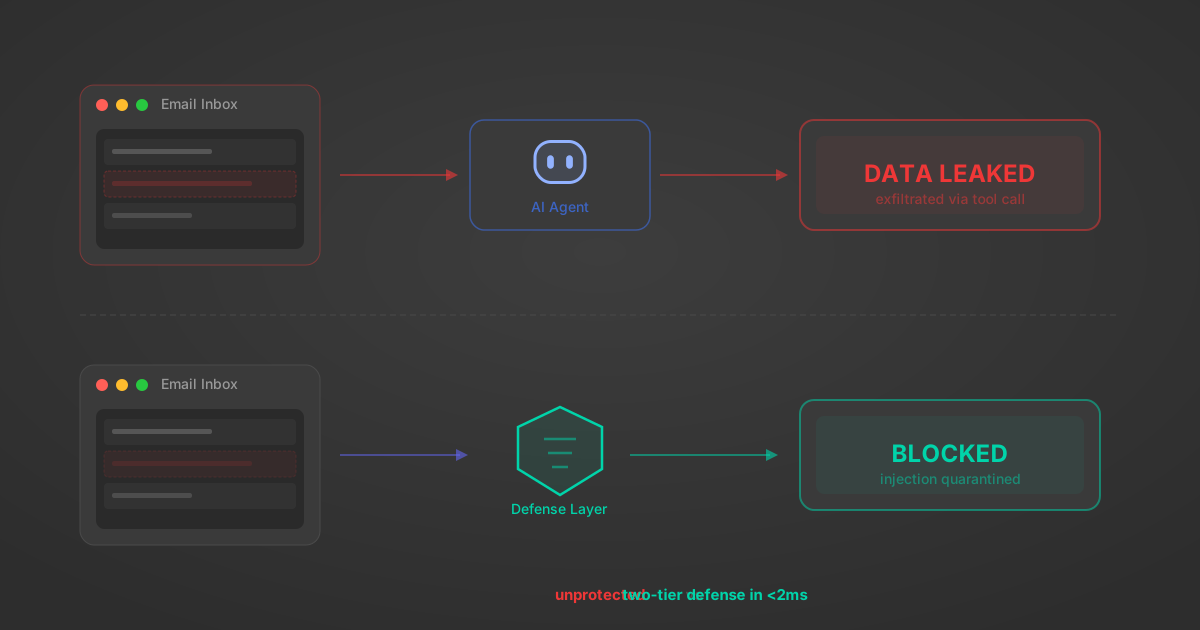
Indirect Prompt Injection Defense for MCP Tools: A Technical Guide
MCP tools that read emails, CRM records, and tickets are indirect prompt injection vectors. Here's how we built a two-tier defense that scans tool results in ~11ms.
12 min

MCP vs A2A: Architecture, Security, and When to Use Each
MCP vs A2A: what each protocol standardizes, how they differ, their shared security risks including indirect prompt injection, and when to use one, both, or a hybrid architecture.
12 min
MCP vs API: What Hundreds of Connector Builds Taught Us
MCP wraps APIs, it doesn't replace them. After building hundreds of connectors that serve both, here's when each approach wins.
14 min read
Nextcloud MCP Server FAQ
Does StackOne have a Nextcloud MCP server?
Nextcloud MCP server vs direct API integration: what's the difference?
How does Nextcloud authentication work for AI agents?
origin_owner_id.Are Nextcloud MCP tools vulnerable to prompt injection?
What is the context bloat of a Nextcloud agent and how do I avoid it?
Can I limit which actions my Nextcloud agent can access?
Can I create custom agent actions for my Nextcloud MCP server?
When should I NOT use a Nextcloud MCP server?
What AI frameworks and AI clients does the StackOne Nextcloud MCP server support?
Put your AI agents to work
All the tools you need to build and scale AI agent integrations, with best-in-class connectivity, execution, and security.