
Plaid MCP Server
for AI Agents
Connect your AI agent to StackOne's Plaid MCP server and give it 59 MCP tools out of the box. Auth, tool execution, and security all managed.
 StackOne






Coverage
59 Agent Actions
Create, read, update, and delete across Plaid — and extend your agent's capabilities with custom actions.

Authentication
Agent Tool Authentication
Per-user OAuth in one call. Your Plaid MCP server gets session-scoped tokens with zero credentials stored on your infra.
Agent Auth →
Security
Agent Protection
Every Plaid tool response scanned for prompt injection in milliseconds — 88.7% accuracy, all running on CPU.
Prompt Injection Defense →
Performance
Max Agent Context. Min Cost.
Free up to 96% of your agent's context window to enhance reasoning and reduce cost, on every Plaid call.
Tools Discovery →What is the Plaid MCP Server?
A Plaid MCP server lets AI agents read and write Plaid data through the Model Context Protocol — Anthropic's open standard for connecting LLMs to external tools. StackOne's Plaid MCP server ships with 59 pre-built actions, fully extensible via the Connector Builder — plus managed authentication, prompt injection defense, observability, and agent execution runtime. Connect it from MCP clients like Claude Desktop, Claude Code, Cursor, Goose, and VS Code, or from agent frameworks like OpenAI Agents SDK, LangChain, and Vercel AI SDK.
All Plaid MCP Tools
Every action from Plaid's API, ready for your agent. Create, read, update, and delete — scoped to exactly what you need.
Asset Reports
- Create Asset Report
Create an Asset Report for the linked Item, providing a point-in-time snapshot of account balances, transactions, and identity data for lending and verification via POST /asset_report/create
- Get Asset Report
Retrieve a completed Asset Report containing account balances, transaction history, and identity data via POST /asset_report/get
- Remove Asset Report
Permanently delete an Asset Report and invalidate its token via POST /asset_report/remove
Institutions
- Get Institutions
Retrieve a paginated list of all Plaid-supported financial institutions with filtering by country, products, and routing numbers via POST /institutions/get
- Search Institutions
Search Plaid's institution directory by name or query string with optional product and country filters via POST /institutions/search
Items
- Get Item
Retrieve metadata and health status for a linked financial institution Item via POST /item/get
- Remove Item
Permanently remove a linked Item, invalidating its access_token and ending all associated billing via POST /item/remove
Link Tokens
- Create Link Token
Create a link_token to initialize Plaid Link, the client-side UI component for bank account connection, via POST /link/token/create
- Get Link Token
Retrieve metadata and configuration details for a previously created link_token via POST /link/token/get
Statements
- List Statements
Retrieve a list of available bank statements for all accounts linked to an Item via POST /statements/list
- Download Statement
Download a single bank statement PDF by its statement ID via POST /statements/download
Transactions
- Get Transactions
Fetch historical transaction data within a specified date range with pagination and optional enrichment fields via POST /transactions/get
- Sync Transactions
Get incremental transaction updates using Plaid's recommended cursor-based sync approach, returning added, modified, and removed transactions since the last sync via POST /transactions/sync
Transfers
- Create Transfer
Initiate a money movement using a previously-approved authorization, returning the transfer_id and initial status (pending) via POST /transfer/create
- Get Transfer
Retrieve the current state and metadata of a single transfer by transfer_id via POST /transfer/get
- List Transfers
List transfers with optional filters by date range, account, status, or originator via POST /transfer/list
Transfer Events
- List Transfer Events
List historical lifecycle events across transfers with date and status filters via POST /transfer/event/list
- Sync Transfer Events
Incrementally pull transfer lifecycle events using a monotonically-increasing event_id cursor via POST /transfer/event/sync
Transfer Refunds
- Create Transfer Refund
Refund some or all of a posted/settled transfer back to the user's bank via POST /transfer/refund/create
- Get Transfer Refund
Retrieve refund details and current status by refund_id via POST /transfer/refund/get
Other (39)
- Create Check Report
Generate a fresh Consumer Report (Plaid Check) for a user, kicking off async aggregation of bank, income, and cashflow data via POST /cra/check_report/create
- Create Transfer Authorization
Authorize a money movement before creating a transfer, returning a Plaid risk decision (approved, declined, user_action_required) via POST /transfer/authorization/create
- Get Accounts
Retrieve all financial accounts (checking, savings, credit, loan, investment) linked to an Item via POST /accounts/get
- Get Account Balance
Fetch real-time balance data directly from the financial institution for all or specific accounts via POST /accounts/balance/get
- Get Asset Report PDF
Download a completed Asset Report as a formatted PDF document (binary response, application/pdf) for sharing with lenders and verifiers via POST /asset_report/pdf/get
- Get Auth
Retrieve bank account numbers and routing numbers needed to initiate ACH, EFT, BACS, and wire transfers via POST /auth/get
- Get Check Base Report
Retrieve the base bank/cash-flow Consumer Report containing items, accounts, balances, and transactions via POST /cra/check_report/base_report/get
- Get Check Income Insights
Retrieve the income-stream-analysis section of the Consumer Report (recurring deposits clustered into employer streams) via POST /cra/check_report/income_insights/get
- Get Check Cashflow Insights
Retrieve cashflow-pattern analysis (income vs expense, NSF events, savings trends) of the Consumer Report via POST /cra/check_report/cashflow_insights/get
- Get Check LendScore
Retrieve Plaid's proprietary LendScore (cash-flow-based credit score) for the user via POST /cra/check_report/lend_score/get
- Get Check Partner Insights
Retrieve partner-derived cash-flow insights computed by Plaid's underwriting partners via POST /cra/check_report/partner_insights/get
- Get Check Report PDF
Download the Consumer Report as a formatted PDF document for sharing with lenders via POST /cra/check_report/pdf/get
- Get Identity
Retrieve personal identity information (name, email, phone, address) for account holders directly from the financial institution via POST /identity/get
- Get Bank Income
Retrieve completed Bank Income reports (income streams identified from bank deposits) for a user via POST /credit/bank_income/get
- Get Bank Income PDF
Download a Bank Income report as a formatted PDF document for sharing with lenders via POST /credit/bank_income/pdf/get
- Get Payroll Income
Retrieve verified payroll-system-sourced income data for a user (W-2, paystubs, employer info) via POST /credit/payroll_income/get
- Get Payroll Income Risk Signals
Retrieve fraud risk signals on parsed payroll documents (paystubs, W-2s) via POST /credit/payroll_income/risk_signals/get
- Get Employment
Retrieve employment verification data (employer name, employment dates, status) sourced from payroll provider via POST /credit/employment/get
- Get Credit Sessions
List the user's Income / Consumer-Report Link sessions and their final statuses via POST /credit/sessions/get
- Get Institution By ID
Retrieve detailed metadata for a single financial institution by its Plaid institution_id via POST /institutions/get_by_id
- Get Investment Holdings
Retrieve current investment portfolio holdings including stocks, bonds, mutual funds, and ETFs for linked brokerage and retirement accounts via POST /investments/holdings/get
- Get Investment Transactions
Retrieve investment transactions (buys, sells, dividends, fees, transfers) within a specified date range for linked brokerage accounts via POST /investments/transactions/get
- Get Liabilities
Retrieve detailed liabilities data for credit cards, student loans, and mortgages associated with an Item via POST /liabilities/get
- Get Recurring Transactions
Fetch Plaid-detected recurring transaction patterns (subscriptions, income deposits, bills) for accounts associated with an Item via POST /transactions/recurring/get
- Get Transfer Capabilities
Determine RTP eligibility and other transfer capabilities for a Plaid Item via POST /transfer/capabilities/get
- Update Item Webhook
Update or set the webhook URL for receiving real-time event notifications for an Item via POST /item/webhook/update
- Refresh Asset Report
Create a refreshed copy of an existing Asset Report with updated data from the financial institutions via POST /asset_report/refresh
- Filter Asset Report
Create a filtered copy of an Asset Report with specified accounts excluded via POST /asset_report/filter
- Enrich Transactions
Enrich your own (non-Plaid-sourced) transactions with merchant info, categorization, and counterparty data via POST /transactions/enrich
- Exchange Public Token
Exchange a single-use public_token for a permanent access_token via POST /item/public_token/exchange
- Evaluate Signal
Score the ACH return risk of a proposed debit transaction and apply Dashboard rulesets via POST /signal/evaluate
- Prepare Signal
Pre-warm Plaid's risk model for an Item so the next /signal/evaluate completes faster via POST /signal/prepare
- Report Signal Decision
Report whether you proceeded with or blocked the ACH debit after a Signal score, used to refine Plaid's model via POST /signal/decision/report
- Report Signal Return
Report a returned ACH transaction back to Plaid with the return code so its risk model can learn via POST /signal/return/report
- Refresh Statements
Trigger on-demand extraction of bank statements for a specified date range via POST /statements/refresh
- Refresh Transactions
Trigger an on-demand refresh of transaction data for an Item, bypassing the normal automatic update schedule, via POST /transactions/refresh
- Cancel Transfer
Cancel a transfer that has not yet posted to the bank network via POST /transfer/cancel
- Cancel Transfer Authorization
Cancel an unused transfer authorization before it expires via POST /transfer/authorization/cancel
- Cancel Transfer Refund
Cancel a pending refund before it posts to the network via POST /transfer/refund/cancel
Plaid AI Agent Use Cases
Connect your AI agent to Plaid and help your team scale the finance operations they run by hand today.
Automate invoice processing with AI agents connected to your ERP, accounting software, and AP tools through StackOne.
ViewUse StackOne to connect your AI agent to your accounting, CRM, and messaging systems to automate Accounts Receivable dunning and payment follow-up.
ViewUse StackOne to connect your AI agent to your accounting, email, and document management systems to automate invoice processing and purchase order matching.
ViewSet Up Your Plaid MCP Server in Minutes
One endpoint. Any framework. Your agent is talking to Plaid in under 10 lines of code.
Agent Frameworks


 JSON
JSON{
"mcpServers": {
"stackone": {
"command": "npx",
"args": [
"-y",
"mcp-remote@latest",
"https://api.stackone.com/mcp?x-account-id=<account_id>",
"--header",
"Authorization: Basic <YOUR_BASE64_TOKEN>"
]
}
}
}Check More Accounting MCP Servers
139+ actions
125+ actions
117+ actions
115+ actions
105+ actions
95+ actions
89+ actions
Platform Resources

MCP Code Mode: Keeping Tool Responses Out of Agent Context
Anthropic's code_execution processes data already in context. Custom MCP code mode keeps raw tool responses in a sandbox. 14K tokens vs 500.
11 min

Comparing BM25, TF-IDF, and Hybrid Search for MCP Tool Discovery
Benchmarking BM25, TF-IDF, and hybrid search for MCP tool discovery across 916 tools. The 80/20 TF-IDF/BM25 hybrid hits 21% Top-1 accuracy in under 1ms.
10 min
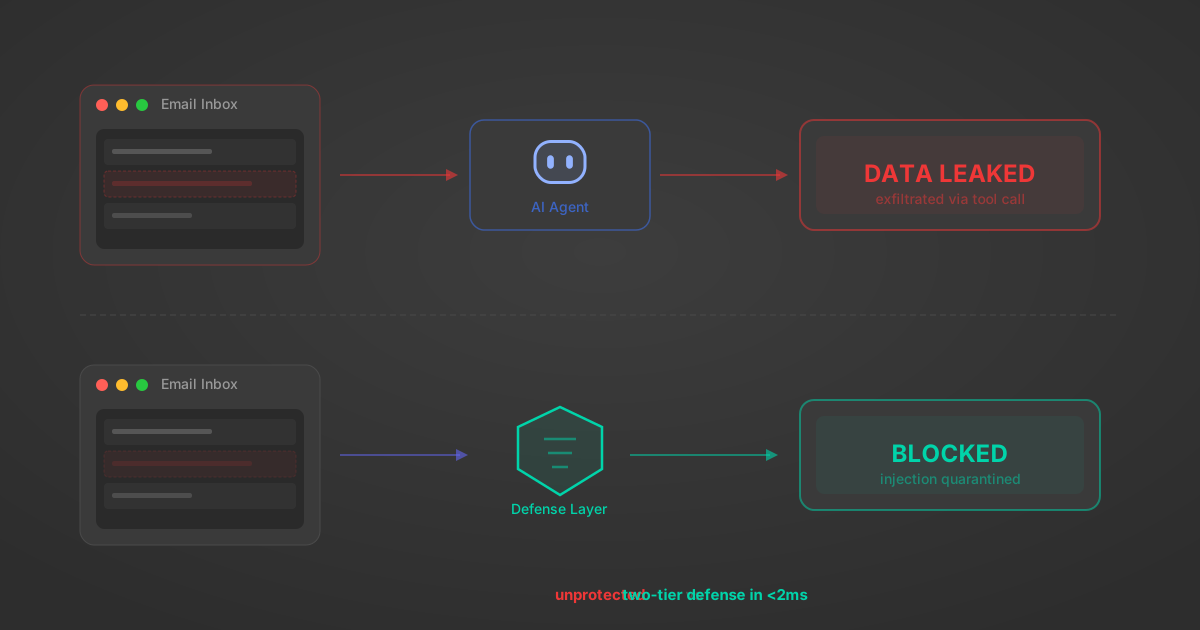
Indirect Prompt Injection Defense for MCP Tools: A Technical Guide
MCP tools that read emails, CRM records, and tickets are indirect prompt injection vectors. Here's how we built a two-tier defense that scans tool results in ~11ms.
12 min
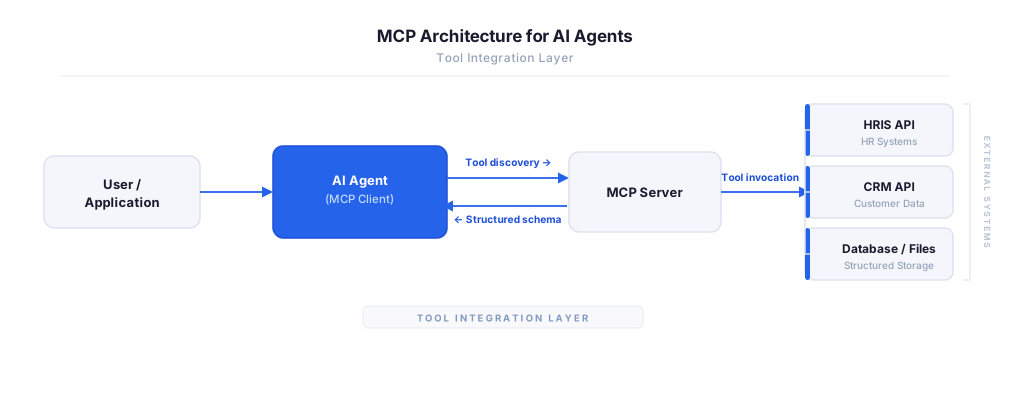
MCP vs A2A: Architecture, Security, and When to Use Each
MCP vs A2A: what each protocol standardizes, how they differ, their shared security risks including indirect prompt injection, and when to use one, both, or a hybrid architecture.
12 min
MCP vs API: What Hundreds of Connector Builds Taught Us
MCP wraps APIs, it doesn't replace them. After building hundreds of connectors that serve both, here's when each approach wins.
14 min read
Plaid MCP Server FAQ
Does StackOne have a Plaid MCP server?
Plaid MCP server vs direct API integration — what's the difference?
How does Plaid authentication work for AI agents?
origin_owner_id.Are Plaid MCP tools vulnerable to prompt injection?
What is the context bloat of a Plaid agent and how do I avoid it?
Can I limit which actions my Plaid agent can access?
Can I create custom agent actions for my Plaid MCP server?
When should I NOT use a Plaid MCP server?
What AI frameworks and AI clients does the StackOne Plaid MCP server support?
Put your AI agents to work
All the tools you need to build and scale AI agent integrations, with best-in-class connectivity, execution, and security.