


DeepL MCP Server
for AI Agents
Connect your AI agent to StackOne's DeepL MCP server and give it 57 MCP tools out of the box. Auth, tool execution, and security all managed.
 StackOne


Coverage
57 Agent Actions
Agents can read, write and delete in DeepL. Extend your agent's capabilities with custom actions.

Authentication
Agent Tool Authentication
Per-user OAuth in one call. Your DeepL MCP server gets session-scoped tokens with zero credentials stored on your infra.
Agent Auth →
Security
Agent Protection
Every DeepL tool response scanned for prompt injection in milliseconds, with 88.7% accuracy, all running on CPU.
Prompt Injection Defense →
Performance
Max Agent Context. Min Cost.
Free up to 96% of your agent's context window to enhance reasoning and reduce cost, on every DeepL call.
Tools Discovery →What is the DeepL MCP Server?
A DeepL MCP server lets AI agents read and write DeepL data through the Model Context Protocol, Anthropic's open standard for connecting LLMs to external tools. StackOne's DeepL MCP server ships with 57 pre-built actions, fully extensible via the Connector Builder, plus managed authentication, prompt injection defense, observability, and agent execution runtime. Connect it from MCP clients like Claude Desktop, Claude Code, Cursor, Goose, and VS Code, or from agent frameworks like OpenAI Agents SDK, LangChain, and Vercel AI SDK.
All DeepL MCP Tools
Every StackOne action for DeepL, ready for your agent. Read, write and delete, scoped to exactly what you need.
Developer Keys
- Create Developer Key
Create a developer key in your organization with the given label and return its metadata, including the key_id.
- List Developer Keys
List every developer key in your organization, including labels, creation and deactivation timestamps, and any configured usage limits.
Glossarys
- Create Glossary
Create a glossary containing one or more dictionaries, each holding entries for a single source and target language pair.
- Get Glossary
Retrieve meta information for a single glossary, omitting the glossary entries.
- Update Glossary
Edit glossary details, such as name or a dictionary for a source and target language.
- Delete Glossary
Deletes the specified glossary.
Spoken Terms
- Create Spoken Terms
Create a new Spoken Terms collection with one or more term lists.
- List Spoken Terms
List all Spoken Terms collections and their metadata, but not the actual terms.
- Get Spoken Terms
Retrieve metadata for a Spoken Terms collection, including term list information but not the actual terms.
- Update Spoken Terms
Update the name of a Spoken Terms collection or merge new entries into an existing term list.
- Delete Spoken Terms
Delete the entire Spoken Terms collection.
Style Profiles
- Create Style Profile
Create a style profile.
- List Style Profiles
Retrieve a list of style profiles available to the authenticated account, newest first.
- Get Style Profile
Retrieve a single style profile by its ID, including the components it links and its timestamps.
- Update Style Profile
Update a style profile you own or that was shared with you for editing.
- Delete Style Profile
Delete a style profile.
Style Rule Lists
- Create Style Rule List
Create a style rule list for a single language, optionally with its configured rules and custom instructions.
- List Style Rule Lists
List the style rule lists in your account.
- Get Style Rule List
Retrieve a single style rule list, including its configured rules and custom instructions.
- Update Style Rule List
Rename a style rule list.
- Delete Style Rule List
Delete a style rule list and its custom instructions.
Custom Instructions
- Create Custom Instruction
Add a custom instruction to a style rule list to express a style preference that the predefined rules do not cover.
- Get Custom Instruction
Retrieve a single custom instruction from a style rule list.
- Update Custom Instruction
Replace a custom instruction.
- Delete Custom Instruction
Delete a custom instruction from a style rule list.
Translation Memorys
- Import Translation Memory
Create a translation memory by importing a TMX file.
- Get Translation Memory
Retrieve a single translation memory by its ID, including its languages and segment count.
- Export Translation Memory
Export a translation memory as a TMX file.
- Delete Translation Memory
Delete a translation memory and all of its segments.
Voice Translation Jobs
- Create Voice Translation Job
Creates an async voice translation job.
- Get Voice Translation Job
Returns the current status of a voice translation job, including per-target result statuses.
Other (26)
- Upload Document For Translation
Upload a document for translation and receive a document_id and document_key.
- Get Admin Usage Analytics
Retrieve usage statistics for the organization within a specified date range.
- Get Admin Custom Tag Analytics
Retrieve usage statistics broken down by custom tags within a specified date range.
- Get Document Translation Status
Retrieve the translation status of an uploaded document.
- Download Translated Document
Download a translated document.
- List Glossaries
List all glossaries and their meta-information, but not the glossary entries.
- Get Glossary Entries
List the entries of a single glossary in tsv format.
- List Language Resources
Returns all DeepL API resources and the features they support.
- List Languages
Returns languages supported by the specified DeepL API resource.
- Get Quality Evaluation
Returns the current state of a quality evaluation; poll until the evaluation completes to get the full report.
- Get Spoken Terms Entries
Retrieve the actual terms for a specific language from a Spoken Terms collection.
- List Translation Memories
Retrieve a list of translation memories associated with the authenticated account.
- Get Translation Memory Job
Retrieve the status of a translation memory import or export job.
- List Translation Memory Segments
List the segments stored in a translation memory, one page at a time.
- Get Usage
Retrieve character and minute usage for the current billing period together with the corresponding account limits.
- Set Developer Key Usage Limits
Set per-key usage limits for characters, speech-to-text milliseconds, and speech-to-speech milliseconds.
- Update Style Rule Configured Rules
Replace the full set of configured rules on a style rule list.
- Delete Glossary Dictionary
Delete the dictionary for a single source and target language pair from a glossary, leaving the glossary and its other dictionaries in place.
- Delete Spoken Terms List
Delete a term list for a specific language from the Spoken Terms collection.
- Deactivate Developer Key
Deactivate a developer key so it can no longer authenticate API requests.
- Rename Developer Key
Change the label of a developer key.
- Replace Glossary Dictionary
Replace all entries in the dictionary for a source and target language pair, or create the dictionary if it does not exist yet.
- Replace Spoken Terms List
Replace an existing term list for a language, or create a new one if it doesn't exist.
- Translate Text
Translate one or more text strings into a target language.
- Rephrase Text
Rewrite one or more texts to improve fluency and readability, optionally targeting a specific writing style or tone.
- Correct Text
Fix spelling and grammar errors in one or more texts.
Set Up Your DeepL MCP Server in Minutes
One endpoint. Any framework. Your agent is talking to DeepL in under 10 lines of code.
Agent Frameworks


 JSON
{
  "mcpServers": {
    "stackone": {
      "command": "npx",
      "args": [
        "-y",
        "mcp-remote@latest",
        "https://api.stackone.com/mcp?x-account-id=<account_id>",
        "--header",
        "Authorization: Basic <YOUR_BASE64_TOKEN>"
      ]
    }
  }
}Platform Resources

Comparing BM25, TF-IDF, and Hybrid Search for MCP Tool Discovery
Benchmarking BM25, TF-IDF, and hybrid search for MCP tool discovery across 916 tools. The 80/20 TF-IDF/BM25 hybrid hits 21% Top-1 accuracy in under 1ms.
10 min
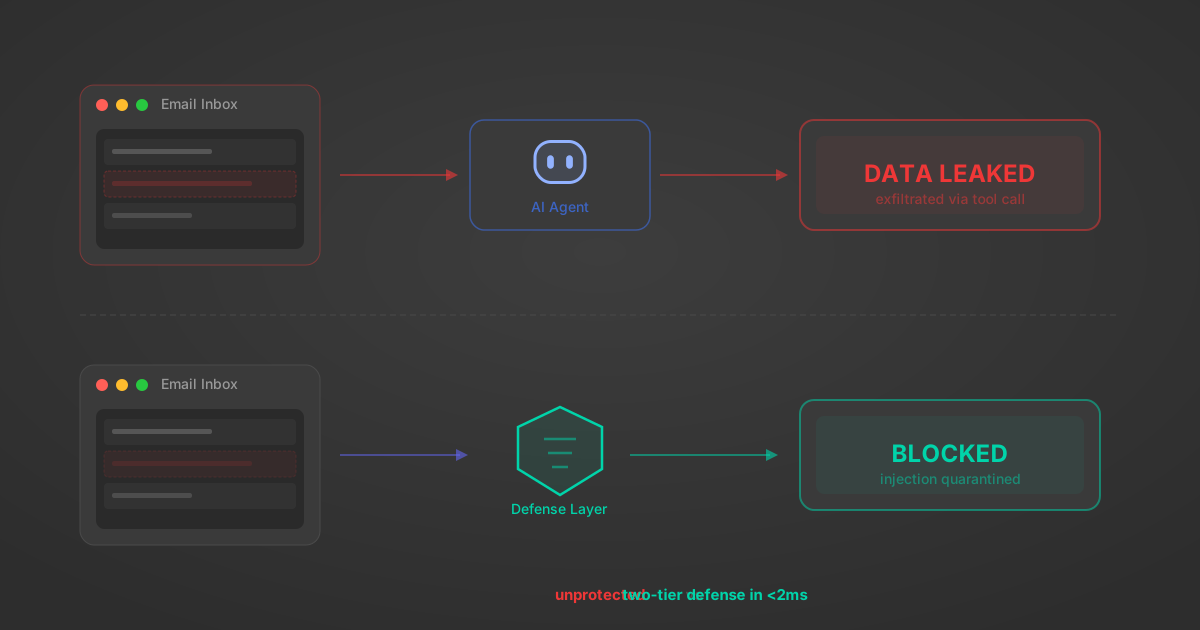
Indirect Prompt Injection Defense for MCP Tools: A Technical Guide
MCP tools that read emails, CRM records, and tickets are indirect prompt injection vectors. Here's how we built a two-tier defense that scans tool results in ~11ms.
12 min

MCP vs A2A: Architecture, Security, and When to Use Each
MCP vs A2A: what each protocol standardizes, how they differ, their shared security risks including indirect prompt injection, and when to use one, both, or a hybrid architecture.
12 min
MCP vs API: What Hundreds of Connector Builds Taught Us
MCP wraps APIs, it doesn't replace them. After building hundreds of connectors that serve both, here's when each approach wins.
14 min read
DeepL MCP Server FAQ
Does StackOne have a DeepL MCP server?
DeepL MCP server vs direct API integration: what's the difference?
How does DeepL authentication work for AI agents?
origin_owner_id.Are DeepL MCP tools vulnerable to prompt injection?
What is the context bloat of a DeepL agent and how do I avoid it?
Can I limit which actions my DeepL agent can access?
Can I create custom agent actions for my DeepL MCP server?
When should I NOT use a DeepL MCP server?
What AI frameworks and AI clients does the StackOne DeepL MCP server support?
Put your AI agents to work
All the tools you need to build and scale AI agent integrations, with best-in-class connectivity, execution, and security.