


OpenSearch MCP Server
for AI Agents
Connect your AI agent to StackOne's OpenSearch MCP server and give it 69 MCP tools out of the box. Auth, tool execution, and security all managed.
 StackOne






Coverage
69 Agent Actions
Agents can read, write and delete in OpenSearch. Extend your agent's capabilities with custom actions.

Authentication
Agent Tool Authentication
Per-user OAuth in one call. Your OpenSearch MCP server gets session-scoped tokens with zero credentials stored on your infra.
Agent Auth →
Security
Agent Protection
Every OpenSearch tool response scanned for prompt injection in milliseconds, with 88.7% accuracy, all running on CPU.
Prompt Injection Defense →
Performance
Max Agent Context. Min Cost.
Free up to 96% of your agent's context window to enhance reasoning and reduce cost, on every OpenSearch call.
Tools Discovery →What is the OpenSearch MCP Server?
A OpenSearch MCP server lets AI agents read and write OpenSearch data through the Model Context Protocol, Anthropic's open standard for connecting LLMs to external tools. StackOne's OpenSearch MCP server ships with 69 pre-built actions, fully extensible via the Connector Builder, plus managed authentication, prompt injection defense, observability, and agent execution runtime. Connect it from MCP clients like Claude Desktop, Claude Code, Cursor, Goose, and VS Code, or from agent frameworks like OpenAI Agents SDK, LangChain, and Vercel AI SDK.
All OpenSearch MCP Tools
Every StackOne action for OpenSearch, ready for your agent. Read, write and delete, scoped to exactly what you need.
Cluster Settings
- Get Cluster Settings
Return persistent, transient, and default cluster settings.
- Update Cluster Settings
Set persistent or transient cluster settings. Persistent settings survive restarts; transient do not.
Saved Objects
- Create Saved Object
Create a new Dashboards saved object.
- Import Saved Objects
Import an NDJSON bundle of saved objects (produced by export or hand-crafted).
- Get Saved Object
Fetch a single Dashboards saved object (dashboard, visualization, index-pattern, etc.) by type + id.
- Export Saved Objects
Export a set of saved objects (with dependencies) as an NDJSON bundle. Response body is raw NDJSON text (one JSON object per line, newline-terminated) — pass it verbatim to `dashboards_import_saved_objects` (after base64-encoding) or parse each line with `JSON.parse` client-side.
- Update Saved Object
Update the attributes of an existing Dashboards saved object.
- Delete Saved Object
Delete a Dashboards saved object by type + id.
Documents By Querys
- Update Documents By Query
Apply a script or noop update to every document matching a query.
- Delete Documents By Query
Delete all documents matching a query in one call.
Indexs
- Create Index
Create a new index with optional settings, mappings, and aliases.
- Clone Index
Copy an existing index to a new name — source must have the write-block set before calling.
- Search Index
Full-text and structured search over one or more indices using the Query DSL.
- Delete Index
Permanently delete an index and all its data.
Mappings
- Get Mapping
Return the mapping (field types) for one or more indices.
- Update Mapping
Add new fields to an index mapping. Cannot change existing field types.
Index Settings
- Get Index Settings
Return the settings for one or more indices (shard count, replicas, analysis, refresh interval).
- Update Index Settings
Update dynamic index settings (replica count, refresh interval, allocation, etc.).
Point-in-Times
- Create Point-in-Time
Freeze an index at a moment in time so subsequent searches see a consistent view.
- Delete Point-in-Time
Release a PIT so its heap can be reclaimed.
Snapshot Repositorys
- Get Snapshot Repository
Return details of a specific repository (type, settings).
- Delete Snapshot Repository
Unregister a snapshot repository. Does NOT delete the snapshots themselves — files remain in the backend storage.
Other (47)
- Create Or Update Document (Explicit ID)
Index a document at a specific ID; overwrites if the ID already exists unless op_type=create.
- Add Alias To Index
Attach a single alias to a single index (non-atomic — use update_aliases for atomic swaps).
- List Indices (Cat)
Compact tabular listing of every index — health, status, docs count, disk usage, shards.
- List Aliases (Cat)
Compact tabular alias listing — alias, index, filter, routing, is_write_index.
- Get Cluster Health
Snapshot of cluster health — status (green/yellow/red), active/relocating shards, and pending tasks. The canonical connection-health check.
- Get Cluster Statistics
Aggregated statistics across the whole cluster — nodes, shards, storage, JVM heap, and OS/process metrics.
- Get Cluster State
Full cluster state — routing table, metadata, node roster, and index settings. Very large payload; filter via the `metric` + `index` path segments.
- List Cluster Pending Tasks
Tasks queued on the cluster manager but not yet executed — useful to spot backlogs during allocation storms.
- Get Document By ID
Fetch a single document (source + metadata) by its ID.
- Get Document Source Only
Fetch only the _source field of a document, without _seq_no / _primary_term / _version metadata.
- Get Index Info
Return the settings, mappings, and aliases of one or more indices.
- Get Alias Info
Return details of a specific alias on a specific index (or across a wildcard set).
- List All Aliases
Return every alias across every index (or a filtered subset).
- Search Across All Indices
Same as search but without an index in the URL — required when using a Point-in-Time reference.
- List Snapshot Repositories
Return every registered snapshot repository on the cluster.
- List Snapshots In Repository
List snapshots in the given repository — companion LIST for the create/get/delete snapshot actions.
- Get Snapshot Details
Return details of one or more snapshots — status, indices, start/end times, shard counts.
- Get Task
Fetch the status of a running or completed task by task_id.
- Delete Document
Delete a document by ID.
- Delete Alias From Index
Remove an alias from an index.
- Delete Snapshot
Delete a snapshot and reclaim its unique segments from the repository.
- Cat Cluster Health
One-line summary of cluster health — status, node counts, shard counts.
- Cat Nodes
Per-node overview — heap, CPU, load, disk, role, and cluster-manager status.
- Find Saved Objects
Search and paginate Dashboards saved objects. The canonical enumeration endpoint for datasync discovery.
- Bulk Get Saved Objects
Fetch many saved objects in a single request.
- Index Document (Auto-ID)
Add a document to an index and let OpenSearch generate the ID.
- Check Document Exists
Existence check for a document — returns 200 if the document exists, 404 if not.
- Partial Update Document
Apply a partial update to a document using the update DSL (doc merge, script, or upsert).
- Bulk Index/Update/Delete (NDJSON)
Execute many index/update/delete operations in a single request. **Body must be NDJSON** (newline-delimited JSON), not standard JSON — each operation is metadata line + optional source line.
- Bulk Operations Scoped To One Index
Same NDJSON bulk semantics as bulk_operations, but scoped to a single index in the URL — operations can omit `_index` in their metadata.
- Multi-Get Documents
Fetch multiple documents by ID in one round-trip, optionally across different indices.
- Reindex Documents
Copy documents from a source index (or remote cluster) to a destination index; the canonical datasync migration primitive.
- Check Index Exists
Existence check for an index — 200 if it exists, 404 if not.
- Refresh Index
Force a refresh so recently indexed documents become searchable immediately.
- Flush Index
Persist in-memory transaction log to disk.
- Force Merge Index
Merge index segments to reduce their count; heavy operation.
- Open Index
Re-open a closed index so it becomes readable/writable.
- Close Index
Close an index so it stops accepting reads/writes; frees cluster resources.
- Atomic Update Of Aliases
Apply multiple alias add/remove operations atomically.
- Multi-Search (NDJSON)
Run several searches in one round-trip; body is NDJSON with alternating header + query lines.
- Count Documents Matching Query
Return the count of documents matching a query, without returning the hits themselves.
- Scroll (Deep Pagination — Legacy)
Fetch the next batch of a scroll context. Discouraged for new work — use PIT + search_after instead.
- Clear Scroll Context
Release the memory held by one or more scroll contexts.
- Register Snapshot Repository
Register a snapshot repository backed by fs, s3, gcs, or azure storage.
- Take Snapshot
Create a snapshot of one or more indices to the target repository.
- Restore Snapshot
Restore indices from a snapshot back into the cluster.
- Cancel Task
Cancel a running task by task_id. Cancellation is cooperative — the task ends at the next check point.
Set Up Your OpenSearch MCP Server in Minutes
One endpoint. Any framework. Your agent is talking to OpenSearch in under 10 lines of code.
Agent Frameworks


 JSON
JSON{
"mcpServers": {
"stackone": {
"command": "npx",
"args": [
"-y",
"mcp-remote@latest",
"https://api.stackone.com/mcp?x-account-id=<account_id>",
"--header",
"Authorization: Basic <YOUR_BASE64_TOKEN>"
]
}
}
}Platform Resources

Comparing BM25, TF-IDF, and Hybrid Search for MCP Tool Discovery
Benchmarking BM25, TF-IDF, and hybrid search for MCP tool discovery across 916 tools. The 80/20 TF-IDF/BM25 hybrid hits 21% Top-1 accuracy in under 1ms.
10 min
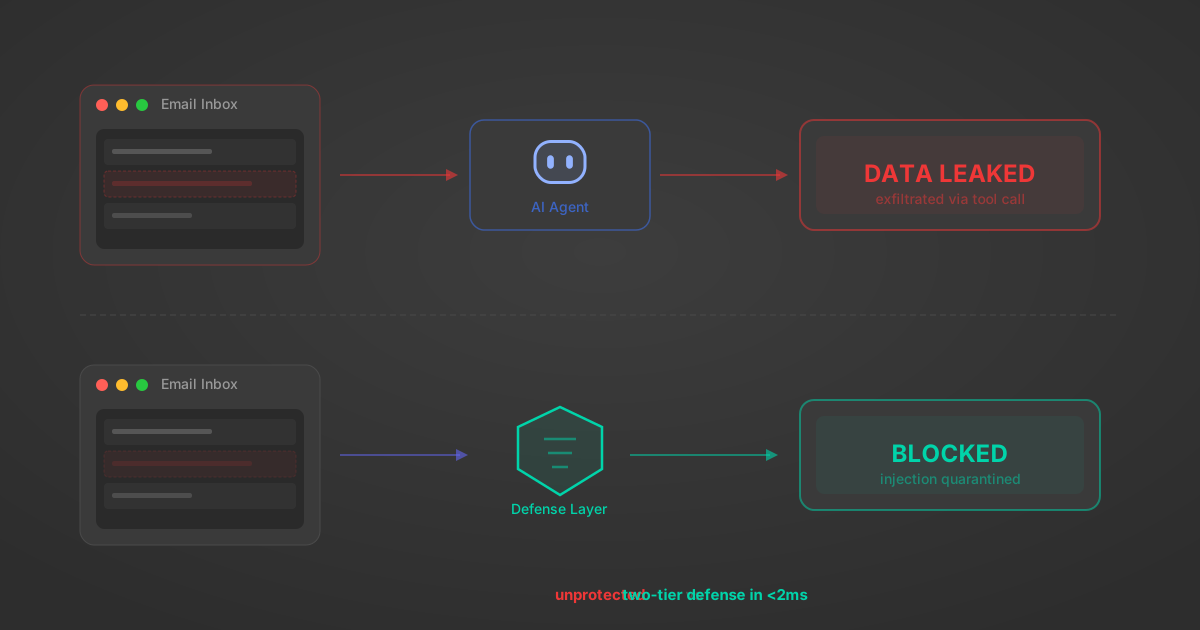
Indirect Prompt Injection Defense for MCP Tools: A Technical Guide
MCP tools that read emails, CRM records, and tickets are indirect prompt injection vectors. Here's how we built a two-tier defense that scans tool results in ~11ms.
12 min
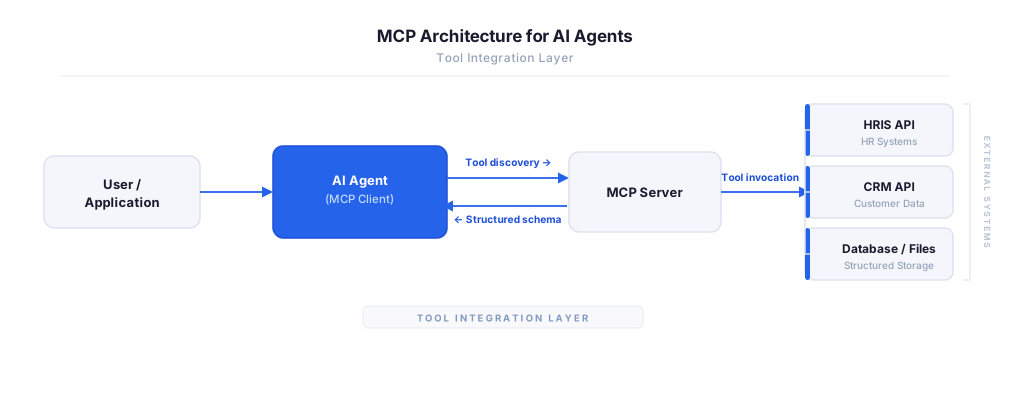
MCP vs A2A: Architecture, Security, and When to Use Each
MCP vs A2A: what each protocol standardizes, how they differ, their shared security risks including indirect prompt injection, and when to use one, both, or a hybrid architecture.
12 min
MCP vs API: What Hundreds of Connector Builds Taught Us
MCP wraps APIs, it doesn't replace them. After building hundreds of connectors that serve both, here's when each approach wins.
14 min read
OpenSearch MCP Server FAQ
Does StackOne have a OpenSearch MCP server?
OpenSearch MCP server vs direct API integration: what's the difference?
How does OpenSearch authentication work for AI agents?
origin_owner_id.Are OpenSearch MCP tools vulnerable to prompt injection?
What is the context bloat of a OpenSearch agent and how do I avoid it?
Can I limit which actions my OpenSearch agent can access?
Can I create custom agent actions for my OpenSearch MCP server?
When should I NOT use a OpenSearch MCP server?
What AI frameworks and AI clients does the StackOne OpenSearch MCP server support?
Put your AI agents to work
All the tools you need to build and scale AI agent integrations, with best-in-class connectivity, execution, and security.