


Metabase MCP Server
for AI Agents
Connect your AI agent to StackOne's Metabase MCP server and give it 337 MCP tools out of the box. Auth, tool execution, and security all managed.
 StackOne


Coverage
337 Agent Actions
Agents can read, write, delete and run operations in Metabase. Extend your agent's capabilities with custom actions.

Authentication
Agent Tool Authentication
Per-user OAuth in one call. Your Metabase MCP server gets session-scoped tokens with zero credentials stored on your infra.
Agent Auth →
Security
Agent Protection
Every Metabase tool response scanned for prompt injection in milliseconds, with 88.7% accuracy, all running on CPU.
Prompt Injection Defense →
Performance
Max Agent Context. Min Cost.
Free up to 96% of your agent's context window to enhance reasoning and reduce cost, on every Metabase call.
Tools Discovery →What is the Metabase MCP Server?
A Metabase MCP server lets AI agents read and write Metabase data through the Model Context Protocol, Anthropic's open standard for connecting LLMs to external tools. StackOne's Metabase MCP server ships with 337 pre-built actions, fully extensible via the Connector Builder, plus managed authentication, prompt injection defense, observability, and agent execution runtime. Connect it from MCP clients like Claude Desktop, Claude Code, Cursor, Goose, and VS Code, or from agent frameworks like OpenAI Agents SDK, LangChain, and Vercel AI SDK.
All Metabase MCP Tools
Every StackOne action for Metabase, ready for your agent. Read, write, delete and run operations, scoped to exactly what you need.
Actions
- Create Action
Create a new action.
- List Actions
Returns the actions the current user can read, unarchived unless ?archived=true.
- Get Action
Fetch an Action.
- Update Action
Update an Action.
- Delete Action
Delete an Action.
Action Public Links
- Create Action Public Link
Generate publicly-accessible links for this Action.
- Delete Action Public Link
Delete the publicly-accessible link to this Dashboard.
Alerts
- List Alerts
Fetch alerts which the current user has created or will receive, or all alerts if the user is an admin.
- Get Alert
Fetch an alert by ID.
API Keys
- Create API Key
Create a new API key (and an associated User) with the provided name and group ID.
- List API Keys
List the API keys in a Metabase instance, with the group each key belongs to.
- Update API Key
Update an API key by changing its group and/or its name.
- Delete API Key
Delete an ApiKey.
Bookmarks
- Create Bookmark
Create a new bookmark for user.
- List Bookmarks
Fetch all bookmarks for the user.
- Delete Bookmark
Delete a bookmark.
Cache Configs
- List Cache Configs
Return cache configuration.
- Update Cache Config
Store cache configuration.
- Delete Cache Config
Delete cache configurations.
Cards
- Create Card
Create a new Card.
- Copy Card
Copy a Card, with the new name 'Copy of _name_'.
- List Cards
Get all the Cards.
- Get Card
Get Card with ID.
- Query Card
Run the query associated with a Card.
- Update Card
Update a Card.
- Move Cards
Moves a number of Cards to a single collection or dashboard.
- Delete Card
Hard delete a Card.
Card Parameter Values
- Search Card Parameter Values
Fetch possible values of the parameter whose ID is param-key that contain query.
- Get Card Parameter Values
Fetch possible values of the parameter whose ID is param-key.
Card Public Links
- Create Card Public Link
Generate publicly-accessible links for this Card.
- Delete Card Public Link
Delete the publicly-accessible link to this Card.
Channels
- Create Channel
Create a channel.
- List Channels
Get all channels.
- Get Channel
Get a channel.
- Update Channel
Update a channel.
Collections
- Create Collection
Create a new Collection.
- List Collections
Fetch a list of all Collections that the current user has read permissions for (can_write is returned as an additional property of each Collection so you can tell which of these you have write permissions for.) By default, this returns non-archived Collections, but instead you can show archived ones by passing ?archived=true.
- Get Collection
Fetch a specific Collection with standard details added.
- Update Collection
Modify an existing Collection, including archiving or unarchiving it, or moving it.
- Delete Collection
Deletes a collection permanently. It must be in the trash first (update_collection with archived true); otherwise Metabase returns 400.
Root Dashboard Question Candidates
- List Root Dashboard Question Candidates
Find cards in the root collection that can be moved into dashboards in the root collection.
- Move Root Dashboard Question Candidates
Move candidate cards to the dashboards they appear in (for the root collection)
Collection Permissions Graphs
- Get Collection Permissions Graph
Fetch a graph of all Collection Permissions.
- Update Collection Permissions Graph
Do a batch update of Collections Permissions by passing in a modified graph.
Comments
- Create Comment
Create a new comment.
- List Comments
Get comments for an entity.
- Update Comment
Update a comment.
- Delete Comment
Soft delete a comment.
Dashboard Parameter Values
- Search Dashboard Parameter Values
Fetch possible values of the parameter whose ID is param-key that contain query.
- Get Dashboard Parameter Values
Fetch possible values of the parameter whose ID is param-key.
Dashboards
- Create Dashboard
Create a new Dashboard.
- Copy Dashboard
Copy a Dashboard.
- Get Dashboard
Get Dashboard with ID.
- Update Dashboard
Update a Dashboard, and optionally the dashcards and tabs of a Dashboard.
- Delete Dashboard
Hard delete a Dashboard.
Dashboard Public Links
- Create Dashboard Public Link
Generate publicly-accessible links for this Dashboard.
- Delete Dashboard Public Link
Delete the publicly-accessible link to this Dashboard.
Database Schemas
- List Database Schemas
Returns a list of all the schemas with tables found for the database id.
- Sync Database Schema
Trigger a manual update of the schema metadata for this Database.
Databases
- Create Database
Add a new Database.
- List Databases
Fetch all Databases.; include=tables means we should hydrate the Tables belonging to each DB.
- Get Database
Get a single Database with id.
- Update Database
Update a Database.
- Delete Database
Delete a Database.
Dataset Parameter Values
- Search Dataset Parameter Values
Return parameter values for cards or dashboards that are being edited.
- Get Dataset Parameter Values
Return parameter values for cards or dashboards that are being edited.
Documents
- Create Document
Create a new Document.
- Copy Document
Copy a Document.
- List Documents
Gets existing Documents.
- Get Document
Returns an existing Document by ID.
- Update Document
Updates an existing Document.
- Delete Document
Permanently deletes a document. It must be archived first (update_document with archived true); otherwise Metabase returns 400.
Document Public Links
- Create Document Public Link
Generate a publicly-accessible UUID for a Document.
- Delete Document Public Link
Remove the public link for a Document.
Field Values
- Search Field Values
Search a field's values for text.
- Get Field Values
If a Field's value of has_field_values is list, return a list of all the distinct values of the Field (or remapped Field), and (if defined by a User) a map of human-readable remapped values.
- Update Field Values
Update the fields values and human-readable values for a Field whose semantic type is category/city/state/country or whose base type is type/Boolean.
Fields
- Get Field
Get Field with ID.
- Update Field
Update Field with ID.
Field Dimensions
- Create Field Dimension
Sets the dimension for the given field at ID.
- Delete Field Dimension
Remove the dimension associated to field at ID.
Glossary Terms
- Create Glossary Term
Create a new glossary entry.
- List Glossary Terms
Fetch all glossary entries, optionally filtered by search term.
- Update Glossary Term
Update an existing glossary entry.
- Delete Glossary Term
Delete a glossary entry.
Groups
- Create Group
Create a new PermissionsGroup.
- List Groups
List the permission groups in a Metabase instance, with member counts.
- Get Group
Get a Metabase permission group by ID, with its members.
- Update Group
Update the name of a PermissionsGroup.
- Delete Group
Delete a specific PermissionsGroup.
Group Memberships
- Create Group Membership
Add a User to a PermissionsGroup.
- List Group Memberships
List the group memberships in a Metabase instance, keyed by user id.
- Update Group Membership
Update a Permission Group membership.
- Delete Group Membership
Remove a User from a PermissionsGroup (delete their membership).
Unified Groups
- List Unified Groups
List unified permission groups in a Metabase instance.
- Get Unified Group
Get a unified Metabase permission group by ID.
Unified Roles
- List Unified Roles
List unified roles in Metabase.
- Get Unified Role
Get a unified Metabase role by ID.
Unified Users
- List Unified Users
List unified users in a Metabase instance.
- Get Unified User
Get a unified Metabase user by ID.
Measures
- Create Measure
Create a new Measure.
- List Measures
Fetch *all* Measures.
- Get Measure
Fetch Measure with ID.
- Update Measure
Update a Measure with ID.
Measure Dimension Values
- Search Measure Dimension Values
Search for values of a dimension that contain the query string.
- Get Measure Dimension Values
Fetch values for a dimension of a measure.
Metric Dimensions
- Add Metric Dimension
Add dimensions to a metric.
- List Metric Dimensions
List a metric's curated dimensions, and (when with-addable=true) the columns still available to add, grouped by source table.
- Update Metric Dimension
Update a metric dimension's display_name, description, default_temporal_unit, and/or source column.
- Remove Metric Dimension
Remove dimensions (by UUID) from a metric.
Metrics
- List Metrics
Get a list of metrics.
- Get Metric
Fetch a Metric with ID.
Metric Dimension Values
- Search Metric Dimension Values
Search for values of a dimension that contain the query string.
- Get Metric Dimension Values
Fetch values for a dimension of a metric.
Model Indexs
- Create Model Index
Create ModelIndex.
- Get Model Index
Retrieve ModelIndex.
- Delete Model Index
Delete ModelIndex.
Admin Notifications
- List Admin Notifications
List card-type notifications (alerts) for admin management.
- Get Admin Notification
Get a single card-type notification with last_check, last_send, check_history (up to 10 most-recent terminal alert-type TaskRuns) and send_history (up to 10 most-recent channel-send delivery attempts).
Notifications
- Create Notification
Create a new notification, return the created notification.
- Send Notification
Send a notification by id.
- List Notifications
List notifications.; creator_id - if provided returns only notifications created by this user; recipient_id - if provided returns only notification that has recipient_id as a recipient; creator_or_recipient_id - if provided returns only notification that has user_id as creator or recipient; card_id - if provided returns only notification that has card_id as payload.
- Get Notification
Get a notification by id.
- Update Notification
Update a notification, can also update its subscriptions, handlers.
Permissions Graphs
- Get Permissions Graph
Fetch a graph of all Permissions.
- Update Permissions Graph
Do a batch update of Permissions by passing in a modified graph.
Pulses
- Create Pulse
Create a new Pulse.
- List Pulses
Fetch all dashboard subscriptions.
- Get Pulse
Fetch Pulse with ID.
- Update Pulse
Update a Pulse with id.
Weights
- Get Search Weights
Return the current weights being used to rank the search results.
- Update Search Weights
Update the current weights being used to rank the search results.
Segments
- Create Segment
Create a new Segment.
- List Segments
Fetch *all* Segments.
- Get Segment
Fetch Segment with ID.
- Update Segment
Update a Segment with ID.
Settings
- List Settings
Get all Settings and their values.
- Get Setting
Fetch a single Setting.
- Update Setting
Create/update a Setting.
- Update Settings
Update multiple Settings values.
Native Query Snippets
- Create Native Query Snippet
Create a new NativeQuerySnippet.
- List Native Query Snippets
Fetch all snippets.
- Get Native Query Snippet
Fetch native query snippet with ID.
- Update Native Query Snippet
Update an existing NativeQuerySnippet.
Tables
- List Tables
Get all Tables.
- Get Table
Get Table with ID.
- Update Table
Update Table with ID.
Task Runs
- List Task Runs
List task runs with optional filters.
- Get Task Run
Get a single task run with all its child tasks.
Tasks
- List Tasks
Fetch a list of recent tasks stored as Task History.
- Get Task
Get TaskHistory entry with ID.
Timeline Events
- Create Timeline Event
Create a new TimelineEvent.
- Get Timeline Event
Fetch the TimelineEvent with id.
- Update Timeline Event
Update a TimelineEvent.
- Delete Timeline Event
Delete a TimelineEvent.
Timelines
- Create Timeline
Create a new Timeline.
- List Timelines
Fetch a list of Timelines.
- Get Timeline
Fetch the Timeline with id.
- Update Timeline
Update the Timeline with id.
- Delete Timeline
Delete a Timeline.
Transform Jobs
- Create Transform Job
Create a new transform job.
- List Transform Jobs
Get all transform jobs.
- Get Transform Job
Get a transform job by ID.
- Update Transform Job
Update a transform job.
- Delete Transform Job
Delete a transform job.
Transform Runs
- List Transform Runs
Paginated unified run history - every row is a root run — a job run, a manual DAG-reprocess run, or a standalone transform run — never a member run of a job/DAG (those are listed by GET /run and the per-run transform-runs endpoints).
- Search Transform Runs
Get transform runs based on a set of filter params.
- Get Transform Run
Get a transform run by ID.
Transforms
- Create Transform
Create a new transform.
- List Transforms
Get a list of transforms.
- Get Transform
Get a specific transform.
- Update Transform
Update a transform.
- Delete Transform
Delete a transform.
Transform Inspection Lens
- Get Transform Inspection Lens
Phase 2 - Get full lens contents for a transform.
- Query Transform Inspection Lens
Execute a query in the context of a transform inspector lens.
Transform Tags
- Create Transform Tag
Create a new transform tag.
- List Transform Tags
Get a list of all transform tags.
- Update Transform Tag
Update a transform tag.
- Delete Transform Tag
Delete a transform tag.
Users
- Create User
Create a new User, return a 400 if the email address is already taken.
- List Users
List people in a Metabase instance, with their group ids.
- Get User
Get a Metabase person by ID, with their group memberships.
- Update User
Update an existing, active User.
Other (154)
- Add Sample Database
Add the sample database as a new Database.
- Create Moderation Review
Create a new ModerationReview.
- Send Unsaved Notification
Send an unsaved notification.
- Append CSV To Table
Inserts the rows of an uploaded CSV file into the table identified by id.
- Upload CSV
Create a table and model populated with the values from the attached CSV.
- Create User Password Reset Url
Generate a password reset URL for a user.
- List Public Actions
Fetch a list of Actions with public UUIDs.
- Get Action Execute Values
Fetches the values for filling in execution parameters.
- List Popular Items
Get the list of 5 popular things on the instance.
- List Recent Items
Get a list of recent items the current user has been viewing most recently under the recents key.
- Get Most Recently Viewed Dashboard
Get the most recently viewed dashboard for the current user.
- List Card Dashboards
Get a list of {:name ...
- List Card Series
Fetches a list of compatible series with the card with id card_id.; last_cursor with value is the id of the last card from the previous page to fetch the next page.; query to search card by name.; exclude_ids to filter out a list of card ids.
- List Embeddable Cards
Fetch a list of Cards where enable_embedding is true.
- List Public Cards
Fetch a list of Cards with public UUIDs.
- Get Card Parameter Remapping
Fetch the remapped value for a given value of the parameter with ID param-key.
- Get Card Query Metadata
Get all of the required query metadata for a card.
- Export Card Query
Run the query associated with a Card, and return its results as a file in the specified format.
- List Cards Dashboards
Get the dashboards that multiple cards appear in.
- Query Card Pivot
Run the query associated with a Card.
- List Collection Dashboard Question Candidates
Find cards in this collection that can be moved into dashboards in this collection.
- List Collection Items
Fetch a specific Collection's items with the following options - models - only include objects of a specific set of models.
- List Root Collection Items
Fetch objects that the current user should see at their root level.
- Get Collection Items Metadata
Metadata about the collection's items list - the models with at least one visible item plus the item count.
- Get Collection Root
Return the 'Root' Collection object with standard details added.
- Get Collection Trash
Fetch the trash collection, as in /api/collection/:trash-id.
- Get Collection Tree
Similar to GET /, but returns Collections in a tree structure, e.g.
- Get Root Collection Items Metadata
Metadata about the Root Collection's items list - the models with at least one visible item plus the item count.
- List Mentionable Users
Get a list of entities suitable for mentions.
- List Dashboard Items
Get Dashboard with ID.
- List Embeddable Dashboards
Fetch a list of Dashboards where enable_embedding is true.
- List Public Dashboards
Fetch a list of Dashboards with public UUIDs.
- List Valid Filter Fields
Utility endpoint for powering Dashboard UI.
- Get Dashboard Parameter Remapping
Fetch the remapped value for a given value of the parameter with ID param-key.
- Get Dashboard Query Metadata
Get all of the required query metadata for the cards on dashboard.
- Get Dashboard Related
Return related entities.
- Export Dashboard PDF
Render Dashboard with ID to a PDF (server-side, the same way dashboard subscriptions render charts) and stream it back as a file download.
- Export Dashcard Query
Run the query associated with a Saved Question (Card) in the context of a Dashboard that includes it, and return its results as a file in the specified format.
- Get Dashcard Action Execute Values
Fetches the values for filling in execution parameters.
- Query Dashcard
Run the query associated with a Saved Question (Card) in the context of a Dashboard that includes it.
- Query Dashcard Pivot
Run a pivot table query for a specific DashCard.
- List Database Fields
Get a list of all Fields in Database.
- List Database ID Fields
Get a list of all primary key Fields for Database.
- List Database Schema Tables
Returns a list of Tables for the given Database id and schema.
- List Database Schema Tables By Query
Return a list of Tables for a Database whose schema is the schema query parameter, or nil or an empty string when no schema is given.
- List Database Syncable Schemas
Returns a list of all syncable schemas found for the database id.
- List Virtual Database Datasets
Returns a list of all the datasets found for the saved questions virtual database.
- List Virtual Database Schema Datasets
Returns a list of Tables for the datasets virtual database.
- List Virtual Database Schema Tables
Returns a list of Tables for the saved questions virtual database.
- List Virtual Database Schemas
Returns a list of all the schemas found for the saved questions virtual database.
- Get Database Autocomplete Suggestions
Return a list of autocomplete suggestions for a given prefix, or substring.
- Get Database Card Autocomplete Suggestions
Return a list of Card autocomplete suggestions for a given query in a given Database.
- Get Database Healthcheck
Reports whether the database can currently connect.
- Get Database Metadata
Get metadata about a Database, including all of its Tables and Fields.
- Get Database Settings Available
Get all database-local settings and their availability for the given database.
- Get Database Usage Info
Get usage info for a database.
- Get Virtual Database Metadata
Endpoint that provides metadata for the Saved Questions 'virtual' database.
- Export Dataset Query
Execute a query and download the result data as a file in the specified format.
- Get Dataset Parameter Remapping
Return the remapped parameter values for cards or dashboards that are being edited.
- Get Dataset Query Metadata
Get all of the required query metadata for an ad-hoc query.
- Get Native Query
Fetch a native version of an MBQL query.
- List Public Documents
List all Documents that have public links.
- Export Document Card Query
Download query results for a Card embedded in a Document.
- Get Field Related
Return related entities.
- Get Field Remapping
Fetch remapped Field values.
- Get Field Summary
Get the count and distinct count of Field with ID.
- Get Field Table IDs
Get unique Table IDs for a list of Field IDs.
- List Invite Group IDs
IDs of the permission groups holding a stored read (or read-write) grant on the collection of a shareable item (a dashboard or a question).
- Get Unified Credentials
Get the current Metabase connection's unified credentials and identity.
- List Login History
Fetch recent logins for the current user.
- Get Measure Dimension Remapping
Fetch remapped value for a specific dimension value.
- Get Metric Dimension Remapping
Fetch remapped value for a specific dimension value.
- Get Metric Breakout Values
Fetch distinct breakout dimension values for a metric or measure definition.
- List Model Indexes
Retrieve list of ModelIndex.
- Get Database Permissions Graph
Fetch a graph of all Permissions for db-id db-id.
- Get Group Permissions Graph
Fetch a graph of all Permissions for group-id group-id.
- List Persisted Models
List the entries of PersistedInfo in order to show a status page.
- Get Persisted Card
Fetch a particular PersistedInfo by card-id.
- Get Persisted Info
Fetch a particular PersistedInfo by id.
- Get Pulse Form Input
Provides relevant configuration information and user choices for creating/updating Pulses.
- List Entity Revisions
Fetch Revisions for an object with ID.
- List Revisions
Get revisions of an object.
- Search
Search for items in Metabase.
- Get Segment Related
Return related entities.
- List Table FKs
Get all foreign keys whose destination is a Field that belongs to this Table.
- Get Card Table Query Metadata
Return metadata for the 'virtual' table for a Card.
- Get Table Data
Get the data for the given table.
- Get Table Query Metadata
Get metadata about a Table useful for running queries.
- Get Table Related
Return related entities.
- List Task Run Entities
Get distinct entities that have task runs for a given run type.
- List Unique Tasks
Returns possibly empty vector of unique task names in alphabetical order.
- Get Task Info
Return raw data about all scheduled tasks (i.e., Quartz Jobs and Triggers).
- List Collection Timelines
Fetch a specific Collection's timelines.
- List Root Collection Timelines
Fetch the root Collection's timelines.
- List Transform Job Run Transform Runs
Get the transform runs that made up a specific job run.
- List Transform Job Runs
Get paginated run history for a transform job.
- List Transform Job Transforms
Get the transforms of job specified by the job's ID.
- List Transform DAG Transforms
Preview the transforms a DAG reprocess from this transform would run (see POST /:id/run-dag), in execution order.
- Get Transform Dependencies
Get the dependencies of a specific transform.
- Get Current User
Get the Metabase user the API key acts as.
- List User Recipients
Fetch a list of Users.
- Move Cards To Collection
Bulk update endpoint for Card Collections.
- Move Dashboard Question Candidates
Move candidate cards to the dashboards they appear in.
- Set Default Metric Dimension
Mark exactly one dimension as the metric's default, clearing any previous default.
- Set Persist Refresh Schedule
Set the cron schedule to refresh persisted models.
- Sync Table Schema
Trigger a manual update of the schema metadata for this Table.
- Set Transform Jobs Active
Activate or deactivate every transform job.
- Update User Password
Update a user's password.
- Delete Transform Table
Delete a transform's output table.
- Execute Action
Execute the Action.
- Count API Keys
Get the count of API keys in the DB with the default scope.
- Regenerate API Key
Regenerate an API Key.
- Reorder Bookmarks
Sets the order of bookmarks for user.
- Invalidate Cache
Invalidate cache entries.
- Test Channel
Test a channel connection.
- Toggle Comment Reaction
Toggle a reaction on a comment.
- Execute Dashcard Action
Execute the associated Action in the context of a Dashboard and DashboardCard that includes it.
- Save Dashboard
Save a denormalized description of dashboard.
- Save Dashboard To Collection
Save a denormalized description of dashboard into collection with ID parent-collection-id.
- Discard Database Field Values
Discards all saved field values for this Database.
- Rescan Database Field Values
Trigger a manual scan of the field values for this Database.
- Validate Database
Validate that we can connect to a database given a set of details.
- Run Dataset Query
Execute a query and retrieve the results in the usual format.
- Run Pivot Dataset Query
Generate a pivoted dataset for an ad-hoc query.
- Discard Field Values
Discard the FieldValues belonging to this Field.
- Rescan Field Values
Manually trigger an update for the FieldValues for this Field.
- Clear Group Memberships
Remove all members from a PermissionsGroup.
- Reorder Metric Dimensions
Persist a new ordering for a metric's dimensions.
- Run Metric Dataset Query
Execute a metric or measure-based query and stream the results.
- Bulk Update Admin Notifications
Bulk-archive or -change-creator a set of notifications.
- Disable Model Persistence
Disable global setting to allow databases to persist models.
- Enable Model Persistence
Enable global setting to allow databases to persist models.
- Persist Card
Mark the model (card) as persisted.
- Persist Database
Attempt to enable model persistence for a database.
- Refresh Persisted Card
Refresh the persisted model caching card-id.
- Unpersist Card
Unpersist this model.
- Unpersist Database
Attempt to disable model persistence for a database.
- Test Pulse
Test send an unsaved pulse.
- Revert Revision
Revert an object to a prior revision.
- Force Search Reindex
This will trigger an immediate reindexing, if we are using search index.
- Reinitialize Search Index
This will blow away any search indexes, re-create, and re-populate them.
- Reorder Table Fields
Reorder fields.
- Discard Table Field Values
Discard the FieldValues belonging to the Fields in this Table.
- Replace Table CSV
Replaces the contents of the table identified by id with the rows of an uploaded CSV file.
- Rescan Table Field Values
Manually trigger an update for the FieldValues for the Fields belonging to this Table.
- Cancel Transform Job Run
Cancel an in-progress job run and request cancellation of its still-running transforms.
- Run Transform Job
Run a transform job manually.
- Inspect Transform
Phase 1 - Discover available lenses for a transform.
- Cancel Transform
Cancel the current run for a given transform.
- Reset Transform Checkpoint
Reset the stored checkpoint for an incremental transform.
- Run Transform
Run a transform.
- Run Transform DAG
Trigger a DAG-reprocess run starting from a single transform - runs the transform and every transform in its transitive dependency closure.
- Reactivate User
Reactivate user at id.
- Disable User
Disable a User.
Set Up Your Metabase MCP Server in Minutes
One endpoint. Any framework. Your agent is talking to Metabase in under 10 lines of code.
Agent Frameworks


 JSON
{
  "mcpServers": {
    "stackone": {
      "command": "npx",
      "args": [
        "-y",
        "mcp-remote@latest",
        "https://api.stackone.com/mcp?x-account-id=<account_id>",
        "--header",
        "Authorization: Basic <YOUR_BASE64_TOKEN>"
      ]
    }
  }
}
Check More Data & Analytics MCP Servers
490+ actions
203+ actions
122+ actions
115+ actions
112+ actions
102+ actions
98+ actions
Platform Resources
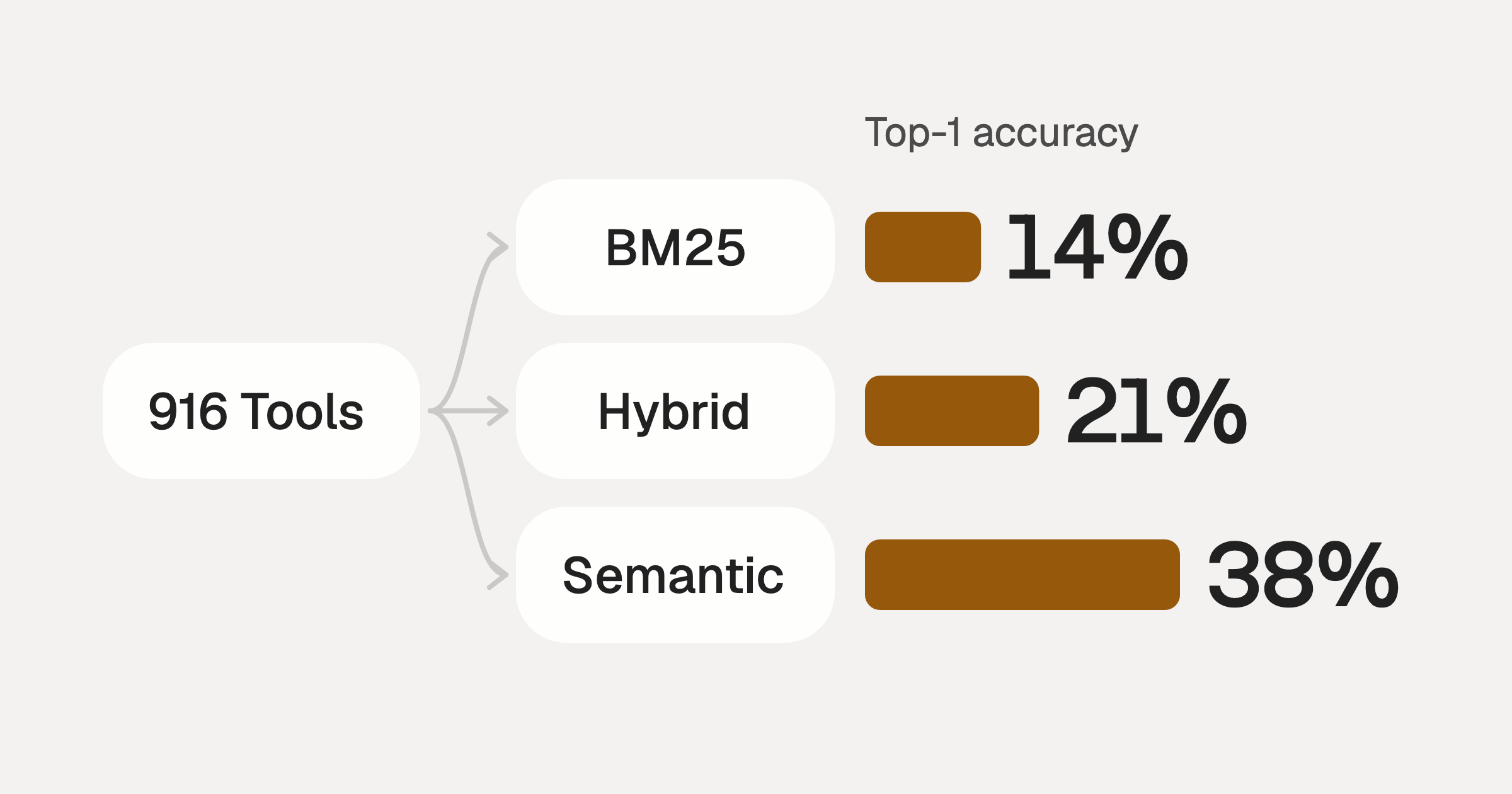
Comparing BM25, TF-IDF, and Hybrid Search for MCP Tool Discovery
Benchmarking BM25, TF-IDF, and hybrid search for MCP tool discovery across 916 tools. The 80/20 TF-IDF/BM25 hybrid hits 21% Top-1 accuracy in under 1ms.
10 min
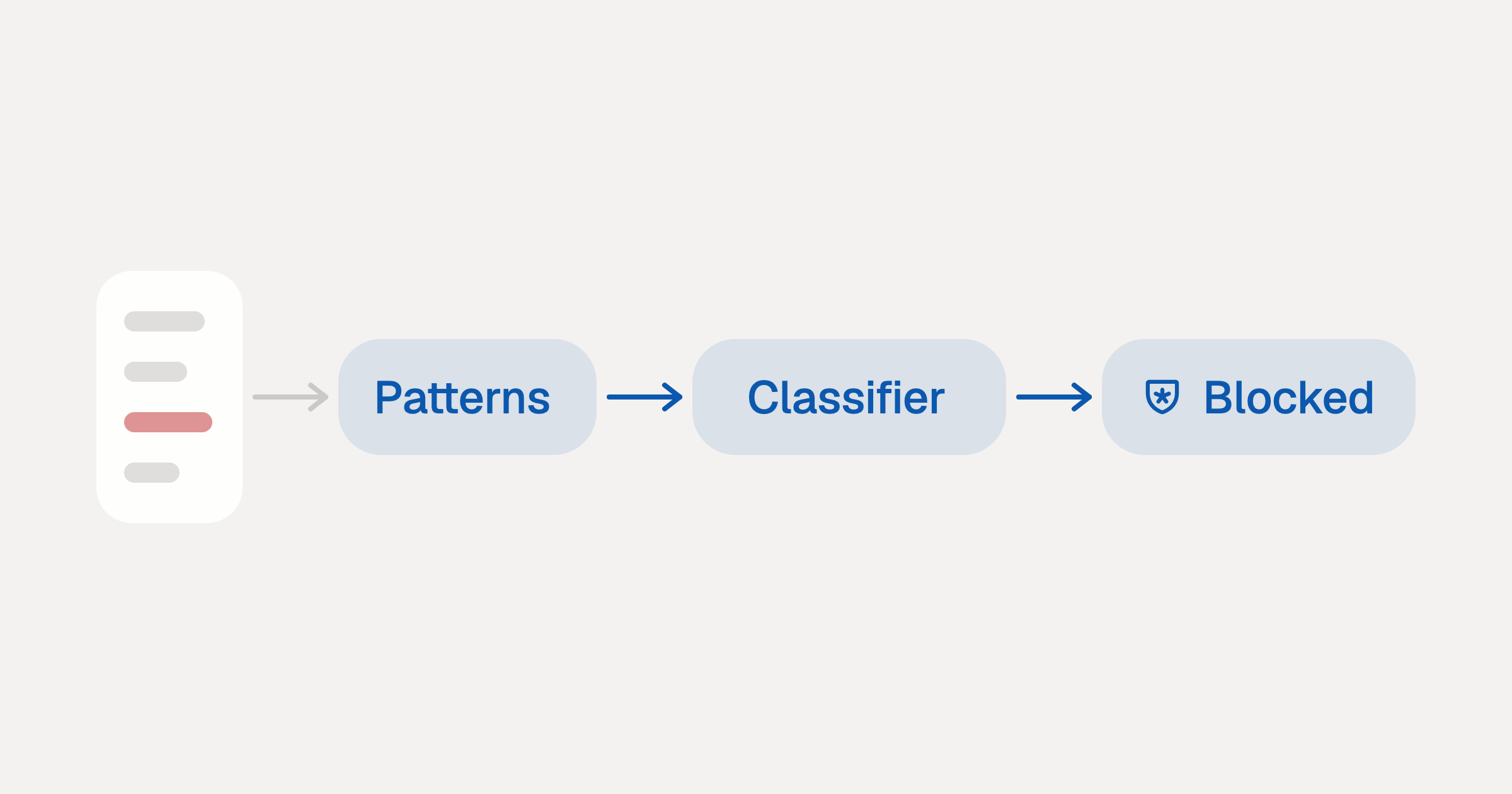
Indirect Prompt Injection Defense for MCP Tools: A Technical Guide
MCP tools that read emails, CRM records, and tickets are indirect prompt injection vectors. Here's how we built a two-tier defense that scans tool results in ~11ms.
12 min
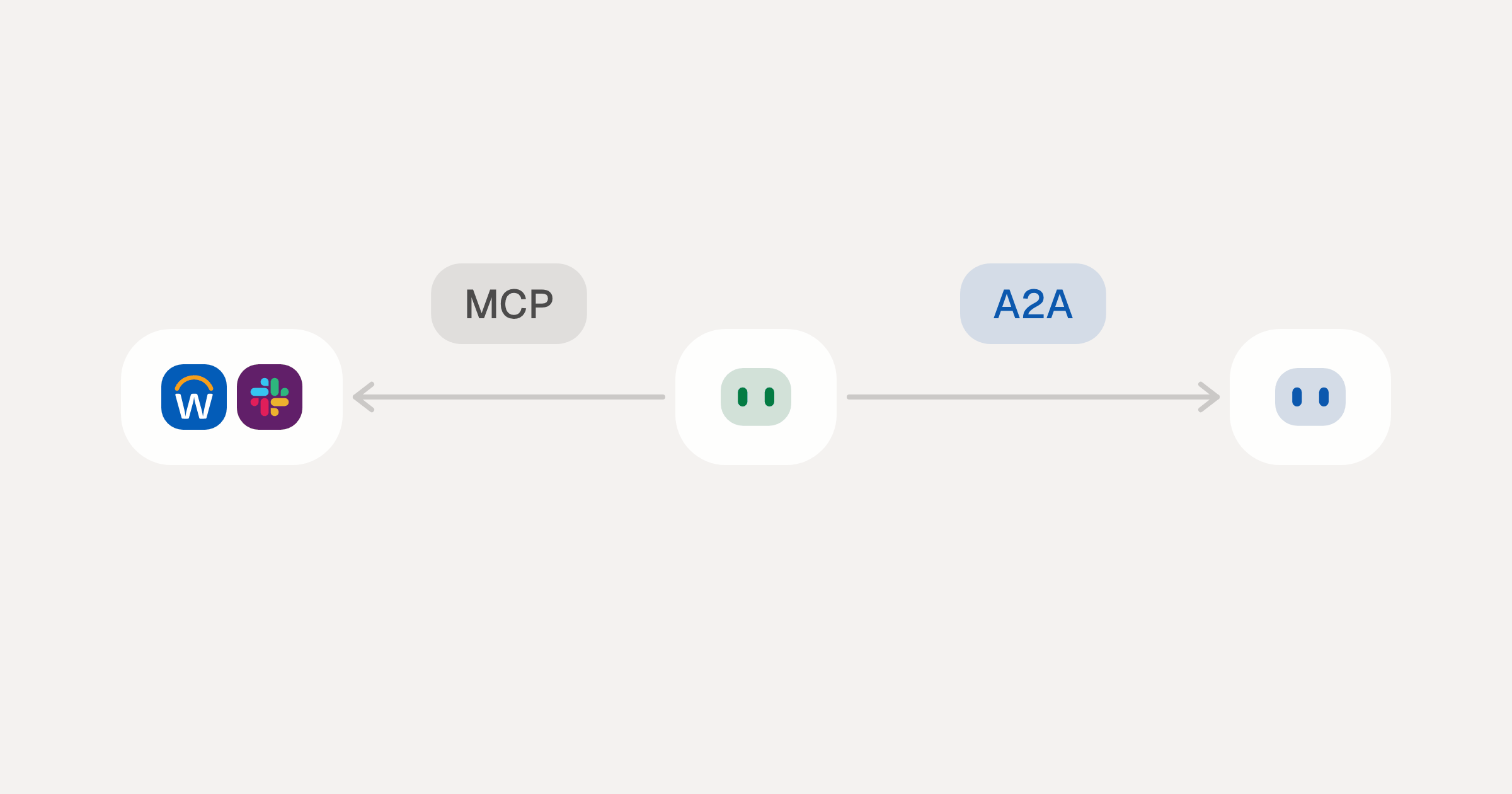
MCP vs A2A: Architecture, Security, and When to Use Each
MCP vs A2A: what each protocol standardizes, how they differ, the security risks they share, and when to use one, both or a hybrid.
12 min
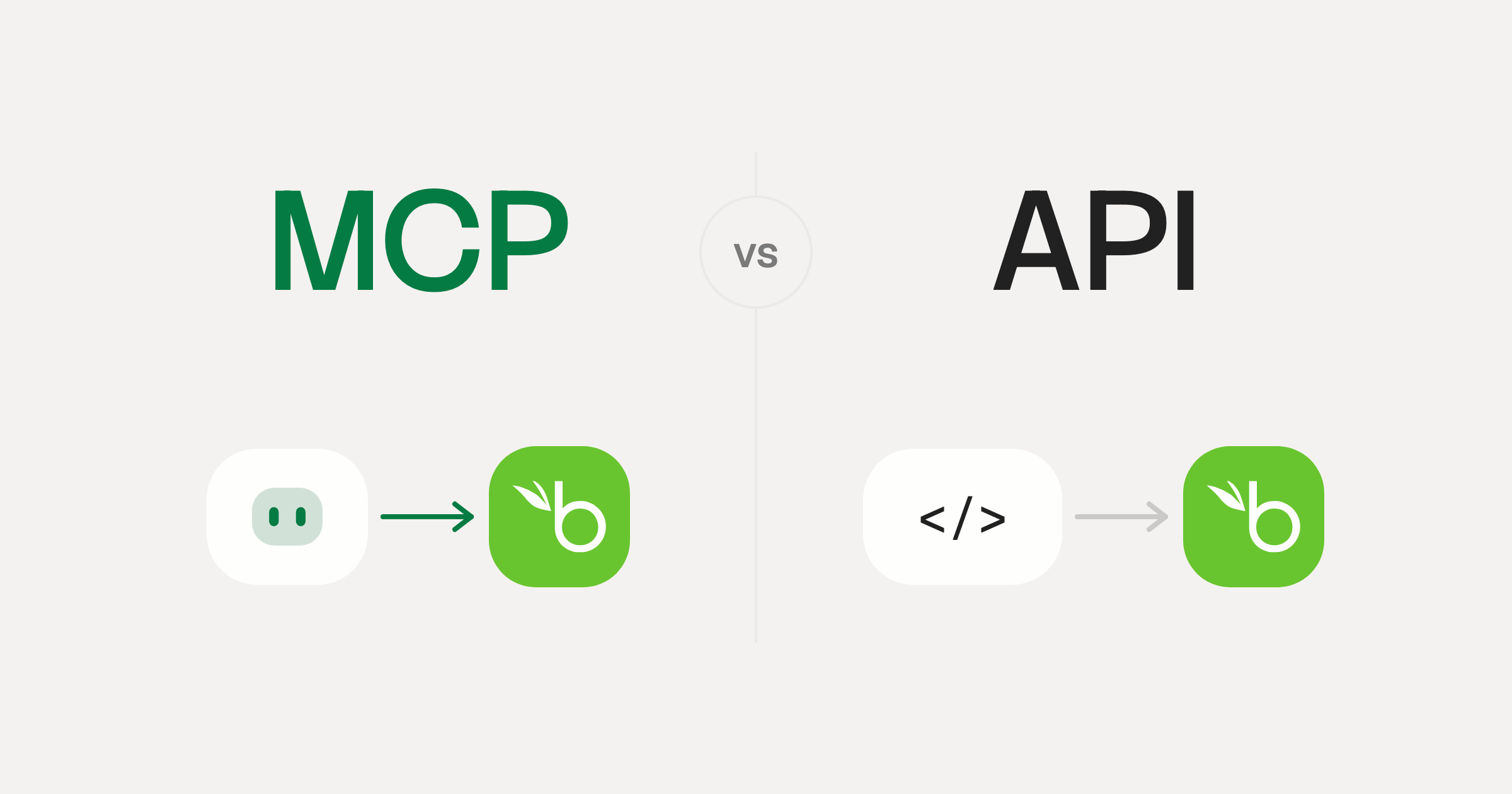
MCP vs API: What Hundreds of Connector Builds Taught Us
MCP wraps APIs, it doesn't replace them. After building hundreds of connectors that serve both, here's when each approach wins.
14 min read
Metabase MCP Server FAQ
Does StackOne have a Metabase MCP server?
Metabase MCP server vs direct API integration: what's the difference?
How does Metabase authentication work for AI agents?
origin_owner_id.Are Metabase MCP tools vulnerable to prompt injection?
What is the context bloat of a Metabase agent and how do I avoid it?
Can I limit which actions my Metabase agent can access?
Can I create custom agent actions for my Metabase MCP server?
When should I NOT use a Metabase MCP server?
What AI frameworks and AI clients does the StackOne Metabase MCP server support?
Put your AI agents to work
Connect AI to every company system and control what it can do in each one, down to the field.