
PayPal MCP Server
for AI Agents
Connect your AI agent to StackOne's PayPal MCP server and give it 64 MCP tools out of the box. Auth, tool execution, and security all managed.
 StackOne






Coverage
64 Agent Actions
Create, read, update, and delete across PayPal — and extend your agent's capabilities with custom actions.

Authentication
Agent Tool Authentication
Per-user OAuth in one call. Your PayPal MCP server gets session-scoped tokens with zero credentials stored on your infra.
Agent Auth →
Security
Agent Protection
Every PayPal tool response scanned for prompt injection in milliseconds — 88.7% accuracy, all running on CPU.
Prompt Injection Defense →
Performance
Max Agent Context. Min Cost.
Free up to 96% of your agent's context window to enhance reasoning and reduce cost, on every PayPal call.
Tools Discovery →What is the PayPal MCP Server?
A PayPal MCP server lets AI agents read and write PayPal data through the Model Context Protocol — Anthropic's open standard for connecting LLMs to external tools. StackOne's PayPal MCP server ships with 64 pre-built actions, fully extensible via the Connector Builder — plus managed authentication, prompt injection defense, observability, and agent execution runtime. Connect it from MCP clients like Claude Desktop, Claude Code, Cursor, Goose, and VS Code, or from agent frameworks like OpenAI Agents SDK, LangChain, and Vercel AI SDK.
All PayPal MCP Tools
Every action from PayPal's API, ready for your agent. Create, read, update, and delete — scoped to exactly what you need.
Orders
- Create Order
Create a new PayPal order for payment processing
- Get Order
Show details for an order by ID
- Update Order
Update an order with CREATED or APPROVED status
Invoices
- Send Invoice
Send or schedule a draft invoice to the recipient
- List Invoices
List invoices with optional filtering and pagination
- Get Invoice
Retrieve details of a specific invoice by ID
- Search Invoices
Search for invoices using filters via POST /v2/invoicing/search-invoices. All filter fields go in the request body (not query params except page, page_size, total_required). An empty body (no filters) returns all invoices.
- Update Invoice
Fully update an existing invoice — use this to change payment terms, line items, recipient, amounts, or any other invoice field. This is a full replacement (PUT), not a partial update.
- Delete Invoice
Delete a draft invoice by ID
Products
- Create Product
Create a new catalog product. Only name and type are required; never block on a missing optional value like home_url or image_url.
- List Products
List catalog products with pagination
- Get Product
Retrieve details of a specific catalog product
- Update Product
Update a catalog product's description, category, image_url, or home_url fields using JSON Patch with "add" or "remove" operations. Returns 204 No Content on success.
Subscription Plans
- Create Subscription Plan
Create a new subscription billing plan linked to a product, defining pricing, billing cycles, and payment preferences. For simple flat-rate plans use fixed_price, NOT VOLUME pricing. VOLUME and TIERED require 2+ tiers and quantity_supported=true.
- List Subscription Plans
List subscription billing plans with pagination
- Get Subscription Plan
Retrieve details of a specific subscription plan
Subscriptions
- Create Subscription
Create a new PayPal subscription that enrolls a subscriber into a billing plan, returning HATEOAS approval links the subscriber must visit to activate billing
- Get Subscription
Retrieve the full details of a specific PayPal subscription including its status, billing info, subscriber details, and plan configuration
- Update Subscription
Update an ACTIVE or SUSPENDED subscription using JSON Patch operations. Returns 204 No Content on success.
Payouts
- Create Batch Payout
Create a batch payout to send payments to multiple recipients (max 15,000 items). sender_batch_id must be unique per 30 days even on failed attempts. Default to PAYPAL wallet — VENMO is US-only and unsupported in sandbox.
- Get Batch Payout
Retrieve details of a batch payout
Disputes
- List Disputes
List disputes with optional filtering by state, date range, or transaction ID. Supports page and page_size (1-50, default 10) for pagination. dispute_state accepts only ONE value per call.
- Get Dispute
Retrieve details of a specific dispute
Webhooks
- Create Webhook
Create a new webhook to receive event notifications. WARNING — PayPal sends a live HTTPS request to the URL at creation time and returns 400 if unreachable. Do NOT use example.com, localhost, or placeholder URLs.
- List Webhooks
List all webhooks for the app
- Get Webhook
Retrieve full details of a specific webhook by its ID
- Update Webhook
Update a webhook's URL or event types using JSON Patch. Only the "replace" operation is supported.
- Delete Webhook
Delete a webhook by ID
Unified Users
- List Unified Users
List unified users (staff logins) on the connected PayPal business account.
- Get Unified User
Get a unified PayPal user by ID.
Other (34)
- Create Draft Invoice
Create a new draft invoice
- Send Invoice Reminder
Send a reminder to the payer about an invoice. The invoice must have at least one recipient with an email address — invoices without primary_recipients will return 400.
- Send Dispute Message
Send a message about a dispute to the other party
- Get Captured Payment
Retrieve details of a captured payment
- Get Refund
Retrieve details of a specific refund
- Get Authorization
Retrieve details of an authorized payment
- List Subscription Transactions
List transactions for a specific subscription
- Get Payout Item
Retrieve details of a specific payout item
- List Transactions
Search for transactions within a date range
- List Balances
List account balances by currency
- List Webhook Event Types
List all available webhook event types
- List Webhook Event Notifications
List webhook event notifications with optional filtering by date range, transaction ID, or event type. If filtering by date, start_time and end_time must both be in the past and within a 30-day window (use 29 days to be safe).
- Get Webhook Event
Retrieve details of a specific webhook event notification by ID
- Get Unified Credentials
Get the current PayPal connection's unified credentials and identity.
- Update Plan
Update a billing plan's name, description, payment preferences, or tax settings using JSON Patch. Returns 204 No Content on success.
- Delete External Payment
Delete an external payment from an invoice
- Capture Order Payment
Capture payment for an approved order
- Authorize Order Payment
Authorize payment for an approved order
- Refund Captured Payment
Refund a captured payment in full or partially
- Capture Authorized Payment
Capture an authorized payment
- Void Authorization
Void an authorized payment
- Cancel Sent Invoice
Cancel a sent invoice
- Record Invoice Payment
Records an external payment (cash, check, bank transfer, etc.) against a sent invoice via POST /v2/invoicing/invoices/{invoice_id}/payments. The invoice must be in SENT, PARTIALLY_PAID, or PAYMENT_PENDING status — DRAFT or CANCELLED invoices return 422 Unprocessable Entity, so use send_invoice first if needed. Returns an EXTR-prefixed payment_id usable with delete_external_payment to reverse the record.
- Generate Invoice Number
Generate the next sequential invoice number
- Record Invoice Refund
Records a refund against a paid invoice via POST /v2/invoicing/invoices/{invoice_id}/refunds. If the total refunded amount equals all payments, the invoice status changes to REFUNDED; otherwise it changes to PARTIALLY_REFUNDED.
- Activate Plan
Activate a billing plan that was created with status CREATED. Returns 204 No Content on success.
- Deactivate Plan
Deactivate an ACTIVE billing plan. No new subscriptions can be created against it. Returns 204 No Content on success.
- Revise Subscription Plan Or Quantity
Revise the plan, quantity, or shipping details of a subscription. Requires buyer re-approval via redirect.
- Cancel Subscription
Cancel an active subscription
- Suspend Subscription
Suspend an active subscription
- Activate Subscription
Activate a suspended subscription
- Cancel Unclaimed Payout Item
ONLY works on UNCLAIMED payout items — PENDING items cannot be cancelled (returns 400). Always check transaction_status with get_payout_item first before calling this action.
- Accept Dispute Claim
Accept a dispute claim and refund the buyer
- Escalate Dispute To Claim
Escalate a dispute to a PayPal claim
Set Up Your PayPal MCP Server in Minutes
One endpoint. Any framework. Your agent is talking to PayPal in under 10 lines of code.
Agent Frameworks


 JSON
JSON{
"mcpServers": {
"stackone": {
"command": "npx",
"args": [
"-y",
"mcp-remote@latest",
"https://api.stackone.com/mcp?x-account-id=<account_id>",
"--header",
"Authorization: Basic <YOUR_BASE64_TOKEN>"
]
}
}
}Check More Commerce MCP Servers
172+ actions
138+ actions
137+ actions
128+ actions
120+ actions
90+ actions

90+ actions
Platform Resources

MCP Code Mode: Keeping Tool Responses Out of Agent Context
Anthropic's code_execution processes data already in context. Custom MCP code mode keeps raw tool responses in a sandbox. 14K tokens vs 500.
11 min

Comparing BM25, TF-IDF, and Hybrid Search for MCP Tool Discovery
Benchmarking BM25, TF-IDF, and hybrid search for MCP tool discovery across 916 tools. The 80/20 TF-IDF/BM25 hybrid hits 21% Top-1 accuracy in under 1ms.
10 min
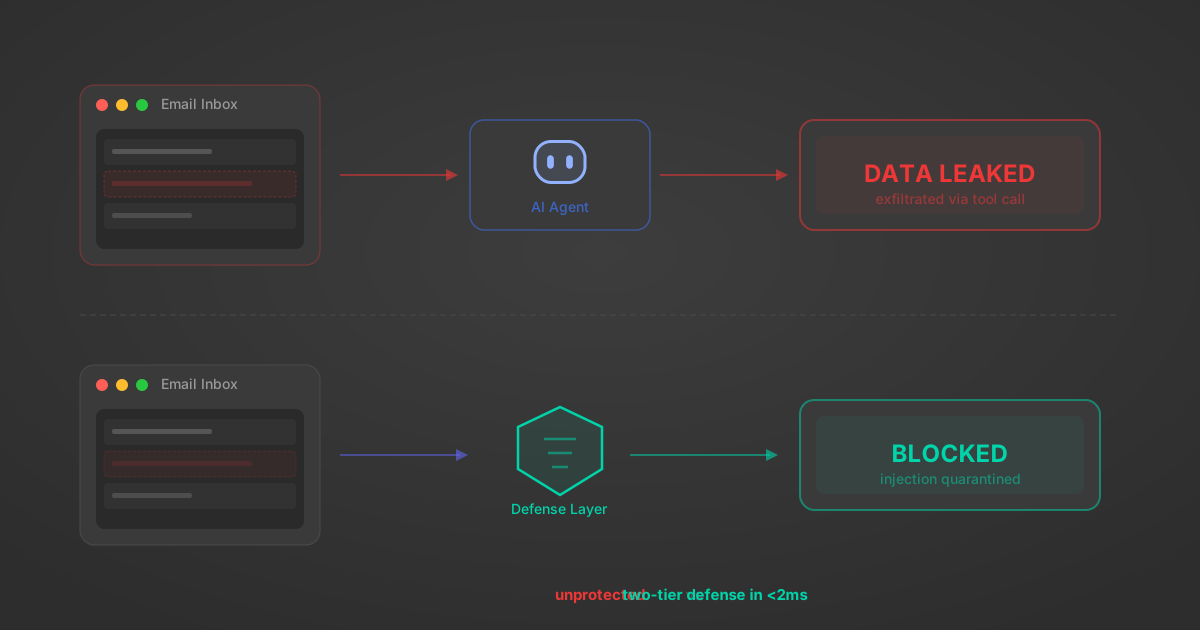
Indirect Prompt Injection Defense for MCP Tools: A Technical Guide
MCP tools that read emails, CRM records, and tickets are indirect prompt injection vectors. Here's how we built a two-tier defense that scans tool results in ~11ms.
12 min
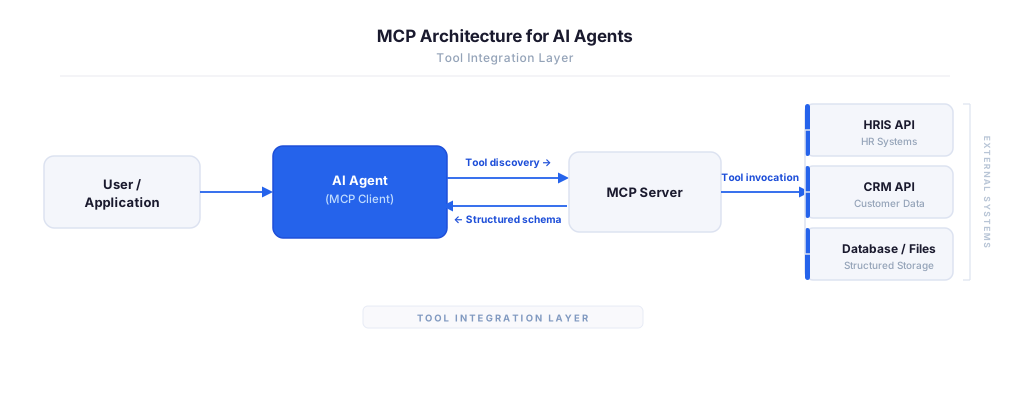
MCP vs A2A: Architecture, Security, and When to Use Each
MCP vs A2A: what each protocol standardizes, how they differ, their shared security risks including indirect prompt injection, and when to use one, both, or a hybrid architecture.
12 min
MCP vs API: What Hundreds of Connector Builds Taught Us
MCP wraps APIs, it doesn't replace them. After building hundreds of connectors that serve both, here's when each approach wins.
14 min read
PayPal MCP Server FAQ
Does StackOne have a PayPal MCP server?
PayPal MCP server vs direct API integration — what's the difference?
How does PayPal authentication work for AI agents?
origin_owner_id.Are PayPal MCP tools vulnerable to prompt injection?
What is the context bloat of a PayPal agent and how do I avoid it?
Can I limit which actions my PayPal agent can access?
Can I create custom agent actions for my PayPal MCP server?
When should I NOT use a PayPal MCP server?
What AI frameworks and AI clients does the StackOne PayPal MCP server support?
Put your AI agents to work
All the tools you need to build and scale AI agent integrations, with best-in-class connectivity, execution, and security.