
RECRU MCP Server
for AI Agents
Connect your AI agent to StackOne's RECRU MCP server and give it 65 MCP tools out of the box. Auth, tool execution, and security all managed.
 StackOne






Coverage
65 Agent Actions
Create, read, update, and delete across RECRU — and extend your agent's capabilities with custom actions.

Authentication
Agent Tool Authentication
Per-user OAuth in one call. Your RECRU MCP server gets session-scoped tokens with zero credentials stored on your infra.
Agent Auth →
Security
Agent Protection
Every RECRU tool response scanned for prompt injection in milliseconds — 88.7% accuracy, all running on CPU.
Prompt Injection Defense →
Performance
Max Agent Context. Min Cost.
Free up to 96% of your agent's context window to enhance reasoning and reduce cost, on every RECRU call.
Tools Discovery →What is the RECRU MCP Server?
A RECRU MCP server lets AI agents read and write RECRU data through the Model Context Protocol — Anthropic's open standard for connecting LLMs to external tools. StackOne's RECRU MCP server ships with 65 pre-built actions, fully extensible via the Connector Builder — plus managed authentication, prompt injection defense, observability, and agent execution runtime. Connect it from MCP clients like Claude Desktop, Claude Code, Cursor, Goose, and VS Code, or from agent frameworks like OpenAI Agents SDK, LangChain, and Vercel AI SDK.
All RECRU MCP Tools
Every action from RECRU's API, ready for your agent. Create, read, update, and delete — scoped to exactly what you need.
Candidate Educations
- Add Candidate Education
Add Candidate Education
- List Candidate Educations
List Candidate Educations
- Update Candidate Education
Update Candidate Education
- Delete Candidate Education
Delete Candidate Education
Candidate Preferred Work Locations
- Add Candidate Preferred Work Locations
Add Candidate Preferred Work Locations
- Delete Candidate Preferred Work Locations
Delete Candidate Preferred Work Locations
Candidate Work Positions
- Add Candidate Work Position
Add Candidate Work Position
- List Candidate Work Positions
List Candidate Work Positions
- Update Candidate Work Position
Update Candidate Work Position
- Delete Candidate Work Position
Delete Candidate Work Position
Candidate Events
- List Candidate Events
List of all candidate events
- Delete Candidate Event
Delete Candidate Event
Candidates
- Get Candidate
Detailed information about candidate
- List Candidates
List of candidates with paging and search. Search uses only the basic Candidate entity fields (does not search in tags or projects)
Department Contacts
- Get Department Contact
Return contact of department based on ID
- List Department Contacts
List of Department Contacts
Job Offers
- Get Job Offer
Return job offer based on ID
- List Job Offers
List of job offers with paging and search in basic job offer fields
Project Candidate Phase Events
- Update Project Candidate Phase Event
Update Project Candidate Phase Event
- Delete Project Candidate Phase Event
Delete Project Candidate Phase Event
Users
- Get User
Get User
- List Users
List of users with paging and search
Other (43)
- Create Or Update Candidate (upsert)
Save a new candidate or update existing candidate data (upsert)
- Create Or Update Candidate Event
Create or Update Candidate Event
- Add Tags To Candidate
Add Tags To Candidate
- Create Or Update Department Contact (upsert)
save new department contact or update existing department contact
- Create Or Update Department (upsert)
save new department or update existing department data
- Create Or Update Company Website Offer
Save Job Offer Data on Company Website
- Add Candidate To Project (application)
Add Candidate to Project (application)
- Add Phase Event To Project Candidate
Add Phase Event To Project Candidate
- Create Or Update Project (upsert)
save a new project or update existing project data
- List Candidate Preferred Locations
List Candidate Preferred Locations
- Get Candidate CV File Content
returns base64 encoded file content
- Get Candidate File Content
returns base64 encoded file content
- Get Candidate Test Result Detail
Get Candidate Test Result Detail
- List Candidate Files
List of files with paging and search
- List Candidate Test Results
List Candidate Test Results
- List Candidates (id + Name Only)
Simple list of candidates contains only basic information about the candidate. Use it to increase speed when you don't need a list of tags and projects for each candidate.
- List Candidate Source Channels
List Candidate Source Channels
- List Available Colors
List Available Colors
- List Country Code/Name Pairs
List Country Code/Name Pairs
- List Locales
List Locales
- List Event Types
List Event Types
- List Rejection Reasons
List Rejection Reasons
- Get Department (Client)
Return department based on ID
- Get Department File Content
returns base64 encoded file content
- List Department Files
List of files with paging and search
- List Departments
List of departments with paging and search
- List Departments (id + Name Only)
List of departments with paging and search
- Get Candidate Project Progress (phase History)
Candidate's project stage
- List Candidates On Project
List of candidates with paging and search
- Get Project (Job Opening)
Return project based on ID
- Get Project Offer Reaction Form URL
Get URL to Job Offer Application Form
- List Project Phases (pipeline Stages)
List Project Phases (pipeline stages)
- List Projects
List of projects with paging and search. Search uses only the basic project fields (does not search candidates)
- List Projects (id + Name Only)
Simple list of projects contains only basic information about the project. Use it to increase speed when you don't need a list of candidates for a project
- List Tag Sectors
List of sectors with paging and search
- List Tag Seniority Levels
List of seniorities with paging and search
- List Tags
List of tags with paging and search
- List Allowed Mobile App Menu Items For User
List Allowed Mobile App Menu Items for User
- Set Candidate Color Marker
Set Candidate Color Marker
- Set Department Color Marker
Set Department Color Marker
- Remove Tags From Candidate
Remove Tags From Candidate
- Remove Candidate From Project
Remove Candidate From Project
- Ping RECRU
Verifies the connection to RECRU by calling ToolsService.ping. Returns the server's view of the current time, the caller's IP, the active JWT, and the JWT's absolute expiration timestamp.
RECRU AI Agent Use Cases
Connect your AI agent to RECRU and help your team scale the recruiting operations they run by hand today.
Use StackOne to connect your AI agent to your ATS and job boards to automate job posting distribution.
ViewUse StackOne to connect your AI agent to your ATS, survey tools, and messaging systems to automate reference checks.
ViewUse StackOne to connect your AI agent to your ATS, HRIS, and document management tools to automate offer letter generation.
ViewSet Up Your RECRU MCP Server in Minutes
One endpoint. Any framework. Your agent is talking to RECRU in under 10 lines of code.
Agent Frameworks


 JSON
JSON{
"mcpServers": {
"stackone": {
"command": "npx",
"args": [
"-y",
"mcp-remote@latest",
"https://api.stackone.com/mcp?x-account-id=<account_id>",
"--header",
"Authorization: Basic <YOUR_BASE64_TOKEN>"
]
}
}
}Platform Resources

MCP Code Mode: Keeping Tool Responses Out of Agent Context
Anthropic's code_execution processes data already in context. Custom MCP code mode keeps raw tool responses in a sandbox. 14K tokens vs 500.
11 min

Comparing BM25, TF-IDF, and Hybrid Search for MCP Tool Discovery
Benchmarking BM25, TF-IDF, and hybrid search for MCP tool discovery across 916 tools. The 80/20 TF-IDF/BM25 hybrid hits 21% Top-1 accuracy in under 1ms.
10 min
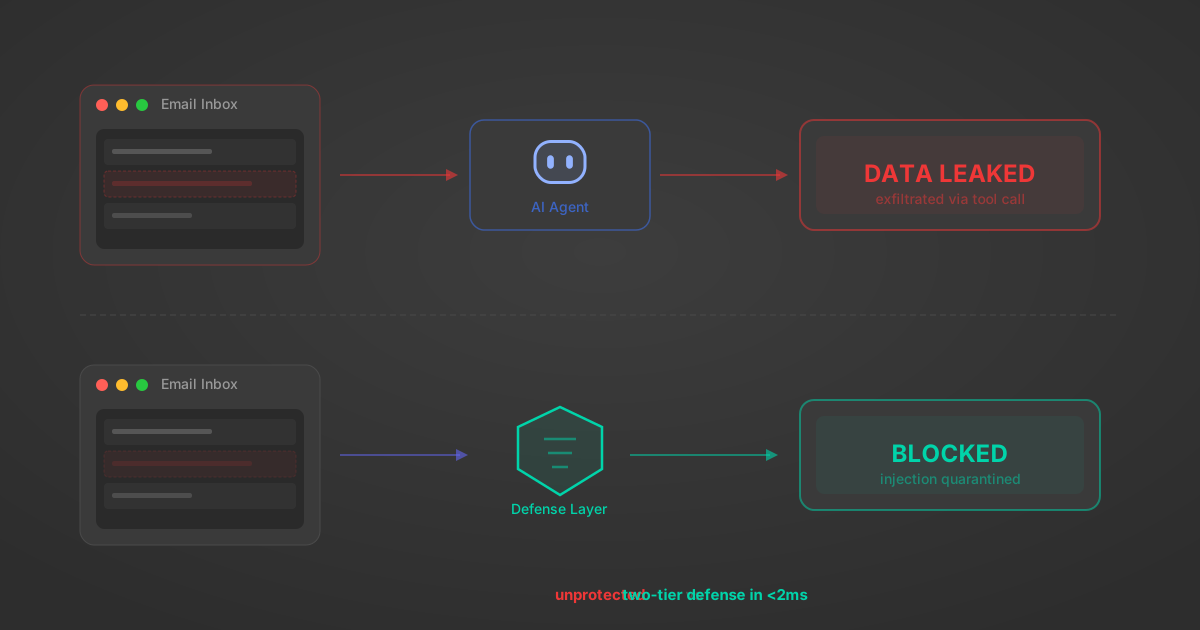
Indirect Prompt Injection Defense for MCP Tools: A Technical Guide
MCP tools that read emails, CRM records, and tickets are indirect prompt injection vectors. Here's how we built a two-tier defense that scans tool results in ~11ms.
12 min
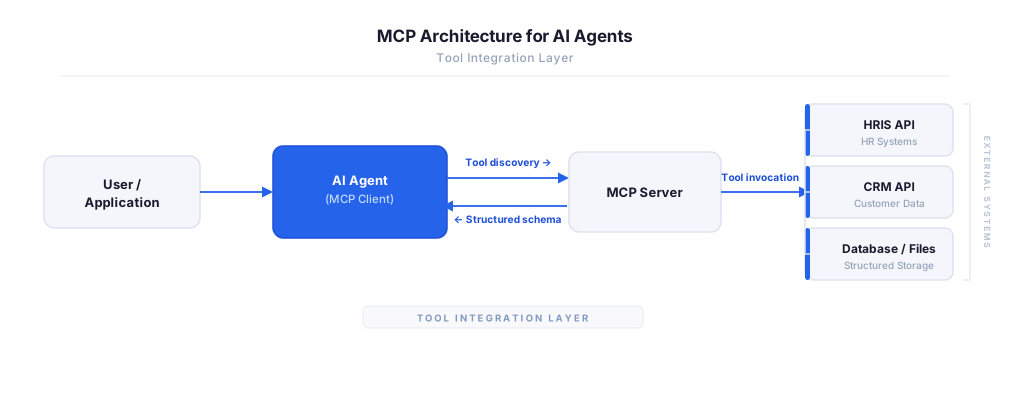
MCP vs A2A: Architecture, Security, and When to Use Each
MCP vs A2A: what each protocol standardizes, how they differ, their shared security risks including indirect prompt injection, and when to use one, both, or a hybrid architecture.
12 min
MCP vs API: What Hundreds of Connector Builds Taught Us
MCP wraps APIs, it doesn't replace them. After building hundreds of connectors that serve both, here's when each approach wins.
14 min read
RECRU MCP Server FAQ
Does StackOne have a RECRU MCP server?
RECRU MCP server vs direct API integration — what's the difference?
How does RECRU authentication work for AI agents?
origin_owner_id.Are RECRU MCP tools vulnerable to prompt injection?
What is the context bloat of a RECRU agent and how do I avoid it?
Can I limit which actions my RECRU agent can access?
Can I create custom agent actions for my RECRU MCP server?
When should I NOT use a RECRU MCP server?
What AI frameworks and AI clients does the StackOne RECRU MCP server support?
Put your AI agents to work
All the tools you need to build and scale AI agent integrations, with best-in-class connectivity, execution, and security.