
E2B MCP Server
for AI Agents
Connect your AI agent to StackOne's E2B MCP server and give it 62 MCP tools out of the box. Auth, tool execution, and security all managed.
 StackOne






Coverage
62 Agent Actions
Create, read, update, and delete across E2B — and extend your agent's capabilities with custom actions.

Authentication
Agent Tool Authentication
Per-user OAuth in one call. Your E2B MCP server gets session-scoped tokens with zero credentials stored on your infra.
Agent Auth →
Security
Agent Protection
Every E2B tool response scanned for prompt injection in milliseconds — 88.7% accuracy, all running on CPU.
Prompt Injection Defense →
Performance
Max Agent Context. Min Cost.
Free up to 96% of your agent's context window to enhance reasoning and reduce cost, on every E2B call.
Tools Discovery →What is the E2B MCP Server?
A E2B MCP server lets AI agents read and write E2B data through the Model Context Protocol — Anthropic's open standard for connecting LLMs to external tools. StackOne's E2B MCP server ships with 62 pre-built actions, fully extensible via the Connector Builder — plus managed authentication, prompt injection defense, observability, and agent execution runtime. Connect it from MCP clients like Claude Desktop, Claude Code, Cursor, Goose, and VS Code, or from agent frameworks like OpenAI Agents SDK, LangChain, and Vercel AI SDK.
All E2B MCP Tools
Every action from E2B's API, ready for your agent. Create, read, update, and delete — scoped to exactly what you need.
Files
- Upload File
Upload a file into a running sandbox, creating parent directories as needed.
- Download File
Download a file from inside a running sandbox by path.
- Move File
Move or rename a file or directory inside a running sandbox.
- Remove File
Delete a file or directory inside a running sandbox.
Watchers
- Create Watcher
Create a pollable filesystem watcher on a directory inside a running sandbox.
- Remove Watcher
Destroy a filesystem watcher and free its server-side event buffer.
Sandboxs
- Create Sandbox
Start a new sandbox from a template and return its ID and envd access token.
- Get Sandbox
Get a single sandbox by ID, including its state, resource allocation, expiry and envd access token.
Sandbox Metrics
- Get Sandbox Metrics
Return the CPU, memory and disk time series for one sandbox.
- List Sandbox Metrics
Return metrics for several sandboxes in a single call.
Snapshots
- Create Snapshot
Capture a sandbox's current state as a persistent snapshot that outlives the sandbox.
- List Snapshots
List the team's snapshots, optionally filtered by source sandbox or name.
Secrets
- Create Secret
Create a secret by storing a runtime marker as its first version.
- List Secrets
List the project's secrets, returning metadata only.
- Get Secret
Get one secret's metadata by identifier or name.
- Update Secret
Rotate a secret by appending a new version of its stored marker.
- Delete Secret
Revoke a secret and schedule its versions for cleanup.
Templates
- Create Template
Create a new sandbox template and its initial build record.
- List Templates
List the team's template definitions.
- Update Template
Update a template's settings, such as whether it is public.
- Delete Template
Delete a template and its builds.
Volumes
- Create Volume
Create a new persistent volume for the team.
- List Volumes
List the team's persistent volumes.
- Get Volume
Get one persistent volume by ID.
- Delete Volume
Delete a persistent volume from the team.
Webhooks
- List Webhooks
List every webhook registered for the API key's team.
- Get Webhook
Return the configuration of a single registered webhook.
Other (35)
- Send Process Input
Send stdin or PTY bytes to a running process inside a sandbox.
- Send Process Signal
Send a termination signal to a running process inside a sandbox.
- List Directory
List the entries of a directory inside a running sandbox, optionally recursing to a given depth.
- Get Watcher Events
Drain the filesystem events a watcher has buffered since the last poll.
- List Processes
List the processes currently running inside a sandbox.
- Get Sandbox Health
Probe whether a sandbox's in-sandbox agent is alive and reachable.
- Get Sandbox Service Stats
Return internal service statistics from a sandbox's in-sandbox agent.
- List Sandbox Environment Variables
Return the environment variables visible inside a running sandbox.
- List Sandboxes
List the team's sandboxes, newest first, with optional state, template, metadata and start-time filters.
- Get Sandbox Logs
Read a sandbox's log stream with cursor, direction, level and search filters.
- List Template Tags
List all tags pointing at builds of one template.
- Get Team Metrics
Return the team's concurrent-sandbox and sandbox-start-rate time series over an interval.
- Get Team Metrics Max
Return the peak value of one team metric over an interval.
- List Template Builds
List all builds for one template.
- Get Build Upload Link
Get a presigned upload link for a tar file of template build layer files.
- Get Build Status
Get the status of one template build, with a slice of its logs.
- Get Build Logs
Read a template build's log stream with cursor, direction, level and source filters.
- List Webhook Deliveries
List the delivery attempts a webhook has made, newest first, with optional time, status and event-type filters.
- Get Webhook Statistics
Return aggregate delivery counts and latency for a webhook over an interval.
- Update Process
Update a running process inside a sandbox, such as resizing its pseudo-terminal.
- Set Sandbox Timeout
Overwrite a sandbox's time to live so it expires the given number of seconds from now.
- Update Sandbox Network
Replace the egress network rules on a running sandbox.
- Delete Tags
Delete one or more tags from a template.
- Stat File
Return metadata for one path inside a running sandbox.
- Make Directory
Create a directory inside a running sandbox.
- Compose Files
Concatenate several files inside a sandbox into one using zero-copy composition.
- Close Process Stdin
Close standard input on a running process to signal end of file.
- Connect To Sandbox
Return sandbox details and resume the sandbox first if it is paused.
- Pause Sandbox
Snapshot a sandbox in place and stop it so it can be resumed later.
- Kill Sandbox
Terminate a sandbox immediately and release its resources.
- Fork Sandbox
Checkpoint a running sandbox and create new sandboxes from that snapshot.
- Refresh Sandbox
Extend a sandbox's time to live to keep it alive.
- Assign Tags
Assign one or more tags to a template build.
- Check Template Alias
Check whether a template exists under a given alias.
- Start Build
Start building a template image from a base image or template and a list of steps.
Set Up Your E2B MCP Server in Minutes
One endpoint. Any framework. Your agent is talking to E2B in under 10 lines of code.
Agent Frameworks


 JSON
JSON{
"mcpServers": {
"stackone": {
"command": "npx",
"args": [
"-y",
"mcp-remote@latest",
"https://api.stackone.com/mcp?x-account-id=<account_id>",
"--header",
"Authorization: Basic <YOUR_BASE64_TOKEN>"
]
}
}
}Check More AI & ML MCP Servers
182+ actions
126+ actions
121+ actions
57+ actions
37+ actions
35+ actions
35+ actions
Platform Resources

MCP Code Mode: Keeping Tool Responses Out of Agent Context
Anthropic's code_execution processes data already in context. Custom MCP code mode keeps raw tool responses in a sandbox. 14K tokens vs 500.
11 min

Comparing BM25, TF-IDF, and Hybrid Search for MCP Tool Discovery
Benchmarking BM25, TF-IDF, and hybrid search for MCP tool discovery across 916 tools. The 80/20 TF-IDF/BM25 hybrid hits 21% Top-1 accuracy in under 1ms.
10 min
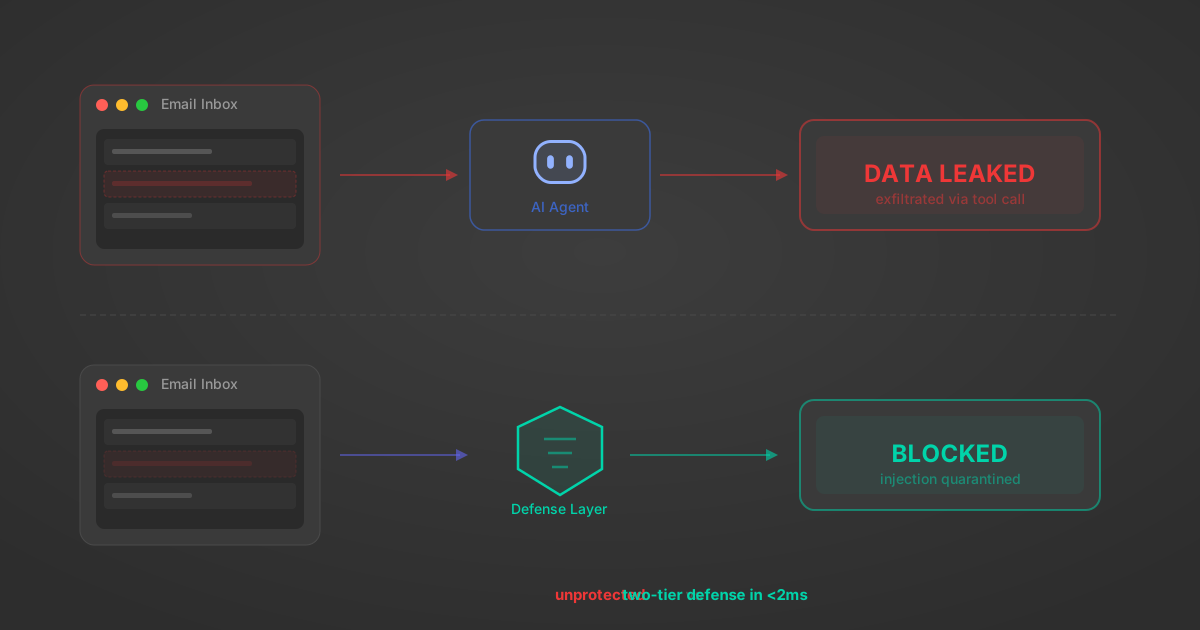
Indirect Prompt Injection Defense for MCP Tools: A Technical Guide
MCP tools that read emails, CRM records, and tickets are indirect prompt injection vectors. Here's how we built a two-tier defense that scans tool results in ~11ms.
12 min
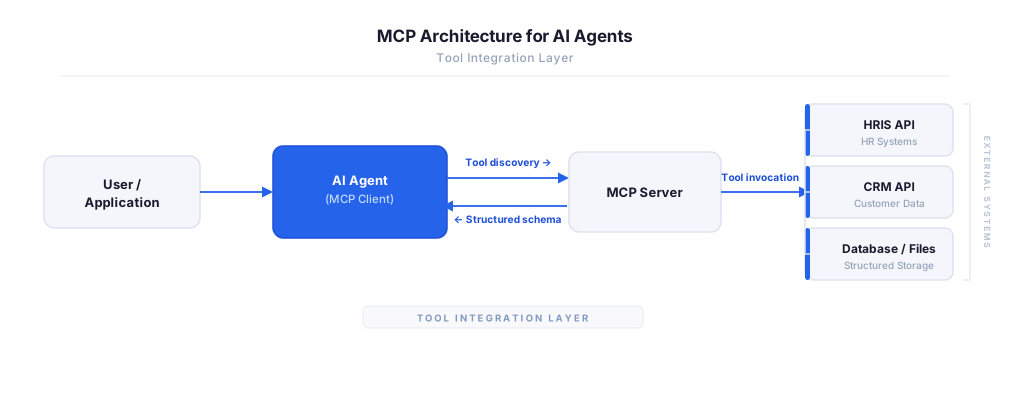
MCP vs A2A: Architecture, Security, and When to Use Each
MCP vs A2A: what each protocol standardizes, how they differ, their shared security risks including indirect prompt injection, and when to use one, both, or a hybrid architecture.
12 min
MCP vs API: What Hundreds of Connector Builds Taught Us
MCP wraps APIs, it doesn't replace them. After building hundreds of connectors that serve both, here's when each approach wins.
14 min read
E2B MCP Server FAQ
Does StackOne have a E2B MCP server?
E2B MCP server vs direct API integration — what's the difference?
How does E2B authentication work for AI agents?
origin_owner_id.Are E2B MCP tools vulnerable to prompt injection?
What is the context bloat of a E2B agent and how do I avoid it?
Can I limit which actions my E2B agent can access?
Can I create custom agent actions for my E2B MCP server?
When should I NOT use a E2B MCP server?
What AI frameworks and AI clients does the StackOne E2B MCP server support?
Put your AI agents to work
All the tools you need to build and scale AI agent integrations, with best-in-class connectivity, execution, and security.