
Bitly MCP Server
for AI Agents
Connect your AI agent to StackOne's Bitly MCP server and give it 85 MCP tools out of the box. Auth, tool execution, and security all managed.
 StackOne






Coverage
85 Agent Actions
Create, read, update, and delete across Bitly — and extend your agent's capabilities with custom actions.

Authentication
Agent Tool Authentication
Per-user OAuth in one call. Your Bitly MCP server gets session-scoped tokens with zero credentials stored on your infra.
Agent Auth →
Security
Agent Protection
Every Bitly tool response scanned for prompt injection in milliseconds — 88.7% accuracy, all running on CPU.
Prompt Injection Defense →
Performance
Max Agent Context. Min Cost.
Free up to 96% of your agent's context window to enhance reasoning and reduce cost, on every Bitly call.
Tools Discovery →What is the Bitly MCP Server?
A Bitly MCP server lets AI agents read and write Bitly data through the Model Context Protocol — Anthropic's open standard for connecting LLMs to external tools. StackOne's Bitly MCP server ships with 85 pre-built actions, fully extensible via the Connector Builder — plus managed authentication, prompt injection defense, observability, and agent execution runtime. Connect it from MCP clients like Claude Desktop, Claude Code, Cursor, Goose, and VS Code, or from agent frameworks like OpenAI Agents SDK, LangChain, and Vercel AI SDK.
All Bitly MCP Tools
Every action from Bitly's API, ready for your agent. Create, read, update, and delete — scoped to exactly what you need.
Current Users
- Get Current User
Retrieve information about the currently authenticated Bitly user
- Update Current User
Update properties of the currently authenticated Bitly user
A Bitlinks
- Create A Bitlink
Create a Bitlink with full options including title, tags, deeplinks and expiration
- Get A Bitlink
Retrieve a single Bitlink by its identifier
- Update A Bitlink
Update properties of an existing Bitlink
- Delete A Bitlink
Delete an unedited Bitlink
A Custom Bitlinks
- Add A Custom Bitlink
Create a custom Bitlink keyword that points to an existing Bitlink
- Get A Custom Bitlink
Retrieve information about a custom Bitlink
- Update A Custom Bitlink
Update a custom Bitlink to point to a different Bitlink
A Groups
- Get A Group
Retrieve details for a specific group by GUID
- Update A Group
Update properties of a group
Group Preferences
- Get Group Preferences
Retrieve preferences for a group
- Update Group Preferences
Update preferences for a group
A Campaigns
- Create A Campaign
Create a new campaign within a group
- Get A Campaign
Retrieve a campaign by GUID
- Update A Campaign
Update properties of a campaign
A Channels
- Create A Channel
Create a new channel within a group
- Get A Channel
Retrieve a channel by GUID
- Update A Channel
Update properties of a channel
A QR Codes
- Create A QR Code
Create a saved QR code resource
- Get A QR Code
Retrieve a saved QR code by ID
- Update A QR Code
Update properties of a saved QR code
- Delete A QR Code
Delete a QR code and its associated link
A Webhooks
- Create A Webhook
Create a webhook for an organization
- Get A Webhook
Retrieve a webhook by GUID
- Update A Webhook
Update properties of a webhook
- Delete A Webhook
Delete a webhook
Other (58)
- Get Clicks For A Bitlink
Retrieve click metrics for a Bitlink over time
- Get Clicks Summary For A Bitlink
Retrieve a summarized click count for a Bitlink
- Get Engagement Counts For A Bitlink
Retrieve engagement counts (button clicks, clicks, scans) over time
- Get Engagement Summary For A Bitlink
Retrieve a summarized engagement count for a Bitlink
- Get Bitlink Metrics By Country
Retrieve click metrics grouped by country for a Bitlink
- Get Bitlink Metrics By City
Retrieve click metrics grouped by city for a Bitlink
- Get Bitlink Metrics By Device
Retrieve click metrics grouped by device type for a Bitlink
- Get Bitlink Metrics By Referrers
Retrieve click metrics grouped by referrer for a Bitlink
- Get Bitlink Metrics By Referrer Name
Retrieve click metrics grouped by referrer name for a Bitlink
- Get Bitlink Metrics By Referring Domains
Retrieve click metrics grouped by referring domain for a Bitlink
- Get Bitlink Metrics By Referrers By Domain
Retrieve click metrics grouped by referrers within each domain
- List Sorted Bitlinks For Group
Retrieve Bitlinks for a group sorted by click count
- Get Clicks For A Custom Bitlink
Retrieve clicks for a custom Bitlink across its lifetime
- Get Custom Bitlink Metrics By Destination
Retrieve click metrics for a custom Bitlink broken down by historical destinations
- List Groups
Retrieve all groups available to the authenticated user
- Get Group Tags
Retrieve all tags defined for a group
- List Bitlinks By Group
Retrieve Bitlinks owned by a group with filtering and pagination
- Get Group Shorten Counts
Retrieve the number of Bitlinks shortened by a group over time
- Get Group Metrics By Country
Retrieve click metrics for a group grouped by country
- Get Group Metrics By City
Retrieve click metrics for a group grouped by city
- Get Group Metrics By Device
Retrieve click metrics for a group grouped by device type
- Get Group Metrics By Referring Networks
Retrieve click metrics for a group grouped by referring network
- Get Group Metrics By Referrer
Retrieve click metrics for a group grouped by referrer
- Get Clicks By Group
Retrieve the total number of clicks across Bitlinks in a group over time
- Get Group Top Performing Links By Engagement
Retrieve top performing Bitlinks in a group ranked by engagement
- Get Group Engagement Metrics Over Time
Retrieve engagement metrics for a group as a time series
- Get Group Feature Usage
Retrieve current limit usage for a group
- Get Group Historical Usage
Retrieve historical limit usage for a group
- Get Group Link Clicks Over Time
Retrieve link clicks over time for all Bitlinks in a group
- Get Group Link Clicks By Device
Retrieve link clicks by device type for all Bitlinks in a group
- Get Group Link Clicks By Referrer
Retrieve link clicks by referrer for all Bitlinks in a group
- Get Group Link Clicks By Country
Retrieve link clicks by country for all Bitlinks in a group
- Get Group Link Clicks By City
Retrieve link clicks by city for all Bitlinks in a group
- Get Group Top Performing Links By Click
Retrieve top performing Bitlinks in a group ranked by click count
- Get Group QR Scan Metrics Over Time
Retrieve QR code scan metrics for a group over time
- Get Group QR Scan Metrics By Country
Retrieve QR code scan metrics for a group by country
- Get Group QR Scan Metrics By City
Retrieve QR code scan metrics for a group by city
- Get Group Top Performing QR Codes
Retrieve top performing QR codes in a group by scan count
- List Organizations
Retrieve all organizations the authenticated user belongs to
- Get An Organization
Retrieve a single organization by GUID
- Get Organization Shorten Counts
Retrieve shorten counts for an organization
- Get Organization Shorten Counts By Group
Retrieve shorten counts for an organization broken down by group
- Get Organization Plan Limits
Retrieve plan limits and usage for an organization
- List Campaigns
Retrieve all campaigns for the authenticated user
- List Channels
Retrieve channels available to the authenticated user
- Get A QR Code Image
Retrieve the rendered image for a saved QR code
- List QR Codes By Group
Retrieve QR codes for a group in reverse chronological order
- Get Scans For A QR Code
Retrieve scan counts for a QR code over time
- Get Scans Summary For A QR Code
Retrieve total scan count for a QR code rolled up into a single value
- Get QR Code Scans By Country
Retrieve country origins of scan traffic for a QR code
- Get QR Code Scans By City
Retrieve city origins of scan traffic for a QR code
- List Branded Short Domains
Retrieve all branded short domains available to the authenticated user
- List Webhooks
Retrieve all webhooks defined for an organization
- Shorten A Link
Convert a long URL into a Bitlink short link
- Expand A Bitlink
Resolve a Bitlink to its long URL
- Bulk Update Bitlinks
Bulk update up to 100 Bitlinks in a group (archive or edit tags)
- Generate A Static QR Code Image
Generate a static QR code image without creating a saved resource
- Verify A Webhook
Send a ping event to verify a webhook is configured correctly
Bitly AI Agent Use Cases
Connect your AI agent to Bitly and help your team scale the marketing operations they run by hand today.
Use StackOne to connect your AI agent to your marketing automation, CRM, and email tools to automate lead nurture email sequences.
ViewUse StackOne to connect your AI agent to your marketing automation, email, and analytics platforms to automate campaign performance reporting.
ViewUse StackOne to connect your AI agent to your document stores, email platforms, and messaging tools to automate content repurposing and distribution.
ViewSet Up Your Bitly MCP Server in Minutes
One endpoint. Any framework. Your agent is talking to Bitly in under 10 lines of code.
Agent Frameworks


 JSON
JSON{
"mcpServers": {
"stackone": {
"command": "npx",
"args": [
"-y",
"mcp-remote@latest",
"https://api.stackone.com/mcp?x-account-id=<account_id>",
"--header",
"Authorization: Basic <YOUR_BASE64_TOKEN>"
]
}
}
}Platform Resources

MCP Code Mode: Keeping Tool Responses Out of Agent Context
Anthropic's code_execution processes data already in context. Custom MCP code mode keeps raw tool responses in a sandbox. 14K tokens vs 500.
11 min

Comparing BM25, TF-IDF, and Hybrid Search for MCP Tool Discovery
Benchmarking BM25, TF-IDF, and hybrid search for MCP tool discovery across 916 tools. The 80/20 TF-IDF/BM25 hybrid hits 21% Top-1 accuracy in under 1ms.
10 min
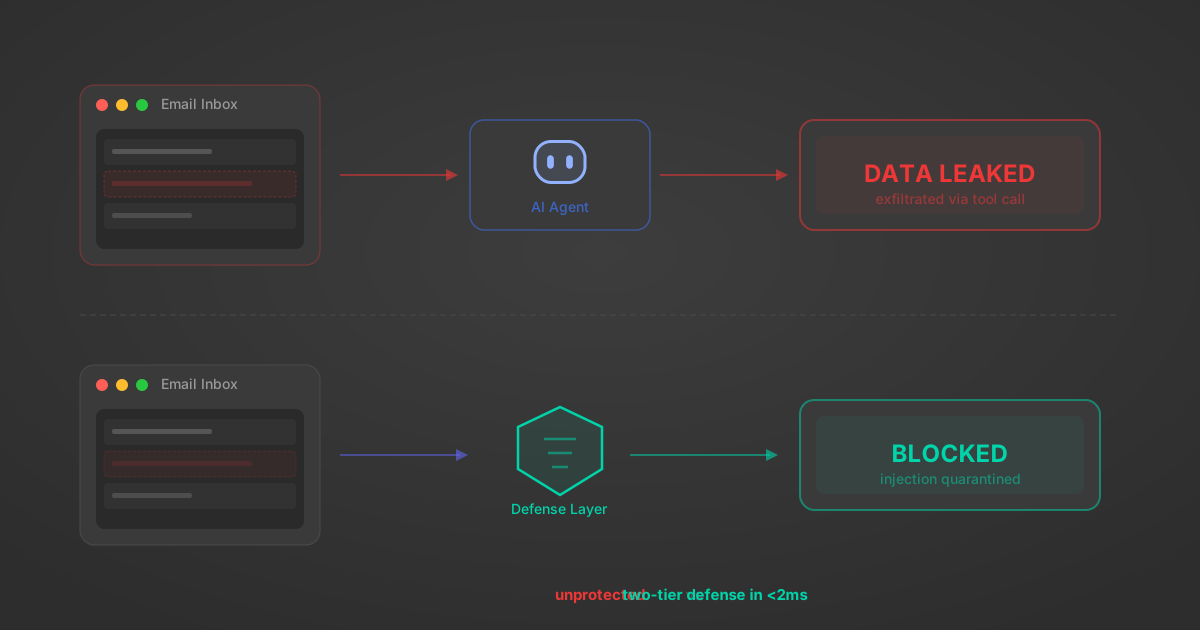
Indirect Prompt Injection Defense for MCP Tools: A Technical Guide
MCP tools that read emails, CRM records, and tickets are indirect prompt injection vectors. Here's how we built a two-tier defense that scans tool results in ~11ms.
12 min
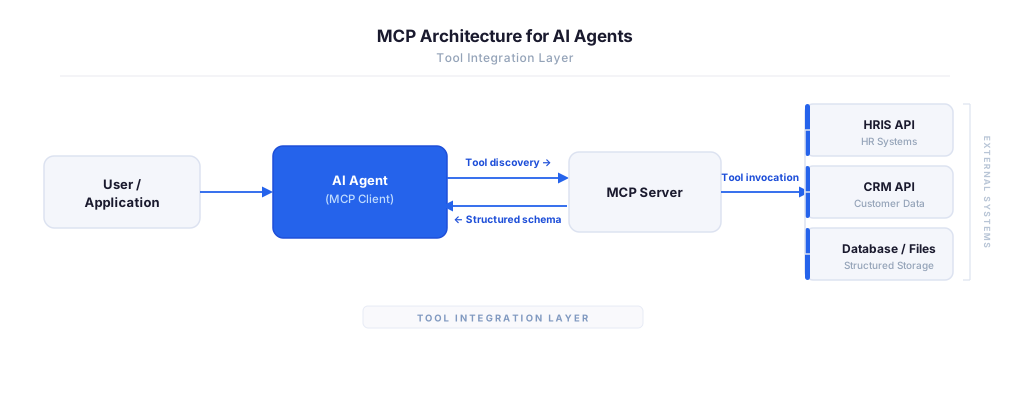
MCP vs A2A: Architecture, Security, and When to Use Each
MCP vs A2A: what each protocol standardizes, how they differ, their shared security risks including indirect prompt injection, and when to use one, both, or a hybrid architecture.
12 min
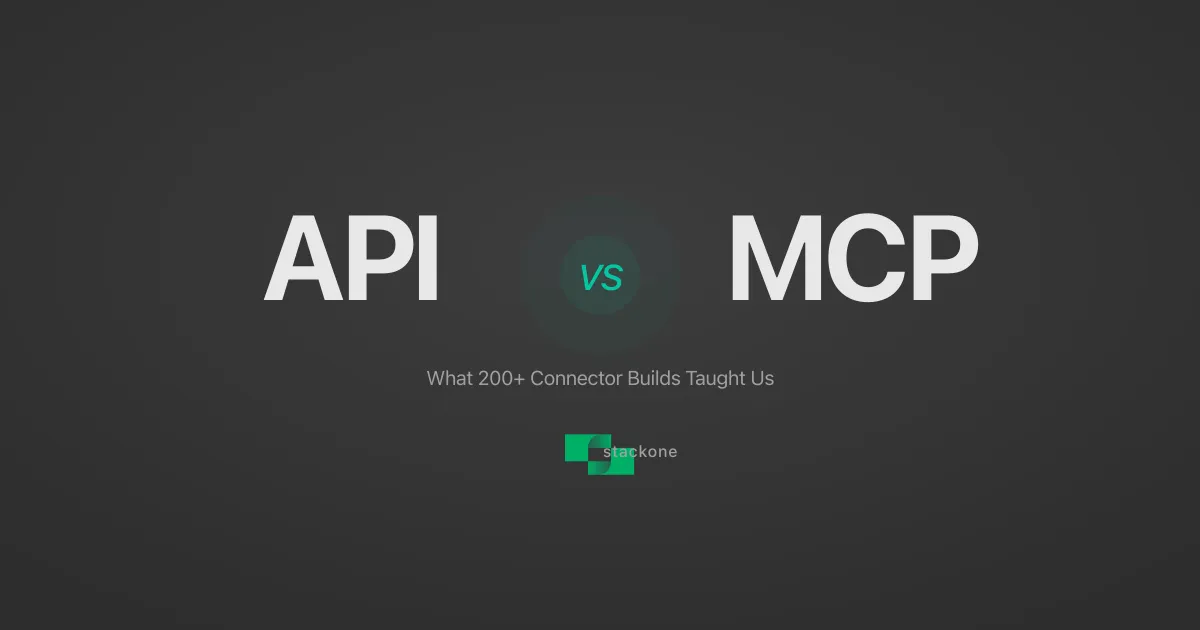
MCP vs API: What Hundreds of Connector Builds Taught Us
MCP wraps APIs, it doesn't replace them. After building hundreds of connectors that serve both, here's when each approach wins.
14 min read
Bitly MCP Server FAQ
Does StackOne have a Bitly MCP server?
Bitly MCP server vs direct API integration — what's the difference?
How does Bitly authentication work for AI agents?
origin_owner_id.Are Bitly MCP tools vulnerable to prompt injection?
What is the context bloat of a Bitly agent and how do I avoid it?
Can I limit which actions my Bitly agent can access?
Can I create custom agent actions for my Bitly MCP server?
When should I NOT use a Bitly MCP server?
What AI frameworks and AI clients does the StackOne Bitly MCP server support?
Put your AI agents to work
All the tools you need to build and scale AI agent integrations, with best-in-class connectivity, execution, and security.