
Supabase MCP Server
for AI Agents
Connect your AI agent to StackOne's Supabase MCP server and give it 138 MCP tools out of the box. Auth, tool execution, and security all managed.
 StackOne






Coverage
138 Agent Actions
Create, read, update, and delete across Supabase — and extend your agent's capabilities with custom actions.

Authentication
Agent Tool Authentication
Per-user OAuth in one call. Your Supabase MCP server gets session-scoped tokens with zero credentials stored on your infra.
Agent Auth →
Security
Agent Protection
Every Supabase tool response scanned for prompt injection in milliseconds — 88.7% accuracy, all running on CPU.
Prompt Injection Defense →
Performance
Max Agent Context. Min Cost.
Free up to 96% of your agent's context window to enhance reasoning and reduce cost, on every Supabase call.
Tools Discovery →What is the Supabase MCP Server?
A Supabase MCP server lets AI agents read and write Supabase data through the Model Context Protocol — Anthropic's open standard for connecting LLMs to external tools. StackOne's Supabase MCP server ships with 138 pre-built actions, fully extensible via the Connector Builder — plus managed authentication, prompt injection defense, observability, and agent execution runtime. Connect it from MCP clients like Claude Desktop, Claude Code, Cursor, Goose, and VS Code, or from agent frameworks like OpenAI Agents SDK, LangChain, and Vercel AI SDK.
All Supabase MCP Tools
Every action from Supabase's API, ready for your agent. Create, read, update, and delete — scoped to exactly what you need.
SSO Providers
- Create SSO Provider
Create a new SSO provider for the project
- Get SSO Provider
Get details of a specific SSO provider
- Update SSO Provider
Update an existing SSO provider configuration
- Delete SSO Provider
Delete an SSO provider from the project
Legacy Signing Keys
- Create Legacy Signing Key
Set up the project's existing JWT secret as an in-use JWT signing key
- Get Legacy Signing Key
Get the signing key information for the JWT secret imported as signing key
Project Signing Keys
- Create Project Signing Key
Create a new signing key for the project in standby status
- Get Project Signing Key
Get information about a signing key
- Get Project Signing Keys
List all signing keys for the project
- Update Project Signing Key
Update a signing key, mainly its status
- Remove Project Signing Key
Remove a signing key from a project
Project TPA Integrations
- Create Project TPA Integration
Creates a new third-party auth integration
- Get Project TPA Integration
Get a third-party integration
- List Project TPA Integrations
Lists all third-party auth integrations
- Delete Project TPA Integration
Removes a third-party auth integration
Auth Service Configs
- Get Auth Service Config
Gets project's auth config
- Update Auth Service Config
Updates a project's auth config
Database Configs
- Get Database Config
Retrieve PostgreSQL database configuration for the project
- Update Database Config
Update PostgreSQL database configuration settings
Pooler Configs
- Get Pooler Config
Retrieve connection pooler configuration
- Update Pooler Config
Update connection pooler configuration
SSL Enforcement Configs
- Get SSL Enforcement Config
Retrieve SSL enforcement configuration
- Update SSL Enforcement Config
Update SSL enforcement configuration
A Branchs
- Create A Branch
Create a database branch
- Get A Branch
Get a database branch by name
- Delete A Branch
Delete a database branch
Database Branch Configs
- Get Database Branch Config
Get database branch config
- Update Database Branch Config
Update database branch config
The Status Of An Action Runs
- Get The Status Of An Action Run
Get the status of an action run
- Update The Status Of An Action Run
Update the status of an action run
A Functions
- Create A Function
Create a new Edge Function in a project
- Get A Function
Retrieve details of a specific Edge Function
- Update A Function
Update an existing Edge Function configuration or code
- Delete A Function
Delete an Edge Function from a project
Unified Organizations
- List Unified Organizations
List unified organizations in Supabase.
- Get Unified Organization
Get a unified Supabase organization by ID.
Unified Roles
- List Unified Roles
List unified roles in Supabase.
- Get Unified Role
Get a unified Supabase role by ID.
Unified Users
- List Unified Users
List unified users in Supabase. filter.organization_id is optional — auto-resolved when the connection sees exactly one organization, otherwise a 400 asks for it.
- Get Unified User
Get a unified Supabase user by ID. Resolves the connection's organization when exactly one is visible; returns 400 when zero or several are visible.
JIT Access
- List JIT Access
List all user-id to role mappings
- Get JIT Access
Get user-id to role mappings (requires JIT enabled)
- Update JIT Access
Update a user mapping (requires JIT enabled)
- Delete JIT Access
Delete JIT access by user-id (requires JIT enabled)
JIT Access Configs
- Get JIT Access Config
Get project's just-in-time access configuration
- Update JIT Access Config
Update project's just-in-time access configuration
Organizations
- Create Organization
Create a new organization (Experimental)
- Get Organization
Retrieve details for a specific organization
PostgREST Configurations
- Get PostgREST Configuration
Get the PostgREST API configuration for a project
- Update PostgREST Configuration
Updates project's PostgREST API config
Projects
- Create Project
Create a new Supabase project
- Get Project
Retrieve details for a specific project
- Update Project
Update project settings and configuration
- Delete Project
Delete a Supabase project permanently
Network Restrictions
- Get Network Restrictions
Get the network restrictions configuration for a project
- Update Network Restrictions
Update the network restrictions for a project
Realtime Configurations
- Get Realtime Configuration
Get the realtime configuration for a project
- Update Realtime Configuration
Update the realtime configuration for a project
CLI Login Roles
- Create CLI Login Role
Create a login role for CLI with temporary password
- Delete CLI Login Roles
Delete existing login roles used by CLI
API Keys
- Create API Key
Creates a new API key for the project
- Get API Key
Get API key
- Update API Key
Updates an API key for the project
- Delete API Key
Deletes an API key for the project
PgSodium Configs
- Get PgSodium Config
Get pgsodium config
- Update PgSodium Config
Update pgsodium config
Storage Configs
- Get Storage Config
Gets project's storage config
- Update Storage Config
Updates project's storage config
Other (70)
- Get Readonly Mode Status
Check if database is in readonly mode
- Get Project PgBouncer Config
Retrieve PgBouncer connection pooler configuration
- List All Snippets
Retrieve all SQL code snippets for the logged in user
- Get Snippet
Retrieve a specific SQL code snippet
- Get Function Combined Statistics
Get combined statistics for a project's functions
- Get Project Logs
Execute SQL query on project logs
- Get Usage API Counts
Get project's usage API counts
- Get Usage API Requests Count
Get project's usage API requests count
- List All SSO Providers
List all SSO providers for the project
- List All Backups
Retrieve a list of all available database backups
- Get Database Metadata
Retrieve database connection strings and metadata
- Get Vanity Subdomain Config
Get the vanity subdomain configuration
- Get Hostname Config
Get the custom hostname configuration
- List All Branches
List all branches
- List All Action Runs
List all action runs
- Get The Logs Of An Action Run
Get the logs of an action run
- List All Functions
Retrieve a list of all Edge Functions in a project
- Get A Function Body
Retrieve the source code body of an Edge Function
- Get Unified Credentials
Get the current Supabase connection's unified credentials and identity.
- List Unified Resource Types
List unified resource types in Supabase.
- List Unified Resource Users
List unified resource users in Supabase.
- List Migration History
List applied migration versions
- Get Migration Entry
Fetch an existing entry from migration history (partner OAuth apps only)
- List All Organizations
Retrieve a list of all organizations the authenticated user has access to
- List Organization Members
Retrieve a list of all members in an organization
- List All Projects
Retrieve a list of all projects in your organization
- Get All Projects For Organization
Retrieve a list of all projects within a specific organization
- Get Available Regions
Retrieve a list of all available regions for creating Supabase projects
- Get Services Health
Get the health status of services for a project
- Get Postgres Upgrade Eligibility
Check if a project is eligible for a PostgreSQL version upgrade
- Get Postgres Upgrade Status
Retrieve the status of an in-progress or completed Postgres version upgrade
- List All Secrets
Returns all secrets you've previously added to the specified project
- Get Project API Keys
Get project api keys
- List All Buckets
Lists all buckets
- Update Database Password
Update the database password for the project
- Update Custom Hostname
Update the custom hostname configuration
- Remove Read Replica
Remove a read replica
- Disable Readonly Mode Temporarily
Temporarily disable readonly mode for maintenance
- Enable Database Webhook
Enable webhooks for database events
- Restore PITR Backup
Restore database from a Point-in-Time Recovery backup
- Run Query
Execute a SQL query on the database
- Read-Only Query
Execute a read-only SQL query on the database
- Generate TypeScript Types
Generate TypeScript type definitions from database schema
- Check Vanity Subdomain Availability
Check if a vanity subdomain is available
- Activate Vanity Subdomain
Activate a vanity subdomain for the project
- Deactivate Vanity Subdomain
Deactivate and remove the vanity subdomain
- Initialize Custom Hostname
Initialize a custom hostname for the project
- Activate Custom Hostname
Activate the custom hostname after DNS verification
- Reverify DNS Config
Reverify DNS configuration for custom hostname
- Merge A Branch
Merge a database branch
- Push A Branch
Push a database branch
- Reset A Branch
Reset a database branch
- Restore A Scheduled Branch Deletion
Restore a scheduled branch deletion
- Diff A Branch
Diff a database branch
- Disable Preview Branching
Disables preview branching
- Count The Number Of Action Runs
Count the number of action runs
- Bulk Update Functions
Update multiple Edge Functions at once
- Deploy A Function
Deploy a new function bundle with code
- Authorize JIT Access
Authorize user-id to role mappings (requires JIT enabled)
- Apply Database Migration
Apply a database migration (partner OAuth apps only)
- Upsert Migration Without Applying
Upsert a database migration without applying (partner OAuth apps only)
- Patch Migration Entry
Patch an existing entry in migration history (partner OAuth apps only)
- Rollback Database Migrations
Rollback database migrations and remove them from history table (partner OAuth apps only)
- Pause Project
Pause a Supabase project to reduce costs
- Restore Project
Restore a paused Supabase project
- Cancel Project Restoration
Cancel an in-progress project restoration
- Upgrade Postgres Version
Upgrade the PostgreSQL version for a project
- Shutdown Realtime Connections
Shutdown realtime connections for a project
- Bulk Create Secrets
Creates multiple secrets and adds them to the specified project
- Bulk Delete Secrets
Deletes all secrets with the given names from the specified project
Set Up Your Supabase MCP Server in Minutes
One endpoint. Any framework. Your agent is talking to Supabase in under 10 lines of code.
Agent Frameworks


 JSON
JSON{
"mcpServers": {
"stackone": {
"command": "npx",
"args": [
"-y",
"mcp-remote@latest",
"https://api.stackone.com/mcp?x-account-id=<account_id>",
"--header",
"Authorization: Basic <YOUR_BASE64_TOKEN>"
]
}
}
}Platform Resources

MCP Code Mode: Keeping Tool Responses Out of Agent Context
Anthropic's code_execution processes data already in context. Custom MCP code mode keeps raw tool responses in a sandbox. 14K tokens vs 500.
11 min

Comparing BM25, TF-IDF, and Hybrid Search for MCP Tool Discovery
Benchmarking BM25, TF-IDF, and hybrid search for MCP tool discovery across 916 tools. The 80/20 TF-IDF/BM25 hybrid hits 21% Top-1 accuracy in under 1ms.
10 min
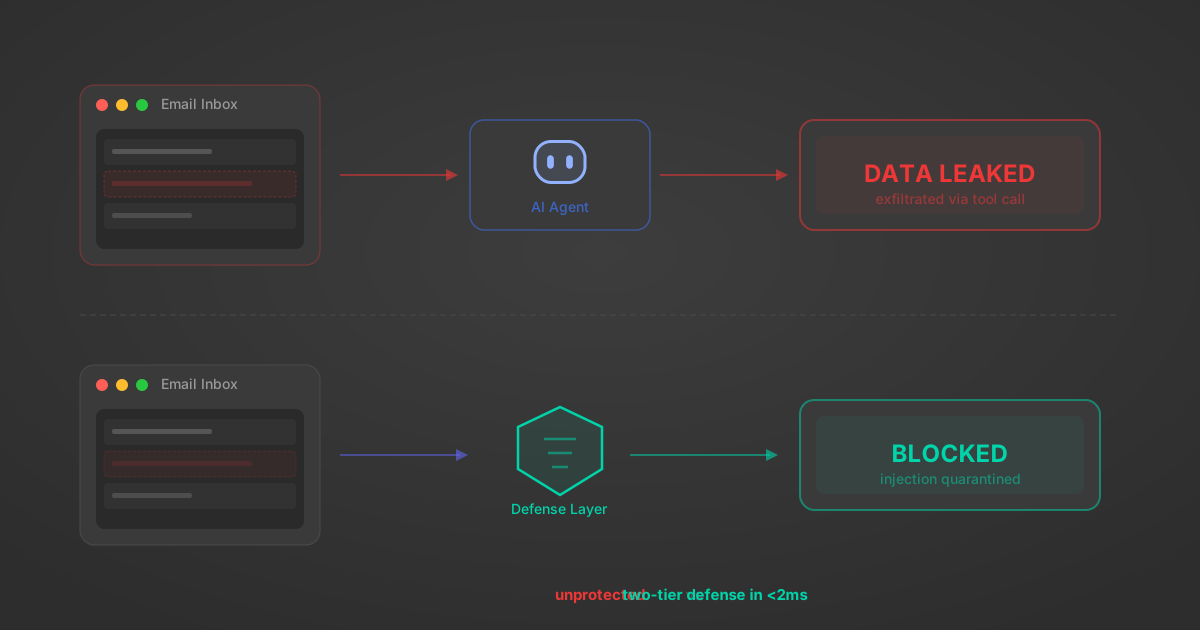
Indirect Prompt Injection Defense for MCP Tools: A Technical Guide
MCP tools that read emails, CRM records, and tickets are indirect prompt injection vectors. Here's how we built a two-tier defense that scans tool results in ~11ms.
12 min
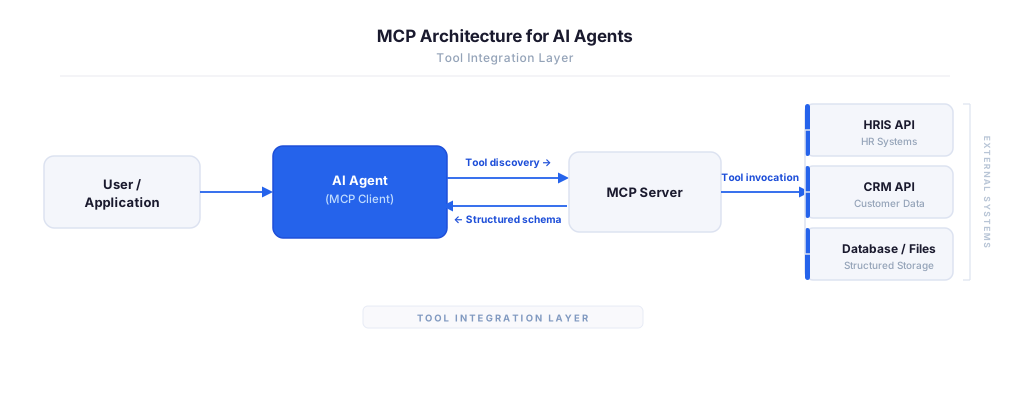
MCP vs A2A: Architecture, Security, and When to Use Each
MCP vs A2A: what each protocol standardizes, how they differ, their shared security risks including indirect prompt injection, and when to use one, both, or a hybrid architecture.
12 min
MCP vs API: What Hundreds of Connector Builds Taught Us
MCP wraps APIs, it doesn't replace them. After building hundreds of connectors that serve both, here's when each approach wins.
14 min read
Supabase MCP Server FAQ
Does StackOne have a Supabase MCP server?
Supabase MCP server vs direct API integration — what's the difference?
How does Supabase authentication work for AI agents?
origin_owner_id.Are Supabase MCP tools vulnerable to prompt injection?
What is the context bloat of a Supabase agent and how do I avoid it?
Can I limit which actions my Supabase agent can access?
Can I create custom agent actions for my Supabase MCP server?
When should I NOT use a Supabase MCP server?
What AI frameworks and AI clients does the StackOne Supabase MCP server support?
Put your AI agents to work
All the tools you need to build and scale AI agent integrations, with best-in-class connectivity, execution, and security.