
SonarQube Cloud MCP Server
for AI Agents
Connect your AI agent to StackOne's SonarQube Cloud MCP server and give it 102 MCP tools out of the box. Auth, tool execution, and security all managed.
 StackOne






Coverage
102 Agent Actions
Create, read, update, and delete across SonarQube Cloud — and extend your agent's capabilities with custom actions.

Authentication
Agent Tool Authentication
Per-user OAuth in one call. Your SonarQube Cloud MCP server gets session-scoped tokens with zero credentials stored on your infra.
Agent Auth →
Security
Agent Protection
Every SonarQube Cloud tool response scanned for prompt injection in milliseconds — 88.7% accuracy, all running on CPU.
Prompt Injection Defense →
Performance
Max Agent Context. Min Cost.
Free up to 96% of your agent's context window to enhance reasoning and reduce cost, on every SonarQube Cloud call.
Tools Discovery →What is the SonarQube Cloud MCP Server?
A SonarQube Cloud MCP server lets AI agents read and write SonarQube Cloud data through the Model Context Protocol — Anthropic's open standard for connecting LLMs to external tools. StackOne's SonarQube Cloud MCP server ships with 102 pre-built actions, fully extensible via the Connector Builder — plus managed authentication, prompt injection defense, observability, and agent execution runtime. Connect it from MCP clients like Claude Desktop, Claude Code, Cursor, Goose, and VS Code, or from agent frameworks like OpenAI Agents SDK, LangChain, and Vercel AI SDK.
All SonarQube Cloud MCP Tools
Every action from SonarQube Cloud's API, ready for your agent. Create, read, update, and delete — scoped to exactly what you need.
Unified Groups
- List Unified Groups
List unified groups in SonarQube Cloud.
- Get Unified Group
Get a unified SonarQube Cloud group by id.
Unified Organizations
- List Unified Organizations
List unified organizations in SonarQube Cloud.
- Get Unified Organization
Get a unified SonarQube Cloud organization by id.
Unified Users
- List Unified Users
List unified users in SonarQube Cloud.
- Get Unified User
Get a unified SonarQube Cloud user by id.
Other (96)
- Get Unified Credentials
Get the current SonarQube Cloud connection's unified credentials and identity.
- Authentication Logout
Logout a user.
- Authentication Validate
Check credentials. Returns true for anonymous user.
- Ce Activity Status
Returns CE activity related metrics.Requires 'Administer' permission on the specified project.
- Ce Component
Get the pending tasks, in-progress tasks and the last executed task of a given component (usually a project). Requires `Browse` permission on the specified component.
- Components Search
Search for top-level components (projects) in the organization, filterable by name pattern and qualifier. Use this to find a project's key when you only know its name. For drilling into directories/files within a project, use `components_tree` instead.
- Components Show
Returns a component (file, directory, project) and its ancestors. The ancestors are ordered from the parent to the root project. Requires the following permission: 'Browse' on the project of the specified component.
- Components Tree
Navigate through components based on the chosen strategy.Requires the following permission: 'Browse' on the specified project.When limiting search with the q parameter, directories are not returned.
- Duplications Show
Get duplications. Require Browse permission on file's project
- Favorites Add
Add a project as favorite for the authenticated user.Only 100 components can be added as favorite.Requires authentication and the following permission: 'Browse' on the project.
- Favorites Remove
Remove a component (project, directory, file etc.) as favorite for the authenticated user.Requires authentication.
- Favorites Search
Search for the authenticated user favorites.Requires authentication.
- Hotspots Search
Search for Security Hotspots.
- Issues Authors
Search SCM accounts which match a given query.Requires authentication.
- Issues Search
Search for issues.Requires the 'Browse' permission on the specified project(s).
- Issues Tags
List tags matching a given query
- Languages List
List supported programming languages
- Measures Component
Return component with specified measures. The componentId or the component parameter must be provided.Requires the following permission: 'Browse' on the project of specified component.
- Measures Component Tree
Recursively walk a project's directory/file tree and return the specified measures (e.g. coverage, complexity, ncloc) for each descendant component. Use this when you need per-file or per-directory metrics across a project, not just the project-level totals (which is what `measures_component` returns). Required: `component` (project key) and `metricKeys` (comma-separated). Use `strategy` (`children`/`all`/`leaves`) to control how deep to recurse. Requires `Browse` on the project.
- Measures Search History
Search measures history of a component.Measures are ordered chronologically.Pagination applies to the number of measures for each metric.Requires the following permission: 'Browse' on the specified component
- Metrics Search
Search for metrics
- Metrics Types
List all available metric types.
- Notifications Add
Add a notification for the authenticated user.Requires one of the following permissions: Authentication if no login is provided. If a project is provided, requires the 'Browse' permission on the specified project. If a project is provided, requires the 'Browse' permission on the specified project.
- Notifications List
List notifications of the authenticated user
- Notifications Remove
Remove a notification for the authenticated user
- Permissions Add Project Creator To Template
Add a project creator to a permission template.Requires the permission 'Administer' on the organization.
- Permissions Add User
Add permission to a user. This service defaults to global permissions, but can be limited to project permissions by providing project id or project key.Requires the permission 'Administer' on the specified project.
- Permissions Add User To Template
Add a user to a permission template. Requires the permission 'Administer' on the organization.
- Permissions Apply Template
Apply a permission template to one project.The project id or project key must be provided.The template id or name must be provided.Requires the permission 'Administer' on the organization.
- Permissions Bulk Apply Template
Apply a permission template to **many** projects in one call — use this to roll out (or re-roll-out) a template across a whole project set, optionally filtered by `projects` (comma-separated keys), `q` (name pattern), `analyzedBefore`, or `onProvisionedOnly`. For a single-project apply, use `permissions_apply_template` instead. Required: `templateId` or (`templateName` + `organization`). Requires `Administer` on the organization.
- Permissions Create Template
Create a new permission template — a reusable named bundle of permissions that can be applied to projects (via `permissions_apply_template` or `permissions_bulk_apply_template`). Required: `name` (unique within the org). Optional `description` and `projectKeyPattern` (regex that auto-matches projects to this template). Requires `Administer` on the organization.
- Permissions Delete Template
Delete a permission template.Requires the permission 'Administer' on the organization.
- Permissions Remove Project Creator From Template
Remove a project creator from a permission template.Requires the permission 'Administer' on the organization.
- Permissions Remove User
Remove permission from a user. This service defaults to global permissions, but can be limited to project permissions by providing project id or project key. Requires the permission 'Administer' on the specified project.
- Permissions Remove User From Template
Remove a user from a permission template. Requires the permission 'Administer' on the organization.
- Permissions Search Templates
List the permission templates configured for the organization (each template is a reusable named bundle of permissions that can be applied to projects). Use this to discover available template ids/names before calling `permissions_apply_template`, `permissions_bulk_apply_template`, `permissions_update_template`, or any of the `permissions_*_template` actions. Requires `Administer` on the organization.
- Permissions Set Default Template
Set a permission template as default.Requires the permission 'Administer' on the organization.
- Permissions Update Template
Update a permission template.Requires the permission 'Administer' on the organization.
- Project Analyses Create Event
Pin a version tag or release marker (an "event") onto a specific Sonar analysis. Use this to attach things like `v1.2.3` to the analysis that represents a release — these show up on the project timeline in the UI. Required: `analysis` (analysis key from `project_analyses_search`) and `name` (the label, e.g. `v1.2.3`). Optional `category` is `VERSION` (default) or `OTHER`. Requires `Administer` on the project.
- Project Analyses Delete
Delete a project analysis.Requires the permission 'Administer' on the project of the specified analysis.
- Project Analyses Delete Event
Remove a version tag / release marker (an "event") that was previously pinned to a Sonar analysis. Use this to clear a version label from the project timeline — does NOT delete the underlying analysis itself (use `project_analyses_delete` for that). Required: `event` (event key). Only events of category VERSION or OTHER can be deleted. Requires `Administer` on the project.
- Project Analyses Search
Search a project analyses and attached events.Requires the following permission: 'Browse' on the specified project
- Project Analyses Unset Baseline
Unset any manually-set New Code Period baseline on a project or a long-lived branch.Unsetting a manual baseline restores the use of the `sonar.leak.period` setting.Requires the permission 'Administer' on the specified project.
- Project Analyses Update Event
Rename an existing version tag / release marker (an "event") on a Sonar analysis — e.g. change `v1.2.3` to `v1.2.4`. Required: `event` (event key) and `name` (new label). Only events of category VERSION or OTHER can be updated. Requires `Administer` on the project.
- Project Badges Ai Code Assurance
Generate a badge for project's AI assurance as an SVG.Requires 'Browse' permission on the specified project.
- Project Badges Measure
Generate badge for project's measure as an SVG.Requires a security token for private projects.
- Project Badges Quality Gate
Generate badge for project's quality gate as an SVG.Requires a security token for private projects.
- Project Branches Delete
Delete a non-main branch of a project.Requires 'Administer' rights on the specified project.
- Project Branches List
List the branches of a project.The statistics are the overall counts on long branches, and the count of issues detected on the changed code on short branches, and are only provided if the project parameter is specified.If the project parameter is specified, requires the user to have 'Browse' or 'Execute analysis' rights on that project. Otherwise, only returns branches from projects on which this user has 'Browse' or 'Execute analysis' rights.
- Project Branches Rename
Rename the main branch of a project.Requires 'Administer' permission on the specified project.
- Project Links Create
Create a new project link.Requires 'Administer' permission on the specified project, or global 'Administer' permission.
- Project Links Delete
Delete existing project link.Requires 'Administer' permission on the specified project, or global 'Administer' permission.
- Project Links Search
List links of a project. Exactly one of `projectId` or `projectKey` must be provided. Requires `Administer` or `Browse` permission on the specified project.
- Project Pull Requests Delete
Delete a pull request.Requires 'Administer' rights on the specified project.
- Project Pull Requests List
List the pull requests of a project.One of the following permissions is required: 'Browse' rights on the specified project'Execute Analysis' rights on the specified project
- Project Tags Search
Search tags
- Project Tags Set
Set tags on a project.Requires the following permission: 'Administer' rights on the specified project
- Projects Bulk Delete
Delete one or several projects.Only the 1'000 first items in project filters are taken into account.Requires 'Administer System' permission.At least one parameter is required among analyzedBefore, projects and q
- Projects Create
Create a project.Requires 'Create Projects' permission
- Projects Delete
Delete a project. Requires 'Administer System' permission or 'Administer' permission on the project.
- Projects Search
Search for projects. Results are filtered to projects the caller has access to.
- Projects Update Key
Update a project or module key and all its sub-components keys.Requires the permission 'Administer' on the specified project.
- Projects Update Visibility
Updates visibility of a project.Requires 'Project administer' permission on the specified project
- Qualityprofiles Backup
Backup a quality profile in XML form. The exported profile can be restored through api/qualityprofiles/restore.
- Qualityprofiles Changelog
Get the history of changes on a quality profile: rule activation/deactivation, change in parameters/severity. Events are ordered by date in descending order (most recent first).
- Qualityprofiles Copy
Copy a quality profile. Requires to be logged in and the 'Administer Quality Profiles' permission.
- Qualityprofiles Create
Create a quality profile.Requires to be logged in and the 'Administer Quality Profiles' permission.
- Qualityprofiles Delete
Delete a quality profile and all its descendants. The default quality profile cannot be deleted. Requires one of the following permissions: 'Administer Quality Profiles' Edit right on the specified quality profile
- Qualityprofiles Inheritance
Show a quality profile's ancestors and children. Provide either `key` alone, or the trio `language` + `qualityProfile` + `organization` together.
- Qualityprofiles Projects
List projects with their association status regarding a quality profile
- Qualityprofiles Search
Search quality profiles
- Rules Repositories
List available rule repositories
- Rules Search
Search for a collection of relevant rules matching a specified query.Since 5.5, following fields in the response have been deprecated :"effortToFixDescription" becomes "gapDescription""debtRemFnCoeff" becomes "remFnGapMultiplier""defaultDebtRemFnCoeff" becomes "defaultRemFnGapMultiplier""debtRemFnOffset" becomes "remFnBaseEffort""defaultDebtRemFnOffset" becomes "defaultRemFnBaseEffort""debtOverloaded" becomes "remFnOverloaded"
- Rules Show
Get detailed information about a ruleSince 5.5, following fields in the response have been deprecated :"effortToFixDescription" becomes "gapDescription""debtRemFnCoeff" becomes "remFnGapMultiplier""defaultDebtRemFnCoeff" becomes "defaultRemFnGapMultiplier""debtRemFnOffset" becomes "remFnBaseEffort""defaultDebtRemFnOffset" becomes "defaultRemFnBaseEffort""debtOverloaded" becomes "remFnOverloaded"In 7.1, the field 'scope' has been added.
- Rules Tags
List rule tags
- Rules Update
Update an existing rule.Requires the 'Administer Quality Profiles' permission
- Settings List Definitions
List settings definitions.Requires 'Browse' permission when a component is specifiedTo access licensed settings, authentication is requiredTo access secured settings, one of the following permissions is required: 'Execute Analysis''Administer' rights on the specified component
- Settings Reset
Remove a setting value.The settings defined in conf/sonar.properties are read-only and can't be changed.Requires the permission 'Administer' on the specified component.
- User Groups Add User
Add a user to a group. SonarCloud identifies the group by `name` + `organization` only; numeric group `id` is not accepted by this endpoint. Requires `Administer System`.
- User Groups Create
Create a group.Requires the following permission: 'Administer System'.
- User Groups Delete
Delete a group. The default groups cannot be deleted. SonarCloud identifies the group by `name` + `organization` only; numeric group `id` is not accepted by this endpoint. Requires `Administer System`.
- User Groups Search
Search for user groups.Requires the following permission: 'Administer System'.
- User Groups Update
Update a group.Requires the following permission: 'Administer System'.
- User Groups Users
Given a group name, list the users in that group (with selection/membership flags). Use this when the question is "who is in group Y?". For the reverse direction — "which groups does user X belong to?" — use `users_groups`. SonarCloud identifies the group by `name` + `organization` only; numeric group `id` is not accepted by this endpoint. Requires `Administer System`.
- User Tokens Generate
Generate a user access token. Please keep your tokens secret. They enable you to authenticate and analyze projects. The endpoint generates a token for the logged in user.
- User Tokens Revoke
Revoke an access token of the authenticated user.
- User Tokens Search
List the access tokens of the authenticated user. Field 'lastConnectionDate' is only updated every hour, so it may not be accurate, for instance when a user is using a token many times in less than one hour.
- Users Groups
Given a user login, list every group that user is a member of. Use this when the question is "which groups does user X belong to?". For the reverse direction — "who is in group Y?" — use `user_groups_users`. Requires `Administer` on the organization.
- Webhooks List
List the webhooks configured for an organization or a specific project.
- Webhooks Create
Create a new webhook for an organization or a specific project.
- Webhooks Update
Update the name, URL, or secret of an existing webhook.
- Webhooks Delete
Delete a webhook by its key.
- Webhooks Deliveries
List recent webhook deliveries for a webhook, task, or project.
- Webhooks Delivery
Get a single webhook delivery, including its full payload.
- Webservices List
List web services
- Webservices Response Example
Display web service response example
Set Up Your SonarQube Cloud MCP Server in Minutes
One endpoint. Any framework. Your agent is talking to SonarQube Cloud in under 10 lines of code.
Agent Frameworks


 JSON
JSON{
"mcpServers": {
"stackone": {
"command": "npx",
"args": [
"-y",
"mcp-remote@latest",
"https://api.stackone.com/mcp?x-account-id=<account_id>",
"--header",
"Authorization: Basic <YOUR_BASE64_TOKEN>"
]
}
}
}Check More developer MCP Servers
266+ actions
124+ actions
119+ actions
87+ actions
71+ actions
67+ actions
62+ actions
Platform Resources

MCP Code Mode: Keeping Tool Responses Out of Agent Context
Anthropic's code_execution processes data already in context. Custom MCP code mode keeps raw tool responses in a sandbox. 14K tokens vs 500.
11 min

Comparing BM25, TF-IDF, and Hybrid Search for MCP Tool Discovery
Benchmarking BM25, TF-IDF, and hybrid search for MCP tool discovery across 916 tools. The 80/20 TF-IDF/BM25 hybrid hits 21% Top-1 accuracy in under 1ms.
10 min
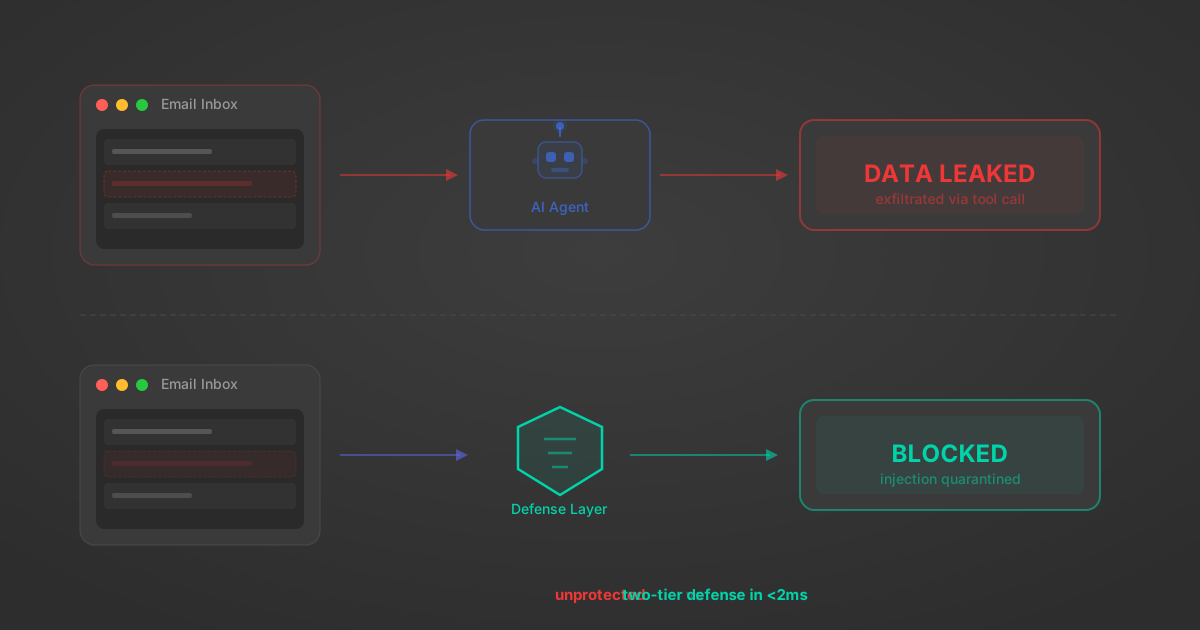
Indirect Prompt Injection Defense for MCP Tools: A Technical Guide
MCP tools that read emails, CRM records, and tickets are indirect prompt injection vectors. Here's how we built a two-tier defense that scans tool results in ~11ms.
12 min
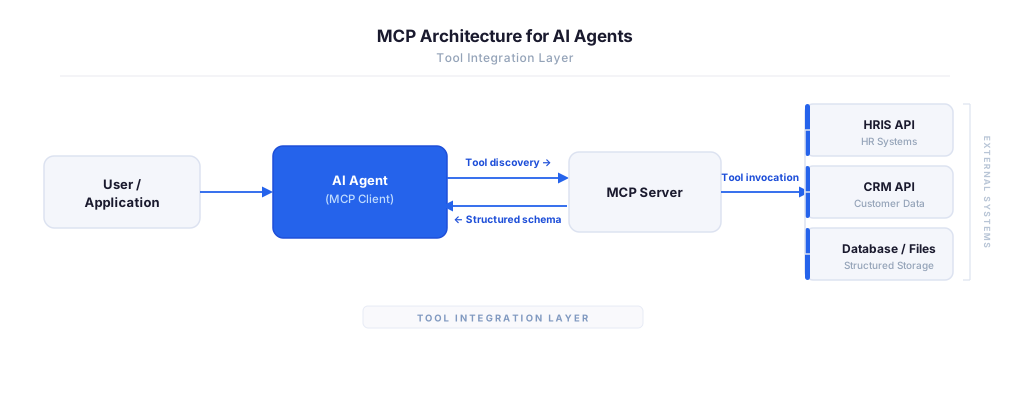
MCP vs A2A: Architecture, Security, and When to Use Each
MCP vs A2A: what each protocol standardizes, how they differ, their shared security risks including indirect prompt injection, and when to use one, both, or a hybrid architecture.
12 min
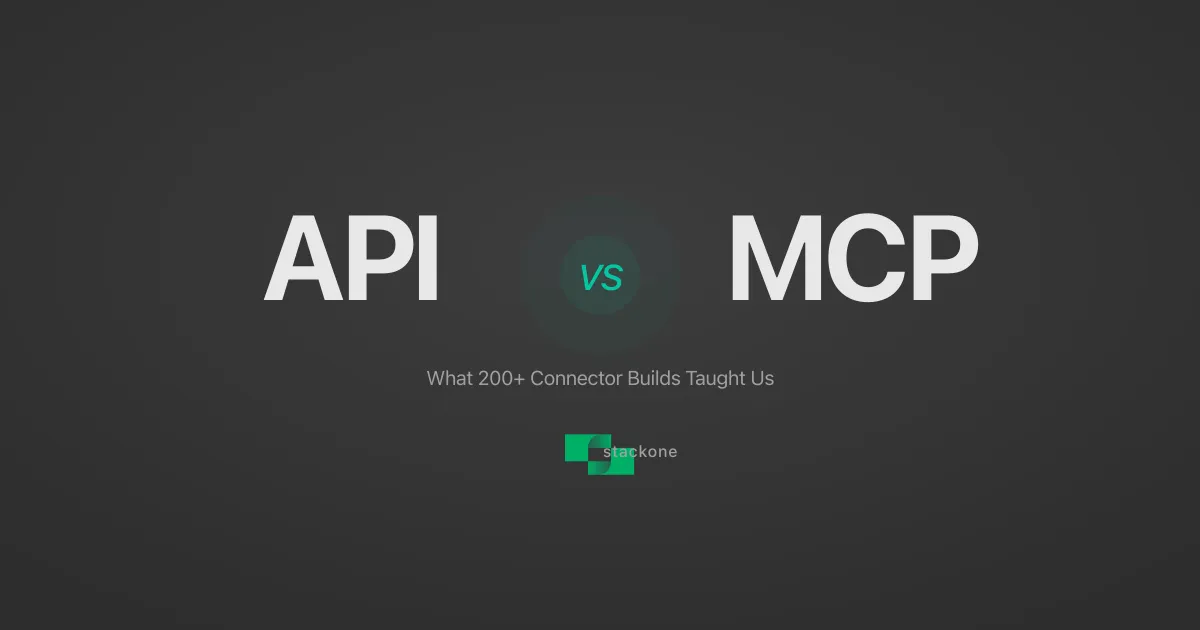
MCP vs API: What Hundreds of Connector Builds Taught Us
MCP wraps APIs, it doesn't replace them. After building hundreds of connectors that serve both, here's when each approach wins.
14 min read
SonarQube Cloud MCP Server FAQ
Does StackOne have a SonarQube Cloud MCP server?
SonarQube Cloud MCP server vs direct API integration — what's the difference?
How does SonarQube Cloud authentication work for AI agents?
origin_owner_id.Are SonarQube Cloud MCP tools vulnerable to prompt injection?
What is the context bloat of a SonarQube Cloud agent and how do I avoid it?
Can I limit which actions my SonarQube Cloud agent can access?
Can I create custom agent actions for my SonarQube Cloud MCP server?
When should I NOT use a SonarQube Cloud MCP server?
What AI frameworks and AI clients does the StackOne SonarQube Cloud MCP server support?
Put your AI agents to work
All the tools you need to build and scale AI agent integrations, with best-in-class connectivity, execution, and security.