
Fivetran MCP Server
for AI Agents
Connect your AI agent to StackOne's Fivetran MCP server and give it 172 MCP tools out of the box. Auth, tool execution, and security all managed.
 StackOne






Coverage
172 Agent Actions
Create, read, update, and delete across Fivetran — and extend your agent's capabilities with custom actions.

Authentication
Agent Tool Authentication
Per-user OAuth in one call. Your Fivetran MCP server gets session-scoped tokens with zero credentials stored on your infra.
Agent Auth →
Security
Agent Protection
Every Fivetran tool response scanned for prompt injection in milliseconds — 88.7% accuracy, all running on CPU.
Prompt Injection Defense →
Performance
Max Agent Context. Min Cost.
Free up to 96% of your agent's context window to enhance reasoning and reduce cost, on every Fivetran call.
Tools Discovery →What is the Fivetran MCP Server?
A Fivetran MCP server lets AI agents read and write Fivetran data through the Model Context Protocol — Anthropic's open standard for connecting LLMs to external tools. StackOne's Fivetran MCP server ships with 172 pre-built actions, fully extensible via the Connector Builder — plus managed authentication, prompt injection defense, observability, and agent execution runtime. Connect it from MCP clients like Claude Desktop, Claude Code, Cursor, Goose, and VS Code, or from agent frameworks like OpenAI Agents SDK, LangChain, and Vercel AI SDK.
All Fivetran MCP Tools
Every action from Fivetran's API, ready for your agent. Create, read, update, and delete — scoped to exactly what you need.
Connection Certificates
- List Connection Certificates
Retrieve all approved TLS certificates for a connection
- Get Connection Certificate
Retrieve details of a specific approved certificate for a connection
Connector SDK Packages
- Create Connector SDK Package
Upload a new Connector SDK package to your Fivetran account
- Download Connector SDK Package
Download the connector code package file for a specific Connector SDK package
- Update Connector SDK Package
Update an existing Connector SDK package with new connector code
- Delete Connector SDK Package
Permanently delete a Connector SDK package from your Fivetran account
Connections
- Create Connection
Create a new data connection (pipeline) within a destination group
- List Connections
Retrieve all connections (data pipelines) in the Fivetran account
- Get Connection
Retrieve detailed information about a specific connection by ID
- Update Connection
Modify a connection's configuration, sync schedule, or pause state
- Delete Connection
Permanently remove a connection from the Fivetran account
Connection States
- Get Connection State
Retrieve the current state of a connection (only for Function and Connection SDK connectors)
- Update Connection State
Update the state of a connection (only for Function and Connection SDK connectors)
Connection Schema Configs
- Get Connection Schema Config
Retrieve schema configuration for a connection including enabled tables and columns
- Update Connection Schema Config
Enable or disable schemas, tables, and columns for a connection
Destinations
- Create Destination
Create a new destination (data warehouse or database) within a group
- List Destinations
Retrieve all destinations in the Fivetran account
- Get Destination
Retrieve details of a specific destination by ID
- Update Destination
Modify a destination's configuration settings
- Delete Destination
Permanently remove a destination from the Fivetran account
Connector Webhooks
- Create Connector Webhook
Processes Fivetran create_connector webhook events.
- Delete Connector Webhook
Processes Fivetran delete_connector webhook events.
Groups
- Create Group
Create a new group (destination) in the Fivetran account
- List Groups
Retrieve all groups (destinations) in the Fivetran account
- Get Group
Retrieve details of a specific group by ID
- Update Group
Modify a group's name or properties
- Delete Group
Permanently remove a group from the Fivetran account
Unified Groups
- List Unified Groups
List every Fivetran Team mapped to the IAM unified group schema, cursor-paginated up to 1000 per page. Fivetran Teams are the actual user-grouping concept (Enterprise / Business Critical plan only) — distinct from Fivetran "Groups" which are destination containers. Pass expand=["roles"] to inline each team's account-level role.
- Get Unified Group
Retrieve a single Fivetran Team by id, mapped to the IAM unified group schema. Optionally pass expand=["users"] to inline the first 1000 members and their team-level roles, and/or expand=["roles"] to inline the team's own account-level role.
Unified Organizations
- List Unified Organizations
List the organizations available to the current Fivetran connection mapped to the IAM unified organization schema. Fivetran is single-tenant per API key, so this returns exactly one record (the connected account) sourced from GET /v1/account/info.
- Get Unified Organization
Retrieve the connected Fivetran account as the single organization record. Fivetran is single-tenant per API key — this action always returns the same one record sourced from GET /v1/account/info. The id input is accepted for round-trip symmetry with unified_list_organizations but is not used to filter (there is nothing to filter to).
Unified Roles
- List Unified Roles
List every role available in the connected Fivetran account (predefined and custom), mapped to the IAM unified role schema. Role type derives from the current account/destination/connection role tier (Manage/Administrator → admin, Analyst → basic, Edit/Billing/Creator → editor, View/Reviewer → viewer); scope is keyed to the role's Fivetran scope class (ACCOUNT / DESTINATION / CONNECTOR / TEAM).
- Get Unified Role
Retrieve a single Fivetran role by its name (the Fivetran identifier). Fivetran has no per-role GET endpoint — implemented as a filter over the role list. Returns an empty result when no role matches the name.
Unified Users
- List Unified Users
List every user in the connected Fivetran account mapped to the IAM unified user schema, cursor-paginated up to 1000 per page. Pass expand=["roles"] to inline each user's account-level role (admin, basic, editor, viewer, unassigned); status is derived from the active/invited lifecycle flags.
- Get Unified User
Retrieve a single Fivetran user by id, mapped to the IAM unified user schema. Optionally pass expand=["groups"] to inline the user's Fivetran Group memberships and/or expand=["roles"] to inline their account-level role.
Hybrid Deployment Agents
- Create Hybrid Deployment Agent
Create a new hybrid deployment agent for on-premises data processing
- List Hybrid Deployment Agents
Retrieve all hybrid deployment agents in the Fivetran account
- Get Hybrid Deployment Agent
Retrieve details of a specific hybrid deployment agent by ID
- Delete Hybrid Deployment Agent
Permanently remove a hybrid deployment agent
Log Services
- Create Log Service
Configure a new external log service integration for a group
- List Log Services
Retrieve all configured external log service integrations
- Get Log Service
Retrieve details of a specific log service integration by ID
- Update Log Service
Modify a log service integration's configuration
- Delete Log Service
Permanently remove a log service integration
Account Log Services
- Create Account Log Service
Configure an account-level external log service integration
- Get Account Log Service
Retrieve the account-level external log service configuration
- Update Account Log Service
Modify the account-level log service integration configuration
- Delete Account Log Service
Permanently remove the account-level log service integration
Private Links
- Create Private Link
Set up a new private network connection for Fivetran
- List Private Links
Retrieve all private link configurations in the Fivetran account
- Get Private Link
Retrieve details of a specific private link configuration by ID
- Update Private Link
Modify a private link configuration
- Delete Private Link
Permanently remove a private link configuration
Proxy Agents
- Create Proxy Agent
Create a new proxy agent for network routing
- List Proxy Agents
Retrieve all proxy agents in the Fivetran account
- Get Proxy Agent
Retrieve details of a specific proxy agent by ID
- Delete Proxy Agent
Permanently remove a proxy agent
Connector Metadatas
- List Connector Metadata
Retrieve metadata about all connector types supported by Fivetran
- Get Connector Metadata
Retrieve configuration metadata for a specific connector type
System Keys
- Create System Key
Generate a new system API key for programmatic access
- List System Keys
Retrieve all system API keys in the Fivetran account
- Get System Key
Retrieve details of a specific system key by ID
- Update System Key
Modify a system key's name or permission role
- Delete System Key
Permanently remove a system key and revoke its access
Teams
- Create Team
Create a new team for organizing users and managing permissions
- List Teams
Retrieve all teams in the Fivetran account
- Get Team
Retrieve details of a specific team by ID
- Update Team
Modify a team's name, description, or account-level role
- Delete Team
Permanently remove a team from the Fivetran account
Team User Memberships
- Get Team User Membership
Retrieve details of a user's membership in a specific team
- Update Team User Membership
Modify a user's role within a specific team
Team Connection Memberships
- Add Team Connection Membership
Grant a team access to a specific connection
- List Team Connection Memberships
Retrieve all connections accessible by a specific team
- Get Team Connection Membership
Retrieve a team's access details for a specific connection
- Update Team Connection Membership
Modify a team's role for a specific connection
- Delete Team Connection Membership
Revoke a team's access to a specific connection
Team Group Memberships
- Add Team Group Membership
Associate a team with a group, granting group-level access
- List Team Group Memberships
Retrieve all groups accessible by a specific team
- Get Team Group Membership
Retrieve a team's membership details for a specific group
- Update Team Group Membership
Modify a team's role within a specific group
- Delete Team Group Membership
Remove a team's membership from a specific group
Transformations
- Create Transformation
Create a new data transformation in Fivetran
- List Transformations
Retrieve all data transformations in the Fivetran account
- Get Transformation
Retrieve details of a specific transformation by ID
- Update Transformation
Modify a transformation's configuration or schedule
- Delete Transformation
Permanently remove a transformation from the account
Transformation Projects
- Create Transformation Project
Create a new transformation project (e.g., a dbt project)
- List Transformation Projects
Retrieve all transformation projects in the account
- Get Transformation Project
Retrieve details of a specific transformation project by ID
- Update Transformation Project
Modify a transformation project's configuration
- Delete Transformation Project
Permanently remove a transformation project
A Users
- Update A User
Updates information for an existing user within your Fivetran account
- Delete A User
Deletes a user from your Fivetran account
Connection Memberships
- Retrieve Connection Membership
Returns the details of a user's membership in a connection
- Update Connection Membership
Updates user membership in a connection
- Delete Connection Membership
Removes user membership in a connection
Group Memberships
- Add Group Membership
Adds a user membership in a group
- Update Group Membership
Updates user group membership
- Delete Group Membership
Removes user from a group
Webhooks
- List Webhooks
Retrieve all configured webhooks in the Fivetran account
- Get Webhook
Retrieve details of a specific webhook by ID
- Update Webhook
Update an existing webhook's URL, events, active state, or secret
- Delete Webhook
Delete an existing webhook by ID
Other (69)
- Add User To Group
Add an existing user to a group with a specified role
- Add User To Team
Add a user to a team with a specified role
- Add A Connection Membership
Adds a connection membership for a user
- Create Account Webhook
Create a new webhook for the current account
- Create Group Webhook
Create a new webhook for a specific group
- List Connection Fingerprints
Retrieve all approved SSH fingerprints for a connection
- List Destination Certificates
Retrieve all approved TLS certificates for a destination
- List Destination Fingerprints
Retrieve all approved SSH fingerprints for a destination
- List All Connector SDK Packages
Returns a list of all Connector SDK packages in your Fivetran account
- Retrieve Connector SDK Package Details
Returns details for a specific Connector SDK package
- List Group Users
Retrieve all users with access to a specific group
- List Group Connections
Retrieve all connections within a specific group
- Get Group SSH Key
Retrieve the SSH public key for a specific group
- Get Group Service Account
Retrieve service account credentials for a specific group
- Get Unified Credentials
Return the connected Fivetran account identity and auth type mapped to the IAM unified credentials schema. Fivetran has no /me endpoint and API keys are not bound to a single user (the key inherits its generator's RBAC) — name is the Fivetran account name; auth_type is pinned to "api_key" because this connector exclusively supports API Key + Secret HTTP Basic authentication.
- List Unified Resource Types
Enumerate the resource_type values accepted by unified_list_resource_users on this connector. On Fivetran the supported types are "destination" (Fivetran Groups — destination containers) and "team" (Fivetran Teams — user groupings, Enterprise / Business Critical plan only). Returns a flat string array.
- List Unified Resource Users
List the users with access to a specific Fivetran destination (Group) or Team as IAM users, each annotated with their resource-scoped role. Cursor-paginated up to 1000 per page. resource_type must be "destination" or "team"; resource_id accepts either the raw Fivetran group / team id or a StackOne-encoded composite id (both decode to the same target).
- List Proxy Agent Connections
Retrieve all connections routed through a specific proxy agent
- Get Account Information
Retrieve account details associated with the current API credentials
- List Roles
Retrieve all predefined and custom roles in the Fivetran account
- List Team Users
Retrieve all users that are members of a specific team
- List Transformation Packages
Retrieve available Quickstart transformation packages
- List Users
Returns a list of all users within your Fivetran account
- Retrieve A User Details
Returns a user object if a valid identifier was provided
- List All Connection Memberships
Returns all connection memberships for a user within your Fivetran account
- List All Group Memberships
Returns the membership details for all groups a user belongs to
- Retrieve Group Membership Details
Returns details of a user membership in a group
- Sync Connection Data
Manually trigger an incremental data sync for a connection
- Sync Start Webhook
Processes Fivetran sync_start webhook events.
- Sync End Webhook
Processes Fivetran sync_end webhook events.
- Remove User From Group
Revoke a user's access to a specific group
- Delete Team Account Role
Revoke a team's account-level role assignment
- Remove User From Team
Remove a user from a specific team
- Delete Account Role
Removes a user's role from an account; the user remains a member of the account
- Approve Connection Certificate
Approve a TLS certificate for a connection to enable secure connectivity
- Revoke Connection Certificate
Revoke an approved TLS certificate from a connection
- Approve Connection Fingerprint
Approve an SSH fingerprint for a connection
- Revoke Connection Fingerprint
Revoke an approved SSH fingerprint from a connection
- Approve Destination Certificate
Approve a TLS certificate for a destination
- Revoke Destination Certificate
Revoke an approved TLS certificate from a destination
- Approve Destination Fingerprint
Approve an SSH fingerprint for a destination
- Revoke Destination Fingerprint
Revoke an approved SSH fingerprint from a destination
- Re-sync Connection Data
Trigger a full historical re-sync of all connection data
- Run Connection Setup Tests
Execute setup validation tests to verify a connection's configuration
- Reload Connection Schema
Reload and refresh the schema configuration from the source to detect new tables or columns
- Generate Connect Card
Generate a Connect Card URI for embedding connector setup in an application
- Run Destination Setup Tests
Execute validation tests to verify a destination's configuration and connectivity
- Webhook Verification
Acknowledges Fivetran's test_event validation ping (and any unmatched/malformed payload) with a 200 — no event is emitted — so the webhook registers and stays active.
- Transformation Start Webhook
Processes Fivetran transformation_start webhook events.
- Transformation Succeeded Webhook
Processes Fivetran transformation_succeeded webhook events.
- Transformation Failed Webhook
Processes Fivetran transformation_failed webhook events.
- Connection Successful Webhook
Processes Fivetran connection_successful webhook events.
- Connection Failure Webhook
Processes Fivetran connection_failure webhook events.
- Pause Connector Webhook
Processes Fivetran pause_connector webhook events.
- Resume Connector Webhook
Processes Fivetran resume_connector webhook events.
- Edit Connector Webhook
Processes Fivetran edit_connector webhook events.
- Force Update Connector Webhook
Processes Fivetran force_update_connector webhook events.
- Resync Connector Webhook
Processes Fivetran resync_connector webhook events.
- Resync Table Webhook
Processes Fivetran resync_table webhook events.
- IAM Auth Test
Validate the current Fivetran API key + secret and return the raw, unmapped Fivetran /v1/account/info JSON (id, account_name, country_code, language, support_account_id, ...). Bypasses the unified IAM credentials schema — use this for debugging credential mismatches or revocation, not for normal app flows.
- Regenerate Agent Authentication Keys
Regenerate authentication keys for a hybrid deployment agent
- Reset Agent Credentials
Reset credentials for a hybrid deployment agent
- Test Log Service
Run validation tests for a log service integration
- Rotate System Key
Generate a new secret for an existing system key without downtime
- Run Transformation
Manually trigger a transformation run
- Cancel Transformation
Stop a currently running transformation
- Test Transformation Project
Run validation tests for a transformation project configuration
- Invite A User
Invites a new user to your Fivetran account
- Test Webhook
Send a test event to a webhook to verify its configuration
Set Up Your Fivetran MCP Server in Minutes
One endpoint. Any framework. Your agent is talking to Fivetran in under 10 lines of code.
Agent Frameworks


 JSON
JSON{
"mcpServers": {
"stackone": {
"command": "npx",
"args": [
"-y",
"mcp-remote@latest",
"https://api.stackone.com/mcp?x-account-id=<account_id>",
"--header",
"Authorization: Basic <YOUR_BASE64_TOKEN>"
]
}
}
}Platform Resources

MCP Code Mode: Keeping Tool Responses Out of Agent Context
Anthropic's code_execution processes data already in context. Custom MCP code mode keeps raw tool responses in a sandbox. 14K tokens vs 500.
11 min

Comparing BM25, TF-IDF, and Hybrid Search for MCP Tool Discovery
Benchmarking BM25, TF-IDF, and hybrid search for MCP tool discovery across 916 tools. The 80/20 TF-IDF/BM25 hybrid hits 21% Top-1 accuracy in under 1ms.
10 min
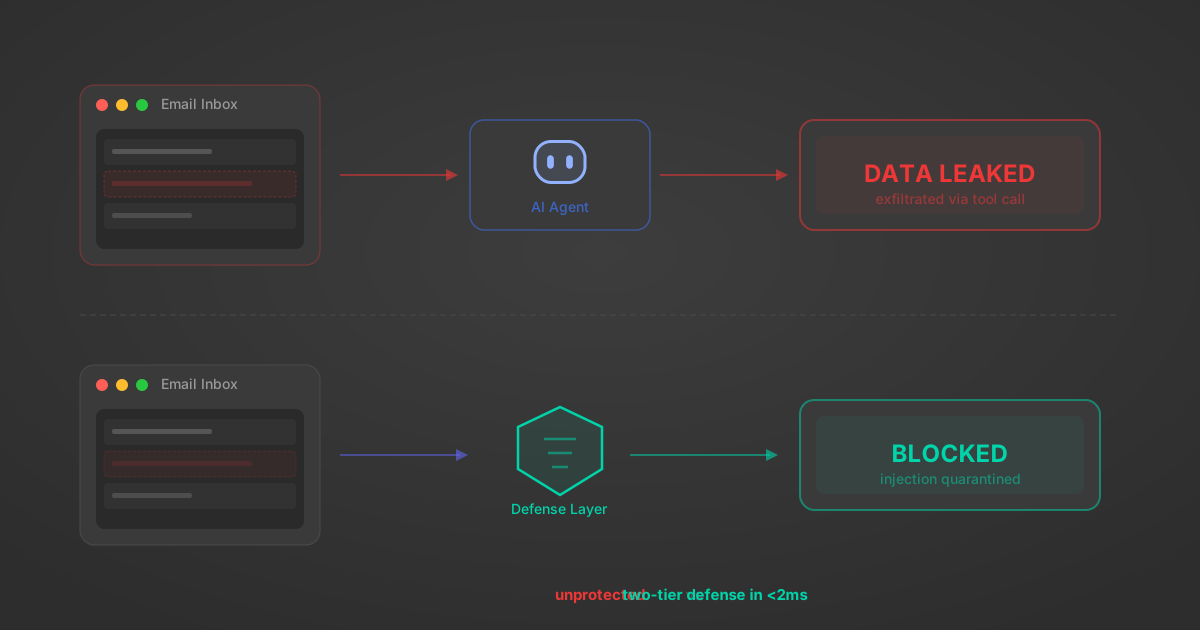
Indirect Prompt Injection Defense for MCP Tools: A Technical Guide
MCP tools that read emails, CRM records, and tickets are indirect prompt injection vectors. Here's how we built a two-tier defense that scans tool results in ~11ms.
12 min
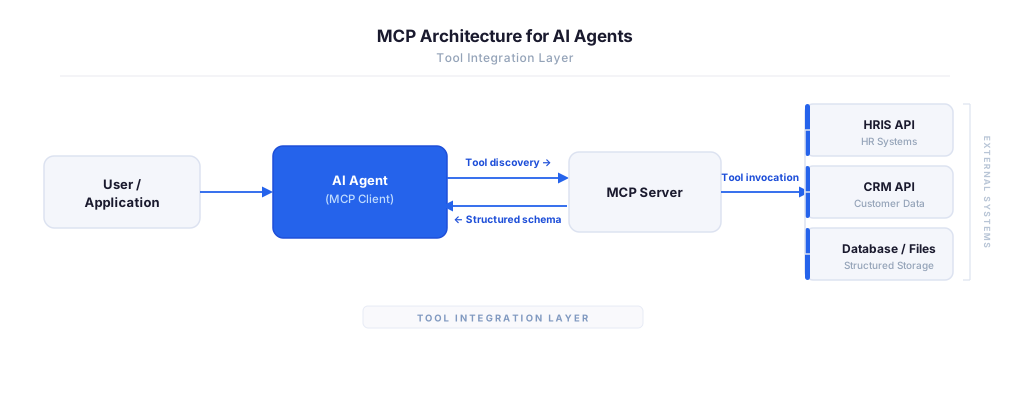
MCP vs A2A: Architecture, Security, and When to Use Each
MCP vs A2A: what each protocol standardizes, how they differ, their shared security risks including indirect prompt injection, and when to use one, both, or a hybrid architecture.
12 min
MCP vs API: What Hundreds of Connector Builds Taught Us
MCP wraps APIs, it doesn't replace them. After building hundreds of connectors that serve both, here's when each approach wins.
14 min read
Fivetran MCP Server FAQ
Does StackOne have a Fivetran MCP server?
Fivetran MCP server vs direct API integration — what's the difference?
How does Fivetran authentication work for AI agents?
origin_owner_id.Are Fivetran MCP tools vulnerable to prompt injection?
What is the context bloat of a Fivetran agent and how do I avoid it?
Can I limit which actions my Fivetran agent can access?
Can I create custom agent actions for my Fivetran MCP server?
When should I NOT use a Fivetran MCP server?
What AI frameworks and AI clients does the StackOne Fivetran MCP server support?
Put your AI agents to work
All the tools you need to build and scale AI agent integrations, with best-in-class connectivity, execution, and security.