


AlphaSense MCP Server
for AI Agents
Connect your AI agent to StackOne's AlphaSense MCP server and give it 32 MCP tools out of the box. Auth, tool execution, and security all managed.
 StackOne


Coverage
32 Agent Actions
Agents can read, write and delete in AlphaSense. Extend your agent's capabilities with custom actions.

Authentication
Agent Tool Authentication
Per-user OAuth in one call. Your AlphaSense MCP server gets session-scoped tokens with zero credentials stored on your infra.
Agent Auth →
Security
Agent Protection
Every AlphaSense tool response scanned for prompt injection in milliseconds, with 88.7% accuracy, all running on CPU.
Prompt Injection Defense →
Performance
Max Agent Context. Min Cost.
Free up to 96% of your agent's context window to enhance reasoning and reduce cost, on every AlphaSense call.
Tools Discovery →What is the AlphaSense MCP Server?
A AlphaSense MCP server lets AI agents read and write AlphaSense data through the Model Context Protocol, Anthropic's open standard for connecting LLMs to external tools. StackOne's AlphaSense MCP server ships with 32 pre-built actions, fully extensible via the Connector Builder, plus managed authentication, prompt injection defense, observability, and agent execution runtime. Connect it from MCP clients like Claude Desktop, Claude Code, Cursor, Goose, and VS Code, or from agent frameworks like OpenAI Agents SDK, LangChain, and Vercel AI SDK.
All AlphaSense MCP Tools
Every StackOne action for AlphaSense, ready for your agent. Read, write and delete, scoped to exactly what you need.
Broker Research User Entitlements
- List Broker Research User Entitlements
Check which broker research entitlement groups are currently granted to specific users, and the status of their entitlement requests
- Update Broker Research User Entitlements
Change the entitlement groups held by users who already have an entitlement request, optionally approving or declining them at the same time
Broker Research Entitlement Requests
- List Broker Research Entitlement Requests
List broker research entitlement requests raised to the provider, filtered by status and request date, with offset pagination
- Update Broker Research Entitlement Requests
Approve or decline broker research entitlement requests by request id, and set the entitlement groups granted with them
Documents
- Export Documents
Start an export job for one or more documents and get back a task id per document for polling the download link
- Search Documents
Search the AlphaSense document corpus by keyword, company, date, document type, industry, country, broker or expert-insight filters
Watchlists
- Create Watchlist
Create a watchlist from a list of companies, optionally shared with other users, marked as favourite or created on behalf of another user
- List Watchlists
List the authenticated user's watchlists with their companies, or fetch specific watchlists by id
- Delete Watchlist
Permanently delete a single watchlist by id
- Delete Watchlists
Permanently delete several watchlists in one call and get back the ids that were actually deleted
Other (22)
- Add Companies To Watchlist
Add companies to an existing watchlist without disturbing the companies already on it
- List Brokers
List the broker research sources the account is entitled to, as a hierarchy of groups and the brokers inside them
- Search Proactive Entitlement Companies
Find companies by name fragment that have at least one user eligible for proactive broker-research entitlement under the calling provider
- Search Proactive Entitlement User
Look up one end user by their full email address and return their current proactive broker-research entitlement standing with the calling provider
- List Company Peers
List the peer companies of a company identified by AlphaSense id, name, ticker, Crunchbase id, CIK or ISIN
- List Company Quarterly Trending Topics
List the trending topics discussed in a company's transcripts for a given quarter, each with an AI-generated summary and citations
- List Suggested Tickers
Autocomplete companies from a free-text company name or ticker fragment, for resolving user input into searchable company identifiers
- List Company Users
List the AlphaSense users belonging to a company, with search, sorting, active-only filtering and offset pagination
- Search By Doc ID
Retrieve a single document and its metadata by AlphaSense document id
- Get Document Snippets
Retrieve the keyword-hit snippets of a document, showing the surrounding statement, page number and hit offsets
- Search Document Images
Search for charts, tables and other images inside documents, filtered by image type and by the same document filters as a document search
- List Saved Searches
List the saved searches available to the account, optionally narrowed to specific saved-search types
- Search By ID
Execute a saved search by id and return the matching documents, optionally overriding its stored filters and sort order
- Get Document Counts
Count the documents matching a search filter, grouped by company, industry, country, or by document type over daily, weekly, monthly or quarterly buckets
- Get User
Retrieve the authenticated user, or another user by numeric id, together with their broker research credentials and aftermarket research allowance
- Remove Companies From Watchlist
Remove companies from a watchlist, leaving the rest of its membership in place
- Entitle Broker Research Users
Proactively grant broker research entitlement groups to individual users or to a whole firm, without waiting for an entitlement request
- Look Up Companies
Resolve one or more companies from any identifier — AlphaSense id, name, ticker, Crunchbase id, CIK or ISIN — and convert between identifier universes
- Check Export Document Status
Check the status of a document export task and retrieve its download URL once the export has finished
- Filing Types V3
Retrieve the full document type and source taxonomy as a tree, supplying the type ids that search filters expect
- Documents Data
Retrieve metadata for several documents at once by their ids, optionally pinning each to a specific version
- Patch Watchlist
Partially update a watchlist — rename it, replace its company list, or change its type or source
Set Up Your AlphaSense MCP Server in Minutes
One endpoint. Any framework. Your agent is talking to AlphaSense in under 10 lines of code.
Agent Frameworks


 JSON
{
  "mcpServers": {
    "stackone": {
      "command": "npx",
      "args": [
        "-y",
        "mcp-remote@latest",
        "https://api.stackone.com/mcp?x-account-id=<account_id>",
        "--header",
        "Authorization: Basic <YOUR_BASE64_TOKEN>"
      ]
    }
  }
}
Platform Resources

Comparing BM25, TF-IDF, and Hybrid Search for MCP Tool Discovery
Benchmarking BM25, TF-IDF, and hybrid search for MCP tool discovery across 916 tools. The 80/20 TF-IDF/BM25 hybrid hits 21% Top-1 accuracy in under 1ms.
10 min
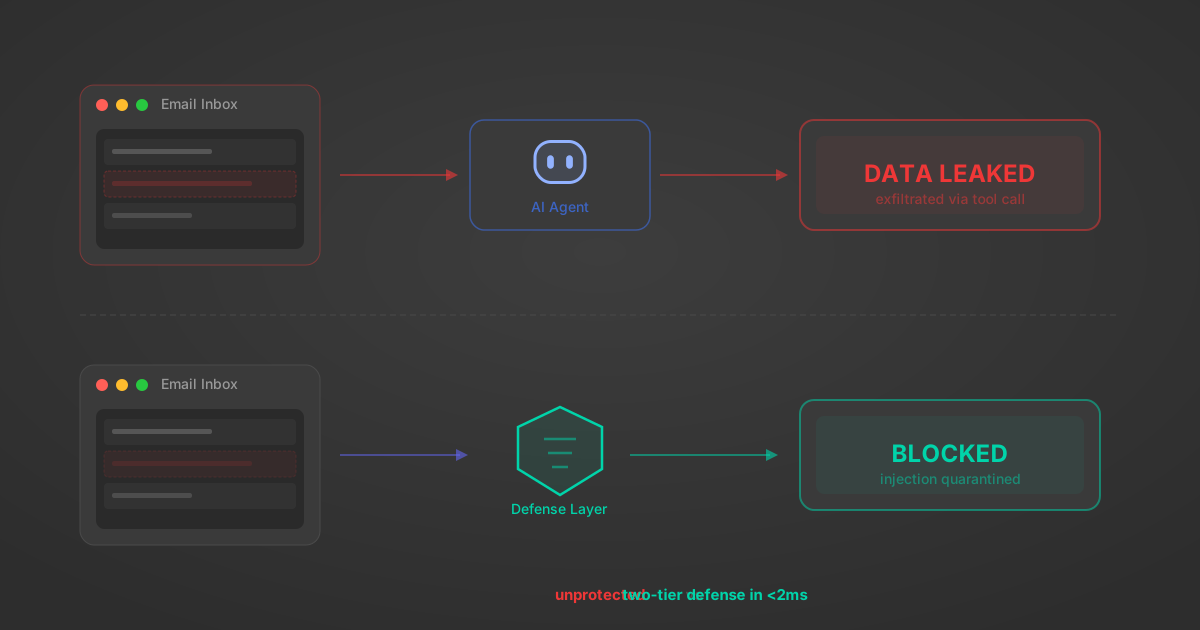
Indirect Prompt Injection Defense for MCP Tools: A Technical Guide
MCP tools that read emails, CRM records, and tickets are indirect prompt injection vectors. Here's how we built a two-tier defense that scans tool results in ~11ms.
12 min

MCP vs A2A: Architecture, Security, and When to Use Each
MCP vs A2A: what each protocol standardizes, how they differ, their shared security risks including indirect prompt injection, and when to use one, both, or a hybrid architecture.
12 min
MCP vs API: What Hundreds of Connector Builds Taught Us
MCP wraps APIs, it doesn't replace them. After building hundreds of connectors that serve both, here's when each approach wins.
14 min read
AlphaSense MCP Server FAQ
Does StackOne have a AlphaSense MCP server?
AlphaSense MCP server vs direct API integration: what's the difference?
How does AlphaSense authentication work for AI agents?
origin_owner_id.Are AlphaSense MCP tools vulnerable to prompt injection?
What is the context bloat of a AlphaSense agent and how do I avoid it?
Can I limit which actions my AlphaSense agent can access?
Can I create custom agent actions for my AlphaSense MCP server?
When should I NOT use a AlphaSense MCP server?
What AI frameworks and AI clients does the StackOne AlphaSense MCP server support?
Put your AI agents to work
All the tools you need to build and scale AI agent integrations, with best-in-class connectivity, execution, and security.