
Crelate MCP Server
for AI Agents
Connect your AI agent to StackOne's Crelate MCP server and give it 61 MCP tools out of the box. Auth, tool execution, and security all managed.
 StackOne






Coverage
61 Agent Actions
Create, read, update, and delete across Crelate — and extend your agent's capabilities with custom actions.

Authentication
Agent Tool Authentication
Per-user OAuth in one call. Your Crelate MCP server gets session-scoped tokens with zero credentials stored on your infra.
Agent Auth →
Security
Agent Protection
Every Crelate tool response scanned for prompt injection in milliseconds — 88.7% accuracy, all running on CPU.
Prompt Injection Defense →
Performance
Max Agent Context. Min Cost.
Free up to 96% of your agent's context window to enhance reasoning and reduce cost, on every Crelate call.
Tools Discovery →What is the Crelate MCP Server?
A Crelate MCP server lets AI agents read and write Crelate data through the Model Context Protocol — Anthropic's open standard for connecting LLMs to external tools. StackOne's Crelate MCP server ships with 61 pre-built actions, fully extensible via the Connector Builder — plus managed authentication, prompt injection defense, observability, and agent execution runtime. Connect it from MCP clients like Claude Desktop, Claude Code, Cursor, Goose, and VS Code, or from agent frameworks like OpenAI Agents SDK, LangChain, and Vercel AI SDK.
All Crelate MCP Tools
Every action from Crelate's API, ready for your agent. Create, read, update, and delete — scoped to exactly what you need.
Activitys
- Create Activity
Creates a new Activities record and returns its generated ID.
- Get Activity
Returns a single Activities record by its unique identifier. Returns a 404 if the record does not exist.
- Update Activity
Partially updates an existing Activities record. Only fields included in the request body are modified; omitted fields are left unchanged.
- Delete Activity
Permanently deletes an Activity record by its unique identifier.
Applications
- List Applications
Records must match all filters provided unless the OR filter operator is specified. <br> If no sort_by is provided, the resulting list will be sorted by ModifiedOn descending. <br> If both recent and modified_after/modified_before are provided, recent will take precedence.
- Get Application
Returns a single Applications record by its unique identifier. Returns a 404 if the record does not exist.
Companies
- List Companies
Records must match all filters provided unless the OR filter operator is specified.<br /> If no sort_by is provided, the resulting list will be sorted by ModifiedOn descending<br /> If both recent and modified_after/modified_before are provided, recent will take precedence.
- Search Companies
Performs a keyword search against all Company records (name, phone, address, website, or other keyword). Returned data is intentionally limited; use a more specific query or the GUID Ids with full retrieval endpoints for complete details.
Companys
- Create Company
Creates a new Companies record and returns its generated ID.
- Get Company
Returns a single Companies record by its unique identifier. Returns a 404 if the record does not exist.
- Update Company
Partially updates an existing Companies record. Only fields included in the request body are modified; omitted fields are left unchanged.
- Delete Company
Permanently deletes a Company record by its unique identifier.
Contacts
- Create Contact
Creates a new Contacts record and returns its generated ID.
- List Contacts
Records must match all filters provided unless the OR filter operator is specified. <br> If no sort_by is provided, the resulting list will be sorted by ModifiedOn descending. <br> If both recent and modified_after/modified_before are provided, recent will take precedence.
- Get Contact
Returns a single Contacts record by its unique identifier. Returns a 404 if the record does not exist.
- Search Contacts
Performs a keyword search against all Contact records (name, contact number, phone, address, website, or other keyword). Returned data is intentionally limited; use a more specific query or the GUID Ids with full retrieval endpoints for complete details.
- Update Contact
Partially updates an existing Contacts record. Only fields included in the request body are modified; omitted fields are left unchanged.
- Delete Contact
Permanently deletes a Contact record by its unique identifier.
Jobs
- Create Job
Creates a new Jobs record and returns its generated ID.
- List Jobs
Returns a paged, filterable list of job records. Supports filtering by stage, company, tags, candidates, and more.
- Get Job
Returns a single Jobs record by its unique identifier. Returns a 404 if the record does not exist.
- Search Jobs
Performs a keyword search against all Job records (name, job number, location, website, or other keyword). Returned data is intentionally limited; use a more specific query or the GUID Ids with full retrieval endpoints for complete details.
- Update Job
Partially updates an existing Jobs record. Only fields included in the request body are modified; omitted fields are left unchanged.
- Delete Job
Permanently deletes a Job record by its unique identifier.
Job Postings
- Search Job Postings
Search Job postings for open Jobs that are not hidden against the Job's title, description, compensation, city, state, zip, country, and company.
- Update Job Posting
Updates the public-facing portal posting details for a job, such as title, description, location, and compensation. Only posting-specific fields are accepted; other job fields are ignored.
Notes
- Create Note
Creates a new note activity on a parent record. A `ParentId` is required.
- List Notes
Returns a paged list of note activities. Filter by parent record, date range, or other criteria.
- Get Note
Returns a single note activity by its unique identifier.
- Update Note
Partially updates a note activity. Only fields included in the request body are modified.
- Delete Note
Permanently deletes a note activity by its unique identifier.
Placements
- List Placements
Records must match all filters provided unless the OR filter operator is specified. <br> If no sort_by is provided, the resulting list will be sorted by ModifiedOn descending. <br> If both recent and modified_after/modified_before are provided, recent will take precedence.
- Get Placement
Returns a single Placements record by its unique identifier. Returns a 404 if the record does not exist.
Tasks
- Create Task
Tasks will default to being incomplete (Completed = false) unless a value is provided.
- List Tasks
Returns a paged list of task activities. Filter by parent record, completion state, date range, or other criteria.
- Get Task
Returns a single task activity by its unique identifier.
- Update Task
Partially updates a task activity. Only fields included in the request body are modified.
- Delete Task
Permanently deletes a task activity by its unique identifier.
Other (23)
- Create Activity With Attachment
Creates a new Activity record and simultaneously uploads and links one or more files as Artifacts via a multipart form. Only Email Activity Types and custom Activity Types that allow attachments may be used.
- Add Contact To Job
Adds a single contact to the specified job's recruiting pipeline at the given workflow stage.
- Add Contacts To Job
Adds one or more contacts to the specified job's recruiting pipeline at the given workflow stage.
- List Activities
Returns a paged list of activity records. Filter by parent record, verb type, date range, or other criteria.
- Get Activity Info
Retrieves attribute information specific to the Activities type. This data changes rarely and Crelate recommends caching it.
- Get Application Info
Retrieves attribute information specific to the Applications type. This data changes rarely and Crelate recommends caching it.
- Get Company Info
Retrieves attribute information specific to the Companies type. This data changes rarely and Crelate recommends caching it.
- List Companies By List
Returns Companies records that belong to the specified saved list.
- Get Contact Info
Retrieves attribute information specific to the Contacts type. This data changes rarely and Crelate recommends caching it.
- List Contacts By List
Returns Contacts records that belong to the specified saved list.
- Get Job Info
Retrieves attribute information specific to the Jobs type. This data changes rarely and Crelate recommends caching it.
- List Jobs By List
Returns Jobs records that belong to the specified saved list.
- Get Placement Info
Retrieves attribute information specific to the Placements type. This data changes rarely and Crelate recommends caching it.
- Update Job Contact Workflow Status
This endpoint does not support handling workflow rules. Consider migrating to the [Workflow Stage](#tag/Workflow-Stages) endpoints for API-supported workflow rule interactions.
- Remove Contact From Job
Removes a contact from the specified job's recruiting pipeline.
- Approve Application
Approved applicants will be moved to the next workflow stage, typically with a meaning of "in progress".
- Block Application
When an applicant is blocked, they are no longer visible and any future applications from that applicant will be discarded.
- Reject Application
Rejected applicants will be moved to a closed negative workflow stage.
- Apply To Job
Submits an application to a Job and returns the created application ID. Depending on settings, applicants either route to the Recruiting Intake dashboard or auto-approve and convert to a Contact (found via the ContactId field on the Application). A resume file may be required based on Job Portal settings.
- Change Company Status
Available statuses can be retrieved by inspecting the results of the Companies metadata endpoint under the `EntityStatus` field.
- Change Contact Status
Available statuses can be retrieved by inspecting the results of the Contacts metadata endpoint under the `EntityStatus` field.
- Disable Job Posting
Disables the job's portal posting and removes it from any free job boards it was published to. The job record itself is not deleted.
- Change Placement Status
Available statuses can be retrieved by inspecting the results of the Placements metadata endpoint under the `EntityStatus` field.
Crelate AI Agent Use Cases
Connect your AI agent to Crelate and help your team scale the sales operations they run by hand today.
Use StackOne to connect your AI agent to your CRM, email, and calendar tools to automate post-demo follow-up.
ViewUse StackOne to connect your AI agent to your CRM, email, and calendar tools to automate deal risk scoring and pipeline alerts.
ViewUse StackOne to connect your AI agent to your ATS and job boards to automate job posting distribution.
ViewSet Up Your Crelate MCP Server in Minutes
One endpoint. Any framework. Your agent is talking to Crelate in under 10 lines of code.
Agent Frameworks


 JSON
JSON{
"mcpServers": {
"stackone": {
"command": "npx",
"args": [
"-y",
"mcp-remote@latest",
"https://api.stackone.com/mcp?x-account-id=<account_id>",
"--header",
"Authorization: Basic <YOUR_BASE64_TOKEN>"
]
}
}
}Check More crm-sales MCP Servers
136+ actions
104+ actions
82+ actions
59+ actions
54+ actions
53+ actions
26+ actions
Platform Resources

MCP Code Mode: Keeping Tool Responses Out of Agent Context
Anthropic's code_execution processes data already in context. Custom MCP code mode keeps raw tool responses in a sandbox. 14K tokens vs 500.
11 min

Comparing BM25, TF-IDF, and Hybrid Search for MCP Tool Discovery
Benchmarking BM25, TF-IDF, and hybrid search for MCP tool discovery across 916 tools. The 80/20 TF-IDF/BM25 hybrid hits 21% Top-1 accuracy in under 1ms.
10 min
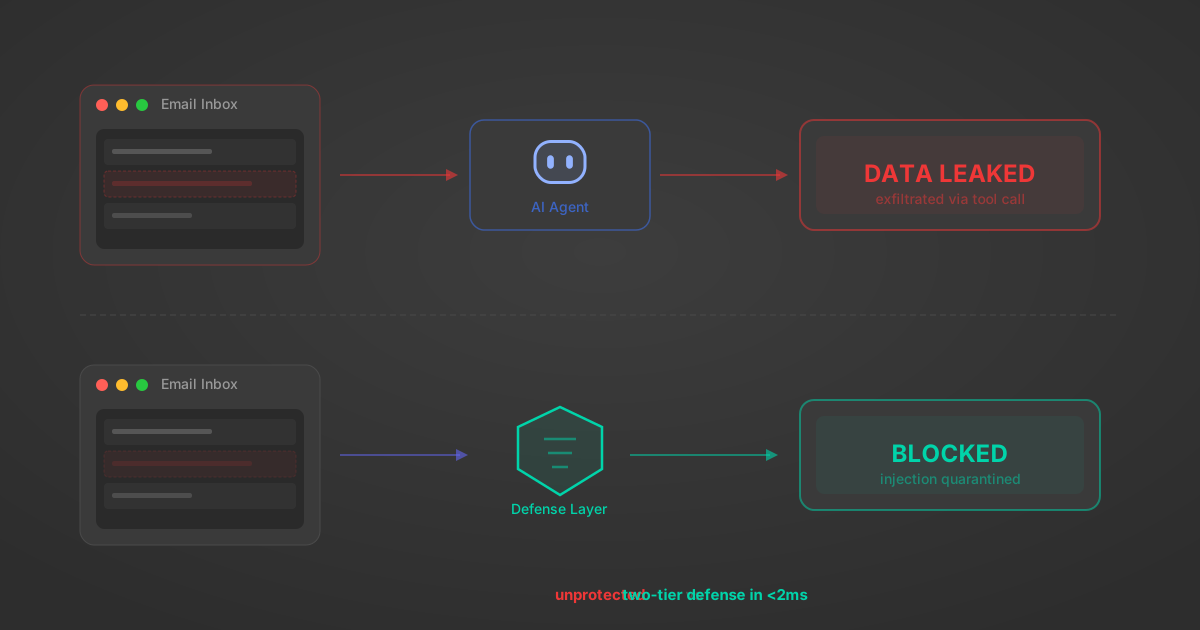
Indirect Prompt Injection Defense for MCP Tools: A Technical Guide
MCP tools that read emails, CRM records, and tickets are indirect prompt injection vectors. Here's how we built a two-tier defense that scans tool results in ~11ms.
12 min
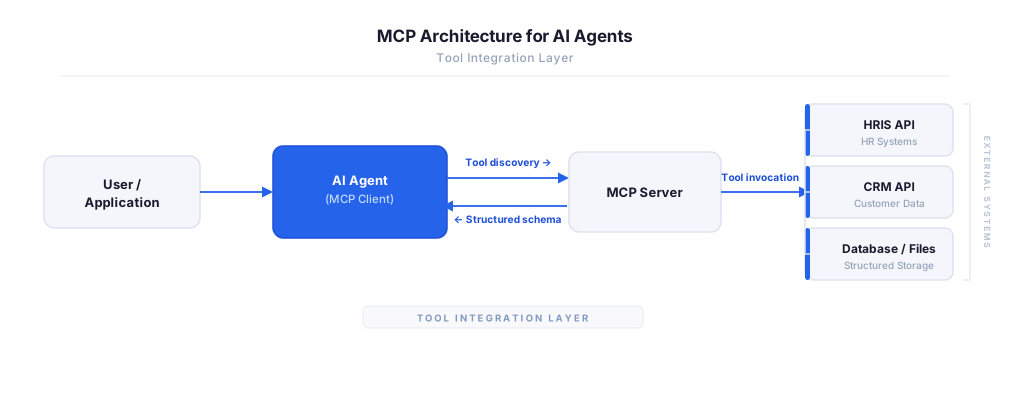
MCP vs A2A: Architecture, Security, and When to Use Each
MCP vs A2A: what each protocol standardizes, how they differ, their shared security risks including indirect prompt injection, and when to use one, both, or a hybrid architecture.
12 min
MCP vs API: What Hundreds of Connector Builds Taught Us
MCP wraps APIs, it doesn't replace them. After building hundreds of connectors that serve both, here's when each approach wins.
14 min read
Crelate MCP Server FAQ
Does StackOne have a Crelate MCP server?
Crelate MCP server vs direct API integration — what's the difference?
How does Crelate authentication work for AI agents?
origin_owner_id.Are Crelate MCP tools vulnerable to prompt injection?
What is the context bloat of a Crelate agent and how do I avoid it?
Can I limit which actions my Crelate agent can access?
Can I create custom agent actions for my Crelate MCP server?
When should I NOT use a Crelate MCP server?
What AI frameworks and AI clients does the StackOne Crelate MCP server support?
Put your AI agents to work
All the tools you need to build and scale AI agent integrations, with best-in-class connectivity, execution, and security.