
Salesforce MCP Server
for AI Agents
Connect your AI agent to StackOne's Salesforce MCP server and give it 380 MCP tools out of the box. Auth, tool execution, and security all managed.
 StackOne






Coverage
380 Agent Actions
Create, read, update, and delete across Salesforce — and extend your agent's capabilities with custom actions.

Authentication
Agent Tool Authentication
Per-user OAuth in one call. Your Salesforce MCP server gets session-scoped tokens with zero credentials stored on your infra.
Agent Auth →
Security
Agent Protection
Every Salesforce tool response scanned for prompt injection in milliseconds — 88.7% accuracy, all running on CPU.
Prompt Injection Defense →
Performance
Max Agent Context. Min Cost.
Free up to 96% of your agent's context window to enhance reasoning and reduce cost, on every Salesforce call.
Tools Discovery →What is the Salesforce MCP Server?
A Salesforce MCP server lets AI agents read and write Salesforce data through the Model Context Protocol — Anthropic's open standard for connecting LLMs to external tools. StackOne's Salesforce MCP server ships with 380 pre-built actions, fully extensible via the Connector Builder — plus managed authentication, prompt injection defense, observability, and agent execution runtime. Connect it from MCP clients like Claude Desktop, Claude Code, Cursor, Goose, and VS Code, or from agent frameworks like OpenAI Agents SDK, LangChain, and Vercel AI SDK.
All Salesforce MCP Tools
Every action from Salesforce's API, ready for your agent. Create, read, update, and delete — scoped to exactly what you need.
Accounts
- Create Account
Create a new Account record in Salesforce with specified field values. Returns the ID of the newly created account.
- List Accounts
Retrieve a paginated list of Account records from Salesforce using SOQL query. Returns account information including name, type, industry, website, and other standard fields.
- Get Account
Retrieve a specific Account record by its unique Salesforce ID. Returns complete account details including all standard and accessible custom fields.
- Search Accounts
Search for Account records using Salesforce SOSL (Salesforce Object Search Language). Returns accounts matching the search term.
- Update Account
Update an existing Account record in Salesforce with specified field values. Only include fields that need to be modified.
- Delete Account
Delete an Account record from Salesforce by its unique ID. This action moves the record to the Recycle Bin.
Dashboards
- List Dashboards
Retrieve a list of recently viewed dashboards available to the current user.
- Get Dashboard
Retrieve metadata and current data for a specific dashboard.
Assets
- Create Asset
Create a new Asset record in Salesforce with specified field values.
- List Assets
Retrieve a paginated list of Asset records from Salesforce using SOQL query.
- Get Asset
Retrieve a specific Asset record by its unique Salesforce ID.
- Search Assets
Search for Asset records using Salesforce full-text search (SOSL).
- Update Asset
Update an existing Asset record in Salesforce with specified field values.
- Delete Asset
Delete an Asset record from Salesforce by its unique ID.
Bulk Ingest Jobs
- Create Bulk Ingest Job
Create a new Bulk API 2.0 ingest job for inserting, updating, upserting, or deleting records.
- Get Bulk Ingest Job
Retrieve status and details of a bulk ingest job.
- List Bulk Ingest Jobs
Retrieve a list of all bulk ingest jobs.
- Delete Bulk Ingest Job
Delete a bulk ingest job and its associated data.
Bulk Query Jobs
- Create Bulk Query Job
Create a new Bulk API 2.0 query job for extracting large volumes of data.
- Get Bulk Query Job
Retrieve status and details of a bulk query job.
- List Bulk Query Jobs
Retrieve a list of all bulk query jobs.
- Delete Bulk Query Job
Delete a bulk query job and its associated data.
Campaigns
- List Campaigns
Retrieve a paginated list of Campaign records from Salesforce using SOQL query. Returns campaign information including name, status, type, dates, and budget details.
- Get Campaign
Retrieve a specific Campaign record by its unique Salesforce ID. Returns complete campaign details including all standard and accessible custom fields.
- Search Campaigns
Search for Campaign records using Salesforce SOSL (Salesforce Object Search Language). Returns campaigns matching the search term.
Campaign Members
- Add Campaign Member
Add a Contact or Lead as a member of a Campaign. Creates a CampaignMember record linking the individual to the campaign.
- Create Campaign Member
Add a Contact or Lead to a Campaign.
- List Campaign Members
Retrieve a list of CampaignMember records for a specific campaign.
- Get Campaign Member
Retrieve a specific CampaignMember record by ID.
- Search Campaign Members
Search for campaign members by name or email.
- Update Campaign Member
Update a CampaignMember record's status or other fields.
- Delete Campaign Member
Remove a member from a campaign.
Cases
- Create Case
Create a new Case record in Salesforce with specified field values, including its record type and custom fields. Returns the ID of the newly created case.
- List Cases
Retrieve a paginated list of Case records from Salesforce using SOQL query. Returns case information including subject, status, priority, origin, and related records.
- Get Case
Retrieve a specific Case record by its unique Salesforce ID. Returns complete case details including all standard and accessible custom fields.
- Search Cases
Search for Case records using Salesforce SOSL (Salesforce Object Search Language). Returns cases matching the search term.
- Update Case
Update an existing Case record in Salesforce with specified field values, including its record type and custom fields. Only include fields that need to be modified.
- Delete Case
Delete a Case record from Salesforce by its unique ID. This action moves the record to the Recycle Bin.
Feed Elements
- Get Feed Element
Retrieve a specific feed element (post) by its ID.
- Delete Feed Element
Delete a feed element (post) from Chatter.
Records Collections
- Create Records Collection
Create up to 200 records of the same object type in a single API call using sObject Collections.
- Update Records Collection
Update up to 200 records of mixed object types in a single API call using sObject Collections.
- Delete Records Collection
Delete up to 200 records in a single API call using sObject Collections.
Contacts
- Create Contact
Create a new Contact record in Salesforce with specified field values. Returns the ID of the newly created contact.
- List Contacts
Retrieve a paginated list of Contact records from Salesforce using SOQL query. Returns contact information including name, email, phone, account association, and other standard fields.
- Get Contact
Retrieve a specific Contact record by its unique Salesforce ID. Returns complete contact details including all standard and accessible custom fields.
- Search Contacts
Search for Contact records using Salesforce SOSL (Salesforce Object Search Language). Returns contacts matching the search term.
- Update Contact
Update an existing Contact record in Salesforce with specified field values. Only include fields that need to be modified.
- Delete Contact
Delete a Contact record from Salesforce by its unique ID. This action moves the record to the Recycle Bin.
Contracts
- Create Contract
Create a new Contract record in Salesforce with specified field values.
- List Contracts
Retrieve a paginated list of Contract records from Salesforce using SOQL query.
- Get Contract
Retrieve a specific Contract record by its unique Salesforce ID.
- Search Contracts
Search for Contract records using Salesforce full-text search (SOSL).
- Update Contract
Update an existing Contract record in Salesforce with specified field values.
- Delete Contract
Delete a Contract record from Salesforce by its unique ID.
Email Messages
- Create Email Message
Create a new EmailMessage record in Salesforce to log an email.
- List Email Messages
Retrieve a paginated list of EmailMessage records from Salesforce using SOQL query.
- Get Email Message
Retrieve a specific EmailMessage record by its unique Salesforce ID.
- Delete Email Message
Delete an EmailMessage record from Salesforce by its unique ID.
Email Templates
- List Email Templates
Retrieve a list of EmailTemplate records from Salesforce.
- Get Email Template
Retrieve a specific EmailTemplate record by its unique Salesforce ID.
Entitlements
- Create Entitlement
Create a new Entitlement record in Salesforce with specified field values.
- List Entitlements
Retrieve a paginated list of Entitlement records from Salesforce using SOQL query.
- Get Entitlement
Retrieve a specific Entitlement record by its unique Salesforce ID.
- Update Entitlement
Update an existing Entitlement record in Salesforce with specified field values.
- Delete Entitlement
Delete an Entitlement record from Salesforce by its unique ID.
Service Contracts
- Create Service Contract
Create a new ServiceContract record in Salesforce.
- List Service Contracts
Retrieve a paginated list of ServiceContract records from Salesforce.
- Get Service Contract
Retrieve a specific ServiceContract record by its unique Salesforce ID.
- Update Service Contract
Update an existing ServiceContract record in Salesforce.
- Delete Service Contract
Delete a ServiceContract record from Salesforce by its unique ID.
Events
- Create Event
Create a new Event record in Salesforce with specified field values. Returns the ID of the newly created event.
- List Events
Retrieve a paginated list of Event records from Salesforce using SOQL query. Returns event information including subject, start/end times, location, and related records.
- Get Event
Retrieve a specific Event record by its unique Salesforce ID. Returns complete event details including all standard and accessible custom fields.
- Update Event
Update an existing Event record in Salesforce with specified field values. Only include fields that need to be modified.
- Delete Event
Delete an Event record from Salesforce by its unique ID. This action moves the record to the Recycle Bin.
Content Documents
- List Content Documents
Retrieve a list of ContentDocument records representing files stored in Salesforce.
- Delete Content Document
Delete a ContentDocument record and all its versions from Salesforce.
Content Versions
- List Content Versions
Retrieve ContentVersion records representing file versions in Salesforce.
- Get Content Version
Retrieve a specific ContentVersion record by its unique Salesforce ID.
- Download Content Version
Download the binary content of a file version using the VersionData blob field.
Attachments
- Create Attachment
Create a new legacy Attachment linked to a parent Salesforce record.
- List Attachments
Retrieve legacy Attachment records linked to Salesforce records.
- Get Attachment
Retrieve a specific Attachment record by its unique Salesforce ID.
- Download Attachment
Download the binary content of a legacy Attachment using the Body blob field.
- Delete Attachment
Delete a legacy Attachment record from Salesforce.
Knowledge Articles
- List Knowledge Articles
Retrieve a list of published knowledge articles visible to the current user.
- Get Knowledge Article
Retrieve the full content of a knowledge article by its ID.
- Search Knowledge Articles
Search knowledge articles by keyword with optional category filtering.
Leads
- Create Lead
Create a new Lead record in Salesforce with specified field values. Returns the ID of the newly created lead.
- List Leads
Retrieve a paginated list of Lead records from Salesforce using SOQL query. Returns lead information including name, company, status, source, and other standard fields.
- Get Lead
Retrieve a specific Lead record by its unique Salesforce ID. Returns complete lead details including all standard and accessible custom fields.
- Search Leads
Search for Lead records using Salesforce SOSL (Salesforce Object Search Language). Returns leads matching the search term.
- Update Lead
Update an existing Lead record in Salesforce with specified field values. Only include fields that need to be modified.
- Delete Lead
Delete a Lead record from Salesforce by its unique ID. This action moves the record to the Recycle Bin.
Record Types
- List Record Types
Retrieve all record types for a specific object.
- Get Record Type
Retrieve a specific RecordType record by its unique Salesforce ID.
Notes
- Create Note
Create a new Note record in Salesforce attached to a parent record. Returns the ID of the newly created note.
- List Notes
Retrieve a paginated list of Note records from Salesforce using SOQL query. Returns note information including title, body, and parent record association.
- Get Note
Retrieve a specific Note record by its unique Salesforce ID. Returns complete note details including title, body, and parent record information.
- Update Note
Update an existing Note record in Salesforce with specified field values. Only include fields that need to be modified.
- Delete Note
Delete a Note record from Salesforce by its unique ID. This action moves the record to the Recycle Bin.
Opportunities
- List Opportunities
Retrieve a paginated list of Opportunity records from Salesforce using SOQL query. Returns opportunity information including name, stage, amount, close date, and other standard fields.
- Search Opportunities
Search for Opportunity records using Salesforce SOSL (Salesforce Object Search Language). Returns opportunities matching the search term.
Opportunitys
- Create Opportunity
Create a new Opportunity record in Salesforce with specified field values. Returns the ID of the newly created opportunity.
- Get Opportunity
Retrieve a specific Opportunity record by its unique Salesforce ID. Returns complete opportunity details including all standard and accessible custom fields.
- Update Opportunity
Update an existing Opportunity record in Salesforce with specified field values. Only include fields that need to be modified.
- Delete Opportunity
Delete an Opportunity record from Salesforce by its unique ID. This action moves the record to the Recycle Bin.
Orders
- Create Order
Create a new Order record in Salesforce with specified field values.
- List Orders
Retrieve a paginated list of Order records from Salesforce using SOQL query.
- Get Order
Retrieve a specific Order record by its unique Salesforce ID.
- Search Orders
Search for Order records using Salesforce full-text search (SOSL).
- Update Order
Update an existing Order record in Salesforce with specified field values.
- Delete Order
Delete an Order record from Salesforce by its unique ID.
Order Items
- Create Order Item
Add a line item to an Order in Salesforce.
- List Order Items
Retrieve all line items for a specific Order.
- Get Order Item
Retrieve a specific OrderItem record by its unique Salesforce ID.
- Update Order Item
Update an existing OrderItem record in Salesforce.
- Delete Order Item
Delete an OrderItem record from Salesforce by its unique ID.
Pricebooks
- Create Pricebook
Create a new custom Pricebook2 record in Salesforce.
- List Pricebooks
Retrieve a paginated list of Pricebook2 records from Salesforce using SOQL query.
- Get Pricebook
Retrieve a specific Pricebook2 record by its unique Salesforce ID.
- Update Pricebook
Update an existing Pricebook2 record in Salesforce.
- Delete Pricebook
Delete a Pricebook2 record from Salesforce by its unique ID.
Pricebook Entries
- List Pricebook Entries
Retrieve pricebook entries for a specific pricebook.
- Search Pricebook Entries
Search for PricebookEntry records by product name or code.
Pricebook Entrys
- Create Pricebook Entry
Add a product to a pricebook with specified pricing.
- Get Pricebook Entry
Retrieve a specific PricebookEntry record by its unique Salesforce ID.
- Update Pricebook Entry
Update an existing PricebookEntry record in Salesforce.
- Delete Pricebook Entry
Delete a PricebookEntry record from Salesforce by its unique ID.
Products
- Create Product
Create a new Product2 record in Salesforce with specified field values.
- List Products
Retrieve a paginated list of Product2 records from Salesforce using SOQL query.
- Get Product
Retrieve a specific Product2 record by its unique Salesforce ID.
- Update Product
Update an existing Product2 record in Salesforce with specified field values.
- Delete Product
Delete a Product2 record from Salesforce by its unique ID.
Service Resources
- Create Service Resource
Create a new ServiceResource record in Salesforce.
- List Service Resources
Retrieve a list of ServiceResource records from Salesforce.
- Get Service Resource
Retrieve a specific ServiceResource record by its unique Salesforce ID.
- Update Service Resource
Update an existing ServiceResource record in Salesforce.
Service Appointments
- Create Service Appointment
Create a new ServiceAppointment record in Salesforce.
- List Service Appointments
Retrieve a list of ServiceAppointment records from Salesforce.
- Get Service Appointment
Retrieve a specific ServiceAppointment record by its unique Salesforce ID.
- Update Service Appointment
Update an existing ServiceAppointment record in Salesforce.
Permission Sets
- List Permission Sets
Retrieve all permission sets in the organization.
- Remove Permission Set
Remove a permission set assignment from a user.
Tasks
- Create Task
Create a new Task record in Salesforce with specified field values. Returns the ID of the newly created task.
- List Tasks
Retrieve a paginated list of Task records from Salesforce using SOQL query. Returns task information including subject, status, priority, due date, and related records.
- Get Task
Retrieve a specific Task record by its unique Salesforce ID. Returns complete task details including all standard and accessible custom fields.
- Update Task
Update an existing Task record in Salesforce with specified field values. Only include fields that need to be modified.
- Delete Task
Delete a Task record from Salesforce by its unique ID. This action moves the record to the Recycle Bin.
Topics
- Create Topic
Create a new Topic record in Salesforce.
- List Topics
Retrieve a list of Topic records from Salesforce.
- Get Topic
Retrieve a specific Topic record by its unique Salesforce ID.
- Search Topics
Search for Topic records using Salesforce full-text search (SOSL).
- Update Topic
Update an existing Topic record in Salesforce.
- Delete Topic
Delete a Topic record from Salesforce by its unique ID.
Users
- List Users
Retrieve a paginated list of User records from Salesforce using SOQL query. Returns user information including name, email, profile, role, and other standard fields.
- Get User
Retrieve a specific User record by its unique Salesforce ID. Returns complete user details including all standard and accessible custom fields.
- Search Users
Search for User records using Salesforce SOSL (Salesforce Object Search Language). Returns users matching the search term.
- Update User
Update an existing User record in Salesforce with specified field values. Only include fields that need to be modified.
Work Orders
- Create Work Order
Create a new WorkOrder record in Salesforce with specified field values.
- List Work Orders
Retrieve a paginated list of WorkOrder records from Salesforce using SOQL query.
- Get Work Order
Retrieve a specific WorkOrder record by its unique Salesforce ID.
- Search Work Orders
Search for WorkOrder records using Salesforce full-text search (SOSL).
- Update Work Order
Update an existing WorkOrder record in Salesforce with specified field values.
- Delete Work Order
Delete a WorkOrder record from Salesforce by its unique ID.
Work Order Line Items
- Create Work Order Line Item
Add a line item to a WorkOrder.
- List Work Order Line Items
Retrieve all line items for a specific WorkOrder.
Account Contact Roles
- Create Account Contact Role
Assign a role to a contact on an account.
- List Account Contact Roles
Retrieve all contact roles for an account.
- Update Account Contact Role
Update a contact role on an account.
- Delete Account Contact Role
Remove a contact role from an account.
Opportunity Contact Roles
- Create Opportunity Contact Role
Assign a role to a contact on an opportunity.
- List Opportunity Contact Roles
Retrieve all contact roles for an opportunity.
- Update Opportunity Contact Role
Update a contact role on an opportunity.
- Delete Opportunity Contact Role
Remove a contact role from an opportunity.
Opportunity Line Items
- Create Opportunity Line Item
Add a product line item to an opportunity.
- List Opportunity Line Items
Retrieve all product line items for an opportunity.
- Get Opportunity Line Item
Retrieve a specific opportunity line item by ID.
- Update Opportunity Line Item
Update an existing opportunity line item.
- Delete Opportunity Line Item
Remove a product line item from an opportunity.
User Roles
- List User Roles
Retrieve all user roles in the organization.
- Get User Role
Retrieve a specific user role by ID.
Profiles
- List Profiles
Retrieve all profiles in the organization.
- Get Profile
Retrieve a specific profile by ID.
Opportunity Forecast Categorys
- Get Opportunity Forecast Category
Retrieve the forecast category for an opportunity.
- Update Opportunity Forecast Category
Update the forecast category for an opportunity.
Case Comments
- Create Case Comment
Add a new comment to a case.
- List Case Comments
Retrieve all comments for a specific case.
- Get Case Comment
Retrieve a specific case comment by ID.
- Update Case Comment
Update an existing case comment.
- Delete Case Comment
Delete a case comment.
Holidays
- List Holidays
Retrieve all holidays defined in the organization.
- Get Holiday
Retrieve a specific holiday by ID.
Group Members
- Add Group Member
Add a user or group as a member of a group.
- List Group Members
Retrieve all members of a specific group or queue.
- Get Group Member
Retrieve a specific group membership record.
- Remove Group Member
Remove a member from a group.
Business Hours
- List Business Hours
Retrieve all business hours records in the organization.
- Get Business Hours
Retrieve a specific business hours record by ID.
Milestones
- List Milestones
Retrieve all milestone records for entitlement management.
- Get Milestone
Retrieve a specific milestone type by ID.
Documents
- List Documents
Retrieve documents from a folder.
- Get Document
Retrieve a specific document by ID.
- Download Document
Download the body of a document.
- Delete Document
Delete a document.
Folders
- List Folders
Retrieve all folders for documents, reports, or dashboards.
- Get Folder
Retrieve a specific folder by ID.
Unified Groups
- List Unified Groups
List unified groups in Salesforce.
- Get Unified Group
Get a unified Salesforce group by ID.
Unified Organizations
- List Unified Organizations
List unified organizations in Salesforce.
- Get Unified Organization
Get a unified Salesforce organization by ID.
Unified Roles
- List Unified Roles
List unified roles in Salesforce.
- Get Unified Role
Get a unified Salesforce role by ID.
Unified Users
- List Unified Users
List unified users in Salesforce.
- Get Unified User
Get a unified Salesforce user by ID.
Individuals
- Create Individual
Create a new Individual record for privacy tracking.
- List Individuals
Retrieve Individual records for privacy management.
- Get Individual
Retrieve a specific Individual record by ID.
- Update Individual
Update an Individual record including personal info and privacy preferences.
- Delete Individual
Delete an Individual record.
Solutions
- Create Solution
Create a new Solution record in Salesforce with specified field values.
- List Solutions
Retrieve a paginated list of Solution records from Salesforce using SOQL query.
- Get Solution
Retrieve a specific Solution record by its unique Salesforce ID.
- Search Solutions
Search for Solution records using Salesforce full-text search (SOSL).
- Update Solution
Update an existing Solution record in Salesforce with specified field values.
- Delete Solution
Delete a Solution record from Salesforce by its unique ID.
Partners
- Create Partner
Create a new Partner relationship record in Salesforce.
- List Partners
Retrieve a paginated list of Partner records from Salesforce using SOQL query.
- Get Partner
Retrieve a specific Partner record by its unique Salesforce ID.
- Delete Partner
Delete a Partner record from Salesforce by its unique ID.
Feed Items
- Create Feed Item
Create a new FeedItem (Chatter post) in Salesforce.
- List Feed Items
Retrieve a paginated list of FeedItem records from Salesforce Chatter feeds.
- Get Feed Item
Retrieve a specific FeedItem record by its unique Salesforce ID.
- Delete Feed Item
Delete a FeedItem record from Salesforce.
Feed Comments
- Create Feed Comment
Create a comment on a FeedItem.
- List Feed Comments
Retrieve comments on a specific FeedItem.
- Delete Feed Comment
Delete a FeedComment from Salesforce.
Locations
- Create Location
Create a new Location record in Salesforce.
- List Locations
Retrieve a paginated list of Location records from Salesforce.
- Get Location
Retrieve a specific Location record by its unique Salesforce ID.
- Search Locations
Search for Location records using Salesforce full-text search (SOSL).
- Update Location
Update an existing Location record in Salesforce.
- Delete Location
Delete a Location record from Salesforce.
Return Orders
- Create Return Order
Create a new ReturnOrder record in Salesforce.
- List Return Orders
Retrieve a paginated list of ReturnOrder records from Salesforce.
- Get Return Order
Retrieve a specific ReturnOrder record by its unique Salesforce ID.
- Update Return Order
Update an existing ReturnOrder record in Salesforce.
- Delete Return Order
Delete a ReturnOrder record from Salesforce.
Other (131)
- Send Email
Send an email using the emailSimple standard invocable action.
- Upload Bulk Job Data
Upload CSV data to a bulk ingest job for processing.
- List Custom Invocable Actions
Retrieve a list of all custom invocable actions including Apex and Flow actions.
- List Flow Actions
Retrieve a list of all autolaunched flows available as invocable actions.
- List Apex Invocable Actions
Retrieve a list of all Apex invocable methods available as actions.
- Get Activity History
Retrieve combined activity history (tasks, events, emails) for a specific record.
- Get Open Activities
Retrieve open (pending) activities for a specific record.
- Get Tasks For Contact
Retrieve all tasks where a contact is the Who (related person).
- Get Events For Contact
Retrieve all events where a contact is the Who (related person).
- Get My Tasks
Retrieve tasks assigned to a specific user.
- Get My Events
Retrieve calendar events for a specific user.
- Get Overdue Tasks
Retrieve all overdue tasks that are not completed.
- Get Tasks Due Today
Retrieve all tasks due today that are not completed.
- Get Upcoming Events
Retrieve upcoming calendar events within the next specified days.
- Get Recent Activities
Retrieve recently completed tasks and past events.
- List Reports
Retrieve a list of recently viewed reports available to the current user.
- Get Report Metadata
Retrieve metadata about a specific report including columns, filters, and groupings.
- List Report Instances
Retrieve a list of asynchronous report execution instances for a report.
- Get Dashboard Status
Check the refresh status of a dashboard.
- Get Approval Processes
Retrieve all available approval processes for the organization.
- List Pending Approval Work Items
Retrieve pending approval work items for processing.
- List Process Instances
Retrieve process instances showing approval history for records.
- List Process Instance Steps
Retrieve step history for a process instance showing each approval step's outcome.
- Get Asset Hierarchy
Retrieve child assets for a parent asset to understand asset hierarchy.
- Get Bulk Job Successful Results
Retrieve successfully processed records from a completed bulk ingest job.
- Get Bulk Job Failed Results
Retrieve failed records from a completed bulk ingest job with error details.
- Get Bulk Job Unprocessed Records
Retrieve unprocessed records from an aborted bulk ingest job.
- Get Bulk Query Results
Retrieve query results from a completed bulk query job.
- List Chatter Groups
Retrieve a list of Chatter groups in the organization.
- List Global Quick Actions
Retrieve all global quick actions available in the organization.
- Get Tabs
Retrieve information about all tabs available to the current user.
- Get Themes
Retrieve theme information for displaying Salesforce icons and colors.
- Search Suggest Records
Get search suggestions based on user input for building autocomplete functionality.
- List Email Message Relations
Retrieve email message relations linking emails to recipients and related records.
- Get Emails For Record
Retrieve all email messages associated with a specific record (Case, Contact, etc.).
- List Data Category Groups
Retrieve data category groups used to organize knowledge articles.
- Get Record Type By Name
Retrieve a record type by its developer name and object type.
- Get Global Picklist Values
Retrieve values from a global value set (global picklist).
- Get Compact Layouts
Retrieve compact layout information for an object.
- Get Page Layouts
Retrieve page layout information for an object.
- Get Approval Layout
Retrieve approval layout information for an object.
- Get Content Note
Retrieve a specific ContentNote record by its unique Salesforce ID. Returns enhanced note details including rich text content.
- Get Orders For Account
Retrieve all orders associated with a specific Account.
- Get Standard Pricebook
Retrieve the standard pricebook for the organization.
- Get Product Pricing
Retrieve all pricebook entries for a specific product across all pricebooks.
- List SObjects
Retrieve a list of all available Salesforce objects in the organization including standard and custom objects.
- Get API Limits
Retrieve the current API usage limits and remaining capacity for the Salesforce organization.
- Get API Versions
Retrieve a list of all available Salesforce REST API versions supported by the instance.
- Get Recently Viewed Records
Retrieve recently viewed records for the current user across specified or all object types.
- List Service Territories
Retrieve a list of ServiceTerritory records from Salesforce.
- Get Service Territory
Retrieve a specific ServiceTerritory record by its unique Salesforce ID.
- List Assigned Resources
Retrieve assigned resources for a service appointment.
- List Public Groups
Retrieve all public groups in the organization.
- List Queues
Retrieve all queues in the organization.
- Get User Permissions
Retrieve permission set assignments for a specific user.
- List Topic Assignments
Retrieve topic assignments linking topics to records.
- Get Topics For Record
Retrieve all topics assigned to a specific record.
- Get Current User
Retrieve the currently authenticated user's information. Returns complete details of the logged-in user.
- Get Opportunity Products Summary
Get a summary of all products on an opportunity with totals.
- Get Role Hierarchy
Retrieve the role hierarchy tree structure.
- List Users By Role
Retrieve all users assigned to a specific role.
- List Users By Profile
Retrieve all users assigned to a specific profile.
- List User Licenses
Retrieve all user licenses in the organization.
- Get Pipeline By Stage
Get aggregated opportunity amounts grouped by stage.
- Get Forecast By Category
Get aggregated opportunity amounts grouped by forecast category.
- List Campaign Member Statuses
Get all available member statuses for a campaign.
- Get Campaign Statistics
Get aggregated statistics for a campaign's membership.
- List Public Case Comments
Retrieve only published (public) comments for a case.
- List Opportunity Stages
Retrieve all opportunity stages defined in the sales process.
- List Active Opportunity Stages
Retrieve only active opportunity stages.
- List Lead Statuses
Retrieve all lead status values.
- List Case Statuses
Retrieve all case status values.
- List Task Statuses
Retrieve all task status values.
- List Contract Statuses
Retrieve all contract status values.
- List Order Statuses
Retrieve all order status values.
- List Solution Statuses
Retrieve all solution status values.
- List Work Order Statuses
Retrieve all work order status values.
- Get Organization Info
Retrieve information about the Salesforce organization.
- List Periods
Retrieve fiscal periods for a given fiscal year.
- List Org Wide Email Addresses
Retrieve all organization-wide email addresses.
- Get Group
Retrieve details of a specific group.
- List All Groups
Retrieve all groups in the organization.
- Get Users In Group
Retrieve all users who are members of a specific group.
- Get Queue Supported Objects
Retrieve the objects supported by a queue.
- Get Default Business Hours
Retrieve the default business hours record.
- List Case Milestones
Retrieve milestone instances for a specific case.
- List Entitlement Processes
Retrieve all entitlement processes (SLA processes).
- Get Account History
Retrieve field change history for an account.
- Get Contact History
Retrieve field change history for a contact.
- Get Opportunity History
Retrieve field change history for an opportunity.
- Get Lead History
Retrieve field change history for a lead.
- Get Case History
Retrieve field change history for a case.
- Get Contract History
Retrieve field change history for a contract.
- List Setup Audit Trail
Retrieve setup audit trail entries for admin changes.
- Get Opportunity Field History
Retrieve granular field change history for an opportunity.
- Get Unified Credentials
Get the current Salesforce connection's unified credentials and identity.
- List Contact Point Consents
Retrieve consent records for contact points (email, phone, etc.).
- List Authorization Form Consents
Retrieve authorization form consent records.
- List Case Solutions
Retrieve solutions associated with a specific case through CaseSolution junction object.
- List Return Order Line Items
Retrieve line items for a specific return order.
- Delete Content Document Link
Remove the link between a file and a Salesforce record by deleting a ContentDocumentLink.
- Remove Topic From Record
Remove a topic assignment from a record.
- Schedule Meeting
Create a calendar event to schedule a meeting with a contact.
- Complete Task
Mark a task as completed.
- Run Report Synchronously
Execute a report synchronously and return the results immediately.
- Run Report Asynchronously
Start an asynchronous report execution and get an instance ID for results.
- Refresh Dashboard
Refresh a dashboard to get the latest data for all components.
- Describe Dashboard
Retrieve metadata about a dashboard including components, filters, and layout.
- Recall Approval Request
Recall a previously submitted approval request before it has been fully processed.
- Abort Bulk Ingest Job
Abort a bulk ingest job to stop processing.
- Abort Bulk Query Job
Abort a bulk query job to stop processing.
- Post Feed Element
Create a new post on a user's feed, group, or record feed.
- Post Comment
Add a comment to a feed element (post).
- Like Feed Element
Add a like to a feed element (post) or comment.
- Execute Composite Batch
Execute multiple independent subrequests in a single API call. Returns results for all subrequests.
- Execute Composite Graph
Execute multiple composite graphs containing dependent and independent subrequests in a single API call.
- Activate Contract
Activate a draft Contract by updating its status to Activated.
- Describe Global
Retrieve a list of all available sObjects in the Salesforce organization with metadata.
- Describe SObject
Retrieve detailed describe metadata for a specific Salesforce object (sObject), including field definitions and permissions.
- Describe Quick Action
Retrieve detailed metadata about a specific quick action.
- Parameterized Search
Execute a parameterized SOSL search with additional filtering options.
- Activate Order
Change an order's status from Draft to Activated.
- Execute SOQL Query
Execute a custom SOQL query against Salesforce. Allows querying any standard or custom object with full SOQL syntax support.
- Execute SOSL Search
Execute a custom SOSL search against Salesforce. Allows full-text searching across multiple objects simultaneously.
- Execute Composite Request
Execute multiple API requests in a single call using Salesforce Composite API. Supports referencing results between requests.
- Assign Resource To Appointment
Assign a service resource to a service appointment.
- Assign Permission Set
Assign a permission set to a user.
- Transfer Record Ownership
Transfer ownership of a record to a different user.
- Assign Topic To Record
Assign a topic to a record (account, contact, case, etc.).
- Link Solution To Case
Associate a solution with a case by creating a CaseSolution record.
- Unlink Solution From Case
Remove the association between a solution and a case by deleting the CaseSolution record.
Salesforce AI Agent Use Cases
Connect your AI agent to Salesforce and help your team scale the sales operations they run by hand today.
Use StackOne to connect your AI agent to your CRM, email, and calendar tools to automate post-demo follow-up.
ViewUse StackOne to connect your AI agent to your CRM, email, and calendar tools to automate deal risk scoring and pipeline alerts.
ViewUse StackOne to connect your AI agent to your CRM, sales engagement, and messaging tools to automate outbound prospecting.
ViewSet Up Your Salesforce MCP Server in Minutes
One endpoint. Any framework. Your agent is talking to Salesforce in under 10 lines of code.
Agent Frameworks


 JSON
JSON{
"mcpServers": {
"stackone": {
"command": "npx",
"args": [
"-y",
"mcp-remote@latest",
"https://api.stackone.com/mcp?x-account-id=<account_id>",
"--header",
"Authorization: Basic <YOUR_BASE64_TOKEN>"
]
}
}
}Salesforce Resources
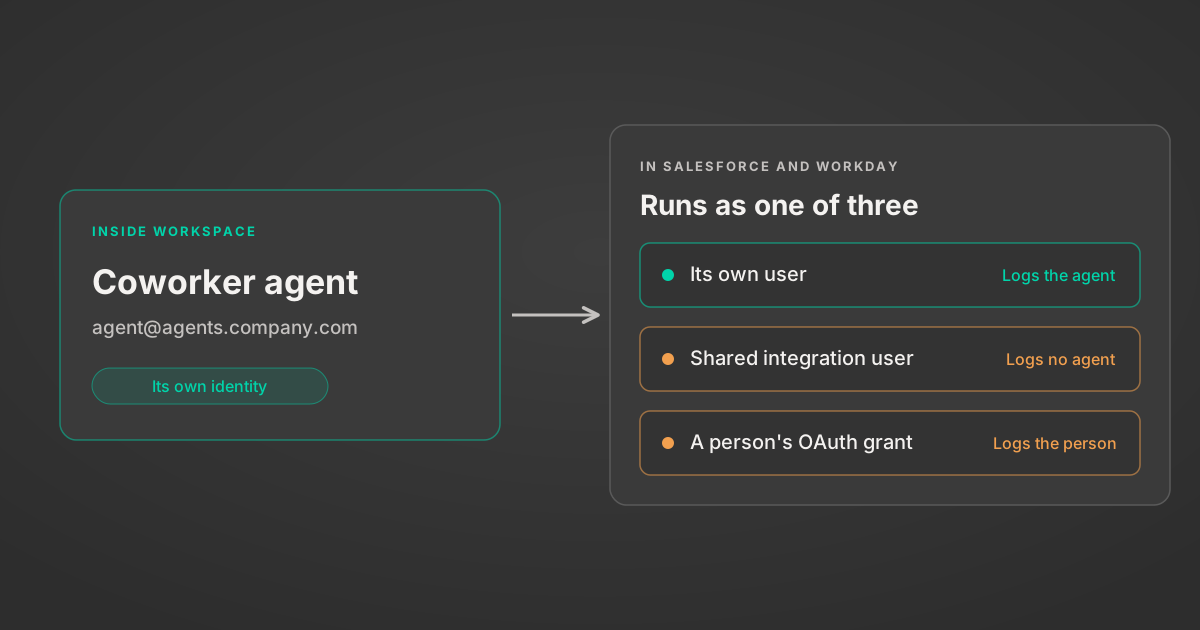
How AI agents log in to Salesforce and Workday
Google now gives each Gemini agent its own identity. Enterprise Salesforce orgs get five Integration licences. Three ways agents log in, and what each costs.
7 min read
Salesforce's $3.6B Fin Deal: Why the Moat Is Integration
Salesforce is paying $3.6B for Fin, an AI agent with its own model. The real prize is integration and distribution, not the model. Here's why it matters.
5 min
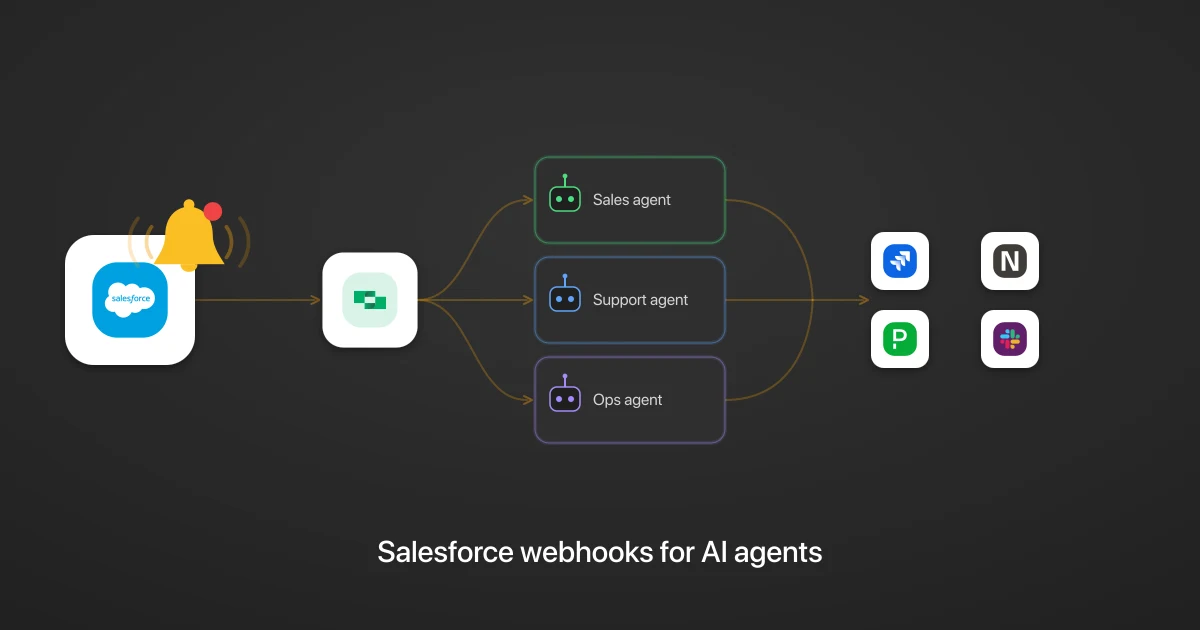
Salesforce webhooks for AI agents: turn CRM events into cross-app agentic workflows
Turn Salesforce events into cross-app agentic workflows, cut token spend and lag, and get a full audit trail of every action.
7 min read

MCP Code Mode: Keeping Tool Responses Out of Agent Context
Anthropic's code_execution processes data already in context. Custom MCP code mode keeps raw tool responses in a sandbox. 14K tokens vs 500.
11 min

Comparing BM25, TF-IDF, and Hybrid Search for MCP Tool Discovery
Benchmarking BM25, TF-IDF, and hybrid search for MCP tool discovery across 916 tools. The 80/20 TF-IDF/BM25 hybrid hits 21% Top-1 accuracy in under 1ms.
10 min
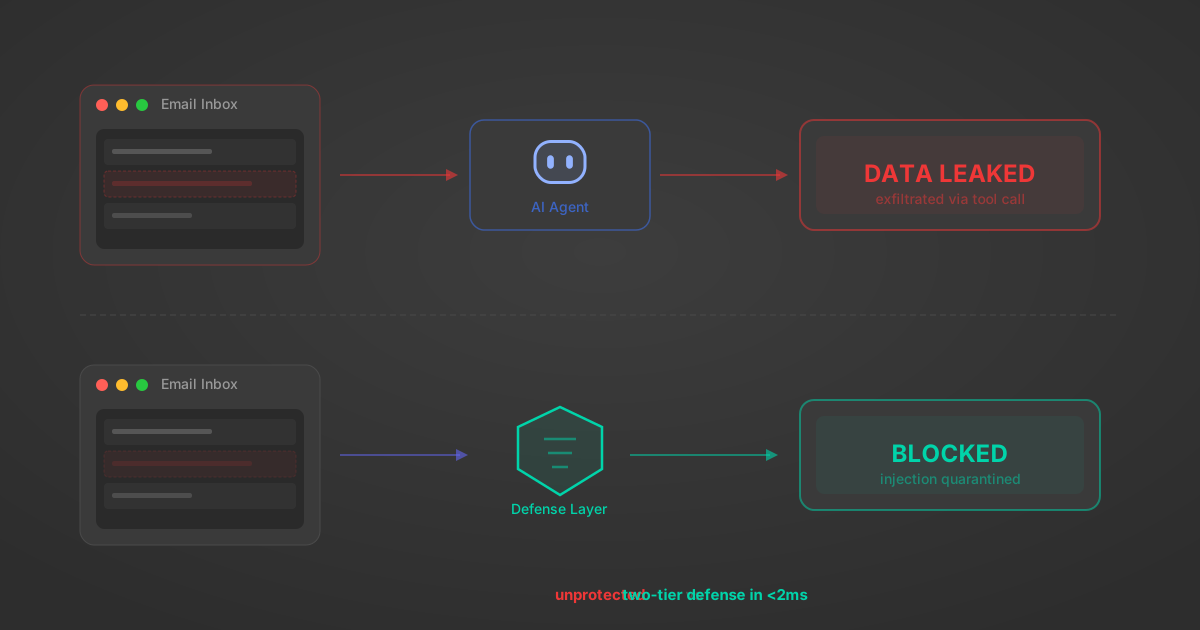
Indirect Prompt Injection Defense for MCP Tools: A Technical Guide
MCP tools that read emails, CRM records, and tickets are indirect prompt injection vectors. Here's how we built a two-tier defense that scans tool results in ~11ms.
12 min
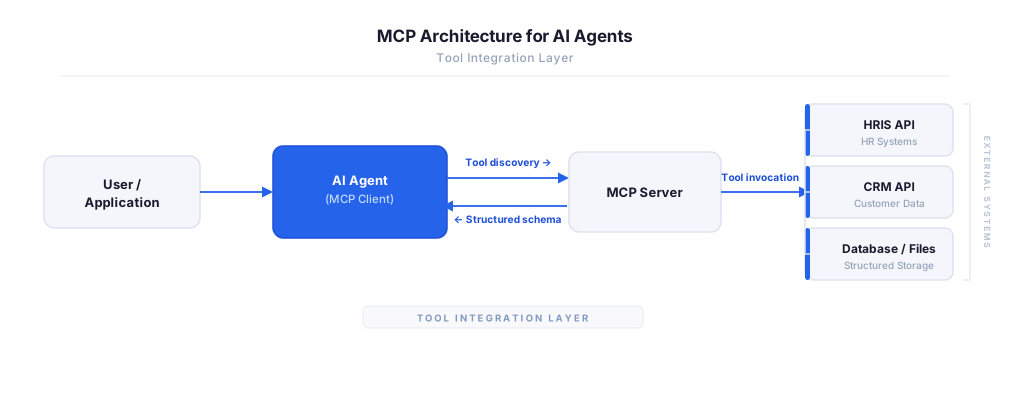
MCP vs A2A: Architecture, Security, and When to Use Each
MCP vs A2A: what each protocol standardizes, how they differ, their shared security risks including indirect prompt injection, and when to use one, both, or a hybrid architecture.
12 min
MCP vs API: What Hundreds of Connector Builds Taught Us
MCP wraps APIs, it doesn't replace them. After building hundreds of connectors that serve both, here's when each approach wins.
14 min read
Salesforce MCP Server FAQ
Does StackOne have a Salesforce MCP server?
Salesforce MCP server vs direct API integration — what's the difference?
How does Salesforce authentication work for AI agents?
origin_owner_id.Are Salesforce MCP tools vulnerable to prompt injection?
What is the context bloat of a Salesforce agent and how do I avoid it?
Can I limit which actions my Salesforce agent can access?
Can I create custom agent actions for my Salesforce MCP server?
When should I NOT use a Salesforce MCP server?
What AI frameworks and AI clients does the StackOne Salesforce MCP server support?
Put your AI agents to work
All the tools you need to build and scale AI agent integrations, with best-in-class connectivity, execution, and security.