


Tenable MCP Server
for AI Agents
Connect your AI agent to StackOne's Tenable MCP server and give it 144 MCP tools out of the box. Auth, tool execution, and security all managed.
 StackOne


Coverage
144 Agent Actions
Agents can read, write, delete and run operations in Tenable. Extend your agent's capabilities with custom actions.

Authentication
Agent Tool Authentication
Per-user OAuth in one call. Your Tenable MCP server gets session-scoped tokens with zero credentials stored on your infra.
Agent Auth →
Security
Agent Protection
Every Tenable tool response scanned for prompt injection in milliseconds, with 88.7% accuracy, all running on CPU.
Prompt Injection Defense →
Performance
Max Agent Context. Min Cost.
Free up to 96% of your agent's context window to enhance reasoning and reduce cost, on every Tenable call.
Tools Discovery →What is the Tenable MCP Server?
A Tenable MCP server lets AI agents read and write Tenable data through the Model Context Protocol, Anthropic's open standard for connecting LLMs to external tools. StackOne's Tenable MCP server ships with 144 pre-built actions, fully extensible via the Connector Builder, plus managed authentication, prompt injection defense, observability, and agent execution runtime. Connect it from MCP clients like Claude Desktop, Claude Code, Cursor, Goose, and VS Code, or from agent frameworks like OpenAI Agents SDK, LangChain, and Vercel AI SDK.
All Tenable MCP Tools
Every StackOne action for Tenable, ready for your agent. Read, write, delete and run operations, scoped to exactly what you need.
Agent Groups
- Create Agent Group
Creates an agent group.
- Get Agent Group
Retrieves details for the specified agent group, including the agent records that belong to the group.
- List Agent Groups
Lists all agent groups.
- Update Agent Group
Changes the name of the agent group.
- Delete Agent Group
Deletes an agent group.
Agents
- Get Agent
Returns the specified agent details for the specified scanner.
- List Agents
Returns a list of agents for the specified scanner.
Assets
- Import Assets
Imports asset data in JSON format.
- Get Asset
Returns details of the specified asset.
- List Assets
Lists up to 5,000 assets.
- Export Assets
Exports all assets that match the request criteria.
- Move Assets
Moves assets from the specified network to another network.
Asset Import Jobs
- Get Asset Import Job
Gets information about the specified import job.
- List Asset Import Jobs
Lists asset import jobs.
Templates
- Get Template
Gets details for the specified template.
- List Templates
Lists Tenable-provided scan templates.
Exclusions
- Create Exclusion
Creates a new exclusion.
- Import Exclusion
Imports exclusions from the exclusion import file provided in your request and returns a list of saved exclusions.
- Get Exclusion
Returns the details for the specified exclusion.
- List Exclusions
Returns a list of exclusions for your Tenable Vulnerability Management scans.
- Update Exclusion
Updates the specified exclusion.
- Delete Exclusion
Deletes the specified exclusion.
Vulnerabilities
- Export Vulnerabilities
Exports vulnerabilities that match the request criteria.
- List Vulnerabilities
Returns a list of recorded vulnerabilities.
Folders
- Create Folder
Creates a new custom folder for the current user.
- List Folders
Lists both Tenable-provided folders and the current user's custom folders.
- Delete Folder
Deletes a folder.
Groups
- Create Group
Creates a user group.
- List Groups
List the user groups of the Tenable Vulnerability Management container.
Unified Groups
- List Unified Groups
List unified groups in Tenable Vulnerability Management.
- Get Unified Group
Get a unified Tenable Vulnerability Management group by ID.
Unified Roles
- List Unified Roles
List unified roles in Tenable Vulnerability Management.
- Get Unified Role
Get a unified Tenable Vulnerability Management role by ID.
Unified Users
- List Unified Users
List unified users in Tenable Vulnerability Management.
- Get Unified User
Get a unified Tenable Vulnerability Management user by ID.
Policys
- Copy Policy
Copies a policy (scan template).
- Create Policy
Creates a policy (scan template).
- Import Policy
Imports an existing policy (scan template) that was uploaded using the POST /file/upload endpoint.
- Export Policy
Exports the specified policy (scan template) in nessus format.
- Get Policy
Returns the details for the specified policy (scan template).
- Update Policy
Updates an existing policy (scan template).
- Delete Policy
Deletes a policy (scan template).
Roles
- Create Role
Creates a custom role with the given privileges.
- List Roles
List the standard and custom roles of the Tenable Vulnerability Management container.
- Get Role
Get one Tenable Vulnerability Management role.
Scanners
- Get Scanner
Returns details for the specified scanner.
- List Scanners
Returns the scanner list.
- Update Scanner
Updates the specified scanner.
- Delete Scanner
Deletes and unlinks a scanner from Tenable Vulnerability Management.
Scan Exports
- Download Scan Export
Download an exported scan.
- List Scan Exports
Returns a list of scan exports generated within the past 30 days that the user is authorized to view.
Scans
- Create Scan
Creates a scan configuration.
- Get Scan
Returns scan results for a specific scan.
- List Scans
Returns a list of scans where you have at least CAN VIEW scan permissions.
- Export Scan
Exports the a scan in the specified format.
- Update Scan
Updates the scan configuration.
- Delete Scan
Deletes a scan.
Scan History Runs
- Get Scan History Run
Returns the details of a previous run of the specified scan.
- Delete Scan History Run
Deletes historical results from a scan.
Tag Categorys
- Create Tag Category
Creates a new tag category.
- Get Tag Category
Returns the details for the specified category.
- Update Tag Category
Updates the specified tag category.
- Delete Tag Category
Deletes the specified category and any associated tag values.
Tag Values
- Create Tag Value
Creates a tag value.
- Get Tag Value
Returns the details for specified tag value.
- List Tag Values
Returns a list of tag values.
- Update Tag Value
Updates the specified tag value.
- Delete Tag Value
Deletes the specified tag value.
Users
- Create User
Creates a user in the Tenable Vulnerability Management container.
- List Users
List the users of the Tenable Vulnerability Management container.
- Get User
Get one Tenable Vulnerability Management user.
Other (73)
- Add Agent To Group
Adds an agent to the agent group.
- Send Agent Directives
Creates an instruction for an individual Tenable Agent to perform.
- Upload File
Upload a file to Tenable Vulnerability Management for import_policy to import.
- Add Or Remove Asset Tags
Adds or removes tags from the specified assets, and returns the UUID of the asynchronous asset update job.
- Get Agent Safe Mode Summary
Returns a summary of agents in safe mode for your container.
- List Agents By Group
Returns a list of agents for the specified agent group.
- Download Policy Audit File
Downloads the specified custom audit file associated with the scan or policy.
- Get Editor Configuration
Gets the configuration details for the scan or user-defined template (policy).
- Get Policy Plugin Details
Gets the details of the plugin associated with the scan or policy.
- Download Assets Chunk
Downloads a specific asset export chunk.
- Download Compliance Chunk
Downloads a specific compliance data chunk by ID.
- Download Vulnerabilities Chunk
Downloads a specific vulnerabilities export chunk.
- Get Assets Export Status
Returns the status of an assets export request.
- Get Compliance Export Status
Returns the status of the specified compliance export.
- Get Vulnerability Export Status
Returns the status of a vulnerability export request.
- List Asset Export Jobs
Retrieves a list of asset export jobs.
- List Compliance Export Jobs
Returns a list of the last 1,000 compliance export requests along with their statuses and related metadata.
- List Vulnerability Export Jobs
Retrieves a list of vulnerability export jobs.
- Export Assets V2
Exports all assets that match the request criteria.
- Export Compliance Data
Exports compliance data that matches the request criteria.
- List Agent Filters
Lists the filtering, sorting and wildcard capabilities available for agent records.
- List Asset Filters
Lists the filters available for assets on the workbench endpoints.
- List Vulnerability Filters
Lists the filters available for the Vulnerabilities Workbench.
- List Group Users
List the users in one Tenable Vulnerability Management group.
- List Networks
Lists the network objects of the organization, including the default network 00000000-0000-0000-0000-000000000000.
- Get Plugin Details
Returns details for a specified plugin.
- List Plugin Families
Returns the list of plugin families.
- List Plugin Family Plugins
Returns the list of plugins for the specified family ID.
- List Plugins
Returns a paginated list of Tenable plugins sorted by plugin ID with detailed plugin information.
- List Plugin Family Plugins By Name
Returns the list of plugins for the specified family name.
- List Policies
Returns a list of policies (scan templates).
- Get Scanner Key
Retrieves the key of the requested scanner.
- List AWS Scan Targets
Lists AWS scan targets if the requested scanner is an Amazon Web Services scanner.
- List Running Scans
Lists scans running on the requested scanner.
- Get Host Details
Returns details for the specified host.
- Get Latest Scan Status
Returns the latest status for a scan.
- Get Scan Attachment File
Gets the requested scan attachment file.
- Get Scan History
Returns a list of objects, each of which represent an individual run of the specified scan.
- Get Scan Progress
Returns the progress for the specified scan.
- Get Scan Timezones
Returns the timezones accepted for scheduling recurring scans and exclusions.
- List Scan Configs By Agent Group
Retrieves the scan configurations associated with the specified agent group.
- List Asset Tag Assignments
Returns a list of assigned tags for the specified asset UUID.
- List Asset Tag Filters
Returns a list of filters that you can use to create the rules for applying dynamic tags.
- List Tag Categories
Returns a list of tag categories.
- List Tag Exclusions
Returns a list of assets that have been excluded from the specified dynamic tag.
- Get User Role IDs
Get the ids of the roles assigned to one Tenable user.
- Get User Authorizations
Get the sign-in methods authorized for one Tenable user.
- Get Asset Activity Log
Returns the activity log for the specified asset.
- Get Asset Vulnerability Info
Retrieves the details for a vulnerability recorded on a specified asset.
- Get Workbench Asset Info
Returns information about the specified asset.
- Get Workbench Plugin Details
Retrieves the details for a plugin.
- List Asset Vulnerabilities
Retrieves a list of the vulnerabilities recorded for a specified asset.
- List Asset Vulnerabilities For Plugin
Retrieves the vulnerability outputs for a plugin recorded on a specified asset.
- List Assets With Vulnerabilities
Returns a list of assets with vulnerabilities.
- List Plugin Outputs
Retrieves the vulnerability outputs for a plugin.
- List Workbench Assets
Retrieves a list of assets.
- Update Asset ACR
Overwrites the Tenable-provided Asset Criticality Rating (ACR) for the specified assets.
- Update Scan Status
Changes the status of a scan.
- Remove Agent From Group
Removes an agent from the specified agent group.
- Rename Agent
Renames an agent.
- Unlink Agent
Unlinks an agent.
- Bulk Delete Assets
Deletes the specified assets.
- Cancel Asset Export
Cancels the specified assets export job.
- Cancel Compliance Export
Cancels the specified compliance export job.
- Cancel Vulnerability Export
Cancels the specified vulnerability export job.
- Rename Folder
Renames a folder for the current user.
- Check Scan Export Status
Returns the file status of the specified exported scan.
- Force Stop Scan
Force stops a scan.
- Launch Scan
Launches a scan.
- Pause Scan
Pauses a scan.
- Resume Scan
Resumes a scan.
- Stop Scan
Stops a scan.
- Bulk Delete Tag Values
Deletes tag values in bulk.
Set Up Your Tenable MCP Server in Minutes
One endpoint. Any framework. Your agent is talking to Tenable in under 10 lines of code.
Agent Frameworks


 JSON
{
  "mcpServers": {
    "stackone": {
      "command": "npx",
      "args": [
        "-y",
        "mcp-remote@latest",
        "https://api.stackone.com/mcp?x-account-id=<account_id>",
        "--header",
        "Authorization: Basic <YOUR_BASE64_TOKEN>"
      ]
    }
  }
}Platform Resources

Comparing BM25, TF-IDF, and Hybrid Search for MCP Tool Discovery
Benchmarking BM25, TF-IDF, and hybrid search for MCP tool discovery across 916 tools. The 80/20 TF-IDF/BM25 hybrid hits 21% Top-1 accuracy in under 1ms.
10 min
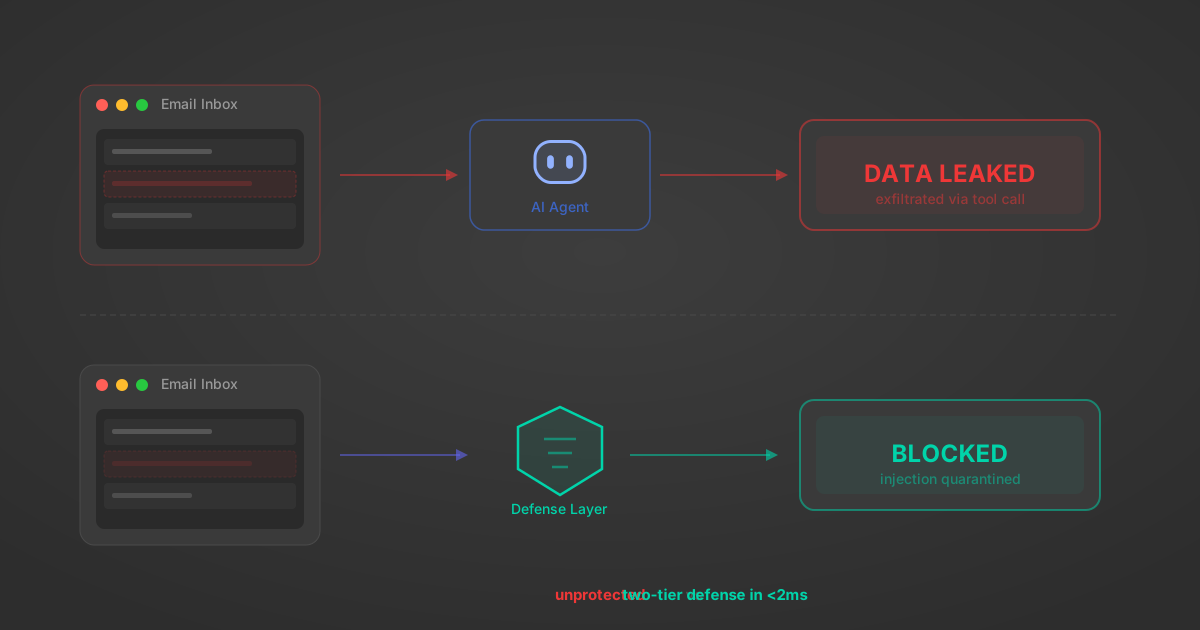
Indirect Prompt Injection Defense for MCP Tools: A Technical Guide
MCP tools that read emails, CRM records, and tickets are indirect prompt injection vectors. Here's how we built a two-tier defense that scans tool results in ~11ms.
12 min

MCP vs A2A: Architecture, Security, and When to Use Each
MCP vs A2A: what each protocol standardizes, how they differ, their shared security risks including indirect prompt injection, and when to use one, both, or a hybrid architecture.
12 min
MCP vs API: What Hundreds of Connector Builds Taught Us
MCP wraps APIs, it doesn't replace them. After building hundreds of connectors that serve both, here's when each approach wins.
14 min read
Tenable MCP Server FAQ
Does StackOne have a Tenable MCP server?
Tenable MCP server vs direct API integration: what's the difference?
How does Tenable authentication work for AI agents?
origin_owner_id.Are Tenable MCP tools vulnerable to prompt injection?
What is the context bloat of a Tenable agent and how do I avoid it?
Can I limit which actions my Tenable agent can access?
Can I create custom agent actions for my Tenable MCP server?
When should I NOT use a Tenable MCP server?
What AI frameworks and AI clients does the StackOne Tenable MCP server support?
Put your AI agents to work
All the tools you need to build and scale AI agent integrations, with best-in-class connectivity, execution, and security.