


Better Stack MCP Server
for AI Agents
Connect your AI agent to StackOne's Better Stack MCP server and give it 145 MCP tools out of the box. Auth, tool execution, and security all managed.
 StackOne


Coverage
145 Agent Actions
Agents can read, write and delete in Better Stack. Extend your agent's capabilities with custom actions.

Authentication
Agent Tool Authentication
Per-user OAuth in one call. Your Better Stack MCP server gets session-scoped tokens with zero credentials stored on your infra.
Agent Auth →
Security
Agent Protection
Every Better Stack tool response scanned for prompt injection in milliseconds, with 88.7% accuracy, all running on CPU.
Prompt Injection Defense →
Performance
Max Agent Context. Min Cost.
Free up to 96% of your agent's context window to enhance reasoning and reduce cost, on every Better Stack call.
Tools Discovery →What is the Better Stack MCP Server?
A Better Stack MCP server lets AI agents read and write Better Stack data through the Model Context Protocol, Anthropic's open standard for connecting LLMs to external tools. StackOne's Better Stack MCP server ships with 145 pre-built actions, fully extensible via the Connector Builder, plus managed authentication, prompt injection defense, observability, and agent execution runtime. Connect it from MCP clients like Claude Desktop, Claude Code, Cursor, Goose, and VS Code, or from agent frameworks like OpenAI Agents SDK, LangChain, and Vercel AI SDK.
All Better Stack MCP Tools
Every StackOne action for Better Stack, ready for your agent. Read, write and delete, scoped to exactly what you need.
An Alerts
- Update An Alert
Update an alert by ID, whether it is on a dashboard chart or an exploration.
- Remove An Alert
Permanently delete an alert by ID, whether it is on a dashboard chart or an exploration.
An Applications
- Create An Application
Creates a new error tracking application.
- Update An Application
Updates an existing error tracking application.
- Remove An Application
Deletes an existing error tracking application.
Catalog Attributes
- Create Catalog Attribute
Add an attribute (column) to a Catalog relation.
- List Catalog Attributes
List the attributes (columns) of a Catalog relation; create_catalog_record needs their IDs.
- Get Catalog Attribute
Get one attribute of a Catalog relation by ID.
- Update Catalog Attribute
Update an existing Catalog attribute.
- Remove Catalog Attribute
Permanently deletes an existing Catalog attribute.
Catalog Records
- Create Catalog Record
Add a record to a Catalog relation, giving a value for each of its attributes.
- List Catalog Records
List the records of a Catalog relation.
- Update Catalog Record
Update an existing Catalog record.
- Remove Catalog Record
Permanently deletes an existing Catalog record.
Catalog Relations
- Create Catalog Relation
Create a Catalog relation, a custom inventory such as services or teams.
- List Catalog Relations
List Catalog relations, the custom inventories (such as services or teams) defined in Better Stack.
- Get Catalog Relation
Get one Catalog relation by ID, including its attributes.
- Update Catalog Relation
Update an existing Catalog relation.
- Remove Catalog Relation
Permanently deletes an existing Catalog relation.
A Dashboard Groups
- Create A Dashboard Group
Creates a new dashboard group for organizing dashboards.
- Update A Dashboard Group
Updates an existing dashboard group by its ID.
- Remove A Dashboard Group
Permanently deletes a dashboard group by its ID.
A Dashboards
- Create A Dashboard
Creates a new dashboard, including its variables and other properties.
- Update A Dashboard
Updates an existing dashboard by its ID.
- Remove A Dashboard
Permanently deletes an existing dashboard.
Heartbeat Groups
- Create Heartbeat Group
Create a heartbeat group to organize heartbeat monitors.
- Get Heartbeat Group
Get one heartbeat group by ID.
- List Heartbeat Groups
List heartbeat groups.
- Update Heartbeat Group
Update the attributes of an existing heartbeat group.
- Remove Heartbeat Group
Permanently deletes an existing heartbeat group.
Heartbeats
- List Heartbeats
List heartbeat monitors (cron jobs and scheduled tasks) with their current status.
- Update Heartbeat
Update a heartbeat monitor; send only the fields to change.
- Remove Heartbeat
Permanently deletes an existing heartbeat.
Unified Roles
- List Unified Roles
List unified roles in a Better Stack organization.
- Get Unified Role
Get a unified Better Stack role by ID.
Unified Users
- List Unified Users
List unified users in a Better Stack team.
- Get Unified User
Get a unified Better Stack user by ID.
Comments
- Create Comment
Add a comment to an incident.
- Get Comment
Get one comment on an incident by ID.
- List Comments
List all comments on an incident in one response.
- Update Comment
Update a comment on an incident. Only comments created through the API can be updated.
- Remove Comment
Permanently delete a comment from an incident.
Incidents
- Create Incident
Create an incident manually and alert the current on-call person.
- Get Incident
Get one incident by ID, including its cause, status and timestamps.
- List Incidents
List incidents, filtered by monitor, heartbeat, date range, or resolved and acknowledged state.
- Remove Incident
Permanently delete an incident.
Metadatas
- List Metadata
List metadata key-value records attached to monitors, heartbeats, incidents and integrations.
- Update Metadata
Create, update, or remove metadata values for specified key for given incident, monitor, or other resources.
Monitor Groups
- Create Monitor Group
Create a monitor group to organize uptime monitors.
- Get Monitor Group
Get one monitor group by ID.
- List Monitor Groups
List monitor groups.
- Update Monitor Group
Update the attributes of an existing monitor group.
- Remove Monitor Group
Permanently deletes an existing monitor group.
Monitors
- Create Monitor
Create an uptime monitor (HTTP status, keyword, ping, TCP, UDP, SMTP, POP, IMAP, DNS or Playwright).
- Get Monitor
Get one uptime monitor by ID, including its current status and check settings.
- List Monitors
List uptime monitors with their current status, filtered by URL or name.
- Update Monitor
Update a monitor; send only the fields to change. Set paused to pause or resume checks.
- Remove Monitor
Permanently deletes an existing monitor.
An On-call Schedules
- Create An On-call Schedule
Create a new on-call schedule.
- Update An On-call Schedule
Update an existing on-call schedule.
On-call Schedule Events
- List On-call Schedule Events
List the on-call shifts of a schedule, optionally within a time window.
- Update On-call Schedule Event
Update an on-call shift. Shifts starting before today 0:00 UTC cannot be changed.
- Remove On-call Schedule Event
Delete an on-call shift. Shifts starting before today 0:00 UTC cannot be deleted.
On-call Schedules
- Get On-call Schedule
Get an on-call schedule and the users currently on call. Use default as schedule_id for the team's default schedule.
- List On-call Schedules
List on-call schedules.
- Remove On-call Schedule
Permanently deletes an existing on-call schedule.
Escalation Policys
- Create Escalation Policy
Create an escalation policy: the ordered steps that decide who is alerted for an incident and when.
- Get Escalation Policy
Get one escalation policy by ID, including its steps.
- Update Escalation Policy
Update an existing escalation policy.
- Remove Escalation Policy
Permanently deletes an existing escalation policy.
A Releases
- Create A Release
Register a release (for example from CI at deploy time) so errors can be tied to it.
- Remove A Release
Remove a release. A release that still receives errors is detected again automatically.
Severitys
- Create Severity
Create an incident severity that sets which channels (SMS, call, e-mail, push) alert the on-call person.
- Get Severity
Get one incident severity by ID.
- Update Severity
Update an existing severity.
- Remove Severity
Permanently deletes an existing severity.
Severity Groups
- Get Severity Group
Get one severity group by ID.
- List Severity Groups
List severity groups, which organize incident severities. create_severity and update_severity take their IDs.
A Source Groups
- Create A Source Group
Create a source group to organize telemetry sources.
- Update A Source Group
Updates an existing source group.
- Remove A Source Group
Permanently deletes an existing source group.
A Sources
- Create A Source
Create a log or metrics source for a platform; the response carries its ingestion token.
- Update A Source
Update a telemetry source; send only the fields to change.
- Remove A Source
Permanently delete a telemetry source.
Status Page Reports
- Create Status Page Report
Post an incident or maintenance report on a status page, with the affected resources and their status.
- Get Status Page Report
Get one status page report by ID.
- List Status Page Reports
List incident and maintenance reports posted on a status page.
- Update Status Page Report
Update the title or timing of a status page report. Affected resources change through new status updates.
- Remove Status Page Report
Permanently delete a status page report.
Status Page Resources
- Create Status Page Resource
Add a resource (a monitor, heartbeat, group or manually tracked item) to a status page.
- Get Status Page Resource
Get one resource (component) of a status page by ID.
- List Status Page Resources
List the resources (components) shown on a status page, needed for affected_resources on reports.
- Update Status Page Resource
Update an existing status page resource.
- Remove Status Page Resource
Permanently deletes an existing status page resource.
Status Pages
- Create Status Page
Create a status page with its company name, subdomain and timezone.
- Get Status Page
Get one status page by ID.
- List Status Pages
List status pages.
- Update Status Page
Update an existing status page.
- Remove Status Page
Permanently deletes an existing status page.
Status Updates
- Create Status Update
Post a new status update on a status page report, optionally changing the affected resources.
- Get Status Update
Get one status update of a status page report.
Team Members
- List Team Members
List members and pending invitations of a Better Stack team.
- Get Team Member
Get a single Better Stack team member by ID.
Other (42)
- Create A Dashboard Alert
Creates a new alert for a specific dashboard chart.
- Create A Heartbeat
Create a heartbeat monitor that alerts when a cron job or scheduled task stops checking in.
- Create An On-call Schedule Event
Add an on-call shift (for example an override) to a schedule.
- Get A Single Alert
Get one telemetry alert by ID.
- List All Alerts
List all telemetry alerts across dashboards and explorations.
- Get A Single Application
Get one error tracking application by ID.
- List All Applications
List error tracking applications.
- Get A Single Catalog Record
Get one Catalog record by ID.
- Get A Single Dashboard Group
Retrieves a single dashboard group by its ID.
- List All Dashboard Groups
Retrieves a paginated list of your team's dashboard groups.
- Get A Single Dashboard
Get one dashboard by ID, including its charts, sections and variables.
- List All Dashboards
List telemetry dashboards (summary view).
- Get A Heartbeat's Availability Summary
Get a heartbeat's availability summary, optionally for a date range.
- Get A Single Heartbeat
Get one heartbeat monitor by ID.
- Get Unified Credentials
Get the current Better Stack connection's unified credentials and identity.
- List Incident Timeline
Get the full timeline of an incident (comments, alert payloads, responses and status report cards) in one response.
- List Monitors In Group
List the monitors in a monitor group.
- Get An On-call Schedule Rotation
Get the rotation currently used by an on-call schedule.
- Get A Single On-call Schedule Event
Get one on-call shift by ID.
- List Escalation Policies
List escalation policies, used to route and escalate incidents.
- Get A Single Release
Get one error tracking release by ID.
- List All Releases
List error tracking releases.
- List Roles
List the built-in and custom roles in a Better Stack organization.
- List Severities
List incident severities, used when escalating or alerting.
- Get A Single Source Group
Get a single source group by its ID.
- List All Source Groups
List telemetry source groups.
- Get A Single Source
Get one telemetry source by ID, including its ingestion token and host.
- List All Sources
List log and metrics sources (telemetry ingestion endpoints).
- List Status Updates Per Report
List the status updates posted on a status page report.
- List Status Page Sections
List status page sections in Better Stack.
- Get Usage Overview
Get the organization's usage and incurred cost across all Better Stack products.
- Get Usage Per Product
Get the organization's usage and incurred cost for one Better Stack product, itemized by line item.
- Update Team Member Role
Changes a team member's role.
- Remove A Team Member From Team By E-mail
Removes a member from the team, or cancels a pending invitation, by their email address.
- Remove A Team Member From Team By ID
Removes a member from the team by their ID.
- Acknowledge Incident
Acknowledge an ongoing incident so it stops escalating.
- Escalate Incident
Escalate an ongoing incident to a team member, a team, an escalation policy or the whole organization.
- Reopen Incident
Reopen a resolved incident.
- Resolve Incident
Resolve an ongoing incident.
- Monitor Availability
Get a monitor's availability (SLA) summary, optionally for a date range.
- Monitor Response Times
Get a monitor's response times by region for the last 24 hours.
- Invite A Team Member
Invites a new user to your organization.
Set Up Your Better Stack MCP Server in Minutes
One endpoint. Any framework. Your agent is talking to Better Stack in under 10 lines of code.
Agent Frameworks


 JSON
{
  "mcpServers": {
    "stackone": {
      "command": "npx",
      "args": [
        "-y",
        "mcp-remote@latest",
        "https://api.stackone.com/mcp?x-account-id=<account_id>",
        "--header",
        "Authorization: Basic <YOUR_BASE64_TOKEN>"
      ]
    }
  }
}Platform Resources
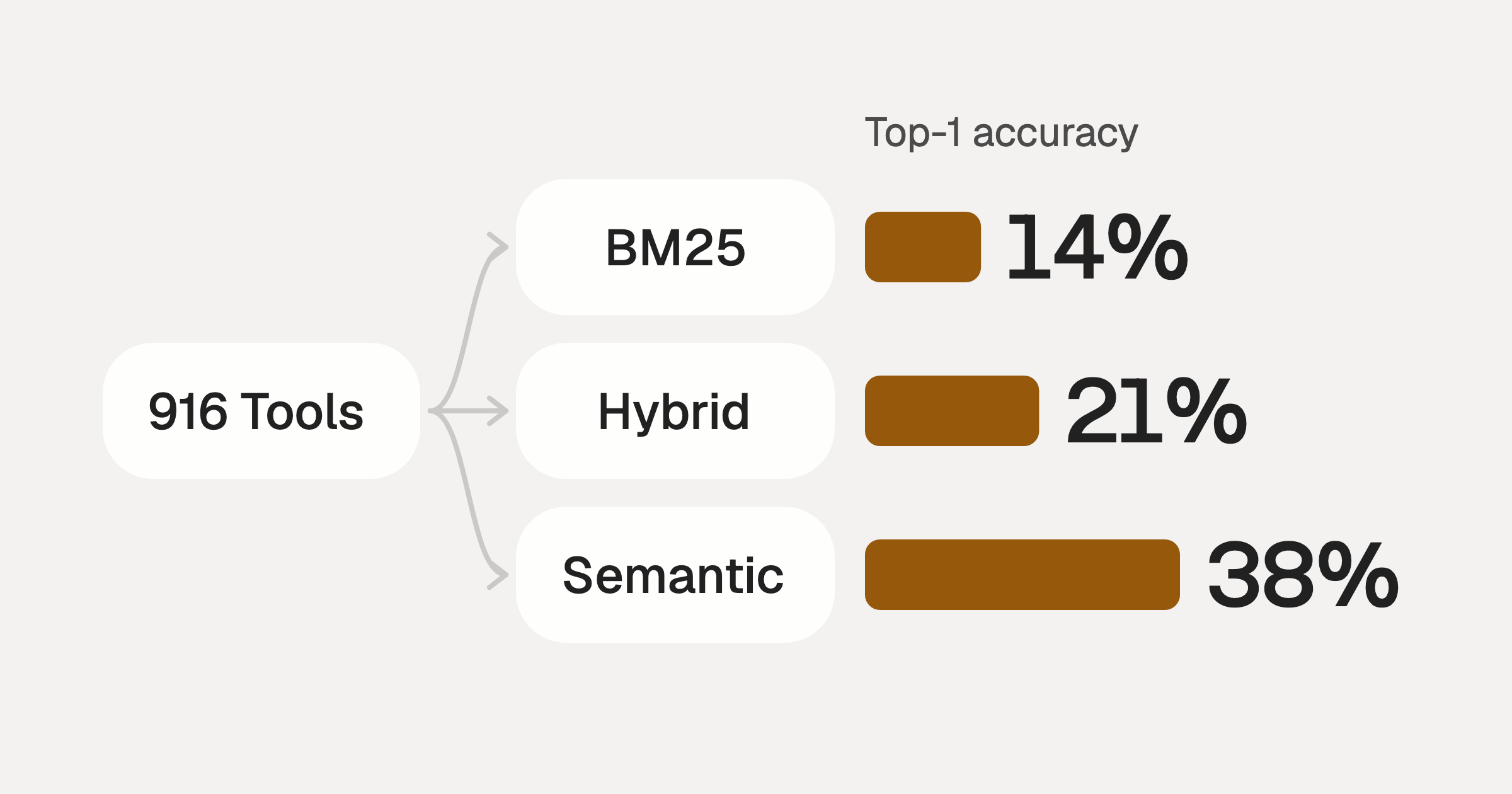
Comparing BM25, TF-IDF, and Hybrid Search for MCP Tool Discovery
Benchmarking BM25, TF-IDF, and hybrid search for MCP tool discovery across 916 tools. The 80/20 TF-IDF/BM25 hybrid hits 21% Top-1 accuracy in under 1ms.
10 min
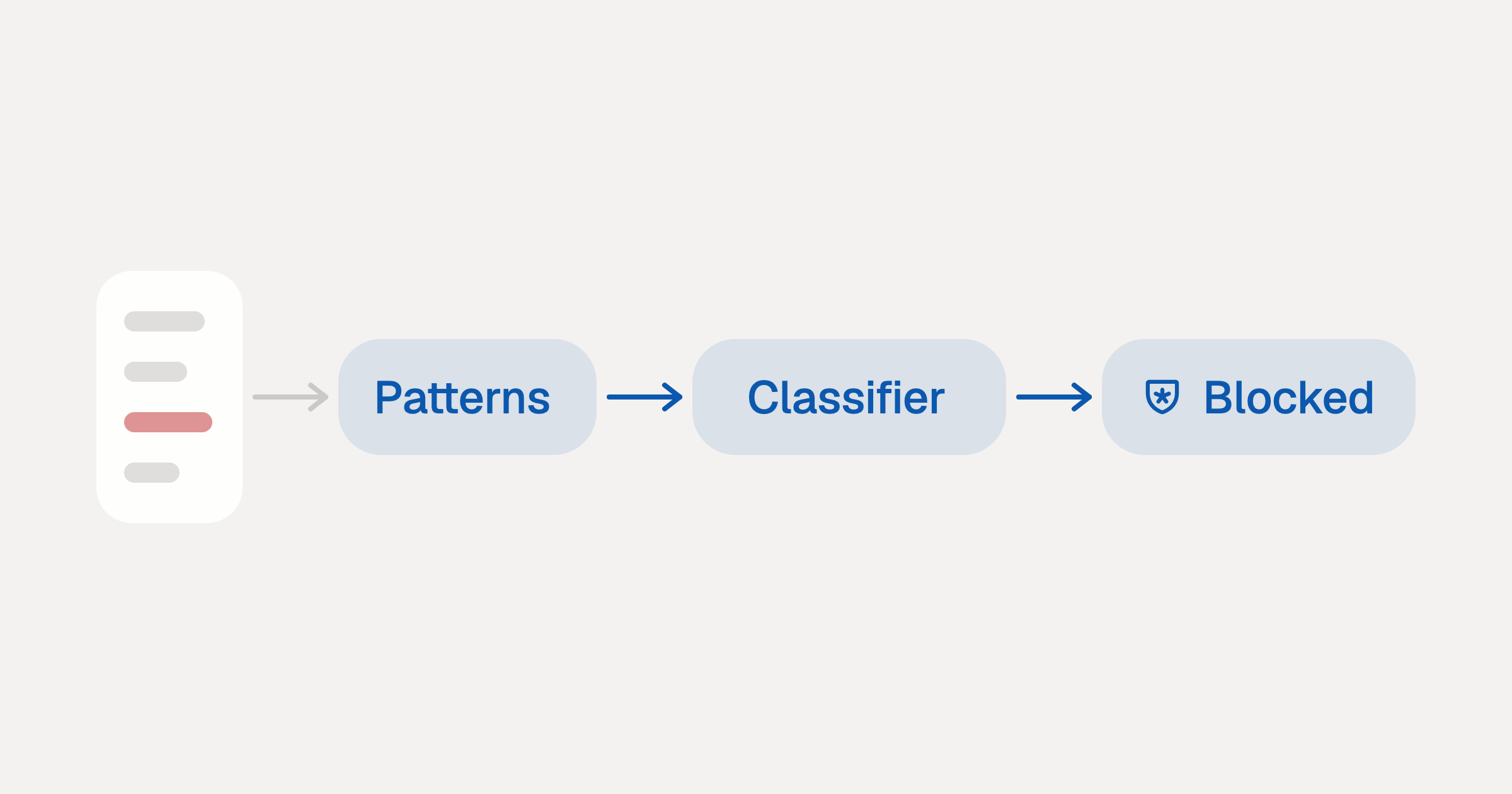
Indirect Prompt Injection Defense for MCP Tools: A Technical Guide
MCP tools that read emails, CRM records, and tickets are indirect prompt injection vectors. Here's how we built a two-tier defense that scans tool results in ~11ms.
12 min
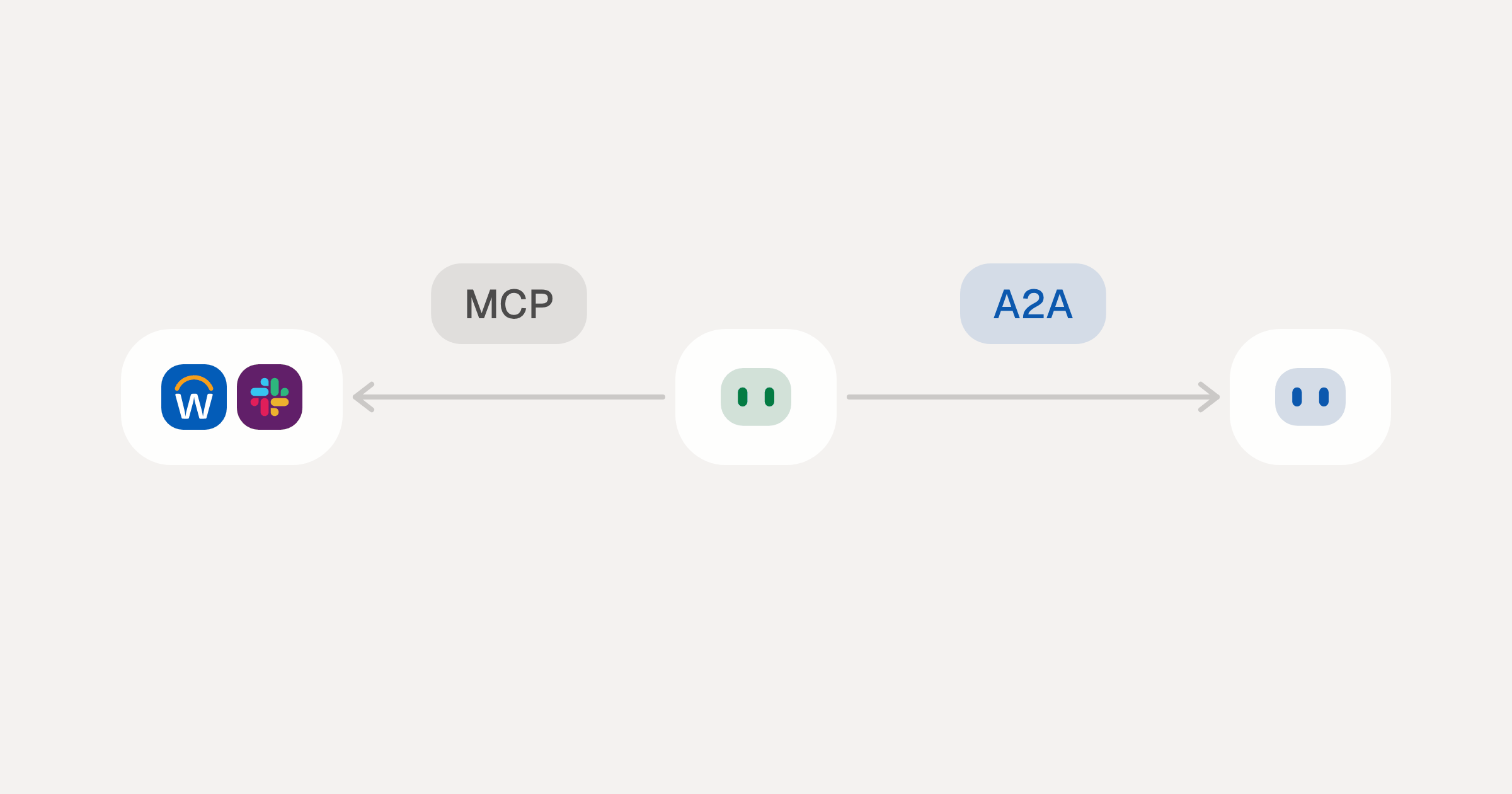
MCP vs A2A: Architecture, Security, and When to Use Each
MCP vs A2A: what each protocol standardizes, how they differ, the security risks they share, and when to use one, both or a hybrid.
12 min
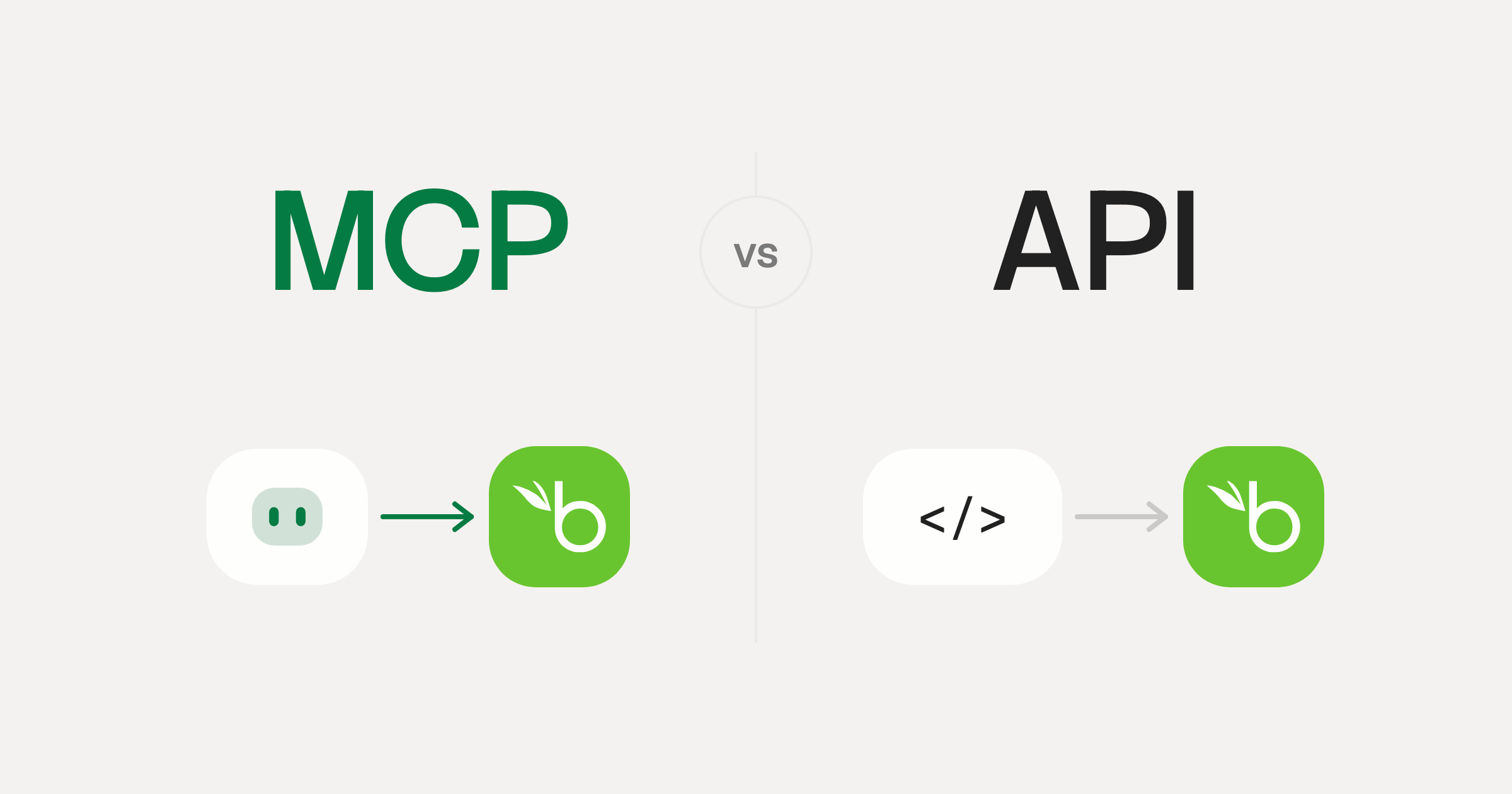
MCP vs API: What Hundreds of Connector Builds Taught Us
MCP wraps APIs, it doesn't replace them. After building hundreds of connectors that serve both, here's when each approach wins.
14 min read
Better Stack MCP Server FAQ
Does StackOne have a Better Stack MCP server?
Better Stack MCP server vs direct API integration: what's the difference?
How does Better Stack authentication work for AI agents?
origin_owner_id.Are Better Stack MCP tools vulnerable to prompt injection?
What is the context bloat of a Better Stack agent and how do I avoid it?
Can I limit which actions my Better Stack agent can access?
Can I create custom agent actions for my Better Stack MCP server?
When should I NOT use a Better Stack MCP server?
What AI frameworks and AI clients does the StackOne Better Stack MCP server support?
Put your AI agents to work
Connect AI to every company system and control what it can do in each one, down to the field.