
Liferay MCP Server
for AI Agents
Connect your AI agent to StackOne's Liferay MCP server and give it 104 MCP tools out of the box. Auth, tool execution, and security all managed.
 StackOne






Coverage
104 Agent Actions
Create, read, update, and delete across Liferay — and extend your agent's capabilities with custom actions.

Authentication
Agent Tool Authentication
Per-user OAuth in one call. Your Liferay MCP server gets session-scoped tokens with zero credentials stored on your infra.
Agent Auth →
Security
Agent Protection
Every Liferay tool response scanned for prompt injection in milliseconds — 88.7% accuracy, all running on CPU.
Prompt Injection Defense →
Performance
Max Agent Context. Min Cost.
Free up to 96% of your agent's context window to enhance reasoning and reduce cost, on every Liferay call.
Tools Discovery →What is the Liferay MCP Server?
A Liferay MCP server lets AI agents read and write Liferay data through the Model Context Protocol — Anthropic's open standard for connecting LLMs to external tools. StackOne's Liferay MCP server ships with 104 pre-built actions, fully extensible via the Connector Builder — plus managed authentication, prompt injection defense, observability, and agent execution runtime. Connect it from MCP clients like Claude Desktop, Claude Code, Cursor, Goose, and VS Code, or from agent frameworks like OpenAI Agents SDK, LangChain, and Vercel AI SDK.
All Liferay MCP Tools
Every action from Liferay's API, ready for your agent. Create, read, update, and delete — scoped to exactly what you need.
Accounts
- Create Account
Create a new business account in Liferay
- List Accounts
Retrieve a paginated list of B2B business accounts (companies/organizations) from Liferay. NOT for looking up individual portal users — to look up a user by email use get_user_account_by_email_address, and to search portal users use list_user_accounts.
- Get Account
Retrieve an account by ID
- Update Account
Update an existing business account
- Delete Account
Delete an account by ID
Blog Postings
- Create Blog Posting
Create a new blog posting for a site
- List Blog Postings
Retrieve a paginated list of blog postings for a site. PREFERRED tool when the user asks to "list posts", "confirm a post exists", "show all posts", or otherwise verify blog post presence on a site — do NOT use list_my_sites for this (list_my_sites only enumerates sites, not posts).
- Get Blog Posting
Retrieve a single blog posting by ID
- Update Blog Posting
Update an existing blog posting
- Delete Blog Posting
Delete a blog posting by ID
Blog Posting Comments
- Create Blog Posting Comment
Add a comment to a blog posting
- List Blog Posting Comments
Retrieve comments on a blog posting
Structured Content Comments
- Create Structured Content Comment
Add a comment to a structured content article
- List Structured Content Comments
List comments on a structured content article
Document Comments
- Create Document Comment
Add a comment to a document
- List Document Comments
Retrieve comments on a document
Comments
- Get Comment
Retrieve a comment by ID
- Delete Comment
Delete a comment by ID
Content Structures
- List Content Structures
Retrieve a paginated list of content structures (templates) for a site
- Get Content Structure
Retrieve a content structure by ID
Document Folders
- Create Document Folder
Create a new document folder in a site
- List Document Folders
Retrieve a paginated list of document folders for a site
- Get Document Folder
Retrieve a document folder by ID
- Update Document Folder
Update an existing document folder
- Delete Document Folder
Delete a document folder by ID
Documents
- Create Document
Upload a new document to a site
- List Documents
Retrieve a paginated list of documents for a site
- Get Document
Retrieve a document by ID
- Update Document
Replace a document's file and optionally update metadata
- Delete Document
Delete a document by ID
Unified Groups
- List Unified Groups
List Liferay user groups mapped to the IAM unified group schema. Liferay user groups are flat collaboration groups with no parent/child hierarchy.
- Get Unified Group
Retrieve a single Liferay user group by id, mapped to the IAM unified group schema.
Unified Organizations
- List Unified Organizations
List Liferay organizations mapped to the IAM unified organization schema. Always requests the full organization hierarchy, since the unified schema has no parent/child fields.
- Get Unified Organization
Retrieve a single Liferay organization by id, mapped to the IAM unified organization schema.
Unified Roles
- List Unified Roles
List Liferay roles mapped to the IAM unified role schema. Includes regular, site, organization, and account-scoped roles.
- Get Unified Role
Retrieve a single Liferay role by id, mapped to the IAM unified role schema.
Unified Users
- List Unified Users
List Liferay user accounts mapped to the IAM unified user schema. Wraps GET /o/headless-admin-user/v1.0/user-accounts.
- Get Unified User
Retrieve a single Liferay user account by id, mapped to the IAM unified user schema.
Organizations
- Create Organization
Create a new organization in Liferay
- List Organizations
Retrieve a paginated list of organizations from Liferay
- Get Organization
Retrieve an organization by ID
- Update Organization
Update an existing organization
- Delete Organization
Delete an organization by ID
Roles
- Create Role
Create a new role in Liferay
- List Roles
Retrieve a paginated list of roles from Liferay
- Get Role
Retrieve a role by ID
- Update Role
Update an existing role
- Delete Role
Delete a role by ID
Structured Content Folders
- Create Structured Content Folder
Create a new folder for organizing structured content
- List Structured Content Folders
Retrieve a paginated list of structured content folders for a site
- Get Structured Content Folder
Retrieve a structured content folder by ID
- Update Structured Content Folder
Update an existing structured content folder
- Delete Structured Content Folder
Delete a structured content folder by ID
Structured Contents
- Create Structured Content
Create a new structured content article (web content) in a site
- List Structured Contents
Retrieve a paginated list of structured content (web content) for a site
- Get Structured Content
Retrieve a structured content article by ID
- Update Structured Content
Partially update an existing structured content article (title, contentFields, description, keywords, friendlyUrlPath, externalReferenceCode). Does NOT support moving the article to a different folder — that field is not accepted in this PATCH body.
- Delete Structured Content
Delete a structured content article by ID
User Groups
- Create User Group
Create a new user group in Liferay
- List User Groups
Retrieve a paginated list of user groups from Liferay
- Get User Group
Retrieve a user group by ID
- Update User Group
Update an existing user group
- Delete User Group
Permanently delete a user group by ID. Returns 403 Forbidden for system-managed or otherwise non-deletable groups; treat 403 as "this specific group cannot be deleted" rather than a transient error to retry.
User Accounts
- Create User Account
Create a new user account in Liferay. Returns 409 Conflict when a user with the same email or screenName already exists; treat 409 as "user already exists" and use get_user_account_by_email_address to retrieve the existing user rather than retrying the create or treating it as a hard failure.
- List User Accounts
Retrieve a paginated list of portal user accounts from Liferay with optional search/filter. NOT the preferred tool when the prompt already provides an email address — use get_user_account_by_email_address for direct single-user lookup by email. Use this action for name/keyword searches, status filters, or browsing.
- Get User Account
Retrieve a single user account by ID
- Update User Account
Update an existing user account
- Delete User Account
Delete a user account by ID
Other (36)
- Create Comment Reply
Reply to a comment
- Create Document In Folder
Upload a new document to a specific folder
- Add Users To User Group
Add users to a user group
- Get Account By External Reference Code
Retrieve a business account by its external reference code (ERC), a system-assigned sync identifier — NOT the account/company name
- List Account User Accounts
List users assigned to an account
- List Account Roles
List account-scoped roles on an account
- List Comment Replies
Retrieve replies to a comment
- List Document Folder Subfolders
List subfolders of a document folder
- List Document Folder Documents
List documents inside a document folder
- Get Unified Credentials
Return the authenticated Liferay identity for the current connection, mapped to the IAM unified credentials schema. Calls GET /o/headless-admin-user/v1.0/my-user-account and inlines the authenticated user record under the user field. auth_type is always "oauth" because this connector exclusively supports OAuth2 flows (authorization_code and client_credentials).
- List Unified Resource Types
List unified resource types in Liferay.
- List Unified Resource Users
List unified resource users in Liferay.
- List Organization User Accounts
List users belonging to an organization
- List Child Organizations
List child organizations under a parent organization
- Get Role By External Reference Code
Retrieve a role by its external reference code (ERC), a unique identifier string assigned when the role is synced from an external system
- Get Site
Retrieve a site by ID
- Get Site By Friendly URL Path
Retrieve a site by its human-readable URL path
- List Site User Accounts
List users who are members of a specific site. Scope is restricted to users explicitly assigned to the given siteId — users that exist in the instance but are not site members will not appear here. An empty `items` array is a valid result meaning no site member matched the filter; do not retry with broader filters unless the user asks. For instance-wide user searches (including users not assigned to any site), use list_user_accounts.
- List My Sites
Retrieve all sites the current user has access to. PREFERRED discovery tool when a site name or friendly URL is known but the numeric siteId is not — use this before any site-scoped operation to look up the siteId.
- List Structured Content Folder Subfolders
List subfolders of a structured content folder
- List Structured Content Folder Contents
List structured content articles inside a folder
- List Site Taxonomy Vocabularies
Retrieve taxonomy vocabularies defined in a site
- List Taxonomy Categories
List taxonomy categories under a taxonomy vocabulary
- List User Group Members
List users belonging to a user group
- Get User Account By Email Address
PREFERRED tool for looking up a single user account by email address. Use this whenever the prompt provides an email and asks to "pull up", "find", "look up", or "get" the user — not list_user_accounts (which searches/filters portal users) and not list_accounts (which lists B2B business accounts, a different resource). Returns 404 when no user is registered under the supplied email; treat that 404 as the negative answer ("no user with this email") and report it directly to the caller rather than retrying with variants or abandoning the workflow.
- List User Accounts By Status
List users filtered by status
- List User Groups For User
List the user groups that a specific user belongs to. Requires a userAccountId — use list_user_accounts or get_user_account_by_email_address first to obtain the user's numeric ID.
- Get My User Account
Retrieve the currently authenticated user's account
- Remove User From Account
Remove a user from an account by email address. Returns 404 when the user is not currently assigned to the specified account; treat that 404 as the negative answer ("user is not a member of this account") and report it directly — do not retry with different IDs or abandon the workflow.
- Remove Users From User Group
Remove users from a user group
- Assign User To Account
Assign an existing user to a business account by their exact email address. Both inputs must come from prior list/lookup calls — do not guess or synthesize them.
- Assign Account Role To User
Assign an account-scoped role to a user using numeric IDs (accountId, accountRoleId, userAccountId)
- Replace Comment
Replace a comment's contents (full replacement)
- IAM Auth Test
Validate the current Liferay OAuth token and return the raw, unmapped /my-user-account JSON. Bypasses the unified IAM credentials schema — use this for debugging which Liferay identity the connection is bound to.
- Assign Role To User
Grant a role to a user account. Both IDs must be resolved from prior list/lookup calls — do not pass names, emails, or guessed numeric IDs.
- Unassign Role From User
Remove a role from a user account
Set Up Your Liferay MCP Server in Minutes
One endpoint. Any framework. Your agent is talking to Liferay in under 10 lines of code.
Agent Frameworks


 JSON
JSON{
"mcpServers": {
"stackone": {
"command": "npx",
"args": [
"-y",
"mcp-remote@latest",
"https://api.stackone.com/mcp?x-account-id=<account_id>",
"--header",
"Authorization: Basic <YOUR_BASE64_TOKEN>"
]
}
}
}Platform Resources

Comparing BM25, TF-IDF, and Hybrid Search for MCP Tool Discovery
Benchmarking BM25, TF-IDF, and hybrid search for MCP tool discovery across 916 tools. The 80/20 TF-IDF/BM25 hybrid hits 21% Top-1 accuracy in under 1ms.
10 min
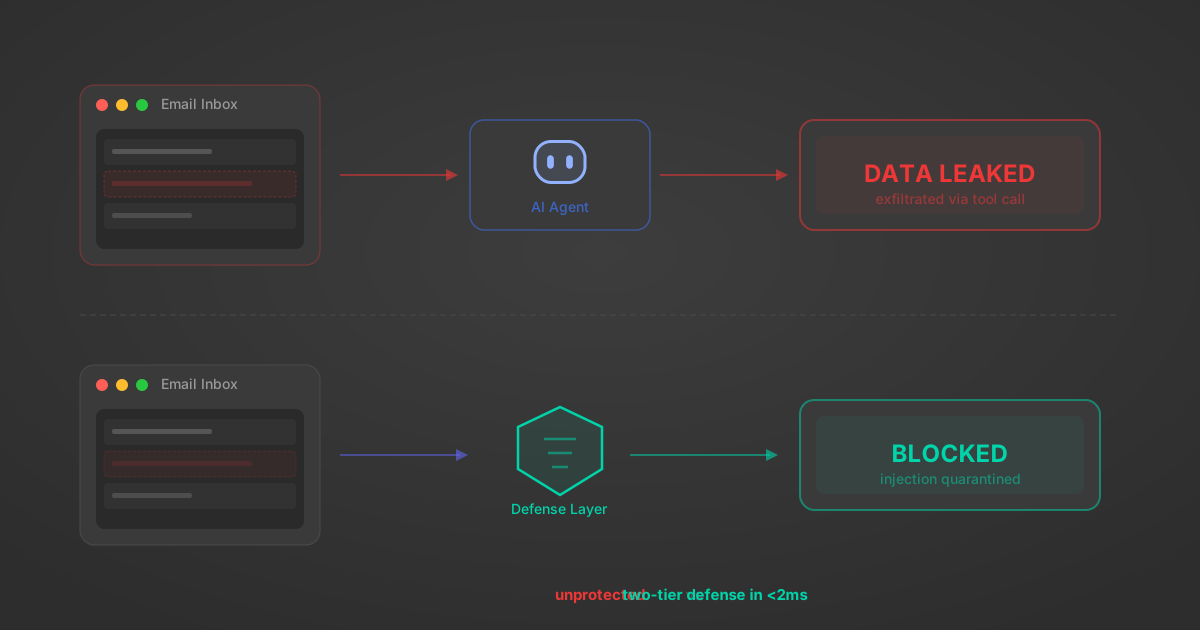
Indirect Prompt Injection Defense for MCP Tools: A Technical Guide
MCP tools that read emails, CRM records, and tickets are indirect prompt injection vectors. Here's how we built a two-tier defense that scans tool results in ~11ms.
12 min
MCP vs A2A: Architecture, Security, and When to Use Each
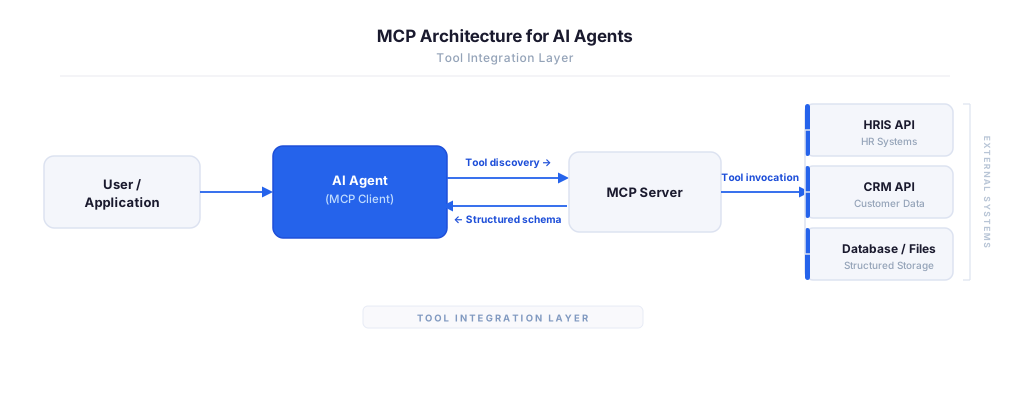
MCP vs A2A: what each protocol standardizes, how they differ, their shared security risks including indirect prompt injection, and when to use one, both, or a hybrid architecture.
12 min
MCP vs API: What Hundreds of Connector Builds Taught Us
MCP wraps APIs, it doesn't replace them. After building hundreds of connectors that serve both, here's when each approach wins.
14 min read
Liferay MCP Server FAQ
Does StackOne have a Liferay MCP server?
Liferay MCP server vs direct API integration — what's the difference?
How does Liferay authentication work for AI agents?
origin_owner_id.Are Liferay MCP tools vulnerable to prompt injection?
What is the context bloat of a Liferay agent and how do I avoid it?
Can I limit which actions my Liferay agent can access?
Can I create custom agent actions for my Liferay MCP server?
When should I NOT use a Liferay MCP server?
What AI frameworks and AI clients does the StackOne Liferay MCP server support?
Put your AI agents to work
All the tools you need to build and scale AI agent integrations, with best-in-class connectivity, execution, and security.