
Workiva MCP Server
for AI Agents
Connect your AI agent to StackOne's Workiva MCP server and give it 266 MCP tools out of the box. Auth, tool execution, and security all managed.
 StackOne






Coverage
266 Agent Actions
Create, read, update, and delete across Workiva — and extend your agent's capabilities with custom actions.

Authentication
Agent Tool Authentication
Per-user OAuth in one call. Your Workiva MCP server gets session-scoped tokens with zero credentials stored on your infra.
Agent Auth →
Security
Agent Protection
Every Workiva tool response scanned for prompt injection in milliseconds — 88.7% accuracy, all running on CPU.
Prompt Injection Defense →
Performance
Max Agent Context. Min Cost.
Free up to 96% of your agent's context window to enhance reasoning and reduce cost, on every Workiva call.
Tools Discovery →What is the Workiva MCP Server?
A Workiva MCP server lets AI agents read and write Workiva data through the Model Context Protocol — Anthropic's open standard for connecting LLMs to external tools. StackOne's Workiva MCP server ships with 266 pre-built actions, fully extensible via the Connector Builder — plus managed authentication, prompt injection defense, observability, and agent execution runtime. Connect it from MCP clients like Claude Desktop, Claude Code, Cursor, Goose, and VS Code, or from agent frameworks like OpenAI Agents SDK, LangChain, and Vercel AI SDK.
All Workiva MCP Tools
Every action from Workiva's API, ready for your agent. Create, read, update, and delete — scoped to exactly what you need.
A Single Organizations
- Retrieve A Single Organization
Retrieves an organization given its ID
- Update A Single Organization
Updates the properties of an organization.
A Single Workspaces
- Retrieve A Single Workspace
Retrieves a workspace given its ID
- Update A Single Workspace
Updates the properties of a workspace.
A Single Groups
- Retrieve A Single Group
Retrieves a group given its ID
- Update A Single Group
Updates the properties of a group.
- Delete A Single Group
Deletes a group given its ID.
A Single Sections
- Retrieve A Single Section
Retrieves a section given its ID.
- Delete A Single Section
Deletes a section given its ID.
File Results For A Single Operations
- Retrieve Copy File Results For A Single Operation
Returns a `CopyFileListResult` describing the results of a file copy operation.
- Retrieve Import File Results For A Single Operation
Returns a `ImportFileListResult` describing the results of a file import operation.
A Single Sheets
- Retrieve A Single Sheet
Retrieves a sheet given its ID.
- Delete A Single Sheet
Deletes a sheet given its ID.
A Single Metrics
- Retrieve A Single Metric
Retrieves a `Metric` given its ID
- Delete A Single Metric
Deletes a metric given its ID
A Single Metric Values
- Retrieve A Single Metric Value
Retrieves a metric value given its ID
- Delete A Single Metric Value
Deletes a metric value given its ID
A Single Topics
- Retrieve A Single Topic
Retrieves a topic given its ID
- Delete A Single Topic
Deletes a topic given its ID
A Single Tasks
- Retrieve A Single Task
Retrieves a task given its ID
- Delete A Single Task
Deletes a task given its ID
Other (245)
- Create A New Organization User
Creates a new OrganizationUser resource
- Create A New Workspace
Creates a new workspace resource
- Create A New Group In A Workspace
Creates a new group resource
- Create A New Workspace Membership
Creates a new `WorkspaceMembership` resource
- Create A New Workspace Membership With Options
Creates a new `WorkspaceMembership` and allows control over notification options.
- Create A New Section In A Document
Creates a new section in a document, given its properties.
- Copy Section
Asynchronously copies a section given details about the copy's destination within the same or another document.
- Create A New File
Creates a new file.
- Create New Record Edits
Creates new record edits given their properties.
- Create A Process
Create a new process with the specified configuration and job hierarchy.
- Create A New Sheet In A Spreadsheet
Creates a new sheet in a spreadsheet, given its properties.
- Copy Sheet
Asynchronously copies a sheet given details about the copy's destination within the same or another spreadsheet.
- Create A New Program
Creates a new program.
- Create A New Dimension
Creates a new dimension.
- Create A New Metric
Creates a new metric.
- Create A New Metric Value
Creates a new metric value
- Create A New Topic
Creates a new topic.
- Create A New Task
Creates a new task given its properties.
- Create A New Matrix
Create a new empty matrix.
- Create A New Sample
Create a new sample in a matrix.
- Retrieve A Single Activity
Retrieves an activity given its ID.
- Retrieve A List Of Activity Actions
Retrieves a list of actions performed that may produce activities.
- Retrieve A Single Activity Action
Returns an action performed, given its ID Attention The Workiva Platform does not guarantee that actions taken in the platform will always result in the same Activity ID.
- Retrieve A List Of Activities For An Organization
Returns a paginated list of activities for a given organization.
- Retrieve A List Of Activities For A Workspace
Returns a paginated list of activities for a given organization and workspace.
- Retrieve A List Of Organizations
Returns a paginated list of organizations.
- Retrieve Available Roles Within An Organization
Retrieves available roles within an organization given its ID
- Retrieve Available Solutions Within An Organization
Retrieves available solutions within an organization given its ID
- Retrieve List Of An Organizations Users
Retrieve users in an organization.
- Retrieve A Single User In An Organization
Retrieves an organization user given its ID
- List Roles Assigned To An Organization User
Retrieve a User's roles within an Organization
- Retrieve List Of Workspaces
Retrieve a list of workspaces in an organization.
- Retrieve List Of Groups
Retrieve a list of groups in a workspace
- Retrieve List Of Group Members
Retrieve a list of members in a workspace group
- Retrieve List Of Workspace Memberships
Retrieve all memberships of a workspace
- Retrieve A Single Workspace Membership
Retrieves a workspace membership given its ID
- Retrieve Available Roles For A Workspace Membership
Retrieves available roles for a workspace membership
- Retrieve Available Roles Within A Workspace
Retrieves available roles within a workspace given an organization and workspace ID
- Retrieve Available Solutions Within A Workspace
Retrieves available solutions within a workspace given its ID
- Retrieve A Solution By Id
Retrieve a solutions within a workspace given its ID
- Retrieve An Anchor By ID
Returns an `Anchor` given its id.
- Retrieve A Destination Link By Id
Returns a `DestinationLink` given its id
- Retrieve Drawing Elements By Id
Returns a `DrawingElementListResult` given its id
- Retrieve A List Of Drawing Anchors
Returns an `AnchorsListResult` for a given drawingId.
- Retrieve A Drawing Anchor By ID
Returns an `Anchor` given its id.
- Retrieve A List Of Drawing Anchor Extensions
Returns a paginated list of `AnchorExtensions` for a given anchorId.
- Retrieve An Image By Id
Returns a `Image` given its id
- Retrieve A List Of Rich Text Anchors
Returns an `AnchorsListResult` for a given richTextId.
- Retrieve A Rich Text Anchor By Id
Returns an `Anchor` given its id.
- Retrieve A List Of Rich Text Anchor Extensions
Returns a paginated list of `AnchorExtensions` for a given anchorId.
- Retrieve Rich Text Paragraphs
Returns a `ParagraphsListResult` for a rich text object, given its id.
- Retrieve A Style Guide By Id
Returns the `StyleGuide` populated with the text styles, list styles, etc.
- Retrieve A List Of Table Anchors
Returns an `AnchorsListResult` given tableId.
- Retrieve A Table Anchor By ID
Returns an `Anchor` given its id.
- Retrieve A List Of Table Anchor Extensions
Returns a paginated list of `AnchorExtensions` for a given anchorId.
- Retrieve Table Cell Content
Returns a `TableCellsResult` for a given tableId.
- Retrieve Table Column Properties
Returns a `ColumnPropertiesListResult` for a table
- Retrieve A List Of Range Links
Returns a `RangeLinkListResult` for a given tableId.
- Retrieve A Range Link By Id
Returns a `RangeLink` given its id
- Retrieve Range Link Destinations For A Source
Returns a `RangeLinkListResult` of destinations for a given source range link.
- Retrieve A Table's Properties By Id
Returns a `TableProperties` for a table
- Retrieve Table Row Properties
Returns a `RowPropertiesListResult` for a table
- Retrieve A CustomSchema
Retrieves the CustomSchema, which has the complete schema of custom fields and groups for the entire workspace, optionally filtering to a historical revision.
- Retrieve A List Of Documents
Returns a paginated list of documents.
- Retrieve A Single Document
Retrieves a document given its ID.
- Retrieve A Paginated Collection Of Bookmarks From A Document
Returns bookmarks within a document in document order.
- Retrieve A Single Bookmark From A Document
Returns the bookmark with the given ID from the document.
- Retrieve A List Of Milestones For A Document
Returns MilestoneListResult.
- Retrieve Permissions For A Document
Retrieves a paginated list of permissions for a given document
- Retrieve A List Of Sections
Returns a list of sections.
- Retrieve Permissions For A Section In A Document
Retrieves a paginated list of permissions for the given section in a document
- Retrieve A Collection Of Tables From A Document
Returns the collection of tables within a document.
- Retrieve A List Of Files
Returns a paginated list of files.
- Retrieve A List Of Trashed Files
Returns a paginated list of files that have been trashed.
- Retrieve A Single File
Retrieves a file given its ID
- Retrieve Permissions For A File
Retrieves a paginated list of permissions for a given file
- Retrieve A List Of Records
Returns a list of records matching the provided filters.
- Retrieve A Single Record
Retrieves a record given its ID.
- Retrieve A List Of Types
The Types endpoint is used to discover what types of records exist and their attributes.
- Retrieve A Single Type
Returns a record type given its ID (name)
- Retrieve A Milestone By Id
Returns a `Milestone` given its id
- Retrieve A Single Operation
Retrieves an operation given its ID.
- Retrieve Results For An Image Upload
Returns an `ImageUploadResultCollection` describing the results of an image upload.
- Retrieve The Results Of A Metric Values Batch Upsertion Operation
Returns a `MetricValuesListResult` describing the results of a metric values batch upsertion operation.
- Retrieve Results For A Milestone Creation
Returns a `MilestoneCreationListResult` describing the results of a milestone creation.
- Retrieve Results For A Patch Document
Returns a `PatchDocumentListResult` describing the results of a patch document.
- Retrieve Results For A Patch Presentation
Returns a `PatchPresentationListResult` describing the results of a patch presentation.
- Retrieve Results For A Patch Section
Returns a `PatchSectionListResult` describing the results of a patch section.
- Retrieve Results For A Patch Sheet
Returns a `PatchSheetListResult` describing the results of a patch sheet.
- Retrieve Results For A Patch Slide Layout
Returns a `PatchSlideLayoutListResult` describing the results of a patch slide layout.
- Retrieve Results For A Patch Slide
Returns a `PatchSlideListResult` describing the results of a patch slide.
- Retrieve Results For A Patch Spreadsheet
Returns a `PatchSpreadsheetListResult` describing the results of a patch spreadsheet.
- Retrieve Results For A Patch Table Properties
Returns a `PatchTablePropertiesListResult` describing the results of a patch table properties.
- Retrieve Results For A Range Link Edit
Returns a `RangeLinkEditResultCollection` describing the results of a range link edit.
- Retrieve Results For A Rich Text Batch Edit
Returns a `RichTextEditListResult` describing the results of a rich text batch edit.
- Retrieve Results For A Rich Text Anchor Creation
Returns a `RichTextAnchorCreationResultCollection` describing the results of a rich text anchor creation.
- Retrieve Results For A Rich Text Duplication Edit
Returns a `RichTextDuplicationEditListResult` describing the results of a rich text duplication edit.
- Retrieve Results For A Rich Text Links Batch Edit
Returns a `RichTextLinksEditListResult` describing the results of a rich text batch edit.
- Retrieve Results For A Table Anchor Creation
Returns a `TableAnchorCreationResultCollection` describing the results of a table anchor creation.
- Retrieve Results For A Table Cell Edit
Returns a `TableCellEditListResult` describing the results of a table cell edit.
- Retrieve Results For A Table Edit
Returns a `TableEditListResult` describing the results of a table edit.
- Retrieve Results For A Table Links Edit
Returns a `TableLinksEditListResult` describing the results of a table links edit.
- Retrieve Results For A Table Reapply Filter
Returns a `TableReapplyFilterListResult` describing the results of a table reapply filter.
- Retrieve A List Of All Available Permissions
Returns a list of permissions.
- Retrieve A Single Permission
Retrieves a permission given its ID
- Retrieve A Single Presentation
Retrieves a presentation given its ID.
- Retrieve A List Of Milestones For A Presentation
Returns MilestoneListResult.
- Retrieve Permissions For A Presentation
Retrieves a paginated list of permissions for a given presentation
- Retrieve A List Of Slide Layouts
Returns a list of slide layouts.
- Retrieve A Single Slide Layout
Retrieves a slide layout given its ID.
- Retrieve A List Of Slides
Returns a list of slides.
- Retrieve A Single Slide
Retrieves a slide given its ID.
- Retrieve Permissions For A Slide In A Presentation
Retrieves a paginated list of permissions for the given slide in a presentation
- Retrieve A Collection Of Tables From A Presentation
Returns the collection of tables within a presentation.
- Retrieve A ProcessRun By ID
Retrieve a ProcessRun (running instance of a process) by its unique identifier.
- Retrieve A List Of Processes
Retrieve a paginated list of processes the caller has access to, with each process's associated ProcessRun embedded (if started).
- Retrieve A Process By ID
Retrieve a process by its id.
- List Organization Users
Similar to an organization admin's "People View" export, this returns a paged list of specific details about the organization's users, including their usernames, display names, email addresses, SAML IDs, last logins, workspace memberships, licenses and roles.
- Retrieve A List Of Spreadsheets
Returns a paginated list of spreadsheets.
- Retrieve A Single Spreadsheet
Retrieves a spreadsheet given its ID.
- Retrieve A List Of Datasets
Returns a list of datasets.
- Retrieve A List Of Milestones For A Spreadsheet
Returns MilestoneListResult.
- Retrieve Permissions For A Spreadsheet
Retrieves a paginated list of permissions for a given spreadsheet
- Retrieve A List Of Sheets
Returns a list of sheets.
- Retrieve Permissions For A Sheet In A Spreadsheet
Retrieves a paginated list of permissions for the given sheet in a spreadsheet
- Retrieve Data From A Sheet
Retrieve data from a range in a sheet.
- Retrieve A List Of Range Values
Returns the paginated values for a specified range.
- Retrieve A List Of Programs
Returns a paginated list of programs.
- Retrieve A Single Program
Retrieves a program given its ID
- Retrieve A List Of Dimensions
Returns a paginated list of dimensions.
- Retrieve A Single Dimension
Retrieves a dimension given its ID
- Retrieve A List Of Metrics
Returns a paginated list of Metrics.
- Retrieve A List Of Metric Values
Returns a paginated list of metric Values
- Retrieve Permissions For A Program
Retrieves a paginated list of permissions for a given Sustainability Program
- Retrieve A List Of Topics
Returns a paginated list of topics.
- Retrieve A List Of Tasks
Returns a paginated list of tasks.
- Retrieve A List Of Test Forms
Retrieves a list of test forms.
- Retrieve A Single Test Form
Retrieves a test form given its ID.
- Retrieve A List Of Test Phases
Returns a list of test phases.
- Retrieve A List Of Test Phase Attachments
Returns a list of attachments for a test phase.
- Retrieve A Single Test Phase Attachment
Retrieve a single attachment by its ID.
- Retrieve A List Of Matrices
Returns a list of matrices.
- Retrieve A Single Matrix
Retrieves a matrix given its ID.
- Retrieve A List Of Matrix Attachments
Returns a list of attachments for a matrix.
- Retrieve A Single Matrix Attachment
Retrieve a single attachment by its ID.
- Retrieve A List Of Samples
Returns a list of samples.
- Retrieve A Single Sample
Retrieves a sample given its ID.
- Retrieve A List Of Sample Attachments
Returns a list of attachments for a sample.
- Retrieve A Single Sample Attachment
Retrieve a single attachment by its ID.
- Update Sheet Content
Asynchronously submits a SheetUpdate to a sheet.
- Update Values In A Range
Overwrites all values in a range with new values.
- Update Samples
Updates multiple samples, with the requestBody of each specifying columns to update by their IDs.
- Delete An Organization User
Delete a user from an organization
- Delete A Workspace Membership
Revoke a user's membership to a `Workspace`.
- Delete A Single Dataset
Deletes the dataset for the specified sheet.
- Assign Existing User To Organization
Assign an existing organization user to an organization
- Partially Update A Single User In An Organization
Partially update the properties of a User within an Organization.
- Assign Roles For An Organization User
Assign a User's roles within an Organization.
- Revoke Roles For An Organization User
Revoke a User's roles within an Organization.
- Modify Members In A Group
Add and/or remove members from a group.
- Assign Roles For A Workspace Membership
Assign a member's roles within a Workspace.
- Revoke Roles For A Workspace Membership
Revoke a member's roles within a Workspace.
- Initiate A Destination Link Conversion
Converts a destination link into a source link.
- Initiate Upload Of An Image
Retrieves a URL that can be used to upload an image, and an operationId to track the image upload progress.
- Initiate Creation Of A New Rich Text Anchor
Create a new `Anchor` using a `RichTextAnchorCreation` request.
- Initiate Duplication Edits To Rich Text
Sends a `RichTextDuplicationEdit` to perform on the rich text.
- Initiate Edits To Rich Text
Sends a `RichTextBatchEdit` to perform as a batch on the rich text.
- Initiate Edits To Rich Text Links
Sends a `RichTextLinksBatchEdit` to perform as a batch on the rich text.
- Initiate A Style Guide Export
Export the style guide with the given identifier.
- Initiate Import Of A Style Guide
Imports a style guide to the given identifier.
- Initiate Creation Of A New Table Anchor
Create a new `Anchor` using a `TableAnchorCreation` request.
- Initiate Edits To Table Cells
Sends a `TableCellsBatchEdit` to perform on the cells in a table.
- Initiate Edit To A Table
Sends a single `TableEdit` to perform on the table.
- Reapply Filters To The Table
Performs a `TableFiltersReapplication` on the specified table.
- Initiate Edit To Table Links
Sends a `TableLinksBatchEdit` to perform on the links in a table.
- Initiate Range Links Edits On A Table
Sends a `RangeLinkEdit` to perform on the range links in a table.
- Partially Update A Table's Properties
Partially updates a table's properties given its ID.
- Partially Update A CustomSchema
Partially update the schema of custom fields and custom field groups for the entire workspace.
- Partially Update A Single Document
Updates the properties of a document.
- Apply A Batch Of Bookmark Edits To A Document
Sends a collection of bookmark edits to perform atomically on a document.
- Initiate A Document Export
Asynchronously exports a document as .PDF or .DOCX., or .XHTML.
- Reapply Filters To The Document
Performs a `DocumentFiltersReapplication` on the specified document.
- Replace Link Destinations In A Document
Replaces existing link destinations with new destinations.
- Initiate Publication Of Links In A Document
Publishes the links in a document - either all (as document owner) or only one's own.
- Modify Permissions On A Document
Assign and/or revoke permissions on a document.
- Partially Update A Single Section
Updates the properties of a section.
- Initiate Sections Edits
Updates the properties of a collection of sections in a document using SectionsEdits request.
- Modify Permissions On A Given Section Of A Document
Assign and/or revoke permissions on a section.
- Initiate A File Import
Import a file for conversion to a Workiva equivalent.
- Partially Update A Single File
Partially updates the properties of a file.
- Initiate A File Copy
Copy a file to a new location.
- Initiate A File Export By ID
Export a file by its unique ID.
- Initiate Restoration Of A Single File
Restores a file given its ID.
- Initiate Trash Of A Single File
Trashes a file given its ID.
- Modify Permissions On A File
Assign and/or revoke permissions on a file.
- Initiate A Graph Report Export
Asynchronously exports a graph report (only CSV available at this time).
- Initiates A Request To Create A New Milestone
Create a new `Milestone` using a `MilestoneCreation` request.
- Partially Updates A Milestone
Partially updates a `Milestone` with a given id.
- Deletes A Milestone
Deletes the `Milestone` with a given id.
- Retrieves The Results From A Destination Link Source Conversion.
Returns the results for a destination link source conversion.
- Partially Updates A Single Presentation
Updates the properties of a presentation.
- Initiate A Presentation Export
Asynchronously export a presentation as .PDF or .PPTX.
- Reapply Filters To The Presentation
Performs a `PresentationFiltersReapplication` on the specified presentation.
- Replace Link Destinations In A Presentation
Replaces existing link destinations with new destinations.
- Initiate Publication Of Links In A Presentation
Publishes the links in a presentation - either all (as document owner) or only one's own.
- Modify Permissions On A Presentation
Assign and/or revoke permissions on a presentation.
- Partially Update A Single Slide Layout
Updates one or more properties of a single slide layout.
- Partially Update A Single Slide
Updates one or more properties of a single slide.
- Modify Permissions On A Given Slide Of A Presentation
Assign and/or revoke permissions on a slide.
- Partially Update A Process
Updates the properties of a process via JSON Patch.
- Bulk Update Group And Job Names
Updates names for specified jobs and groups.
- Run A Process
Run an existing process by its id, creating a new ProcessRun.
- Validate A Process
Run a validation check on a process and return any structural or configuration errors found.
- Partially Update A Single Spreadsheet
Updates the properties of a spreadsheet.
- Bulk Upsert Of Datasets
Asynchronously upserts an array of datasets to a spreadsheet, given their properties.
- Initiate A Spreadsheet Export
Asynchronously exports a spreadsheet as .XLSX, .PDF, or .CSV.
- Reapply Filters To The Spreadsheet
Performs a `SpreadsheetFiltersReapplication` on the specified spreadsheet.
- Replace Link Destinations In A Spreadsheet
Replaces existing link destinations with new destinations.
- Initiate Publication Of Links In A Spreadsheet
Publishes the links in a spreadsheet - either all (as document owner) or only one's own.
- Modify Permissions On A Spreadsheet
Assign and/or revoke permissions on a spreadsheet.
- Partially Update A Single Sheet
Updates the properties of a sheet.
- Modify Permissions On A Given Sheet Of A Spreadsheet
Assign and/or revoke permissions on a sheet.
- Partially Update A Single Program
Partially updates the properties of a program.
- Partially Update A Single Dimension
Partially updates the properties of a dimension.
- Partially Update A Single Metric
Partially updates the properties of a metric.
- Partially Update A Single Metric Value
Partially updates the properties of a metric value.
- Initiate A Batch Deletion Of Metric Values
Batch delete the given metric values.
- Initiate A Batch Upsertion Of Metric Values
Batch upsert values for the given metric.
- Modify Permissions On A Program
Assign and/or revoke permissions on a Sustainability Program.
- Partially Update A Single Topic
Partially updates the properties of a topic.
- Partially Update A Single Task
Partially updates the properties of a task.
- Initiate A Task Action Submission
This endpoint enables submitting actions on a task.
- Initiate A Test Form Export
Asynchronously exports a test form.
- Retrive A Single Test Phase
Retrieves a test phase given its ID.
- Initiate A Test Phase Attachment Upload
Starts the process to upload and attach a file to a test phase using a graph attachment upload object.
- Initiate A Test Phase Attachment Download
Asynchronously downloads an attachment from a test phase.
- Initiate A Test Phase Attachment Export
Asynchronously exports an attachment for a test phase to .PDF.
- Initiate A Matrix Attachment Upload
Starts the process to upload and attach a file to a matrix using a graph attachment upload object.
- Initiate A Matrix Attachment Download
Asynchronously downloads an attachment from a matrix.
- Initiate An Export Of A Matrix Attachment
Asynchronously exports an attachment for a matrix to .PDF.
- Insert Samples
Inserts multiple samples into a matrix, and appends new samples to the end of the matrix.
- Partially Update A Single Sample
Partially updates the properties of a sample.
- Initiate An Upload Of A Sample Attachment
Starts the process to upload and attach a file to a sample using a graph attachment upload object.
- Initiate A Download Of A Sample Attachment
Asynchronously downloads an attachment from a sample.
- Initiate An Export Of A Sample Attachment
Asynchronously exports an attachment for a sample to .PDF.
Set Up Your Workiva MCP Server in Minutes
One endpoint. Any framework. Your agent is talking to Workiva in under 10 lines of code.
Agent Frameworks


 JSON
JSON{
"mcpServers": {
"stackone": {
"command": "npx",
"args": [
"-y",
"mcp-remote@latest",
"https://api.stackone.com/mcp?x-account-id=<account_id>",
"--header",
"Authorization: Basic <YOUR_BASE64_TOKEN>"
]
}
}
}Check More developer MCP Servers
124+ actions
119+ actions
102+ actions
87+ actions
71+ actions
68+ actions
67+ actions
Platform Resources

MCP Code Mode: Keeping Tool Responses Out of Agent Context
Anthropic's code_execution processes data already in context. Custom MCP code mode keeps raw tool responses in a sandbox. 14K tokens vs 500.
11 min

Comparing BM25, TF-IDF, and Hybrid Search for MCP Tool Discovery
Benchmarking BM25, TF-IDF, and hybrid search for MCP tool discovery across 916 tools. The 80/20 TF-IDF/BM25 hybrid hits 21% Top-1 accuracy in under 1ms.
10 min
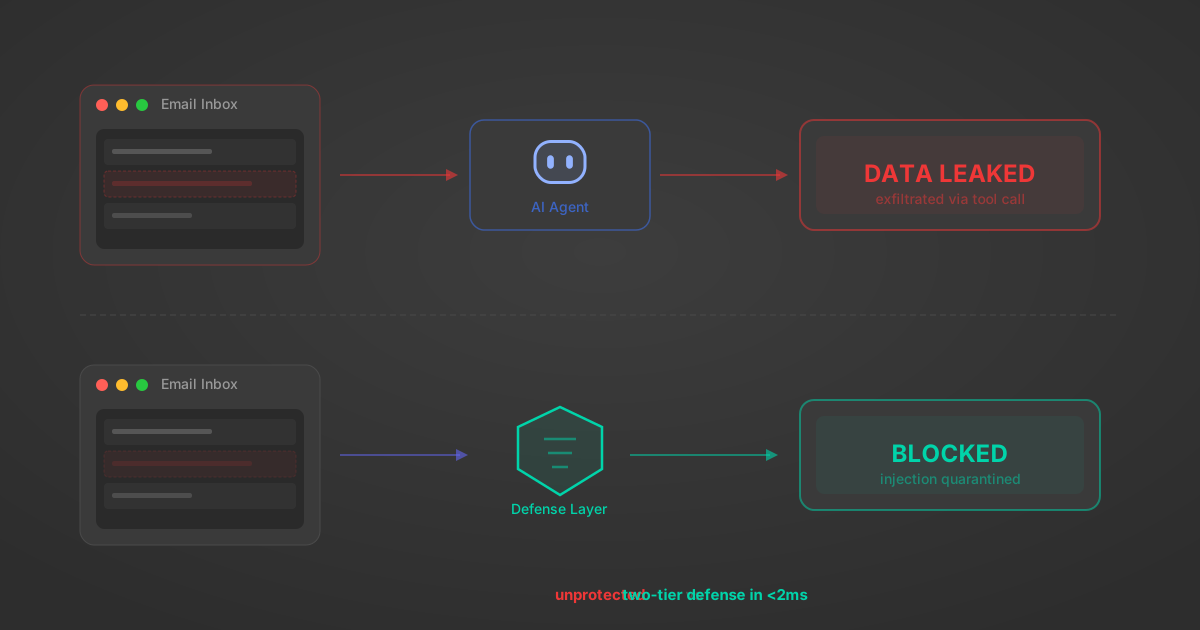
Indirect Prompt Injection Defense for MCP Tools: A Technical Guide
MCP tools that read emails, CRM records, and tickets are indirect prompt injection vectors. Here's how we built a two-tier defense that scans tool results in ~11ms.
12 min
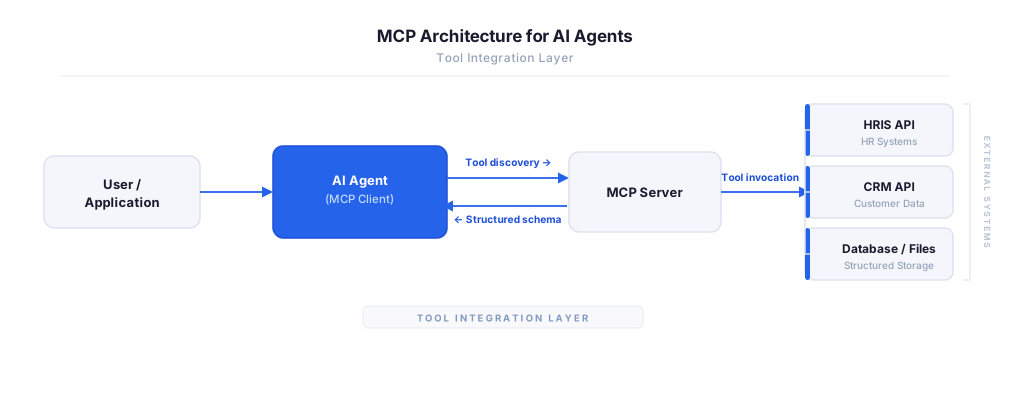
MCP vs A2A: Architecture, Security, and When to Use Each
MCP vs A2A: what each protocol standardizes, how they differ, their shared security risks including indirect prompt injection, and when to use one, both, or a hybrid architecture.
12 min
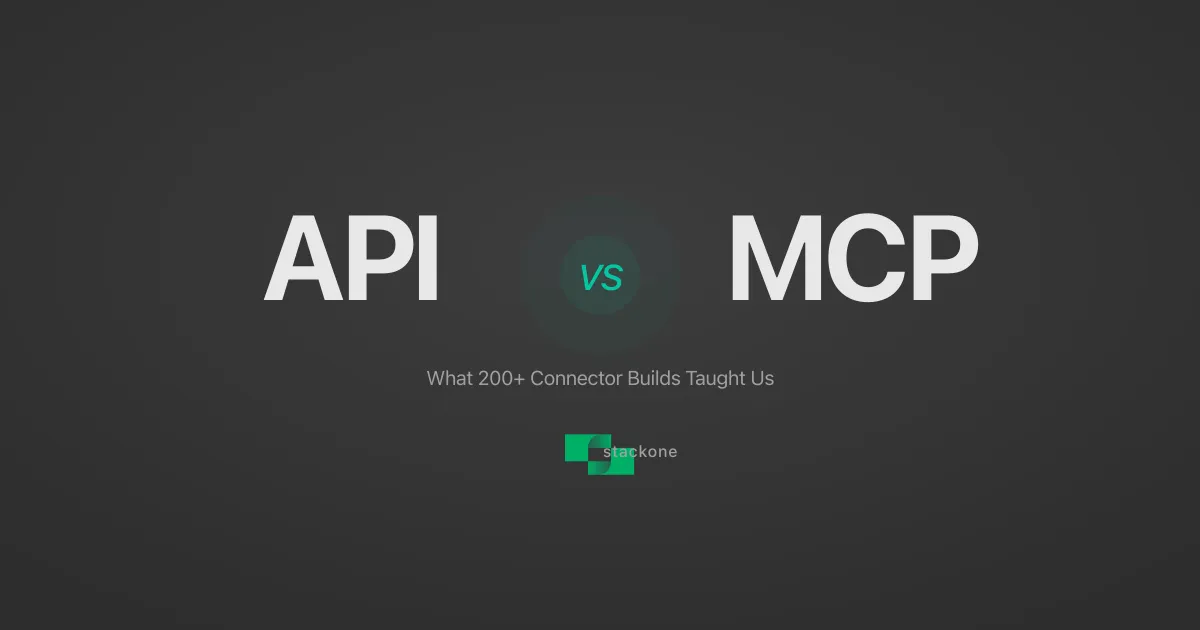
MCP vs API: What Hundreds of Connector Builds Taught Us
MCP wraps APIs, it doesn't replace them. After building hundreds of connectors that serve both, here's when each approach wins.
14 min read
Workiva MCP Server FAQ
Does StackOne have a Workiva MCP server?
Workiva MCP server vs direct API integration — what's the difference?
How does Workiva authentication work for AI agents?
origin_owner_id.Are Workiva MCP tools vulnerable to prompt injection?
What is the context bloat of a Workiva agent and how do I avoid it?
Can I limit which actions my Workiva agent can access?
Can I create custom agent actions for my Workiva MCP server?
When should I NOT use a Workiva MCP server?
What AI frameworks and AI clients does the StackOne Workiva MCP server support?
Put your AI agents to work
All the tools you need to build and scale AI agent integrations, with best-in-class connectivity, execution, and security.