


Postman MCP Server
for AI Agents
Connect your AI agent to StackOne's Postman MCP server and give it 153 MCP tools out of the box. Auth, tool execution, and security all managed.
 StackOne


Coverage
153 Agent Actions
Agents can read, write, delete and run operations in Postman. Extend your agent's capabilities with custom actions.

Authentication
Agent Tool Authentication
Per-user OAuth in one call. Your Postman MCP server gets session-scoped tokens with zero credentials stored on your infra.
Agent Auth →
Security
Agent Protection
Every Postman tool response scanned for prompt injection in milliseconds, with 88.7% accuracy, all running on CPU.
Prompt Injection Defense →
Performance
Max Agent Context. Min Cost.
Free up to 96% of your agent's context window to enhance reasoning and reduce cost, on every Postman call.
Tools Discovery →What is the Postman MCP Server?
A Postman MCP server lets AI agents read and write Postman data through the Model Context Protocol, Anthropic's open standard for connecting LLMs to external tools. StackOne's Postman MCP server ships with 153 pre-built actions, fully extensible via the Connector Builder, plus managed authentication, prompt injection defense, observability, and agent execution runtime. Connect it from MCP clients like Claude Desktop, Claude Code, Cursor, Goose, and VS Code, or from agent frameworks like OpenAI Agents SDK, LangChain, and Vercel AI SDK.
All Postman MCP Tools
Every StackOne action for Postman, ready for your agent. Read, write, delete and run operations, scoped to exactly what you need.
A Forks
- Create A Fork
Creates a fork from an existing collection into a workspace.
- Create A Fork
Creates a fork of an existing environment in Postman, returning the Postman API response unchanged.
A Collections
- Create A Collection
Creates a collection using the Postman Collection v2.1.0 schema format.
- Get A Collection
Gets information about a collection. For a complete list of this endpoint's possible values, refer to the Postman Collection Format documentation.
- Delete A Collection
Deletes a Postman collection by its ID, permanently removing its folders, requests and saved responses.
A Collection's Roles
- Get A Collection's Roles
Gets information about all roles in a collection. The response returns the IDs of all users, teams, and groups with access to view or edit the collection.
- Update A Collection's Roles
Updates the roles of users, groups, or teams in a collection. On success, this returns an HTTP `204 No Content` response.
Pull Source Changes
- Pull Source Changes
Pulls the changes from a parent (source) collection into the forked collection.
- Pull Source Changes
Pulls the changes from a parent (source) environment into the forked environment.
A Folder's Comments
- Update A Folder's Comment
Updates a comment on a folder. Note: This endpoint accepts a max of 10,000 characters.
- Delete A Folder's Comment
Deletes a comment from a folder. On success, this returns an HTTP `204 No Content` response.
A Request's Comments
- Update A Request's Comment
Updates a comment on a request. Note: This endpoint accepts a max of 10,000 characters.
- Delete A Request's Comment
Deletes a comment from a request. On success, this returns an HTTP `204 No Content` response.
A Response's Comments
- Update A Response's Comment
Updates a comment on a response. Note: This endpoint accepts a max of 10,000 characters.
- Delete A Response's Comment
Deletes a comment from a response. On success, this returns an HTTP `204 No Content` response.
A Collection's Comments
- Update A Collection's Comment
Updates a comment on a collection. Note: This endpoint accepts a max of 10,000 characters.
- Delete A Collection's Comment
Deletes a comment from a collection. On success, this returns an HTTP `204 No Content` response.
An Environments
- Create An Environment
Creates an environment. Note: - The request body size cannot exceed the maximum allowed size of 30MB.
- Get An Environment
Gets information about an environment in Postman, returning the Postman API response unchanged.
- Update An Environment
Updates specific environment properties, such as its name and variables.
- Delete An Environment
Deletes an environment in Postman, returning the Postman API response unchanged.
A Folders
- Create A Folder
Creates a folder in a collection. For a complete list of properties, refer to the Folder entry in the Postman Collection Format documentation.
- Get A Folder
Gets information about a folder in a collection.
- Update A Folder
Updates a folder in a collection. For a complete list of properties, refer to the Folder entry in the Postman Collection Format documentation.
- Delete A Folder
Deletes a folder in a collection in Postman, returning the Postman API response unchanged.
Groups
- List Groups
List the groups of the Postman team.
- Get Group
Get one Postman group by ID.
Unified Groups
- List Unified Groups
List unified groups in the Postman team.
- Get Unified Group
Get a unified Postman group by ID.
Unified Users
- List Unified Users
List unified users in the Postman team.
- Get Unified User
Get a unified Postman team user by ID.
A Mock Servers
- Create A Mock Server
Creates a mock server in a collection. Note: - You cannot create mocks for collections added to an API definition.
- Publish A Mock Server
Publishes a mock server. Publishing a mock server sets its Access Control configuration setting to public.
- Get A Mock Server
Gets information about a mock server in Postman, returning the Postman API response unchanged.
- Update A Mock Server
Updates a mock server's properties, such as its name or collection.
- Delete A Mock Server
Deletes a mock server in Postman, returning the Postman API response unchanged.
A Monitors
- Create A Monitor
Creates a monitor. Note: - You cannot create monitors for collections added to an API definition.
- Get A Monitor
Gets information about a monitor in Postman, returning the Postman API response unchanged.
- Update A Monitor
Updates a monitor's configurations in Postman, returning the Postman API response unchanged.
- Delete A Monitor
Deletes a monitor in Postman, returning the Postman API response unchanged.
A Requests
- Create A Request
Creates a request in a collection. For a complete list of properties, refer to the Request entry in the Postman Collection Format documentation.
- Get A Request
Gets information about a request in a collection.
- Update A Request
Updates a request in a collection. For a complete list of properties, refer to the Request entry in the Postman Collection Format documentation.
- Delete A Request
Deletes a request in a collection in Postman, returning the Postman API response unchanged.
A Responses
- Create A Response
Creates a request response in a collection. For a complete list of request body properties, refer to the Response entry in the Postman Collection Format documentation.
- Get A Response
Gets information about a response in a collection.
- Update A Response
Updates a response in a collection. For a complete list of properties, see the Postman Collection Format documentation.
- Delete A Response
Deletes a response in a collection in Postman, returning the Postman API response unchanged.
A Server Responses
- Create A Server Response
Creates a server response. Server responses let you simulate 5xx server-level responses, such as 500 or 503.
- Get A Server Response
Gets information about a server response in Postman, returning the Postman API response unchanged.
- Update A Server Response
Updates a server response in Postman, returning the Postman API response unchanged.
- Delete A Server Response
Deletes a mock server's server response in Postman, returning the Postman API response unchanged.
A Spec Files
- Create A Spec File
Creates a file for an OpenAPI or a protobuf 2 or 3 specification. Note: - If the file path contains a `/` (forward slash) character, then a folder is created.
- Get A Spec File
Gets the contents of an API specification's file.
- Update A Spec File
Updates a file for an OpenAPI or protobuf 2 or 3 specification. Note: - This endpoint does not accept an empty request body.
- Delete A Spec File
Deletes a file in an API specification. On success, this returns an HTTP `204 No Content` response.
A Version Tags
- Create A Version Tag
Creates a version tag for a specification. Version tags are snapshots of a specification at a point in time that let you to track changes to your specifications over time.
- Get A Version Tag
Gets information about a specification's version tag. The response returns a snapshot of a specification at a point in time that lets you track changes to your specifications over time.
A Specs
- Create A Spec
Creates an API specification in Postman's Spec Hub. Specifications can be single or multi-file.
- Get A Spec
Gets information about an API specification in Postman, returning the Postman API response unchanged.
- Delete A Spec
Deletes an API specification. On success, this returns an HTTP `204 No Content` response.
A Collection's Tags
- Get A Collection's Tags
Gets all the tags associated with a collection.
- Update A Collection's Tags
Updates a collection's associated tags. This endpoint replaces all existing tags with those you pass in the request body.
A Workspace's Tags
- Get A Workspace's Tags
Gets all the tags associated with a workspace.
- Update A Workspace's Tags
Updates a workspace's associated tags. This endpoint replaces all existing tags with those you pass in the request body.
Teams
- List Teams
List the Postman teams in the organization.
- Get Team
Get one Postman team by ID.
A Teams
- Create A Team
Creates a Postman team in your organization in Postman, returning the Postman API response unchanged.
- Update A Team
Updates a Postman team's name in your organization. Note: You can only update the team's `name`.
A Workspace Updates
- Create A Workspace Update
Creates a workspace update in the given workspace. Workspace updates keep workspace watchers informed about changes, such as new features, bug fixes, breaking changes, and announcements.
- Get A Workspace Update
Gets information about a workspace update in Postman, returning the Postman API response unchanged.
- Update A Workspace Update
Updates a workspace update. Note: This endpoint requires the `application/merge-patch+json` Content-Type header.
- Delete A Workspace Update
Deletes a workspace update. On success, this returns an HTTP `204 No Content` response.
Team Users
- List Team Users
List the users of the Postman team.
- Get Team User
Get one user of the Postman team by ID.
A Workspaces
- Create A Workspace
Creates a new workspace. Note: - This endpoint returns a 403 `Forbidden` response if the user does not have permission to create workspaces.
- Get A Workspace
Gets information about a workspace. Note: This endpoint's response contains the `visibility` field.
- Update A Workspace
Updates a workspace's property, such as its name or visibility.
- Delete A Workspace
Deletes an existing workspace in Postman, returning the Postman API response unchanged.
Global Variables
- Get Global Variables
Gets a workspace's global variables. Global variables enable you to access data between collections, requests, scripts, and environments and are available throughout a workspace.
- Update Global Variables
Updates and replaces a workspace's global variables. This endpoint replaces all existing global variables with the variables you pass in the request body.
Other (72)
- Create A Pull Request
Creates a pull request for a forked collection into its parent collection.
- Publish Documentation
Publishes a collection's documentation. This makes it publicly available to anyone with the link to the documentation.
- Create A Folder Comment
Creates a comment on a folder. To create a reply on an existing comment, include the `threadId` property in the request body.
- Create A Request Comment
Creates a comment on a request. To create a reply on an existing comment, include the `threadId` property in the request body.
- Create A Response Comment
Creates a comment on a response. To create a reply on an existing comment, include the `threadId` property in the request body.
- Create A Collection Comment
Creates a comment on a collection. To create a reply on an existing comment, include the `threadId` property in the request body.
- Create An Access Request
Creates an access request for a team. Access requests include actions such as request to join a team, upgrading a user's role, adding members, and requesting team role access to another team.
- Create A Webhook
Creates a webhook that triggers a collection with a custom payload. You can get the webhook's URL from the `webhookUrl` property in the endpoint's response.
- List Audit Log Event Actions
Gets a complete list of all available audit log event actions.
- List Team Audit Logs
Gets a list of your team's generated audit events. For a complete list of all audit events, see Audit logs.
- List Collection's Forks
Gets a collection's forked collections. The response returns data for each fork, such as the fork's ID, the user who forked it, and the fork's creation date.
- List Collection's Pull Requests
Gets information about a collection's pull requests, such as the source and destination IDs, status of the pull requests, and a URL link to the pull requests.
- List Forked Collections
Gets a list of all the authenticated user's forked collections.
- List Collections
Gets all of your collections. The response includes all of your subscribed collections.
- Get Source Collection's Status
Checks whether there is a change between the forked collection and its parent (source) collection.
- List Folder's Comments
Gets all comments left by users in a folder in Postman, returning the Postman API response unchanged.
- List Request's Comments
Gets all comments left by users in a request.
- List Response's Comments
Gets all comments left by users in a response.
- List Collection's Comments
Gets all comments left by users in a collection.
- List Environment's Forks
Gets all of an environment's forked environments.
- List Environments
Gets information about all of your environments.
- Get Unified Credentials
Get the current Postman connection's unified credentials and identity.
- List Mock Server's Call Logs
Gets a mock server's call logs. You can get a maximum of 6.5MB of call logs or a total of 100 call logs, whichever limit is met first in one API call.
- List Mock Servers
Gets all active mock servers. By default, this endpoint returns only mock servers you created across all workspaces.
- List Monitors
Gets all monitors in Postman, returning the Postman API response unchanged.
- List Server Responses
Gets all of a mock server's server responses.
- List Specs
Gets all API specifications in a workspace in Postman, returning the Postman API response unchanged.
- Get Generated Spec
Gets the API specification generated for the given collection.
- Get A Spec's Generated Collections
Gets all of an API specification's generated collections.
- Get A Spec's Definition
Gets the complete contents of an OpenAPI or AsyncAPI specification's definition.
- List Spec's Files
Gets all the files in an API specification in Postman, returning the Postman API response unchanged.
- List Specification's Version Tags
Gets a list of a specification's version tags.
- List Elements By Tag
Gets Postman elements (entities) by a given tag. Tags enable you to organize and search workspaces, APIs, and collections that contain shared tags.
- Get Merge Or Pull Task Status
Gets the status of a collection's merge or a pull changes task. Note: After a merge's success or failure, the task's status is only available for a period of 24 hours.
- Get Async Collection Update Status
Gets the status of an asynchronous collection update task.
- Get Duplication Task Status
Gets the status of a collection duplication task.
- Get Status Of An Async Spec Task
Gets the status of an asynchronous API specification creation task.
- Get Team Access Requests
List the pending access requests of a Postman team.
- Get A Team's Settings
Gets a team's settings in Postman, returning the Postman API response unchanged.
- List Workspace Updates
Gets a list of workspace updates for the given workspace.
- Get Authenticated User
Get the Postman user that owns the API key.
- List Roles
Gets information about all roles in a workspace, based on the team's plan.
- List Workspace's Activity Feed
Gets a workspace's activity feed. Activity feeds return information about who added or removed collections, environments, or elements from a workspace, and users that join or leave a workspace.
- Get A Workspace's Roles
Gets the roles of users, user groups, and partners in a workspace. Note: Partner roles don't support SCIM IDs.
- List Workspaces
Gets all workspaces. The response includes your workspaces and any workspaces that you have access to.
- Update Part Of A Collection
Updates specific collection information, such as its name, events, or its variables.
- Sync Collection With Spec
Syncs a collection generated from an API specification. This is an asynchronous endpoint that returns an HTTP `202 Accepted` response.
- Sync Spec With Collection
Syncs an API specification linked to a collection. This is an asynchronous endpoint that returns an HTTP `202 Accepted` response.
- Update A Spec's Properties
Updates an API specification's properties, such as its name.
- Update Spec Sync Options
Updates the sync options for a specification's generated collection.
- Update Team Settings
Updates a team's settings in Postman, returning the Postman API response unchanged.
- Update Workspace Roles
Updates the roles of users, user groups, or partners in a workspace. To get a list of roles, use the GET `/workspace-roles` endpoint.
- Remove Team Members
Removes entities, such as users or organizations, from your Postman team.
- Merge Or Pull Changes Into A Collection Fork
Merges a forked (source) collection and its parent (destination) collection asynchronously.
- Duplicate A Collection
Creates a duplicate of the given collection in another workspace. Use the GET `/collection-duplicate-tasks/{taskId}` endpoint to get the duplication task's current status.
- Replace A Collection's Data
Replaces the contents of a collection using the Postman Collection v2.1.0 schema format.
- Transfer Folders
Copies or moves folders into a collection or folder.
- Transfer Requests
Copies or moves requests into a collection or folder.
- Transfer Responses
Copies or moves responses into a request.
- Unpublish Documentation
Unpublishes a collection's documentation. On success, this returns an HTTP `204 No Content` response.
- Resolve A Comment Thread
Resolves a comment and any associated replies. On success, this returns an HTTP `204 No Content` response.
- Merge A Fork
Merges a forked environment back into its parent environment.
- Replace An Environment's Data
Replaces all the contents of an environment with the given information.
- Unpublish A Mock Server
Unpublishes a mock server. Unpublishing a mock server sets its Access Control configuration setting to private.
- Run A Monitor
Runs a monitor and returns its run results. Note: * If you pass the `async=true` query parameter, the response does not return the `stats`, `executions`, and `failures` responses.
- Generate A Collection From Spec
Creates a collection from the given OpenAPI 2.0, 3.0, or 3.1 specification or Smithy specification.
- Generate Spec From Collection
Generates an OpenAPI 2.0, 3.0, or 3.1 specification for the given collection.
- Approve Or Deny An Access Request
Approve or deny a team's access request in Postman, returning the Postman API response unchanged.
- Manage Team Member Roles
Adds or removes member roles in groups, teams, organizations, as well as individual users' roles.
- Manage Partner Workspace Invites
Manages invitations and access to your team's Partner Workspaces. You can use this endpoint to: - Send Partner Workspace invitations to the given email addresses.
- Transfer Element To A Workspace
Transfers a Postman element from one workspace to another workspace. Supported elements include collections, environments, mocks, monitors, and Flows modules and actions.
- Transfer Workspace To A Team
Transfers a workspace from one team (`source`) to another team (`destination`).
Set Up Your Postman MCP Server in Minutes
One endpoint. Any framework. Your agent is talking to Postman in under 10 lines of code.
Agent Frameworks


 JSON
{
  "mcpServers": {
    "stackone": {
      "command": "npx",
      "args": [
        "-y",
        "mcp-remote@latest",
        "https://api.stackone.com/mcp?x-account-id=<account_id>",
        "--header",
        "Authorization: Basic <YOUR_BASE64_TOKEN>"
      ]
    }
  }
}
Check More Developer Tools MCP Servers
222+ actions
185+ actions
182+ actions
164+ actions
156+ actions
152+ actions
150+ actions
Platform Resources

Comparing BM25, TF-IDF, and Hybrid Search for MCP Tool Discovery
Benchmarking BM25, TF-IDF, and hybrid search for MCP tool discovery across 916 tools. The 80/20 TF-IDF/BM25 hybrid hits 21% Top-1 accuracy in under 1ms.
10 min
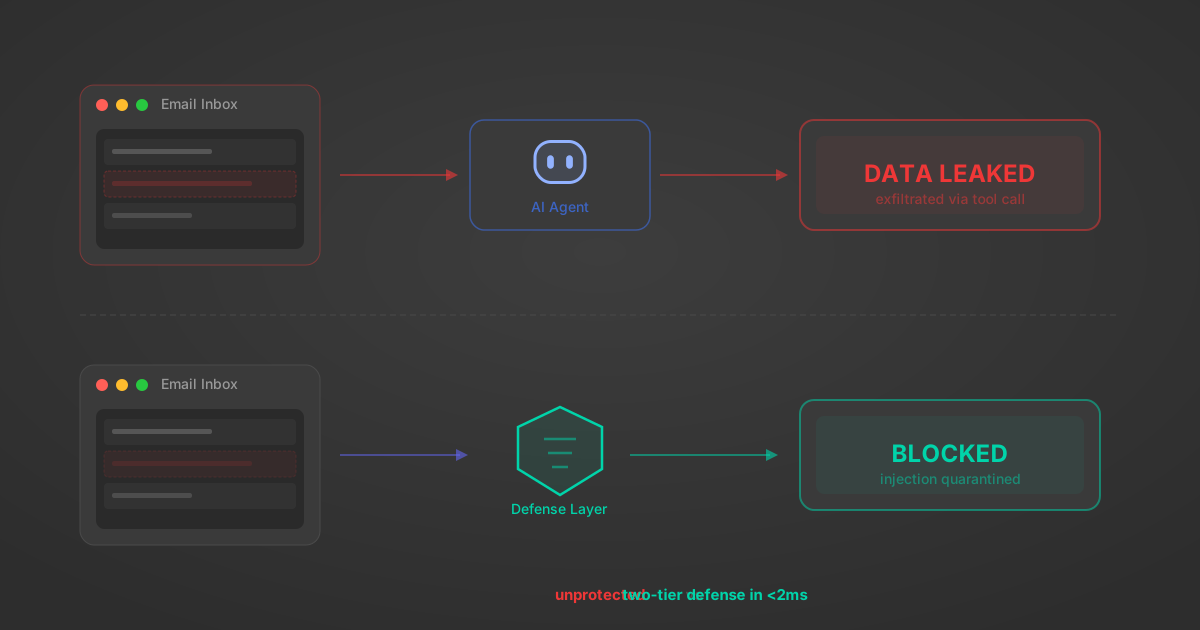
Indirect Prompt Injection Defense for MCP Tools: A Technical Guide
MCP tools that read emails, CRM records, and tickets are indirect prompt injection vectors. Here's how we built a two-tier defense that scans tool results in ~11ms.
12 min

MCP vs A2A: Architecture, Security, and When to Use Each
MCP vs A2A: what each protocol standardizes, how they differ, their shared security risks including indirect prompt injection, and when to use one, both, or a hybrid architecture.
12 min
MCP vs API: What Hundreds of Connector Builds Taught Us
MCP wraps APIs, it doesn't replace them. After building hundreds of connectors that serve both, here's when each approach wins.
14 min read
Postman MCP Server FAQ
Does StackOne have a Postman MCP server?
Postman MCP server vs direct API integration: what's the difference?
How does Postman authentication work for AI agents?
origin_owner_id.Are Postman MCP tools vulnerable to prompt injection?
What is the context bloat of a Postman agent and how do I avoid it?
Can I limit which actions my Postman agent can access?
Can I create custom agent actions for my Postman MCP server?
When should I NOT use a Postman MCP server?
What AI frameworks and AI clients does the StackOne Postman MCP server support?
Put your AI agents to work
All the tools you need to build and scale AI agent integrations, with best-in-class connectivity, execution, and security.