
Pinpoint MCP Server
for AI Agents
Connect your AI agent to StackOne's Pinpoint MCP server and give it 91 MCP tools out of the box. Auth, tool execution, and security all managed.
 StackOne






Coverage
91 Agent Actions
Create, read, update, and delete across Pinpoint — and extend your agent's capabilities with custom actions.

Authentication
Agent Tool Authentication
Per-user OAuth in one call. Your Pinpoint MCP server gets session-scoped tokens with zero credentials stored on your infra.
Agent Auth →
Security
Agent Protection
Every Pinpoint tool response scanned for prompt injection in milliseconds — 88.7% accuracy, all running on CPU.
Prompt Injection Defense →
Performance
Max Agent Context. Min Cost.
Free up to 96% of your agent's context window to enhance reasoning and reduce cost, on every Pinpoint call.
Tools Discovery →What is the Pinpoint MCP Server?
A Pinpoint MCP server lets AI agents read and write Pinpoint data through the Model Context Protocol — Anthropic's open standard for connecting LLMs to external tools. StackOne's Pinpoint MCP server ships with 91 pre-built actions, fully extensible via the Connector Builder — plus managed authentication, prompt injection defense, observability, and agent execution runtime. Connect it from MCP clients like Claude Desktop, Claude Code, Cursor, Goose, and VS Code, or from agent frameworks like OpenAI Agents SDK, LangChain, and Vercel AI SDK.
All Pinpoint MCP Tools
Every action from Pinpoint's API, ready for your agent. Create, read, update, and delete — scoped to exactly what you need.
Access Groups
- List Access Groups
Retrieve a list of access groups that define user permissions and roles within the platform.
- Get Access Group
Fetch detailed information about a specific access group by ID.
Answers
- Create Answer
Submit a candidate's answer to a screening question on an application or job seeker profile.
- Get Answer
Fetch a specific answer by ID.
- Update Answer
Modify a candidate's previously submitted answer to update the response value.
- Delete Answer
Remove a candidate's answer from the system.
Applications
- Create Application
Create a new job application for a candidate, submitting their profile to a specific job posting with required information.
- List Applications
Retrieve a paginated list of job applications with optional filtering by candidate email, job, stage, and other criteria.
- Get Application
Fetch detailed information about a specific application by ID, including candidate details, current stage, job information, and all related data.
- Update Application
Update an existing application's details, move it to a different stage in the hiring workflow, or modify application metadata and tags.
- Delete Application
Remove an application from the system.
Candidate Surveys
- List Candidate Surveys
Retrieve candidate survey responses to analyze post-interview feedback, experience ratings, and candidate satisfaction data.
- Get Candidate Survey
Fetch individual candidate survey response to review detailed feedback and experience ratings from a specific candidate.
Candidates
- List Candidates
Retrieve a paginated list of candidate profiles with optional filtering and related resources.
- Get Candidate
Fetch detailed information about a specific candidate by ID.
- Update Candidate
Update candidate profile information including contact details, skills, and custom attributes.
Comments
- Create Comment
Add a comment or note to an application or candidate profile to record interviewer feedback, hiring team discussions, or important observations.
- List Comments
Retrieve comments and notes on applications or candidates for team collaboration and feedback synchronization across hiring workflows.
- Get Comment
Fetch a specific comment by ID to retrieve detailed feedback, interviewer notes, or team discussion threads.
Custom Fields
- Create Custom Field
Define a new custom field to track organization-specific information on applications, jobs, candidates, or offers with custom validation.
- List Custom Fields
Retrieve custom field definitions to discover organization-specific data fields configured for applications, jobs, candidates, or offers.
- Get Custom Field
Fetch detailed information about a specific custom field including its schema, validation rules, and applicable resource types.
- Update Custom Field
Modify custom field configuration including validation rules, display options, and field metadata to adapt to changing business needs.
- Delete Custom Field
Remove a custom field definition from the system, which will also delete all associated custom attribute values.
Custom Attributes
- Create Custom Attribute
Set a custom attribute value on a resource instance to store organization-specific data on applications, jobs, or candidates.
- List Custom Attributes
Retrieve custom attribute values set on resource instances to access organization-specific data stored on applications, jobs, or candidates.
- Get Custom Attribute
Fetch a specific custom attribute by ID to retrieve its current value and related metadata.
- Update Custom Attribute
Update the value of an existing custom attribute. Only value fields may be changed; reassociation is not supported.
- Delete Custom Attribute
Remove a custom attribute value from a resource instance to clear organization-specific data that is no longer needed.
Hiring Workflows
- List Hiring Workflows
Retrieve hiring workflow templates to display available workflows when creating jobs and understand standard hiring processes.
- Get Hiring Workflow
Fetch detailed information about a specific hiring workflow including all stages, requirements, and configuration settings.
Interviews
- List Interviews
Retrieve a list of scheduled interviews with participant information for calendar synchronization and scheduling coordination.
- Get Interview
Fetch detailed information about a specific interview including date, time, participants, location, and associated application details.
- Update Interview
Update an interview's summary in HTML format. Only the summary field is supported for updates.
Job Seekers
- List Job Seekers
Retrieve a list of job seeker profiles from the passive candidate pool for proactive talent sourcing and pipeline building.
- Get Job Seeker
Fetch detailed information about a specific job seeker including profile, preferences, and passive candidate pool status.
Jobs
- Create Job
Create a new job posting with title, description, status, hiring workflow, and organizational structure links for department and location.
- List Jobs
Retrieve a paginated list of job postings with optional filters for status, department, location, and other criteria to sync with external job boards.
- Get Job
Fetch detailed information about a specific job posting including description, requirements, hiring workflow, department, and location details.
- Update Job
Update an existing job posting.
- Delete Job
Delete a job posting.
Onboarding Applications
- List Onboarding Applications
Retrieve a list of onboarding applications to track new hire onboarding progress, task completion, and document collection status.
- Get Onboarding Application
Fetch detailed information about a specific onboarding application including tasks, documents, and completion status for new hires.
Structured Sections
- List Structured Sections
Retrieve structured section definitions for onboarding workflows to understand form layouts and data collection requirements.
- Get Structured Section
Fetch detailed information about a specific structured section to understand its form layout, field definitions, and data collection requirements for onboarding workflows.
Structured Section Responses
- Create Structured Section Response
Submit a response to a structured onboarding section to record candidate or new hire data in onboarding forms and workflows.
- Update Structured Section Response
Modify a structured onboarding section response to update new hire information or correct onboarding form submissions.
- Delete Structured Section Response
Remove a structured onboarding section response to clear incorrect form submissions or reset onboarding data.
Departments
- Create Department
Create a new department to organize job postings and manage organizational hierarchy in the ATS.
- List Departments
Retrieve a list of company departments for organizing job postings and managing organizational hierarchy in the ATS.
- Get Department
Fetch detailed information about a specific department including name, hierarchy, and associated job postings.
- Update Department
Update department details such as name or organizational hierarchy to sync changes from external HR systems.
- Delete Department
Remove a department from the system to archive outdated department records from the organizational structure.
Divisions
- Create Division
Create a new division for high-level organizational structure reporting and hierarchy management.
- List Divisions
Retrieve a list of company divisions for high-level organizational structure reporting and hierarchy management.
- Get Division
Fetch detailed information about a specific division including its departments and organizational position within the company structure.
- Update Division
Update division details such as name or organizational position to sync changes from external HR systems.
- Delete Division
Remove a division from the system to archive outdated division records from the organizational structure.
Locations
- Create Location
Create a new office location for filtering job postings and displaying available work locations to candidates.
- List Locations
Retrieve a list of company office locations for filtering job postings and displaying available work locations to candidates.
- Get Location
Fetch detailed information about a specific office location including address, city, state, country, and timezone information.
- Update Location
Update location details such as address, contact information, or office status to sync changes from external HR systems.
- Delete Location
Remove a location from the system to archive closed offices or outdated location records from the organizational structure.
Structure Links
- Create Structure Link
Create a new department-location association to set up organizational structure for new offices or department expansions.
- List Structure Links
Retrieve structure links that associate departments with locations to map job postings to specific organizational combinations.
- Get Structure Link
Fetch a specific structure link to understand the department-location association for a particular organizational unit.
- Update Structure Link
Update a structure link. Only the accepts_speculative_applications attribute can be modified.
- Delete Structure Link
Permanently delete a structure link from the system to remove department-location associations.
Structure Custom Group Ones
- Create Structure Custom Group One
Create a new custom organizational group for structuring teams and departments.
- List Structure Custom Group Ones
Retrieve a list of custom organizational groups for structuring teams and departments.
- Get Structure Custom Group One
Retrieve a specific custom organizational group by ID.
- Update Structure Custom Group One
Update an existing custom organizational group.
- Delete Structure Custom Group One
Delete a custom organizational group.
Requisition Templates
- List Requisition Templates
Retrieve a list of requisition templates used for creating job requisitions.
- Get Requisition Template
Retrieve a specific requisition template by ID with related fields.
Requisitions
- Create Requisition
Create a new hiring requisition with approval workflows and headcount tracking.
- List Requisitions
Retrieve a list of hiring requisitions with approval workflows and headcount tracking.
- Get Requisition
Retrieve a specific requisition by ID with related resources and custom details.
- Update Requisition
Archive a requisition by setting archived status to true.
- Delete Requisition
Permanently delete a requisition by ID.
Scorecards
- List Scorecards
Retrieve a list of interview scorecards to access evaluation criteria, rating scales, and interviewer feedback templates.
- Get Scorecard
Fetch detailed information about a specific scorecard including evaluation criteria, rating scales, and feedback questions.
Users
- Create User
Create a new user in the system. As a bare minimum, first_name, last_name, and email must be supplied. user_type must also be supplied.
- List Users
Retrieve a list of platform users to sync hiring team members, permissions, and user access across integrated systems.
- Get User
Fetch detailed information about a specific user including profile, role, permissions, and department assignments.
- Delete User
Permanently delete a user from the system to remove access and archive user records.
Other (5)
- List Positions
Retrieve a list of positions
- List Equality Monitoring Categories
Retrieve all equality monitoring categories configured in the system for tracking diversity and inclusion data.
- Get Equality Monitoring Category
Retrieve detailed information about a specific equality monitoring category including its enabled status and associated monitoring options.
- List Questions
Retrieve all screening questions used across jobs and applications to manage candidate qualification criteria and assessment requirements.
- Fetch Position
Retrieve a single position by ID
Pinpoint AI Agent Use Cases
Connect your AI agent to Pinpoint and help your team scale the recruiting operations they run by hand today.
Use StackOne to connect your AI agent to your ATS and job boards to automate job posting distribution.
ViewUse StackOne to connect your AI agent to your ATS, survey tools, and messaging systems to automate reference checks.
ViewUse StackOne to connect your AI agent to your ATS, HRIS, and document management tools to automate offer letter generation.
ViewSet Up Your Pinpoint MCP Server in Minutes
One endpoint. Any framework. Your agent is talking to Pinpoint in under 10 lines of code.
Agent Frameworks


 JSON
JSON{
"mcpServers": {
"stackone": {
"command": "npx",
"args": [
"-y",
"mcp-remote@latest",
"https://api.stackone.com/mcp?x-account-id=<account_id>",
"--header",
"Authorization: Basic <YOUR_BASE64_TOKEN>"
]
}
}
}Platform Resources

MCP Code Mode: Keeping Tool Responses Out of Agent Context
Anthropic's code_execution processes data already in context. Custom MCP code mode keeps raw tool responses in a sandbox. 14K tokens vs 500.
11 min

Comparing BM25, TF-IDF, and Hybrid Search for MCP Tool Discovery
Benchmarking BM25, TF-IDF, and hybrid search for MCP tool discovery across 916 tools. The 80/20 TF-IDF/BM25 hybrid hits 21% Top-1 accuracy in under 1ms.
10 min
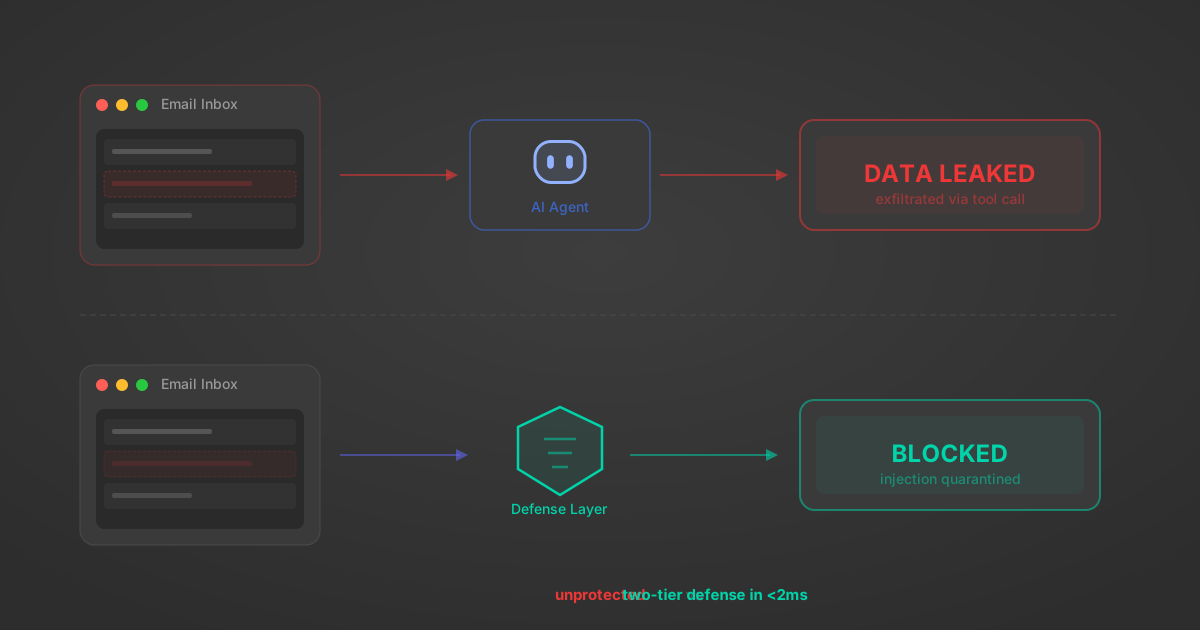
Indirect Prompt Injection Defense for MCP Tools: A Technical Guide
MCP tools that read emails, CRM records, and tickets are indirect prompt injection vectors. Here's how we built a two-tier defense that scans tool results in ~11ms.
12 min
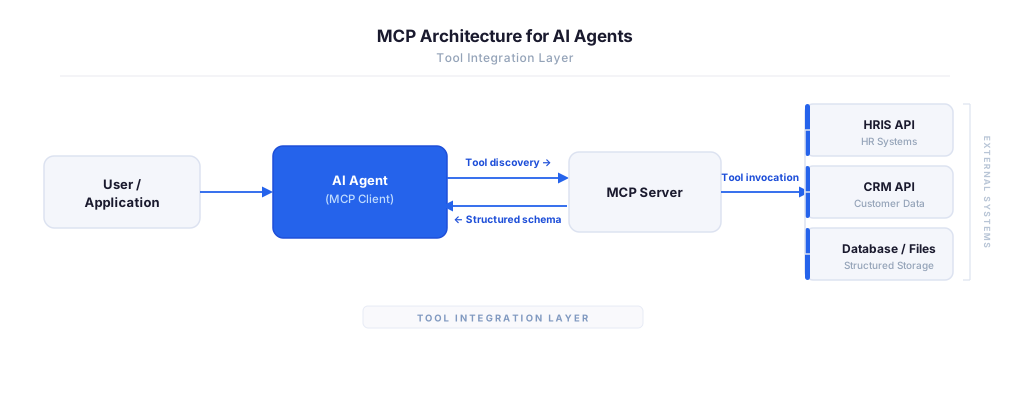
MCP vs A2A: Architecture, Security, and When to Use Each
MCP vs A2A: what each protocol standardizes, how they differ, their shared security risks including indirect prompt injection, and when to use one, both, or a hybrid architecture.
12 min
MCP vs API: What Hundreds of Connector Builds Taught Us
MCP wraps APIs, it doesn't replace them. After building hundreds of connectors that serve both, here's when each approach wins.
14 min read
Pinpoint MCP Server FAQ
Does StackOne have a Pinpoint MCP server?
Pinpoint MCP server vs direct API integration — what's the difference?
How does Pinpoint authentication work for AI agents?
origin_owner_id.Are Pinpoint MCP tools vulnerable to prompt injection?
What is the context bloat of a Pinpoint agent and how do I avoid it?
Can I limit which actions my Pinpoint agent can access?
Can I create custom agent actions for my Pinpoint MCP server?
When should I NOT use a Pinpoint MCP server?
What AI frameworks and AI clients does the StackOne Pinpoint MCP server support?
Put your AI agents to work
All the tools you need to build and scale AI agent integrations, with best-in-class connectivity, execution, and security.