
Aircall MCP Server
for AI Agents
Connect your AI agent to StackOne's Aircall MCP server and give it 82 MCP tools out of the box. Auth, tool execution, and security all managed.
 StackOne






Coverage
82 Agent Actions
Create, read, update, and delete across Aircall — and extend your agent's capabilities with custom actions.

Authentication
Agent Tool Authentication
Per-user OAuth in one call. Your Aircall MCP server gets session-scoped tokens with zero credentials stored on your infra.
Agent Auth →
Security
Agent Protection
Every Aircall tool response scanned for prompt injection in milliseconds — 88.7% accuracy, all running on CPU.
Prompt Injection Defense →
Performance
Max Agent Context. Min Cost.
Free up to 96% of your agent's context window to enhance reasoning and reduce cost, on every Aircall call.
Tools Discovery →What is the Aircall MCP Server?
A Aircall MCP server lets AI agents read and write Aircall data through the Model Context Protocol — Anthropic's open standard for connecting LLMs to external tools. StackOne's Aircall MCP server ships with 82 pre-built actions, fully extensible via the Connector Builder — plus managed authentication, prompt injection defense, observability, and agent execution runtime. Connect it from MCP clients like Claude Desktop, Claude Code, Cursor, Goose, and VS Code, or from agent frameworks like OpenAI Agents SDK, LangChain, and Vercel AI SDK.
All Aircall MCP Tools
Every action from Aircall's API, ready for your agent. Create, read, update, and delete — scoped to exactly what you need.
Calls
- List Calls
Retrieve a paginated list of calls in the company.
- Get Call
Retrieve a single call by ID.
- Search Calls
Search calls by phone number, user, tags, or other filters.
Contacts
- Create Contact
Create a new contact in the address book.
- List Contacts
Retrieve a paginated list of contacts in the Aircall address book.
- Search Contacts
Search contacts by phone number or email.
- Get Contact
Retrieve a single contact by ID.
- Update Contact
Update an existing contact.
- Delete Contact
Delete a contact from the address book.
Contact Phone Numbers
- Update Contact Phone Number
Update a phone number entry on a contact.
- Delete Contact Phone Number
Delete a phone number entry from a contact.
Contact Emails
- Update Contact Email
Update an email entry on a contact.
- Delete Contact Email
Delete an email entry from a contact.
Dialer Campaigns
- Create Dialer Campaign
Create an active dialer campaign for a user.
- Get Dialer Campaign
Retrieve the active dialer campaign for a user.
- Delete Dialer Campaign
Delete the active dialer campaign for a user.
Dialer Campaign Phone Numbers
- Add Dialer Campaign Phone Numbers
Add phone numbers to a user's dialer campaign.
- List Dialer Campaign Phone Numbers
Retrieve phone numbers attached to a user's dialer campaign.
- Delete Dialer Campaign Phone Number
Remove a phone number from a user's dialer campaign.
Unified Groups
- List Unified Groups
List every Aircall Team on the connected company, mapped to the IAM unified group schema as team-style groups (type=team). Pass expand=["users"] to inline each team's members (already present on the same response, no extra call).
- Get Unified Group
Retrieve a single Aircall Team by numeric ID, mapped to the IAM unified group schema as a team-style group. Pass expand=["users"] to inline the team's members (already present on the same response, no extra call).
Unified Organizations
- List Unified Organizations
Return the connected Aircall company as a single IAM organization. Aircall is single-tenant from the API key's perspective so this action always returns exactly one record. The id is pinned to the literal "aircall" for stable cross-action role-scope joins.
- Get Unified Organization
Retrieve the connected Aircall company as a single IAM organization. Aircall is single-tenant from the API key's perspective so this action returns the same record regardless of the supplied id, sourced from /v1/company.
Unified Roles
- List Unified Roles
Return the four stable workspace-scoped Aircall roles (owner / admin / supervisor / agent), synthesized from Aircall's documented role_ids values. The set is static and closed; Aircall exposes no role field on GET user responses, so individual users cannot be joined to this catalog.
- Get Unified Role
Retrieve a single synthesized Aircall IAM role by stable key (owner, admin, supervisor, or agent). Recognizes the StackOne-encoded id from unified_list_roles or the raw key; an unrecognized key returns a generic record with type unmapped_value rather than erroring.
Unified Users
- List Unified Users
List every user on the connected Aircall account from the V2 users endpoint, mapped to the StackOne IAM unified user schema.
- Get Unified User
Retrieve a single Aircall user by ID via the V2 users endpoint, mapped to the IAM unified user schema.
Numbers
- List Numbers
Retrieve a paginated list of numbers provisioned on the Aircall account.
- Get Number
Retrieve a single Aircall number by ID.
- Update Number
Update an Aircall number's settings.
Tags
- Create Tag
Create a new tag in the company.
- List Tags
Retrieve a paginated list of tags in the company.
- Get Tag
Retrieve a single tag by ID.
- Update Tag
Update an existing tag.
- Delete Tag
Delete a tag from the company.
Teams
- Create Team
Create a new team in the company.
- List Teams
Retrieve a paginated list of teams in the company.
- Get Team
Retrieve a single team by ID.
- Delete Team
Delete a team from the company.
User V2s
- Create User V2
Create a new user using the Aircall V2 endpoint.
- Get User V2
Retrieve a single user using the Aircall V2 endpoint.
- Update User V2
Update an existing user using the Aircall V2 endpoint.
Webhooks
- Create Webhook
Register a new webhook.
- List Webhooks
Retrieve a paginated list of webhooks configured on the company.
- Get Webhook
Retrieve a single webhook by ID.
- Update Webhook
Update an existing webhook.
- Delete Webhook
Delete a webhook.
Other (35)
- Create Call Insight Card
Attach an Insight Card to a call.
- Add Phone Number To Contact
Add a new phone number to an existing contact.
- Add Email To Contact
Add a new email address to a contact.
- Add User To Team
Add a user to an existing team.
- Get Call Transcription
Retrieve the transcription of a call.
- Get Call Realtime Transcription
Retrieve the realtime transcription of an ongoing call.
- Get Call Sentiments
Retrieve sentiment analysis for a call.
- Get Call Topics
Retrieve detected topics for a call.
- Get Call Summary
Retrieve the AI-generated summary for a call.
- Get Call Custom Summary Result
Retrieve a custom summary result for a call.
- Get Call Action Items
Retrieve AI-extracted action items for a call.
- Get Call Playbook Result
Retrieve playbook evaluation result for a call.
- Get Call Evaluations
Retrieve evaluations submitted for a call.
- Get Company
Retrieve information about the Aircall company associated with the authenticated account.
- Get Unified Credentials
Return metadata about the connected Aircall API key — auth_type pinned to api_key (single-auth connector). Aircall exposes no /me endpoint and the company endpoint carries no per-user identity, so the inline user block and name are left null.
- List Unified Resource Types
Enumerate the resource_type values accepted by unified_list_resource_users on this connector. Returns a flat string array; on Aircall the supported values are "number" (users assigned to a specific Aircall phone number) and "team" (members of a specific team).
- List Unified Resource Users
List the users assigned to a specific Aircall Number (resource_type=number) or the members of a specific Team (resource_type=team) as IAM users, each annotated with a resource-scoped role. Pass the RAW Aircall numeric id as resource_id, NOT a StackOne-encoded composite id.
- List Users Availabilities
Retrieve the availability status of all users.
- Get User Availability
Check the current availability of a single user.
- List Users V2
Retrieve a paginated list of users using the Aircall V2 users endpoint.
- List Numbers For User V2
Retrieve all numbers assigned to a specific user (V2).
- Update Music And Messages
Update a number's music and messages URLs.
- Delete Call Recording
Delete the recording of a call.
- Delete Call Voicemail
Delete the voicemail recording of a call.
- Remove User From Team
Remove a user from a team.
- Delete User
Delete an Aircall user.
- Comment Call
Add a comment to a call.
- Tag Call
Apply one or more tags to a call.
- Archive Call
Archive a call.
- Unarchive Call
Unarchive a previously archived call.
- IAM Auth Test
Validate the current Aircall API key and return the raw, unmapped /v1/company response (company name plus user and number counts). Use this when troubleshooting key validity or API connectivity, not for normal app flows.
- Registration Status
Fetch compliance status for A2P 10DLC and toll-free messaging registration for a specific number.
- Ping
Verify API connectivity and authentication with the Aircall Public API.
- Start Outbound Call
Initiate an outbound call from a user's Aircall Phone.
- Dial Phone Number
Pre-fill a phone number in a user's Aircall Phone dialer. The target user must be signed in to the Aircall Phone app.
Aircall AI Agent Use Cases
Connect your AI agent to Aircall and help your team scale the sales operations they run by hand today.
Use StackOne to connect your AI agent to your CRM, email, and calendar tools to automate post-demo follow-up.
ViewUse StackOne to connect your AI agent to your CRM, email, and calendar tools to automate deal risk scoring and pipeline alerts.
ViewUse StackOne to connect your AI agent to your CRM, sales engagement, and messaging tools to automate outbound prospecting.
ViewSet Up Your Aircall MCP Server in Minutes
One endpoint. Any framework. Your agent is talking to Aircall in under 10 lines of code.
Agent Frameworks


 JSON
JSON{
"mcpServers": {
"stackone": {
"command": "npx",
"args": [
"-y",
"mcp-remote@latest",
"https://api.stackone.com/mcp?x-account-id=<account_id>",
"--header",
"Authorization: Basic <YOUR_BASE64_TOKEN>"
]
}
}
}Platform Resources

MCP Code Mode: Keeping Tool Responses Out of Agent Context
Anthropic's code_execution processes data already in context. Custom MCP code mode keeps raw tool responses in a sandbox. 14K tokens vs 500.
11 min

Comparing BM25, TF-IDF, and Hybrid Search for MCP Tool Discovery
Benchmarking BM25, TF-IDF, and hybrid search for MCP tool discovery across 916 tools. The 80/20 TF-IDF/BM25 hybrid hits 21% Top-1 accuracy in under 1ms.
10 min
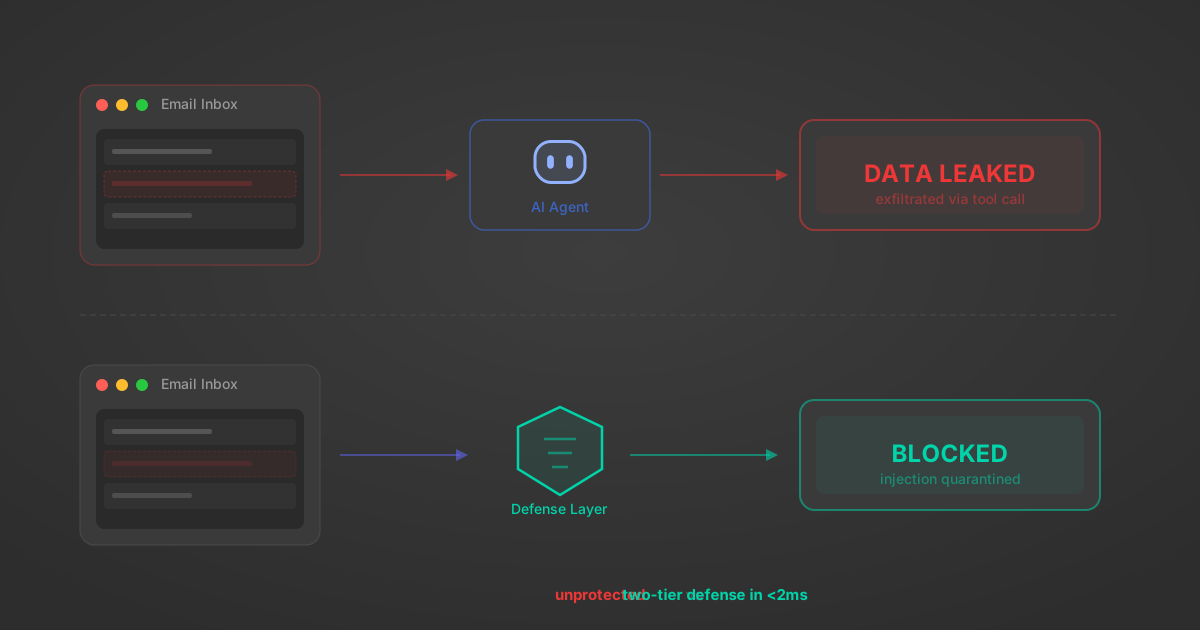
Indirect Prompt Injection Defense for MCP Tools: A Technical Guide
MCP tools that read emails, CRM records, and tickets are indirect prompt injection vectors. Here's how we built a two-tier defense that scans tool results in ~11ms.
12 min
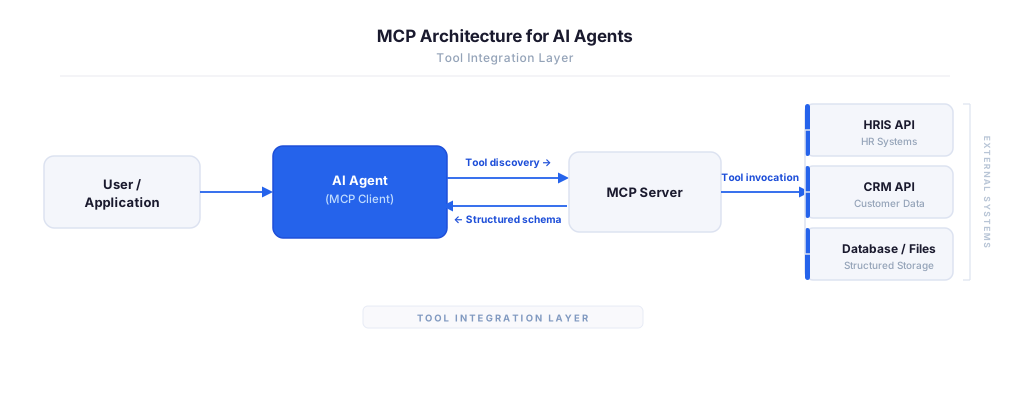
MCP vs A2A: Architecture, Security, and When to Use Each
MCP vs A2A: what each protocol standardizes, how they differ, their shared security risks including indirect prompt injection, and when to use one, both, or a hybrid architecture.
12 min
MCP vs API: What Hundreds of Connector Builds Taught Us
MCP wraps APIs, it doesn't replace them. After building hundreds of connectors that serve both, here's when each approach wins.
14 min read
Aircall MCP Server FAQ
Does StackOne have a Aircall MCP server?
Aircall MCP server vs direct API integration — what's the difference?
How does Aircall authentication work for AI agents?
origin_owner_id.Are Aircall MCP tools vulnerable to prompt injection?
What is the context bloat of a Aircall agent and how do I avoid it?
Can I limit which actions my Aircall agent can access?
Can I create custom agent actions for my Aircall MCP server?
When should I NOT use a Aircall MCP server?
What AI frameworks and AI clients does the StackOne Aircall MCP server support?
Put your AI agents to work
All the tools you need to build and scale AI agent integrations, with best-in-class connectivity, execution, and security.