


HighLevel MCP Server
for AI Agents
Connect your AI agent to StackOne's HighLevel MCP server and give it 251 MCP tools out of the box. Auth, tool execution, and security all managed.
 StackOne


Coverage
251 Agent Actions
Agents can read, write, delete and run operations in HighLevel. Extend your agent's capabilities with custom actions.

Authentication
Agent Tool Authentication
Per-user OAuth in one call. Your HighLevel MCP server gets session-scoped tokens with zero credentials stored on your infra.
Agent Auth →
Security
Agent Protection
Every HighLevel tool response scanned for prompt injection in milliseconds, with 88.7% accuracy, all running on CPU.
Prompt Injection Defense →
Performance
Max Agent Context. Min Cost.
Free up to 96% of your agent's context window to enhance reasoning and reduce cost, on every HighLevel call.
Tools Discovery →What is the HighLevel MCP Server?
A HighLevel MCP server lets AI agents read and write HighLevel data through the Model Context Protocol, Anthropic's open standard for connecting LLMs to external tools. StackOne's HighLevel MCP server ships with 251 pre-built actions, fully extensible via the Connector Builder, plus managed authentication, prompt injection defense, observability, and agent execution runtime. Connect it from MCP clients like Claude Desktop, Claude Code, Cursor, Goose, and VS Code, or from agent frameworks like OpenAI Agents SDK, LangChain, and Vercel AI SDK.
All HighLevel MCP Tools
Every StackOne action for HighLevel, ready for your agent. Read, write, delete and run operations, scoped to exactly what you need.
Association By IDs
- Get Association By ID
Get a SYSTEM_DEFINED or USER_DEFINED association by id.
- Update Association By ID
Update the labels of an association.
Associations
- Create Association
Create a custom association between contacts, custom objects or businesses.
- Delete Association
Delete a USER_DEFINED association by id.
Business
- Create Business
Create a business in a location, needing name and locationId.
- Get Business
Retrieve one business by businessId.
- Update Business
Update a business by businessId.
- Delete Business
Delete a business by businessId.
Appointments
- Create Appointment
Book a new appointment on a calendar for a contact.
- Get Appointment
Fetch one appointment by eventId.
- Update Appointment
Update an existing appointment by eventId.
Appointment Notes
- Create Appointment Note
Add a note to an existing appointment.
- Update Appointment Note
Update the body of an existing appointment note.
- Delete Appointment Note
Delete a note from an appointment by appointmentId and noteId.
Block Slots
- Create Block Slot
Create a blocked time slot on a calendar.
- Update Block Slot
Update a blocked slot by eventId.
Groups
- Get Groups
List all calendar groups in a location.
- Update Group
Update a calendar group's name, description and slug by groupId.
- Delete Group
Delete a calendar group by groupId.
Notifications
- Create Notification
Create one or more notifications for a single calendar.
- Get Notifications
List notifications for a calendar based on query.
- Get Notification
Get one calendar notification by notificationId.
- Update Notification
Update a calendar notification by id.
- Delete Notification
Delete a calendar notification by id.
Calendar Resources
- Create Calendar Resource
Create a calendar resource of a given resourceType (Services V1).
- Get Calendar Resource
Get a calendar resource by resourceType and id (Services V1).
- List Calendar Resources
List calendar resources by resourceType and locationId, paginated with skip and limit (Services V1).
- Update Calendar Resource
Update a calendar resource by resourceType and id (Services V1).
- Delete Calendar Resource
Delete a calendar resource by resourceType and id (Services V1).
Calendars
- Create Calendar
Create a calendar in a location.
- Get Calendars
List all calendars in a location.
- Get Calendar
Get a calendar by ID.
- Update Calendar
Update a calendar by ID.
- Delete Calendar
Delete a calendar by ID.
Contact Notes
- Create Contact Note
Create a note on a contact.
- Get Contact Note
Fetch one contact note by contactId and note id.
- Update Contact Note
Update an existing contact note by contactId and note id.
- Delete Contact Note
Delete a contact note by contactId and note id.
Tasks
- Get Task
Get a single contact task by id.
- Update Task
Update a contact task's title, body, due date, completion or assignee.
- Delete Task
Delete a task from a contact.
Contacts
- Create Contact
Create a new contact in a location.
- Search Contacts
Search contacts using combinations of advanced filters.
- Get Contact
Retrieve one contact by id.
- Update Contact
Update an existing contact by id.
- Delete Contact
Delete a contact by id.
Contact Followers
- Add Contact Followers
Add followers (users) to a contact.
- Remove Contact Followers
Remove followers from a contact.
Tags
- Add Tags
Add tags to one contact.
- Create Tag
Create a tag in a location.
- Get Tags
List tags for a location.
- Update Tag
Update a location tag name.
- Remove Tags
Remove tags from one contact.
- Delete Tag
Delete a location tag.
Transcription By Message IDs
- Download Transcription By Message ID
Download the recording transcription for a message by passing the message id.
- Get Transcription By Message ID
Get the recording transcription for a message by passing the message id.
Conversations
- Create Conversation
Creates a new conversation with the data provided.
- Search Conversations
Search conversations by criteria with sort and filter options.
- Get Conversation
Get the conversation details based on the conversation ID.
- Update Conversation
Update the conversation details based on the conversation ID.
- Delete Conversation
Delete the conversation details based on the conversation ID.
Coupons
- Create Coupon
Create a new promotional coupon with customizable parameters such as discount amount, validity period, usage limits, and applicable products.
- List Coupons
Retrieve a list of all coupons available in your location.
- Update Coupon
Modify existing coupon details such as discount values, validity periods, usage limits, and other promotional parameters.
- Delete Coupon
Permanently remove a coupon from your system using its unique identifier.
Custom Fields
- Create Custom Field
Create a custom field (Custom Objects and Company only today).
- Get Custom Fields
List custom fields for a location.
- Get Custom Field
Get one location custom field by id.
- Update Custom Field
Update a location custom field.
- Delete Custom Field
Delete a location custom field.
Custom Field By IDs
- Update Custom Field By ID
Update a custom field by id.
- Delete Custom Field By ID
Delete a custom field by id.
Email Campaigns
- Create Email Campaign
Create a new email campaign in a location.
- List Email Campaigns
List email campaigns for a location.
- Update Email Campaign
Update an email campaign draft.
- Delete Email Campaign
Delete an email campaign.
An Email Templates
- Create An Email Template
Create an email template in a location, needing name and editorType.
- Update An Email Template
Update an email template by templateId.
Unified Organizations
- List Unified Organizations
List unified organizations (sub-accounts) in a HighLevel agency.
- Get Unified Organization
Get a unified HighLevel organization (sub-account) by ID.
Unified Roles
- List Unified Roles
List unified roles in a HighLevel agency.
- Get Unified Role
Get a unified HighLevel role by ID.
Unified Users
- List Unified Users
List unified users in a HighLevel agency or sub-account.
- Get Unified User
Get a unified HighLevel user by ID.
Estimates
- Send Estimate
Send an estimate by estimateId. Accepts Agency or Sub-Account tokens.
- List Estimates
Get a paginated list of estimates using limit and offset. Accepts Agency or Sub-Account tokens.
- Update Estimate
Update an existing estimate with new details. Accepts Agency or Sub-Account tokens.
- Delete Estimate
Delete an existing estimate. Accepts Agency or Sub-Account tokens.
Schedules
- List Schedules
List invoice schedules.
- Update Schedule
Update an invoice schedule by id.
- Delete Schedule
Delete an invoice schedule by id.
Templates
- Create Template
Create an invoice template.
- Update Template
Update an invoice template by id.
- Delete Template
Delete an invoice template by id.
Invoices
- Create Invoice
Create an invoice.
- Send Invoice
Send an invoice to the customer.
- List Invoices
List invoices.
- Get Invoice
Get an invoice by id.
- Update Invoice
Update an invoice by id.
- Delete Invoice
Delete an invoice by id.
Custom Values
- Create Custom Value
Create a custom value in a location.
- Get Custom Values
Get all custom values for a location.
- Get Custom Value
Get one custom value by id.
- Update Custom Value
Update a custom value by id.
- Delete Custom Value
Delete a custom value by id.
Sub-Accounts
- Create Sub-Account
Create a new sub-account (formerly location) under the agency.
- Get Sub-Account
Get details of a sub-account by id. Works with an Agency or Sub-Account token.
Records
- Create Record
Create a custom object or business record.
- Update Record
Update a custom object or business record by id.
- Delete Record
Delete a custom object or business record by id.
Object Schema By Key IDs
- Get Object Schema By Key ID
Retrieve Object Schema by key or ID. This will return the schema of the custom object, including all its fields and properties.
- Update Object Schema By Key ID
Update Custom Object Schema or standard object's like contact, opportunity, business searchable fields.
Opportunitys
- Create Opportunity
Create an opportunity, needing pipelineId, locationId, name, status and contactId.
- Search Opportunity
Search opportunities by q, status, campaignId or id for a location, cursor paginated.
- Get Opportunity
Get one opportunity by id.
- Update Opportunity
Update an opportunity by id.
- Delete Opportunity
Delete an opportunity by id.
Opportunity Followers
- Add Opportunity Followers
Add followers to an opportunity by id.
- Remove Opportunity Followers
Remove specific followers, or all with isRemoveAllFollowers, from an opportunity.
Pipelines
- Create Pipeline
Create a pipeline with at least one stage for a location. Names must be unique per location.
- Get Pipelines
List pipelines for a location.
- Get Pipeline
Retrieve one pipeline by id with its stages and configuration.
- Update Pipeline
Update a pipeline. The stages array is a full replacement. Include a stage id to keep it or omit it to create a new stage.
- Delete Pipeline
Permanently delete a pipeline and all opportunities within it. Irreversible.
Price By ID For A Products
- Get Price By ID For A Product
Get one price of a product by priceId.
- Update Price By ID For A Product
Update a price of a product by priceId.
- Delete Price By ID For A Product
Delete a price of a product by priceId.
Products
- Create Product
Create a product, needing name, locationId and productType. Works with an Agency or Sub-Account token.
- List Products
List products of a location, offset paginated, filterable by search and collectionIds.
Product By IDs
- Get Product By ID
Get one product by productId and locationId.
- Update Product By ID
Update a product by productId, needing name, locationId and productType.
- Delete Product By ID
Delete a product by productId and locationId.
Posts
- Create Post
Create social posts for all supported platforms, with per-channel customization, needing locationId and type.
- Get Post
Get one social post by id.
- Get Posts
List social planner posts for a location, offset paginated, with filters in the body.
- Delete Post
Delete a social post by id.
Links
- Create Link
Create a trigger link.
- Get Links
Get trigger links for a location.
- Update Link
Update a trigger link.
- Delete Link
Delete a trigger link.
Users
- Create User
Create User in HighLevel.
- Search Users
Search Users in HighLevel.
- Get User
Get User in HighLevel.
- Update User
Update User in HighLevel.
- Delete User
Delete User in HighLevel.
Workflows
- Create Workflow
Create a draft workflow from a complete definition. Available only on sub-accounts where HighLevel has enabled the workflow API.
- Get Workflow
List workflows for a location.
Other (104)
- Create Relation For You Associated Entities
Create a relation linking two records under an existing association.
- Create Calendar Group
Create a calendar group, needing locationId, name, description and slug.
- Create Contact Task
Create a task on a contact.
- Add Contact To Campaign
Add a contact to a campaign.
- Add Contact To Workflow
Add a contact to a workflow, with an optional event start time.
- Add An External Outbound Call
Record an outbound call in a conversation via a conversation provider.
- Add An Inbound Message
Record an inbound message in a conversation via a conversation provider.
- Send A New Message
Send a new outbound message to a contact on a channel such as SMS or email.
- Upload File Attachments
Upload files as message attachments from URLs.
- Create Invoice From Estimate
Create a new invoice from an existing estimate. Accepts Agency or Sub-Account tokens.
- Create New Estimate
Create a new estimate with the provided details. Accepts Agency or Sub-Account tokens.
- Create Invoice Schedule
Create an invoice schedule.
- Create Send
Create or update a text2pay invoice.
- Create Location Custom Field
Create a custom field for a location.
- Create Media Folder
Creates a new folder in the media storage.
- Upload File Into Media Storage
Upload a file to media storage, either by hosted file URL or by file content.
- Create Custom Object
Create a custom object schema.
- Create Order Fulfillment
Create a fulfillment for an order.
- Create Price For A Product
Create a price for a product.
- Get All Associations For A Sub-Account Location
List all associations for a location, paginated with skip and limit.
- Get All Relations By Record ID
List all relations for a record id, paginated with skip and limit.
- Get Association By Object Keys
Get associations by object key such as contacts, custom objects or opportunities.
- Get Association Key By Key Name
Get a standard or user defined association by its key name.
- Get Businesses By Location
List businesses of a location, offset paginated with limit and skip.
- Get Blocked Slots
List blocked slots for a location within a time range.
- Get Calendar Events
List calendar events for a location within a time range.
- Get Notes
List notes for an appointment. Paginated by limit and offset.
- Get Free Slots
Get free slots for a calendar between a start and end date, optionally by timezone and user.
- Get Campaigns
Get campaigns for a location.
- Get Company
Get a company by companyId. Requires an Agency token.
- Get All Notes
List all notes for a contact.
- Get All Tasks
List all tasks for a contact.
- Get Appointments For Contact
List appointments for a contact.
- Get Duplicate Contact
Find an existing duplicate contact by email or phone in a location.
- Get Contacts By BusinessId
List contacts linked to a business.
- Export Messages By Location ID
Export messages for a location with cursor-based pagination.
- Get Messages By Conversation ID
Get messages for a conversation.
- Get Recording By Message ID
Get the recording for a message by passing the message id.
- Get Email By ID
Get an email by id.
- Get Message By Message ID
Get message by message id in HighLevel.
- Get Custom Fields By Object Key
List custom fields for an object key in a location.
- Get Campaign Statistics
Get statistics for email campaigns, workflows or bulk actions by source and sourceId.
- Get Email Campaign By ID
Get one email campaign by ID.
- List Email Templates
List templates of a location, offset paginated with search and sortBy options.
- Get Email Template By ID
Get one email template by templateId.
- Get Forms
List forms for a location.
- Get Forms Submissions
List form submissions for a location.
- Get Unified Credentials
Get the current HighLevel connection's unified credentials and identity.
- Get An Schedule
Get an invoice schedule by id.
- List Invoice Templates
List invoice templates.
- Get An Template
Get an invoice template by id.
- Get Tag By ID
Get one location tag by id.
- Search Locations
Search sub-accounts. Works with an Agency or Sub-Account token. Offset paginated using skip and limit.
- Get List Of Filesfolders
Fetches list of files and folders from the media storage.
- Search Object Records
Search records of a custom object or business schema.
- Get Record By ID
Get a business or custom object record by id.
- Get All Objects For A Location
Get all objects for a location in HighLevel.
- Get Lost Reason
List lost reasons for a location, offset paginated, filterable by name, deleted and query.
- Search Opportunities
Search opportunities with advanced filter combinations, cursor paginated via searchAfter.
- List Fulfillment
List the fulfillment history of an order.
- List Order Notes
List all notes of an order.
- List Orders
List orders with filters such as status, payment status and date range. Offset paginated.
- Get Order By ID
Retrieve one order by orderId.
- List Prices For A Product
List prices of a product, offset paginated.
- Get Accounts
List social accounts and groups for a location.
- List Subscriptions
List subscriptions with filters.
- Get Subscription By ID
Retrieve a subscription by id.
- Get Surveys
List surveys for a location, offset paginated with skip, limit and type.
- Get Surveys Submissions
List survey submissions for a location, page number paginated, filterable by surveyId and q.
- List Transactions
List transactions with filters such as payment mode and date range. Offset paginated.
- Get Transaction By ID
Retrieve one transaction by transactionId.
- Get Link By ID
Get a single trigger link by id.
- Update Task Completed
Set the completed status of a contact task.
- Update Contacts Tags
Add or remove tags across multiple contacts in one call.
- Update Message Status
Update the status of a message.
- Update Opportunity Status
Update only the status of an opportunity by id.
- Delete Relation
Delete a relation by relationId.
- Delete Event
Delete a calendar event by eventId.
- Delete Contact From Workflow
Remove a contact from a workflow.
- Remove Contact From Campaign
Remove a contact from one campaign.
- Remove Contact From Every Campaign
Remove a contact from every campaign it is enrolled in.
- Delete A Template
Delete a template by templateId.
- Delete File Or Folder
Deletes specific file or folder from the media storage.
- Disable Group
Enable or disable a calendar group via isActive.
- Validate Group Slug
Check whether a calendar group slug is available in a location.
- Lookup Contact By Email Or Phone
Look up contacts by exact email or phone in a location, up to 20 per page.
- Add/Remove Contacts From Business
Bulk add or remove contacts from a business in a location.
- Upsert Contact
Create or update a contact following the location's Allow Duplicate Contact setting.
- Cancel A Scheduled Email Message
Cancel a scheduled email message.
- Cancel A Scheduled Message
Cancel a scheduled message.
- Fetch Coupon
Retrieve comprehensive information about a specific coupon using either its unique identifier or promotional code.
- Schedule Campaign
Schedule or start an email campaign that is in draft, cancelled or paused status.
- Generate Estimate Number
Get the next estimate number for the given location. Accepts Agency or Sub-Account tokens.
- Cancel An Scheduled Invoice
Cancel a scheduled invoice by schedule id.
- Schedule An Schedule Invoice
Start an invoice schedule so it begins sending to the customer.
- Generate Invoice Number
Get the next invoice number for a location.
- Record A Manual Payment For An Invoice
Record a manual payment for an invoice.
- Void Invoice
Void an invoice by id.
- Task Search Filter
Search tasks in a location with filters. Paginated by offset.
- Fetch Timezones
Fetch the available timezones for a location.
- Upsert Opportunity
Create or update an opportunity, with pipelineId and locationId required, matched by contact and pipeline.
- Record Order Payment
Record a payment for an order and update its status.
- Edit Post
Edit a social post by id, needing locationId, id and type.
- Filter Users By Email
Filter users by company ID, deleted status, and email array.
HighLevel AI Agent Use Cases
Connect your AI agent to HighLevel and help your team scale the sales operations they run by hand today.
Use StackOne to connect your AI agent to your CRM, email, and calendar tools to automate post-demo follow-up.
ViewUse StackOne to connect your AI agent to your CRM, email, and calendar tools to automate deal risk scoring and pipeline alerts.
ViewUse StackOne to connect your AI agent to your CRM, sales engagement, and messaging tools to automate outbound prospecting.
ViewSet Up Your HighLevel MCP Server in Minutes
One endpoint. Any framework. Your agent is talking to HighLevel in under 10 lines of code.
Agent Frameworks


 JSON
{
  "mcpServers": {
    "stackone": {
      "command": "npx",
      "args": [
        "-y",
        "mcp-remote@latest",
        "https://api.stackone.com/mcp?x-account-id=<account_id>",
        "--header",
        "Authorization: Basic <YOUR_BASE64_TOKEN>"
      ]
    }
  }
}
Check More crm-sales MCP Servers
195+ actions
187+ actions
136+ actions
104+ actions
82+ actions
75+ actions
66+ actions
Platform Resources
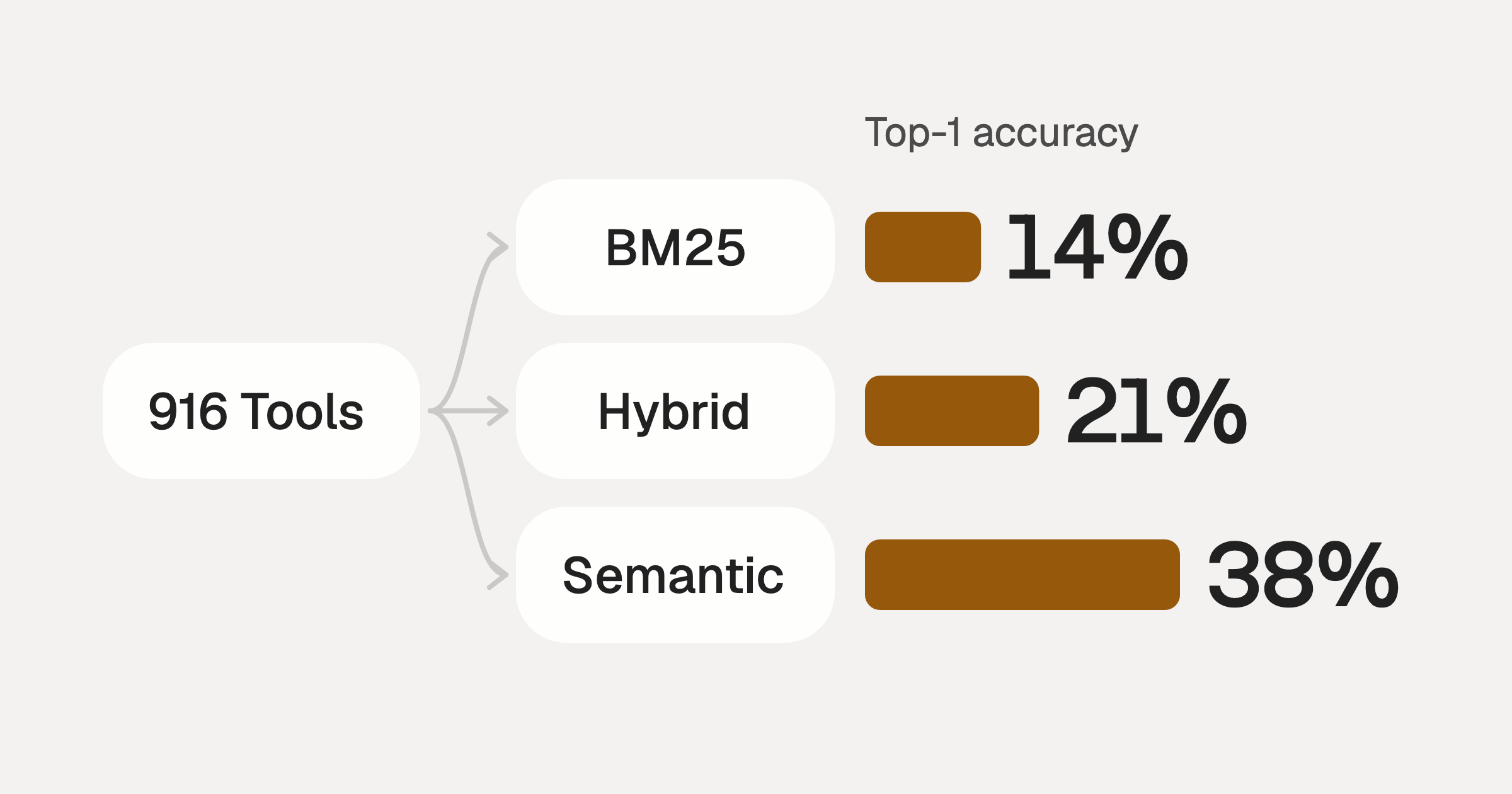
Comparing BM25, TF-IDF, and Hybrid Search for MCP Tool Discovery
Benchmarking BM25, TF-IDF, and hybrid search for MCP tool discovery across 916 tools. The 80/20 TF-IDF/BM25 hybrid hits 21% Top-1 accuracy in under 1ms.
10 min
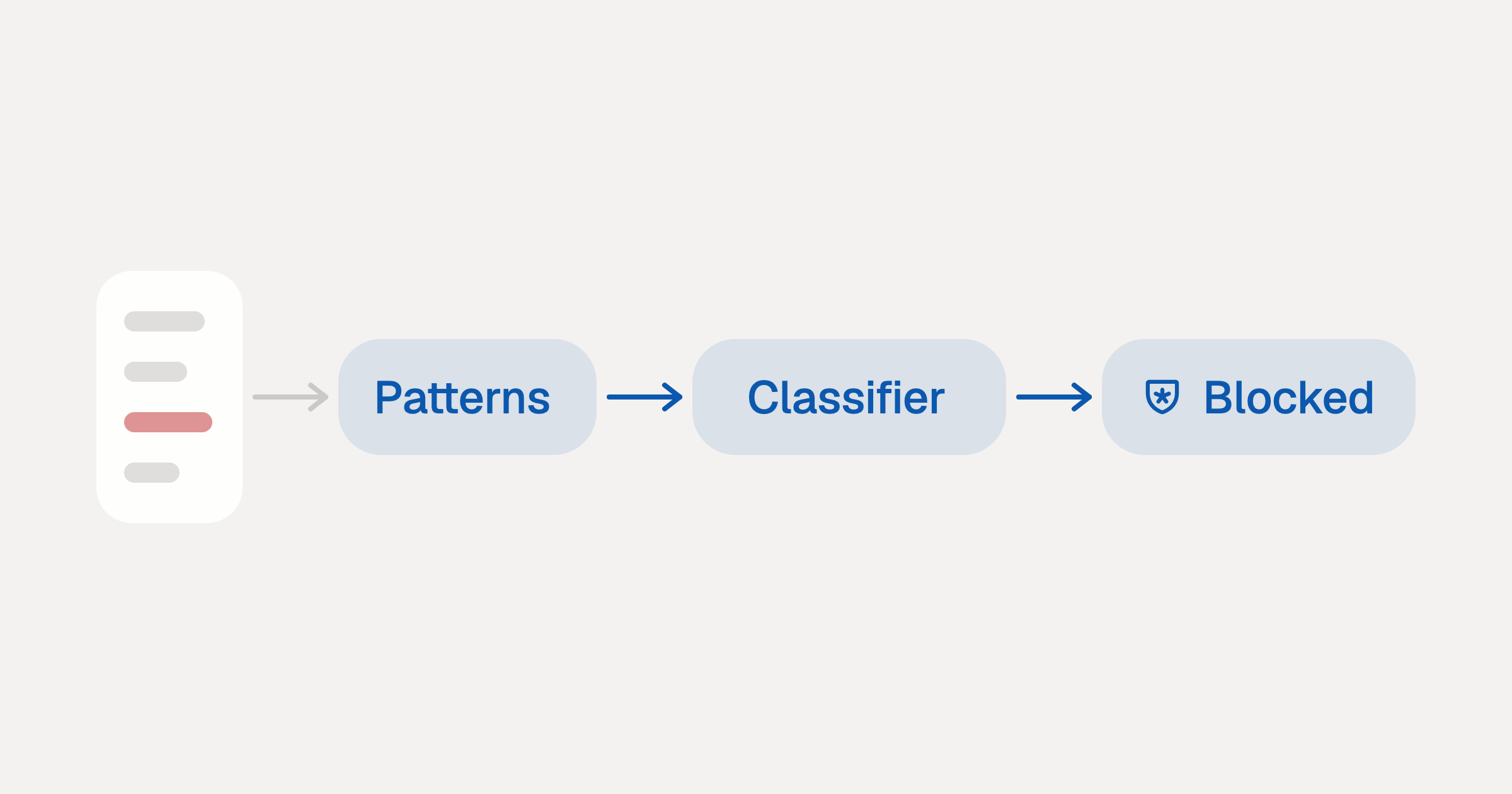
Indirect Prompt Injection Defense for MCP Tools: A Technical Guide
MCP tools that read emails, CRM records, and tickets are indirect prompt injection vectors. Here's how we built a two-tier defense that scans tool results in ~11ms.
12 min
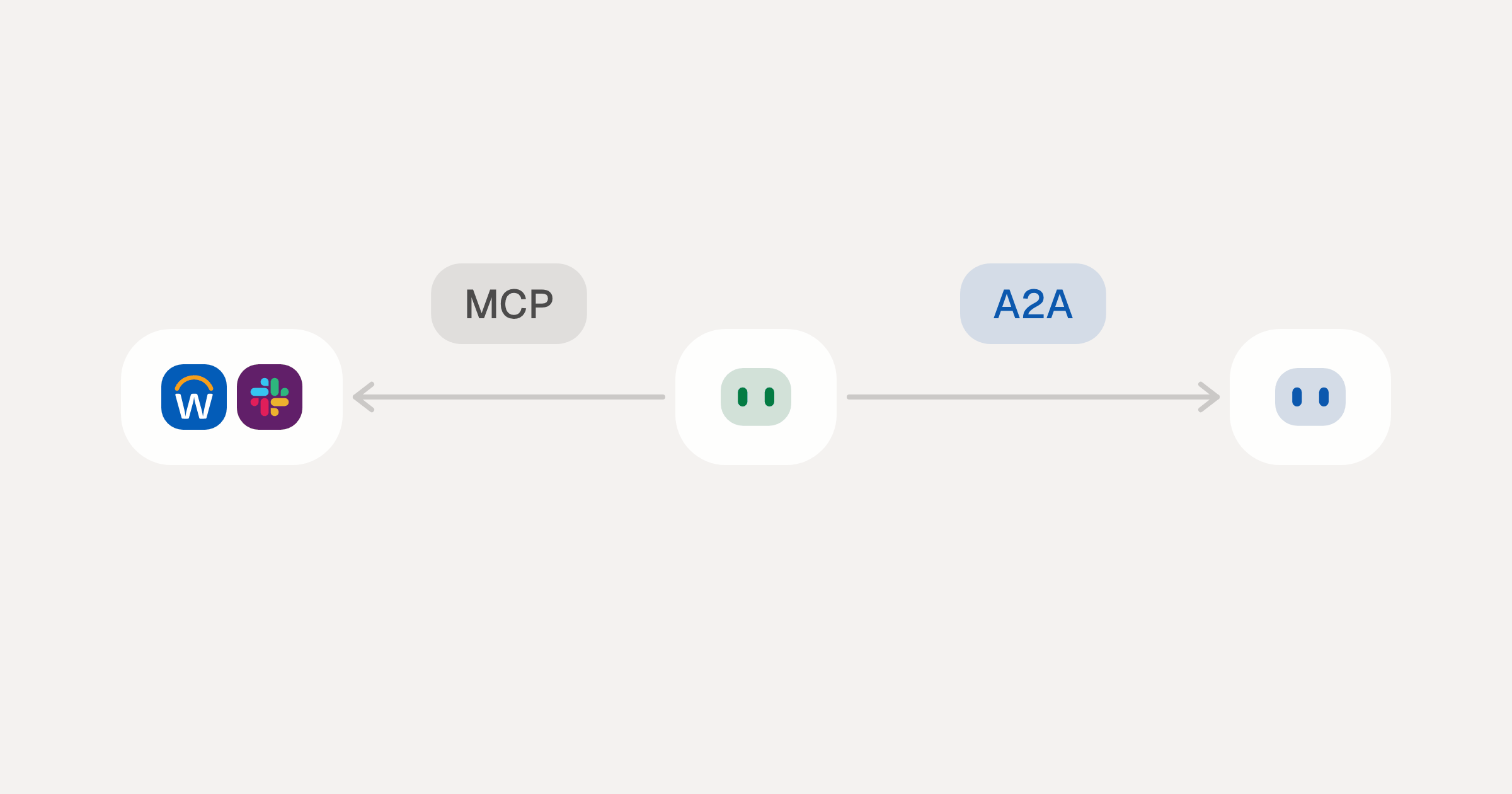
MCP vs A2A: Architecture, Security, and When to Use Each
MCP vs A2A: what each protocol standardizes, how they differ, the security risks they share, and when to use one, both or a hybrid.
12 min
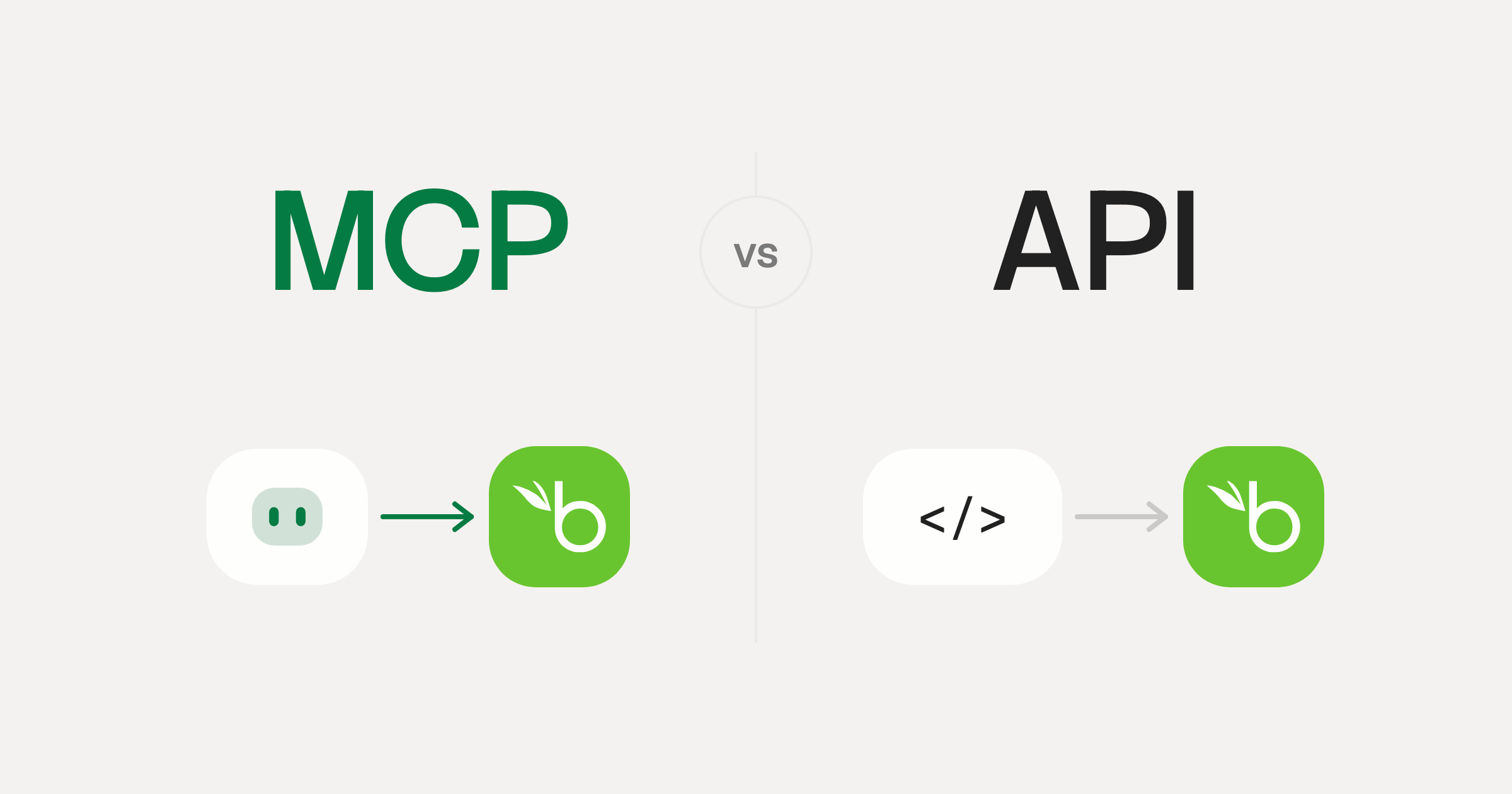
MCP vs API: What Hundreds of Connector Builds Taught Us
MCP wraps APIs, it doesn't replace them. After building hundreds of connectors that serve both, here's when each approach wins.
14 min read
HighLevel MCP Server FAQ
Does StackOne have a HighLevel MCP server?
HighLevel MCP server vs direct API integration: what's the difference?
How does HighLevel authentication work for AI agents?
origin_owner_id.Are HighLevel MCP tools vulnerable to prompt injection?
What is the context bloat of a HighLevel agent and how do I avoid it?
Can I limit which actions my HighLevel agent can access?
Can I create custom agent actions for my HighLevel MCP server?
When should I NOT use a HighLevel MCP server?
What AI frameworks and AI clients does the StackOne HighLevel MCP server support?
Put your AI agents to work
Connect AI to every company system and control what it can do in each one, down to the field.