
PingOne MCP Server
for AI Agents
Connect your AI agent to StackOne's PingOne MCP server and give it 124 MCP tools out of the box. Auth, tool execution, and security all managed.
 StackOne






Coverage
124 Agent Actions
Create, read, update, and delete across PingOne — and extend your agent's capabilities with custom actions.

Authentication
Agent Tool Authentication
Per-user OAuth in one call. Your PingOne MCP server gets session-scoped tokens with zero credentials stored on your infra.
Agent Auth →
Security
Agent Protection
Every PingOne tool response scanned for prompt injection in milliseconds — 88.7% accuracy, all running on CPU.
Prompt Injection Defense →
Performance
Max Agent Context. Min Cost.
Free up to 96% of your agent's context window to enhance reasoning and reduce cost, on every PingOne call.
Tools Discovery →What is the PingOne MCP Server?
A PingOne MCP server lets AI agents read and write PingOne data through the Model Context Protocol — Anthropic's open standard for connecting LLMs to external tools. StackOne's PingOne MCP server ships with 124 pre-built actions, fully extensible via the Connector Builder — plus managed authentication, prompt injection defense, observability, and agent execution runtime. Connect it from MCP clients like Claude Desktop, Claude Code, Cursor, Goose, and VS Code, or from agent frameworks like OpenAI Agents SDK, LangChain, and Vercel AI SDK.
All PingOne MCP Tools
Every action from PingOne's API, ready for your agent. Create, read, update, and delete — scoped to exactly what you need.
Certificates
- Import Certificate
Upload a base64-encoded PEM X.509 certificate into the PingOne certificate store as SIGNING or ENCRYPTION usage.
- List Certificates
List all X.509 certificates imported into the PingOne environment's certificate store.
Populations
- Create Population
Create a new population (user segment) in the PingOne environment with an optional default flag and password policy.
- List Populations
List every population (user segment) in the PingOne environment with optional SCIM filtering and cursor pagination.
- Get Population
Retrieve one population by its PingOne ID, including its associated password policy and user count.
- Update Population
Replace a population's name, description, default flag, and password policy via full PUT replacement.
- Delete Population
Permanently delete a population. The population must be empty (no assigned users) before deletion.
Population Default Identity Providers
- Get Population Default Identity Provider
Retrieve the default identity provider assigned to a population for sign-on flows.
- Update Population Default Identity Provider
Set or replace the default identity provider for a population so its users authenticate via that IdP by default.
Users
- Create User
Create a PingOne user with profile attributes, address, optional initial password, and population assignment.
- List Users
List users in the PingOne environment with SCIM filtering, cursor pagination, and configurable page size.
- Get User
Retrieve one PingOne user by ID, optionally expanded with their group membership IDs or names.
- Update User
PATCH update specific attributes of a user without replacing the full resource.
- Delete User
Permanently delete a user and all of their associated data from the environment. Irreversible.
User Enabled Status
- Get User Enabled Status
Check whether a user account is enabled (can sign in) or disabled.
- Update User Enabled Status
Enable or disable a user account (disabled users cannot sign in).
User Populations
- Get User Population
Retrieve the population a user currently belongs to.
- Update User Population
Move a user to a different population, switching the password and sign-on policies that apply to them.
User Role Assignments
- Create User Role Assignment
Grant an admin role directly to a user at a specific scope (organization, environment, or population).
- List User Role Assignments
List every admin role assigned directly to a user with its scope type and scope ID.
- Get User Role Assignment
Retrieve one role assignment on a user, including the role reference and scope details.
- Delete User Role Assignment
Revoke a specific admin role assignment from a user, removing the permissions it granted.
User Identity Providers
- Get User Identity Provider
Retrieve the external identity provider currently linked to a user.
- Update User Identity Provider
Link or re-link a user to an external identity provider, replacing any previous IdP association.
User Verify Status
- Get User Verify Status
Retrieve the current PingOne Verify identity-verification status for a user.
- Update User Verify Status
Programmatically set the PingOne Verify identity-verification status on a user.
Groups
- Create Group
Create a new group (static or dynamic) with optional population scoping, userFilter, external ID, and custom data.
- List Groups
List all groups in the PingOne environment with SCIM filtering and cursor pagination.
- Get Group
Retrieve one group by ID, optionally including total member counts.
- Update Group
Replace a group's name, description, userFilter, external ID, and custom data via full PUT replacement.
- Delete Group
Permanently delete a group. All current members and role assignments are dropped automatically.
Group Nested Groups
- List Group Nested Groups
List all parent groups that contain this group as a nested (child) member.
- Get Group Nested Group
Retrieve a single nested-group relationship record between a child group and a specific parent group.
Group Role Assignments
- Create Group Role Assignment
Grant an admin role to every member of a group at a specified scope (organization, environment, or population).
- List Group Role Assignments
List admin role assignments attached to a group (members inherit these permissions).
- Get Group Role Assignment
Retrieve one admin role assignment attached to a group, including its role and scope.
- Delete Group Role Assignment
Revoke an admin role assignment from a group. All members lose the permissions they inherited through it.
Applications
- Create Application
Register a new OIDC, SAML, Worker, or external-link application with protocol-specific configuration.
- List Applications
List every application (OIDC, SAML, Worker, External Link, etc.) registered in the PingOne environment.
- Get Application
Retrieve a single application with its full protocol-specific configuration.
- Update Application
Replace the full configuration of an existing application via PUT (name, enabled, protocol, type required).
- Delete Application
Permanently delete an application and all of its dependent configuration (grants, attributes, assignments, secrets).
Application Secrets
- Get Application Secret
Retrieve the current (and previous, if any) client secret for an OIDC application.
- Delete Application Secret
Retire the previous (rotated-out) client secret so only the current secret remains usable.
Application Grants
- Create Application Grant
Grant an OAuth application access to a specific API resource with a set of scopes.
- List Application Grants
List every resource grant attached to an application (which API resources it can call and with which scopes).
- Get Application Grant
Retrieve one resource grant on an application, including its resource and scope details.
- Update Application Grant
Replace the scopes on a resource grant (resourceId and at least one scope are both required).
- Delete Application Grant
Remove a resource grant, revoking the application's access to that API resource and its scopes.
Application Sign-On Policy Assignments
- Create Application Sign-On Policy Assignment
Attach a sign-on policy to an application at a given evaluation priority.
- List Application Sign-On Policy Assignments
List the sign-on policies attached to an application, in evaluation priority order.
- Get Application Sign-On Policy Assignment
Retrieve one sign-on policy assignment on an application (policy reference and priority).
- Update Application Sign-On Policy Assignment
Replace the referenced policy and/or priority on an existing sign-on policy assignment.
- Delete Application Sign-On Policy Assignment
Detach a sign-on policy from an application (the policy itself is not deleted).
Application Role Assignments
- Create Application Role Assignment
Grant a Worker App an admin role at a specific scope (organization, environment, or population).
- List Application Role Assignments
List admin role assignments on an application (typically Worker Apps using Client Credentials).
- Get Application Role Assignment
Retrieve one admin role assignment on an application, including its role and scope.
- Delete Application Role Assignment
Revoke an admin role from a Worker App, removing its permissions at the assignment's scope.
Application Attributes
- Create Application Attribute
Add an OIDC custom claim or SAML assertion attribute mapping to an application.
- List Application Attributes
List the application's attribute mappings (OIDC custom claims or SAML assertion attributes).
- Get Application Attribute
Retrieve one attribute mapping on an application (claim/attribute name, expression, required flag).
- Update Application Attribute
Replace the name, value expression, and required flag of an existing attribute mapping.
- Delete Application Attribute
Permanently remove an attribute mapping so it is no longer emitted in tokens or SAML assertions.
System Roles
- List System Roles
List every built-in (system-defined) admin role available at the PingOne organization level.
- Get System Role
Retrieve one built-in admin role with its full permission set and applicable scope types.
Custom Roles
- Create Custom Role
Define a new custom admin role with a specific permission set and applicable assignment scopes.
- List Custom Roles
List all custom (environment-scoped) admin roles defined in the connected PingOne environment.
- Get Custom Role
Retrieve one custom admin role with its full permission set and applicable scopes.
- Update Custom Role
Replace the name, description, permissions, and applicable scopes of a custom admin role via full PUT.
- Delete Custom Role
Permanently delete a custom admin role. All existing assignments of the role must be revoked first.
Password Policys
- Create Password Policy
Create a new password policy with complexity, history, lockout, and age rules.
- Get Password Policy
Retrieve one password policy with its full set of complexity, history, lockout, and expiry rules.
- Update Password Policy
Replace the full configuration of a password policy via PUT (name plus the three exclusion flags are required).
- Delete Password Policy
Permanently delete a password policy. Populations using it fall back to the environment default.
Identity Providers
- Create Identity Provider
Configure a new external identity provider (OIDC, SAML, or social) for federated authentication.
- List Identity Providers
List every external identity provider (social and enterprise IdPs) configured in the environment.
- Get Identity Provider
Retrieve one external identity provider with its full configuration (type, endpoints, credentials).
- Update Identity Provider
Replace the full configuration of an external identity provider via PUT (name, type, and enabled are required; type cannot be changed).
- Delete Identity Provider
Permanently delete an external IdP. Linked users keep their accounts but lose the federation link.
Identity Provider Attributes
- Create Identity Provider Attribute
Add an attribute mapping that assigns an external IdP claim to a PingOne user attribute.
- List Identity Provider Attributes
List the attribute mappings that translate external IdP claims into PingOne user attributes at sign-on.
- Get Identity Provider Attribute
Retrieve one attribute mapping on an IdP (PingOne attribute name, external claim expression, update mode).
- Update Identity Provider Attribute
Replace the name, value expression, and update behavior of an IdP attribute mapping.
- Delete Identity Provider Attribute
Remove an IdP attribute mapping so the associated external claim is no longer applied at sign-on.
Sign-On Policys
- Create Sign-On Policy
Create an empty sign-on policy shell. Add policy actions and application assignments afterwards.
- Get Sign-On Policy
Retrieve one sign-on policy by ID (name, description, default flag, timestamps).
- Update Sign-On Policy
Replace a sign-on policy's name, description, and default flag. Policy actions are managed separately.
- Delete Sign-On Policy
Permanently delete a sign-on policy. All application assignments referencing it must be removed first; the default policy cannot be deleted.
User MFA Devices
- List User MFA Devices
List every MFA device (TOTP, email, FIDO2, mobile, etc.) registered to a specific user with its status and type.
- Get User MFA Device
Retrieve one MFA device record for a user (type, status, nickname, activation timestamp).
- Delete User MFA Device
Permanently remove a registered MFA device from a user. The user must re-enroll to use that device type again.
User MFA Enableds
- Get User MFA Enabled
Check whether MFA is enabled for a user (disabled users skip all MFA actions in sign-on policies).
- Update User MFA Enabled
Enable or disable MFA for a user, overriding sign-on policy MFA requirements.
Device Authentication Policys
- Create Device Authentication Policy
Create a device authentication (MFA) policy with per-method enablement — all five methods (sms/email/mobile/totp/voice) must be configured.
- Get Device Authentication Policy
Retrieve one device authentication (MFA) policy with its full per-method configuration.
- Update Device Authentication Policy
Replace a device authentication (MFA) policy via full PUT — all five method enablement flags must be supplied.
- Delete Device Authentication Policy
Permanently delete a device authentication (MFA) policy. The default policy cannot be deleted and all referencing sign-on actions must be updated first.
Unified Groups
- List Unified Groups
List unified groups in the connected PingOne environment.
- Get Unified Group
Get a unified PingOne group by ID.
Unified Organizations
- List Unified Organizations
List the PingOne environment associated with the current connection.
- Get Unified Organization
Get a unified PingOne environment by ID.
Unified Roles
- List Unified Roles
List the built-in and custom PingOne admin roles available in the connected environment.
- Get Unified Role
Get a unified PingOne admin role, built-in or custom, by ID.
Unified Users
- List Unified Users
List unified users in the connected PingOne environment.
- Get Unified User
Get a unified PingOne user by ID.
Other (19)
- Add User To Group
Add a user as a direct member of a group so they inherit that group's role and policy assignments.
- Add Group To Group
Nest this group inside a parent group so its members inherit the parent's role and policy assignments.
- Get Current User Info
Retrieve OIDC profile claims (sub, email, name, etc.) for the user represented by the current access token via the PingOne userinfo endpoint.
- Get User Password Metadata
Retrieve password-state metadata for a user (status, last-change timestamp, external-management flag) — never the password itself.
- List User Groups
List every group the user is a member of, including groups inherited through nested group membership.
- Get User Group Membership
Check whether a user is a member of a specific group and return the membership record.
- Get User Activities
Retrieve environment-wide user activity metrics (sign-ons, MFA usage, behavioral counters) aggregated across users.
- List Password Policies
List every password policy in the environment, including the default policy used when a population has none.
- List Sign-On Policies
List every sign-on policy in the environment. Each policy defines an ordered authentication flow (login, MFA, agreement).
- List Device Authentication Policies
List every device authentication (MFA) policy — these configure which MFA methods users may use and how.
- Get Unified Credentials
Get the current PingOne connection's unified credentials and identity.
- List Unified Resource Types
List the resource_type values unified_list_resource_users accepts on this connector.
- List Unified Resource Users
List the PingOne users bound to a group or population, each with a resource-scoped role.
- Set User Password
Administratively set a new password for a user without requiring their current password.
- Update User MFA Device Nickname
Set or rename the user-facing nickname on an MFA device (e.g., "Work iPhone").
- Remove User From Group
Remove a user's direct membership from a group and revoke the associated inherited role/policy assignments.
- Remove Group From Group
Break the nested-group relationship between a child group and its parent group (groups themselves are not deleted).
- Generate Application Secret
Rotate the client secret for an OIDC application, preserving the previous secret for graceful migration.
- Pair User MFA Device
Start an MFA device pairing flow for a user (TOTP, FIDO2, EMAIL, or MOBILE).
Set Up Your PingOne MCP Server in Minutes
One endpoint. Any framework. Your agent is talking to PingOne in under 10 lines of code.
Agent Frameworks


 JSON
JSON{
"mcpServers": {
"stackone": {
"command": "npx",
"args": [
"-y",
"mcp-remote@latest",
"https://api.stackone.com/mcp?x-account-id=<account_id>",
"--header",
"Authorization: Basic <YOUR_BASE64_TOKEN>"
]
}
}
}Check More developer MCP Servers
266+ actions
234+ actions
119+ actions
102+ actions
87+ actions
71+ actions
68+ actions
Platform Resources

MCP Code Mode: Keeping Tool Responses Out of Agent Context
Anthropic's code_execution processes data already in context. Custom MCP code mode keeps raw tool responses in a sandbox. 14K tokens vs 500.
11 min

Comparing BM25, TF-IDF, and Hybrid Search for MCP Tool Discovery
Benchmarking BM25, TF-IDF, and hybrid search for MCP tool discovery across 916 tools. The 80/20 TF-IDF/BM25 hybrid hits 21% Top-1 accuracy in under 1ms.
10 min
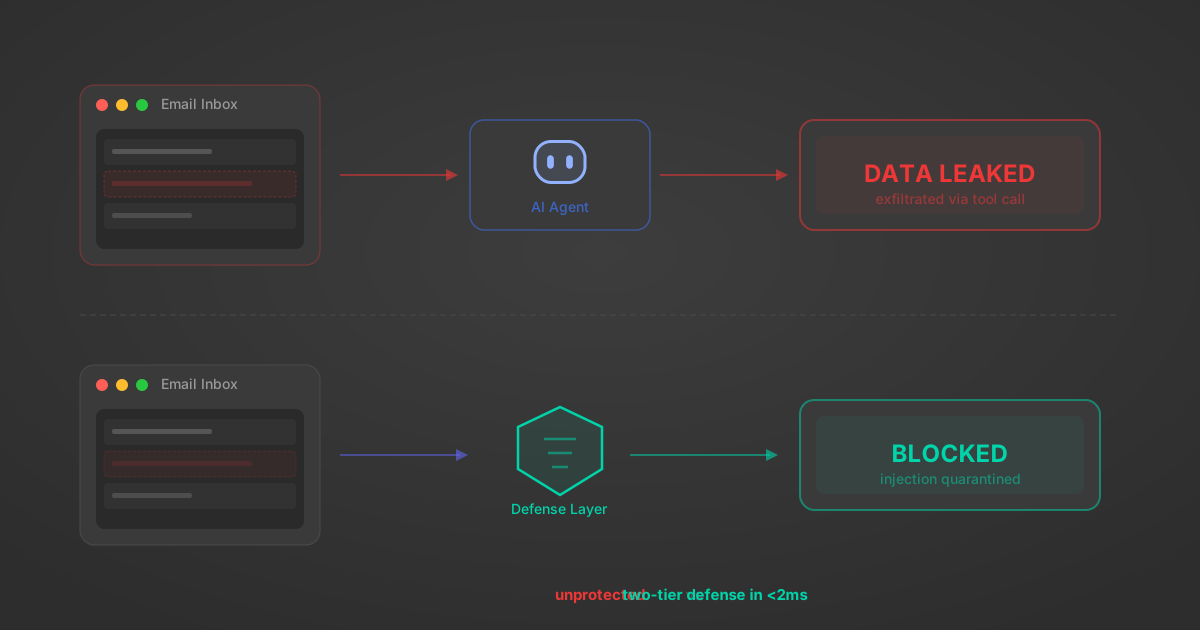
Indirect Prompt Injection Defense for MCP Tools: A Technical Guide
MCP tools that read emails, CRM records, and tickets are indirect prompt injection vectors. Here's how we built a two-tier defense that scans tool results in ~11ms.
12 min
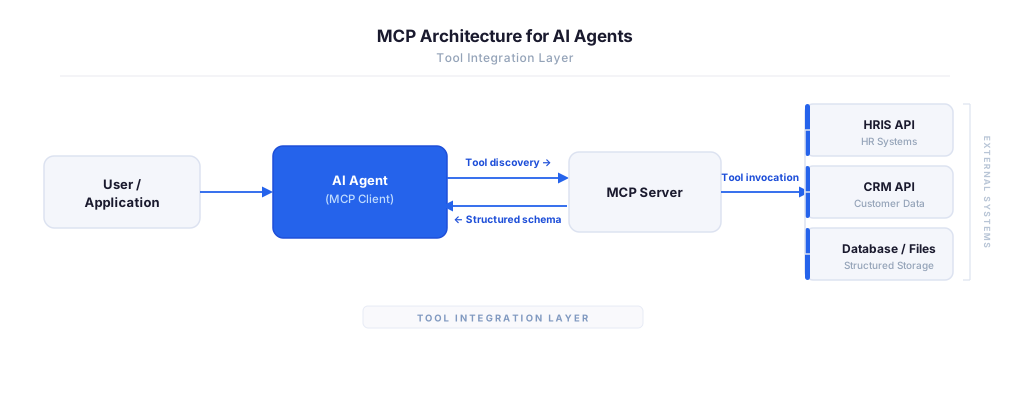
MCP vs A2A: Architecture, Security, and When to Use Each
MCP vs A2A: what each protocol standardizes, how they differ, their shared security risks including indirect prompt injection, and when to use one, both, or a hybrid architecture.
12 min
MCP vs API: What Hundreds of Connector Builds Taught Us
MCP wraps APIs, it doesn't replace them. After building hundreds of connectors that serve both, here's when each approach wins.
14 min read
PingOne MCP Server FAQ
Does StackOne have a PingOne MCP server?
PingOne MCP server vs direct API integration — what's the difference?
How does PingOne authentication work for AI agents?
origin_owner_id.Are PingOne MCP tools vulnerable to prompt injection?
What is the context bloat of a PingOne agent and how do I avoid it?
Can I limit which actions my PingOne agent can access?
Can I create custom agent actions for my PingOne MCP server?
When should I NOT use a PingOne MCP server?
What AI frameworks and AI clients does the StackOne PingOne MCP server support?
Put your AI agents to work
All the tools you need to build and scale AI agent integrations, with best-in-class connectivity, execution, and security.