


Aikido MCP Server
for AI Agents
Connect your AI agent to StackOne's Aikido MCP server and give it 212 MCP tools out of the box. Auth, tool execution, and security all managed.
 StackOne


Coverage
212 Agent Actions
Agents can read, write, delete and run operations in Aikido. Extend your agent's capabilities with custom actions.

Authentication
Agent Tool Authentication
Per-user OAuth in one call. Your Aikido MCP server gets session-scoped tokens with zero credentials stored on your infra.
Agent Auth →
Security
Agent Protection
Every Aikido tool response scanned for prompt injection in milliseconds, with 88.7% accuracy, all running on CPU.
Prompt Injection Defense →
Performance
Max Agent Context. Min Cost.
Free up to 96% of your agent's context window to enhance reasoning and reduce cost, on every Aikido call.
Tools Discovery →What is the Aikido MCP Server?
A Aikido MCP server lets AI agents read and write Aikido data through the Model Context Protocol, Anthropic's open standard for connecting LLMs to external tools. StackOne's Aikido MCP server ships with 212 pre-built actions, fully extensible via the Connector Builder, plus managed authentication, prompt injection defense, observability, and agent execution runtime. Connect it from MCP clients like Claude Desktop, Claude Code, Cursor, Goose, and VS Code, or from agent frameworks like OpenAI Agents SDK, LangChain, and Vercel AI SDK.
All Aikido MCP Tools
Every StackOne action for Aikido, ready for your agent. Read, write, delete and run operations, scoped to exactly what you need.
Container AutoFix PR Creation Settings
- Get Container AutoFix PR Creation Settings
Get the workspace container AutoFix PR creation settings. Container selection is returned as containers_scope ("all" or "selected") plus container_ids (empty when scope is "all").
- Update Container AutoFix PR Creation Settings
Update the workspace container AutoFix PR creation settings. PRs are created and re-evaluated every day.
Dependency AutoFix PR Creation Settings
- Get Dependency AutoFix PR Creation Settings
Get the workspace dependency AutoFix PR creation settings. Repository selection is returned as repos_scope ("all" or "selected") plus repo_ids (empty when scope is "all").
- Update Dependency AutoFix PR Creation Settings
Update the workspace dependency AutoFix PR creation settings. PRs are created and re-evaluated every day. Use severity_filter to set which dependency upgrades to autofix.
Pentest AutoFix PR Creation Settings
- Get Pentest AutoFix PR Creation Settings
Get the workspace Pentest & AI Code Analysis AutoFix PR creation settings. Repository selection is returned as repos_scope ("all" or "selected") plus repo_ids (empty when scope is "all").
- Update Pentest AutoFix PR Creation Settings
Update the workspace Pentest & AI Code Analysis AutoFix PR creation settings. PRs are created and re-evaluated every day. Use severity_filter to set which severities to autofix.
SAST AutoFix Settings
- Get SAST AutoFix Settings
Get the workspace SAST & IaC AutoFix PR creation settings. Repository selection is returned as repos_scope ("all" or "selected") plus repo_ids (empty when scope is "all").
- Update SAST AutoFix Settings
Update the workspace SAST & IaC AutoFix PR creation settings. PRs are created and re-evaluated every day. Use severity_filter to set which severities to autofix.
Broker Resource URLs
- Add Broker Resource URL
Adds an internal resource URL that a broker app can access. Only base URLs are allowed, without a path (for example https://internal.resource.com). Resource URLs that point to another broker resource are not allowed.
- Delete Broker Resource URL
Removes a resource URL from a broker app
Container Labels
- Add Container Label
Add a label to a container repository
- Update Container Label
Update a label for a container repository
- Remove Container Label
Remove a label from a container repository
Containers
- Clone Container
Clone container with a specific tag filter
- Get Container
Returns the requested container repository
- List Containers
Returns a list of all the active container repositories in your account
- Delete Container
Delete public or self-reported SBOM container
Custom Rules
- Create Custom Rule
Create a new custom semgrep rule
- Get Custom Rule
Get a custom semgrep rule
- List Custom Rules
List custom semgrep rules
- Remove Custom Rule
Remove a custom semgrep rule
Subdomains
- Add Subdomain
Add a subdomain to a attack surface domain
- List Subdomains
List all the subdomains for a attack surface domain
- Remove Subdomain
Removes a subdomain from a attack surface domain
Domains
- Create Domain
Create a new domain
- List Domains
Returns a list of all the active domains connected in your account
- Remove Domain
Removes a domain with a specified id
Endpoint Exceptions
- Add Endpoint Exception
Adds an exception to the endpoint protection settings
- List Endpoint Exceptions
Returns a list of all the endpoint protection exceptions
- Remove Endpoint Exception
Removes an exception from the endpoint protection settings
Endpoint Devices
- List Endpoint Devices
Returns a list of all the endpoint protection devices
- Remove Endpoint Device
Removes a device from endpoint protection
Pentest Assessments
- Get Pentest Assessment
Get detailed information about a specific pentest assessment including status, progress, and issue count
- List Pentest Assessments
Returns all pentest assessments in your account, newest first. Draft assessments are not included.
Code Repo Labels
- Add Code Repo Label
Add a label to a code repository
- Update Code Repo Label
Update a label for a code repository
- Remove Code Repo Label
Remove a label from a code repository
Code Repos
- Clone Code Repo
Clone code repo for multi branch scanning
- Get Code Repo
Returns the details of a code repository
- Delete Code Repo
Delete code repo. Only supported for selfscanned or cloned repositories.
Teams
- Create Team
Create a new team
- List Teams
Returns a list of all the teams in your account
- Update Team
Update an existing team
- Delete Team
Delete a non-imported team
Users
- Get User
Returns the specified user details
- List Users
Returns a list of all the users
Webhooks
- Add Webhook
Add webhook
- List Webhooks
List webhooks
- Remove Webhook
Remove webhook
Zen Apps
- Create Zen App
Create a new Zen app
- Get Zen App
Get a Zen app
- List Zen Apps
List Zen apps
- Update Zen App
Update an existing Zen app
- Delete Zen App
Delete a Zen app
Zen App Bot Lists
- Get Zen App Bot Lists
Get the bot lists configuration for an app
- Update Zen App Bot Lists
Update the bot lists configuration for an app
Zen App Countries
- Get Zen App Countries
Get the country-based IP blocking configuration for an app
- Update Zen App Countries
Update the country-based IP blocking configuration for an app
Zen App IP Lists
- Get Zen App IP Lists
Get the IP lists configuration for an app including known threat actors and Tor settings
- Update Zen App IP Lists
Update the IP lists configuration for an app including known threat actors and Tor settings. This endpoint supports partial updates - only include the properties you want to modify.
Zen App Users
- List Zen App Users
List the users for a Zen app
- Update Zen App User
Update blocking status of a user
Other (150)
- Create Kubernetes Cloud
Connect your Kubernetes cluster to Aikido. This will register a cluster and return the agent token needed for installation. https://github.com/AikidoSec/helm-charts
- Add Azure Container Registry
Add Azure container registry to Aikido to scan
- Add GCP Artifact Registry
Add GCP Artifact Registry to Aikido to scan
- Add GitLab Self-Managed Container Registry
Add a GitLab Self-Managed (self-hosted) container registry to Aikido to scan
- Add Public Container
Add public container image to Aikido to scan, such as nginx:latest
- Upload Container SBOM
Upload a self-generated SBOM
- Add Note To Issue Group
Add note to issue group
- Create Pentest Draft
Create a new draft pentest assessment. The project will be created if it doesn't exist. You can either provide existing repository IDs or create a custom repository from a download URL.
- Add Exclude Path To A Code Repo
Add an exclude path to a code repo
- Import New Code Repositories
Triggers a code repositories sync with your Git provider
- Add User To Team
Add user to team
- List Aikido Images
Returns a paginated list of Aikido images in your account.
- List AutoFix History
Returns a paginated list of autofix tasks in your account. Use the result's next field for pagination.
- List Issues Addressed By A Task
Returns the issues that an autofix task was trying to solve. Use the autofix task ID (the `id` field) from the /autofix/history endpoint.
- List Hardened Image Requests
Returns the list of hardened image requests that have been submitted for your account, including their current status.
- List Broker Apps
Returns a list of all broker apps in your account, including their mapped resource URLs.
- List Cloud Assets
Returns cloud assets for the connected clouds in your account. Supports pagination, filtering and search parameters similar to the cloud inventory UI. Array-valued filters are passed as comma-separated values.
- List Connected Clouds
Returns a list of all the active clouds connected in your account
- Get Code Coverage For A Repository
Returns the latest code coverage summary for a repository. Optionally filter by branch name. When no branch is provided, results for the default branch are returned. Requires a paid plan.
- List All Code Coverage Repositories
Returns a paginated list of repositories that have code coverage results. Optionally filter by branch name. When no branch is provided, results for each repository's default branch are returned. Requires a paid plan.
- List Code Quality Findings For A Pull Request
Returns a list of code quality findings for a specific pull request. Only the findings from the latest scan are returned, excluding any suppressed findings.
- List Code Quality Findings For A Repository
Returns a paginated list of code quality findings for a repository. Findings represent repository state across full-repository scans rather than a snapshot of one scan. Use the result's next field for pagination.
- Get CIS AWS Compliance Overview
Returns the CIS AWS compliance overview in JSON format. This endpoint is available on all paid plans.
- Get CIS Compliance Overview
Returns the CIS compliance overview in JSON format. This endpoint is available on all paid plans.
- Get DORA Compliance Overview
Returns the DORA compliance overview in JSON format. This endpoint is available on all paid plans.
- Get FedRAMP DAST Report
Returns the 'Domains & API - FedRAMP report' as an OSCAL v1.1.2 assessment-results (SAR) document, covering all domains and APIs monitored by surface monitoring. This endpoint is available on all paid plans.
- Get GDPR Compliance Overview
Returns the GDPR compliance overview in JSON format. This endpoint is available on all paid plans.
- Get ISO Compliance Overview
Returns the ISO compliance overview in JSON format. This endpoint is available on all paid plans.
- Get NIS2 Compliance Overview
Returns the NIS2 compliance overview in JSON format. This endpoint is available on all paid plans.
- Get PCI Compliance Overview
Returns the PCI compliance overview in JSON format. This endpoint is available on all paid plans.
- Get SOC 2 Compliance Overview
Returns the SOC2 compliance overview in JSON format. This endpoint is available on all paid plans.
- Export Container Repo Licenses
Returns an overview of all packages & licenses found in a container
- Export Raw SBOM
Returns the latest uploaded SBOM of a container with all metadata collected.
- Get Container Registry
Returns the requested container registry
- List Container Runners
Returns a list of places where a container image runs, such as AWS lambdas, AWS ECS, Azure Jobs, Kubernetes pods,..
- List Data Leaks
List leaked credentials (data leaks) found for an attack surface domain
- List Endpoint Activity Logs
Returns a paginated list of endpoint protection activity log items
- List Installed Packages
Returns a list of all the installed packages
- List Endpoint Permission Groups
Returns a list of all the endpoint protection permission groups
- Export All Issues
Returns a list of all issues (open, ignored, snoozed, closed,..) in your account in JSON or CSV format
- Get Issue
Returns the details of a single issue
- Get Issue Counts
Returns the total number of open issues
- Get Issue CVE Exploitability
Returns the CVE exploitability analysis results for a single issue
- Get Issue CVE Exploitability Bulk
Returns the CVE exploitability analysis results for multiple issues
- Get Issue Details Bulk
Returns the details of multiple issues. This feature needs to be enabled by Aikido support before it can be used.
- Get Issue Group
Returns the details of an issue group
- Get Issue Reachability
Returns the reachability of a single issue
- List Notes For Issue Group
List notes for an issue group
- List Open Issue Groups
Returns a list of all the open issue groups in your account, as seen in the feed. Use the result's next field for pagination.
- List Licenses
Returns a list of licenses
- Get Latest Local Scanner Version
Returns information about the latest local scanner
- Get Attack Analysis
Get attack analysis for a specific pentest issue
- List AI Code Analysis Assessments
Returns all AI Code Analysis (code audit) assessments in your account, newest first.
- Get CI Scan
Returns the details and results of a PR check.
- Get Default PR Checks Configuration
Returns the workspace default PR Checks configuration. This configuration is applied to newly activated repositories that do not have a repo-specific configuration.
- List PR Check Manual Actions
Returns all manual ignores or snoozes actions taken on issues flagged in PRs
- List PR Checks
Returns PR checks
- List PR Checks Configurations
Returns a paginated list of all the CI checks configurations in your account
- Export PDF Report
Returns a report as a pdf
- List Activity Log
Returns the activity log items
- List Cloud Rules
List cloud rules. Requires scope clouds:read
- List IaC Rules
List IaC rules. Requires scope repositories:read
- List Mobile Rules
List Mobile rules. Requires scope repositories:read
- List SAST Rules
List SAST rules. Requires scope repositories:read
- Export Code Repo Licenses
Returns an overview of all packages & licenses found in a code repository
- Export SBOM For Team
Only available for Scale plan workspaces! Returns an overview of all packages & licenses found in code repositories linked to a specified team
- List Code Repositories
Returns a list of all the active code repositories in your account
- List User Requests
Returns a paginated list of user requests in your account.
- Get Changelog Summary
Get changelog summary for package
- Get CVE Details
Get details about a CVE
- Get Package Health Scores
Returns a health score and summary for each requested package version that has been scored. Packages must use the name@version format.
- List CWE Descriptions
Returns the CWE class and description for every CWE Aikido tracks.
- List End-of-life Runtimes
Returns the global end-of-life catalog for runtimes, frameworks, and operating systems. This is reference data, not the runtimes detected in a workspace. Match an end-of-life finding's affected package to runtime_name.
- List Malware Packages
Get malware packages
- Get Task Tracking Project Mapping
Get project mapping
- List Issue Group Tasks
Returns the tasks related to an issue group
- List Task Tracking Integrations
List task tracking integrations
- List Task Tracking Project Tasks
List tasks live from the integrated task tracker
- List Task Tracking Projects
List task tracking projects
- List IDE Adoption
Returns a list of all the users that have an active IDE token
- List Pending Invites
Returns unused user invites that have not been accepted yet. Includes email invites and shareable link invites.
- List User Login History
Returns a paginated list of user login events in your workspace, newest first.
- Export Virtual Machine SBOM
Returns a SBOM of a virtual machine
- List Virtual Machines
Returns a list of all the virtual machines in your account
- Get SLA Settings
Returns the SLA settings for the workspace
- Get Wallet Balance
Returns the current credit balance of the workspace's wallet
- Get Workspace Configuration Errors
Returns the configuration errors of the workspace
- Get Workspace Info
Returns information about the workspace of the client
- Get Zen App Event
Get a Zen event
- Update Code Scanning Access Token
Update the access token used for code scanning.
- Update Azure Cloud
Update the credentials for an Azure cloud
- Update Container Internet Connection
Update container connectivity status
- Update Container Sensitivity
Update container sensitivity
- Update Container Tag Filter
Update the tag filter used for the container scanning
- Update Auth Headers
Update Authentication Headers for a Domain
- Update Custom Scan Headers
Update Custom Scan Headers for a Domain
- Update OpenAPI Spec
Updates the OpenAPI spec of a domain with a specified id
- Update Scan Frequency
Sets how often Aikido scans a domain.
- Set Environment Variables
Add or update environment variables, including Gradle private registry variables such as ORG_GRADLE_PROJECT_*. An environment variable that already exists is overwritten. Keys omitted from the request are left unchanged.
- Update Code Repo Connectivity
Update code repository connectivity
- Update Code Repo Sensitivity
Update code repository sensitivity
- Update Repository Path Limitation For A Team
Update the path limitations for a repository that is already linked to a team. This works for both manually created and imported teams (e.g. GitHub teams), and does not change which resources are linked to the team.
- Update User Rights
Update the specified user rights
- Update Zen App Blocking
Enable or disable blocking mode for a Zen app
- Update Zen App IP Blocklist
Set the custom IP blocklist for an app. This will replace the existing blocklist with the new one.
- Remove Cloud
Removes a cloud with a specified id
- Remove Exclude Path From A Code Repo
Remove an exclude path from a code repo
- Remove User From Team
Remove user from team
- Request Hardened Image
Request that a specific image tag be secured. The request is recorded and does not trigger an immediate rebuild.
- Validate Bug Bounty Report
Validates a new bug bounty report for a given program.
- Connect AWS Cloud
Connect a new AWS cloud environment
- Connect Azure Cloud
Connect a new Azure cloud environment. https://help.aikido.dev/doc/get-required-values--set-up-configuration-to-connect-azure-cloud-via-public-api/docMB6NzhONG
- Connect GCP Cloud
Connect a new Gcp cloud environment. https://help.aikido.dev/cloud-scanning/connect-your-cloud/gcp/get-required-values-+-set-up-configuration-to-connect-gcp-cloud-via-public-api
- Ignore Code Quality Finding
Ignores an open code quality finding. Use the finding id returned by the repo-findings list endpoint.
- Activate Container
Activate container
- Deactivate Container
Deactivate container
- Generate Bulk SBOM
Returns an SBOM of all packages & licenses found in specified containers
- Link Code Repository To Container
Link code repository to container
- Scan Container
Scan a container
- Unlink Code Repository From Container
Unlink code repository from container
- Edit Custom Rule
Edit a custom semgrep rule
- Start Scan For A Domain
Start scan for a domain
- Adjust Severity Of An Issue Group
Adjust severity of an issue group to 'critical', 'high', 'medium' or 'low'
- Adjust Severity Of An Issue
Adjust severity of a single issue to 'critical', 'high', 'medium' or 'low'
- Ignore Issue
Ignore an issue
- Ignore Issue Group
Ignore an issue group
- Snooze Issue
Snooze an issue for a given period
- Snooze Issue Group
Snooze an issue group for a given period
- Solve Issue
Solve an issue
- Unignore Issue
Unignore an issue
- Unignore Issue Group
Unignore an issue group
- Unsnooze Issue
Unsnooze an issue for a given period
- Unsnooze Issue Group
Unsnooze an issue group
- Mark License As Internal
Mark licenses for a package as internally developed. Aikido will no longer show these licenses as a risk.
- Overwrite License
Overwrite License For Package
- Configure Default PR Checks
Create or update the workspace default PR Checks configuration. This configuration is applied to newly activated repositories that do not have a repo-specific configuration.
- Configure PR Checks
Configure PR Checks
- Configure PR Checks For All Repos
Configure PR Checks for all active repositories in the account. Currently only supports GitHub.
- Manage Private Registry
Add or update your private package registry connection, such as a private NPM or Maven package registry.
- Deactivate Code Repo
Deactivate code repo
- Scan Code Repo
Scan a code repository
- Manage Dev Dep Scanning
Update code repository dev dependency scanning
- Review User Request
Reviews a user request
- Link Existing Task To Issue
Link existing task to issue group
- Map Code Repo To Task Tracking Projects
Map code repo to task tracking projects. Make sure the mapping mode is set to 'repos' in the task tracker settings.
- Map Teams To Task Tracking Projects
Map teams to task tracking projects. Make sure the mapping mode is set to 'teams' in the task tracker settings.
- Link Resource To Team
Link resource to team
- Unlink Resource From Team
Unlink resource from team
- Disable User
Disable (remove from the workspace) the specified user
- Rotate Zen App Token
Creates a new token and revokes the current token if it exists for a Zen app
Set Up Your Aikido MCP Server in Minutes
One endpoint. Any framework. Your agent is talking to Aikido in under 10 lines of code.
Agent Frameworks


 JSON
{
  "mcpServers": {
    "stackone": {
      "command": "npx",
      "args": [
        "-y",
        "mcp-remote@latest",
        "https://api.stackone.com/mcp?x-account-id=<account_id>",
        "--header",
        "Authorization: Basic <YOUR_BASE64_TOKEN>"
      ]
    }
  }
}
Platform Resources

Comparing BM25, TF-IDF, and Hybrid Search for MCP Tool Discovery
Benchmarking BM25, TF-IDF, and hybrid search for MCP tool discovery across 916 tools. The 80/20 TF-IDF/BM25 hybrid hits 21% Top-1 accuracy in under 1ms.
10 min
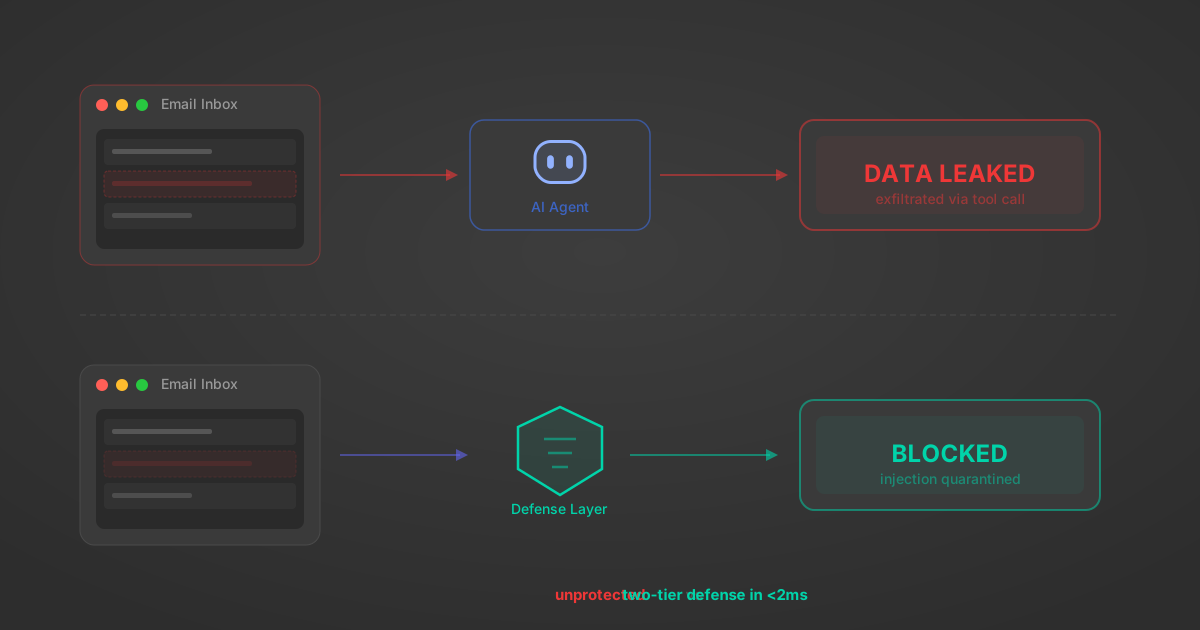
Indirect Prompt Injection Defense for MCP Tools: A Technical Guide
MCP tools that read emails, CRM records, and tickets are indirect prompt injection vectors. Here's how we built a two-tier defense that scans tool results in ~11ms.
12 min

MCP vs A2A: Architecture, Security, and When to Use Each
MCP vs A2A: what each protocol standardizes, how they differ, their shared security risks including indirect prompt injection, and when to use one, both, or a hybrid architecture.
12 min
MCP vs API: What Hundreds of Connector Builds Taught Us
MCP wraps APIs, it doesn't replace them. After building hundreds of connectors that serve both, here's when each approach wins.
14 min read
Aikido MCP Server FAQ
Does StackOne have a Aikido MCP server?
Aikido MCP server vs direct API integration: what's the difference?
How does Aikido authentication work for AI agents?
origin_owner_id.Are Aikido MCP tools vulnerable to prompt injection?
What is the context bloat of a Aikido agent and how do I avoid it?
Can I limit which actions my Aikido agent can access?
Can I create custom agent actions for my Aikido MCP server?
When should I NOT use a Aikido MCP server?
What AI frameworks and AI clients does the StackOne Aikido MCP server support?
Put your AI agents to work
All the tools you need to build and scale AI agent integrations, with best-in-class connectivity, execution, and security.