


ElevenLabs MCP Server
for AI Agents
Connect your AI agent to StackOne's ElevenLabs MCP server and give it 182 MCP tools out of the box. Auth, tool execution, and security all managed.
 StackOne


Coverage
182 Agent Actions
Agents can read, write, delete and run operations in ElevenLabs. Extend your agent's capabilities with custom actions.

Authentication
Agent Tool Authentication
Per-user OAuth in one call. Your ElevenLabs MCP server gets session-scoped tokens with zero credentials stored on your infra.
Agent Auth →
Security
Agent Protection
Every ElevenLabs tool response scanned for prompt injection in milliseconds, with 88.7% accuracy, all running on CPU.
Prompt Injection Defense →
Performance
Max Agent Context. Min Cost.
Free up to 96% of your agent's context window to enhance reasoning and reduce cost, on every ElevenLabs call.
Tools Discovery →What is the ElevenLabs MCP Server?
A ElevenLabs MCP server lets AI agents read and write ElevenLabs data through the Model Context Protocol, Anthropic's open standard for connecting LLMs to external tools. StackOne's ElevenLabs MCP server ships with 182 pre-built actions, fully extensible via the Connector Builder, plus managed authentication, prompt injection defense, observability, and agent execution runtime. Connect it from MCP clients like Claude Desktop, Claude Code, Cursor, Goose, and VS Code, or from agent frameworks like OpenAI Agents SDK, LangChain, and Vercel AI SDK.
All ElevenLabs MCP Tools
Every StackOne action for ElevenLabs, ready for your agent. Read, write, delete and run operations, scoped to exactly what you need.
Agents
- Create Agent
Create an ElevenLabs conversational AI agent from a conversation configuration.
- Get Agent
Get an agent with its conversation configuration, platform settings and phone numbers.
- List Agents
List conversational AI agents with search, archive and creator filters.
- Update Agent
Update an agent name, conversation configuration, platform settings, tags or workflow.
- Delete Agent
Delete a conversational AI agent.
Tests
- Create Test
Create an agent test that checks a response, a tool call or a simulated conversation.
- List Tests
List agent response tests and test folders.
Test Invocations
- Get Test Invocation
Get the status and results of an agent test run.
- List Test Invocations
List past agent test runs.
Calls
- List Batch Calls
List the batch calling jobs in the workspace.
- Get Batch Call
Get a batch call with its status, schedule and per-recipient progress.
- Delete Batch Call
Permanently delete a batch call and all its recipient records.
Conversations
- List Conversations
List agent conversations with filters for agent, time range, duration, outcome, rating and more.
- Get Conversation
Get a conversation with its transcript, metadata and analysis.
- Delete Conversation
Delete a conversation and its transcript.
Knowledge Base Documents
- List Knowledge Base Documents
List knowledge base documents and folders with search, type and owner filters.
- Get Knowledge Base Document
Get a knowledge base document with its type, metadata, usage and content details.
- Update Knowledge Base Document
Rename a knowledge base document or folder, or replace the content of a text, URL or file document.
- Delete Knowledge Base Document
Delete a knowledge base document or folder.
Dubbings
- Create Dubbing
Dub an uploaded or linked audio or video file into another language.
- Get Dubbing
Get a dubbing project with its status, source language and target languages.
- Delete Dubbing
Delete a dubbing project.
History Items
- Get History Item
Get one generated history item, including its text, voice, model and settings.
- Download History Items
Download one or more generated history items as a single audio file or a zip archive, returned as a download.
- Delete History Item
Delete a generated audio item from the ElevenLabs history.
Unified Groups
- List Unified Groups
List unified user groups in an ElevenLabs workspace.
- Get Unified Group
Get a unified ElevenLabs user group by ID.
Unified Roles
- List Unified Roles
List unified roles (seat types) in an ElevenLabs workspace.
- Get Unified Role
Get a unified ElevenLabs role (seat type) by ID.
Unified Users
- List Unified Users
List unified users in an ElevenLabs workspace.
- Get Unified User
Get a unified ElevenLabs user by ID.
Music Finetunes
- Create Music Finetune
Create a music finetune, optionally with one audio file to train on.
- List Music Finetunes
List music finetunes you can use: your own, workspace-shared and ElevenLabs-curated.
- Get Music Finetune
Get one music finetune with its status and training progress.
- Update Music Finetune
Update the name, tags, primary genre or visibility of a music finetune.
- Delete Music Finetune
Permanently delete a music finetune you own.
Phone Numbers
- Import Phone Number
Import a Twilio, Exotel or SIP trunk phone number into the workspace for agent calls.
- List Phone Numbers
List the phone numbers imported into the workspace and the agents they are assigned to.
- Get Phone Number
Get a phone number with its provider, label, direction support and assigned agent.
- Update Phone Number
Update a phone number's assigned agent, label or SIP trunk settings.
- Delete Phone Number
Remove an imported phone number from the workspace.
Pronunciation Dictionarys
- Get Pronunciation Dictionary
Get a pronunciation dictionary with its latest version and rule count.
- Update Pronunciation Dictionary
Rename or archive a pronunciation dictionary.
Pronunciation Dictionary Rules
- Add Pronunciation Dictionary Rules
Add alias or phoneme rules to a pronunciation dictionary, creating a new version.
- Set Pronunciation Dictionary Rules
Replace all rules of a pronunciation dictionary with a new list, creating a new version.
- Remove Pronunciation Dictionary Rules
Remove rules from a pronunciation dictionary by the strings they replace, creating a new version.
Secrets
- Create Secret
Store a new workspace secret, such as an API key an agent tool needs.
- List Secrets
List the workspace secrets that agents, tools and phone numbers can reference.
- Get Secret
Get a workspace secret's name and the resources that use it.
- Update Secret
Rename a workspace secret and replace its value.
- Delete Secret
Delete a workspace secret that is no longer used.
Service Accounts
- Create Service Account
Create a service account in the ElevenLabs workspace.
- Get Service Accounts
List the ElevenLabs workspace's service accounts and their API keys.
Service Account API Keys
- Create Service Account API Key
Create an API key for a service account with chosen permissions.
- Get Service Account API Keys
List the API keys of one ElevenLabs service account.
- Update Service Account API Key
Enable, disable, rename or change the permissions and limits of a service account API key.
- Delete Service Account API Key
Delete an API key of a service account.
Speech Engines
- Create Speech Engine
Create a Speech Engine that connects ElevenLabs speech recognition and voices to your own WebSocket server.
- List Speech Engines
List Speech Engine resources, which add ElevenLabs speech recognition and voice to your own chat agent or LLM server.
- Get Speech Engine
Get the full configuration of one Speech Engine.
- Update Speech Engine
Update the settings of a Speech Engine; only the fields you send change.
- Delete Speech Engine
Permanently delete a Speech Engine.
Transcriptions
- Create Transcription
Transcribe an uploaded or linked audio or video file to text with word timestamps and optional speaker labels.
- Get Transcription
Get a previously generated speech-to-text transcript by its ID.
- Delete Transcription
Delete a previously generated speech-to-text transcript.
Tools
- Create Tool
Create a workspace tool (webhook, client, system or MCP) that agents can call.
- List Tools
List the workspace tools available to agents.
- Get Tool
Get a workspace tool with its configuration and usage statistics.
- Update Tool
Update the configuration of a workspace tool.
- Delete Tool
Delete a workspace tool so agents can no longer call it.
Voice Collections
- Create Voice Collection
Create a voice collection to group voices.
- List Voice Collections
List the voice collections you have access to, sorted by title.
- Get Voice Collection
Get the title, icon and your access role for one voice collection.
- Update Voice Collection
Change the title or icon of a voice collection.
- Delete Voice Collection
Delete a voice collection without deleting the voices in it.
Voices
- Add Voice
Create an instant voice clone from an uploaded audio recording.
- Get Voice
Get a voice with its samples, labels, settings and sharing details.
- List Voices
List voices available to the account, with search, filtering, sorting and pagination.
- Delete Voice
Delete a voice from your ElevenLabs voice library.
Shared Voices
- Add Shared Voice
Copy a voice from the public voice library into your voices.
- List Shared Voices
Search the public ElevenLabs voice library by category, gender, age, accent, language and use case.
PVC Voices
- Create PVC Voice
Create a Professional Voice Clone with metadata and no samples yet.
- Update PVC Voice
Change the name, language, description or labels of a Professional Voice Clone.
PVC Voice Samples
- Update PVC Voice Sample
Apply noise removal, select speakers, trim or rename a Professional Voice Clone sample.
- Delete PVC Voice Sample
Delete one audio sample from a Professional Voice Clone.
Workspace Groups
- Get Workspace Groups
List every user group in the ElevenLabs workspace with its members.
- Search Workspace Groups
Find ElevenLabs user groups by name, with their members' emails.
Workspace Group Members
- Add Workspace Group Member
Add a workspace member to an ElevenLabs user group by email.
- Remove Workspace Group Member
Remove a member from an ElevenLabs user group by email.
Workspace Auth Connections
- Create Workspace Auth Connection
Create an auth connection that agent tools use to authenticate to external APIs.
- Get Workspace Auth Connections
List the auth connections agents and tools use to call external APIs.
- Update Workspace Auth Connection
Update an auth connection's provider or credentials.
- Delete Workspace Auth Connection
Delete a workspace auth connection.
Invite Users
- Invite User
Invite someone to the ElevenLabs workspace by email.
- Invite Users
Invite several people to the ElevenLabs workspace by email in one call.
Workspace Webhooks
- Create Workspace Webhook
Create an HMAC-signed webhook for the ElevenLabs workspace.
- List Workspace Webhooks
List the webhooks configured for the ElevenLabs workspace.
- Update Workspace Webhook
Rename, enable or disable a workspace webhook and set its events.
- Delete Workspace Webhook
Delete a workspace webhook.
Other (83)
- Create Audio Native Project
Create an Audio Native project that narrates an article and returns an embeddable player snippet.
- Send Conversation Feedback
Rate a conversation as liked or disliked.
- Create Knowledge Base Document From URL
Scrape a web page into a knowledge base document that agents can use.
- Create Knowledge Base Document From Text
Create a knowledge base document from plain text.
- Create Knowledge Base Document From File
Create a knowledge base document by uploading a file such as a PDF.
- Create Knowledge Base Folder
Create a folder in the knowledge base to organise documents.
- Create Forced Alignment
Align an audio file with its known transcript and return timing for every character and word.
- Create Music Plan
Generate a structured music composition plan (styles, sections or chunks, durations, lyrics) from a text prompt.
- Upload Music
Upload a song so it can be referenced for inpainting, optionally extracting its composition plan.
- Create Pronunciation Dictionary From Rules
Create a pronunciation dictionary from alias or phoneme rules.
- Create Pronunciation Dictionary From File
Create a pronunciation dictionary from a lexicon .pls file.
- Create Sound Effect
Generate a short non-musical sound effect (for example a doorbell or footsteps) from a text prompt and return the audio file as a download.
- Create Dialogue
Convert a list of text and voice pairs into one multi-speaker dialogue audio file, returned as a download.
- Create Dialogue With Timing
Convert a list of text and voice pairs into dialogue audio with character-level timing and voice segments.
- Create Speech
Convert text to speech with a chosen voice and return the audio file as a download.
- Create Speech With Timing
Convert text to speech with a chosen voice and return base64 audio plus character-level timing.
- Create Voice From Preview
Save a generated voice preview as a voice in your voice library.
- Create Single Use Token
Create a time-limited single-use token that a frontend client can use instead of the API key.
- Add Voice To Collection
Add a voice to a voice collection.
- Add Samples To PVC Voice
Upload an audio sample to a Professional Voice Clone.
- Query Agent Knowledge Base RAG
Run an agent's knowledge base retrieval for a query and return the chunks it would use.
- List Audio Isolation History
List your audio isolation (voice isolator) generations, newest first.
- Get Audio Native Settings
Get the player settings and status of an Audio Native project.
- Export Batch Call Results
Export all recipients and conversation results of a finished batch call as CSV.
- Search Knowledge Base
Fuzzy text search across the content of knowledge base documents.
- Get Dependent Agents For Documents
List the agents that use any of the given knowledge base documents or folders.
- List Dubs
List dubbing projects in the workspace, with status and language filters.
- Get Dubbed File
Download the dubbed audio or video for one target language.
- Get Dubbing Transcript
Get the transcript of a dub in one language as SRT, WebVTT or JSON.
- List Generated Items
List text-to-speech and other generated audio items in the ElevenLabs history, newest first.
- Get History Item Audio
Download the generated audio of one history item as an MP3 file.
- Get Unified Credentials
Get the current ElevenLabs connection's unified credentials and identity.
- List Models
List the available ElevenLabs models with their languages, limits and capabilities.
- List Pronunciation Dictionaries
List the pronunciation dictionaries you can access.
- Get Pronunciation Dictionary Version
Download the rules of a pronunciation dictionary version as a PLS file.
- List Audio Effects
List the filter presets, reverb environments and background noises available for audio_effects.
- Get Voice Preview Audio
Download the audio of one voice preview generated by design_voice or remix_voice.
- Get User
Get the ElevenLabs user who owns the connection's API key.
- Get User Subscription
Get the subscription tier, character usage and limits for the API key owner.
- Get Default Voice Settings
Get the default stability, similarity, style and speed settings used for voices.
- Get Voice Settings
Get the stability, similarity boost, style and speed settings saved for a voice.
- List Voices (Legacy)
List every voice available to the user in one response (legacy endpoint).
- Get Voice Accents
List the accents available in the shared voice library.
- List Similar Voices
Find shared library voices that sound like an uploaded audio sample.
- Get PVC Verification Captcha
Get the verification captcha text for a Professional Voice Clone.
- Get Voice Sample Audio
Download the audio of one sample attached to a voice.
- Get PVC Voice Sample Audio
Get the first 30 seconds of a Professional Voice Clone sample as base64 audio.
- Get PVC Voice Sample Waveform
Get the visual waveform data of a Professional Voice Clone sample.
- Get PVC Speaker Separation Status
Get the speaker separation status of a Professional Voice Clone sample and the detected speakers.
- Get PVC Separated Speaker Audio
Get the separated audio of one speaker in a Professional Voice Clone sample.
- Get Workspace Members
List every member of the ElevenLabs workspace with their seat type.
- Get Workspace Resource
Get who a shared ElevenLabs workspace resource is shared with, and with which role.
- List Audit Logs
List workspace audit log entries, newest first, with time and actor filters.
- Get Workspace Usage
Get workspace credit usage over time, bucketed and optionally grouped by product, model, voice or user.
- List API Requests
List the API requests made in the workspace, with time range, column filters and search.
- Update Audio Native Content
Replace the article content of an Audio Native project with an uploaded txt or HTML file.
- Update Audio Native Content From URL
Refresh the Audio Native project linked to a web page from that page, then convert and publish it.
- Update Member
Lock, unlock or change the seat type of a workspace member.
- Set API Key Third-Party Disabling Policy
Set the workspace-wide policy on whether API key holders may disable their keys.
- Delete Audio Isolation History Item
Delete one audio isolation generation and its media files.
- Remove Voice From Collection
Remove a voice from a voice collection without deleting the voice.
- Delete Voice Sample
Delete one audio sample from a cloned voice.
- Delete Existing Invitation
Cancel a pending workspace invitation by email.
- Duplicate Agent
Create a copy of an existing agent, optionally with a new name.
- Bulk Move Tests To Folder
Move several agent tests or test folders into another folder.
- Run Agent Tests
Run one or more saved tests against an agent.
- Submit Batch Call
Submit a batch of outbound agent calls to a list of recipients, now or at a scheduled time.
- Cancel Batch Call
Cancel a running or scheduled batch call, stopping calls not yet placed.
- Retry Batch Call
Call the failed and no-response recipients of a batch call again.
- Bulk Move Knowledge Base Documents
Move several knowledge base documents or folders into another folder.
- Bulk Delete Knowledge Base Documents
Delete several knowledge base documents or folders in one call.
- Compose Music
Compose a song, jingle or background track from a text prompt or a composition plan and return the audio file as a download.
- Duplicate Speech Engine
Create a copy of an existing Speech Engine with the same settings.
- Design Voice
Generate voice previews from a text description of the voice you want.
- Remix Voice
Generate voice previews that change an existing voice according to a text prompt.
- Edit Voice Settings
Update the saved stability, similarity boost, style, speaker boost and speed settings of a voice.
- Verify PVC Verification Captcha
Submit a recording of the captcha to verify a Professional Voice Clone.
- Edit Voice
Rename a voice you created, change its description or labels, or add an audio sample.
- Start PVC Speaker Separation
Start detecting and separating the speakers in a Professional Voice Clone sample.
- Train PVC Voice
Start training a Professional Voice Clone on its samples.
- Request PVC Manual Verification
Request manual verification of a Professional Voice Clone by uploading a verification document.
- Share Workspace Resource
Grant a user, group or service account API key a role on an ElevenLabs workspace resource.
- Unshare Workspace Resource
Remove a user's, group's or service account API key's role on an ElevenLabs workspace resource.
Set Up Your ElevenLabs MCP Server in Minutes
One endpoint. Any framework. Your agent is talking to ElevenLabs in under 10 lines of code.
Agent Frameworks


 JSON
{
  "mcpServers": {
    "stackone": {
      "command": "npx",
      "args": [
        "-y",
        "mcp-remote@latest",
        "https://api.stackone.com/mcp?x-account-id=<account_id>",
        "--header",
        "Authorization: Basic <YOUR_BASE64_TOKEN>"
      ]
    }
  }
}
Check More AI & ML MCP Servers
164+ actions
126+ actions
121+ actions
62+ actions
57+ actions
42+ actions
37+ actions
Platform Resources
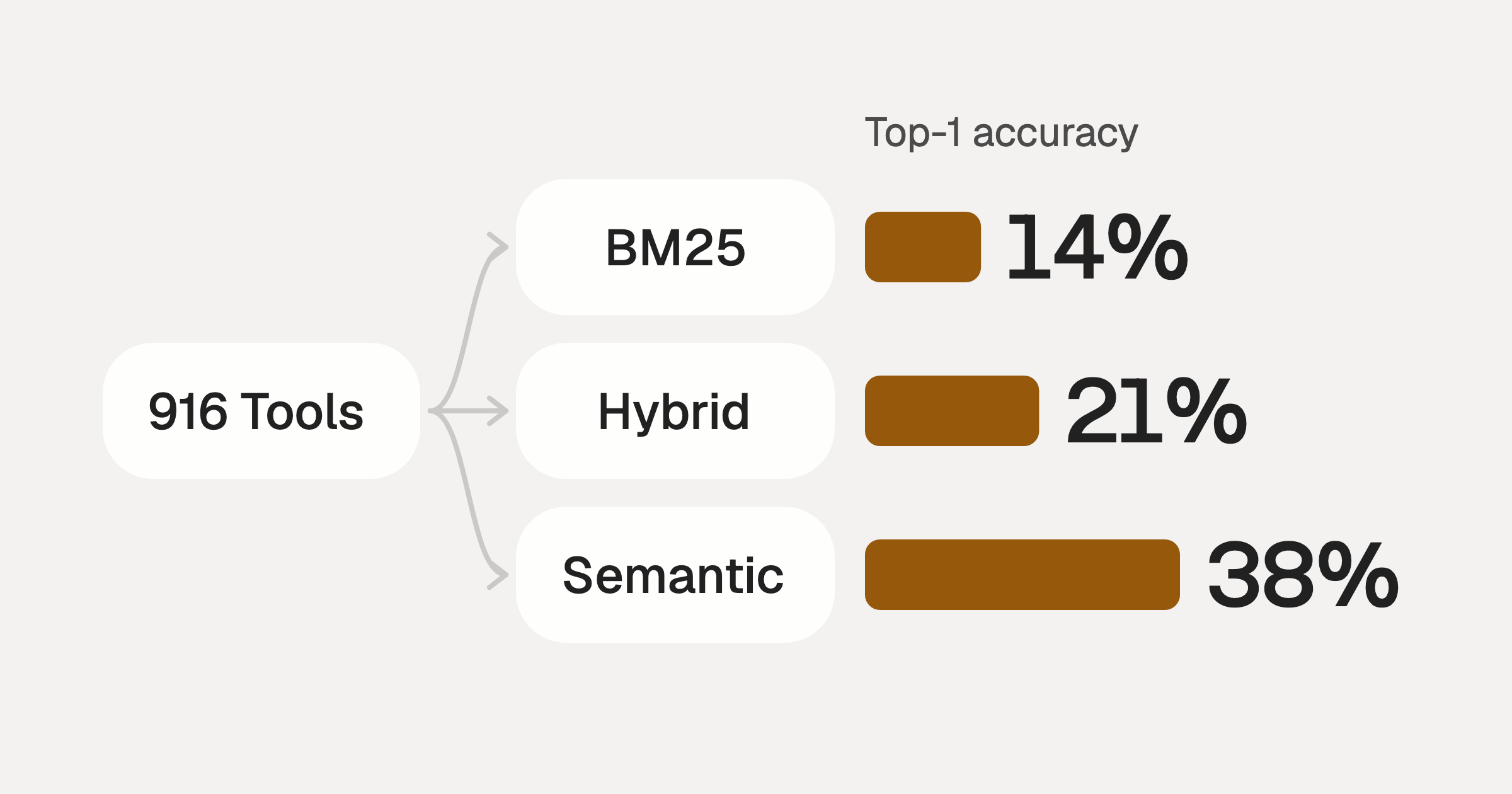
Comparing BM25, TF-IDF, and Hybrid Search for MCP Tool Discovery
Benchmarking BM25, TF-IDF, and hybrid search for MCP tool discovery across 916 tools. The 80/20 TF-IDF/BM25 hybrid hits 21% Top-1 accuracy in under 1ms.
10 min
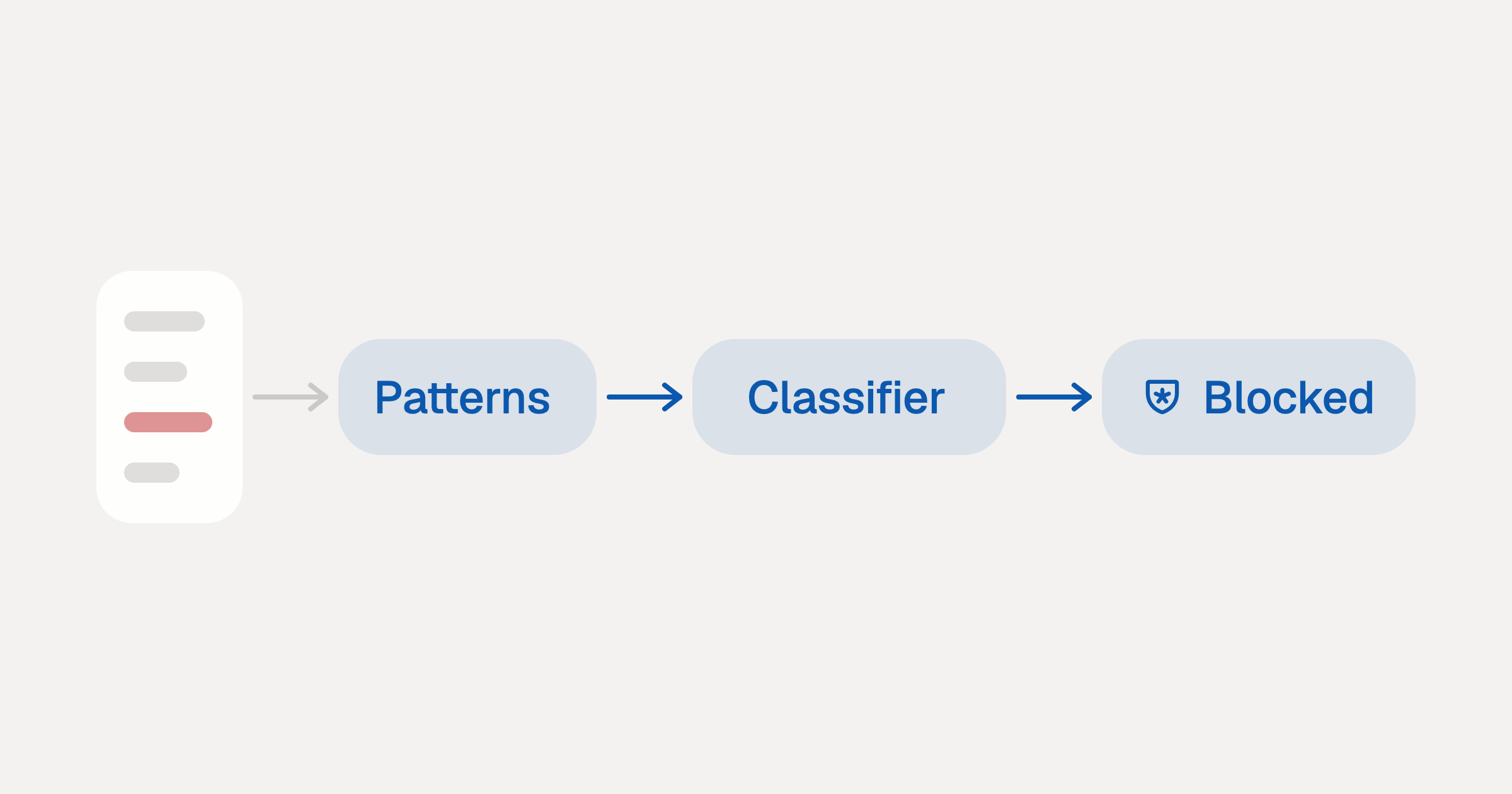
Indirect Prompt Injection Defense for MCP Tools: A Technical Guide
MCP tools that read emails, CRM records, and tickets are indirect prompt injection vectors. Here's how we built a two-tier defense that scans tool results in ~11ms.
12 min
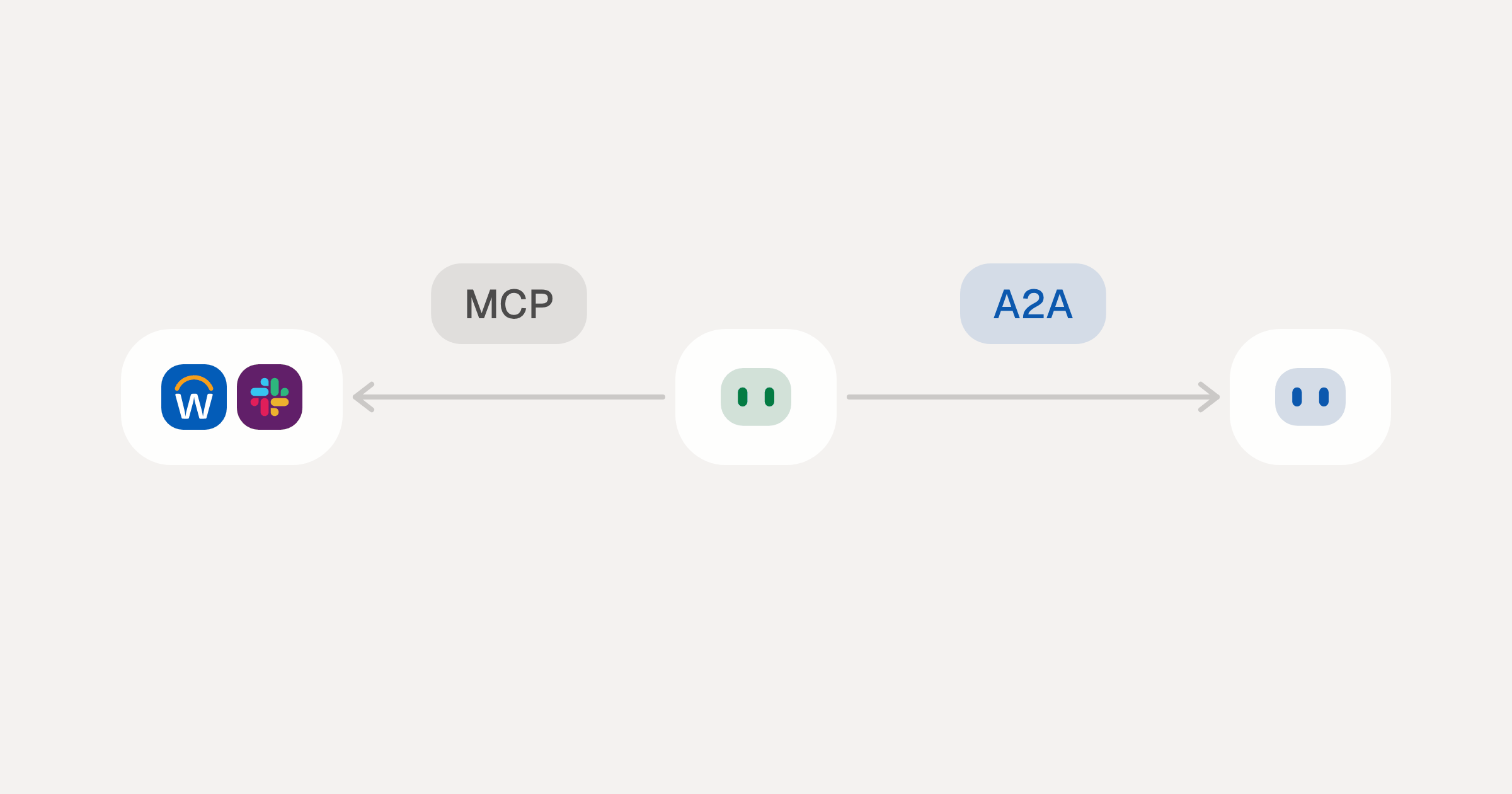
MCP vs A2A: Architecture, Security, and When to Use Each
MCP vs A2A: what each protocol standardizes, how they differ, the security risks they share, and when to use one, both or a hybrid.
12 min
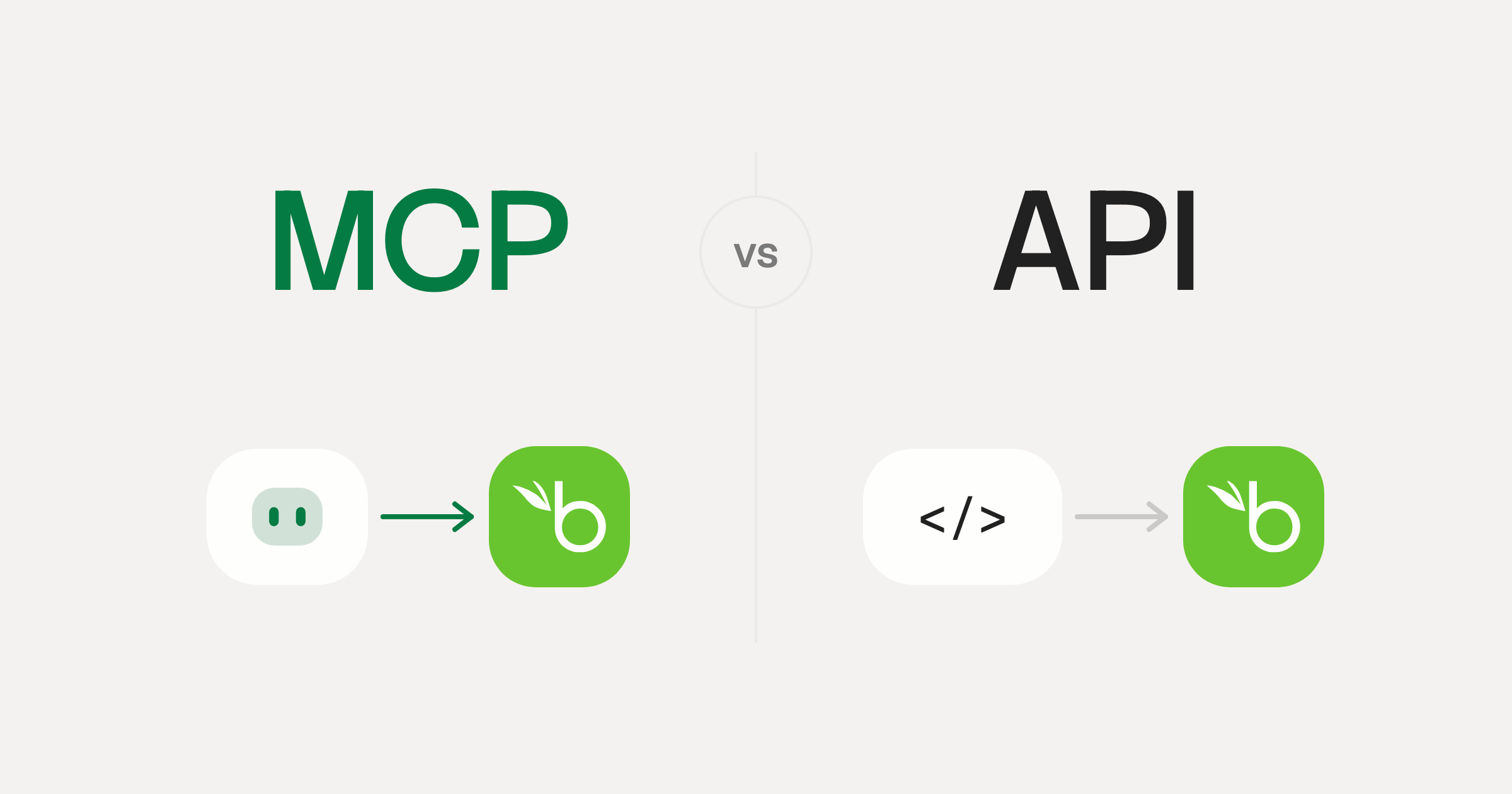
MCP vs API: What Hundreds of Connector Builds Taught Us
MCP wraps APIs, it doesn't replace them. After building hundreds of connectors that serve both, here's when each approach wins.
14 min read
ElevenLabs MCP Server FAQ
Does StackOne have a ElevenLabs MCP server?
ElevenLabs MCP server vs direct API integration: what's the difference?
How does ElevenLabs authentication work for AI agents?
origin_owner_id.Are ElevenLabs MCP tools vulnerable to prompt injection?
What is the context bloat of a ElevenLabs agent and how do I avoid it?
Can I limit which actions my ElevenLabs agent can access?
Can I create custom agent actions for my ElevenLabs MCP server?
When should I NOT use a ElevenLabs MCP server?
What AI frameworks and AI clients does the StackOne ElevenLabs MCP server support?
Put your AI agents to work
Connect AI to every company system and control what it can do in each one, down to the field.