


Twelve Data MCP Server
for AI Agents
Connect your AI agent to StackOne's Twelve Data MCP server and give it 75 MCP tools out of the box. Auth, tool execution, and security all managed.
 StackOne






Coverage
75 Agent Actions
Read-only access to Twelve Data. Extend your agent's capabilities with custom actions.

Authentication
Agent Tool Authentication
Per-user OAuth in one call. Your Twelve Data MCP server gets session-scoped tokens with zero credentials stored on your infra.
Agent Auth →
Security
Agent Protection
Every Twelve Data tool response scanned for prompt injection in milliseconds, with 88.7% accuracy, all running on CPU.
Prompt Injection Defense →
Performance
Max Agent Context. Min Cost.
Free up to 96% of your agent's context window to enhance reasoning and reduce cost, on every Twelve Data call.
Tools Discovery →What is the Twelve Data MCP Server?
A Twelve Data MCP server lets AI agents read Twelve Data data through the Model Context Protocol, Anthropic's open standard for connecting LLMs to external tools. StackOne's Twelve Data MCP server ships with 75 pre-built actions, fully extensible via the Connector Builder, plus managed authentication, prompt injection defense, observability, and agent execution runtime. Connect it from MCP clients like Claude Desktop, Claude Code, Cursor, Goose, and VS Code, or from agent frameworks like OpenAI Agents SDK, LangChain, and Vercel AI SDK.
All Twelve Data MCP Tools
Every StackOne action for Twelve Data, ready for your agent. Read-only, scoped to exactly what you need.
Other (75)
- Get Analyst Ratings US Equities
Get Analyst Ratings US Equities for an instrument
- Get Earnings Estimate
Get Earnings Estimate for an instrument
- Get Growth Estimates
Get Growth Estimates for an instrument
- Get Price Target
Get Price Target for an instrument
- Get Recommendations
Get Recommendations for an instrument
- Get Dividends Calendar
Get Dividends Calendar entries
- Get Earnings Calendar
Get Earnings Calendar entries
- Get IPO Calendar
Get IPO Calendar entries
- Get Splits Calendar
Get Splits Calendar entries
- Get Balance Sheet
Get the Balance Sheet for an instrument
- Get Cash Flow
Get the Cash Flow for an instrument
- Get Dividends
Get the Dividends for an instrument
- Get Earnings
Get the Earnings for an instrument
- Get Income Statement
Get the Income Statement for an instrument
- Get Market Capitalization
Get the Market Capitalization for an instrument
- Get Profile
Get the Profile for an instrument
- Get Splits
Get the Splits for an instrument
- Get Statistics
Get the Statistics for an instrument
- Get Logo
Get the logo image URL for a company, cryptocurrency, or forex pair
- Get Technical Indicators
Get all technical indicators supported by Twelve Data with their parameters and output values
- Get RSI
Get Relative Strength Index values for an instrument at a chosen interval
- Get MACD
Get Moving Average Convergence Divergence values for an instrument at a chosen interval
- Get SMA
Get Simple Moving Average values for an instrument at a chosen interval
- Get EMA
Get Exponential Moving Average values for an instrument at a chosen interval
- Get Bollinger Bands
Get Bollinger Bands values for an instrument at a chosen interval
- Get Average Directional Index
Get Average Directional Index values for an instrument at a chosen interval
- Get Aroon Indicator
Get Aroon Indicator values for an instrument at a chosen interval
- Get Average True Range
Get Average True Range values for an instrument at a chosen interval
- Get Commodity Channel Index
Get Commodity Channel Index values for an instrument at a chosen interval
- Get Ichimoku Cloud
Get Ichimoku Cloud values for an instrument at a chosen interval
- Get Money Flow Index
Get Money Flow Index values for an instrument at a chosen interval
- Get On Balance Volume
Get On Balance Volume values for an instrument at a chosen interval
- Get Parabolic Stop And Reverse
Get Parabolic Stop And Reverse values for an instrument at a chosen interval
- Get Stochastic Oscillator
Get Stochastic Oscillator values for an instrument at a chosen interval
- Get Supertrend
Get Supertrend values for an instrument at a chosen interval
- Get Volume Weighted Average Price
Get Volume Weighted Average Price values for an instrument at a chosen interval
- Get Williams %R
Get Williams %R values for an instrument at a chosen interval
- Get Momentum
Get Momentum values for an instrument at a chosen interval
- Get Rate Of Change
Get Rate of Change values for an instrument at a chosen interval
- Get Stochastic RSI
Get Stochastic RSI values for an instrument at a chosen interval
- Get Keltner Channel
Get Keltner Channel values for an instrument at a chosen interval
- Get Kaufman Adaptive Moving Average
Get Kaufman Adaptive Moving Average values for an instrument at a chosen interval
- Get Double Exponential Moving Average
Get Double Exponential Moving Average values for an instrument at a chosen interval
- Get Triple Exponential Moving Average
Get Triple Exponential Moving Average values for an instrument at a chosen interval
- Get Percentage Price Oscillator
Get Percentage Price Oscillator values for an instrument at a chosen interval
- Get Normalized Average True Range
Get Normalized Average True Range values for an instrument at a chosen interval
- Get Weighted Moving Average
Get Weighted Moving Average values for an instrument at a chosen interval
- Get Price
Get the latest price for a stock, forex pair, or cryptocurrency
- Get Quote
Get the latest quote with OHLC, volume, and 52-week range for an instrument
- Get Time Series
Get historical OHLCV bars for an instrument at a chosen interval
- Get End Of Day Price
Get the latest end-of-day closing price for an instrument
- Get Exchange Rate
Get the real-time exchange rate for a currency pair
- Get Currency Conversion
Convert an amount between two currencies using the real-time exchange rate
- Get Time Series Cross
Get historical cross-rate OHLC series for any two instruments
- Get Symbol Search
Search instruments by ticker or name across all asset classes
- Get Stocks
Get available stock symbols, filterable by symbol, exchange, or country
- Get Forex Pairs
Get available forex pairs, filterable by symbol or currency
- Get Cryptocurrencies
Get available cryptocurrency pairs, filterable by symbol, exchange, or currency
- Get ETFs
Get available exchange-traded funds, filterable by symbol, country, fund family, or fund type
- Get Exchanges
Get available equity exchanges, filterable by asset type, name, MIC code, or country
- Get Cryptocurrency Exchanges
Get available cryptocurrency exchanges
- Get Market State
Get the current open or closed state of stock exchanges with time to next open or close
- Get Countries
Get countries with their ISO codes, capitals, and currencies
- Get Instrument Types
Get all available financial instrument types
- Get Earliest Timestamp
Get the earliest available datetime for an instrument at a given interval
- Get API Usage
Get the current API credit usage and plan limit for the connected key
- Get Fixed Income
Get Fixed Income
- Get Commodities
Get Commodities
- Get Cross Listings
Get Cross Listings
- Get Exchanges Schedule
Get Exchanges Schedule
- Get Funds
Get Funds
- Get Intervals List
Get Intervals List
- Get Market Movers
Get Market Movers
- List Press Releases
List Press Releases
- Batch Requests
Run several Twelve Data GET requests in one call
Twelve Data AI Agent Use Cases
Connect your AI agent to Twelve Data and help your team scale the finance operations they run by hand today.
Automate invoice processing with AI agents connected to your ERP, accounting software, and AP tools through StackOne.
ViewUse StackOne to connect your AI agent to your accounting, CRM, and messaging systems to automate Accounts Receivable dunning and payment follow-up.
ViewUse StackOne to connect your AI agent to your accounting, email, and document management systems to automate invoice processing and purchase order matching.
ViewSet Up Your Twelve Data MCP Server in Minutes
One endpoint. Any framework. Your agent is talking to Twelve Data in under 10 lines of code.
Agent Frameworks


 JSON
JSON{
"mcpServers": {
"stackone": {
"command": "npx",
"args": [
"-y",
"mcp-remote@latest",
"https://api.stackone.com/mcp?x-account-id=<account_id>",
"--header",
"Authorization: Basic <YOUR_BASE64_TOKEN>"
]
}
}
}Check More finance-payments MCP Servers
104+ actions
83+ actions
79+ actions
70+ actions
67+ actions
60+ actions
59+ actions
Platform Resources

Comparing BM25, TF-IDF, and Hybrid Search for MCP Tool Discovery
Benchmarking BM25, TF-IDF, and hybrid search for MCP tool discovery across 916 tools. The 80/20 TF-IDF/BM25 hybrid hits 21% Top-1 accuracy in under 1ms.
10 min
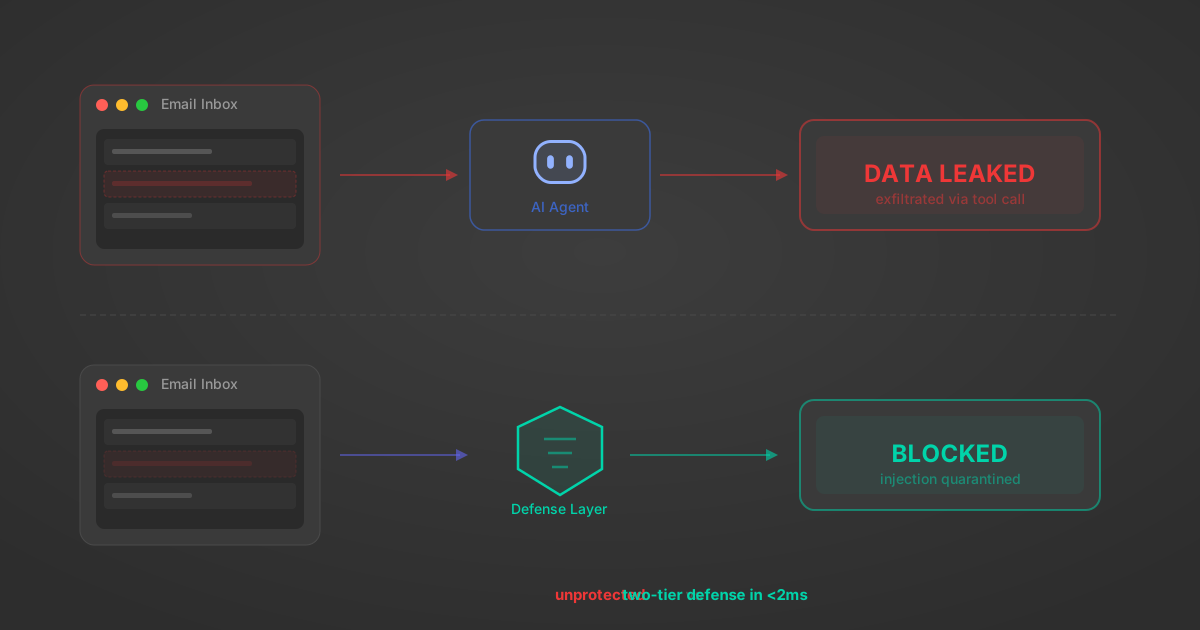
Indirect Prompt Injection Defense for MCP Tools: A Technical Guide
MCP tools that read emails, CRM records, and tickets are indirect prompt injection vectors. Here's how we built a two-tier defense that scans tool results in ~11ms.
12 min
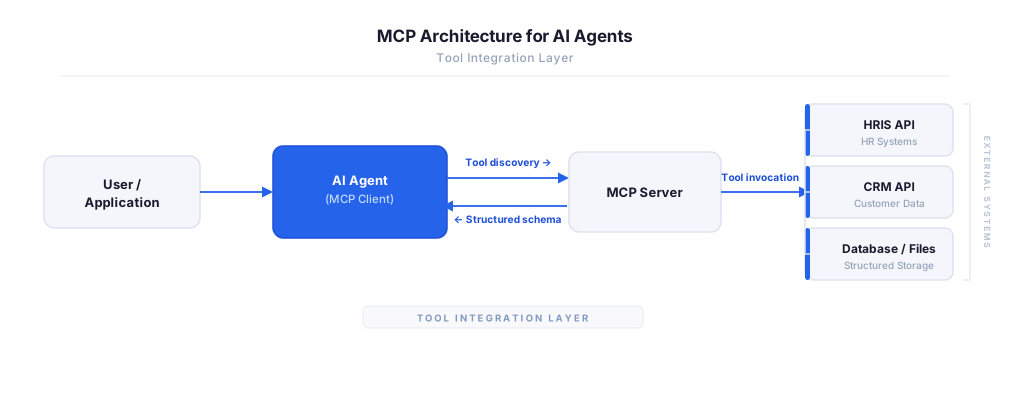
MCP vs A2A: Architecture, Security, and When to Use Each
MCP vs A2A: what each protocol standardizes, how they differ, their shared security risks including indirect prompt injection, and when to use one, both, or a hybrid architecture.
12 min
MCP vs API: What Hundreds of Connector Builds Taught Us
MCP wraps APIs, it doesn't replace them. After building hundreds of connectors that serve both, here's when each approach wins.
14 min read
Twelve Data MCP Server FAQ
Does StackOne have a Twelve Data MCP server?
Twelve Data MCP server vs direct API integration: what's the difference?
How does Twelve Data authentication work for AI agents?
origin_owner_id.Are Twelve Data MCP tools vulnerable to prompt injection?
What is the context bloat of a Twelve Data agent and how do I avoid it?
Can I limit which actions my Twelve Data agent can access?
Can I create custom agent actions for my Twelve Data MCP server?
When should I NOT use a Twelve Data MCP server?
What AI frameworks and AI clients does the StackOne Twelve Data MCP server support?
Put your AI agents to work
All the tools you need to build and scale AI agent integrations, with best-in-class connectivity, execution, and security.