


Oracle Clinical One MCP Server
for AI Agents
Connect your AI agent to StackOne's Oracle Clinical One MCP server and give it 80 MCP tools out of the box. Auth, tool execution, and security all managed.
 StackOne


Coverage
80 Agent Actions
Agents can read, write, delete and run operations in Oracle Clinical One. Extend your agent's capabilities with custom actions.

Authentication
Agent Tool Authentication
Per-user OAuth in one call. Your Oracle Clinical One MCP server gets session-scoped tokens with zero credentials stored on your infra.
Agent Auth →
Security
Agent Protection
Every Oracle Clinical One tool response scanned for prompt injection in milliseconds, with 88.7% accuracy, all running on CPU.
Prompt Injection Defense →
Performance
Max Agent Context. Min Cost.
Free up to 96% of your agent's context window to enhance reasoning and reduce cost, on every Oracle Clinical One call.
Tools Discovery →What is the Oracle Clinical One MCP Server?
A Oracle Clinical One MCP server lets AI agents read and write Oracle Clinical One data through the Model Context Protocol, Anthropic's open standard for connecting LLMs to external tools. StackOne's Oracle Clinical One MCP server ships with 80 pre-built actions, fully extensible via the Connector Builder, plus managed authentication, prompt injection defense, observability, and agent execution runtime. Connect it from MCP clients like Claude Desktop, Claude Code, Cursor, Goose, and VS Code, or from agent frameworks like OpenAI Agents SDK, LangChain, and Vercel AI SDK.
All Oracle Clinical One MCP Tools
Every StackOne action for Oracle Clinical One, ready for your agent. Read, write, delete and run operations, scoped to exactly what you need.
Codelists
- Create Codelist
Create a new codelist with its values.
- List Codelists
List available codelists.
Data Elements For The Repeating Part Of A Multi Section Forms
- Create Data Elements For The Repeating Part Of A Multi Section Form
Adds data in the repeating part of a multi section form in a visit by vendor code.
- Update Data Elements For The Repeating Part Of A Multi Section Form
Updates data in the repeating part of a multi section form by vendor code.
A Specific Forms
- Get A Specific Form
Returns a specific form by formId for the requested study version and mode.
- Delete A Specific Form
Deletes a form from the requested study version.
Randomization Lists
- Create Randomization List
Generates a randomization list in the study with sequence number; Rights - DesignerRandListPost.
- Export Randomization List
Exports a randomization list.
- Get Randomization List
Retrieves a randomization list.
Organizations
- Create Organization
Creates an organization.
- Get Organizations
Lists organizations with their properties, addresses and study usage.
All Visits, Forms And Questionnaires
- Create All Visits, Forms And Questionnaires
Creates all the visits, forms and questionnaires for the study ID on one or more study versions.
- Get All Visits, Forms And Questionnaires
Retrieves all the visits, forms and questionnaires in a study ID in one or more study versions and by mode.
A Visits
- Add A Visit
Creates a visit in v11.0 for the requested study version.
- Delete A Visit
Deletes a visit in v11.0 for the requested study version.
Other (65)
- Add Comment Or Reply To An Object
Adds a comment or reply to an object's comment section.
- Create Data Elements For The Flat Part Of A Multi Section Form
Adds data in the flat part of a multi section form in a visit by vendor code.
- Create Multiple Data Elements For A Subject
Creates multiple data elements for a subject for a particular visit and particular form, with form associations if any and also with file upload support.
- Add Form In A Study Version
Creates a form in the requested study version.
- Add A Kit In A Study
Creates a design-time kit type and persists combination kit dosing member mappings when requested.
- Upload Kit List File
Uploads kit list file.
- Create Open Query
Creates an open query on a data element.
- Create Manual Shipment In Resupply Strategy
Creates a manual shipment as part of a study's predictive resupply group.
- Create A Site
Creates a SDF (Sites or Depots) with the same shipping and primary address, if the query parameter is true.
- Add Study
Creates a study from the submitted study details.
- Create A New Treatment Arm For A Study Version
Creates a new treatment arm for a study version.
- Add A Subject
Adds a subject to a study.
- Create A Subject Transfer
Creates a subject transfer record to move a subject between sites.
- Create And Assign Bulk Users
Create multiple users in bulk for a study.
- Create Visit Status Record
Creates the visit status record for a given subject and visit ID and returns the latest visit attributes including doseHoldAction that the client uses to decide whether the Dose Hold button remains visible.
- Get Codelist By Name
Get the values for a single codelist using its name.
- Get All Comments For An Object
Retrieves all comments and replies for a particular object.
- Get Data Elements Based On Subject, Visit, And Form
Filters and retrieves a subject's data elements for a form or for a form-visit combination.
- Get The Audit History For A Data Element
Retrieves the audit history for a data element.
- Get Data Elements By Subject And Event ID
Retrieves data elements by subject and event ID for a given study and mode.
- Get All Items With Source Data Verification Information
API allows you to retrieve a list of items (data fields) within a clinical study that require Source Data Verification (SDV) for a specified subject, event, and study version.
- Get A List Of Study Forms
Retrieves the forms available in a study for the selected mode and form category.
- Export Kit Details For The Inventory
Exports kit details for the inventory source as a CSV file.
- Get Inventory Statuses
Retrieves statuses from an inventory.
- Get Kit List Details
Retrieves generated or uploaded kit lists details in a study, for both pooled and non-pooled kits.
- Get Kit Types
Retrieves kit types by study ID.
- Search For Kits In A Given Range For A Site
Retrieves kits for a site based on a given number range and filters kits as serialized or non-serialized.
- Get The Number Of Queries In A Study
Returns aggregated counts for each query lifecycle state for the supplied study and mode.
- Get Query Data Based On Multiple Parameters
Retrieves the queries in a study and mode with their details.
- Get Query By ID
Retrieves a query by its ID.
- Get Subjects With Open Queries In A Study
Returns a paginated list of the subjects that have open queries.
- Get Number Of Open Queries In A Study For Selected Subjects
Counts the open queries in a study for the subjects sent in the body.
- Get List Of Randomization Designs In A Study Version
Retrieves a list of all randomization designs for a study version.
- Get Non-Serialized Inventory Order Items
Retrieves all order items for non-serialized inventory.
- List Available Order Status Values
Lists available order status values.
- Search Shipments For A Site
Searches for shipments associated with a site by site ID.
- Search Shipments For A Study
Searches for shipments associated with a study by study ID.
- Get Sign Information
Get paginated sign configuration eligibility records.
- Get Country Name
Lists the countries and states of a study, with optional localized names.
- Get Site Or Depot Details By Study ID Using Filters
Lists the sites, depots or labs of a study, filtered and paginated.
- Get Study Site Details With Study Version Property By Site ID
Retrieves study-site details, including study version properties, for the specified site ID.
- Get A List Of All Studies
Returns the latest version of each study.
- Get List Of Treatment Arms For All Study Versions
Retrieves list of treatment arms for all study versions.
- Get Subject Details
Retrieves full details for a subject by ID with enrollment date.
- Get Subjects For The Specified Study And Mode
Lists all subjects with lock status for the specified study and mode.
- Get Subject History
Retrieves the history of given subject from a given study mode, with Study withdrawn and completion date in response.
- Get Subjects And Their Visit Schedule
Retrieve scheduled visit data for one or more subjects, filtered and sorted by sites, review status, state and other criteria.
- Get A Global User's Details By User ID
Retrieves a global user's details.
- Get Global Users
Retrieves global users.
- Get A User's Modes And Roles
Retrieves all role, mode, site, and depot assignments for the specified user within a single study.
- Get Associated And Dynamic Forms For A Subject Visit
Retrieves the Associated and Dynamic forms for a subject visit.
- Get List Of Visits Status For A Subject
Returns the visit status list for the specified subject, including visit dates, expected actions, and current states.
- Get Study Design Visits
Retrieves v11.0 visit design for the requested study version.
- Get Study Visit
Returns one visit in v11.0 for the requested study version.
- Get A List Of Study Visits
Returns visits for the requested study version in v11.0.
- Update Single Data Element
Updates a single data element to return the additional information of list of child data elements and labs getting cleared with the update of the parent data element.
- Update Subject
Update subject information for a specific subject by identifier within a study.
- Update Visit Status For A Given ID
Updates the visit status record for the specified visit and returns the latest attributes including doseHoldAction that the client uses to decide whether the Dose Hold button remains visible.
- Delete Data Elements In A Form Within A Visit
Removes the data elements in a form within a given visit.
- Delete A Site By ID
Deletes the SDF (site or depot) for the specified SDF ID.
- Verify Multiple Data Elements For A Subject
Verifies multiple data elements for a subject based on the data element ID.
- Upsert Data Elements For The Flat Part Of A Multi Section Form
Updates data in the flat part of a multi section form in a visit by vendor code.
- Bulk Assign Forms To Visits
Adds a form to multiple visits for a study version.
- Bulk User Effective Dates Update
Bulk update effective start/end dates for user assignments in a study.
- Bulk User Sites Update
Bulk update sites for a list of users or users matching search criteria in the specified study.
Set Up Your Oracle Clinical One MCP Server in Minutes
One endpoint. Any framework. Your agent is talking to Oracle Clinical One in under 10 lines of code.
Agent Frameworks


 JSON
{
  "mcpServers": {
    "stackone": {
      "command": "npx",
      "args": [
        "-y",
        "mcp-remote@latest",
        "https://api.stackone.com/mcp?x-account-id=<account_id>",
        "--header",
        "Authorization: Basic <YOUR_BASE64_TOKEN>"
      ]
    }
  }
}
Platform Resources

Comparing BM25, TF-IDF, and Hybrid Search for MCP Tool Discovery
Benchmarking BM25, TF-IDF, and hybrid search for MCP tool discovery across 916 tools. The 80/20 TF-IDF/BM25 hybrid hits 21% Top-1 accuracy in under 1ms.
10 min
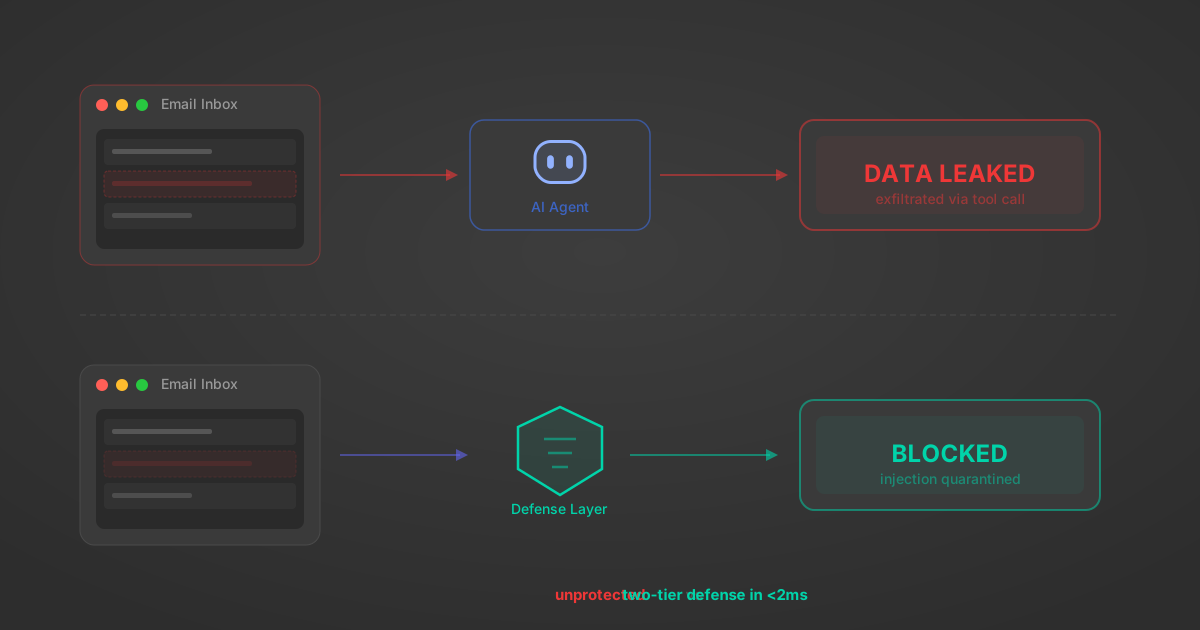
Indirect Prompt Injection Defense for MCP Tools: A Technical Guide
MCP tools that read emails, CRM records, and tickets are indirect prompt injection vectors. Here's how we built a two-tier defense that scans tool results in ~11ms.
12 min

MCP vs A2A: Architecture, Security, and When to Use Each
MCP vs A2A: what each protocol standardizes, how they differ, their shared security risks including indirect prompt injection, and when to use one, both, or a hybrid architecture.
12 min
MCP vs API: What Hundreds of Connector Builds Taught Us
MCP wraps APIs, it doesn't replace them. After building hundreds of connectors that serve both, here's when each approach wins.
14 min read
Oracle Clinical One MCP Server FAQ
Does StackOne have a Oracle Clinical One MCP server?
Oracle Clinical One MCP server vs direct API integration: what's the difference?
How does Oracle Clinical One authentication work for AI agents?
origin_owner_id.Are Oracle Clinical One MCP tools vulnerable to prompt injection?
What is the context bloat of a Oracle Clinical One agent and how do I avoid it?
Can I limit which actions my Oracle Clinical One agent can access?
Can I create custom agent actions for my Oracle Clinical One MCP server?
When should I NOT use a Oracle Clinical One MCP server?
What AI frameworks and AI clients does the StackOne Oracle Clinical One MCP server support?
Put your AI agents to work
All the tools you need to build and scale AI agent integrations, with best-in-class connectivity, execution, and security.