
Smartsheet MCP Server
for AI Agents
Connect your AI agent to StackOne's Smartsheet MCP server and give it 203 MCP tools out of the box. Auth, tool execution, and security all managed.
 StackOne






Coverage
203 Agent Actions
Create, read, update, and delete across Smartsheet — and extend your agent's capabilities with custom actions.

Authentication
Agent Tool Authentication
Per-user OAuth in one call. Your Smartsheet MCP server gets session-scoped tokens with zero credentials stored on your infra.
Agent Auth →
Security
Agent Protection
Every Smartsheet tool response scanned for prompt injection in milliseconds — 88.7% accuracy, all running on CPU.
Prompt Injection Defense →
Performance
Max Agent Context. Min Cost.
Free up to 96% of your agent's context window to enhance reasoning and reduce cost, on every Smartsheet call.
Tools Discovery →What is the Smartsheet MCP Server?
A Smartsheet MCP server lets AI agents read and write Smartsheet data through the Model Context Protocol — Anthropic's open standard for connecting LLMs to external tools. StackOne's Smartsheet MCP server ships with 203 pre-built actions, fully extensible via the Connector Builder — plus managed authentication, prompt injection defense, observability, and agent execution runtime. Connect it from MCP clients like Claude Desktop, Claude Code, Cursor, Goose, and VS Code, or from agent frameworks like OpenAI Agents SDK, LangChain, and Vercel AI SDK.
All Smartsheet MCP Tools
Every action from Smartsheet's API, ready for your agent. Create, read, update, and delete — scoped to exactly what you need.
Attachments
- List Attachments
Retrieve a paginated list of all attachments on a sheet via GET /sheets/{sheetId}/attachments
- Get Attachment
Retrieve a specific attachment by ID via GET /sheets/{sheetId}/attachments/{attachmentId}
- Delete Attachment
Delete an attachment from a sheet via DELETE /sheets/{sheetId}/attachments/{attachmentId}
Attachment Versions
- List Attachment Versions
Retrieve all versions of an attachment via GET /sheets/{sheetId}/attachments/{attachmentId}/versions
- Delete Attachment Versions
Delete all versions of an attachment via DELETE /sheets/{sheetId}/attachments/{attachmentId}/versions
Automation Rules
- List Automation Rules
Retrieve all automation rules on a sheet via GET /sheets/{sheetId}/automationrules
- Get Automation Rule
Retrieve a specific automation rule via GET /sheets/{sheetId}/automationrules/{automationRuleId}
- Update Automation Rule
Update an automation rule via PUT /sheets/{sheetId}/automationrules/{automationRuleId}
- Delete Automation Rule
Delete an automation rule via DELETE /sheets/{sheetId}/automationrules/{automationRuleId}
Contacts
- List Contacts
Retrieve a paginated list of the authenticated user's Smartsheet contacts via GET /contacts
- Get Contact
Retrieve a specific contact's details by ID via GET /contacts/{contactId}
Cross-sheet References
- Create Cross-sheet Reference
Create a cross-sheet reference between two sheets to define a data range for formulas via POST /sheets/{sheetId}/crosssheetreferences
- List Cross-sheet References
Retrieve all cross-sheet references on a sheet via GET /sheets/{sheetId}/crosssheetreferences
- Get Cross-sheet Reference
Retrieve a specific cross-sheet reference via GET /sheets/{sheetId}/crosssheetreferences/{crossSheetReferenceId}
Dashboards
- Copy Dashboard
Duplicate a dashboard to a destination folder or workspace via POST /sights/{sightId}/copy
- List Dashboards
Retrieve a paginated list of all dashboards (sights) accessible to the user via GET /sights
- Get Dashboard
Retrieve a dashboard's full configuration and widgets via GET /sights/{sightId}
- Move Dashboard
Move a dashboard to a different folder or workspace via POST /sights/{sightId}/move
- Update Dashboard
Update a dashboard's name via PUT /sights/{sightId}
- Delete Dashboard
Delete a dashboard via DELETE /sights/{sightId}
Dashboard Publish Status
- Get Dashboard Publish Status
Retrieve the publish status of a dashboard via GET /sights/{sightId}/publish
- Set Dashboard Publish Status
Set the publish status of a dashboard via PUT /sights/{sightId}/publish
Discussions
- Create Discussion
Start a new discussion thread on a sheet via POST /sheets/{sheetId}/discussions
- List Discussions
Retrieve a paginated list of all discussions on a sheet via GET /sheets/{sheetId}/discussions
- Get Discussion
Retrieve a specific discussion by ID via GET /sheets/{sheetId}/discussions/{discussionId}
- Delete Discussion
Delete a discussion and all its comments via DELETE /sheets/{sheetId}/discussions/{discussionId}
Comments
- Create Comment
Add a reply comment to an existing discussion thread via POST /sheets/{sheetId}/discussions/{discussionId}/comments
- Get Comment
Retrieve a single comment by ID from a sheet via GET /sheets/{sheetId}/comments/{commentId}
- Delete Comment
Delete a comment from a sheet via DELETE /sheets/{sheetId}/comments/{commentId}
Row Discussions
- Create Row Discussion
Start a discussion on a specific row via POST /sheets/{sheetId}/rows/{rowId}/discussions
- List Row Discussions
Retrieve all discussions on a specific row via GET /sheets/{sheetId}/rows/{rowId}/discussions
Favorites
- Add Favorite
Add one item to the current user's favorites via POST /favorites
- List Favorites
Retrieve the authenticated user's favorited items via GET /favorites
- Delete Favorite
Remove a single favorite by type and ID via DELETE /favorites/{favoriteType}/{favoriteId}
Folders
- Copy Folder
Duplicate a folder and its contents to a destination folder or workspace via POST /folders/{folderId}/copy
- Update Folder
Rename a folder via PUT /folders/{folderId}
- Move Folder
Move a folder to a different folder or workspace via POST /folders/{folderId}/move
- Delete Folder
Permanently delete a folder and all its contents via DELETE /folders/{folderId}
Groups
- Create Group
Create a new group in the organization via POST /groups, optionally seeding it with initial members by email
- List Groups
Retrieve a paginated list of all groups in the organization via GET /groups, useful for auditing group membership and managing access control
- Get Group
Retrieve a specific group and its full member list via GET /groups/{groupId}
- Update Group
Update a group's name, description, or transfer ownership via PUT /groups/{groupId}
- Delete Group
Permanently delete a group from the organization via DELETE /groups/{groupId}
Group Members
- Add Group Members
Add one or more members to an existing group via POST /groups/{groupId}/members
- Delete Group Member
Remove a specific member from a group via DELETE /groups/{groupId}/members/{userId}
Unified Groups
- List Unified Groups
List unified groups in Smartsheet.
- Get Unified Group
Get a unified Smartsheet group by ID.
Unified Organizations
- List Unified Organizations
List unified organizations in Smartsheet.
- Get Unified Organization
Get a unified Smartsheet organization by ID.
Unified Roles
- List Unified Roles
List unified roles in Smartsheet.
- Get Unified Role
Get a unified Smartsheet role by ID.
Unified Users
- List Unified Users
List unified users in Smartsheet.
- Get Unified User
Get a unified Smartsheet user by ID.
- Update Unified User
Update a unified Smartsheet user by ID.
- Delete Unified User
Delete a unified Smartsheet user by ID.
Proofs
- Create Proof
Create a new proof on a row via POST /sheets/{sheetId}/rows/{rowId}/proofs
- List Proofs
Retrieve all proofs on a sheet via GET /sheets/{sheetId}/proofs
- Get Proof
Retrieve a specific proof by ID via GET /sheets/{sheetId}/proofs/{proofId}
- Update Proof
Update a proof on a sheet via PUT /sheets/{sheetId}/proofs/{proofId}
- Delete Proof
Delete a proof from a sheet via DELETE /sheets/{sheetId}/proofs/{proofId}
Proof Discussions
- Create Proof Discussion
Start a discussion on a proof via POST /sheets/{sheetId}/proofs/{proofId}/discussions
- List Proof Discussions
Retrieve discussions on a proof via GET /sheets/{sheetId}/proofs/{proofId}/discussions
Proof Requests
- Create Proof Requests
Send proof requests (review invitations) via POST /sheets/{sheetId}/proofs/{proofId}/requests
- Delete Proof Requests
Delete proof requests from a proof via DELETE /sheets/{sheetId}/proofs/{proofId}/requests
Proof Versions
- Create Proof Version
Create a new version of a proof via POST /sheets/{sheetId}/proofs/{proofId}/versions
- List Proof Versions
Retrieve all versions of a proof via GET /sheets/{sheetId}/proofs/{proofId}/versions
- Delete Proof Version
Delete a proof version via DELETE /sheets/{sheetId}/proofs/{proofId}/versions
Reports
- Create Report
Create a new report via POST /reports
- List Reports
Retrieve a paginated list of all reports accessible to the user via GET /reports
- Get Report
Retrieve a report's data and configuration via GET /reports/{reportId}
- Delete Report
Delete a report via DELETE /reports/{reportId}
Report Publish Status
- Get Report Publish Status
Retrieve the publish status of a report via GET /reports/{reportId}/publish
- Set Report Publish Status
Set the publish status of a report and return the new status including any enabled publish URLs via PUT /reports/{reportId}/publish
Report Scopes
- Add Report Scope
Add source sheets or workspaces to a report's scope via POST /reports/{reportId}/scope
- Remove Report Scope
Remove source sheets or workspaces from a report's scope via DELETE /reports/{reportId}/scope
Sheets
- Import Sheet
Create a new sheet by importing data from a CSV or XLSX file via POST /sheets/import
- Copy Sheet
Create a copy of a sheet to a specified folder or workspace via POST /sheets/{sheetId}/copy
- Search Sheet
Search for text within a specific sheet identified by sheetId via GET /search/sheets/{sheetId}, returning matching rows for the given query string with an optional numericDates flag to receive dates as Unix epoch timestamps.
- List Sheets
Retrieve a paginated list of all sheets accessible to the authenticated user via GET /sheets
- Get Sheet
Retrieve a full sheet including rows, columns, and cell data via GET /sheets/{sheetId}, with extensive filtering and include options
- Move Sheet
Move a sheet to a different folder or workspace via POST /sheets/{sheetId}/move
- Update Sheet
Update a sheet's name, project settings, or user-level display settings via PUT /sheets/{sheetId}
- Delete Sheet
Permanently delete a sheet and all its data via DELETE /sheets/{sheetId}
Sheet Shares
- Get Sheet Share
Retrieve a specific share on a sheet via GET /sheets/{sheetId}/shares/{shareId}
- Update Sheet Share
Update a share's access level on a sheet via PUT /sheets/{sheetId}/shares/{shareId}
- Delete Sheet Share
Remove a share from a sheet via DELETE /sheets/{sheetId}/shares/{shareId}
Report Shares
- List Report Shares
Retrieve sharing permissions on a report via GET /reports/{reportId}/shares
- Get Report Share
Retrieve a specific share on a report via GET /reports/{reportId}/shares/{shareId}
- Update Report Share
Update a share's access level on a report via PUT /reports/{reportId}/shares/{shareId}
- Delete Report Share
Remove a share from a report via DELETE /reports/{reportId}/shares/{shareId}
Dashboard Shares
- List Dashboard Shares
Retrieve sharing permissions on a dashboard via GET /sights/{sightId}/shares
- Get Dashboard Share
Retrieve a specific share on a dashboard via GET /sights/{sightId}/shares/{shareId}
- Update Dashboard Share
Update a share's access level on a dashboard via PUT /sights/{sightId}/shares/{shareId}
- Delete Dashboard Share
Remove a share from a dashboard via DELETE /sights/{sightId}/shares/{shareId}
Workspace Shares
- List Workspace Shares
Retrieve sharing permissions on a workspace via GET /workspaces/{workspaceId}/shares
- Get Workspace Share
Retrieve a specific share on a workspace via GET /workspaces/{workspaceId}/shares/{shareId}
- Update Workspace Share
Update a share's access level on a workspace via PUT /workspaces/{workspaceId}/shares/{shareId}
- Delete Workspace Share
Remove a share from a workspace via DELETE /workspaces/{workspaceId}/shares/{shareId}
Columns
- Add Columns
Add one or more columns to a sheet via POST /sheets/{sheetId}/columns, supporting bulk insertion in a single request
- List Columns
Retrieve all column definitions for a sheet via GET /sheets/{sheetId}/columns, including type, title, and configuration
- Get Column
Retrieve a single column's definition by ID via GET /sheets/{sheetId}/columns/{columnId}
- Update Column
Update a column's title, type, position, or configuration via PUT /sheets/{sheetId}/columns/{columnId}
- Delete Column
Permanently delete a column and all its cell data from a sheet via DELETE /sheets/{sheetId}/columns/{columnId}
Rows
- Add Rows
Add one or more rows with cell data to a sheet via POST /sheets/{sheetId}/rows, with flexible positioning control
- Copy Rows
Copy rows from one sheet to another via POST /sheets/{sheetId}/rows/copy
- Get Row
Retrieve a specific row and its cell data from a sheet via GET /sheets/{sheetId}/rows/{rowId}
- Update Rows
Update cell values, row positions, or expand/collapse state for one or more rows via PUT /sheets/{sheetId}/rows
- Move Rows
Move rows from one sheet to another via POST /sheets/{sheetId}/rows/move
- Delete Rows
Delete one or more rows from a sheet via DELETE /sheets/{sheetId}/rows, using comma-separated row IDs as a query parameter
Summary Fields
- Add Summary Field
Create a summary field on a sheet via POST /sheets/{sheetId}/summary/fields
- List Summary Fields
Retrieve a paginated list of summary fields for a sheet via GET /sheets/{sheetId}/summary/fields
- Update Summary Field
Update a summary field on a sheet via PUT /sheets/{sheetId}/summary/fields
- Delete Summary Fields
Delete one or more summary fields from a sheet via DELETE /sheets/{sheetId}/summary/fields
Sheet Publish Status
- Get Sheet Publish Status
Retrieve the publish status of a sheet via GET /sheets/{sheetId}/publish
- Set Sheet Publish Status
Set the publish status of a sheet via PUT /sheets/{sheetId}/publish
Sent Update Requests
- List Sent Update Requests
Retrieve all sent update requests on a sheet via GET /sheets/{sheetId}/sentupdaterequests
- Get Sent Update Request
Retrieve a specific sent update request via GET /sheets/{sheetId}/sentupdaterequests/{sentUpdateRequestId}
- Delete Sent Update Request
Delete a sent update request via DELETE /sheets/{sheetId}/sentupdaterequests/{sentUpdateRequestId}
Requests
- Create Update Request
Create an update request on a sheet via POST /sheets/{sheetId}/updaterequests
- List Update Requests
Retrieve all update requests on a sheet via GET /sheets/{sheetId}/updaterequests
- Get Update Request
Retrieve a specific update request via GET /sheets/{sheetId}/updaterequests/{updateRequestId}
- Update Update Request
Update an existing update request via PUT /sheets/{sheetId}/updaterequests/{updateRequestId}
- Delete Update Request
Delete an update request via DELETE /sheets/{sheetId}/updaterequests/{updateRequestId}
Users
- Add User
Add a new user to the Smartsheet organization via POST /users, requiring System Admin permissions
- List Users
Retrieve a paginated list of all users in the Smartsheet organization via GET /users, with optional filtering by email, seat type, and plan ID, plus a displayContributorSeatType flag for free-tier seat visibility
- Get User
Retrieve a specific user's profile by their numeric user ID via GET /users/{userId}
- Update User
Update a user's role assignments or profile attributes via PUT /users/{userId}, requiring System Admin permissions
- Remove User
Permanently remove a user from the Smartsheet organization via DELETE /users/{userId}, with optional asset transfer
Alternate Emails
- Add Alternate Emails
Add one or more alternate email addresses for a user via POST /users/{userId}/alternateemails (Enterprise only, requires System Admin)
- List Alternate Emails
Retrieve a user's alternate email addresses via GET /users/{userId}/alternateemails
- Get Alternate Email
Retrieve a specific alternate email for a user via GET /users/{userId}/alternateemails/{alternateEmailId} (Enterprise only, requires System Admin)
- Delete Alternate Email
Remove an alternate email address from a user via DELETE /users/{userId}/alternateemails/{alternateEmailId} (Enterprise only, requires System Admin)
Webhooks
- Create Webhook
Create a new webhook subscription via POST /webhooks, targeting a specific sheet or other scoped object
- List Webhooks
Retrieve a paginated list of all webhooks owned by the authenticated user via GET /webhooks
- Get Webhook
Retrieve a specific webhook's configuration and status via GET /webhooks/{webhookId}
- Update Webhook
Update a webhook's enabled state, event subscriptions, or custom headers via PUT /webhooks/{webhookId}. Note that scope and scopeObjectId are immutable and cannot be changed after creation.
- Delete Webhook
Permanently delete a webhook via DELETE /webhooks/{webhookId}, immediately stopping all callbacks
Workspaces
- Create Workspace
Create a new workspace via POST /workspaces to organize sheets, reports, and dashboards
- Copy Workspace
Duplicate a workspace and its contents via POST /workspaces/{workspaceId}/copy, with control over which elements are included
- List Workspaces
Retrieve a paginated list of all workspaces accessible to the authenticated user via GET /workspaces, supporting token-based pagination (paginationType, maxItems, lastKey) and optional accessApiLevel for COMMENTER access.
- Get Workspace
Retrieve a workspace and its contents by ID via GET /workspaces/{workspaceId} (deprecated, prefer workspace metadata and children endpoints)
- Update Workspace
Rename a workspace via PUT /workspaces/{workspaceId}
- Delete Workspace
Permanently delete a workspace and all its contents via DELETE /workspaces/{workspaceId}
Other (60)
- Add URL Attachment To Sheet
Attach a URL to a sheet via POST /sheets/{sheetId}/attachments
- Create Folder (Deprecated Path)
(DEPRECATED path, sunsetting June 2026) Create a new subfolder within an existing folder via POST /folders/{folderId}/folders
- Create Home Folder
Create a new top-level folder in the user's Home via POST /home/folders
- Add Report Columns
Add columns to a report by matching source sheet columns via POST /reports/{reportId}/columns
- Send Report Via Email
Email a report to recipients via POST /reports/{reportId}/emails
- Create Sheet (Deprecated)
(DEPRECATED) Create a new sheet from scratch or from a template in the user's Sheets folder (Home) via POST /sheets. The Sheets folder is being replaced by workspaces.
- Create Sheet In Workspace
Create a new sheet in a workspace via POST /workspaces/{workspaceId}/sheets, either from scratch with column definitions or from a template
- Create Sheet In Folder
Create a new sheet from scratch or template inside a folder via POST /folders/{folderId}/sheets
- Send Rows Via Email
Email one or more rows from a sheet via POST /sheets/{sheetId}/rows/emails
- Send Sheet Via Email
Email a sheet to recipients via POST /sheets/{sheetId}/emails
- Create Folder In Workspace
Create a new top-level folder in a workspace via POST /workspaces/{workspaceId}/folders
- List Row Attachments
Retrieve all attachments on a specific row via GET /sheets/{sheetId}/rows/{rowId}/attachments
- Get Dashboard Path
Retrieve the path (folder hierarchy) to a dashboard via GET /sights/{sightId}/path
- List Discussion Attachments
Retrieve attachments on a discussion via GET /sheets/{sheetId}/discussions/{discussionId}/attachments
- List Events
Retrieve an audit trail of events in the organization via GET /events
- List Filtered Events
Retrieve filtered events via POST /filteredEvents
- List Personal Folders
Retrieve a paginated list of top-level personal folders from the user's Home via GET /folders/personal
- Get Folder (Deprecated)
(DEPRECATED, sunsetting June 2026) Retrieve a folder and its contents by ID via GET /folders/{folderId}. Use get_folder_metadata and list_folder_children instead.
- Get Folder Metadata
Retrieve folder metadata (name, dates, permalink) via GET /folders/{folderId}/metadata
- List Folder Children
List immediate child resources of a folder (sheets, reports, dashboards, subfolders, templates) via GET /folders/{folderId}/children
- Get Folder Path
Retrieve the hierarchical path to a folder via GET /folders/{folderId}/path
- Get Unified Credentials
Get the current Smartsheet connection's unified credentials and identity.
- List Unified Resource Types
List unified resource types in Smartsheet.
- List Unified Resource Users
List unified resource users in Smartsheet for a given workspace or sheet.
- List Proof Attachments
Retrieve attachments on a proof via GET /sheets/{sheetId}/proofs/{proofId}/attachments
- List Proof Request Actions
Retrieve request actions on a proof via GET /sheets/{sheetId}/proofs/{proofId}/requestactions
- Get Report Path
Retrieve the path (folder hierarchy) to a report via GET /reports/{reportId}/path
- Search Everything
Search for text across all accessible sheets, reports, and dashboards via GET /search, with optional scopes filtering, modifiedSince date filter, and numericDates flag for Unix epoch timestamps.
- List Sheet Shares (Deprecated)
(DEPRECATED) Retrieve a paginated list of sharing permissions on a sheet via GET /sheets/{sheetId}/shares, filterable by sharingInclude (ITEM for item-level shares, WORKSPACE for workspace-inherited shares).
- Get Sheet Summary
Retrieve the summary object for a sheet via GET /sheets/{sheetId}/summary
- Get Sheet Path
Retrieve the path (folder hierarchy) to a sheet via GET /sheets/{sheetId}/path
- Get Sheet Version
Retrieve the current version number of a sheet via GET /sheets/{sheetId}/version
- List Organization Sheets
Retrieve all sheets in the organization via GET /users/sheets (System Admin only)
- List Image URLs
Get temporary download URLs for cell images via POST /imageurls
- List Templates (Deprecated)
(DEPRECATED) Retrieve a paginated list of user-created templates via GET /templates. Use list_folder_children or workspace children with childrenResourceTypes=sheets,templates instead.
- List Public Templates
Retrieve all public Smartsheet templates via GET /templates/public
- Get Current User
Retrieve the profile of the currently authenticated user via GET /users/me, useful for verifying credentials and obtaining the caller's account context
- List User Plans
Retrieve plans associated with a user via GET /users/{userId}/plans (System Admin only)
- Get Server Info
Retrieve Smartsheet server information via GET /serverinfo
- List Workspace Folders
Retrieve top-level folders in a workspace via GET /workspaces/{workspaceId}/folders, with page-based pagination support (deprecated, use workspace children endpoint instead).
- Get Workspace Children
Retrieve child items of a workspace via GET /workspaces/{workspaceId}/children
- Get Workspace Metadata
Retrieve workspace metadata via GET /workspaces/{workspaceId}/metadata
- Update Report Definition
Update a report's definition (filters, sorting, grouping) via PUT /reports/{reportId}/definition
- Delete Favorites By Type
Remove multiple favorites of a given type via DELETE /favorites/{favoriteType}
- Remove User From Plan
Remove a user from a plan via DELETE /users/{userId}/plans/{planId} (System Admin only)
- Edit Comment
Update the text of a comment on a sheet via PUT /sheets/{sheetId}/comments/{commentId}
- Check Favorite
Check if an item is favorited via GET /favorites/{favoriteType}/{favoriteId}
- IAM Auth Test
Validate the current Smartsheet credentials and return the raw, unmapped /users/me JSON. Bypasses the unified IAM credentials schema — use this when debugging token expiry, revocation, scope mismatches, or 403s, not for normal app flows.
- Share Sheet (Deprecated)
(DEPRECATED) Share a sheet with users or groups via POST /sheets/{sheetId}/shares
- Share Report
Share a report with users or groups via POST /reports/{reportId}/shares
- Share Dashboard
Share a dashboard with users or groups via POST /sights/{sightId}/shares
- Share Workspace
Share a workspace with users or groups via POST /workspaces/{workspaceId}/shares
- Sort Rows
Sort rows in a sheet by one or more columns via POST /sheets/{sheetId}/sort
- Deactivate User
Deactivate a user via POST /users/{userId}/deactivate, blocking all Smartsheet access while preserving their data and permissions
- Reactivate User
Reactivate a previously deactivated user via POST /users/{userId}/reactivate, restoring full Smartsheet access
- Promote Alternate Email To Primary
Promote an alternate email to primary via POST /users/{userId}/alternateemails/{alternateEmailId}/makeprimary (Enterprise only, requires System Admin)
- Downgrade User
Downgrade a user on a plan via POST /users/{userId}/plans/{planId}/downgrade (System Admin only)
- Upgrade User
Upgrade a user on a plan via POST /users/{userId}/plans/{planId}/upgrade (System Admin only)
- Revoke Access Token
Revoke the current OAuth access token via DELETE /token
- Reset Webhook Shared Secret
Reset a webhook's shared secret via POST /webhooks/{webhookId}/resetSharedSecret
Set Up Your Smartsheet MCP Server in Minutes
One endpoint. Any framework. Your agent is talking to Smartsheet in under 10 lines of code.
Agent Frameworks


 JSON
JSON{
"mcpServers": {
"stackone": {
"command": "npx",
"args": [
"-y",
"mcp-remote@latest",
"https://api.stackone.com/mcp?x-account-id=<account_id>",
"--header",
"Authorization: Basic <YOUR_BASE64_TOKEN>"
]
}
}
}Check More Project Management MCP Servers
185+ actions
156+ actions
147+ actions
145+ actions
142+ actions
138+ actions
133+ actions
Platform Resources

MCP Code Mode: Keeping Tool Responses Out of Agent Context
Anthropic's code_execution processes data already in context. Custom MCP code mode keeps raw tool responses in a sandbox. 14K tokens vs 500.
11 min

Comparing BM25, TF-IDF, and Hybrid Search for MCP Tool Discovery
Benchmarking BM25, TF-IDF, and hybrid search for MCP tool discovery across 916 tools. The 80/20 TF-IDF/BM25 hybrid hits 21% Top-1 accuracy in under 1ms.
10 min
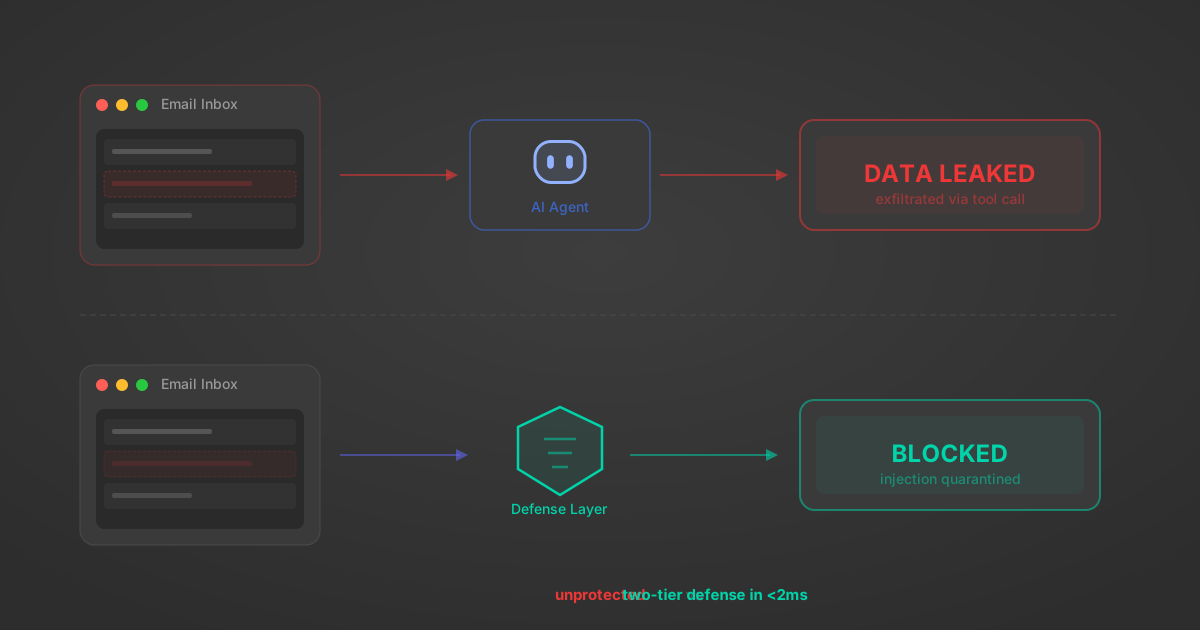
Indirect Prompt Injection Defense for MCP Tools: A Technical Guide
MCP tools that read emails, CRM records, and tickets are indirect prompt injection vectors. Here's how we built a two-tier defense that scans tool results in ~11ms.
12 min
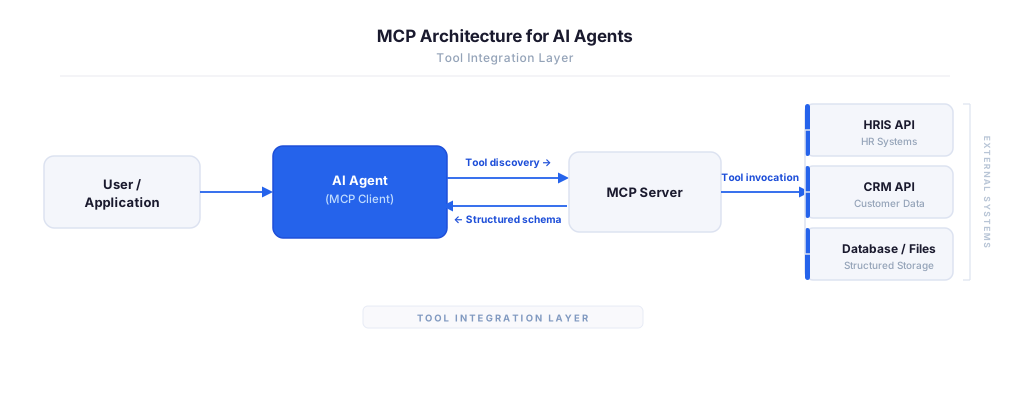
MCP vs A2A: Architecture, Security, and When to Use Each
MCP vs A2A: what each protocol standardizes, how they differ, their shared security risks including indirect prompt injection, and when to use one, both, or a hybrid architecture.
12 min
MCP vs API: What Hundreds of Connector Builds Taught Us
MCP wraps APIs, it doesn't replace them. After building hundreds of connectors that serve both, here's when each approach wins.
14 min read
Smartsheet MCP Server FAQ
Does StackOne have a Smartsheet MCP server?
Smartsheet MCP server vs direct API integration — what's the difference?
How does Smartsheet authentication work for AI agents?
origin_owner_id.Are Smartsheet MCP tools vulnerable to prompt injection?
What is the context bloat of a Smartsheet agent and how do I avoid it?
Can I limit which actions my Smartsheet agent can access?
Can I create custom agent actions for my Smartsheet MCP server?
When should I NOT use a Smartsheet MCP server?
What AI frameworks and AI clients does the StackOne Smartsheet MCP server support?
Put your AI agents to work
All the tools you need to build and scale AI agent integrations, with best-in-class connectivity, execution, and security.