
Absolute Software MCP Server
for AI Agents
Connect your AI agent to StackOne's Absolute Software MCP server and give it 119 MCP tools out of the box. Auth, tool execution, and security all managed.
 StackOne






Coverage
119 Agent Actions
Create, read, update, and delete across Absolute Software — and extend your agent's capabilities with custom actions.

Authentication
Agent Tool Authentication
Per-user OAuth in one call. Your Absolute Software MCP server gets session-scoped tokens with zero credentials stored on your infra.
Agent Auth →
Security
Agent Protection
Every Absolute Software tool response scanned for prompt injection in milliseconds — 88.7% accuracy, all running on CPU.
Prompt Injection Defense →
Performance
Max Agent Context. Min Cost.
Free up to 96% of your agent's context window to enhance reasoning and reduce cost, on every Absolute Software call.
Tools Discovery →What is the Absolute Software MCP Server?
A Absolute Software MCP server lets AI agents read and write Absolute Software data through the Model Context Protocol — Anthropic's open standard for connecting LLMs to external tools. StackOne's Absolute Software MCP server ships with 119 pre-built actions, fully extensible via the Connector Builder — plus managed authentication, prompt injection defense, observability, and agent execution runtime. Connect it from MCP clients like Claude Desktop, Claude Code, Cursor, Goose, and VS Code, or from agent frameworks like OpenAI Agents SDK, LangChain, and Vercel AI SDK.
All Absolute Software MCP Tools
Every action from Absolute Software's API, ready for your agent. Create, read, update, and delete — scoped to exactly what you need.
Action Thresholds
- Get Action Thresholds
Gets action threshold settings including daily limits and enabled status
- Update Action Threshold
Update the daily value and status of an action threshold
Policy Groups For Agent Versions
- Get Policy Groups For Agent Version
Get policy groups assigned to an agent version
- Update Policy Groups For Agent Version
Update the policy groups assigned to an agent version
A Data Point Configurations
- Add A Data Point Configuration
Add a new Custom Data data point to the Custom Data policy
- Get A Data Point Configuration
Get a specific Custom Data data point configuration
- Update A Data Point Configuration
Update an existing Custom Data data point configuration
- Delete A Data Point Configuration
Delete a Custom Data data point configuration
A Custom Device Field Definitions
- Create A Custom Device Field Definition
Create a Custom Device Field to store organisation-specific information
- Update A Custom Device Field Definition
Update an existing Custom Device Field definition
Device Field Values
- Get Device Field Values
Get the assigned values for all of a device's Device Fields
- Update Device Field Values
Update the values of Custom Device Fields for a device
A Freeze Messages
- Create A Freeze Message
Create a Freeze message displayed on frozen devices
- Get A Freeze Message
Get a specific Freeze message by messageUid
- Update A Freeze Message
Update an existing Freeze message
- Delete A Freeze Message
Delete an existing Freeze message
A Geofences
- Create A Geofence
Create a geofence or superfence with a boundary around a location
- Delete A Geofence
Delete a geofence by its geofenceUid
Geolocation Settings
- Get Geolocation Settings
View the current status of each Geolocation setting in your account
- Update Geolocation Settings
Update Geolocation settings for your account
A Device Group Or Folders
- Create A Device Group Or Folder
Create a static device group or folder
- Delete A Device Group Or Folder
Delete a device group or folder by deviceGroupTreeUid
A Policy Groups
- Create A Policy Group
Create a new policy group with a name and description
- Delete A Policy Group
Delete a user-defined policy group
A Reach Scripts
- Get A Reach Script
Get information about a script from the Reach Library
- Download A Reach Script
Download a ZIP file containing a script from the Reach Library
A Users
- Create A User
Create a new user
- Get A User
Get details for a specific user by their unique ID
- Update A User
Update an existing user's details
- Delete A User
Delete a user
Other (89)
- Send A Message To Devices
Create a Messaging request to display a message on device screens
- Get Software Data
Get software application data filtered by app identity
- Get Software Data By Device
Get installed applications for a specific device by deviceUid, device name, serial number, or ESN
- Get Software Data (original Metadata)
Get software data filtered by original (pre-normalization) app name, publisher, and version — before Absolute's app catalogue matching
- Get Software Data History
Get software installation history — filter by first detection date, install date, install path, OS name, and username
- Get Software Data (Advanced)
Get software data using OData-style filter expressions (e.g. appName eq 'Chrome' and osName eq 'Windows 10')
- Get All Data Point Configurations
Get all Custom Data data point configurations
- Get All Data Point Values
Get all Custom Data data points and their scan results for all devices
- Get All Device Field Definitions
Get a list of all Device Field definitions in your account
- Get A Device Field Definition
Get the Device Field definition for a specific field
- Get Device Details
Get core device identity and status information
- Get Device Connectivity
Get device network, user, and activity information
- Get Device Security Status
Get device security component and protection status
- Get Device License Details
Get device license assignment information
- Get Device Details (Advanced)
Get device details using OData-style filter expressions (e.g. agentStatus eq 'A' and deviceName sw 'LAP')
- Get Device Compliance
Get device compliance status — filter by compliance state, device name, UID, and ESN
- Get Device Compliance Details
Get compliance status of devices filtered by network and dates
- Get Historical EDD Scan Results
Get detailed information about historical EDD scan results for all devices
- Get Latest EDD Scan Results Summary
View confidential or at-risk file content detected during the most recent EDD scan
- Get Matched Content For A Match
Get the file content detected in a specific EDD match
- Get Latest EDD Scan Results For A Device
Get EDD scan results for a specific device
- Get Detailed Match Information
Get information about each match detected in a file
- Get Device Eligibility For EDD Scan
Check which devices are ineligible for EDD scanning before requesting a scan
- Get File Delete Actions
Get the status of File Delete actions for specified devices
- Get File Delete Actions By Request
Get the status of File Delete actions for a specific request and devices
- Get Freeze Messages
Get all configured Freeze messages
- Get A Freeze Request
Get information about a Freeze request by requestUid
- Get All Geofences
Get all geofences and superfences in your account
- Get All Device Groups
Get all device groups
- Get All Device Groups And Folders
Get all device groups and folders in a tree structure
- Get Device Groups By Device
Get all device groups that a specific device belongs to
- Get Devices In A Group Or Folder
Get the list of devices in a device group or folder
- Get Account Licenses
Get information about the product licenses associated with your account
- Get License Consumption
Get license consumption showing assigned vs available counts
- Get License Enforcement Status
Determine if license enforcement applies to your account's licenses
- Get Send Message Actions
Get the status of Send Message actions for specified devices
- Get Send Message Actions By Request
Get the status of Send Message actions for a specific request and devices
- Get End User Messages
Get all End User Messages in the Secure Endpoint Console
- Get An End User Message
Get a specific End User Message by messageUid
- Get Missing Devices
Get information about all missing devices
- Get Playbook Variables
Get the list of variables that can be used in playbook parameters
- Get Playbook Templates
Get available playbook templates with their parameters
- Get All Policy Groups
Get all policy groups
- Get A Move Devices Request
Get information about a request to move devices between policy groups
- Get Run Script Actions
Get the status of Run Script actions for specified devices
- Get All Reach Scripts
Get script information for all scripts in the Reach Library
- Get Run Script Actions By Request
Get the status of Run Script actions for a specific request and devices
- Get All Send Message Requests
Get information about all Send Message requests
- Get All File Delete Requests
Get information about all File Delete requests
- List Reach Requests
List remote script (Reach) requests
- Get All Unenroll Device Requests
Get information about all Unenroll Device requests
- Get All Wipe Requests
Get information about all Wipe requests
- Get A Send Message Request
Get information about a specific Send Message request
- Get A File Delete Request
Get information about a specific File Delete request
- Get A Run Script Request
Get information about a specific Run Script request
- Get A Run Script Request Configuration
Get Advanced Configuration Options for a specific Run Script request
- Get An Unenroll Device Request
Get information about a specific Unenroll Device request
- Get A Wipe Request
Get information about a specific Wipe request
- Get All Roles
Get all default and custom roles
- Get SIEM Events
Get a list of SIEM events filtered by creation date
- Get Unenroll Device Actions
Get the status of Unenroll Device actions for specified devices
- Get Unenroll Device Actions By Request
Get the status of Unenroll Device actions for a specific request and devices
- Get All Users
Get a list of all users in your account
- Get Wipe Actions
Get the status of Wipe actions for specified devices
- Get Wipe Actions By Request
Get the status of Wipe actions for a specific request and devices
- Download A Certificate Of Sanitization
Download a Wipe Certificate of Sanitization for a device
- Update Agent Settings
Update the global agent configuration settings
- Update An Offline Freeze Rule
Activate or deactivate an Offline Freeze rule
- Move Devices To A Policy Group
Move devices from one policy group to another
- Remove Freeze From Devices
Create a Remove Freeze request for devices regardless of Freeze status
- Delete Files From Devices
Create a File Delete request to remove files matching a pattern from devices
- Request An EDD Scan
Request a full or delta EDD scan on a group of devices
- Cancel A File Delete Request
Cancel pending File Delete actions for a request
- Edit Device Group Properties
Update the name or description of a device group or folder
- Cancel A Send Message Request
Cancel pending Send Message actions for a request
- Report Devices Missing
Report devices as missing to initiate tracking
- Report Missing Devices Found
Report missing devices as found
- Edit Policy Group Properties
Edit a policy group's name and description
- Activate A Policy
Activate a policy within a policy group
- Deactivate A Policy
Deactivate a policy within a policy group
- Cancel Run Script Actions
Cancel pending Run Script actions on specified devices
- Cancel A Run Script Request
Cancel pending Run Script actions for a specific request and devices
- Freeze Devices
Create an On-demand or Scheduled Freeze request for devices
- Run A Script
Create a Run Script request to execute a Reach script on devices
- Manage A Supervisor Password
Create, update, or remove the supervisor password for devices
- Wipe Devices
Create a Wipe request to remotely remove all sensitive data from devices
- Execute A Playbook On Devices
Create a Playbook request to run a configured Playbook template on devices
- Unenroll Devices
Create an Unenroll request to remove the Absolute agent from devices
- Cancel A Wipe Request
Cancel pending Wipe actions for a request
Set Up Your Absolute Software MCP Server in Minutes
One endpoint. Any framework. Your agent is talking to Absolute Software in under 10 lines of code.
Agent Frameworks


 JSON
JSON{
"mcpServers": {
"stackone": {
"command": "npx",
"args": [
"-y",
"mcp-remote@latest",
"https://api.stackone.com/mcp?x-account-id=<account_id>",
"--header",
"Authorization: Basic <YOUR_BASE64_TOKEN>"
]
}
}
}Check More developer MCP Servers
266+ actions
124+ actions
102+ actions
87+ actions
71+ actions
68+ actions
67+ actions
Platform Resources

MCP Code Mode: Keeping Tool Responses Out of Agent Context
Anthropic's code_execution processes data already in context. Custom MCP code mode keeps raw tool responses in a sandbox. 14K tokens vs 500.
11 min

Comparing BM25, TF-IDF, and Hybrid Search for MCP Tool Discovery
Benchmarking BM25, TF-IDF, and hybrid search for MCP tool discovery across 916 tools. The 80/20 TF-IDF/BM25 hybrid hits 21% Top-1 accuracy in under 1ms.
10 min
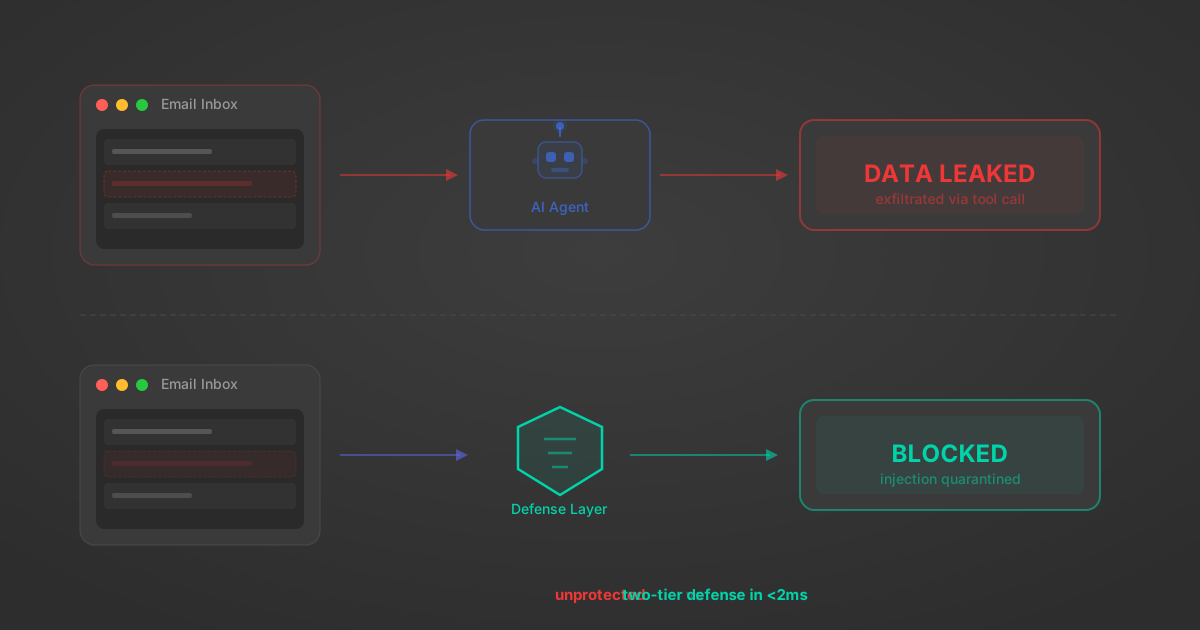
Indirect Prompt Injection Defense for MCP Tools: A Technical Guide
MCP tools that read emails, CRM records, and tickets are indirect prompt injection vectors. Here's how we built a two-tier defense that scans tool results in ~11ms.
12 min
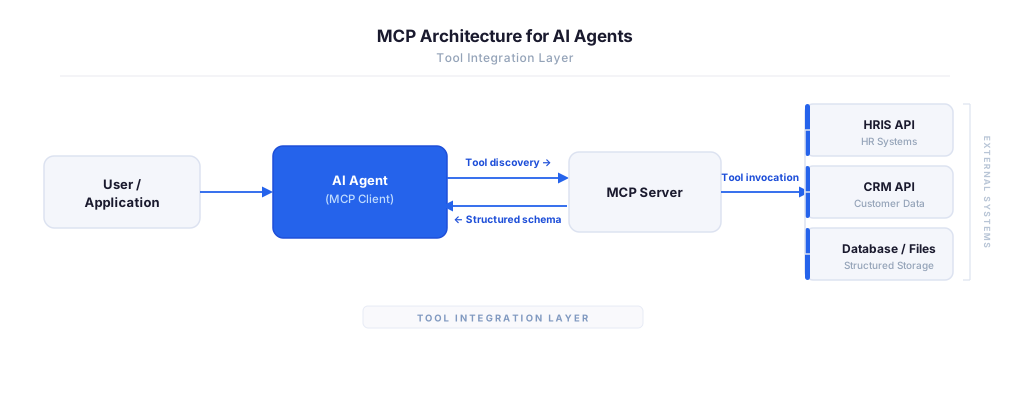
MCP vs A2A: Architecture, Security, and When to Use Each
MCP vs A2A: what each protocol standardizes, how they differ, their shared security risks including indirect prompt injection, and when to use one, both, or a hybrid architecture.
12 min
MCP vs API: What Hundreds of Connector Builds Taught Us
MCP wraps APIs, it doesn't replace them. After building hundreds of connectors that serve both, here's when each approach wins.
14 min read
Absolute Software MCP Server FAQ
Does StackOne have a Absolute Software MCP server?
Absolute Software MCP server vs direct API integration — what's the difference?
How does Absolute Software authentication work for AI agents?
origin_owner_id.Are Absolute Software MCP tools vulnerable to prompt injection?
What is the context bloat of a Absolute Software agent and how do I avoid it?
Can I limit which actions my Absolute Software agent can access?
Can I create custom agent actions for my Absolute Software MCP server?
When should I NOT use a Absolute Software MCP server?
What AI frameworks and AI clients does the StackOne Absolute Software MCP server support?
Put your AI agents to work
All the tools you need to build and scale AI agent integrations, with best-in-class connectivity, execution, and security.