


RingCentral MCP Server
for AI Agents
Connect your AI agent to StackOne's RingCentral MCP server and give it 87 MCP tools out of the box. Auth, tool execution, and security all managed.
 StackOne






Coverage
87 Agent Actions
Extend your agent's capabilities with custom actions.

Authentication
Agent Tool Authentication
Per-user OAuth in one call. Your RingCentral MCP server gets session-scoped tokens with zero credentials stored on your infra.
Agent Auth →
Security
Agent Protection
Every RingCentral tool response scanned for prompt injection in milliseconds, with 88.7% accuracy, all running on CPU.
Prompt Injection Defense →
Performance
Max Agent Context. Min Cost.
Free up to 96% of your agent's context window to enhance reasoning and reduce cost, on every RingCentral call.
Tools Discovery →What is the RingCentral MCP Server?
A RingCentral MCP server lets AI agents work with RingCentral data through the Model Context Protocol, Anthropic's open standard for connecting LLMs to external tools. StackOne's RingCentral MCP server ships with 87 pre-built actions, fully extensible via the Connector Builder, plus managed authentication, prompt injection defense, observability, and agent execution runtime. Connect it from MCP clients like Claude Desktop, Claude Code, Cursor, Goose, and VS Code, or from agent frameworks like OpenAI Agents SDK, LangChain, and Vercel AI SDK.
All RingCentral MCP Tools
Every StackOne action for RingCentral, ready for your agent. Scoped to exactly what you need.
User Call Records
- List User Call Records
Retrieve historical call log records for a single user extension with rich filtering
- Delete User Call Records
Permanently delete call log records for a user extension
Data Export Tasks
- Create Data Export Task
Start an asynchronous Glip (Team Messaging) compliance data export task
- List Data Export Tasks
Retrieve the list of Glip (Team Messaging) compliance data export tasks created for the company
- Get Data Export Task
Retrieve the status and download links of a specific Glip compliance data export task
Extensions
- Create Extension
Provision a new extension (user, virtual user, call queue, voicemail, etc.) on the account
- List Extensions
Retrieve the list of extensions (users, call queues, IVR menus, etc.) provisioned on the account
- Get Extension
Retrieve basic information about a single extension by ID
User Templates
- List User Templates
Retrieve the list of user templates configured for the account
- Get User Template
Retrieve a single user template by ID
Company Directory Entries
- Get Company Directory Entries
Retrieve the company directory of corporate (internal) contacts for the account
- Search Company Directory Entries
Search and filter corporate directory contacts by name, email, extension, department, site, status or type, with sorting and paging
Video Meetings
- List Video Meetings
Retrieve the authenticated user's RingCentral Video meeting history records
- Get Video Meeting
Retrieve a single RingCentral Video meeting history record by its meeting id
Messages
- List Messages
Retrieve a list of messages (SMS, Fax, VoiceMail, Pager) from an extension's message store
- Delete Message
Delete one or more messages by message ID, with optional immediate purge
Message(s)s
- Get Message(s)
Retrieve an individual message record (or multiple records in bulk) by message ID
- Update Message(s)
Update the read status of one or more messages by message ID
Message Store Configurations
- Get Message Store Configuration
Retrieve the account-wide message store retention settings
- Update Message Store Configuration
Update the account-wide message retention policy for Fax and Voicemail messages
Call Queue Presences
- Get Call Queue Presence
Retrieve the presence status of every member of a specific call queue
- Update Call Queue Presence
Bulk-update the queue availability of one or more members of a specific call queue
Agent's Call Queue Presences
- Get Agent's Call Queue Presence
Retrieve all call queues an agent belongs to with their per-queue availability status
- Update Agent's Call Queue Presence
Update a single agent's call availability across one or more of their call queues
User Presence Status
- Get User Presence Status
Retrieve the current presence status of a user extension
- Update User Presence Status
Update a user's presence status, status message and Do Not Disturb state
Unified Presences
- Get Unified Presence
Retrieve a user's aggregated presence across Team Messaging and telephony channels
- Update Unified Presence
Update a user's aggregated presence across Team Messaging and telephony channels
States
- List States
Retrieve the list of states/regions from RingCentral's reference dictionary, optionally filtered by country
- Get State
Retrieve details of a single state/region by its internal identifier
User Assigned Roles
- List User Assigned Roles
Retrieve the roles currently assigned to a user extension
- Update User Assigned Roles
Replace the full set of roles assigned to a user extension
User Administered Sites
- List User Administered Sites
List the business sites a user's extension is authorized to administer
- Update User Administered Sites
Replace the full set of business sites a user's extension is authorized to administer
Teams
- Create Team
Create a new Team Messaging team, optionally adding an initial list of members by ID or email
- List Teams
Retrieve the list of Team Messaging teams visible to the current user
User Profile Images
- Upload User Profile Image
Upload a new profile image for a user extension via multipart form upload
- Get User Profile Image
Download the current profile image of a user extension as binary image content
- Update User Profile Image
Replace an existing profile image of a user extension via multipart form upload
- Delete User Profile Image
Remove the current profile image of a user extension without replacing it
Other (47)
- Add Chat To Favorites
Add a Team Messaging chat to the authenticated user's list of favorite (starred/pinned) chats
- Add BYOD Devices
Bulk-add multiple BYOD (customer provided) devices to the account in a single call
- Upload Multiple User Contacts
Bulk-create personal address book contacts for multiple extensions in one request
- Create Fax Message
Send a fax message with one or more file attachments to one or more recipient fax numbers, optionally with a cover page
- Send A2P SMS
Send a batch of high-volume A2P (Application-to-Person) SMS messages to many recipients in a single call
- Add Opt-In/Out Numbers
Bulk mark recipient phone numbers as opted out (or opted back in) for A2P SMS from a given sender number
- Create Message Store Report
Start an asynchronous task that collects account messages into a downloadable export report
- Send SMS
Send an outbound SMS text message to one or more recipients from a RingCentral phone number
- Send MMS
Send an outbound MMS message with a media file attachment to one or more recipients
- Create Task
Create a new task in a specific Team Messaging chat, assigning it to one or more members
- Create Multiple User Extensions
Provision multiple new user extensions (with customer-provided BYOD devices) in a single bulk call
- Get Emergency Map Configuration Task
Retrieve the status and results of an asynchronous Automatic Location Updates task
- List User Events
Retrieve all calendar events created by the current authenticated user
- Get Event
Retrieve one or more calendar events by ID
- Get Call Session Status
Retrieve the current status of a live call session by its telephony session identifier, including all call parties and their states.
- List Company Active Calls
Retrieve all calls currently in progress across the entire RingCentral account
- List User Active Calls
Retrieve all calls currently in progress for a single user extension
- List Call Queues
Retrieve a paginated list of call queue extensions on the account
- List Favorite Chats
Retrieve the list of the authenticated user's favorite (starred/pinned) team messaging chats
- List Extension Devices
List the devices assigned to a user's extension, with filters for device type, line type, feature, and line pooling
- Get Extension Update Task Status
Poll the status of an asynchronous bulk extension-update task
- List Favorite Contacts
Retrieve the list of favorite contacts marked by an extension
- Get Contacts Upload Task
Retrieve the status of a bulk contacts upload task
- List A2P SMS Statuses
Retrieve aggregate counts of high-volume A2P SMS messages grouped by delivery status and error code
- List Opted Out Numbers
List recipient phone numbers opted out of (or opted in to) high-volume A2P SMS on the account
- Get Message Store Report Task
Retrieve the current status of a message store report export task
- Get RingOut Call Status
Retrieve the current status of a two-legged RingOut call
- List Company User Roles
Retrieve a paginated list of user roles configured on the account
- List Chat Tasks
Retrieve the list of tasks that belong to a specific Team Messaging chat
- Update User Call Queues
Replace the full set of call queues a user extension is an agent in
- Update Multiple Extensions
Bulk-update up to 500 extensions in a single asynchronous request
- Update Favorite Contact List
Replace an extension's entire favorite contacts list with the provided set of records
- Delete Conversation
Delete entire conversation(s) by conversation ID, or all messages matching filter criteria
- Delete User Extensions
Delete one or more user extensions in a single bulk call, optionally keeping their phone numbers and devices in the account inventory
- Enable Automatic Location Updates For Users
Enable or disable the Automatic Location Updates feature for multiple account users in one bulk call
- Calls Aggregation Data
Fetch aggregated call volume and call duration analytics for a single time range
- Calls Timeline Data
Fetch time-series call volume and call duration analytics broken into interval buckets
- Make CallOut
Initiate a two-legged outbound (CallOut) call session that first rings the caller's registered Softphone/Hardphone device and then bridges the call to the destination party once answered.
- Start Conference Call Session
Start a new ad-hoc conference call session on the authenticated account's conferencing line, returning a voiceCallToken and telephony session ID used to bring parties into the conference.
- Drop Call Session
Drop (hang up) an entire live call session by its telephony session identifier, disconnecting every party on the call.
- Send/Resend Welcome Email
Send or resend the welcome email to the system user of a confirmed RingCentral account
- Send/Resend Activation Email
Send or resend the activation email to the system user of an unconfirmed RingCentral account
- Patch Message(s)
Partially update message(s) — change read status and/or restore soft-deleted messages
- Make RingOut Call
Place a two-legged RingOut phone call
- Cancel RingOut Call
Cancel an in-progress or queued two-legged RingOut call
- Archive Team
Archive a Team Messaging team by its chat ID
- Unarchive Team
Unarchive a Team Messaging team by its chat ID, restoring it to Active status
Set Up Your RingCentral MCP Server in Minutes
One endpoint. Any framework. Your agent is talking to RingCentral in under 10 lines of code.
Agent Frameworks


 JSON
JSON{
"mcpServers": {
"stackone": {
"command": "npx",
"args": [
"-y",
"mcp-remote@latest",
"https://api.stackone.com/mcp?x-account-id=<account_id>",
"--header",
"Authorization: Basic <YOUR_BASE64_TOKEN>"
]
}
}
}Platform Resources

Comparing BM25, TF-IDF, and Hybrid Search for MCP Tool Discovery
Benchmarking BM25, TF-IDF, and hybrid search for MCP tool discovery across 916 tools. The 80/20 TF-IDF/BM25 hybrid hits 21% Top-1 accuracy in under 1ms.
10 min
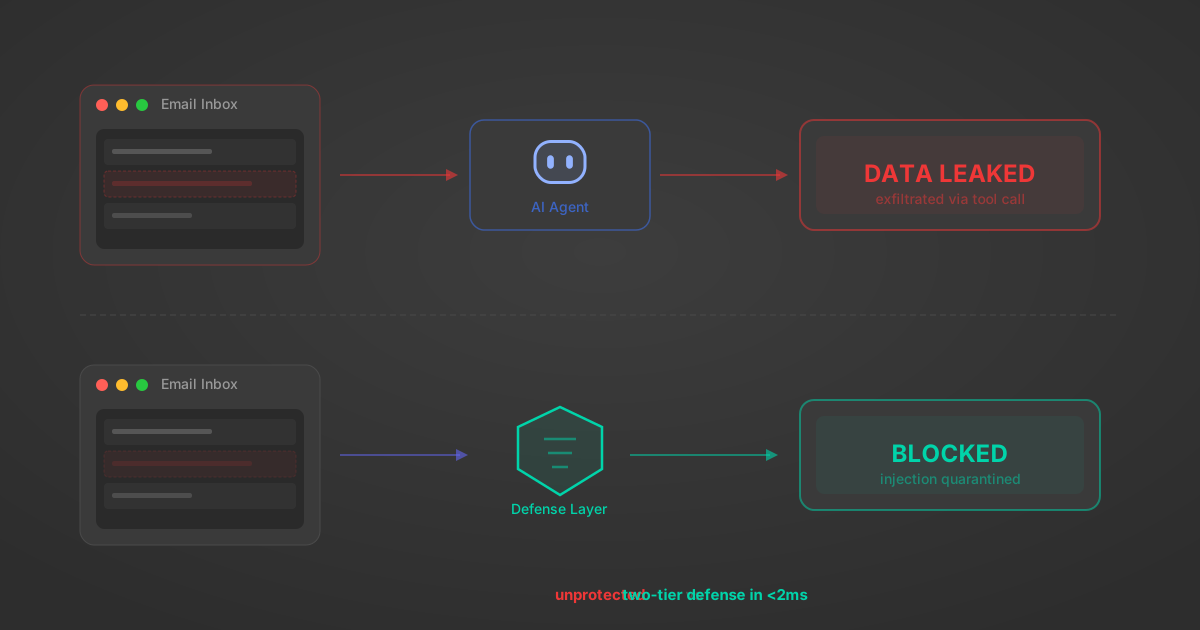
Indirect Prompt Injection Defense for MCP Tools: A Technical Guide
MCP tools that read emails, CRM records, and tickets are indirect prompt injection vectors. Here's how we built a two-tier defense that scans tool results in ~11ms.
12 min
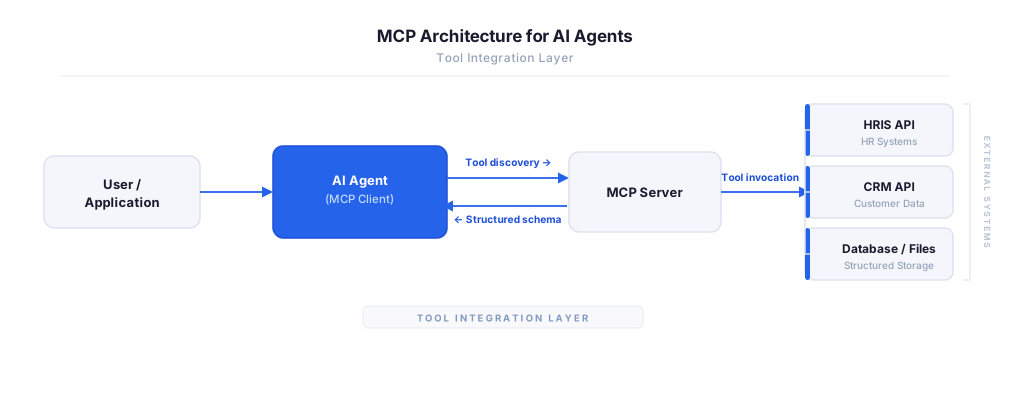
MCP vs A2A: Architecture, Security, and When to Use Each
MCP vs A2A: what each protocol standardizes, how they differ, their shared security risks including indirect prompt injection, and when to use one, both, or a hybrid architecture.
12 min
MCP vs API: What Hundreds of Connector Builds Taught Us
MCP wraps APIs, it doesn't replace them. After building hundreds of connectors that serve both, here's when each approach wins.
14 min read
RingCentral MCP Server FAQ
Does StackOne have a RingCentral MCP server?
RingCentral MCP server vs direct API integration: what's the difference?
How does RingCentral authentication work for AI agents?
origin_owner_id.Are RingCentral MCP tools vulnerable to prompt injection?
What is the context bloat of a RingCentral agent and how do I avoid it?
Can I limit which actions my RingCentral agent can access?
Can I create custom agent actions for my RingCentral MCP server?
When should I NOT use a RingCentral MCP server?
What AI frameworks and AI clients does the StackOne RingCentral MCP server support?
Put your AI agents to work
All the tools you need to build and scale AI agent integrations, with best-in-class connectivity, execution, and security.