


Daloopa MCP Server
for AI Agents
Connect your AI agent to StackOne's Daloopa MCP server and give it 43 MCP tools out of the box. Auth, tool execution, and security all managed.
 StackOne


Coverage
43 Agent Actions
Agents can read, write, delete and run operations in Daloopa. Extend your agent's capabilities with custom actions.

Authentication
Agent Tool Authentication
Per-user OAuth in one call. Your Daloopa MCP server gets session-scoped tokens with zero credentials stored on your infra.
Agent Auth →
Security
Agent Protection
Every Daloopa tool response scanned for prompt injection in milliseconds, with 88.7% accuracy, all running on CPU.
Prompt Injection Defense →
Performance
Max Agent Context. Min Cost.
Free up to 96% of your agent's context window to enhance reasoning and reduce cost, on every Daloopa call.
Tools Discovery →What is the Daloopa MCP Server?
A Daloopa MCP server lets AI agents read and write Daloopa data through the Model Context Protocol, Anthropic's open standard for connecting LLMs to external tools. StackOne's Daloopa MCP server ships with 43 pre-built actions, fully extensible via the Connector Builder, plus managed authentication, prompt injection defense, observability, and agent execution runtime. Connect it from MCP clients like Claude Desktop, Claude Code, Cursor, Goose, and VS Code, or from agent frameworks like OpenAI Agents SDK, LangChain, and Vercel AI SDK.
All Daloopa MCP Tools
Every StackOne action for Daloopa, ready for your agent. Read, write, delete and run operations, scoped to exactly what you need.
Investing Skills
- List Investing Skills
Retrieve the catalog of available investing skills — reusable, model-initiated analytical workflows (earnings review, DCF, comps, etc.).
- Retrieve Investing Skill
Retrieve a single investing skill by its unique name, including its full prompt content, declared inputs, and required tools.
Taxonomy Metrics
- Retrieve Taxonomy Metric
Retrieve detailed information about a specific Taxonomy Metric by its unique identifier.
- List Taxonomy Metrics
Retrieve a list of all available Taxonomy Metrics.
Webhooks
- Create Webhook
Register a new webhook for a given event type.
- List Webhooks
List all webhooks belonging to the authenticated user's API key.
- Retrieve Webhook
Retrieve a single webhook by ID.
- Update Webhook
Update an existing webhook's configuration.
- Delete Webhook
Permanently delete an existing webhook.
Other (34)
- Create Partnership User
Create a user for the given email under the authenticated API key's partnership program. Requires a partnership-enabled API key.
- Add Databricks Company Subscription
Add a subscription to a company for the authenticated user.
- Add Snowflake Company Subscription
Add a subscription to a company for the authenticated user.
- List Companies
Retrieve paginated list of companies covered by Daloopa, optionally filtered by keyword and/or industry
- Get Datapoint Consumption By Date Range
Return the user's datapoint consumption within a date window and the user's effective monthly datapoint limit.
- Get Series Consumption For A Company
Return the series consumption data for the authenticated user for a given company.
- List Companies Accessed By The User
Return the companies the authenticated user has previously pulled data from.
- List Datapoint Access Events By Date Range
Return the individual datapoint access events for the authenticated user within a date window.
- Retrieve Document
Retrieve a specific document by its ID.
- Retrieve Document Content
Return the processed flat text of a supported document (10-K, 10-Q, 8-K, News Article, Others).
- Retrieve Document Metadata
Return structural metadata for a document, including filing type, total characters and named sections
- Get Company Model Download URL
Generate a pre-signed URL to download the Excel model file for a specific company
- Get Industry Model Download URL
Generate a pre-signed URL to download the Excel model file for a specific industry model
- Export Company Fundamentals
Export file with company fundamentals metadata for a company as Parquet or CSV.
- Get Company Fundamental Data
Retrieve paginated fundamental financial data for a specific company and time periods.
- Get Fundamental Data Updates
Retrieve updates and changes to fundamental financial data for a specific company since a given timestamp.
- Get Fundamental Series
Look up series and company context for up to 100 fundamental IDs.
- Get Taxonomy Industry Template Download URL
Generate a pre-signed URL to download the Excel spreadsheet for a specific industry template.
- List Taxonomy Industries
Retrieve Ops industries (IndustryClassification) and their member companies.
- Retrieve Taxonomy Industry Template
Retrieve an industry template for a given IndustryClassification, including associated sectors and active template metrics with associated company series.
- Get Company Industry Model Mappings
Retrieve the mapping between companies and their associated industry models, including ISIN identifiers and model metadata.
- Get Company Stock Price Adjustment Factors
Retrieve paginated corporate-action adjustment factors for a specific company, ordered by ex-date.
- Get Company Stock Prices
Retrieve paginated daily OHLCV (Open, High, Low, Close, Volume) stock price data for a specific company.
- Get Company Series Data
Retrieve financial series data for a specific company with optional filtering
- Get Taxonomy Fundamentals
Return the paginated fundamentals of the series mapped to the given taxonomy metrics, for the given companies and periods.
- List Taxonomy Sectors
Retrieve Ops sectors and their associated Ops industries (IndustryClassification).
- Get Sample Payload For Webhook
Returns a sample payload matching the webhook's configured event type.
- List Webhook Delivery History
Returns delivery history in reverse chronological order.
- List Webhook Event Types
Returns the available webhook event types.
- Check Company Model Status
Check the data freshness signals for specified companies.
- Company Document Lookup
Retrieve paginated list of documents for a specific company, optionally filtered by quarter and filing type.
- Keyword Search
Performs keyword search across multiple documents and returns matches without positional information for faster response times.
- Bulk Add Data Warehouse Company Subscriptions
Add subscriptions to multiple companies for the authenticated user.
- Test Webhook Delivery
Triggers a synchronous test delivery to the webhook's configured URL using a sample payload with 'test': true.
Set Up Your Daloopa MCP Server in Minutes
One endpoint. Any framework. Your agent is talking to Daloopa in under 10 lines of code.
Agent Frameworks


 JSON
{
  "mcpServers": {
    "stackone": {
      "command": "npx",
      "args": [
        "-y",
        "mcp-remote@latest",
        "https://api.stackone.com/mcp?x-account-id=<account_id>",
        "--header",
        "Authorization: Basic <YOUR_BASE64_TOKEN>"
      ]
    }
  }
}
Platform Resources
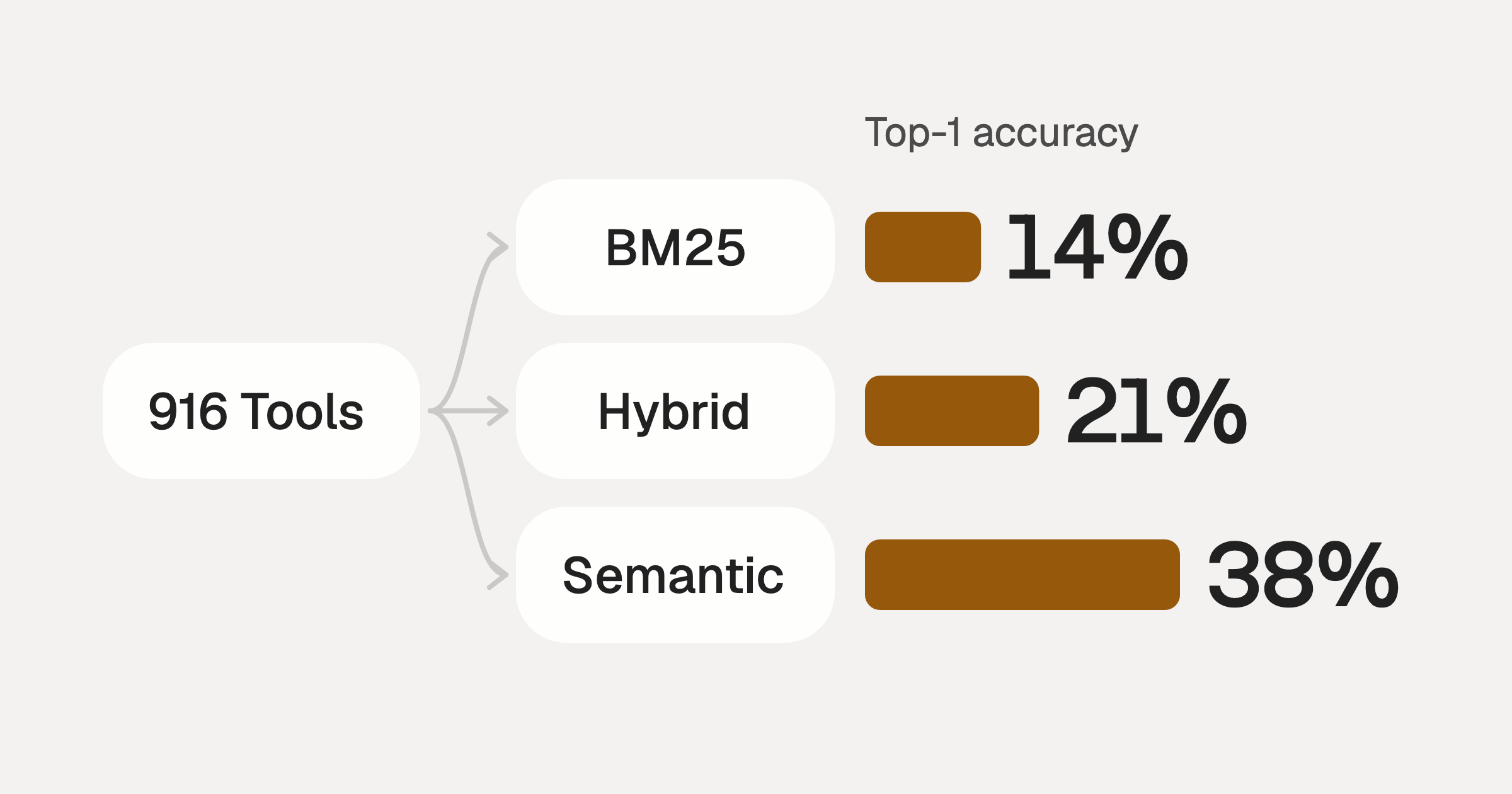
Comparing BM25, TF-IDF, and Hybrid Search for MCP Tool Discovery
Benchmarking BM25, TF-IDF, and hybrid search for MCP tool discovery across 916 tools. The 80/20 TF-IDF/BM25 hybrid hits 21% Top-1 accuracy in under 1ms.
10 min
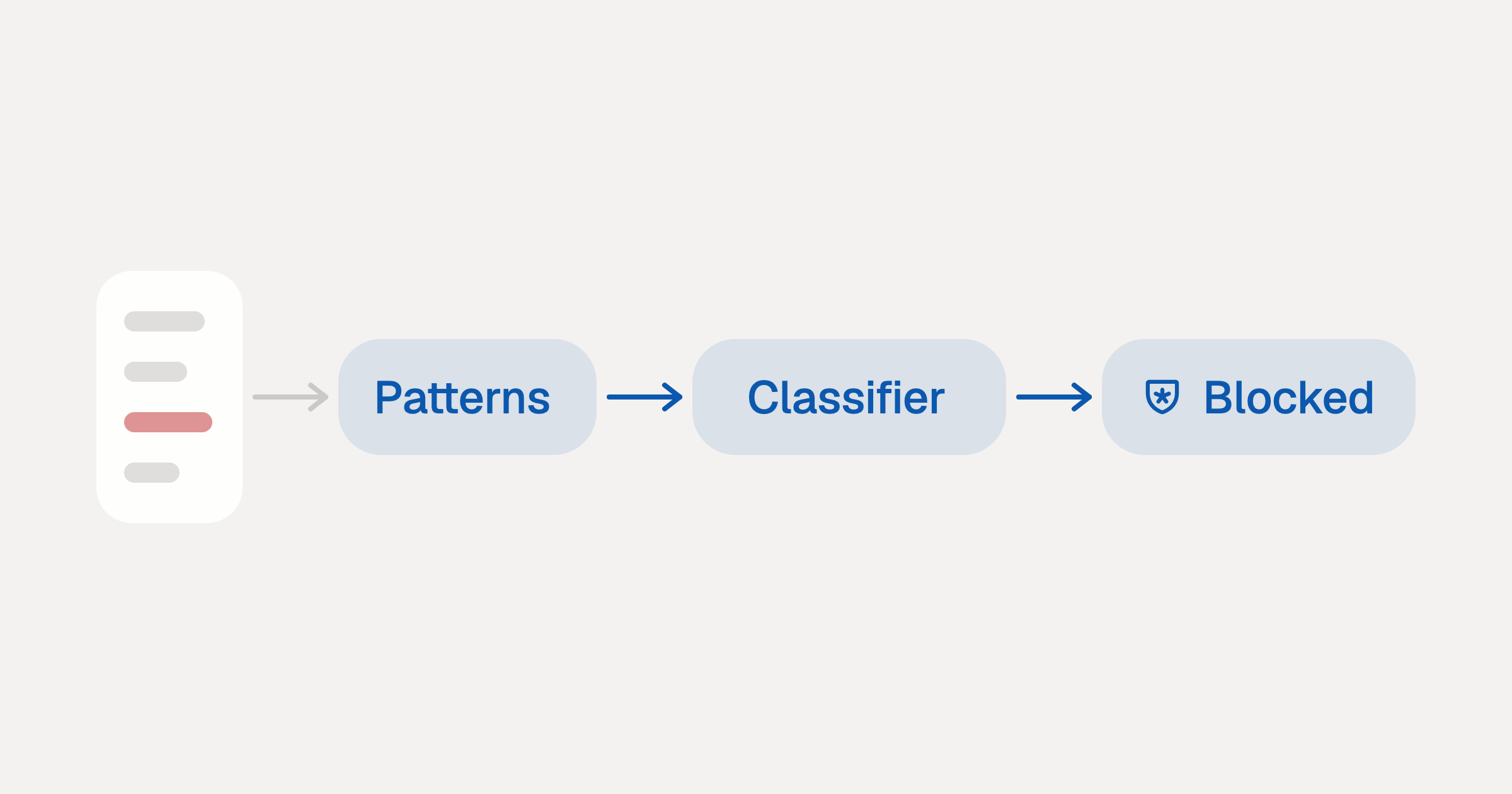
Indirect Prompt Injection Defense for MCP Tools: A Technical Guide
MCP tools that read emails, CRM records, and tickets are indirect prompt injection vectors. Here's how we built a two-tier defense that scans tool results in ~11ms.
12 min
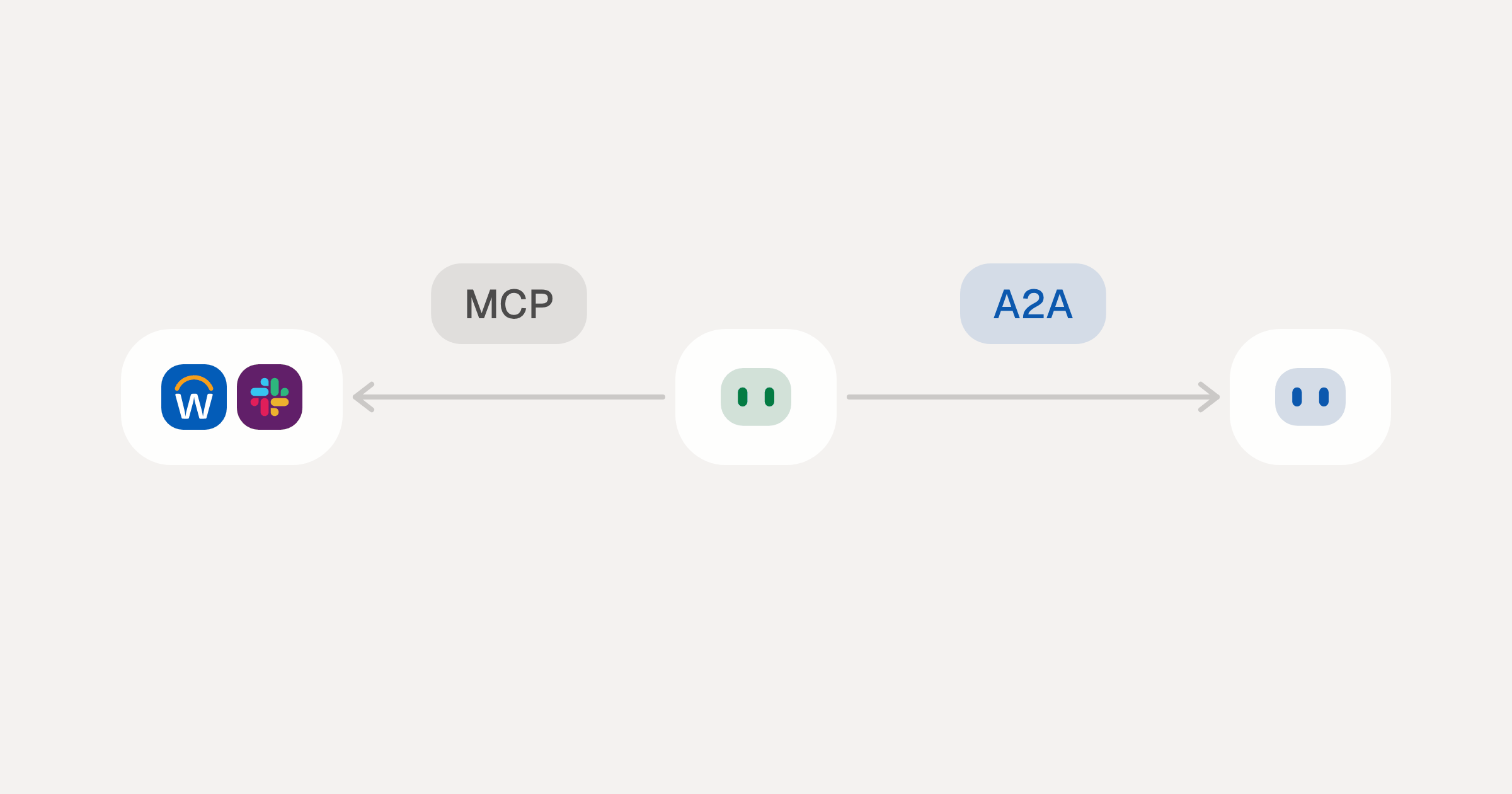
MCP vs A2A: Architecture, Security, and When to Use Each
MCP vs A2A: what each protocol standardizes, how they differ, the security risks they share, and when to use one, both or a hybrid.
12 min
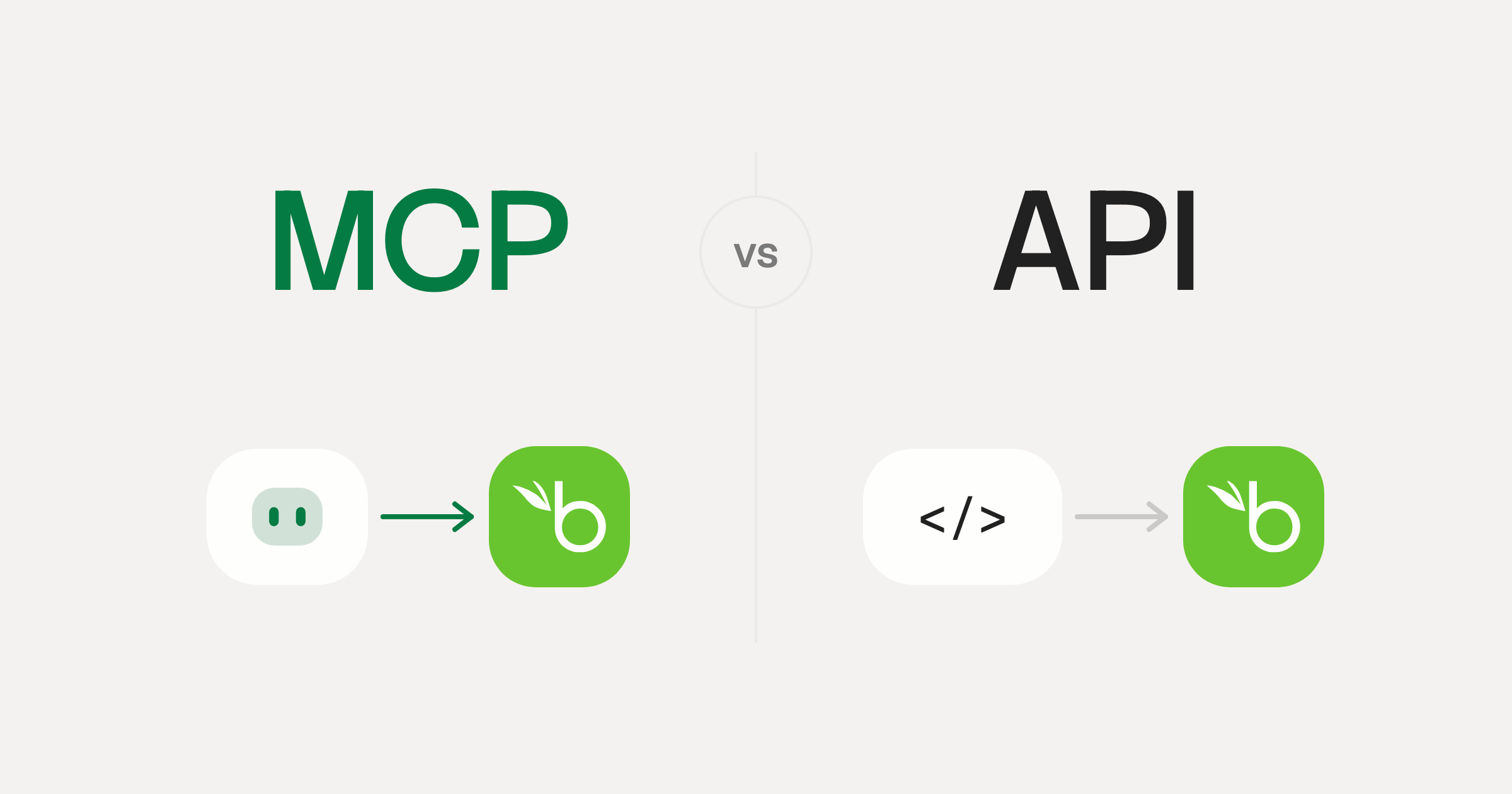
MCP vs API: What Hundreds of Connector Builds Taught Us
MCP wraps APIs, it doesn't replace them. After building hundreds of connectors that serve both, here's when each approach wins.
14 min read
Daloopa MCP Server FAQ
Does StackOne have a Daloopa MCP server?
Daloopa MCP server vs direct API integration: what's the difference?
How does Daloopa authentication work for AI agents?
origin_owner_id.Are Daloopa MCP tools vulnerable to prompt injection?
What is the context bloat of a Daloopa agent and how do I avoid it?
Can I limit which actions my Daloopa agent can access?
Can I create custom agent actions for my Daloopa MCP server?
When should I NOT use a Daloopa MCP server?
What AI frameworks and AI clients does the StackOne Daloopa MCP server support?
Put your AI agents to work
Connect AI to every company system and control what it can do in each one, down to the field.