


La Growth Machine MCP Server
for AI Agents
Connect your AI agent to StackOne's La Growth Machine MCP server and give it 54 MCP tools out of the box. Auth, tool execution, and security all managed.
 StackOne


Coverage
54 Agent Actions
Agents can read, write, delete and run operations in La Growth Machine. Extend your agent's capabilities with custom actions.

Authentication
Agent Tool Authentication
Per-user OAuth in one call. Your La Growth Machine MCP server gets session-scoped tokens with zero credentials stored on your infra.
Agent Auth →
Security
Agent Protection
Every La Growth Machine tool response scanned for prompt injection in milliseconds, with 88.7% accuracy, all running on CPU.
Prompt Injection Defense →
Performance
Max Agent Context. Min Cost.
Free up to 96% of your agent's context window to enhance reasoning and reduce cost, on every La Growth Machine call.
Tools Discovery →What is the La Growth Machine MCP Server?
A La Growth Machine MCP server lets AI agents read and write La Growth Machine data through the Model Context Protocol, Anthropic's open standard for connecting LLMs to external tools. StackOne's La Growth Machine MCP server ships with 54 pre-built actions, fully extensible via the Connector Builder, plus managed authentication, prompt injection defense, observability, and agent execution runtime. Connect it from MCP clients like Claude Desktop, Claude Code, Cursor, Goose, and VS Code, or from agent frameworks like OpenAI Agents SDK, LangChain, and Vercel AI SDK.
All La Growth Machine MCP Tools
Every StackOne action for La Growth Machine, ready for your agent. Read, write, delete and run operations, scoped to exactly what you need.
Audiences
- Create Audience
Creates an empty audience (type CLASSIC)
- List Audiences
Returns all audiences of the authenticated workspace (deleted audiences excluded)
Campaigns
- Get Campaigns
Use this endpoint to retrieve all your campaigns, with their status, audience, sending identity and a few key metrics
- Get Campaign
Use this endpoint to get one campaign: its status, audience, sending identity and settings
- Update Campaign
Use this endpoint to update the settings of one campaign
Inbox Webhooks
- List Inbox Webhooks
Lists the inbox webhooks configured in your workspace, with their IDs, names, target URLs and campaign filters
- Delete Inbox Webhook
Deletes an inbox webhook by its webhookId
Other (47)
- Create Audience From LinkedIn URL
Import leads into an audience from a LinkedIn search, Sales Navigator, post, company followers or event URL
- Send A LinkedIn Message To A Lead
Sends a LinkedIn text or voice message to a lead from one of your connected LinkedIn identities
- Send An Email Message To A Lead
Sends an email to a lead from one of your connected email identities, as a reply in an existing email thread
- Create Or Update A Lead
Creates a lead (or updates it when it already exists)
- Add A Message To An Empty Campaign Step
Creates a new message and links it to a campaign step that has no message yet (a step returned by get_campaign_steps with hasMessage: false)
- Create Inbox Event Webhook
Registers a webhook that receives real-time inbox events: every new LinkedIn or email message, sent or received, in the conversations of your workspace
- Get Audience Leads
Returns a paginated list of leads belonging to a specific audience, with the full lead record
- Get Audience Detail
Returns detailed information about a specific audience
- Get Public Campaigns
Lists the ready-made campaigns anyone can copy with duplicate_campaign
- Get Campaign Stats
Use this endpoint to get the stats of one campaign: audience, replies, LinkedIn relations, per-channel metrics, lead statuses and per-message (template) metrics
- Get Campaign Leads Stats
Get Campaign Leads Stats in La Growth Machine
- Search Conversations
Search Conversations in La Growth Machine
- Get Conversation Messages
Returns the 25 most recent messages of a conversation, sorted chronologically (oldest first)
- Get Credits
Returns the credit balance for the authenticated workspace, and whether it has CRM and extension access
- Search CRM
Looks up a contact in the CRM connected to the workspace (HubSpot or Pipedrive)
- Get Enrich Result
Retrieves the result of an enrichment request previously created with enrich_lead (any mode)
- List Identities
Lists the identities (the LinkedIn and email accounts that send your campaigns) connected to the workspace
- Search Lead
Searches for a lead in the authenticated workspace and returns the first match, with the campaigns it is involved in and its most recent activity
- Get Lead Logs
Returns a paginated list of activity logs for a specific lead, most recent first
- Get Lead Conversations
Returns all inbox conversations associated with a specific lead
- Get Authenticated Member
Returns the member (the person) behind the credentials used for the call: their member ID and email
- List Members
Lists the members (users) of the workspace
- List Identity Preferences
Lists the preferences saved for an identity, sorted by category then key (by key only when filtered on a category)
- Get Campaign Steps
Lists the steps of a campaign sequence that carry a message (email, LinkedIn message, tweet, Twitter DM), in sequence order
- Get Campaign Messages
Returns the text messages (templates) configured in a campaign's sequence: emails, LinkedIn messages and tweets
- List Workspaces
Lists the workspaces the authenticated person can act in: their own workspace and the sub-workspaces (clones) of the same account
- Update Campaign Status
Use this endpoint to pause or resume one campaign
- Update Lead Status
Use this endpoint for updating lead status in campaign
- Remove Lead From Audiences
Removes a lead from one or more audiences
- Delete An Identity Preference
Deletes one preference of an identity
- Duplicate A Campaign
Creates a new draft copy of a campaign: its sequence and every step's message (with new message IDs)
- Share A Campaign By Code
Generates an access code for one of your campaigns
- Stop Sharing A Campaign By Code
Revokes the access code of a campaign
- Preview A Campaign Shared By Code
Returns a preview of a campaign shared with an access code: name, description, language, the inventory of sequence actions and the content of its messages
- Duplicate A Campaign Shared By Code
Copies a campaign shared with an access code into your workspace, as a new draft campaign (status READY, not launched, no audience)
- Edit Inbox Conversation Note
Writes the note (post-it) attached to an inbox conversation
- Archive Conversation
Archives a conversation, removing it from the active inbox
- Unarchive Conversation
Moves an archived conversation back to the active inbox
- Snooze Conversation
Snoozes a conversation until snoozeUntil: it leaves the active inbox and comes back at that date
- Unsnooze Conversation
Brings a snoozed conversation back to the active inbox right away
- Enrich Lead
Starts an enrichment request
- Complete Call Manual Task
Completes a call manual task of a campaign, as when you log the call outcome in the inbox
- Complete Message Manual Task
Completes a custom message manual task: you provide the message that the campaign step will send to the lead
- Enrich LinkedIn Post
Fetches the content and engagement of a public LinkedIn post from its URL: text, author, reaction counts, comments and reposts, posting date and URN
- Save An Identity Preference
Creates or updates a preference of an identity
- Edit A Campaign Message
Replaces the content of an existing message of a campaign step
- Push Website Visitor
Native webhook for website visitor identification tools (RB2B, Warmly, Vector)
La Growth Machine AI Agent Use Cases
Connect your AI agent to La Growth Machine and help your team scale the marketing operations they run by hand today.
Use StackOne to connect your AI agent to your marketing automation, CRM, and email tools to automate lead nurture email sequences.
ViewUse StackOne to connect your AI agent to your marketing automation, email, and analytics platforms to automate campaign performance reporting.
ViewUse StackOne to connect your AI agent to your document stores, email platforms, and messaging tools to automate content repurposing and distribution.
ViewSet Up Your La Growth Machine MCP Server in Minutes
One endpoint. Any framework. Your agent is talking to La Growth Machine in under 10 lines of code.
Agent Frameworks


 JSON
{
  "mcpServers": {
    "stackone": {
      "command": "npx",
      "args": [
        "-y",
        "mcp-remote@latest",
        "https://api.stackone.com/mcp?x-account-id=<account_id>",
        "--header",
        "Authorization: Basic <YOUR_BASE64_TOKEN>"
      ]
    }
  }
}
Check More marketing MCP Servers
187+ actions
150+ actions
66+ actions
59+ actions
57+ actions
57+ actions
43+ actions
Platform Resources

Comparing BM25, TF-IDF, and Hybrid Search for MCP Tool Discovery
Benchmarking BM25, TF-IDF, and hybrid search for MCP tool discovery across 916 tools. The 80/20 TF-IDF/BM25 hybrid hits 21% Top-1 accuracy in under 1ms.
10 min
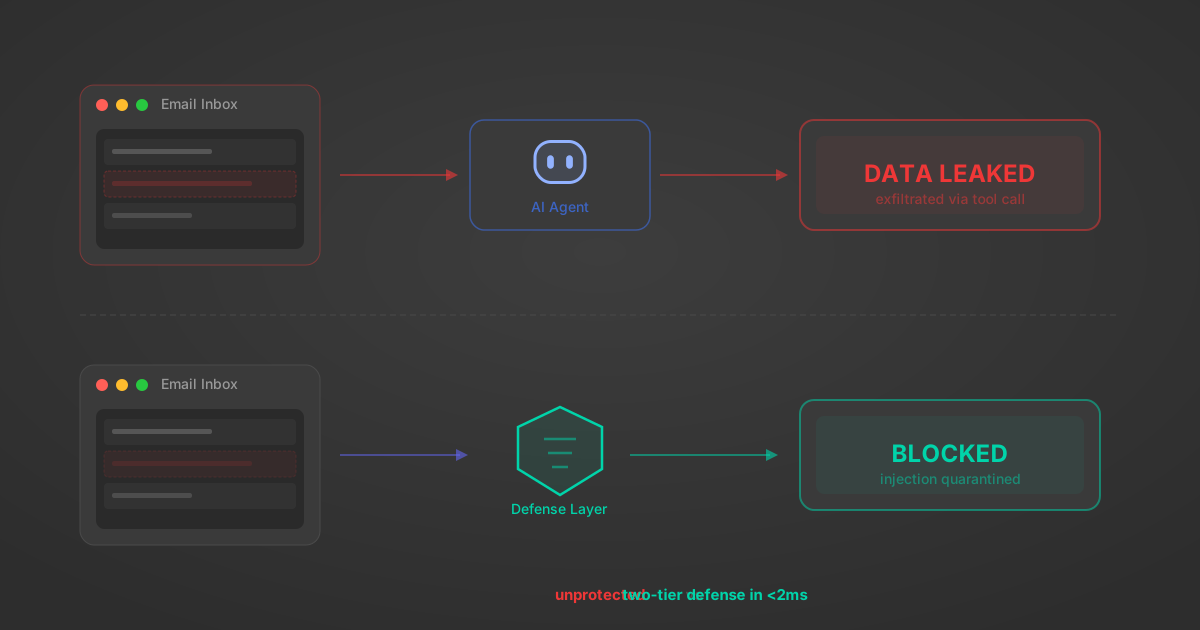
Indirect Prompt Injection Defense for MCP Tools: A Technical Guide
MCP tools that read emails, CRM records, and tickets are indirect prompt injection vectors. Here's how we built a two-tier defense that scans tool results in ~11ms.
12 min

MCP vs A2A: Architecture, Security, and When to Use Each
MCP vs A2A: what each protocol standardizes, how they differ, their shared security risks including indirect prompt injection, and when to use one, both, or a hybrid architecture.
12 min
MCP vs API: What Hundreds of Connector Builds Taught Us
MCP wraps APIs, it doesn't replace them. After building hundreds of connectors that serve both, here's when each approach wins.
14 min read
La Growth Machine MCP Server FAQ
Does StackOne have a La Growth Machine MCP server?
La Growth Machine MCP server vs direct API integration: what's the difference?
How does La Growth Machine authentication work for AI agents?
origin_owner_id.Are La Growth Machine MCP tools vulnerable to prompt injection?
What is the context bloat of a La Growth Machine agent and how do I avoid it?
Can I limit which actions my La Growth Machine agent can access?
Can I create custom agent actions for my La Growth Machine MCP server?
When should I NOT use a La Growth Machine MCP server?
What AI frameworks and AI clients does the StackOne La Growth Machine MCP server support?
Put your AI agents to work
All the tools you need to build and scale AI agent integrations, with best-in-class connectivity, execution, and security.