


Reclaim.ai MCP Server
for AI Agents
Connect your AI agent to StackOne's Reclaim.ai MCP server and give it 103 MCP tools out of the box. Auth, tool execution, and security all managed.
 StackOne


Coverage
103 Agent Actions
Agents can read, write, delete and run operations in Reclaim.ai. Extend your agent's capabilities with custom actions.

Authentication
Agent Tool Authentication
Per-user OAuth in one call. Your Reclaim.ai MCP server gets session-scoped tokens with zero credentials stored on your infra.
Agent Auth →
Security
Agent Protection
Every Reclaim.ai tool response scanned for prompt injection in milliseconds, with 88.7% accuracy, all running on CPU.
Prompt Injection Defense →
Performance
Max Agent Context. Min Cost.
Free up to 96% of your agent's context window to enhance reasoning and reduce cost, on every Reclaim.ai call.
Tools Discovery →What is the Reclaim.ai MCP Server?
A Reclaim.ai MCP server lets AI agents read and write Reclaim.ai data through the Model Context Protocol, Anthropic's open standard for connecting LLMs to external tools. StackOne's Reclaim.ai MCP server ships with 103 pre-built actions, fully extensible via the Connector Builder, plus managed authentication, prompt injection defense, observability, and agent execution runtime. Connect it from MCP clients like Claude Desktop, Claude Code, Cursor, Goose, and VS Code, or from agent frameworks like OpenAI Agents SDK, LangChain, and Vercel AI SDK.
All Reclaim.ai MCP Tools
Every StackOne action for Reclaim.ai, ready for your agent. Read, write, delete and run operations, scoped to exactly what you need.
Policies
- Get Sync Policies
List the calendar-to-calendar sync policies configured for the current user
- List Policies
List all schedule policies configured for the current user
Policys
- Create Sync Policy
Create a sync policy that copies events from one calendar to another
- Get Sync Policy
Get the sync policy between a specific source and target calendar
- Delete Sync Policy
Delete the sync policy between a source and target calendar
One On Ones
- Create One On One
Create a recurring 1:1 meeting that Reclaim auto-schedules with an invitee
- Get One On Ones
List all recurring 1:1 meetings owned by the current user
- Get One On One
Get a recurring 1:1 meeting by ID
- Delete One On One
Delete a recurring 1:1 meeting by ID
Tasks
- Create Task
Create a new Reclaim task that is auto-scheduled into the user's calendar
- Query Tasks
List the current user's Reclaim tasks with optional status, priority, project and ID filters
- Get Task
Get a single Reclaim task by its ID
- Move Task
Move an event on a specific calendar to a new time slot
- Delete Task
Delete a Reclaim task by its ID
Users
- Create User
Provision a new user into the Reclaim team via SCIM 2.0
- Get Users
List users provisioned in the Reclaim team via the SCIM 2.0 endpoint
- Get User
Retrieve a single SCIM-provisioned user by SCIM ID
- Delete User
Deprovision a SCIM-managed user from the Reclaim team
Time Schemes
- Create Time Scheme
Create a new time scheme (hours set) for the current user
- Get Time Scheme
Retrieve a single time scheme (hours set) by ID
- Update Time Scheme
Update an existing time scheme (hours set)
- Delete Time Scheme
Delete a time scheme (hours set)
Other (81)
- Create User Focus Settings
Create focus time settings for the current user
- Create Smart Habit
Create a new Smart Habit that Reclaim auto-schedules on the calendar
- Create Habit Templates
Create Smart Habits from one or more built-in templates
- Create Smart Meeting
Create a smart meeting that Reclaim auto-schedules across attendees' availability
- Add Time
Add more time to a Reclaim task
- List Accounts
List the Google and Microsoft calendar accounts connected to the current Reclaim user
- Get All Calendars
List the calendars available in every connected account, grouped by account
- Get All Personal
List the personal calendars the current Reclaim user has added
- Get Primary
Get the primary calendar Reclaim schedules into for the current user
- Get All Sync
List the sync calendars the current Reclaim user has connected
- Get Change Log
List recent changelog entries recording what Reclaim changed on the user's calendar
- Get Contacts
List the authenticated user's Reclaim contacts
- Query Events
List calendar events across connected calendars with optional filters
- Get Personal Events
List events from the user's personal (synced) calendars
- Get For Calendar
Retrieve a single calendar event by calendar ID and event ID
- Get Moment
Retrieve what the user is doing right now according to their Reclaim calendar
- Get Instances
List the scheduled occurrences of a recurring 1:1
- Search People
Search people the user knows by name or email
- List Recommended Tasks
List tasks Reclaim has recommended from the user's meeting transcripts
- Get Smart Habit Templates
List Reclaim's built-in Smart Habit templates
- Get Time Policies
Get the current user's custom time policies keyed by name
- List Time Policy Schemes
List the current user's time schemes (hours sets) such as working and personal hours
- Move Habit Instance
Move a Smart Habit instance to an exact time
- Delete For Smart Habit Lineage
Delete a Smart Habit
- Delete For Smart Meeting Lineage
Delete a smart meeting by lineage ID
- Analytics Focus Insights V4
Retrieve focus-time and meeting-load insights for a date range
- Analytics Team Analytics V4
Query aggregated team time analytics for a date range with optional filters
- Analytics Team Analytics V4 Filters
List the team metadata filters available for team analytics
- Suggested Times
Suggest meeting times when all attendees are available
- Ideal Time Availability
Get detailed availability for each attendee within a time window
- Patch Sync Policy
Update the settings of the sync policy between a source and target calendar
- Task Changelog
List changelog entries for specific tasks
- Adjust Conference Buffer
Set the decompression buffer length after a meeting event
- Adjust Priority
Set the Reclaim priority of a calendar event
- Reschedule Focus Instance
Snooze a focus-time event to a later slot using a preset option
- Find All User Focus Settings
List the current user's focus time settings
- Patch User Focus Settings
Update the current user's focus time settings
- Enabled Integrations
Check which third-party integrations are connected for the current Reclaim user
- Next Moment
Retrieve the user's next upcoming calendar moment
- Patch One On One
Update a recurring 1:1 meeting by ID
- One On One Reschedule
Ask Reclaim to reschedule one occurrence of a 1:1 to another time
- One On One Skip Week
Skip a 1:1 occurrence for the rest of its week
- Pin Event V2
Pin an event on a specific calendar so it stays at its current time
- Unpin Event V2
Unpin an event on a specific calendar so Reclaim can reschedule it again
- RSVP
Respond to a calendar event invitation
- Find Policy
Retrieve a single schedule policy by its ID
- Patch User
Apply SCIM PatchOp operations to a provisioned user, such as deactivating them
- Find All Smart Habits
List all Smart Habits for the authenticated Reclaim user
- Find For Smart Habit Lineage
Get a single Smart Habit by lineage ID
- Patch Smart Habit
Update the settings of an existing Smart Habit
- Enable Smart Habit
Re-enable a disabled Smart Habit so it is scheduled again
- Disable Smart Habit
Disable a Smart Habit without deleting it
- Start Now
Start a Smart Habit now
- Stop Smart Habit
Stop the currently running Smart Habit instance
- Mark As Done
Mark a single Smart Habit instance as done
- Skip Habit Instance
Skip a single Smart Habit instance
- Reschedule Habit Instance
Snooze a Smart Habit instance to a later time
- Find All Smart Meetings
List all smart meetings for the current user
- Find For Smart Meeting Lineage
Get a smart meeting by lineage ID
- Availability Report
Get candidate time slots for a smart meeting series within a date range
- Patch Smart Meeting
Update a smart meeting's settings by lineage ID
- Convert To Smart Meetings
Convert an existing calendar event into a smart meeting with full settings
- Enable Smart Meeting
Enable a paused smart meeting so Reclaim schedules it again
- Disable Smart Meeting
Disable (pause) a smart meeting without deleting it
- Reschedule Meeting Instance
Push a smart meeting occurrence later by a snooze interval
- Skip Meeting Instance
Skip a single smart meeting occurrence
- Patch Task
Partially update a Reclaim task, changing only the fields provided
- Archive Batch
Archive (mark done) multiple Reclaim tasks in one request
- Start Task
Start working on a Reclaim task now
- Stop Task
Stop the in-progress work session on a Reclaim task
- Done Task
Mark a Reclaim task as done
- Unarchive Task
Unarchive a done Reclaim task so it is scheduled again
- Restart Task
Restart a completed Reclaim task
- Prioritize Task
Prioritize a Reclaim task so it is scheduled as soon as possible
- Snooze Task
Snooze a Reclaim task so it is not scheduled until later
- Task Clear Snooze
Clear the snooze on a Reclaim task so it can be scheduled immediately
- Log Work
Log time already worked on a Reclaim task
- Plan Work
Plan a work block for a Reclaim task at a specific time
- Task Delete Instance And Reschedule
Reschedule one scheduled event of a Reclaim task
- Current User
Retrieve the profile of the Reclaim user who owns the API key
- Patch Current User
Update profile, display and feature settings of the authenticated Reclaim user
Set Up Your Reclaim.ai MCP Server in Minutes
One endpoint. Any framework. Your agent is talking to Reclaim.ai in under 10 lines of code.
Agent Frameworks


 JSON
{
  "mcpServers": {
    "stackone": {
      "command": "npx",
      "args": [
        "-y",
        "mcp-remote@latest",
        "https://api.stackone.com/mcp?x-account-id=<account_id>",
        "--header",
        "Authorization: Basic <YOUR_BASE64_TOKEN>"
      ]
    }
  }
}Platform Resources

Comparing BM25, TF-IDF, and Hybrid Search for MCP Tool Discovery
Benchmarking BM25, TF-IDF, and hybrid search for MCP tool discovery across 916 tools. The 80/20 TF-IDF/BM25 hybrid hits 21% Top-1 accuracy in under 1ms.
10 min
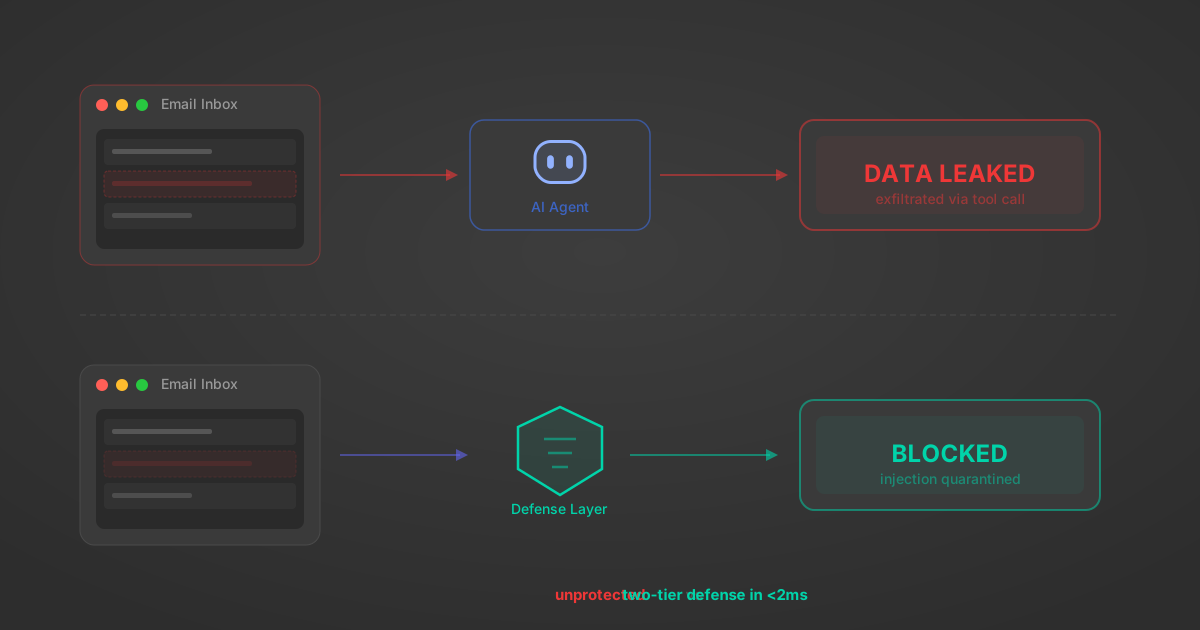
Indirect Prompt Injection Defense for MCP Tools: A Technical Guide
MCP tools that read emails, CRM records, and tickets are indirect prompt injection vectors. Here's how we built a two-tier defense that scans tool results in ~11ms.
12 min

MCP vs A2A: Architecture, Security, and When to Use Each
MCP vs A2A: what each protocol standardizes, how they differ, their shared security risks including indirect prompt injection, and when to use one, both, or a hybrid architecture.
12 min
MCP vs API: What Hundreds of Connector Builds Taught Us
MCP wraps APIs, it doesn't replace them. After building hundreds of connectors that serve both, here's when each approach wins.
14 min read
Reclaim.ai MCP Server FAQ
Does StackOne have a Reclaim.ai MCP server?
Reclaim.ai MCP server vs direct API integration: what's the difference?
How does Reclaim.ai authentication work for AI agents?
origin_owner_id.Are Reclaim.ai MCP tools vulnerable to prompt injection?
What is the context bloat of a Reclaim.ai agent and how do I avoid it?
Can I limit which actions my Reclaim.ai agent can access?
Can I create custom agent actions for my Reclaim.ai MCP server?
When should I NOT use a Reclaim.ai MCP server?
What AI frameworks and AI clients does the StackOne Reclaim.ai MCP server support?
Put your AI agents to work
All the tools you need to build and scale AI agent integrations, with best-in-class connectivity, execution, and security.