


Embat MCP Server
for AI Agents
Connect your AI agent to StackOne's Embat MCP server and give it 59 MCP tools out of the box. Auth, tool execution, and security all managed.
 StackOne


Coverage
59 Agent Actions
Agents can read, write and delete in Embat. Extend your agent's capabilities with custom actions.

Authentication
Agent Tool Authentication
Per-user OAuth in one call. Your Embat MCP server gets session-scoped tokens with zero credentials stored on your infra.
Agent Auth →
Security
Agent Protection
Every Embat tool response scanned for prompt injection in milliseconds, with 88.7% accuracy, all running on CPU.
Prompt Injection Defense →
Performance
Max Agent Context. Min Cost.
Free up to 96% of your agent's context window to enhance reasoning and reduce cost, on every Embat call.
Tools Discovery →What is the Embat MCP Server?
A Embat MCP server lets AI agents read and write Embat data through the Model Context Protocol, Anthropic's open standard for connecting LLMs to external tools. StackOne's Embat MCP server ships with 59 pre-built actions, fully extensible via the Connector Builder, plus managed authentication, prompt injection defense, observability, and agent execution runtime. Connect it from MCP clients like Claude Desktop, Claude Code, Cursor, Goose, and VS Code, or from agent frameworks like OpenAI Agents SDK, LangChain, and Vercel AI SDK.
All Embat MCP Tools
Every StackOne action for Embat, ready for your agent. Read, write and delete, scoped to exactly what you need.
Attributes
- Create Attribute
Creates an attribute. If `customId` is omitted, Embat auto-generates one.
- List Attributes
Returns all attributes configured for a company, including their `values` when the attribute is of type `list`.
- Retrieve Attribute
Returns a single attribute by `customId`.
- Update Attribute
Updates an attribute identified by `customId`.
- Delete Attribute
Deletes an attribute by `customId`, together with all of its values, and clears the `parentId`/`parentCustomId` of any attribute nested under it.
Attributes In Bulks
- Create Attributes In Bulk
Creates several attributes in a single call, following the same rules as the single attribute creation endpoint (upsert by `customId`; omitting `values` on an existing attribute removes all of its current values).
- Update Attributes In Bulk
Updates several attributes in a single call, following the same rules as the single attribute update endpoint.
- Delete Attributes In Bulk
Deletes several attributes in a single call, following the same rules as the single attribute deletion endpoint.
Balances
- List Balances
Returns the end-of-day balances of a company's bank products (accounts), one entry per product per day.
- Retrieve Balance
Returns a single balance by its Embat `id`.
Banks
- List Banks
Returns the company's bank relationships.
- Retrieve Bank
Returns a single bank relationship by its Embat `id`.
Contacts
- Create Contact
Creates a contact (client/supplier). If `customId` is omitted, Embat auto-generates one.
- List Contacts
Returns the contacts (clients/suppliers) of a company.
- Retrieve Contact
Returns a single contact by `customId`.
- Update Contact
Updates a contact identified by `customId`.
- Delete Contact
Deletes a contact by `customId`. If `customId` does not match any contact, the call returns `404`.
Contacts In Bulks
- Create Contacts In Bulk
Creates several contacts in a single call, following the same rules as the single contact creation endpoint: a `customId` that already exists updates the existing contact rather than creating a duplicate.
- Update Contacts In Bulk
Updates several contacts in a single call, identified by `customId`.
- Delete Contacts In Bulk
Deletes several contacts in a single call, identified by `customId`.
Foreign Exchange Rates
- List Foreign Exchange Rates
Returns the daily foreign exchange rates recorded in Embat, most recent first, recalculated to be expressed against `baseCurrency`.
- Retrieve Foreign Exchange Rate
Returns a single foreign exchange rate record by `id`, always expressed against EUR — the `baseCurrency` conversion available on the list endpoint does not apply here.
Operations
- Create Operation
Creates an operation (invoice/bill) with an optional `customId`; if omitted, Embat auto-generates one.
- List Operations
Returns the operations of a company. By default only the operations created through this API are returned (`generatedFrom` `erp` or `external`); use the `generatedFrom` filter to also list operations created by hand...
- Retrieve Operation
Returns a single operation by `customId`.
- Update Operation
Updates an operation identified by `customId`.
- Delete Operation
Cancels an operation by `customId`: its `status` is set to `cancel` and its pending amounts to 0.
Operations In Bulks
- Create Operations In Bulk
Creates several operations in a single call, following the same rules as the single operation creation endpoint.
- Update Operations In Bulk
Updates several operations in a single call, identified by `customId`.
- Delete Operations In Bulk
Cancels several operations in a single call, identified by `customId`, following the same rules as the single delete endpoint.
Payments
- Create Payment
Creates a payment against one or more operations, recording that those operations (invoices/bills) have been settled in your ERP; each settled amount reduces the operation's pending amount in Embat.
- List Payments
Returns the payments generated in Embat for a company.
- Retrieve Payment
Returns a single payment by `customId`. Payments missing required accounting, operation or contact information are not returned even if they exist.
- Update Payment
Updates the synchronization status, error message, registration status or additional info of a payment identified by `customId`.
- Delete Payment
Deletes a payment by `customId`.
Payments In Bulks
- Create Payments In Bulk
Creates several payments in a single call, following the same rules as the single payment creation endpoint.
- Update Payments In Bulk
Updates the synchronization status, error message, registration status or additional info of several payments, identified by `customId`.
- Delete Payments In Bulk
Deletes several payments in a single call, identified by `customId`.
Products
- List Products
Returns the active products (bank accounts, credit lines, cards or wallets) of a company, whether aggregated from a bank connection or added manually.
- Retrieve Product
Returns a single product by its Embat `id`.
- Update Product
Updates the accounting code and/or additional info of a product identified by `id`.
Transactions
- List Transactions
Returns the bank transactions of a company.
- Retrieve Transaction
Returns a single transaction by its Embat `id`.
- Update Transaction
Updates the synchronization status, additional info or custom attribute values of a transaction identified by `id`.
Other (15)
- Add Values To An Attribute
Adds values to an existing attribute, identified by `customId`, without affecting its other values.
- Add Internal Attributes To Operations In Bulk
Attaches internal attribute values to operations, identified by `customId`.
- Create Manual Transactions In Bulk
Creates transactions for a company's product in a single call, grouped by day.
- List Accounting Accounts
Returns the accounting accounts (chart of accounts) of a company, including deactivated ones.
- List Categories
Returns every category configured for the company, both top-level and child categories.
- Retrieve Category
Returns a single category by its Embat `id`.
- List User Companies
Returns the companies your credentials have access to.
- Retrieve Company
Returns the detail of a company, including legal name, administrative contact, tags and configuration.
- List Company Users
Returns the users with access to the company identified by `companyId`.
- List Payment Orders
Returns the payment orders of a company, ordered by execution date (most recent first).
- Download Payment Order Receipt
Downloads the PDF receipt of a payment order by its Embat `id`.
- Update Products In Bulk
Updates the accounting code and/or additional info of several products, identified by `id`.
- Update Transactions In Bulk
Updates the synchronization status, additional info or custom attribute values of several transactions in a single call, identified by `id`.
- Remove Values From An Attribute
Removes one or more values from an attribute, identified by `customId`.
- Remove Internal Attributes From Operations In Bulk
Removes internal attribute values from operations, identified by `customId`.
Embat AI Agent Use Cases
Connect your AI agent to Embat and help your team scale the finance operations they run by hand today.
Automate invoice processing with AI agents connected to your ERP, accounting software, and AP tools through StackOne.
ViewUse StackOne to connect your AI agent to your accounting, CRM, and messaging systems to automate Accounts Receivable dunning and payment follow-up.
ViewUse StackOne to connect your AI agent to your accounting, email, and document management systems to automate invoice processing and purchase order matching.
ViewSet Up Your Embat MCP Server in Minutes
One endpoint. Any framework. Your agent is talking to Embat in under 10 lines of code.
Agent Frameworks


 JSON
{
  "mcpServers": {
    "stackone": {
      "command": "npx",
      "args": [
        "-y",
        "mcp-remote@latest",
        "https://api.stackone.com/mcp?x-account-id=<account_id>",
        "--header",
        "Authorization: Basic <YOUR_BASE64_TOKEN>"
      ]
    }
  }
}
Check More finance-payments MCP Servers
104+ actions
83+ actions
79+ actions
75+ actions
70+ actions
67+ actions
60+ actions
Platform Resources

Comparing BM25, TF-IDF, and Hybrid Search for MCP Tool Discovery
Benchmarking BM25, TF-IDF, and hybrid search for MCP tool discovery across 916 tools. The 80/20 TF-IDF/BM25 hybrid hits 21% Top-1 accuracy in under 1ms.
10 min
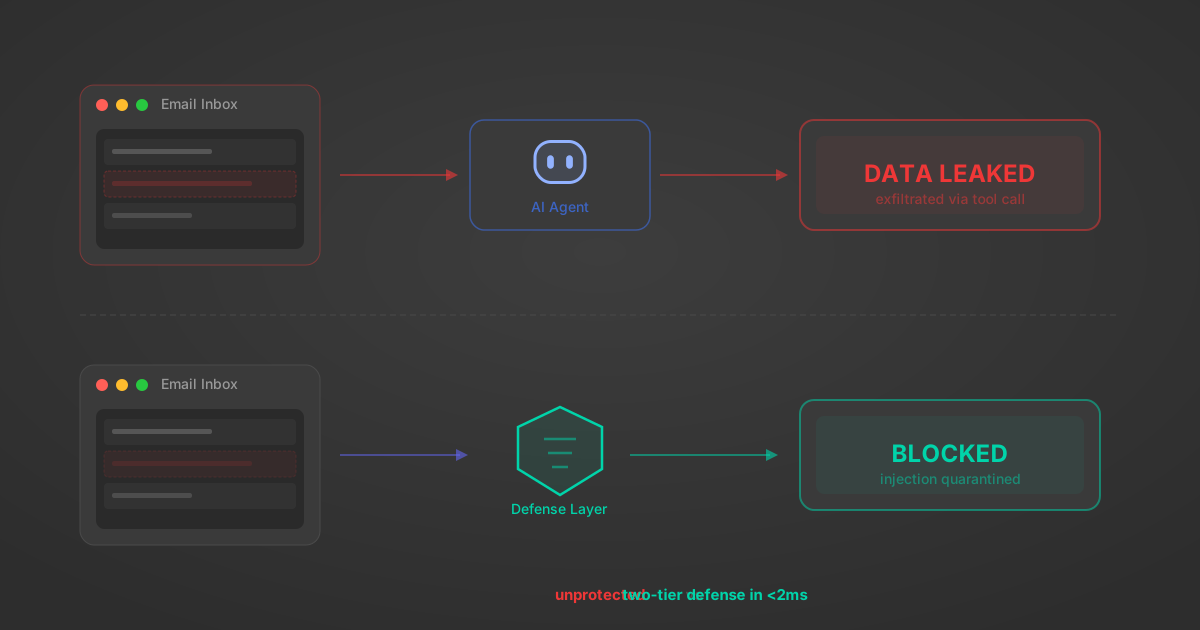
Indirect Prompt Injection Defense for MCP Tools: A Technical Guide
MCP tools that read emails, CRM records, and tickets are indirect prompt injection vectors. Here's how we built a two-tier defense that scans tool results in ~11ms.
12 min

MCP vs A2A: Architecture, Security, and When to Use Each
MCP vs A2A: what each protocol standardizes, how they differ, their shared security risks including indirect prompt injection, and when to use one, both, or a hybrid architecture.
12 min
MCP vs API: What Hundreds of Connector Builds Taught Us
MCP wraps APIs, it doesn't replace them. After building hundreds of connectors that serve both, here's when each approach wins.
14 min read
Embat MCP Server FAQ
Does StackOne have a Embat MCP server?
Embat MCP server vs direct API integration: what's the difference?
How does Embat authentication work for AI agents?
origin_owner_id.Are Embat MCP tools vulnerable to prompt injection?
What is the context bloat of a Embat agent and how do I avoid it?
Can I limit which actions my Embat agent can access?
Can I create custom agent actions for my Embat MCP server?
When should I NOT use a Embat MCP server?
What AI frameworks and AI clients does the StackOne Embat MCP server support?
Put your AI agents to work
All the tools you need to build and scale AI agent integrations, with best-in-class connectivity, execution, and security.