


NetBird MCP Server
for AI Agents
Connect your AI agent to StackOne's NetBird MCP server and give it 224 MCP tools out of the box. Auth, tool execution, and security all managed.
 StackOne


Coverage
224 Agent Actions
Extend your agent's capabilities with custom actions.

Authentication
Agent Tool Authentication
Per-user OAuth in one call. Your NetBird MCP server gets session-scoped tokens with zero credentials stored on your infra.
Agent Auth →
Security
Agent Protection
Every NetBird tool response scanned for prompt injection in milliseconds, with 88.7% accuracy, all running on CPU.
Prompt Injection Defense →
Performance
Max Agent Context. Min Cost.
Free up to 96% of your agent's context window to enhance reasoning and reduce cost, on every NetBird call.
Tools Discovery →What is the NetBird MCP Server?
A NetBird MCP server lets AI agents work with NetBird data through the Model Context Protocol, Anthropic's open standard for connecting LLMs to external tools. StackOne's NetBird MCP server ships with 224 pre-built actions, fully extensible via the Connector Builder, plus managed authentication, prompt injection defense, observability, and agent execution runtime. Connect it from MCP clients like Claude Desktop, Claude Code, Cursor, Goose, and VS Code, or from agent frameworks like OpenAI Agents SDK, LangChain, and Vercel AI SDK.
All NetBird MCP Tools
Every StackOne action for NetBird, ready for your agent. Scoped to exactly what you need.
Accounts
- List Accounts
Get the NetBird account the access token belongs to.
- Update Account
Update the settings of the connected NetBird account.
Agent Network Settings
- Create Agent Network Settings
Bootstrap Agent Network settings in the connected NetBird account.
- Get Agent Network Settings
Get Agent Network settings in the connected NetBird account.
- Update Agent Network Settings
Update Agent Network settings in the connected NetBird account.
- Delete Agent Network Settings
Delete Agent Network settings in the connected NetBird account.
Agent Network Providers
- Create Agent Network Provider
Create an Agent Network provider in the connected NetBird account.
- List Agent Network Providers
List all Agent Network providers in the connected NetBird account.
- Get Agent Network Provider
Get an Agent Network provider in the connected NetBird account.
- Update Agent Network Provider
Update an Agent Network provider in the connected NetBird account.
- Delete Agent Network Provider
Delete an Agent Network provider in the connected NetBird account.
Agent Network Policys
- Create Agent Network Policy
Create an Agent Network policy in the connected NetBird account.
- Get Agent Network Policy
Get an Agent Network policy in the connected NetBird account.
- Update Agent Network Policy
Update an Agent Network policy in the connected NetBird account.
- Delete Agent Network Policy
Delete an Agent Network policy in the connected NetBird account.
Agent Network Guardrails
- Create Agent Network Guardrail
Create an Agent Network guardrail in the connected NetBird account.
- List Agent Network Guardrails
List all Agent Network guardrails in the connected NetBird account.
- Get Agent Network Guardrail
Get an Agent Network guardrail in the connected NetBird account.
- Update Agent Network Guardrail
Update an Agent Network guardrail in the connected NetBird account.
- Delete Agent Network Guardrail
Delete an Agent Network guardrail in the connected NetBird account.
Agent Network Budget Rules
- Create Agent Network Budget Rule
Create an Agent Network budget rule in the connected NetBird account.
- List Agent Network Budget Rules
List all Agent Network budget rules in the connected NetBird account.
- Get Agent Network Budget Rule
Get an Agent Network budget rule in the connected NetBird account.
- Update Agent Network Budget Rule
Update an Agent Network budget rule in the connected NetBird account.
- Delete Agent Network Budget Rule
Delete an Agent Network budget rule in the connected NetBird account.
Agent Network Managed Proxys
- Create Agent Network Managed Proxy
Provision a managed Agent Network gateway in the connected NetBird account.
- Get Agent Network Managed Proxy
Get the status of the managed Agent Network gateway.
Nameserver Groups
- Create Nameserver Group
Create a nameserver group in the connected NetBird account.
- List Nameserver Groups
List all nameserver groups in the connected NetBird account.
- Get Nameserver Group
Get a nameserver group in the connected NetBird account.
- Update Nameserver Group
Update a nameserver group in the connected NetBird account.
- Delete Nameserver Group
Delete a nameserver group in the connected NetBird account.
DNS Settings
- Get DNS Settings
Get DNS settings in the connected NetBird account.
- Update DNS Settings
Update DNS settings in the connected NetBird account.
DNS Zones
- Create DNS Zone
Create a DNS zone in the connected NetBird account.
- List DNS Zones
List all DNS zones in the connected NetBird account.
- Get DNS Zone
Get a DNS zone in the connected NetBird account.
- Update DNS Zone
Update a DNS zone in the connected NetBird account.
- Delete DNS Zone
Delete a DNS zone in the connected NetBird account.
DNS Records
- Create DNS Record
Create a DNS record in the connected NetBird account.
- List DNS Records
List all DNS records in the connected NetBird account.
- Get DNS Record
Get a DNS record in the connected NetBird account.
- Update DNS Record
Update a DNS record in the connected NetBird account.
- Delete DNS Record
Delete a DNS record in the connected NetBird account.
EDR Falcon Integrations
- Create EDR Falcon Integration
Create EDR Falcon integration in the connected NetBird account.
- Get EDR Falcon Integration
Get EDR Falcon integration in the connected NetBird account.
- Update EDR Falcon Integration
Update EDR Falcon integration in the connected NetBird account.
- Delete EDR Falcon Integration
Delete EDR Falcon integration in the connected NetBird account.
EDR FleetDM Integrations
- Create EDR FleetDM Integration
Create EDR FleetDM integration in the connected NetBird account.
- Get EDR FleetDM Integration
Get EDR FleetDM integration in the connected NetBird account.
- Update EDR FleetDM Integration
Update EDR FleetDM integration in the connected NetBird account.
- Delete EDR FleetDM Integration
Delete EDR FleetDM integration in the connected NetBird account.
EDR Huntress Integrations
- Create EDR Huntress Integration
Create EDR Huntress integration in the connected NetBird account.
- Get EDR Huntress Integration
Get EDR Huntress integration in the connected NetBird account.
- Update EDR Huntress Integration
Update EDR Huntress integration in the connected NetBird account.
- Delete EDR Huntress Integration
Delete EDR Huntress integration in the connected NetBird account.
EDR Intune Integrations
- Create EDR Intune Integration
Create EDR Intune integration in the connected NetBird account.
- Get EDR Intune Integration
Get EDR Intune integration in the connected NetBird account.
- Update EDR Intune Integration
Update EDR Intune integration in the connected NetBird account.
- Delete EDR Intune Integration
Delete EDR Intune integration in the connected NetBird account.
EDR SentinelOne Integrations
- Create EDR SentinelOne Integration
Create EDR SentinelOne integration in the connected NetBird account.
- Get EDR SentinelOne Integration
Get EDR SentinelOne integration in the connected NetBird account.
- Update EDR SentinelOne Integration
Update EDR SentinelOne integration in the connected NetBird account.
- Delete EDR SentinelOne Integration
Delete EDR SentinelOne integration in the connected NetBird account.
Event Streaming Integrations
- Create Event Streaming Integration
Create event streaming integration in the connected NetBird account.
- List Event Streaming Integrations
List event streaming integrations in the connected NetBird account.
- Get Event Streaming Integration
Get event streaming integration in the connected NetBird account.
- Update Event Streaming Integration
Update event streaming integration in the connected NetBird account.
- Delete Event Streaming Integration
Delete event streaming integration in the connected NetBird account.
Groups
- Create Group
Create a group in the connected NetBird account.
- List Groups
List the groups of the connected NetBird account.
- Get Group
Get one group of the connected NetBird account.
- Update Group
Update a group in the connected NetBird account.
- Delete Group
Delete a group in the connected NetBird account.
Unified Groups
- List Unified Groups
List unified groups in a NetBird account.
- Get Unified Group
Get a unified NetBird group by ID.
Unified Organizations
- List Unified Organizations
List unified organizations in NetBird.
- Get Unified Organization
Get a unified NetBird organization by ID.
Unified Roles
- List Unified Roles
List the built-in user roles of NetBird.
- Get Unified Role
Get a unified NetBird role by ID.
Unified Users
- List Unified Users
List unified users in a NetBird account.
- Get Unified User
Get a unified NetBird user by ID.
Identity Providers
- Create Identity Provider
Create an identity provider in the connected NetBird account.
- List Identity Providers
List all identity providers in the connected NetBird account.
- Get Identity Provider
Get an identity provider in the connected NetBird account.
- Update Identity Provider
Update an identity provider in the connected NetBird account.
- Delete Identity Provider
Delete an identity provider in the connected NetBird account.
Azure IdP Integrations
- Create Azure IdP Integration
Create an Azure identity provider sync integration.
- List Azure IdP Integrations
List the Azure identity provider sync integrations of the connected NetBird account.
- Get Azure IdP Integration
Get one Azure identity provider sync integration by id.
- Update Azure IdP Integration
Update an Azure identity provider sync integration.
- Sync Azure IdP Integration
Start a sync of an Azure identity provider integration.
- Delete Azure IdP Integration
Delete an Azure identity provider sync integration.
Google IdP Integrations
- Create Google IdP Integration
Create a Google Workspace identity provider sync integration.
- List Google IdP Integrations
List the Google Workspace identity provider sync integrations of the connected NetBird account.
- Get Google IdP Integration
Get one Google Workspace identity provider sync integration by id.
- Update Google IdP Integration
Update a Google Workspace identity provider sync integration.
- Sync Google IdP Integration
Start a sync of a Google Workspace identity provider integration.
- Delete Google IdP Integration
Delete a Google Workspace identity provider sync integration.
Okta SCIM Integrations
- Create Okta SCIM Integration
Create an Okta SCIM provisioning integration.
- List Okta SCIM Integrations
List the Okta SCIM provisioning integrations of the connected NetBird account.
- Get Okta SCIM Integration
Get one Okta SCIM provisioning integration by id.
- Update Okta SCIM Integration
Update an Okta SCIM provisioning integration.
- Delete Okta SCIM Integration
Delete an Okta SCIM provisioning integration.
SCIM Integrations
- Create SCIM Integration
Create a generic SCIM provisioning integration.
- List SCIM Integrations
List the generic SCIM provisioning integrations of the connected NetBird account.
- Get SCIM Integration
Get one generic SCIM provisioning integration by id.
- Update SCIM Integration
Update a generic SCIM provisioning integration.
- Delete SCIM Integration
Delete a generic SCIM provisioning integration.
Networks
- Create Network
Create a network in the connected NetBird account.
- List Networks
List all networks in the connected NetBird account.
- Get Network
Get a network in the connected NetBird account.
- Update Network
Update a network in the connected NetBird account.
- Delete Network
Delete a network in the connected NetBird account.
Network Resources
- Create Network Resource
Create a network resource in the connected NetBird account.
- List Network Resources
List all network resources in the connected NetBird account.
- Get Network Resource
Get a network resource in the connected NetBird account.
- Update Network Resource
Update a network resource in the connected NetBird account.
- Delete Network Resource
Delete a network resource in the connected NetBird account.
Network Routers
- Create Network Router
Create a network router in the connected NetBird account.
- List Network Routers
List the routers of one network in the connected NetBird account.
- Get Network Router
Get a network router in the connected NetBird account.
- Update Network Router
Update a network router in the connected NetBird account.
- Delete Network Router
Delete a network router in the connected NetBird account.
Notification Channels
- Create Notification Channel
Create a notification channel in the connected NetBird account.
- List Notification Channels
List the notification channels of the connected NetBird account.
- Get Notification Channel
Get one notification channel by id.
- Update Notification Channel
Update a notification channel in the connected NetBird account.
- Delete Notification Channel
Delete a notification channel in the connected NetBird account.
Peers
- List Peers
List all peers in the connected NetBird account.
- Get Peer
Get a peer in the connected NetBird account.
- Update Peer
Update a peer in the connected NetBird account.
- Delete Peer
Delete a peer in the connected NetBird account.
Peer Jobs
- Create Peer Job
Create a job, such as a debug bundle, for a peer to run.
- List Peer Jobs
List the jobs of a peer in the connected NetBird account.
- Get Peer Job
Get one job of a peer by id.
Policys
- Create Policy
Create a policy in the connected NetBird account.
- Get Policy
Get a policy in the connected NetBird account.
- Update Policy
Update a policy in the connected NetBird account.
- Delete Policy
Delete a policy in the connected NetBird account.
Posture Checks
- Create Posture Check
Create a posture check in the connected NetBird account.
- List Posture Checks
List all posture checks in the connected NetBird account.
- Get Posture Check
Get a posture check in the connected NetBird account.
- Update Posture Check
Update a posture check in the connected NetBird account.
- Delete Posture Check
Delete a posture check in the connected NetBird account.
Proxy Services
- Create Proxy Service
Create a reverse proxy service in the connected NetBird account.
- List Proxy Services
List the reverse proxy services of the connected NetBird account.
- Get Proxy Service
Get one reverse proxy service by id.
- Update Proxy Service
Update a reverse proxy service in the connected NetBird account.
- Delete Proxy Service
Delete a reverse proxy service in the connected NetBird account.
Proxy Domains
- Create Proxy Domain
Add a custom reverse proxy domain to the connected NetBird account.
- List Proxy Domains
List the reverse proxy domains of the connected NetBird account.
- Delete Proxy Domain
Delete a custom reverse proxy domain.
Proxy Clusters
- List Proxy Clusters
List the reverse proxy clusters available to the connected NetBird account.
- Delete Proxy Cluster
Delete a self-hosted reverse proxy cluster.
Proxy Tokens
- Create Proxy Token
Create a token for a self-hosted reverse proxy.
- List Proxy Tokens
List the tokens of self-hosted reverse proxies.
Routes
- Create Route
Create a route in the connected NetBird account.
- List Routes
List all routes in the connected NetBird account.
- Get Route
Get a route in the connected NetBird account.
- Update Route
Update a route in the connected NetBird account.
- Delete Route
Delete a route in the connected NetBird account.
Setup Keys
- Create Setup Key
Create a setup key in the connected NetBird account.
- List Setup Keys
List all setup keys in the connected NetBird account.
- Get Setup Key
Get a setup key in the connected NetBird account.
- Update Setup Key
Update a setup key in the connected NetBird account.
- Delete Setup Key
Delete a setup key in the connected NetBird account.
Users
- Create User
Create a user in the connected NetBird account.
- List Users
List the users and service users of the connected NetBird account.
- Update User
Update a user in the connected NetBird account.
- Delete User
Delete a user in the connected NetBird account.
User Invites
- Create User Invite
Create a user invite in the connected NetBird account.
- List User Invites
List the user invites of a NetBird account that uses the embedded identity provider.
- Delete User Invite
Delete a user invite in the connected NetBird account.
User Tokens
- Create User Token
Create an access token for a user.
- Get User Token
Get one access token of a user by id.
- Delete User Token
Delete an access token of a user.
Other (47)
- Create Temporary Access Peer
Create a temporary access peer in the connected NetBird account.
- Get Agent Network Agent Config
Get the Agent Network agent config of the token owner.
- List Agent Network Catalog Providers
List Agent Network catalog providers in the connected NetBird account.
- List Agent Network Policies
List all Agent Network policies in the connected NetBird account.
- List Agent Network Access Logs
List Agent Network access logs in the connected NetBird account.
- List Agent Network Access Log Sessions
List Agent Network access logs grouped by session.
- List Agent Network Consumption Counters
List Agent Network consumption counters in the connected NetBird account.
- Get Agent Network Usage Overview
Get the Agent Network usage overview of the connected NetBird account.
- List Audit Events
List the audit events of the connected NetBird account.
- List Network Traffic Events
List network traffic events in the connected NetBird account.
- List Reverse Proxy Access Logs
List reverse proxy access logs in the connected NetBird account.
- Get Unified Credentials
Get the current NetBird connection's unified credentials and identity.
- List Azure IdP Sync Logs
List the sync logs of an Azure identity provider integration.
- List Google IdP Sync Logs
List the sync logs of a Google Workspace identity provider integration.
- List Okta SCIM Sync Logs
List the sync logs of an Okta SCIM provisioning integration.
- List SCIM Sync Logs
List the sync logs of a generic SCIM provisioning integration.
- Get Instance Status
Get the setup status of the NetBird management server.
- Get Instance Version
Get the version of the NetBird management server and the latest available versions.
- List Countries
List the country codes NetBird uses for geo location posture checks.
- List Country Cities
List the city names NetBird knows for one country.
- List All Network Routers
List the routers of every network in the connected NetBird account.
- List Notification Event Types
List the event types a notification channel can subscribe to.
- List Accessible Peers
List accessible peers in the connected NetBird account.
- List Compliance Bypassed Peers
List the peers whose EDR compliance check is bypassed.
- List Policies
List all policies in the connected NetBird account.
- Get Current User
Get the NetBird user that owns the access token, with its permissions when NetBird returns them.
- List User Access Tokens
List the access tokens of one NetBird user.
- Discover Agent Network Provider Models
Discover the models an Agent Network provider credential can reach.
- Peer Added
Fired when a new peer is added to the network.
- Peer Pending Approval
Fired when a peer is waiting for approval to join the network.
- Routing Peer Disconnected
Fired when a routing peer loses its connection.
- Routing Peer Deleted
Fired when a routing peer is deleted from the network.
- User Joined
Fired when a new user joins the account.
- User Pending Approval
Fired when a user is waiting for approval to join the network.
- Service User Created
Fired when a new service user is created.
- IdP Sync Token Expired
Fired when the IdP sync token expires and needs renewal.
- EDR Sync Token Expired
Fired when the EDR sync token expires and needs renewal.
- Regenerate Okta SCIM Token
Regenerate the SCIM token of an Okta SCIM provisioning integration.
- Regenerate SCIM Token
Regenerate the SCIM token of a generic SCIM provisioning integration.
- Bypass Peer Compliance
Bypass the EDR compliance check for a non-compliant peer.
- Revoke Peer Compliance Bypass
Revoke the EDR compliance bypass of a peer.
- Validate Proxy Domain
Start DNS validation of a custom reverse proxy domain.
- Revoke Proxy Token
Revoke a self-hosted reverse proxy token.
- Approve User
Approve a user who is pending approval.
- Reject User
Reject a user who is pending approval, which deletes the user.
- Resend User Invite
Resend the invitation email to an invited user.
- Regenerate User Invite
Regenerate the link of a user invite.
Set Up Your NetBird MCP Server in Minutes
One endpoint. Any framework. Your agent is talking to NetBird in under 10 lines of code.
Agent Frameworks


 JSON
{
  "mcpServers": {
    "stackone": {
      "command": "npx",
      "args": [
        "-y",
        "mcp-remote@latest",
        "https://api.stackone.com/mcp?x-account-id=<account_id>",
        "--header",
        "Authorization: Basic <YOUR_BASE64_TOKEN>"
      ]
    }
  }
}Platform Resources

Comparing BM25, TF-IDF, and Hybrid Search for MCP Tool Discovery
Benchmarking BM25, TF-IDF, and hybrid search for MCP tool discovery across 916 tools. The 80/20 TF-IDF/BM25 hybrid hits 21% Top-1 accuracy in under 1ms.
10 min
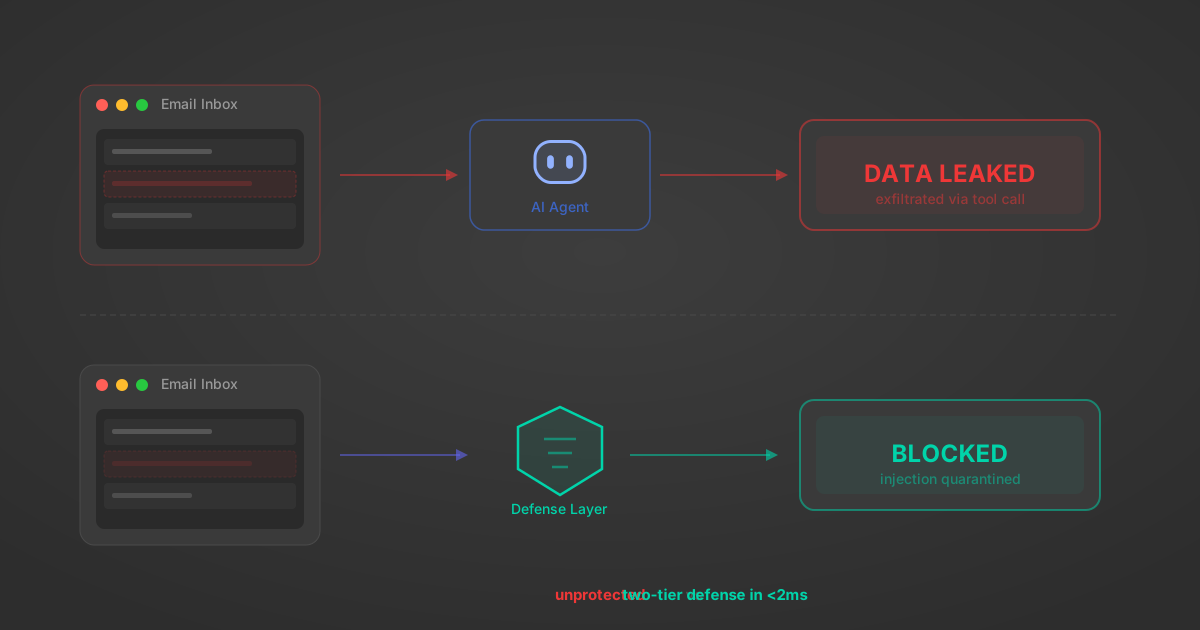
Indirect Prompt Injection Defense for MCP Tools: A Technical Guide
MCP tools that read emails, CRM records, and tickets are indirect prompt injection vectors. Here's how we built a two-tier defense that scans tool results in ~11ms.
12 min

MCP vs A2A: Architecture, Security, and When to Use Each
MCP vs A2A: what each protocol standardizes, how they differ, their shared security risks including indirect prompt injection, and when to use one, both, or a hybrid architecture.
12 min
MCP vs API: What Hundreds of Connector Builds Taught Us
MCP wraps APIs, it doesn't replace them. After building hundreds of connectors that serve both, here's when each approach wins.
14 min read
NetBird MCP Server FAQ
Does StackOne have a NetBird MCP server?
NetBird MCP server vs direct API integration: what's the difference?
How does NetBird authentication work for AI agents?
origin_owner_id.Are NetBird MCP tools vulnerable to prompt injection?
What is the context bloat of a NetBird agent and how do I avoid it?
Can I limit which actions my NetBird agent can access?
Can I create custom agent actions for my NetBird MCP server?
When should I NOT use a NetBird MCP server?
What AI frameworks and AI clients does the StackOne NetBird MCP server support?
Put your AI agents to work
All the tools you need to build and scale AI agent integrations, with best-in-class connectivity, execution, and security.