


How to Manage the Tool Layer Across Teams at Scale
Table of Contents
Enterprise AI adoption is growing faster than the operating practices around it. Deloitte’s Tech Trends 2026 research found 38% of organisations have agent pilots running and 11% have agents in production. Workday’s research found only 27% of AI users run it inside their core workflows; the rest copy and paste between a chat window and the systems where the work is done.
A common reason rollouts stall at that point is ownership. The layer where agents meet business systems, the connections, credentials, permissions and logs, usually has no single owner, so each team solves access and logging separately and the solutions do not line up. This guide outlines an operating model for that layer: who owns it, how access is structured across teams, which identity agents act under, how policies roll out, and what to measure.
What is the tool layer?
Everything between an assistant and the systems it acts on: the connections, the credentials behind them, the set of actions exposed to each agent, the policies on those actions, and the record of what ran. Every organisation running agents already has a tool layer. Most have one that accumulated rather than one that was designed.
The accumulated version looks like this: engineering connected GitHub and Linear to Claude Code in February, sales ops wired the CRM into Copilot in April, and HR is piloting an onboarding agent with its own vendor. Each connection works. Nothing spans them: no shared inventory, no common auth pattern, no record that covers a workflow touching two systems. By mid-2026, agent tooling was already installed on 9.4% of Windows business PCs, so for most organisations the layer exists before anyone agrees it should.
Who should own it?
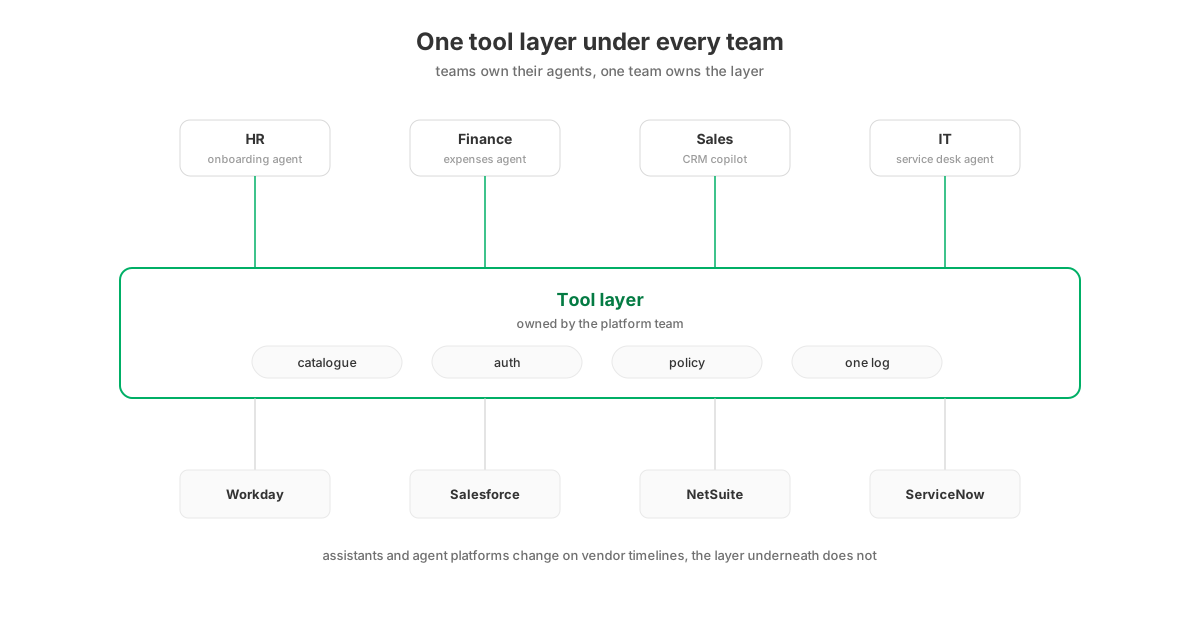
One named team, with the same logic that gives SSO one owner. Teams keep their agents and their workflows; the layer underneath, the catalogue of systems, the auth, the policy engine and the log, is shared infrastructure. In practice that team is usually platform engineering or IT; in a smaller company it can be a single infrastructure engineer who maintains the inventory.
Centralised ownership remains rare in practice. When Flowise and OpenAI’s Agent Builder both shut down within eight weeks of each other, the teams that had built integrations into the agent platform’s canvas lost them with the platform; at the time, only 12% of IT teams reported centralised management of their agent platforms. Agent platforms and assistants churn on vendor timelines you do not control. Connections to your own systems of record should not churn with them, which is the argument for keeping the tool layer below whatever teams build on top, owned by whoever already runs identity and access.
Ownership here means four concrete duties: keep the inventory of what is connected, set the auth pattern every connection uses, run the policy process described below, and hold the log. It does not mean approving every workflow, which is exactly the bottleneck this structure exists to avoid.
How do you structure access across teams?
Through groups and shared access controls, not individual grants. Sensitive connector configurations are restricted to the users and groups who should hold them, a team can work through a shared account without anyone handling its credential, and every grant goes through a group synced from your directory rather than to a named individual.
This part of the model has changed the most over the past quarter, so it is worth being specific about the pieces. In StackOne’s implementation:
-
Restricted connector profiles. The configuration for a sensitive system, say the payroll connector with admin credentials, is visible only to the users and groups granted on it. Each permitted person still links their own account with their own credentials. The HR lead owns the HR profile and decides which colleagues connect through it, without a ticket to IT.
-
Shared accounts where one login should serve a team. An analytics account one person connects can be shared with the rest of the team as members who can run actions but never see or manage the credential. The account carries a Shared label everywhere it appears, including in the account picker when someone connects an MCP client.
-
Groups, not individuals. Grants attach to groups synced from the IdP through SCIM, and just-in-time provisioning adds people at first SSO sign-in. When someone moves from sales ops to finance, their directory move changes their agent’s reach, and no manual cleanup is left behind.
Which identity do agents act under?
For workforce assistants, the person’s own identity wherever the vendor supports it: each user links their accounts through OAuth, the agent inherits exactly that person’s access, and every log line names them. A service account covers the remaining cases: unattended agents acting on events, and systems whose APIs do not support per-user OAuth at all.
There are three ways agents log in to systems like Salesforce and Workday: a dedicated user per agent, one shared integration user, or the requesting person’s own OAuth grant, and they differ in licence cost as much as in security. The shared integration user is the most common starting point, because it is one setup task instead of hundreds, but it is also the model that fails security review: 500 people acting through one credential means the log identifies no individual and the agent holds the union of everyone’s access. Owning the OAuth app and having each user authorise their own connection costs more setup and buys the two properties security will ask about: least privilege per person, and attribution per action. That choice is not always available, though: some vendor APIs support only API keys or a single integration user, with no per-user OAuth to delegate. For those systems a service account is the only workable model, and the controls move up a level. Access to the shared account is granted at team level through groups, and the gateway’s own log still records which person and which assistant initiated each call, so attribution survives even where the downstream system sees a single user. For unattended agents the cleaner model is an identity of the agent’s own: the gateway registers the agent, policies attach to it directly, and the log names it, which keeps any person’s token out of background work entirely.
How do you roll out policies without breaking workflows?
Policies are the rules the tool layer enforces on each call: which tools may run, which fields may be read or written, which argument values are allowed, and what is redacted. They attach to users, groups, agents, accounts or whole connector categories, and a matching deny overrides any allow. The reliable rollout pattern is deny first, at field level, in monitor mode: write the rules that stop what no workflow needs, watch a week of logs to see what each rule would have blocked, then enforce.
Each element of that pattern has evidence behind it:
-
Deny first, because 67% of 3,607 analysed agent failure reports fall into categories a deny rule on unneeded tools or a mask on sensitive fields would have contained. The first policies are not about what agents may do; they are about what nothing should do.
-
Field level, because the app-level allowlist gives you one decision per system, and the decision you actually need is yes to the copilot, no to the salary field: the HR assistant reads start dates all day and never reads compensation.
-
Monitor mode, because a rule written against assumptions about the workflows will be wrong somewhere, and a monitored week shows you where while the error is still a log line rather than a broken workflow. Approval prompts are not a substitute: humans rubber-stamp them within days, so the rules that matter have to live in the call path, not in a dialog box.
In StackOne these are Tool Policies, and a denied call is refused before it ever reaches the underlying system.
What do you measure?
Four signals, each tied to a failure mode described above: the tool count visible to each assistant, first-try tool-selection accuracy, policy denials, and log coverage.
The first two travel together: accuracy drops as the visible tool count grows, the regression appears in tools that already worked, and a new team connecting its systems is the usual trigger. The denial count reads in both directions, since a spike can mean an over-tight rule or an agent attempting actions it should not. And log coverage, the share of agent actions with a record naming who delegated, what ran and what came back, is the number an auditor will ask for first; the EU AI Act’s six-month retention obligation makes it a compliance number too, not just an operational one.
The operating model in five steps
| Step | The decision to make | Done when |
|---|---|---|
| Own | Name the team that runs the layer | Inventory of every agent-to-system connection exists |
| Structure | Restricted profiles and shared accounts, granted through directory groups | No grant attaches to a named individual |
| Identify | Per-user OAuth for assistants; a service account for unattended agents and systems without OAuth | The log names a person or a named agent on every line |
| Govern | Deny-first field-level rules, monitored then enforced | A week of monitor logs reviewed before each enforcement |
| Measure | Track the four signals above | A regression is caught by a metric, not a complaint |
The order of the steps matters less than the first one being taken. Most of the organisations in Deloitte’s stalled 38% have the agents, the licences and the use cases; what they lack is a named owner for the layer those agents depend on. Appoint the owner and the remaining four steps become that team’s roadmap. Left unowned, each team continues building its own private version of the layer, which is how the copy-paste pattern above develops.
Survey figures and failure-report data link to their sources. Product capabilities verified against docs.stackone.com on 12 October 2026.