


 Guillaume Lebedel · · 7 min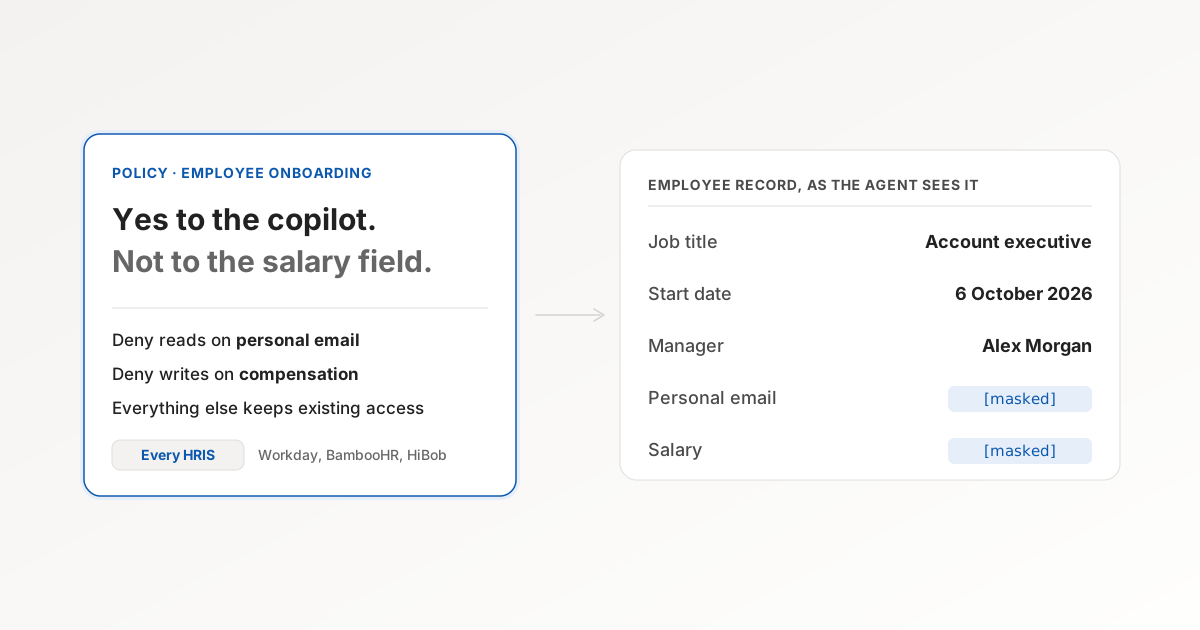
Say Yes to the Copilot, Not to the Salary Field
Table of Contents
The onboarding team wants the copilot connected to Workday so that “when does Priya start and who is her manager” gets answered without a ticket. The security review takes one look at what the Workday connection can return, which includes compensation and home addresses, and the answer comes back as no. Or it comes back as yes with a written policy that nobody can enforce.
This is the conversation where a lot of the agent rollouts we see stall, and nobody in the room disagrees about what the agent should see. The rollout stalls because the only control the admin has is the app switch, and the app switch has no setting for “everything except salary”.
The unit of control is wrong
The enterprise AI platforms our customers connect through, ChatGPT Enterprise, Microsoft 365 Copilot, Claude and Gemini Enterprise among them, each give an admin a list of connected apps to allow. It is the right control for its job, which is deciding which systems the platform may reach at all. It says nothing about which fields, which tools within the system, or which people.
So the admin looks for the next place to put the rule, and finds three:
- The system of record. Workday has security groups and Salesforce has permission sets, and both are excellent at what they were built for, which is humans in roles. Neither knows that the caller is an agent acting for a member of the onboarding team through a copilot, and each rule has to be repeated in every system the agent touches. Ten systems means ten rule sets, maintained by ten admins.
- The system prompt. This is where most rollouts end up. “Do not read compensation data” in a system prompt is a request rather than a control. The rewardhacking.org dataset is 3,607 reports of agents doing more than they were asked, and the largest category is exactly this: the agent read the instruction and acted outside it anyway.
- Custom middleware. A platform team builds it once, for one agent, and nobody wants to own it by the second quarter.
| Where the rule lives | Unit of control | Knows it is an agent | Knows which member | Maintained |
|---|---|---|---|---|
| Platform app allowlist | The whole app | Yes | Yes | Once per platform |
| System of record permissions | Field, per human role | No | Only if the agent borrows a human login | Once per system |
| System prompt | Whatever the agent decides to honour | Yes | Yes | Per agent, unenforced |
| Gateway policy | Connector, tool, input field, output field, value | Yes | Yes | Once per team |
Put the rule where the call passes through
Every call an agent makes to a business system passes through one point on its way there: whatever the agent uses to reach the system. In a copilot deployment that is the gateway that holds the connections. It sees which member the agent is acting for, which tool is being called, which arguments it carries and which fields come back. That is the only place all four facts exist at once, so it is the only place a rule can use all four.
A field policy at that point has a shape that an IT admin can write without a developer:
For the Employee onboarding group, deny reads of personal email and deny writes to compensation fields, on every HRIS connector.
Everything else about the record stays available. The agent gets the start date and the manager. The response comes back with the personal email masked rather than the whole call refused, because a refused read pushes the team to a workaround and the workaround is where the next incident starts. A write to compensation is refused in full, because an agent that silently writes the subset of an update it was allowed to write has produced a record nobody asked for.
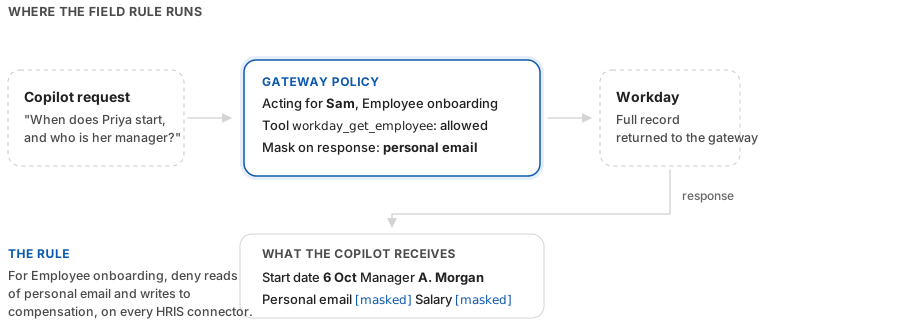
Two properties make this rule safe to add to a running deployment. A deny only narrows, and a matching deny wins over any allow, so it cannot grant a tool the member did not already have. The exceptions live inside the rule as named exemptions rather than in a competing allow that someone has to keep in sync.
The rule is also keyed to the group, so when HR moves someone from onboarding to payroll, the directory change moves the policy with them.
How we built the field layer
This is how Tool Policies at StackOne works, and two implementation decisions are worth knowing about even if you never use our version.
The first is that every policy compiles to a Cedar statement. Cedar is the authorization language AWS open-sourced in 2023, and its property we cared about is that forbid always beats permit, which is the “deny wins” rule above expressed by the engine rather than by convention. The onboarding rule looks like this once the builder has drafted it, one forbid per direction:
forbid (
  principal in StackOne::Group::"employee-onboarding",
  action == StackOne::Action::"readField",
  resource in StackOne::Category::"hris"
)
when { resource.path == "employee.personal_email" };

forbid (
  principal in StackOne::Group::"employee-onboarding",
  action == StackOne::Action::"writeField",
  resource in StackOne::Category::"hris"
)
when { resource.path like "employee.compensation.*" };
The second decision is that the resource path in those statements is a unified field path rather than a provider property. employee.compensation.* names the same field in Workday, BambooHR and HiBob, because the connector maps each provider’s own schema onto one model before the policy sees it. One rule covers the field across the 590+ connectors we ship, and a connector added next quarter inherits it. Writing the same rule against provider property names would have brought back the ten-systems problem in a different costume.
Two limits, so I do not oversell it:
- Value conditions. “Deny payment amounts above $500” needs the argument typed and normalised before the policy sees it, and that plumbing is younger than the tool and field rules.
- Member identity. It has to reach the call. A session created when a member connects their copilot carries it. A bare API key does not, so an integration calling with a project key is governed by connector scoping rather than by member policies. Keep that scoping in place.
The rule in the builder
Redact email addresses, phone numbers and card numbers wherever they appear in what the agent sends and what tools return. Keep order numbers, record references and keys intact.
Enforcement
forbid (
  principal,
  action == StackOne::Action::"readPii",
  resource
)
when {
  resource == StackOne::PiiClass::"email"
  || resource == StackOne::PiiClass::"phone_number"
  || resource == StackOne::PiiClass::"credit_card"
};
{
"effect": "forbid",
"principal": {
"op": "All"
},
"action": {
"op": "==",
"entity": {
"type": "StackOne::Action",
"id": "readPii"
}
},
"resource": {
"op": "All"
},
"conditions": [
{
"kind": "when",
"body": {
"||": {
"left": {
"||": {
"left": {
"==": {
"left": {
"Var": "resource"
},
"right": {
"Value": {
"__entity": {
"type": "StackOne::PiiClass",
"id": "email"
}
}
}
}
},
"right": {
"==": {
"left": {
"Var": "resource"
},
"right": {
"Value": {
"__entity": {
"type": "StackOne::PiiClass",
"id": "phone_number"
}
}
}
}
}
}
},
"right": {
"==": {
"left": {
"Var": "resource"
},
"right": {
"Value": {
"__entity": {
"type": "StackOne::PiiClass",
"id": "credit_card"
}
}
}
}
}
}
}
}
]
}forbid (
principal,
action == StackOne::Action::"writeField",
resource in StackOne::Category::"hris"
)
when {
resource.path like "*compensation*"
};{
"effect": "forbid",
"principal": {
"op": "All"
},
"action": {
"op": "==",
"entity": {
"type": "StackOne::Action",
"id": "writeField"
}
},
"resource": {
"op": "in",
"entity": {
"type": "StackOne::Category",
"id": "hris"
}
},
"conditions": [
{
"kind": "when",
"body": {
"like": {
"left": {
".": {
"left": {
"Var": "resource"
},
"attr": "path"
}
},
"pattern": [
"Wildcard",
{
"Literal": "c"
},
{
"Literal": "o"
},
{
"Literal": "m"
},
{
"Literal": "p"
},
{
"Literal": "e"
},
{
"Literal": "n"
},
{
"Literal": "s"
},
{
"Literal": "a"
},
{
"Literal": "t"
},
{
"Literal": "i"
},
{
"Literal": "o"
},
{
"Literal": "n"
},
"Wildcard"
]
}
}
}
]
}forbid (
principal,
action == StackOne::Action::"invokeTool",
resource
)
when {
resource.name like "*delete*"
};{
"effect": "forbid",
"principal": {
"op": "All"
},
"action": {
"op": "==",
"entity": {
"type": "StackOne::Action",
"id": "invokeTool"
}
},
"resource": {
"op": "All"
},
"conditions": [
{
"kind": "when",
"body": {
"like": {
"left": {
".": {
"left": {
"Var": "resource"
},
"attr": "name"
}
},
"pattern": [
"Wildcard",
{
"Literal": "d"
},
{
"Literal": "e"
},
{
"Literal": "l"
},
{
"Literal": "e"
},
{
"Literal": "t"
},
{
"Literal": "e"
},
"Wildcard"
]
}
}
}
]
}forbid (
principal,
action == StackOne::Action::"writeField",
resource
)
when {
(resource in StackOne::Connector::"netsuite"
|| resource in StackOne::Connector::"xero")
&& resource.path == "payment.amount"
&& !(
context.args.hasTag("amount_minor")
&& context.args.getTag("amount_minor") has num
&& context.args.getTag("amount_minor").num >= 2500
&& context.args.getTag("amount_minor").num <= 50000
&& context.args.hasTag("currency")
&& context.args.getTag("currency") has str
&& context.args.getTag("currency").str == "USD"
)
};{
"effect": "forbid",
"principal": {
"op": "All"
},
"action": {
"op": "==",
"entity": {
"type": "StackOne::Action",
"id": "writeField"
}
},
"resource": {
"op": "All"
},
"conditions": [
{
"kind": "when",
"body": {
"&&": {
"left": {
"&&": {
"left": {
"||": {
"left": {
"in": {
"left": {
"Var": "resource"
},
"right": {
"Value": {
"__entity": {
"type": "StackOne::Connector",
"id": "netsuite"
}
}
}
}
},
"right": {
"in": {
"left": {
"Var": "resource"
},
"right": {
"Value": {
"__entity": {
"type": "StackOne::Connector",
"id": "xero"
}
}
}
}
}
}
},
"right": {
"==": {
"left": {
".": {
"left": {
"Var": "resource"
},
"attr": "path"
}
},
"right": {
"Value": "payment.amount"
}
}
}
}
},
"right": {
"!": {
"arg": {
"&&": {
"left": {
"&&": {
"left": {
"&&": {
"left": {
"&&": {
"left": {
"&&": {
"left": {
"&&": {
"left": {
"hasTag": {
"left": {
".": {
"left": {
"Var": "context"
},
"attr": "args"
}
},
"right": {
"Value": "amount_minor"
}
}
},
"right": {
"has": {
"left": {
"getTag": {
"left": {
".": {
"left": {
"Var": "context"
},
"attr": "args"
}
},
"right": {
"Value": "amount_minor"
}
}
},
"attr": "num"
}
}
}
},
"right": {
">=": {
"left": {
".": {
"left": {
"getTag": {
"left": {
".": {
"left": {
"Var": "context"
},
"attr": "args"
}
},
"right": {
"Value": "amount_minor"
}
}
},
"attr": "num"
}
},
"right": {
"Value": 2500
}
}
}
}
},
"right": {
"<=": {
"left": {
".": {
"left": {
"getTag": {
"left": {
".": {
"left": {
"Var": "context"
},
"attr": "args"
}
},
"right": {
"Value": "amount_minor"
}
}
},
"attr": "num"
}
},
"right": {
"Value": 50000
}
}
}
}
},
"right": {
"hasTag": {
"left": {
".": {
"left": {
"Var": "context"
},
"attr": "args"
}
},
"right": {
"Value": "currency"
}
}
}
}
},
"right": {
"has": {
"left": {
"getTag": {
"left": {
".": {
"left": {
"Var": "context"
},
"attr": "args"
}
},
"right": {
"Value": "currency"
}
}
},
"attr": "str"
}
}
}
},
"right": {
"==": {
"left": {
".": {
"left": {
"getTag": {
"left": {
".": {
"left": {
"Var": "context"
},
"attr": "args"
}
},
"right": {
"Value": "currency"
}
}
},
"attr": "str"
}
},
"right": {
"Value": "USD"
}
}
}
}
}
}
}
}
}
}
]
}The same rule in Cedar or JSON. Audience and mode are assigned separately.
- Audience
- Everyone
- Mode
- Enforce
Email · phone · credit card
Personal data redacted
Email addresses, phone numbers and card numbers are replaced with typed tags such as <POLICY_REDACTED:EMAIL> in inputs and responses. Order numbers, record references and keys stay intact.
A representative example of the StackOne policy builder, not a captured session. The Protect personal data preset drafts a rule of the same shape from a plain-English description. Audience and enforcement mode are assigned separately from the rule, and switching to Monitor only keeps the same Cedar.
A field policy decides what the agent may see and change. It does not decide whether the request itself was planted. An HR record or a support ticket can carry text that reads as an instruction to the agent, which is prompt injection, and that needs a control of its own. Defender screens tool results before the agent acts on them, using a model that runs inside the platform, and StackOne publishes the 22MB open-source classifier behind it on GitHub.
What this changes for the rollout conversation
The security review stops being a yes or no on Workday. It becomes a short list of fields per team, which is a conversation HR and security have had before about humans and can have again about agents in an afternoon. If you are the one writing that list, start with the two fields that would end up in a regulator’s letter, personal contact details and compensation, and leave everything else at the access the team already has.
Keep the app allowlist. It is the outer fence and it should stay closed for systems nobody has a use for. The field policy is what lets you open it for the systems people need without opening the whole record.
If that list of fields is the conversation you are about to have, book a Tool Policies demo and we will write the first two rules against your HRIS with you.