
 Guillaume Lebedel · · 6 min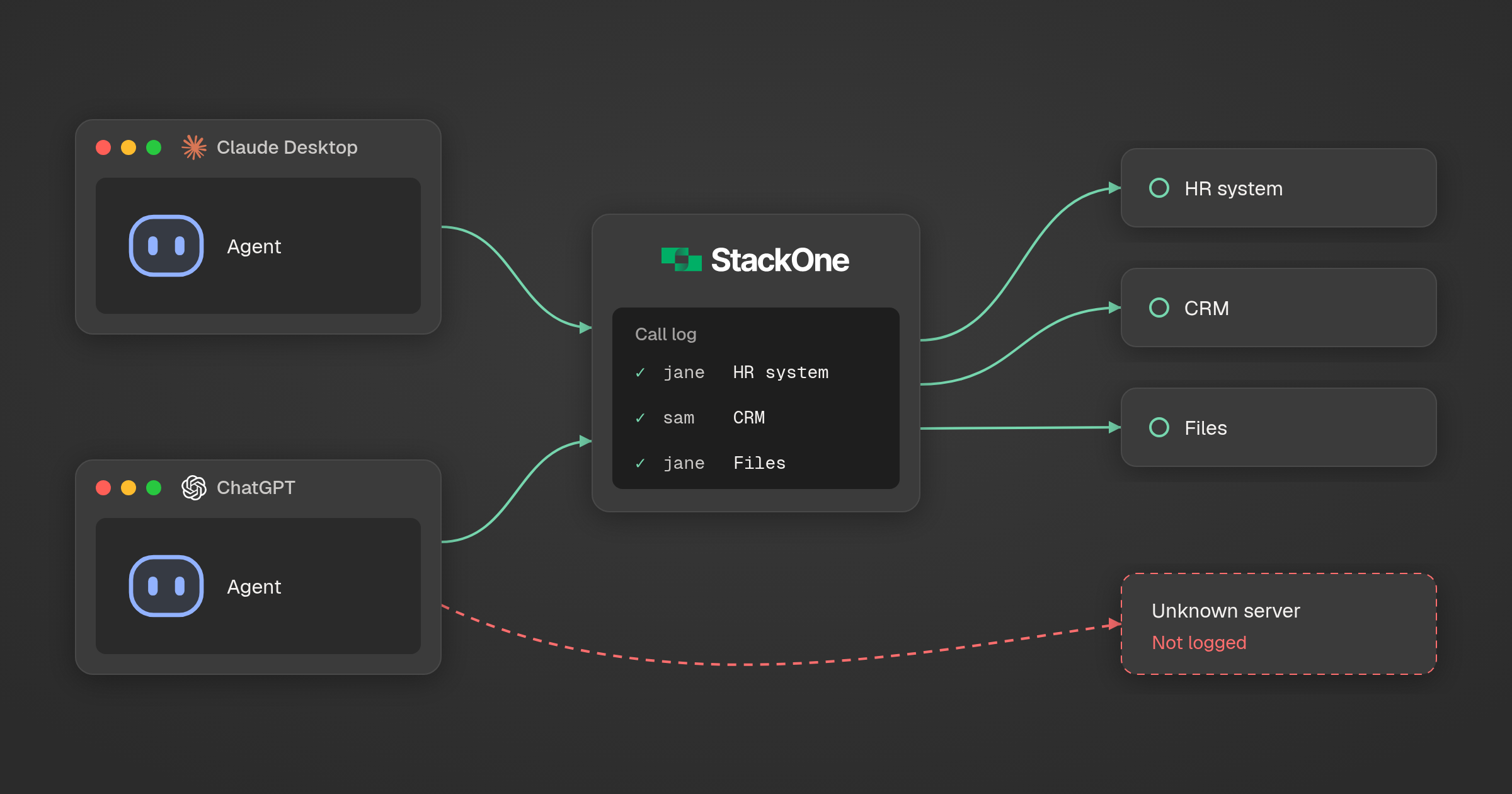
How to track AI agent connections on work PCs
Table of Contents
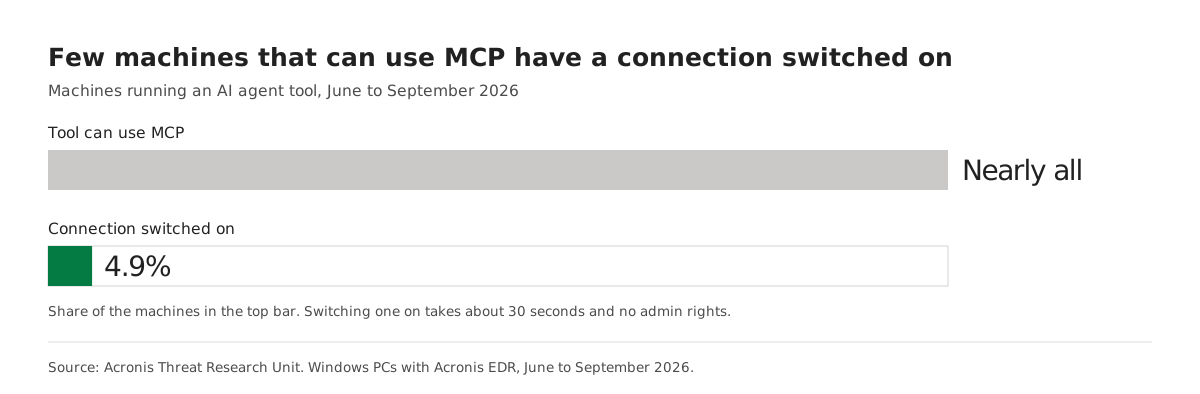
Acronis endpoint data from June to September 2026 found AI agent tools on 9.4% of Windows PCs running its EDR, led by Claude Desktop. Among machines whose tool can use MCP, 4.9% had a connection switched on. That takes about 30 seconds and no admin rights, so IT needs a live list of connections rather than a list of installs.
Figures in this post were checked against their sources on 6 October 2026.
How many business PCs run an AI agent tool today?
About 9.4% of Windows computers with Acronis EDR enabled ran an AI agent tool between June and September 2026, according to Acronis Threat Research Unit endpoint data published on 6 October. A year earlier the figure was close to zero. Only separately installed apps count, so agents used inside a browser tab are not in the number.
Acronis counts tools that can act on their own: coding assistants, command-line agents and desktop AI apps. A chat window that only answers questions is out of scope. Applied to a 2,000-person company with one PC each, 9.4% would be about 190 machines.
Which AI agent tools are most common at work, and why are they desktop apps?
Claude Desktop is the most common, on 26.6% of the machines running any agent tool, ahead of VS Code at 18.3% and Claude Code at 13.5%. About seven in 10 of these tools are graphical apps rather than terminal programs, so agents now reach staff outside engineering as well as developers.
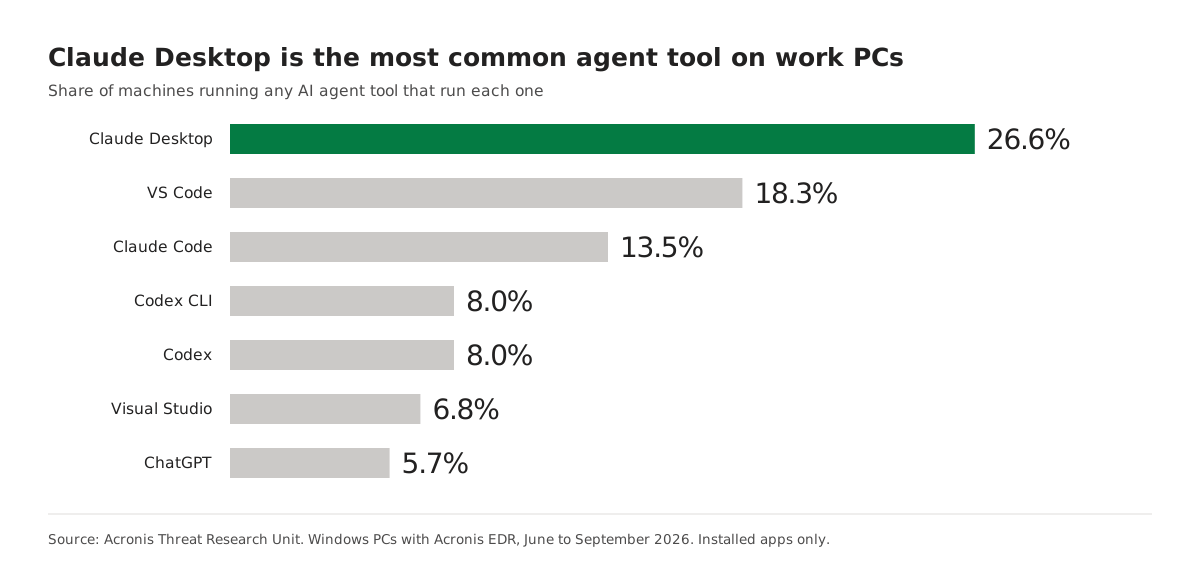
Distribution explains a lot of this. Acronis notes that Microsoft’s share comes mostly from VS Code and Visual Studio, software that was already installed for other work and gained agent features through an update. Policies written for developer terminals, such as shell restrictions, now cover roughly a third of the exposure by Acronis’s estimate.
What is an MCP connection, and why does it matter to IT?
An MCP connection links an AI app to another system, such as a database, a company service or a website, through the Model Context Protocol. Once connected, the agent can read from that system and, depending on the server, write to it. For IT, each connection is a new path from a desktop app into business data.
Switching one on is quick. In Claude Desktop, a local MCP server is added by editing one settings file, claude_desktop_config.json, which the app opens from Settings, Developer, Edit Config, per the official MCP guide to connecting local servers. Acronis puts the job at about 30 seconds for someone who has seen it done once, with no admin rights and nobody’s approval. If Claude is your main assistant, our comparison of MCP gateways for Claude covers the ways to route those connections.
Why is an install inventory not enough to govern AI agents?
An install inventory records which apps are on a machine. It says nothing about what those apps are connected to, and connections change faster than installs. Acronis writes that the two groups “can diverge in an afternoon”, because switching on MCP needs no new software, only an edited settings file.
Endpoint telemetry closes part of the gap. Acronis can tell that a connection was made, whether it runs locally or reaches a remote server, and what it was built with. In its own words, “We see the method of the connection, not its destination.” Knowing which service sits on the other end needs a record from the path the call takes.
| Question IT needs answered | Install inventory | Endpoint telemetry | Gateway log |
|---|---|---|---|
| Is an AI agent app installed? | Yes | Yes | No |
| Is an MCP connection switched on? | No | Yes | Only for connections routed through it |
| Which system is on the other end? | No | No | Yes |
| Which person ran each call, and what did it do? | No | No | Yes |
The cost of not knowing shows up in breach data. In IBM’s Cost of a Data Breach Report 2026, published in July, security incidents involving shadow AI (staff using AI the company never approved) more than doubled, to 43% from 20% a year before. Among organizations with an AI-related breach, 92% lacked proper access controls.
How can IT teams and MSPs track which agent connections exist and when they change?
Treat connections as the thing you inventory. Endpoint telemetry tells you when a new connection appears on a machine. Routing approved connections through one gateway tells you where they go, who used them and what they did. Together they give you the list Acronis says organizations need: which connections exist and when they change.
StackOne builds the gateway half of this. The Tool Gateway MCP gives every employee’s AI app one URL for company systems (540+ as of 6 October 2026), and IT sets access per person. Each call records the assistant it came from and the verified user who ran it, rather than a shared service account. The gateway governs the calls made through it and does not scan laptops for tools that go around it, so it works next to endpoint telemetry rather than replacing it. The difference between controlling the connection and controlling each action is covered in how an MCP gateway differs from a tool gateway.
What should an MSP put in place for clients first?
Start with your own technicians. Acronis found confirmed MSPs make up 78.2% of the customers adopting agent tools and adopt at 7.9%, against 4.7% for direct partners. One technician trying an agent puts it in front of every client that person touches, so the first inventory is your own.
Then roll out the same five steps per client:
- Pull the list of AI agent apps per machine from endpoint data, and add MCP connection status next to each one.
- Alert when a new connection appears, as well as when a new app is installed.
- Give every approved connection a named owner, a person rather than a shared account.
- Route approved connections through one gateway so each call is logged against the user and the assistant. Our guide to what an AI agent audit record should contain lists the fields worth keeping.
- Review the list with each client every month and remove any connection without an owner.
To see per-person access and attributed call logs for employees’ AI apps, explore the Tool Gateway MCP.