


 Alex Cox · · 8 min read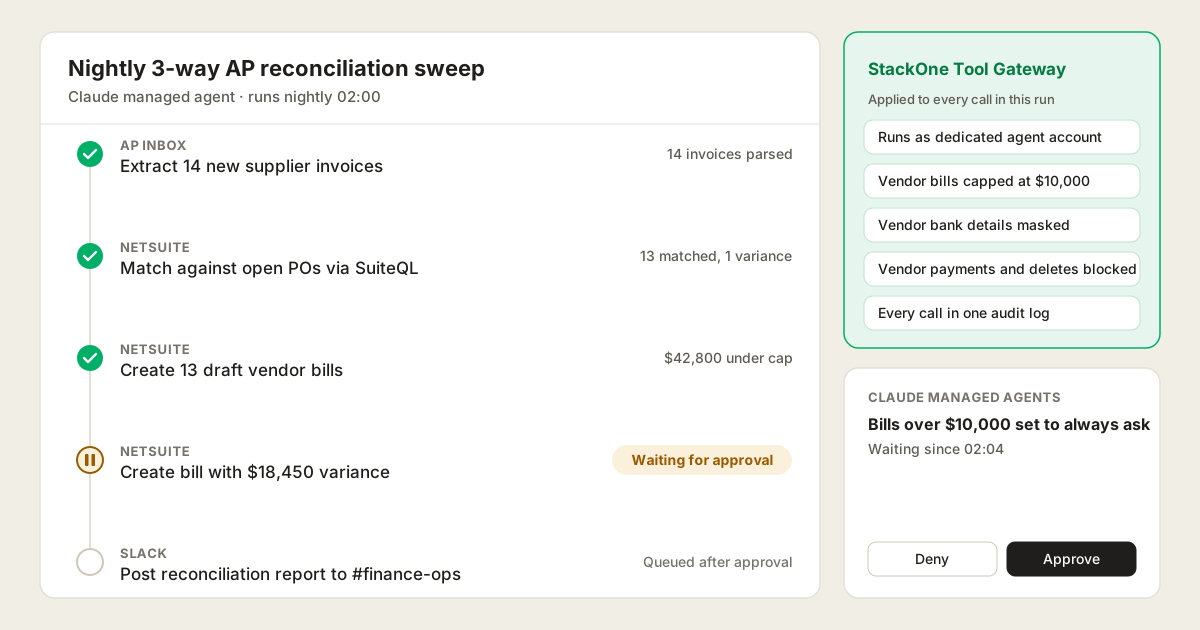
Connect NetSuite to Claude Managed Agents: Automated Finance Operations and Controls
Table of Contents
Claude Managed Agents connect to NetSuite through a remote MCP server, turning scheduled triggers and webhooks into NetSuite actions. NetSuite’s AI Connector Service is built for interactive users signing in via OAuth 2.0, meaning an unattended agent must borrow a human login and whole-role permissions. For automated finance workflows that need unattended machine authentication, value caps, field masking and cross-system audit logs, connect NetSuite to Claude Managed Agents through a Tool Gateway such as StackOne.
This guide is for finance systems owners, controllers and IT security teams planning agents that work in NetSuite without a person at the keyboard. To use Claude as an interactive assistant in Claude Chat and Claude Cowork, see the NetSuite connector.
In this post:
- What a managed agent does in NetSuite: three autonomous finance workflows
- How to connect NetSuite to Claude Managed Agents: three options: the options
- Controlling what the agent can change in NetSuite: approvals, field rules and value caps
- How sign-in shapes NetSuite permissions: human OAuth vs service accounts
- Tool Policies for NetSuite, with examples: guardrails for background agents
- NetSuite options for managed agents compared: what each covers and how each is controlled
- How it works with StackOne for Managed Agents: configuration and vault setup
What a managed agent does in NetSuite
Claude Managed Agents is Anthropic’s hosted agent service. It runs on a schedule or event trigger without someone at the keyboard, which suits finance operations that repeat regularly across systems but require contextual evaluation:
- A nightly three-way Accounts Payable (AP) reconciliation sweep. Match unallocated supplier invoices arriving in the AP inbox against open Purchase Orders (POs) and item receipts via SuiteQL in NetSuite. Line items matching the PO within tolerances automatically create draft vendor bills up to a defined value cap, while pricing discrepancies or quantity variances pause for human approval.
- Automated month-end accrual calculations. Scan unbilled receipt reports across NetSuite and procurement tools on the final business day of the period. Compute accrual estimates for missing vendor bills, verify vendor tax numbers, and draft recurring journal entries under strict balance thresholds.
- Continuous compliance and anomaly detection. Monitor transactions, journal adjustments, and vendor master changes in the background. Apply Tool Policies to verify supporting documentation, detect duplicate invoice submissions, and alert the finance controller in Slack when an unauthorized bank detail change is attempted.
In each workflow, the agent reads widely across NetSuite, inboxes, and messaging tools, while human checkpoints pause high-value or high-variance changes. Where a process is entirely static and never varies, NetSuite SuiteFlow and scheduled SuiteScripts remain the right choice.
How to connect NetSuite to Claude Managed Agents: three options
Claude’s connector directory has had an Oracle-built NetSuite connector since November 2025. You can use it, build your own wrapper, or use a Tool Gateway. (Community-built NetSuite MCP servers exist as a middle ground between DIY and first-party, but they carry the core risk of running someone else’s code with your credentials, have no maintainer-of-record, and present tool descriptions that act as an unvetted instruction surface).
NetSuite AI Connector Service
Oracle’s AI Connector Service is NetSuite’s own MCP server, and because Oracle maintains it, it’s where many teams begin. It’s free, and the Claude connector needs a Pro plan or higher.
Oracle blocks the Administrator role and other full-access roles, and no one has access until an admin grants it.
Oracle’s free MCP Standard Tools SuiteApp gives Claude about 25 tools, as of October 2026. They’re general-purpose: one tool creates a record of any type, one updates any record, and one runs any record action, such as an approval. Others run saved searches, reports and read-only SuiteQL queries. There’s no delete tool, and admins can write their own tools in SuiteScript.
That covers a lot for one person in NetSuite. The limits show up once a team relies on it for unattended agents:
- No machine-to-machine authentication. The service only accepts user OAuth 2.0 sign-in. An unattended background agent must borrow an individual employee’s login, complicating credential rotation and violating audit accountability.
- One tool for every record type. The same Create record tool handles vendor bills, journal entries, and customer records. You cannot allow draft bills without also granting permission to create any other record type permitted by that user’s role.
- Lookups before every write. Create record first fetches the record type’s fields, and Oracle advises checking that a record action is available before running it. In an unattended sweep, these redundant round-trips add unnecessary latency.
- NetSuite only. Tools cannot call external systems, so extracting invoices from an AP inbox or posting status notifications to Slack requires separate MCP servers with independent credentials and fragmented logs.
- Responses aren’t screened. Oracle’s security guidance calls prompt injection “out of NetSuite control”. Memo fields, PO notes, and vendor descriptions are untrusted text that can contain adversarial instructions.
- A short audit window. The integration’s execution log keeps MCP calls for 21 days in production and seven in a sandbox, which falls short of finance compliance and audit retention standards.
A Tool Gateway
A Tool Gateway sits between Claude Managed Agents and every system they touch, applying a consistent policy layer to every call. StackOne’s NetSuite connector provides 80 purpose-built actions across vendor bills, payments, invoices, journal entries, purchase orders, sales orders, customers, vendors, and SuiteQL.
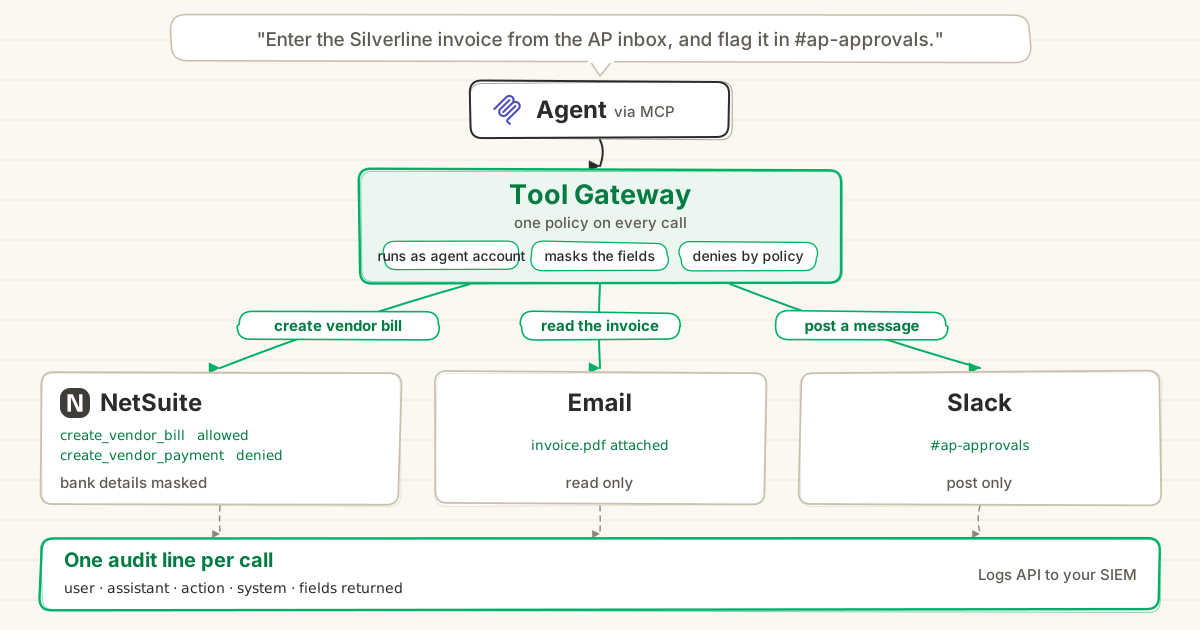
- Each action does one specific job, such as Create Vendor Bill, with predefined schema parameters. Claude doesn’t need to perform metadata discovery calls before writing.
- Dedicated service accounts authenticate securely via the StackOne vault using OAuth or token-based authentication, eliminating borrowed employee credentials.
- Tool Policies set granular guardrails for the agent, capping transaction values, blocking dangerous operations, and masking sensitive bank details before calls reach NetSuite.
- StackOne Defender screens incoming tool responses before the model reads them, stripping prompt injection attempts hidden in purchase order memos or supplier emails.
- Every call is captured in one centralized action log across NetSuite, email, and Slack, ready for export to your SIEM.
- Dual REST and SOAP support. NetSuite environments rely heavily on legacy SuiteTalk SOAP Web Services alongside modern SuiteTalk REST Web Services. While unmapped SOAP actions exist in bespoke NetSuite environments, StackOne’s integration engine natively ingests, parses, and normalizes XML/SOAP alongside REST, enabling rapid action mapping via the AI Connector Builder.
NetSuite AI Connector Service vs StackOne, request by request
Both options connect Claude to NetSuite APIs, but they handle tool scope and agent autonomy differently:
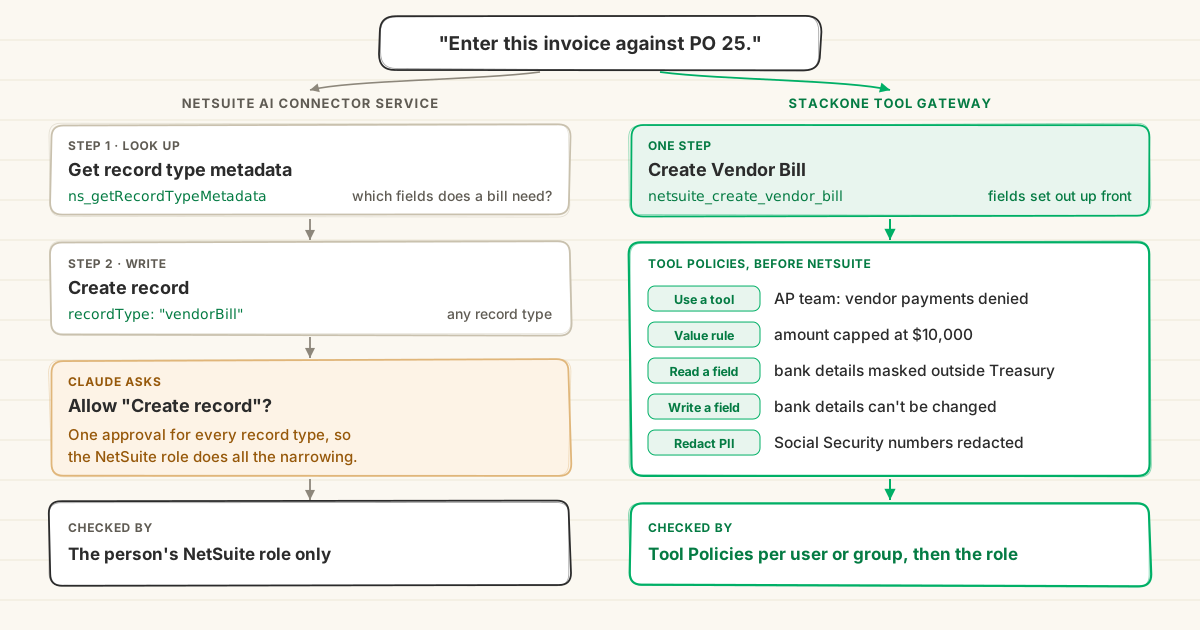
How they differ on unattended finance operations:
| Request | NetSuite AI Connector Service | StackOne Tool Gateway |
|---|---|---|
| “Reconcile invoice and draft bill against PO 25.” | Look up bill fields, then generic Create record | Create Vendor Bill in one call |
| Restrict agent to draft bills without journal entries | Requires creating a dedicated NetSuite role | Pick actions on the agent’s account, or apply a Tool Policy |
| “Approve bill over variance threshold.” | Execute record action across any record type | Not available today; holds for human review |
| “Delete duplicate draft bill.” | No delete tool available | Delete Vendor Bill, or blocked by policy |
| Query open PO balances | SuiteQL query tool | SuiteQL query action with parameter inspection |
| Audit agent actions from the prior quarter | Execution log expires after 21 days | Centralized action log retained across all systems |
Controlling what the agent can change in NetSuite
How sign-in shapes NetSuite permissions
NetSuite’s API accepts three ways to sign in: token-based authentication, OAuth 2.0 user sign-in, and OAuth 2.0 client credentials, where a certificate is mapped to a user and role for machine-to-machine access.
The AI Connector Service supports only one: an interactive user signing in via OAuth 2.0, with a non-administrator role. For background agents, this presents critical limitations:
- Borrowed employee credentials. Because there is no machine-level authentication, an unattended agent must run using a human user’s login. If that employee changes roles or leaves, the agent’s workflow breaks.
- Whole-role access. Whatever permissions the human role possesses in NetSuite, the agent inherits completely.
- Role proliferation. Restricting the agent requires designing and maintaining bespoke NetSuite roles for each automated workflow.
StackOne’s NetSuite connector connects using the NetSuite API, supporting dedicated service accounts and vaulted credentials. The agent operates under its own machine identity rather than a borrowed human account. StackOne then applies Tool Policies to enforce granular controls on top of the NetSuite role, without modifying core ERP permission configurations.
Tool Policies for NetSuite, with examples
Tool Policies inspect and govern every call before it reaches NetSuite. Deny rules take precedence, and policies can run in Monitor mode to evaluate traffic before active enforcement. Six policies for unattended finance agents:
| Rule | Who | What Claude sees |
|---|---|---|
| Block vendor payments and deletes | Automated reconciliation agents | The call is refused before NetSuite |
| Capped bill creation (bills under $10,000) | Overnight AP sweep agent | Bills over $10,000 are refused before NetSuite; bills under the cap follow the tool’s Console permission |
| Mask vendor bank account details | All automated background agents | Bank details and routing numbers return masked |
| Refuse updates to vendor payment terms | All background agents | Modification attempts trigger policy blocks and Slack alerts |
| Redact Personally Identifiable Information (PII) | Background finance agents | Employee Social Security numbers and personal details return redacted |
| Prevent unverified external dispatches | All agents | Outbound messages containing sensitive financial metrics are held for approval |
A NetSuite role can restrict certain record operations, but cannot evaluate transaction amounts, mask specific response fields, or inspect outgoing text. Tool Policies provide these granular safeguards specifically for automated agent traffic.
NetSuite options for managed agents compared
How connection methods compare for Claude Managed Agents, from Oracle’s Standard Tools documentation and StackOne’s NetSuite connector, as of October 2026:
| Community servers | NetSuite AI Connector Service | StackOne Tool Gateway | |
|---|---|---|---|
| Hosting | Self-hosted | Oracle hosted | StackOne hosted |
| Sign-in | Varies (API secrets) | Interactive OAuth 2.0 only | Dedicated service accounts & OAuth via vault |
| Tools | Varies | Broad generic operations (~25 tools) | Specific granular actions (80 actions) |
| Policy rules | None | NetSuite role only | Tool Policies (amounts, fields, masking) |
| SuiteQL queries | Varies | Yes (read-only) | Yes |
| Response screening | None | None | Prompt injection screening via Defender |
| Multi-system reach | NetSuite only | NetSuite only | NetSuite, AP inbox, Slack, CRM and more |
| Audit retention | Local logging | 21 days in production | Centralized audit log across all connected tools |
How it works with StackOne for Managed Agents
Setting up a Claude Managed Agent with NetSuite through StackOne involves configuring the remote server in the Claude Console and authorizing the connection:
-
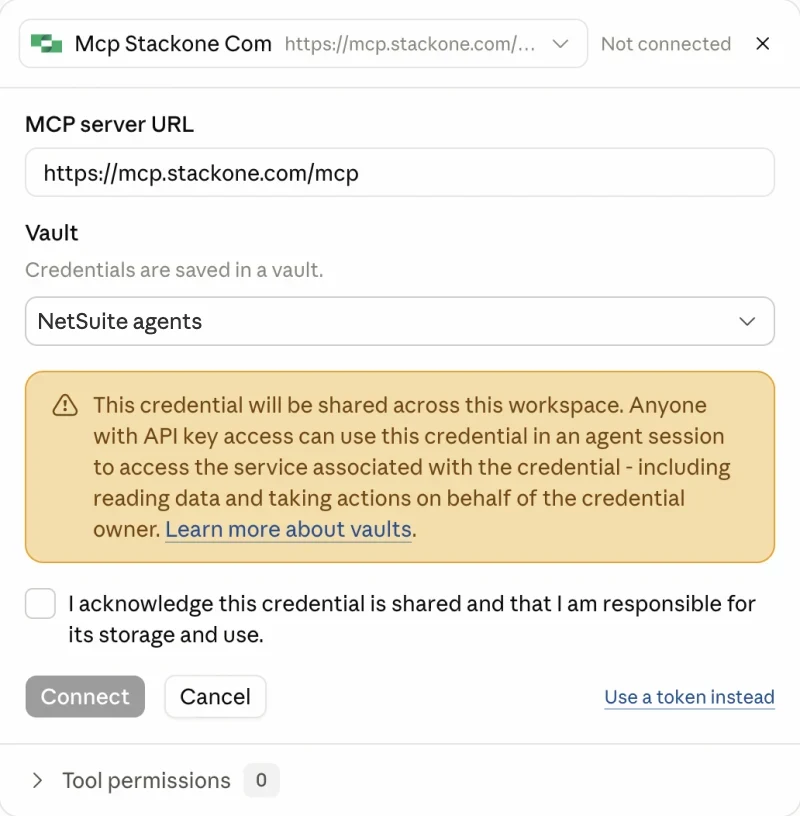
Create the agent in the Claude Console. Under Managed Agents, then Agents, click Create agent, open Tools, click Add MCP server and paste
https://mcp.stackone.com/mcp.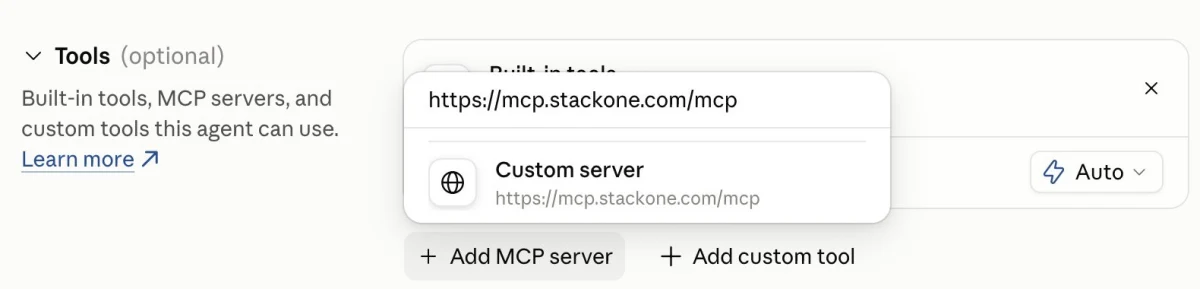
-
Click Connect and sign in to StackOne as the agent’s account. The Console saves the OAuth sign-in in a vault, and the token refreshes automatically.
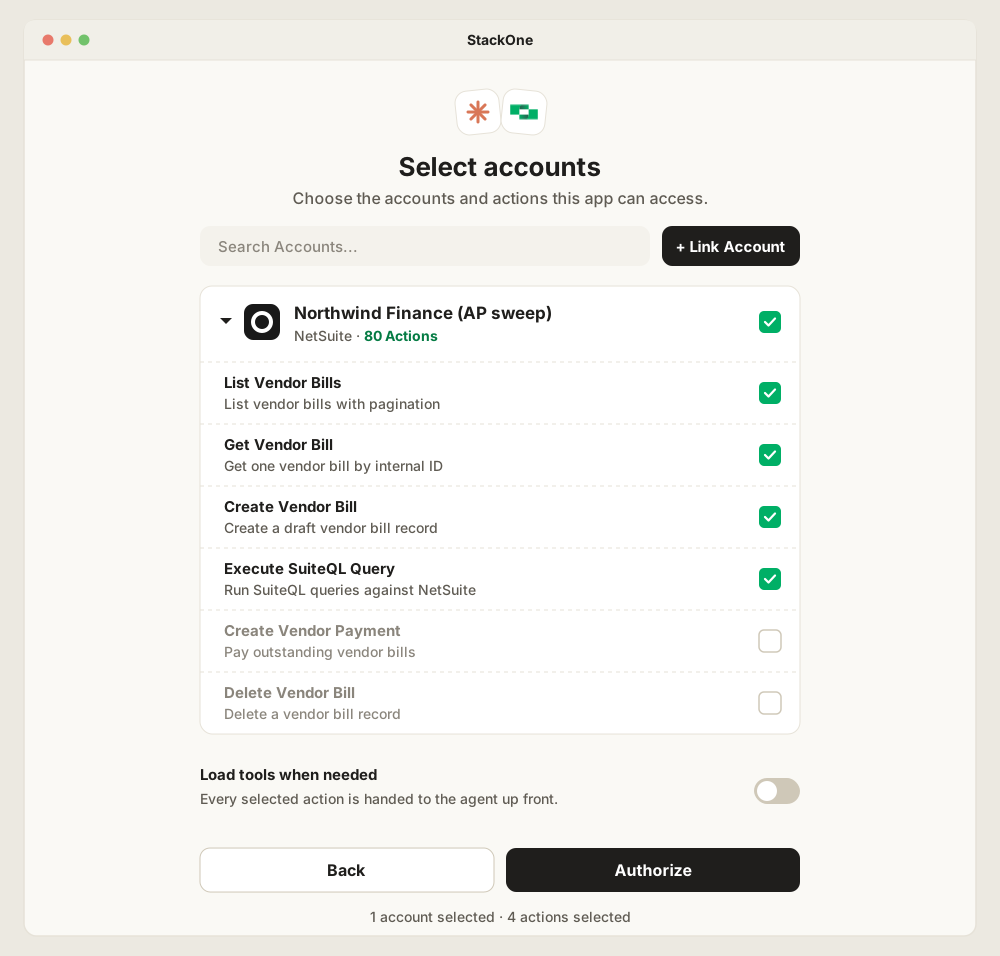
In the StackOne consent window, pick the NetSuite actions the agent can use and leave destructive operations such as Delete Vendor Bill unticked. Turn off “Load tools when needed” so each action reaches the Console as its own tool with its own permission, then click Authorize.
-
Configure per-action permissions and policies. In the Claude Console under Tool permissions, set write actions such as
netsuite_create_vendor_billtoalways_askand routine read/query actions toalways_allow. In the StackOne dashboard, define Tool Policies that enforce value thresholds (such as capping bills at $10,000) and mask sensitive vendor bank details.
With this setup, the nightly reconciliation agent runs autonomously in the background. It extracts supplier invoices from the inbox, matches line items against open POs via SuiteQL, and drafts approved vendor bills within policy limits. Any variance or high-value bill triggers a human checkpoint, with every action recorded in a single audit log.
For how a Tool Gateway compares with an MCP gateway that routes to existing servers, see MCP Gateway vs Tool Gateway.