
 Guillaume Lebedel · · 7 min read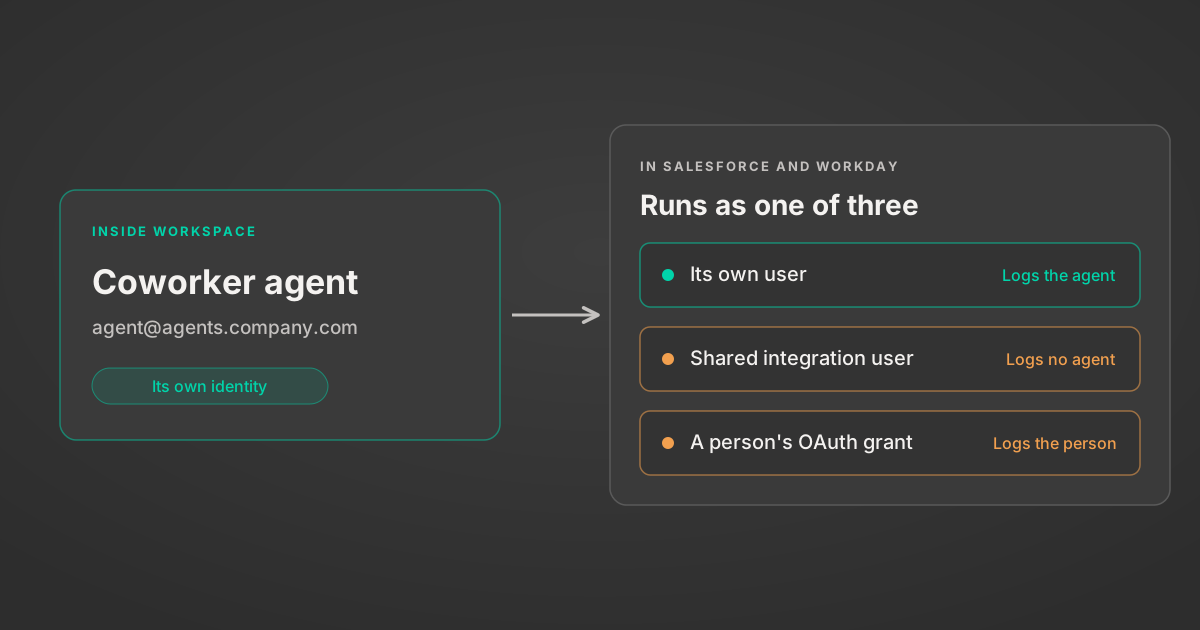
How AI agents log in to Salesforce and Workday
Table of Contents
Google’s new Gemini agent gets agent identity right inside Google Workspace. What it hasn’t answered is what that identity becomes once the agent writes to Salesforce or Workday, where today most agents still show up as a shared integration user or as the person who clicked “Allow”.
Google announced the Gemini agent at Gemini at Work 2026 on 8 October. Thomas Kurian’s keynote post describes coworker agents that each get a dedicated identity: an @agents.company.com email address, a Workspace account with its own calendar and Drive, and an entry in the company directory. In Google’s words, a coworker agent “acts under its own identity rather than yours, and it sees only what you share with it.” Its edits appear under its own name in version history, and every action “is written to an audit trail and attributed to the agent rather than to a person.”
I think that’s the right design. It’s also the easier half of the problem. Google owns Workspace, so it can create the account, attach the permissions and write the logs in one system.
What happens outside Workspace
The same post lists Salesforce, ServiceNow, Jira and Slack among the tools the agent connects to. For external systems, Google says the agent’s identity “is mapped and propagated through industry standards such as OAuth.”
“Mapped” carries most of that sentence. Salesforce has no idea what an @agents.company.com account is, and neither does Workday. When the agent calls their APIs it has to authenticate as something they already understand, and each of them has its own user model, its own licences and its own audit log. Whatever the agent maps to is the name in that log, and it decides how much data the agent can reach.
None of this is specific to Google. Any agent platform that writes to systems it doesn’t own has the same choice to make, including Microsoft’s, Salesforce’s and the ones your team builds in-house. In practice there are three options.
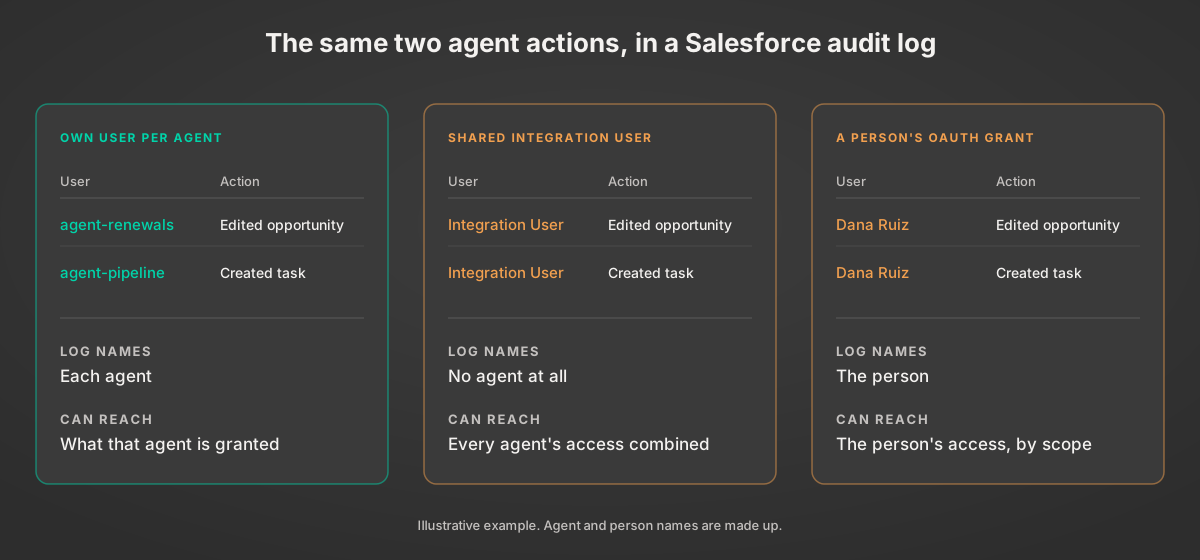
Three ways an agent shows up in Salesforce or Workday
1. A dedicated user for each agent
This is the closest match to what Google does inside Workspace, and Salesforce’s own guidance points the same way. Its documentation recommends “creating and configuring one Salesforce user for every integration” under the principle of least privilege, using the API-only Salesforce Integration licence. Each Enterprise, Unlimited and Performance Edition org includes five of those licences, and additional ones are bought through an account executive.
Workday’s equivalent is the Integration System User (ISU). Setting one up means creating the user, creating an integration system security group, granting that group domain permissions and activating the pending security policy changes. Microsoft’s setup guide for its Viva Learning connector walks through those steps for a single ISU, including Workday setting the session timeout to zero so long jobs don’t expire halfway.
A dedicated user per agent gives you the cleanest audit trail of the three. The price is administration: a provisioning ticket per agent, per system, and in Salesforce a licence as well. Five included licences go quickly once every agent counts as an integration.
2. One shared integration user
This is what most companies already have, because it’s how system-to-system integrations have always been wired. One Salesforce integration user or one Workday ISU, and every agent calls the API through it.
It’s cheap and it’s a single setup. The audit log, though, shows “Integration User” for every action from every agent, and that user needs the combined permissions of all of them. The agent that only reads opportunity stages ends up able to change compensation data because another agent on the same account needs to.
3. A person’s OAuth grant
The third option is the default in most agent products: someone approves a consent screen, and the agent acts with that person’s token. No licence and no ticket.
The audit log records the person, not the agent. Scopes narrow the grant less than people expect. Salesforce’s api scope gives access to “the current, logged-in user’s account” through the REST and Bulk APIs, so the agent can reach whatever that user can, and for a sales ops lead or an HR admin that’s a lot. We wrote about what that looks like when it goes wrong in the Fedora rogue agent incident: once an agent works under a human’s account, nobody can separate what the person did from what the agent did.
| Own user per agent | Shared integration user | A person's OAuth grant | |
|---|---|---|---|
| Audit log shows | The agent | "Integration User" for every agent | The person, not the agent |
| Agent can reach | What that agent is granted | Every agent's permissions combined | The person's access, up to the granted scopes |
| Revoking one agent | Deactivate its user | Breaks every agent on the account | Revokes the person's grant |
| Setup cost | A ticket per agent, plus a Salesforce Integration licence each | One setup, and one Salesforce Integration licence | Nothing extra |
Who this works for, and the case for a shared user
Google’s model works well for Google, because Workspace is where it controls identity end to end. Microsoft can do the same inside Microsoft 365, and Salesforce inside a Salesforce org. Each vendor can make its own agents first-class users in its own product. None of them can do that in someone else’s.
Licensing is part of this too. Salesforce sells integration users as licences, so a model where every agent is a dedicated user is a model where agents need licences. Workday ISUs don’t take a paid seat, but each one is another account for the security team to provision, review and rotate. Five included integration licences per org was a sensible number for a few back-office syncs. It wasn’t sized for dozens of agents, and I’d expect agent identities to show up as their own line on SaaS price lists before long.
There’s a fair case for the shared integration user as well. If the agent runs a fixed job, say copying closed-won deals to the warehouse every night, it behaves like any other integration and a shared user is fine. The trouble starts when the agent decides what to do. Once it picks its own actions, the log needs to say which agent picked them and for whom.
Per-agent users also stop working for software companies that run agents inside their customers’ systems. If your product operates an agent in 300 customers’ Salesforce orgs, you can’t ask 300 admins to provision a user for each of your agents. That’s why delegated OAuth grants are the norm in B2B agent products, audit problem and all.
What to decide before your agents reach Salesforce
- Pick, per system, which identity the audit log will show. Write it down for each agent. If the answer is “the integration user” or “whoever connected it”, you already know what the next incident review will look like.
- Scope each agent to its job, not to the account it runs on. If several agents share a user, enforce an allowlist of actions per agent before the call leaves your side.
- Record both parties on delegated calls. OAuth Token Exchange (RFC 8693) defines an
actclaim so a token can say “this agent, acting for this person”. Few SaaS APIs read it today, so log the agent ID and the person against every call in your own system too. - Keep one connection per end user. In a multi-tenant product, don’t route several customers’ or users’ actions through one service account. When each connection belongs to the person who authorized it, revoking it affects only them.
- Give your most privileged internal agents their own users. For a handful of agents that touch payroll or pricing, the licence and the admin time cost less than the investigation.
StackOne’s agent authentication follows the last two points. Every connection is tied to the user who created it through an origin_owner_id, there are no shared service accounts, and session tokens are scoped to specific accounts and actions. Action logs then show the outcome of every tool call, across 540+ connectors that include Salesforce and Workday.
Once security teams see agents listed by name in Workspace version history, they’ll ask why the Salesforce log still says “Integration User”. It’s easier to have that answer ready before the first incident review than to work it out during one.